

GyroidVault
Docker app from TeeCodeDev's Repository
Overview
Readme
View on GitHubGyroidVault




GyroidVault is a fast, self-hosted 3D model vault and slicing workspace built for 3D printing enthusiasts, makers, and print farm owners. Organize your STL, 3MF, STEP, and G-Code files on your own hardware, inspect multi-part assemblies in a calm 3D studio, measure exact physical dimensions in millimeters, and send slices directly to your printers.
🌐 Official Website: gyroidvault.com
📖 Documentation & Wiki: GitHub Wiki
What's New in v2.3.0
- 🎨 Customizable UI & Themes: Dedicated User Interface tab in Settings with 6 visual themes (Dark Glass, Slate, Midnight, Light, OLED High Contrast, Cyberpunk) and 6 vibrant accent colors with instant live switching.
- ⚙️ Granular Module Toggles & Landing View: Tailor your sidebar and workspace. Toggle categories, collections, tags, favorites, browse explorer, statistics, format pills, print history, or printers off if you don't use them. Choose your landing view (Models, Browse, Collections).
- 🔑 OpenID Connect (OIDC) Single Sign-On (SSO): Native SSO for Keycloak, Authentik, Authelia, and Okta with auto-provisioning and role mapping.
- 📂 Library Scan Modes (Folder Mode vs. File Mode): Choose between grouping subfolders into unified multi-part models (assemblies) or indexing standalone 3D files with automatic companion image/gcode pairing, plus native root-file grouping.
- 🌙 Spin-Down Friendly Disk Sync (NAS / Unraid): Fully configurable library disk sync interval, or set to 0 to completely disable periodic disk wakeups for sleeping hard drives.
- 🖨️ Creality Print Slicer Integration: 1-click slicing deep-link support (
crealityprint://) alongside OrcaSlicer, Bambu Studio, Elegoo Slicer, and Cura. - 💬 Model & Folder Name Tooltips: Hovering over truncated model or folder names now displays their full title instantly.
- 🛡️ 1-Click SQLite & Thumbnail Backup: Instant single-click
.ziparchive download of your database and custom thumbnails for secure offsite backup.
Screenshots
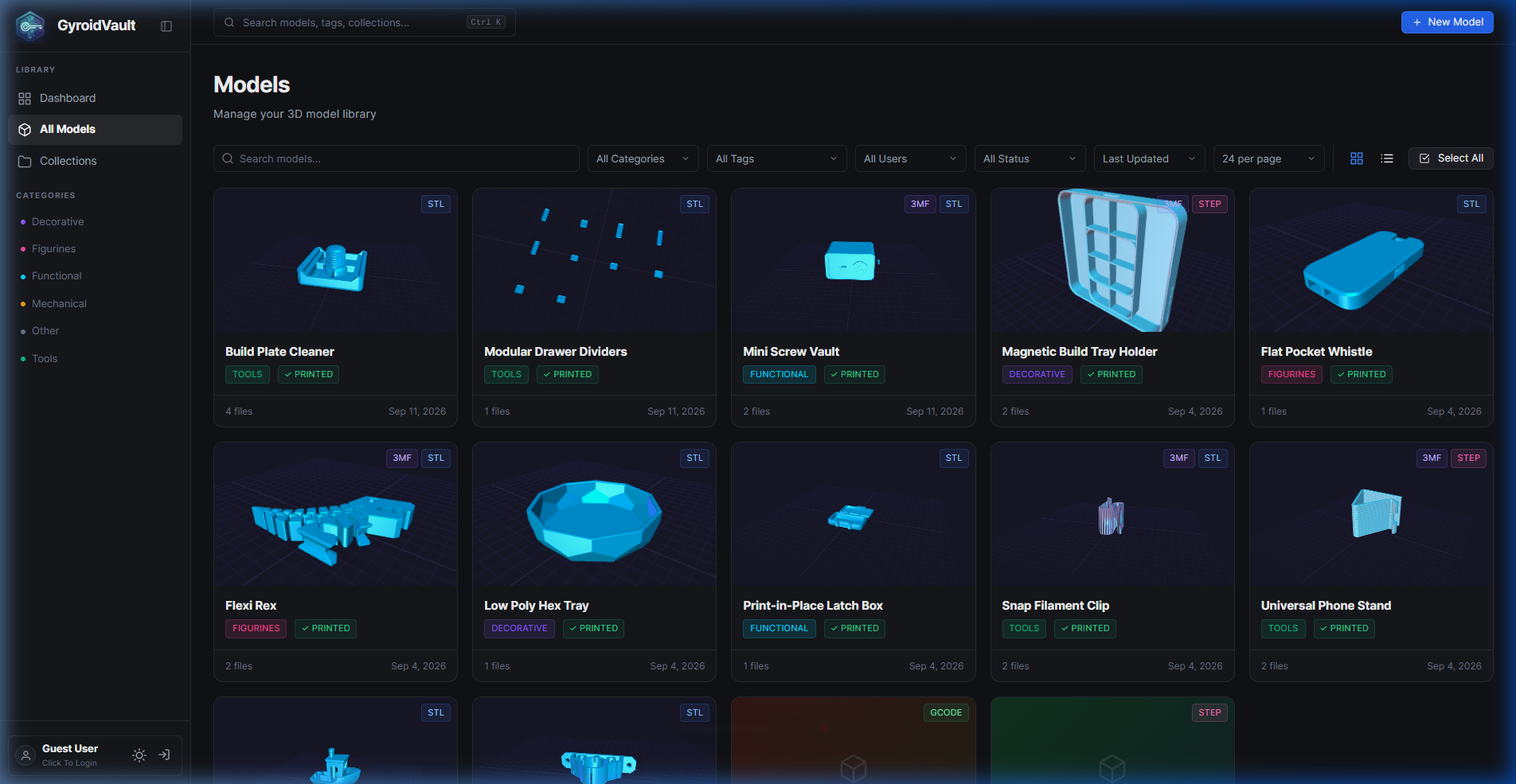
Library Grid with Dynamic 2x2 Collages & Quick Tags |
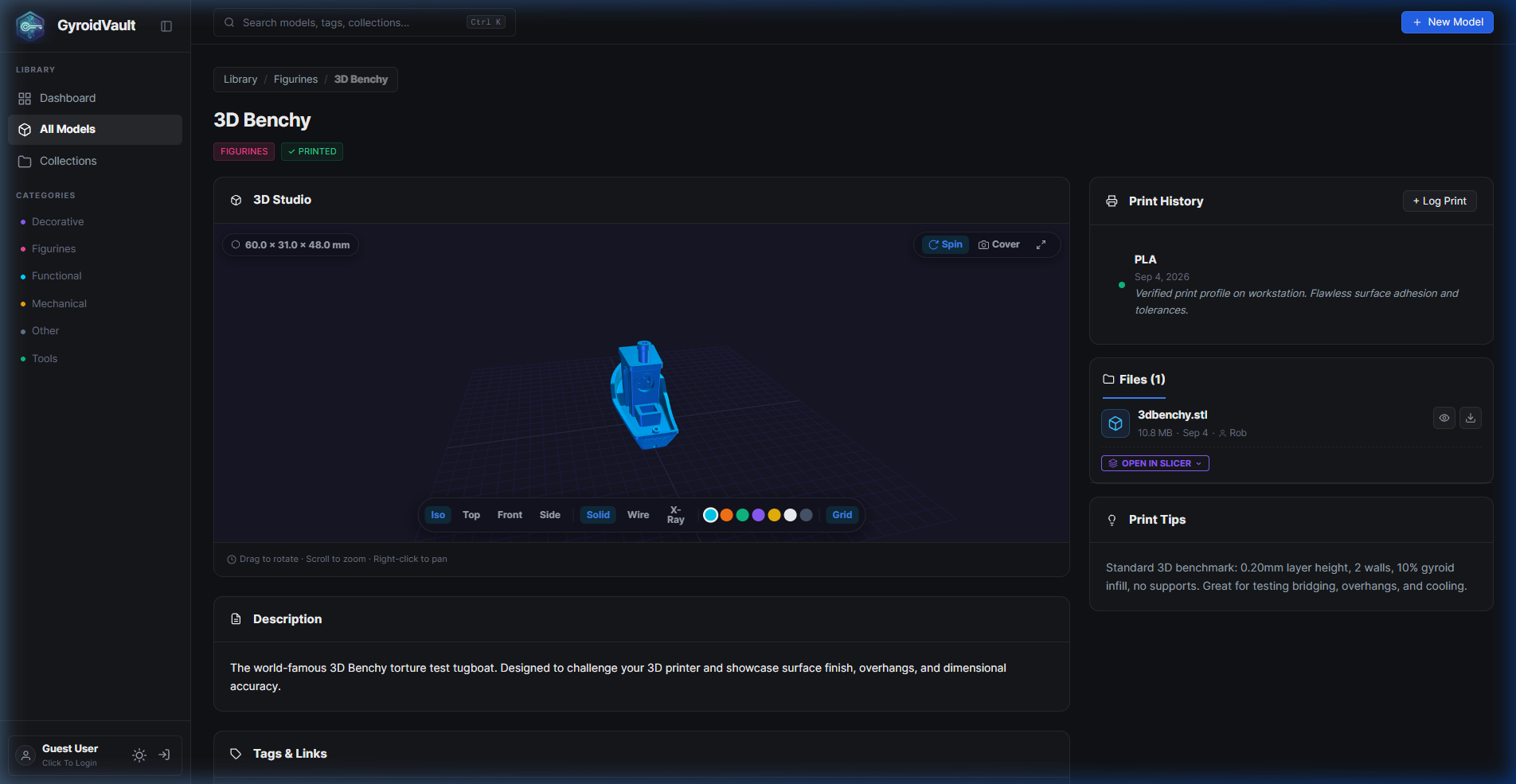
Studio 2.0 2-Column Workspace with mm Dimensions |
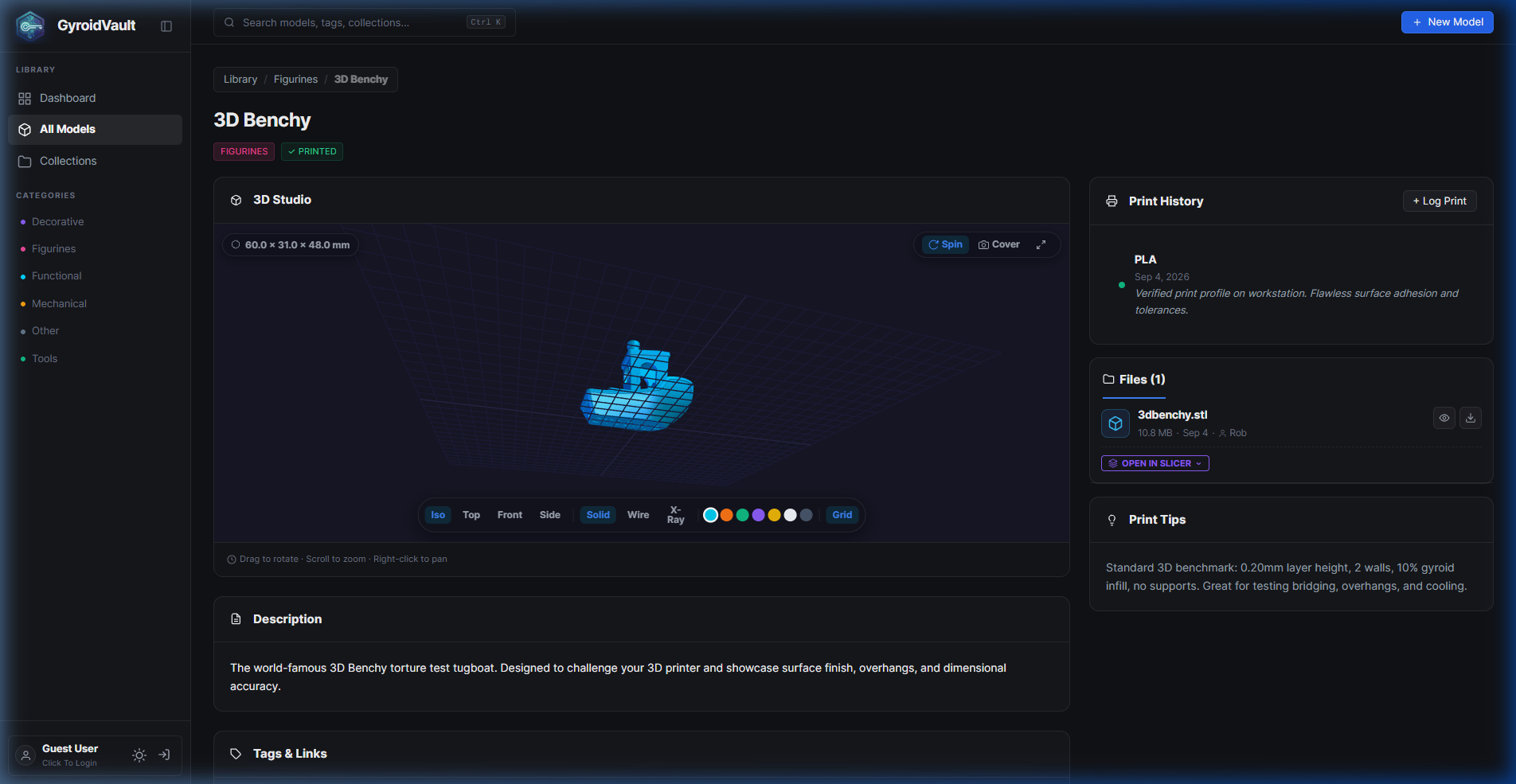
Interactive 3D Studio with Real-time Filament Swatches |
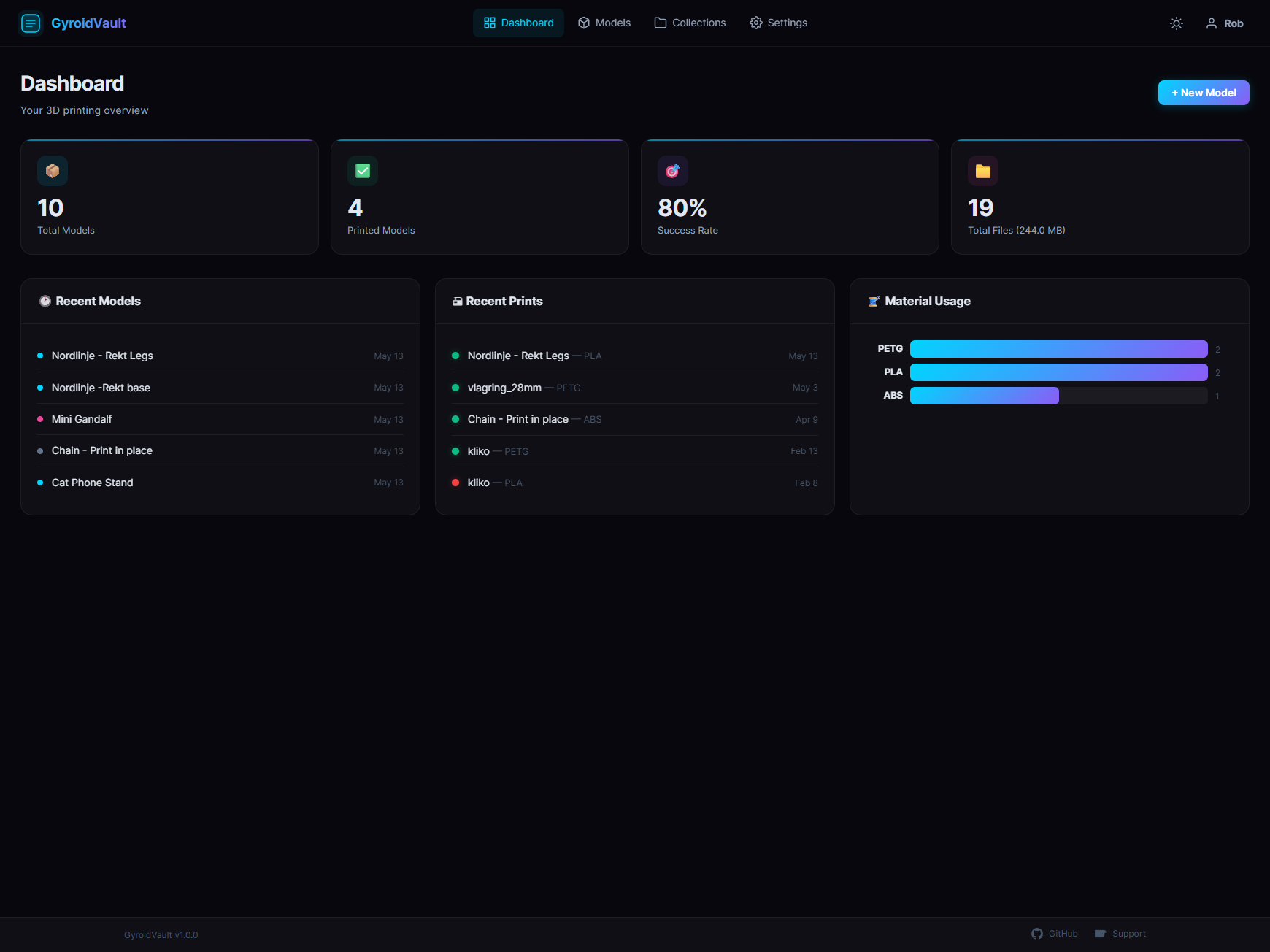
Dashboard Statistics & Material Usage Tracking |
Core Features
- 3D Interactive Studio: Smooth WebGL rendering for STL and 3MF files with isometric presets, wireframe, X-ray inspection, and 1-click thumbnail snapshot generation (
Cover). - Interactive G-Code Previewer: Inspect toolpaths layer by layer with live layer counts, Z-heights, auto-centered camera framing, and nozzle/bed temperature readouts.
- Scale Ready for 2TB+ Libraries: Optimized SQLite indexing and throttled batch disk writes handle tens of thousands of models without UI lag or memory exhaustion.
- Moonraker & Klipper Integration: Connect your 3D printers and upload sliced G-Code files straight to your printer with a single click.
- Power Batch Editing:
Ctrl+ClickorShift+Clickto select dozens of models at once for bulk tagging, category re-assignment, or collection grouping. - Folder Watching & Direct Browsing: Point GyroidVault to your existing 3D print folders on NAS/Unraid shares. It indexes non-destructively without forcing strange directory structures.
- Duplicate File Finder: Scans your library with SHA-256 hashes to uncover identical copies eating up drive space.
- Role-Based Access Control (RBAC): Admin, Uploader, and Viewer permissions. Keep private collections safe while letting family or team members browse read-only.
- Expiring Public Share Links: Generate secure, timed links to share specific models without giving access to your entire library.
- Custom Metadata Fields: Add custom key-value pairs (designer, license, print orientation notes, nozzle size) tailored to your workflow.
Quick Start (Docker Compose)
The recommended installation method is using Docker Compose:
services:
  gyroidvault:
    image: ghcr.io/teecodedev/gyroidvault:latest
    container_name: gyroidvault
    ports:
      - "3457:3000"
    volumes:
      - ./data:/app/data
      - /path/to/your/3dprints:/library
    environment:
      - NODE_ENV=production
      - PORT=3000
      - LIBRARY_PATH=/library
    restart: unless-stopped
- Replace
/path/to/your/3dprintswith the directory path where your 3D files live. - Start the service:
docker compose up -d - Open your browser and go to
http://localhost:3457(or your server IP).
💡 Unraid Users: GyroidVault is available directly in the Unraid Community Applications store. Search for
GyroidVaultto install with pre-configured templates!
Initial Setup
1. Register the Administrator
The first user account created on a fresh GyroidVault installation is automatically promoted to Administrator. No invite code is required for the initial setup.
2. Optional: Configure SMTP Mail
To enable password recovery and email invites:
- Log in as Administrator.
- Go to Settings → SMTP & Mail.
- Fill in your SMTP host, port, credentials, and from-address, then click Send Test Email.
3. Connect Moonraker / Klipper Printers
- Go to Settings → Printers.
- Add your printer name, Moonraker HTTP URL (e.g.,
http://192.168.1.50:7125), and optional API key. - You can now send G-Code files straight to your printer from any model detail page!
Manual Installation (Without Docker)
For running directly on bare metal or custom homelab environments:
# 1. Clone the repository
git clone https://github.com/TeeCodeDev/GyroidVault.git
cd GyroidVault

# 2. Install dependencies (Node.js 18+ required)
npm install

# 3. Setup configuration
cp .env.example .env

# 4. Start the server
npm start
Security & Privacy
- 100% Local & Self-Hosted: Everything lives on your own storage in a lightweight SQLite database. No mandatory cloud accounts, no third-party trackers, no telemetry.
- Strict Path Confinement: File reads and uploads stay strictly inside your configured
LIBRARY_PATH— no directory escaping. - Brute-Force Protection: Rate limiting on logins and sensitive actions. Malicious IPs are temporarily blocked and can be inspected or unblocked from admin settings.
- Session Tokens & Safe Queries: Parameterized database queries and securely generated session secrets keep your vault private.
Slicer URL Handlers
GyroidVault supports direct 1-click file launching into major slicers via desktop URI protocols:
- OrcaSlicer:
orcaslicer:// - Bambu Studio:
bambustudio://(automatic on-the-fly .3mf packaging for raw STL files) - Creality Print:
crealityprint:// - Elegoo Slicer:
orcaslicer:// - Ultimaker Cura:
cura:// - PrusaSlicer:
prusaslicer://
Community & Support
- Bug Reports & Feature Requests: GitHub Issues
- Official Documentation: GyroidVault Wiki
- Website: gyroidvault.com
- Support the Project: If you enjoy using GyroidVault, you can support ongoing maintenance via Ko-fi.
License
GyroidVault is open-source software licensed under the GNU Affero General Public License v3.0 (AGPL-3.0). See the LICENSE file for complete details.
Media gallery
1 / 4Categories
Related apps
Explore more like this
Explore allDetails
ghcr.io/teecodedev/gyroidvault:latestRuntime arguments
- Web UI
http://[IP]:[PORT:3000]/- Network
bridge- Shell
sh- Privileged
- false
Template configuration
The port for the GyroidVault web interface.
- Target
- 3000
- Default
- 3457
Storage for database and settings.
- Target
- /app/data
- Default
- /mnt/user/appdata/gyroidvault
Path to your 3D models and prints library.
- Target
- /library
- Default
- /mnt/user/3Dprints
User ID (PUID).
- Default
- 99
Group ID (PGID).
- Default
- 100
Umask value.
- Default
- 022
Container Timezone
- Target
- TZ
- Default
- Europe/Amsterdam
Internal container path for the library. Must match the 3D Models Library Target path.
- Target
- LIBRARY_PATH
- Default
- /library