
All apps · 0 apps

GymApp
Docker app from Nhật Hoàng's Repository
Overview
Readme
View on GitHubGym App
Gym App is a local-first workout tracker for personal or family use. It includes an exercise library with local JPG/GIF media, group/routine builders, workout logging, body-weight tracking, and basic analytics.
Screenshots
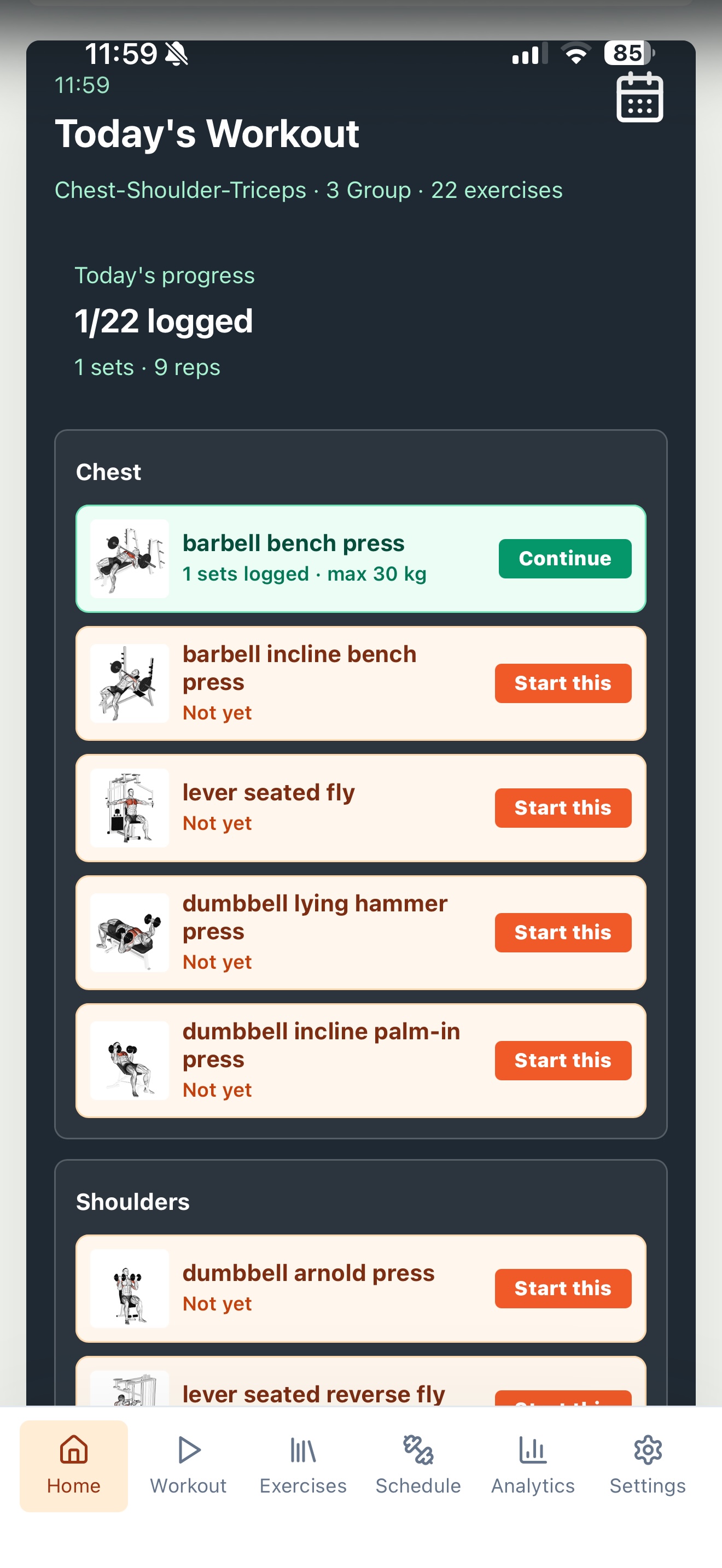 Today's Workout |
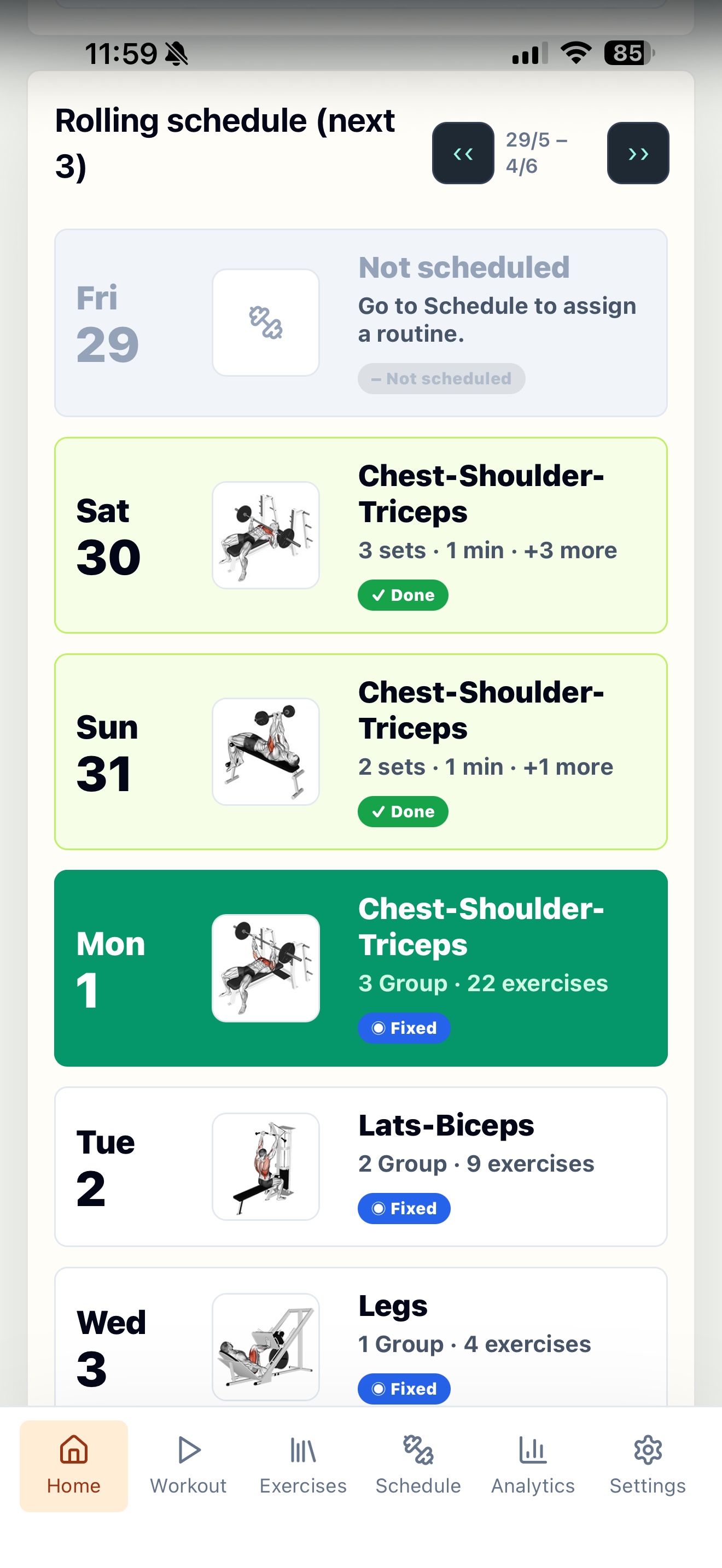 Weekly Schedule |
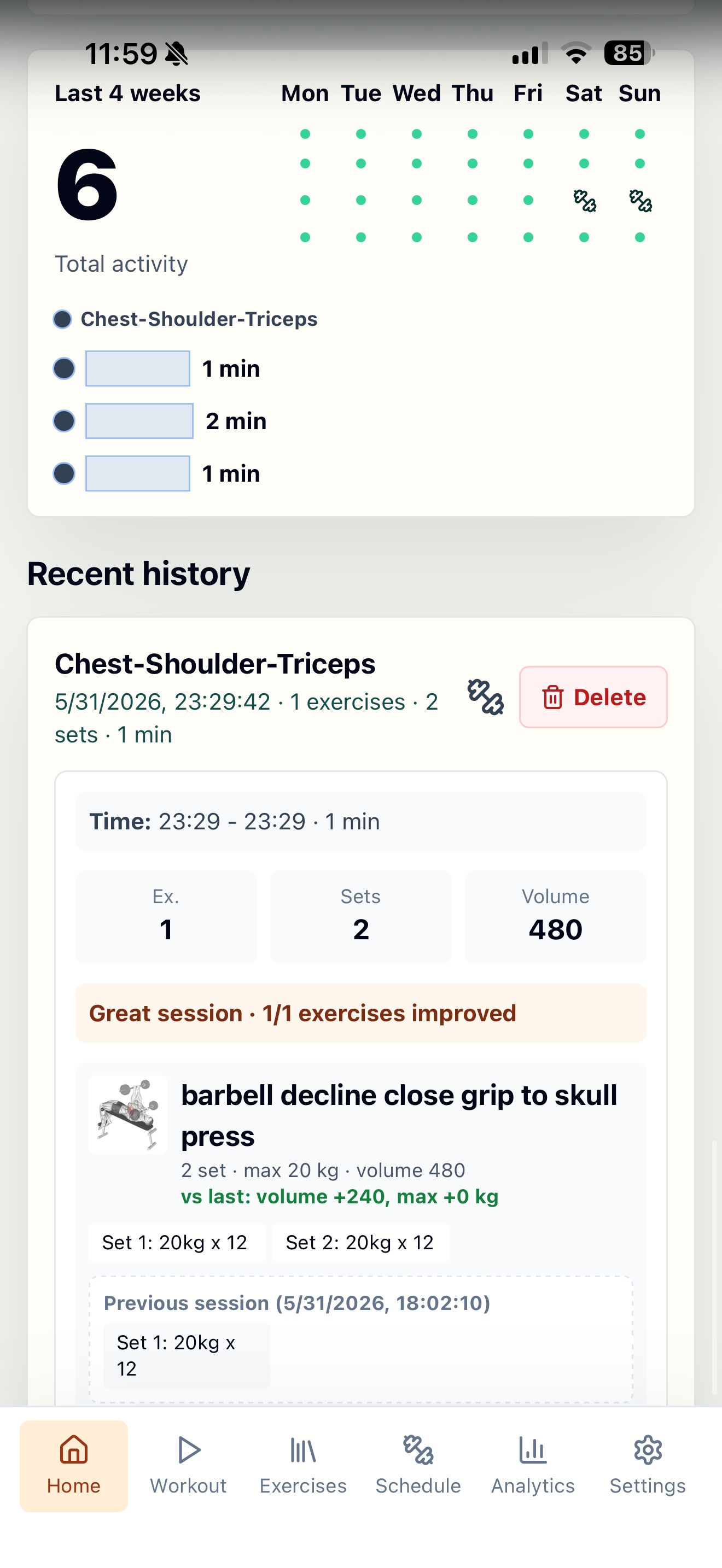 Activity & History |
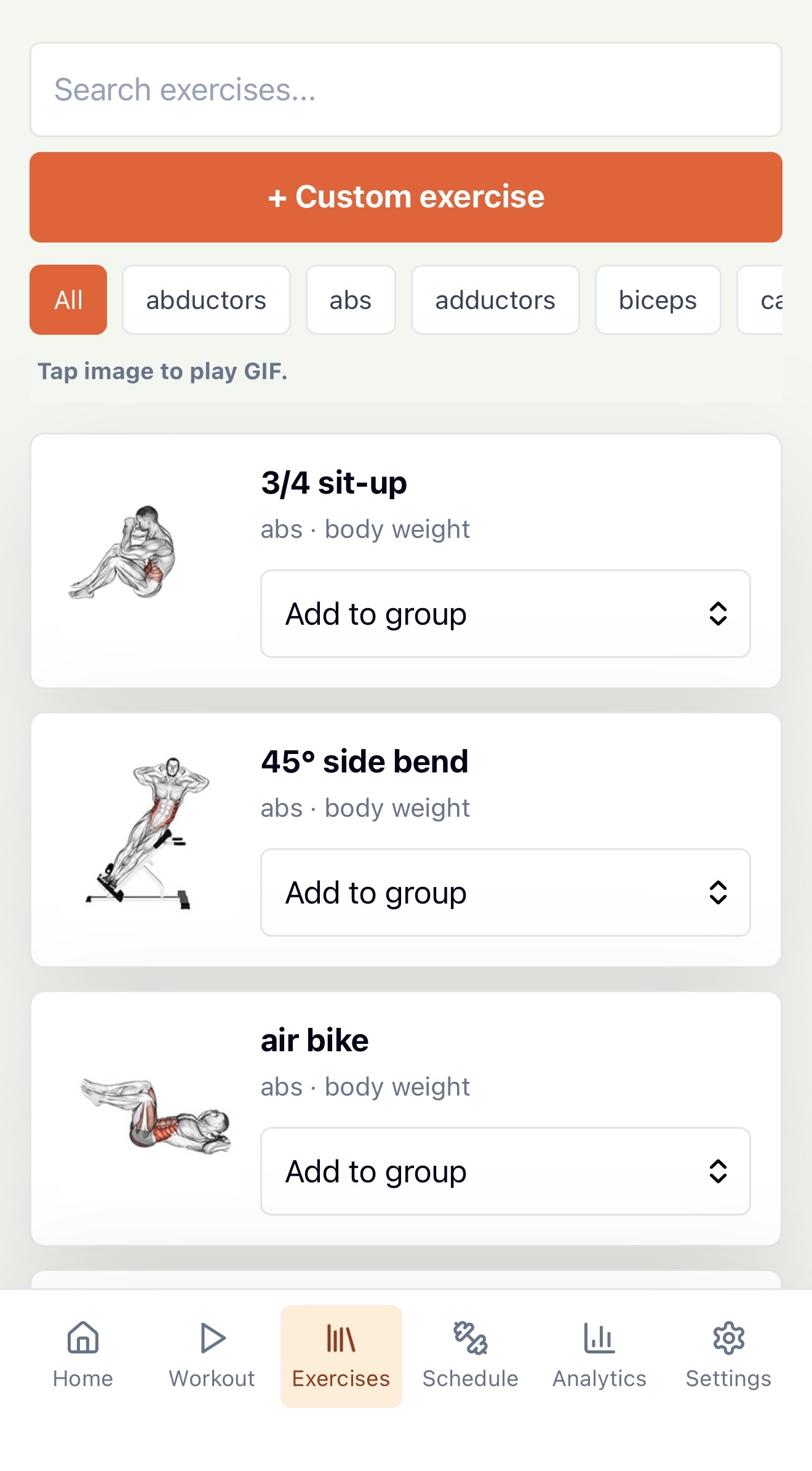 Exercise Library |
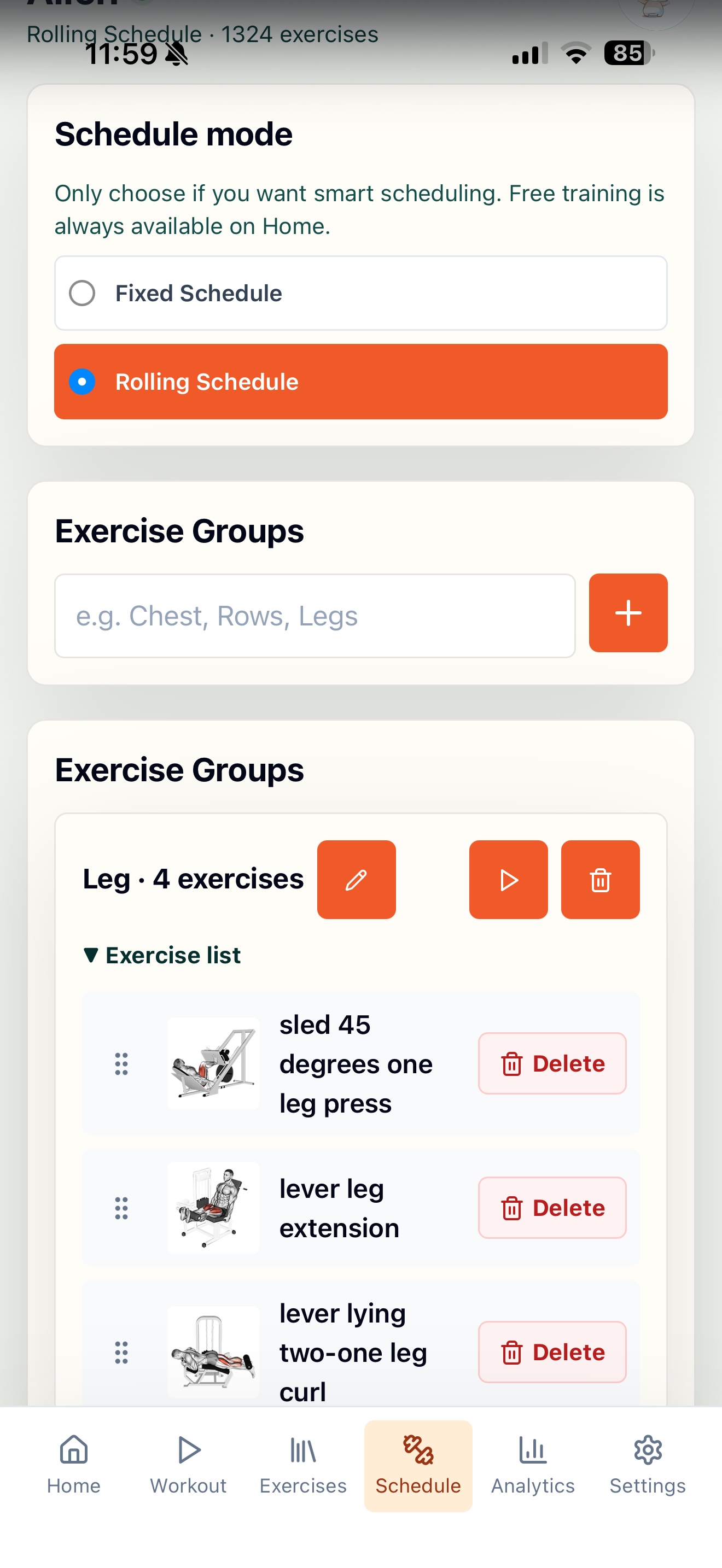 Schedule Builder |
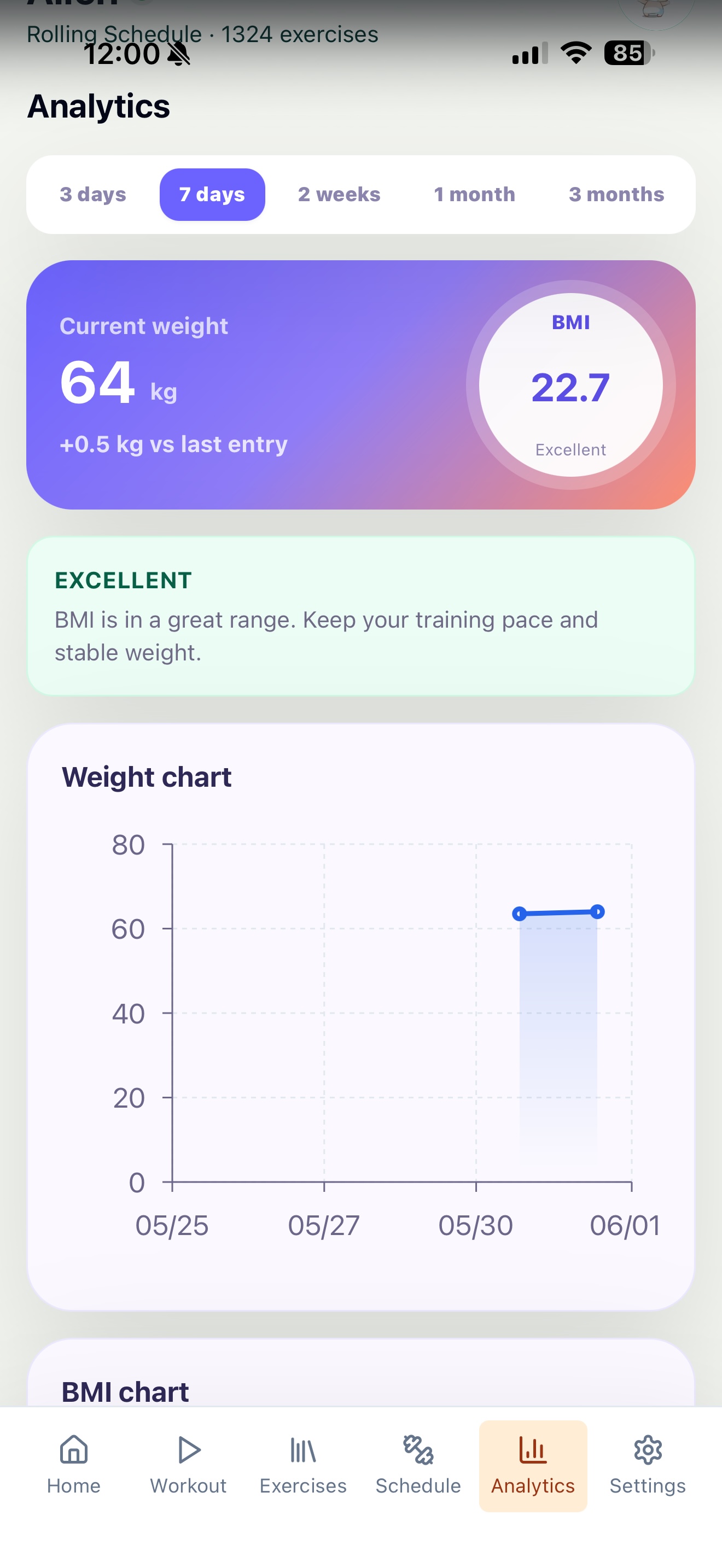 Analytics & BMI |
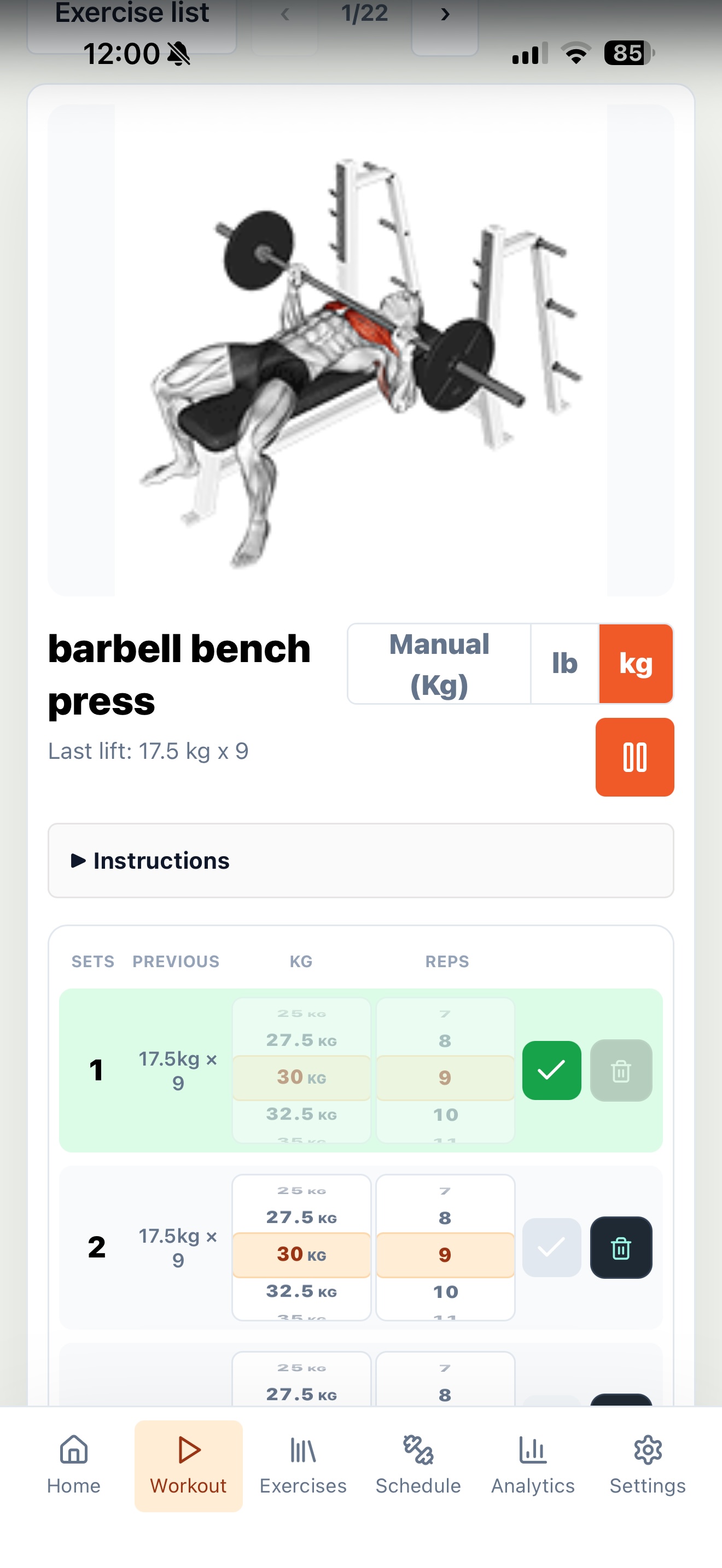 Workout Logging |
Local development
Prerequisites:
- Node.js 22+
- npm
- Internet access for the first dataset download
Clone the exercise dataset before the first local run:
git clone --depth 1 https://github.com/hasaneyldrm/exercises-dataset.git hasaneyldrm-exercises-dataset
Then install dependencies and start the app:
npm install
npm run dev
- Web:
http://localhost:5173 - API:
http://localhost:3001
Default login:
- Username:
admin - Password:
admin123
Optional environment setup:
Copy-Item .env.example .env
Edit .env before the first Docker run if you want to change ADMIN_PASSWORD, PORT, or TZ.
Docker / Unraid
Prerequisites:
- Docker / Docker Compose
- Internet access during the first image build. The Dockerfile downloads the exercise dataset and bundles it into the image.
You do not need to download the exercise dataset manually for Docker/Unraid. The Dockerfile downloads and bundles it during image build.
Build and run from the repo folder:
Copy-Item .env.example .env
docker compose up -d --build
Production URL:
http://SERVER_IP:3001
Persistent data:
- SQLite database:
./data/gym.sqlite - Container path:
/app/data
For Unraid, map an appdata folder to /app/data, for example:
volumes:
  - /mnt/user/appdata/gym-app:/app/data
Recommended Unraid container settings:
| Setting | Value |
|---|---|
| Repository | ghcr.io/thaihoang987/gym-app:latest if you publish an image, or build from this repo with Docker Compose |
| WebUI | http://[IP]:[PORT:3001]/ |
| Network | bridge |
| Web Port | Container 3001 to host 3001 |
| Appdata path | /mnt/user/appdata/gym-app/data mapped to /app/data |
| Restart policy | unless-stopped |
| Default username | admin |
| Default password | admin123, or the ADMIN_PASSWORD variable on a fresh database |
Files to back up:
/mnt/user/appdata/gym-app/data/gym.sqlite/mnt/user/appdata/gym-app/data/uploads/mnt/user/appdata/gym-app/data/exercise-translationsif you add custom translations
Server logs are written to:
/mnt/user/appdata/gym-app/data/logs/server.log
This repo also includes unraid-template.xml for Community Applications/manual template use.
Backup and restore
Gym App has two JSON backup modes:
| Mode | What it includes | Intended use |
|---|---|---|
| User backup | Current user's workout data, custom exercises, routines, body weight logs, exercise settings, and that user's uploaded images/GIFs/icons. It does not include passwords. | Move or restore one user's private training data. |
| Admin backup | Login records for all users, including encrypted password_hash values, plus admin-owned workout data and admin uploaded images/GIFs/icons only. It does not include other users' workout logs, body weights, notes, or uploads. |
Restore accounts/login after migration while preserving user privacy. |
Password hashes are one-way encrypted values. They are not decrypted during restore; admin restore writes the hash back so users can keep logging in with their existing passwords. Non-admin users should export/import their own user backups for privacy.
For a full Unraid/server backup, also keep the appdata folder:
/mnt/user/appdata/gym-app/data
Docker image registry
This repo includes a GitHub Actions workflow that builds and pushes Docker images to GitHub Container Registry:
- Stable image:
ghcr.io/thaihoang987/gym-app:latestfrommain - Beta image:
ghcr.io/thaihoang987/gym-app:betafrombeta/log-template-metrics - SHA tags:
ghcr.io/thaihoang987/gym-app:sha-<commit> - Release tags:
ghcr.io/thaihoang987/gym-app:0.3.47when pushing Git tags likev0.3.47 - Workflow:
.github/workflows/docker.yml
If the package is public, Unraid users can run the image directly with:
ghcr.io/thaihoang987/gym-app:latest
For beta testing on Unraid, use:
ghcr.io/thaihoang987/gym-app:beta
If the package is private, open the package page on GitHub and set visibility to public, or log in to GHCR from Unraid before pulling.
Publish to Unraid Community Apps
This repo includes an Unraid Community Applications template:
Publishing checklist:
- Push to
mainand confirm the Docker workflow publishesghcr.io/thaihoang987/gym-app:latest. - In GitHub Packages, set the GHCR package visibility to Public.
- Test install on your own Unraid server with
/mnt/user/appdata/gym-app/datamapped to/app/data. - Optional but recommended: create an Unraid forum support topic and update the
<Support>link inunraid-template.xml. - Submit the repository at
https://ca.unraid.net/submit.
Full checklist: docs/UNRAID_COMMUNITY_APPS.md.
Update flow
This repo is structured so updates can be pulled and rebuilt without touching user data:
git pull
docker compose up -d --build
The app keeps persistent workout data in ./data, which is mounted into the container. Do not commit data/*.sqlite* to GitHub.
Install on phone
Gym App includes PWA support, so it can be installed to the home screen on phones and tablets.
Android Chrome:
- Open
http://SERVER_IP:3001. - Open the browser menu.
- Tap Install app or Add to Home screen.
iPhone / iPad Safari:
- Open
http://SERVER_IP:3001. - Tap the Share button.
- Tap Add to Home Screen.
Notes:
- iOS and Android must be on the same network as the server unless you expose the app through a reverse proxy/VPN.
- Browser notification behavior is limited on iOS/Android and depends on browser permissions.
- PWA install works best over HTTPS. Local LAN HTTP can still be opened in the browser, but some PWA features may be limited.
Included dataset
Gym App uses hasaneyldrm/exercises-dataset for the default exercise library:
hasaneyldrm-exercises-dataset/data/exercises.json: 1,324 exerciseshasaneyldrm-exercises-dataset/images: JPG thumbnailshasaneyldrm-exercises-dataset/videos: GIF animations
The dataset folder is not committed to this repo. For Docker builds, it is downloaded during image build. For local development, clone it manually with the command in the Local development section.
The library list renders lightweight JPG cards in batches. GIF files are loaded only when opening exercise detail or entering workout mode.
The bundled exercise dataset is for personal, educational, and non-commercial use according to the dataset README. Exercise images and GIFs may belong to their respective copyright holders. See THIRD_PARTY_NOTICES.md before redistributing this repo or Docker image publicly.
Troubleshooting
Docker build fails while downloading packages or dataset
The first build needs internet access for npm packages and hasaneyldrm/exercises-dataset. Check DNS/network access from the Docker host and run:
docker compose build --no-cache
docker compose up -d
Cannot open the app from a phone
Make sure the phone is on the same LAN/VPN as the server. Use:
http://SERVER_IP:3001
If it still fails, check firewall rules and confirm the container maps host port 3001 to container port 3001.
Default password does not change
ADMIN_PASSWORD only applies when the database is created for the first time. If data/gym.sqlite already exists, change the password inside the app Settings or delete the database only if you intentionally want a fresh install.
Library is empty in local development
For local npm run dev, clone the dataset manually:
git clone --depth 1 https://github.com/hasaneyldrm/exercises-dataset.git hasaneyldrm-exercises-dataset
Docker builds download this dataset automatically.
Uploaded images or GIFs are missing after update
Check that /app/data is mapped to persistent storage. Uploaded files live under:
/app/data/uploads
On Unraid this should be:
/mnt/user/appdata/gym-app/data/uploads
Check server logs
Local/Docker Compose:
Get-Content .\data\logs\server.log -Tail 50
docker logs gym-app
Unraid:
tail -f /mnt/user/appdata/gym-app/data/logs/server.log
Connect / Disconnect indicator is red
The app checks /api/health every 10 seconds. Red means the browser cannot reach the backend. Check that the server/container is running and that the phone/browser is using the correct server IP and port.
Third-party licenses
Gym App uses third-party open-source modules such as React, Vite, Express, dnd kit, react-wheel-picker, Recharts, lucide-react, Tailwind CSS, and others. See THIRD_PARTY_NOTICES.md for license and attribution details.
Donate
Gym App is free for personal use. If it helps you, you can optionally support development and maintenance:
- Ko-fi: https://ko-fi.com/leonbell
- PayPal: https://paypal.me/leonbell95
Donations are voluntary and do not purchase a license to any third-party exercise dataset, images, or GIFs bundled with or referenced by this project.
Notes
- Build output is generated into
dist. node_modulesand runtime database files are ignored for Docker/Git usage.- The Dockerfile builds the frontend and serves the production app through the Express server on port
3001.
Install GymApp on Unraid in a few clicks.
Find GymApp in Community Apps on your Unraid server, review the template, and click Install. Unraid handles the Docker app or plugin setup from the published template.
Categories
Related apps
Explore more like this
Explore allDetails
ghcr.io/thaihoang987/gym-app:latestRuntime arguments
- Web UI
http://[IP]:[PORT:3001]/- Network
bridge- Shell
sh- Privileged
- false
- Extra Params
--restart=unless-stopped
Template configuration
Port to access the web interface. Open http://your-ip:3001 in your browser.
- Target
- 3001
- Default
- 3001
- Value
- 3001
Where the database, uploaded images, and logs are stored. Back this up regularly!
- Target
- /app/data
- Default
- /mnt/user/appdata/gym-app/data
- Value
- /mnt/user/appdata/gym-app/data
Password for the default admin account on first run. Change this before starting! Only applies when creating a fresh database.
- Target
- ADMIN_PASSWORD
- Default
- admin123
- Value
- admin123
Your timezone for correct date/time display. E.g. Asia/Ho_Chi_Minh, America/New_York, Europe/London.
- Target
- TZ
- Default
- Asia/Ho_Chi_Minh
- Value
- Asia/Ho_Chi_Minh
Internal server port. Keep this matching the Web Port above.
- Target
- PORT
- Default
- 3001
- Value
- 3001