
All apps · 0 apps

GroveMap
Docker app from BobbySmalls' Repository
Overview
Readme
View on GitHub

GroveMap
Disk usage analyzer with an interactive treemap web UI.
Built for Unraid but runs anywhere Docker does.
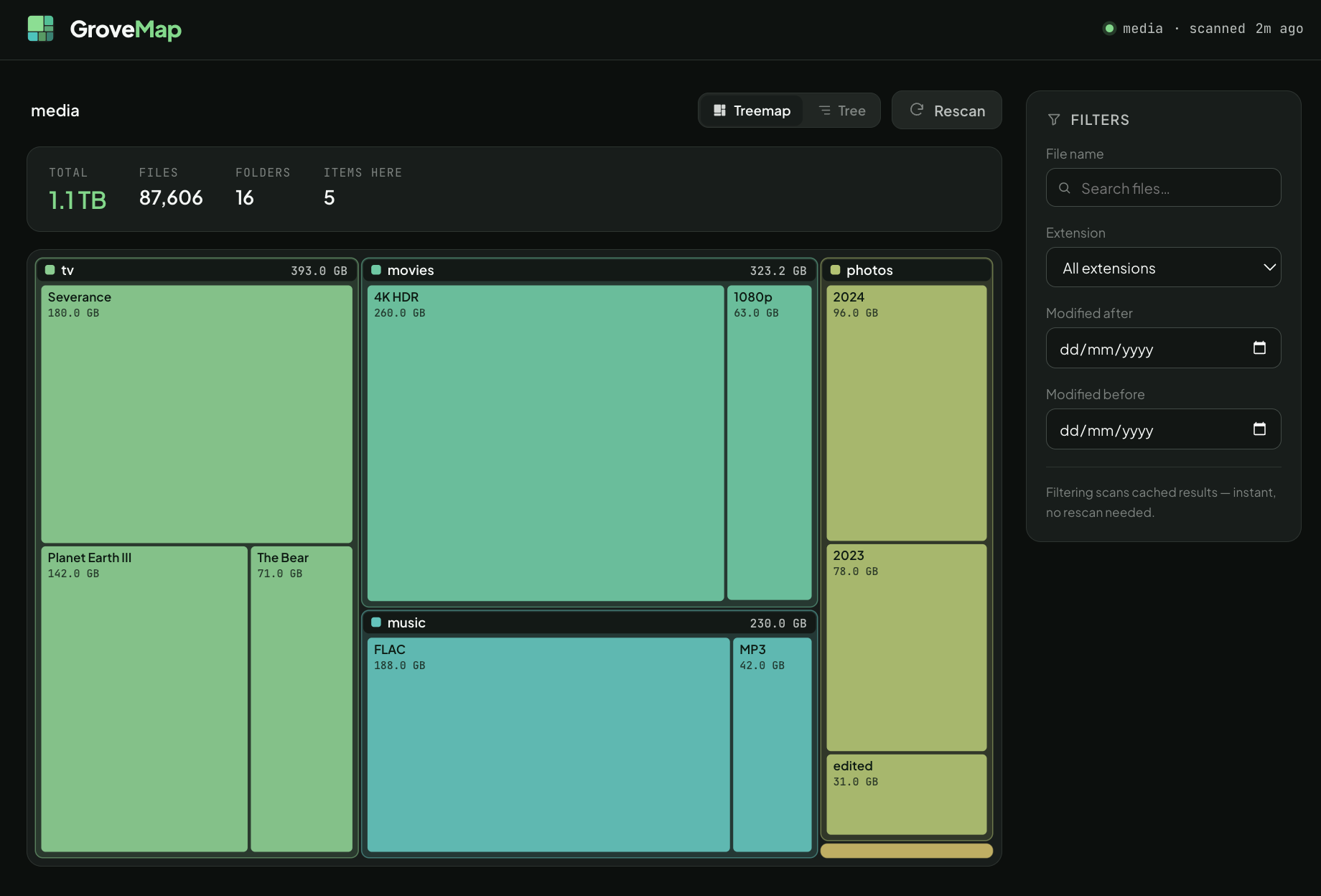
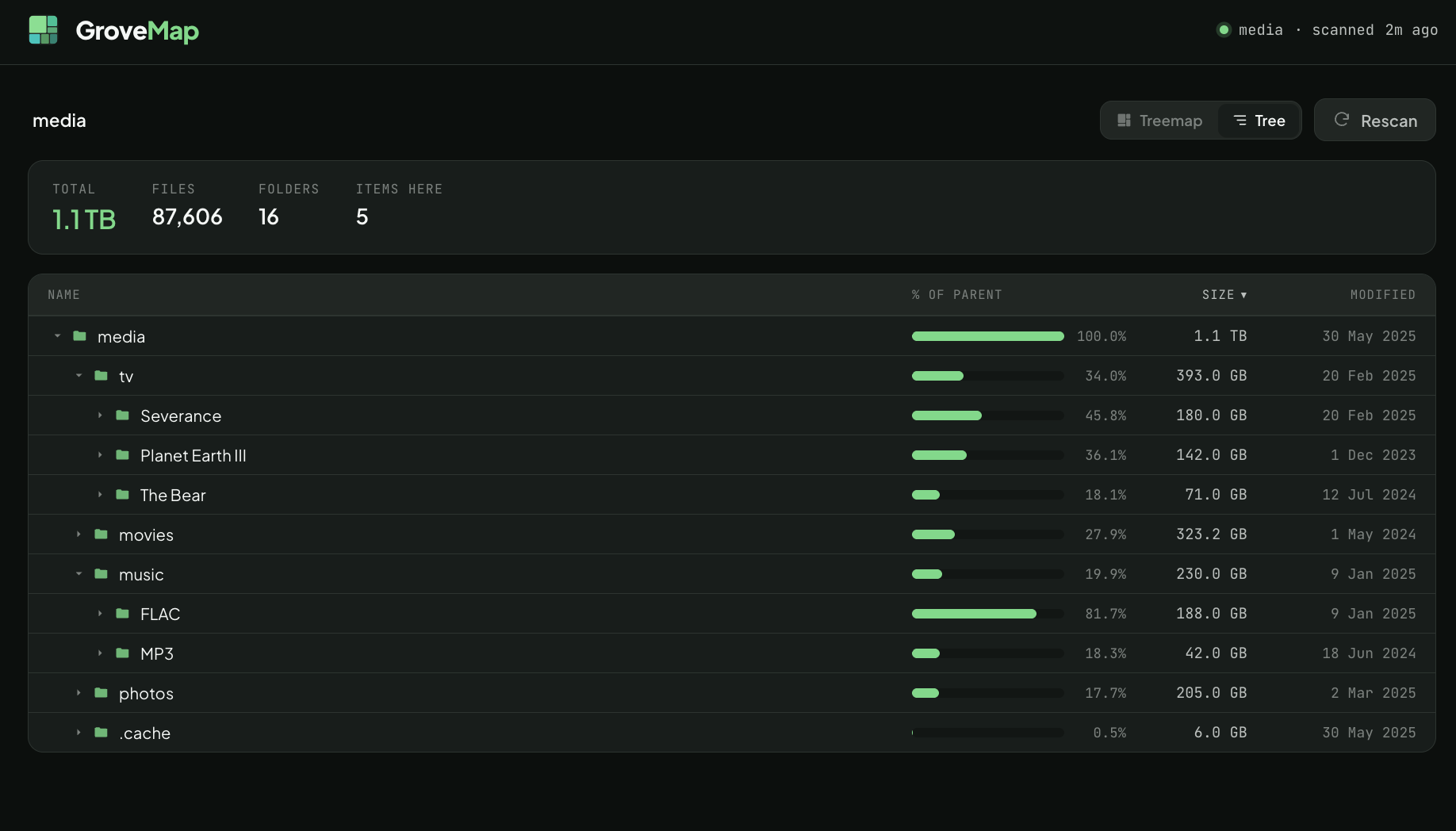
Mount any directories into the container and GroveMap will scan them, cache the results, and present an interactive treemap you can drill into. Filter files by name, extension, or date to find what's eating your storage.
Quick Start
docker build -t grovemap .
docker run -d -p 8080:8080 -v /mnt/user:/data/user:ro --name grovemap grovemap
Open http://your-server:8080.
Features
- Interactive treemap - proportional visualization of disk usage, click to drill down
- Tree list view - sortable hierarchical breakdown with size bars and modified dates; toggle between treemap and tree from the header
- Multiple volumes - mount as many directories as you need under
/data/ - Filtering - search by file name, extension, or modification date range
- Background scanning - UI stays responsive while scans run
- Auto-discovery - any directory under
/data/becomes a scannable root - Read-only - all mounts use
:ro, GroveMap never modifies your files
Configuration
| Environment Variable | Default | Description |
|---|---|---|
SCAN_CACHE_TTL |
300 |
Seconds a scan result is served before it is considered stale. Once stale, the next request keeps returning the existing tree while a fresh scan runs in the background (the UI never blanks). |
SCAN_ON_START |
true |
Automatically scan all roots when the container starts |
DATA_ROOT |
/data |
Base path where mounted volumes are discovered |
STATIC_DIR |
/app/static |
Directory the built frontend is served from |
Note: the web UI port is fixed at
8080inside the container (theuvicorncommand hardcodes it). To change it, remap the port at the Docker level (-p 9000:8080) rather than setting an env var.
Invalid or empty values for SCAN_CACHE_TTL / SCAN_ON_START fall back to their defaults rather than crashing the container.
Unraid Installation
Via Docker CLI
docker run -d \
  --name grovemap \
  -p 8080:8080 \
  -v /mnt/user/media:/data/media:ro \
  -v /mnt/user/documents:/data/documents:ro \
  -e SCAN_CACHE_TTL=300 \
  --restart unless-stopped \
  grovemap
Via Unraid Docker UI
- Go to Docker > Add Container
- Set Repository to
grovemap(or your built image name) - Add a Port mapping: host
8080-> container8080 - Add Path mappings for each directory to scan:
- Host:
/mnt/user/media-> Container:/data/media, Access: Read Only
- Host:
- Set WebUI to
http://[IP]:[PORT:8080]
The Unraid Community Apps template is templates/grovemap.xml (this is the one kept in sync with the published image). A legacy unraid-template.xml also exists at the repo root.
Development
Prerequisites
- Python 3.12+
- Node.js 20+
- npm
Backend
cd backend
pip install -r requirements.txt
DATA_ROOT=./test-data STATIC_DIR=../frontend/dist uvicorn main:app --reload --port 8080
Frontend
cd frontend
npm install
npm run dev
The Vite dev server runs on port 5173 and proxies /api requests to the backend on port 8080.
Project Structure
grovemap/
├── Dockerfile              # Multi-stage build (node + python-alpine)
├── docker-compose.yml      # Local testing with Docker
├── templates/
│   └── grovemap.xml        # Unraid Community Apps template (maintained)
├── unraid-template.xml     # Legacy Unraid template
├── backend/
│   ├── requirements.txt    # fastapi, uvicorn
│   ├── main.py             # API routes + SPA serving (path-confined)
│   ├── scanner.py          # Recursive directory scanner (os.scandir)
│   └── cache.py            # In-memory stale-while-revalidate scan cache
└── frontend/
    ├── package.json
    ├── vite.config.ts      # Dev proxy to backend
    └── src/
        ├── App.tsx         # Root selector / treemap view routing
        ├── api/client.ts   # React Query hooks
        ├── utils.ts        # formatSize, formatDate, color palette
        └── components/
            ├── RootSelector.tsx   # Volume cards with scan status
            ├── TreemapView.tsx    # Main view: shared header + view toggle
            ├── Treemap.tsx        # d3-hierarchy SVG treemap
            ├── TreeListView.tsx   # Sortable hierarchical list with size bars
            ├── ViewToggle.tsx     # Treemap / Tree segmented control
            ├── Breadcrumb.tsx     # Drill-down navigation
            ├── FilterPanel.tsx    # Name/extension/date filters
            ├── FileList.tsx       # Filtered file results table
            └── ScanStatus.tsx     # Scan progress indicator
API Endpoints
| Method | Endpoint | Description |
|---|---|---|
GET |
/api/roots |
List mounted volumes with scan status |
GET |
/api/tree?root=...&depth=3&path=... |
Directory tree with sizes |
GET |
/api/files?root=...&name=...&extension=... |
Filtered file listing |
POST |
/api/scan?root=... |
Trigger a rescan |
GET |
/api/status |
Scan status for all roots |
Architecture Decisions
- No database - scan results are cached in memory only; all scan state is lost on restart. The cache (
cache.py) is keyed by root path and guarded by a single lock. For datasets under 500K files, a full scan completes in seconds and the memory footprint is manageable. - Depth-limited tree responses - the API returns trees truncated at depth 3 (
dirs_only=false). Nodes at the cutoff carryhas_childrenso the tree list view can lazy-fetch deeper levels on expand, avoiding massive payloads. (The treemap only renders the first two depth levels; the deeper data feeds the tree list.) - Stale-while-revalidate scanning - scans run in a daemon thread. Once a cached result passes
SCAN_CACHE_TTLit is kept and served while a background rescan runs, so navigating folders never blanks the UI or forces a wait. The tree response includes arefreshingflag and the frontend polls (every 2s) only while an initial scan or a background refresh is in flight. A failed background refresh retains the last good result and backs off for one TTL. (This replaced earlier behavior where an expired cache triggered a blocking rescan on the next navigation — see issue #3.) - Read-only mounts - volumes are mounted as
:roby default. The scanner only reads file metadata (os.scandir+stat), never modifies files, and does not follow symlinks when computing sizes.
Security Model
GroveMap has no authentication and binds to 0.0.0.0:8080. Anyone who can reach the port can browse the sizes and file listings of every mounted volume. Run it only on a trusted LAN (or behind a reverse proxy that adds auth), and keep all mounts read-only (:ro).
The API confines file access to DATA_ROOT: every root/path query is resolved with realpath and rejected if it escapes DATA_ROOT, and the static-file route is likewise confined to STATIC_DIR so it cannot be used to read arbitrary container files via ../ traversal.
Known Limitations
- Large / deep trees - the scanner is recursive and holds the full tree plus a flat file list in memory, with no depth or file-count cap. Extremely deep trees can hit Python's recursion limit and very large arrays (many millions of files) can use significant memory.
- Symlinks - not followed during scanning (sizes exclude symlinked content), but are followed during root discovery, so a symlinked directory under
DATA_ROOTmay appear as a root yet scan as empty. - File filtering -
/api/filesfiltering and sorting run on the request thread; a query over a very large scan can be slow. The file-name search box is not debounced, and date filters use the browser's local midnight (off by the UTC offset at day boundaries). - Concurrency - a manual rescan issued while a scan is already running for the same root can briefly overlap.
License
MIT
Media gallery
1 / 2Categories
Related apps
Explore more like this
Explore allDetails
ghcr.io/robsmallridge/grovemap:latestRuntime arguments
- Web UI
http://[IP]:[PORT:8080]- Network
bridge- Shell
sh- Privileged
- false
Template configuration
Port for the web interface
- Target
- 8080
- Default
- 8080
- Value
- 8080
First directory to analyze
- Target
- /data/share1
- Default
- /mnt/user
- Value
- /mnt/user
Second directory to analyze (optional)
- Target
- /data/share2
Third directory to analyze (optional)
- Target
- /data/share3
Seconds to cache scan results before a background refresh
- Target
- SCAN_CACHE_TTL
- Default
- 300
Auto-scan when container starts
- Target
- SCAN_ON_START
- Default
- true