

GravityLAN
Docker app from Sleeper's Repository
Overview
Readme
View on GitHub
GravityLAN
Your homelab, mapped and maintained.
Scan the network, keep an inventory of every device, draw the topology, watch and update your Linux hosts, and open a shell on any of them from the browser.
DE: Dein Homelab im Blick. Netz scannen, Geräte inventarisieren, Topologie zeichnen, Linux-Hosts überwachen und aktualisieren, Shell im Browser.


Quick start · Features · Agent · Security · Changelog · Releases · Docker Hub · Deutsch
[!NOTE] Pre-release. GravityLAN is in active development and features may change between versions. Export a backup (Settings → Backup & restore) before you upgrade.
What it is
GravityLAN is a self-hosted dashboard for the network at home or in the lab. It sweeps your subnets, keeps every device it finds in one inventory, and lets you add what a scanner can't know: groups, racks, cabling, which VM runs on which host. Install the optional agent on your Linux machines and the same inventory shows their load, disks and temperatures, counts pending package updates and installs them on request.
Everything runs in one container with one SQLite file: a FastAPI backend and a React interface, in English and German, usable on a phone. It is built for a trusted home network, not for direct exposure to the internet.
Features
| Area | What you get |
|---|---|
| Health & Availability | Real-time SLA radar, latency & jitter telemetry, flapping detection, SSL certificate expiry checks, pending security patches, and 24/7 server vs client classification with dedicated interactive charts and mobile touch cards. |
| Discovery | Scheduled Nmap and ARP scans of your scan subnets (one list, kept in Settings and on the IP addresses page), plus a lighter presence check in between: hosts, open ports, services, hostnames (DNS, mDNS) and vendors. Containers with their own LAN address are found too, also ipvlan setups where several of them share the host's MAC. A device only counts as offline after several failed checks in a row (ping, ARP and TCP; 3 by default), so busy hosts don't flap. |
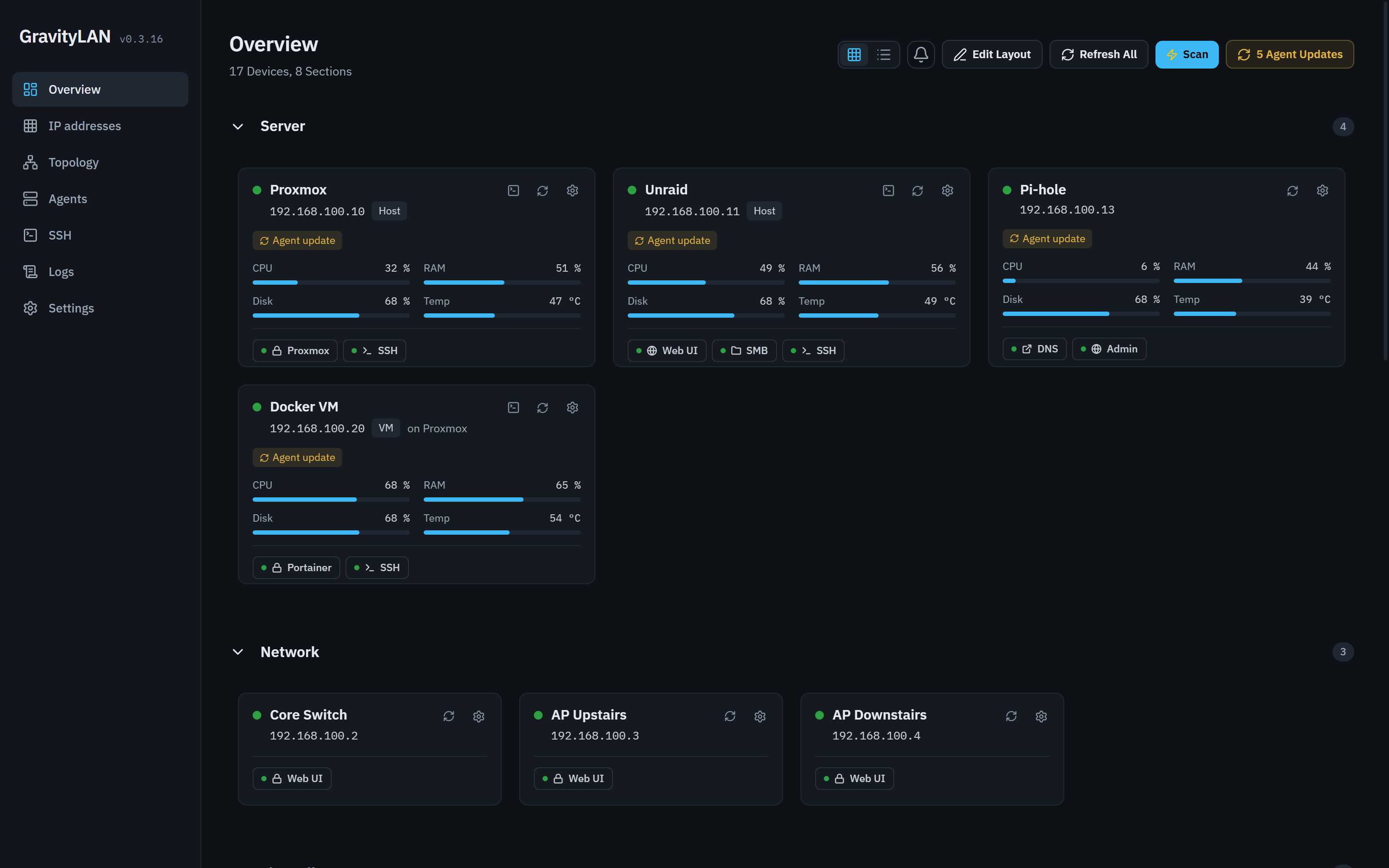
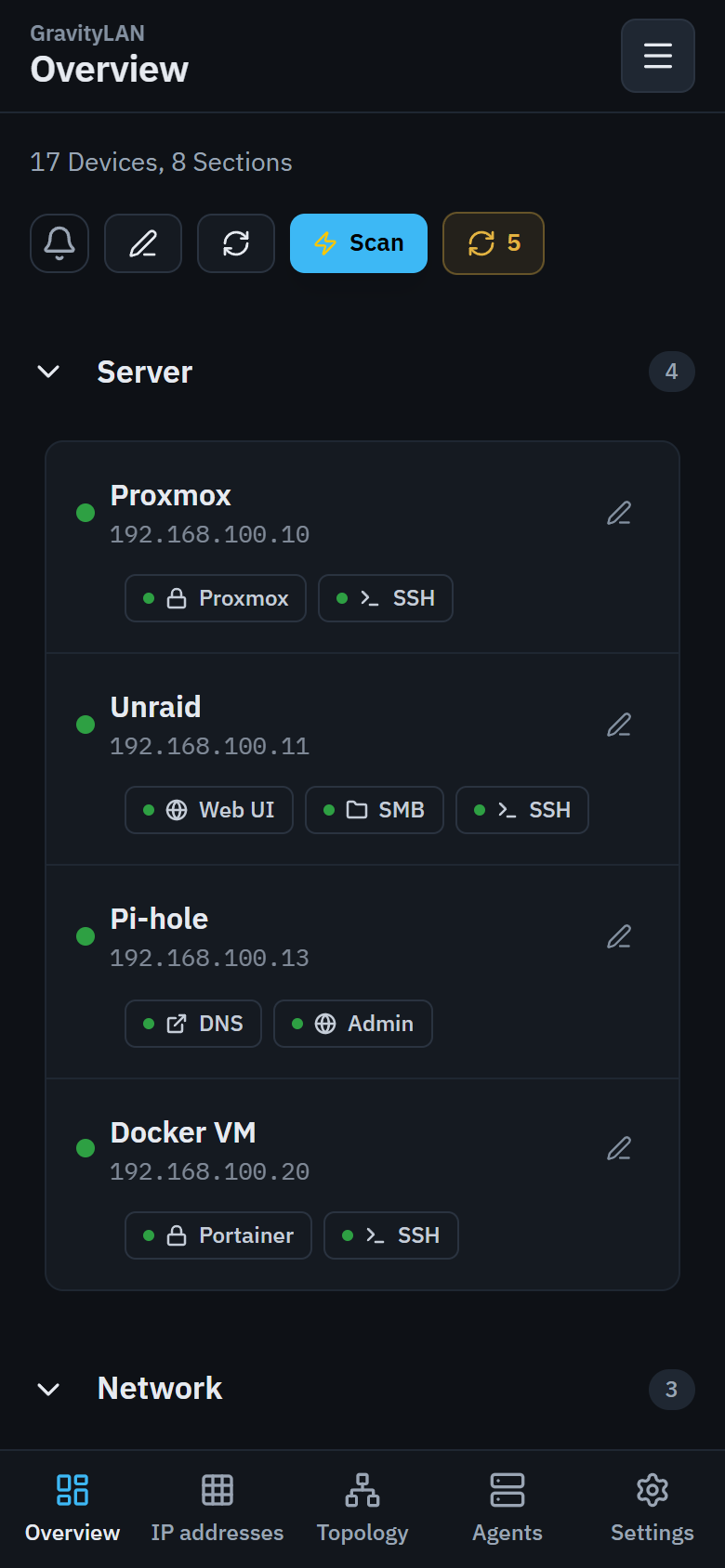
| Overview | Your devices in your own sections, as tiles or a list, with live agent metrics and service links that open the web UI (or copy the SMB path). IP changes, issues and a notification feed; tiles can be arranged freely. |
| IP addresses | A map of each subnet's address space: used, free, online, offline. A badge on every subnet shows how GravityLAN reaches it: L2 Direct on one of its own interfaces, L3 Routed through a router, or L2 Probe through an agent inside it. Every scan subnet has its own tab; a paused one stays there, greyed out. Manage subnets, named areas and per-subnet scan settings. |
| Routed subnets & VLANs | ARP stops at the router, so in a routed subnet a scan finds the hosts but not their MAC addresses, and GravityLAN won't hand the router's MAC (proxy ARP) to every host there. For the real MACs and vendors, let an agent in that subnet work as a Layer-2 probe, or give the container an address in each VLAN with the multi-VLAN compose variant. |
| One router, many VLANs | A router that is the gateway of several subnets stays one device: its address in each VLAN is an interface with its own online state, shown in every IP tab and as one topology node, with a colour chip per network. Each subnet can store its gateway and VLAN tag; a "Gateways" list in the dashboard shows them all, and duplicates are offered for merging as interfaces. |
| Topology & racks | Draw how devices are connected, with link speeds (1, 2.5, 10 GbE …) and an animated data flow, or switch to the rack view and place devices by height unit. |
| Linux agent | One Python script per host, reporting CPU, RAM, disks, network and temperature (every 30 s by default) with a 6 h to 30 day history. Detects the OS and knows LXC containers and ZFS pools. |
| Package updates | The agent counts pending updates (apt, dnf, yum), and you install them over SSH from the Agents page with live output, also as a sudo user. |
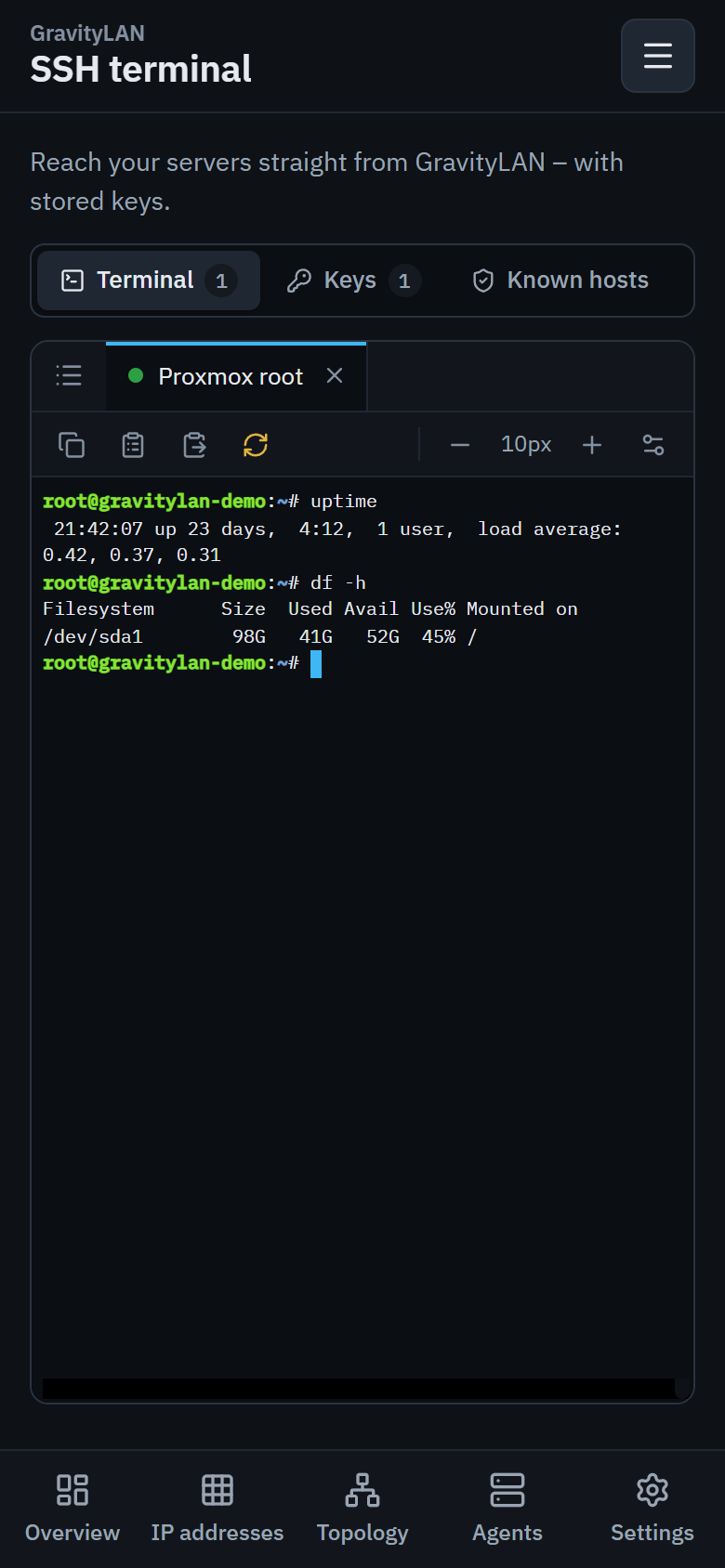
| SSH terminal | Shells on your devices in the browser, also on phones: tabs that stay open while you use the rest of GravityLAN, saved and recent connections, host key check, copy, paste and "copy last command", fonts and colour schemes. Keys (OpenSSH, PEM, PuTTY .ppk) are stored encrypted on the server. |
| Agent rollout | Install or update agents over SSH (with a saved key connection or credentials you type in), with a one-line installer carrying a one-time code, for all outdated agents at once in the Agent Update Center, or straight from an open terminal. |
| API & integrations | REST API with Swagger UI at /docs, a Python client (gravitylan_api), read-only API tokens (finer scopes through the API) and webhooks for device.offline and scan.complete. |
| Backup & restore | Export and import devices, groups and settings as JSON. An import never touches the admin password, the master token or the setup state. |
| Setup & settings | A setup wizard on first start; the list of scan subnets (add, pause, remove, or take a network detected on the host with one click), device groups (create, rename, sort), scan schedule, offline threshold, DNS server, history retention, log level, language, password, API tokens and a live log viewer. |
Screenshots
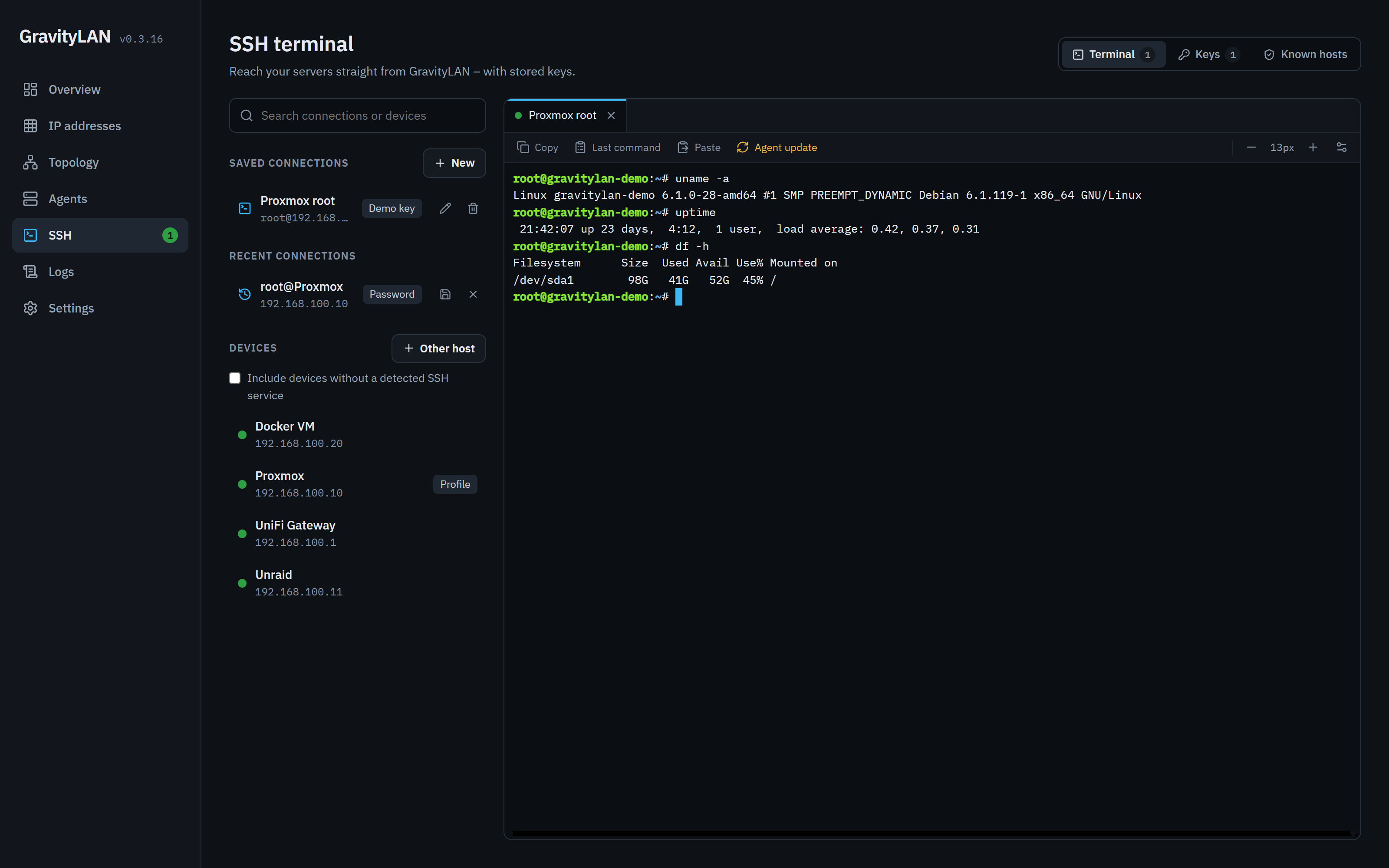 SSH terminal: tabs, saved connections, agent update |
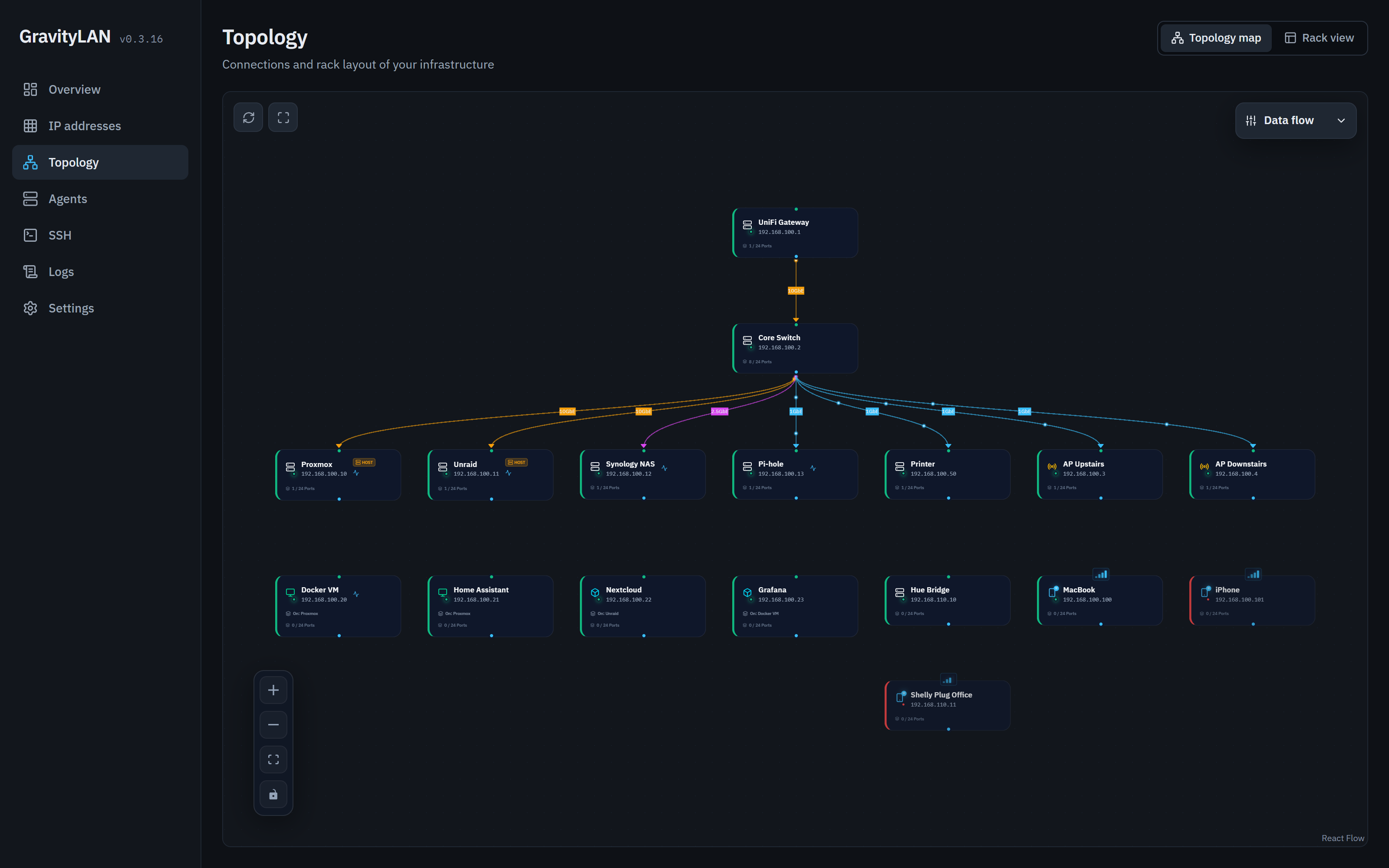 Topology: devices, links and link speeds |
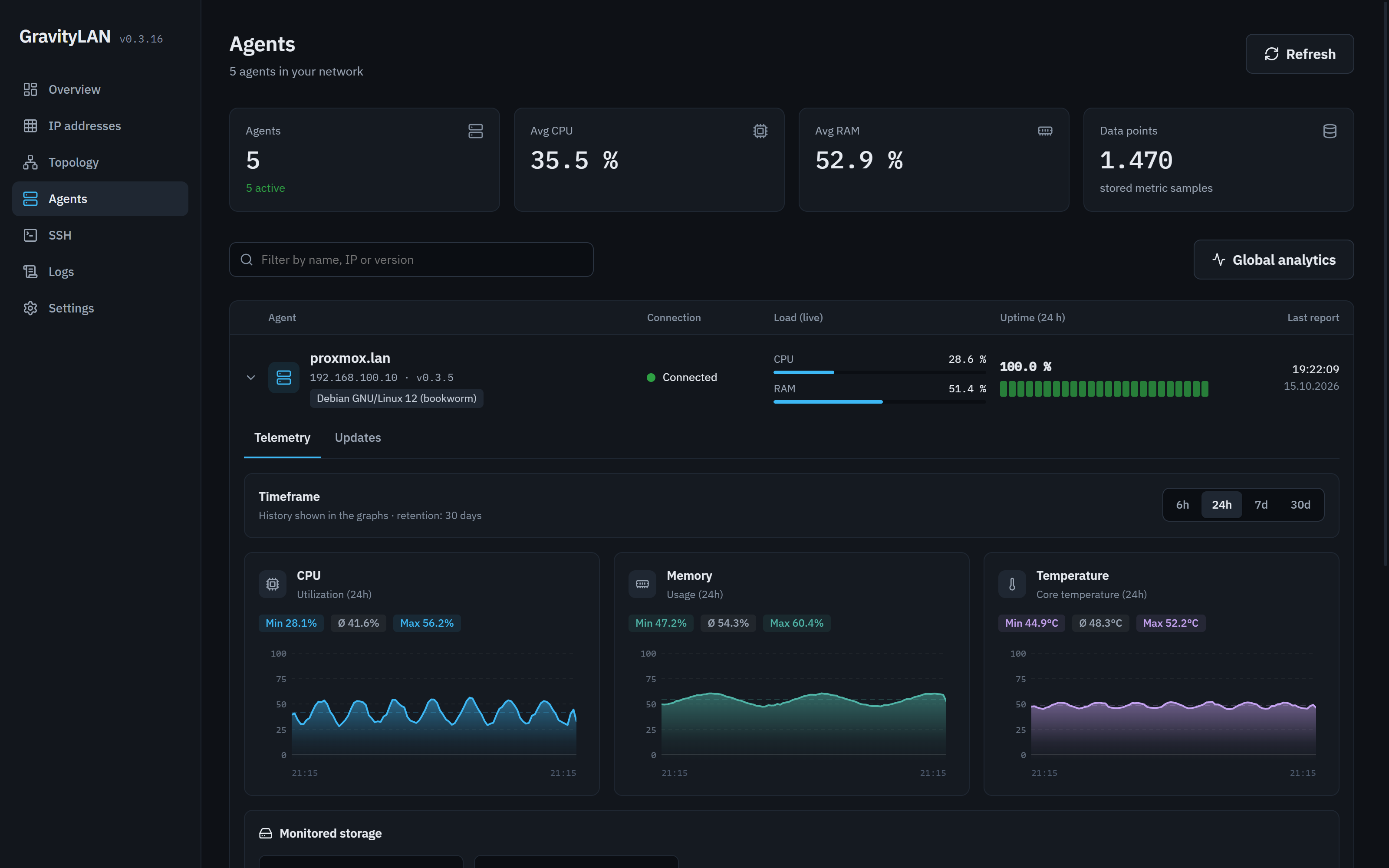 Agents: live load, availability, history |
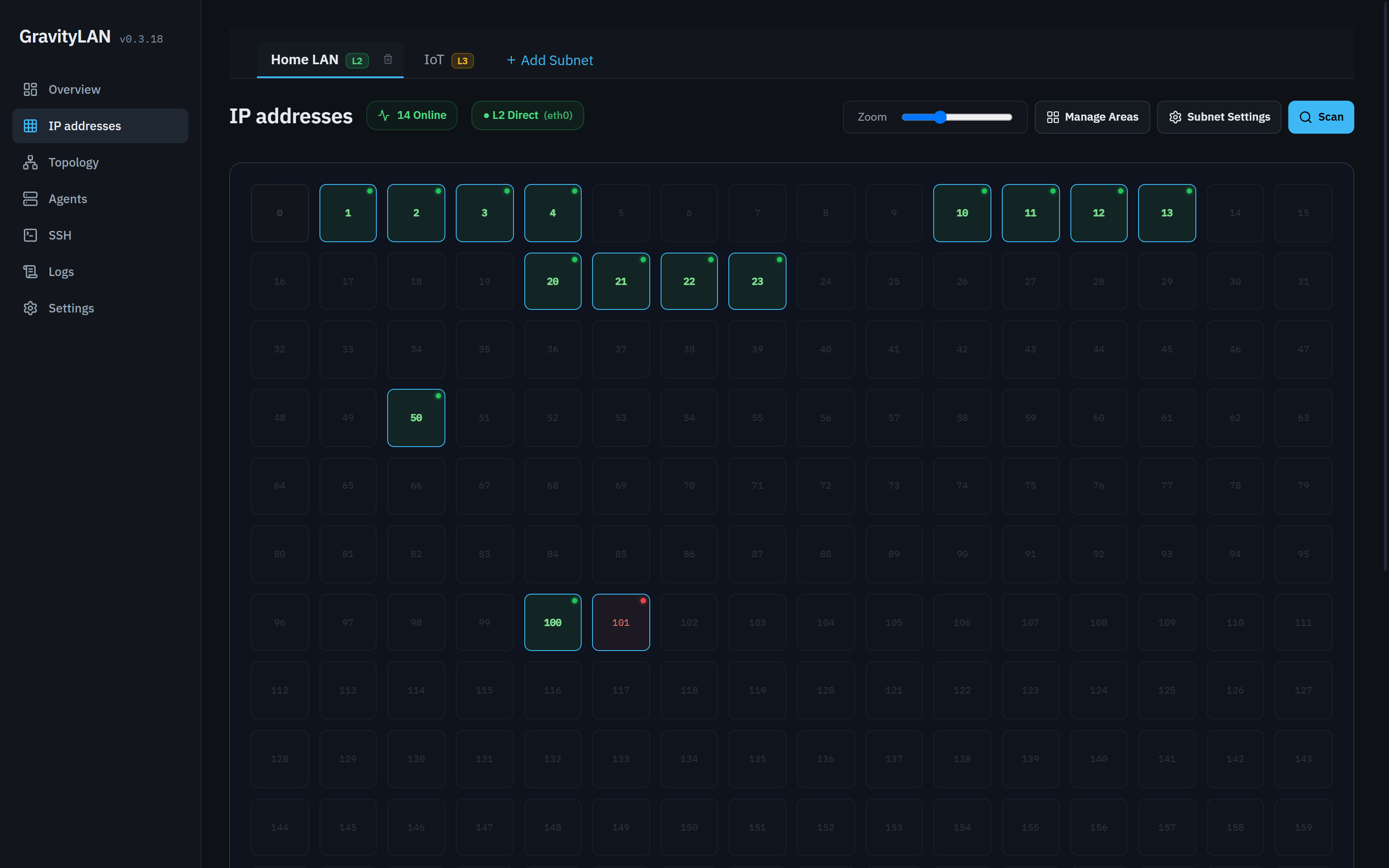 IP addresses: every address of a subnet |
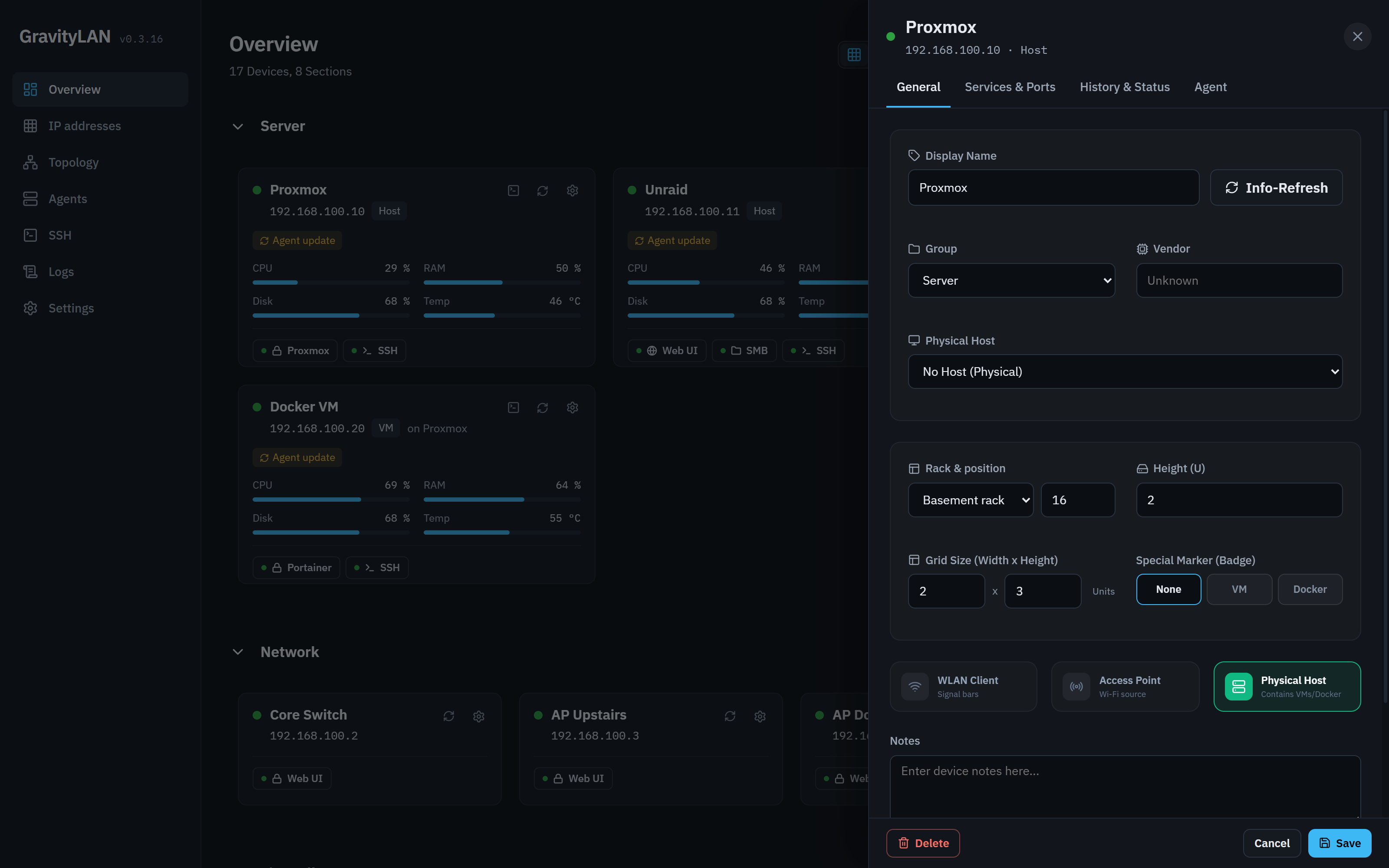 Device editor: group, host, rack position |
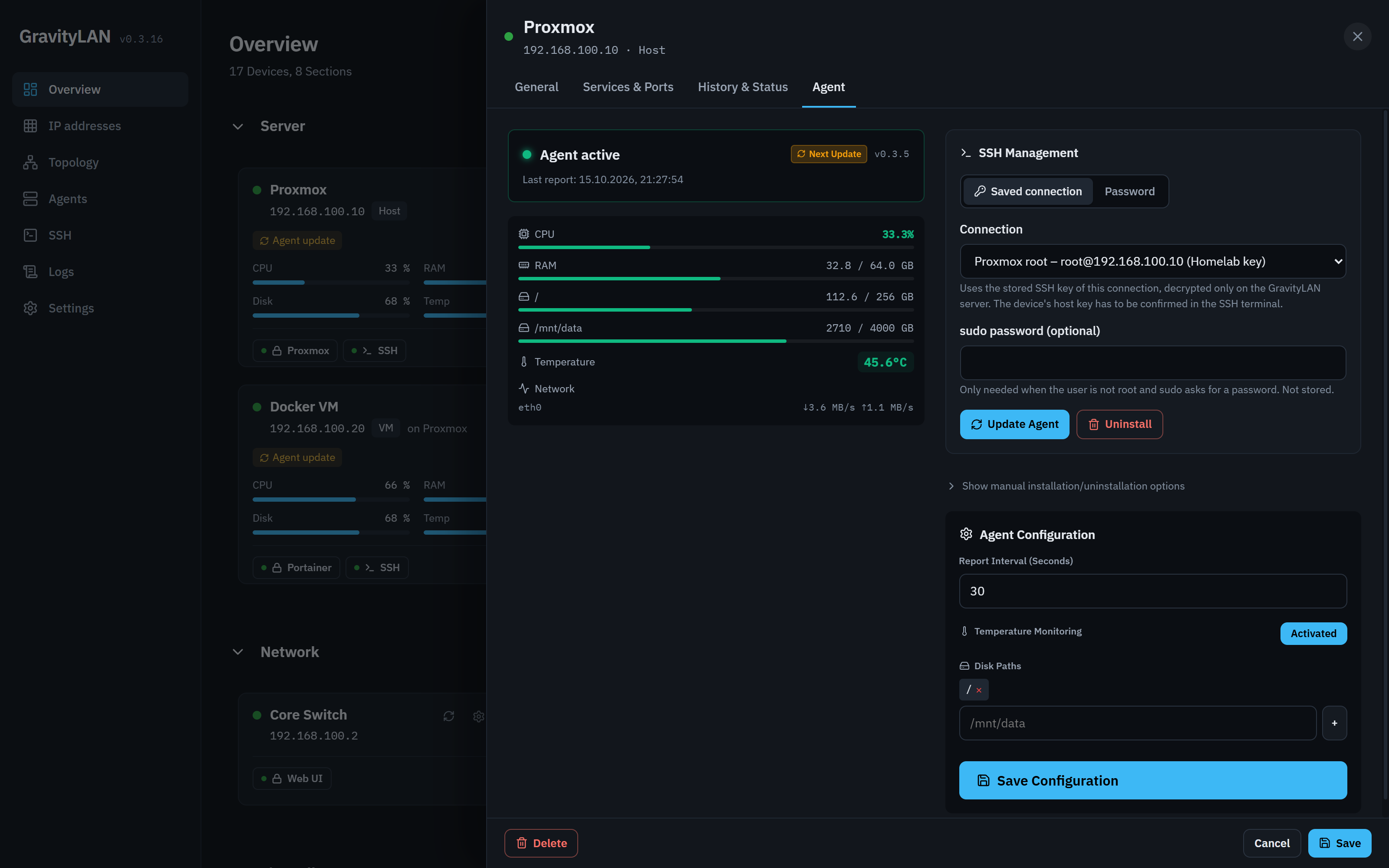 Agent tab: update over a saved key connection |
Quick start
docker run -d --name gravitylan \
  -p 8000:8000 \
  -v gravitylan-data:/app/data \
  --cap-add=NET_RAW --cap-add=NET_ADMIN \
  --restart unless-stopped \
  sleeperxr/gravitylan:latest
Open http://<your-host>:8000 and go through the setup wizard: it detects your subnets and saves them as scan subnets, runs the first scan and sets the admin password. Subnets the container can't see directly, such as an IoT VLAN behind the router, can be added in the same step.
[!IMPORTANT] Finish the setup wizard right after the first start. Until then only the wizard's own routes answer, but whoever opens the page first chooses the admin password. The same applies after a factory reset.
Docker Compose. The repository has five variants; start one with docker compose -f <file> up -d:
docker-compose.yml: bridge network on port 8000. The simplest start; ARP and MAC detection only see what the bridge passes through.docker-compose.hostnet.yml: host network. The best view of the LAN (ARP, MAC addresses, multicast), with less isolation.docker-compose.macvlan.yml: macvlan, so the container gets its own address in your LAN. SetGRAVITYLAN_IP,GRAVITYLAN_SUBNET,GRAVITYLAN_GATEWAYandGRAVITYLAN_INTERFACEfor your network.docker-compose.multi-vlan.yml: macvlan on 802.1Q-tagged VLAN interfaces, so the container gets its own address in each VLAN and sees real MAC addresses in all of them. The template has three (main, IoT, server); the host needs the VLAN interfaces (eth0.10…, on Unraidbr0.10…). SetVLAN_*_IFACE,VLAN_*_SUBNET,VLAN_*_GATEWAYandGRAVITYLAN_*_IP. Guide: docs/multi-vlan-setup.md.docker-compose.unraid.yml: host network for Unraid; builds the image from a checkout of this repository.
The image is multi-stage (Vite build, then a slim Python runtime) and runs as a non-root user; Nmap gets only the capabilities it needs. To build it yourself: docker build -t gravitylan:local .
The agent
The agent is optional: discovery, topology and the SSH terminal work without it. It is a single Python script that runs as a service on a Linux host and reports to GravityLAN with its own device token. It uses systemd where available, Synology's rc.d, a copy on the flash drive on Unraid (which runs from RAM), or a plain background start.
Install from the Agent tab of the device editor:
- Over SSH: pick a saved key connection of the device or type in a user and password. Typed-in credentials are used for that request only and never stored. A saved key is decrypted on the GravityLAN server only, and only used for a host whose key you have confirmed in the SSH terminal.
- One-line installer: copy the
curl … | sudo bashcommand and run it on the host. It carries a one-time code (valid 30 minutes, usable once); "New code" makes a fresh one.
Update. When the server ships a newer agent, the overview shows how many hosts are behind. The Agent Update Center updates them together (each with its saved key connection, the rest with one user and password), an open SSH terminal offers an Agent update button that types the command into the shell for you to check and run, and the one-line installer works for updates too.
Layer-2 probe. In a subnet GravityLAN only reaches through a router, an agent can supply the MAC addresses. In the device editor's Agent tab, switch on L2 Subnet Scanner (Probe) under Agent Configuration and save; the agent picks it up with its next report. From then on it refreshes its ARP table once a minute (a quick sweep of its own subnets, up to 512 addresses each) and sends the MAC and IP pairs along with its metrics. GravityLAN only accepts addresses inside a scan subnet that also contains the probe's own address, so that subnet has to be in your scan subnets. It fills in MAC addresses and vendors of known devices, new hosts show up under Recent Findings, and the IP addresses page marks that subnet L2 Probe (<device>). This needs agent 0.3.8 or newer; the sweep came with 0.3.9.
To uninstall, use the same tab (over SSH) or the uninstall one-liner next to the installer. More detail: AGENT.md.
Python client
pip install ./gravitylan_api
from gravitylan_api import GravityLANClient

client = GravityLANClient(base_url="http://gravitylan.local:8000", token="<API token>")
for device in client.devices.list():
    print(device["display_name"], device["ip"])
Create a token under Settings → API Tokens (Read-Only). The client also reads GRAVITYLAN_BASE_URL and GRAVITYLAN_TOKEN from the environment and only needs requests.
Configuration
Most options live in the database and are changed in the setup wizard and on the Settings page. Environment variables (prefix GRAVITYLAN_, see backend/app/config.py):
| Variable | Meaning | Default |
|---|---|---|
GRAVITYLAN_DATA_DIR |
Data directory (SQLite database, vault key) | /app/data |
GRAVITYLAN_DATABASE_URL |
Full SQLAlchemy URL, if you don't want SQLite in the data directory | empty |
GRAVITYLAN_PORT / GRAVITYLAN_HOST |
Listen port and address | 8000 / 0.0.0.0 |
GRAVITYLAN_DEBUG |
Verbose logging | false |
GRAVITYLAN_SECURE_COOKIES |
Mark the session cookie Secure; turn on behind HTTPS |
false |
GRAVITYLAN_SSH_STRICT_MODE |
Refuse unknown SSH host keys when deploying agents or installing updates | false |
GRAVITYLAN_SSH_IDLE_TIMEOUT_MINUTES |
Close terminal sessions without input after N minutes (0 = never) | 30 |
GRAVITYLAN_SSH_MAX_SESSIONS |
Maximum number of open terminal sessions | 10 |
GRAVITYLAN_VAULT_KEY |
Key for the encrypted SSH key store; otherwise generated as data/ssh_vault.key |
empty |
GRAVITYLAN_HISTORY_RETENTION_DAYS |
Keep metrics and history for N days (1 to 365) | 30 |
GRAVITYLAN_SCAN_TIMEOUT |
Port connect timeout per target, in seconds | 1.5 |
GRAVITYLAN_SCAN_WORKERS |
Scanner concurrency | 20 |
GRAVITYLAN_SCAN_INTERVAL_MINUTES |
Automatic scan interval (0 = off) | 0 |
GRAVITYLAN_CORS_ORIGINS |
Extra CORS origins (not needed for the bundled UI) | empty |
Security and operation
GravityLAN assumes a trusted home network. For access from outside, use a VPN or your usual reverse proxy with HTTPS, and set GRAVITYLAN_SECURE_COOKIES=true. Over plain HTTP, terminal keystrokes cross the network unencrypted.
- Login:
httpOnlysession cookie, Argon2 password hashes. After 5 failed attempts within a minute from one address, logins are refused for the rest of that minute. Behind a reverse proxy on another machine, all attempts count against the proxy's address. - API tokens are stored hashed and are read-only unless given other scopes; the scopes also apply to WebSocket connections, and downloading an agent's config needs
agent:write. Each agent has its own token, stored as a SHA-256 hash as well, and an unknown agent has to be adopted on its device card. - Agent reports: ARP neighbours are only accepted from devices with the Layer-2 probe switched on, and only inside the probe's own scan subnet, so one agent can't rewrite the MAC addresses or state of other devices.
- SSH: keys and stored passwords are encrypted on the server and never sent back to the browser. Only logged-in browser sessions can open shells or use saved keys, not API or master tokens. A host whose key changed is blocked until you remove the old entry; package updates also remember a host's key on first contact and refuse a different one later. Details: ADR 002.
- Agent install: the agent's config is readable by root only, its service runs with a private
/tmpand read-only home directories, and install codes are masked in the request log. The server URL written into the installer has to be a plainhttp(s)://host[:port][/path]. - Webhooks can't target the GravityLAN host itself, link-local addresses or cloud metadata services; the target is checked again before every delivery. LAN addresses work.
- Backups don't contain SSH keys, stored passwords or agent tokens, and importing one never replaces the admin password, the master token or the setup state. Keep
data/ssh_vault.key(orGRAVITYLAN_VAULT_KEY) safe on its own: without it, stored keys can't be decrypted.
More: SECURITY.md · Threat model · Container hardening · Security baseline
Architecture
flowchart TB
  subgraph clients [Clients]
    SPA[Web UI: React, Vite, TypeScript]
    PY[gravitylan_api and scripts]
  end
  subgraph server [GravityLAN container]
    API[FastAPI: REST and WebSockets]
    SC[Scanner and scheduler]
    DB[(SQLite)]
  end
  subgraph lan [Your LAN]
    HOSTS[Hosts, services, containers]
    AG[Linux agents, optional]
  end
  SPA <-->|session cookie| API
  PY -->|API token| API
  API --> DB
  SC -->|Nmap, ARP| HOSTS
  AG -->|metrics, device token| API
  API -->|SSH: terminal, deploy, updates| HOSTS
Architecture decisions are recorded in docs/adr/.
Development
Windows: .\start_gravitylan.ps1 installs the dependencies and starts Uvicorn on :8000 and Vite on :5173.
Linux and macOS:
# Backend (Python 3.12+, Nmap installed)
cd backend
pip install -r requirements.txt
python -m uvicorn app.main:app --reload --host 0.0.0.0 --port 8000

# Frontend (Node 20+), in a second terminal; proxies /api to :8000
cd frontend
npm install
npm run dev
Without touching your network: python scripts/dev_demo.py (in the backend virtualenv) starts the API on 127.0.0.1:8000 with a throw-away demo database, simulated agents and a fake SSH shell, but no scans. Start the frontend as above and log in with demo. --reset seeds the demo data again, --fresh starts like a new install.
Tests and checks:
cd backend && python -m pytest          # backend
python -m pytest gravitylan_api/tests   # Python client, from the repository root
cd frontend && npm test                 # frontend (Vitest)
cd frontend && npm run typecheck        # TypeScript
Repository layout:
agent/            Linux agent (gravitylan-agent.py) and systemd unit
backend/app/      FastAPI app: api/, models/, schemas/, scanner/, services/, database/
backend/tests/    Backend tests (pytest)
frontend/         React UI (Vite, TypeScript, Tailwind)
gravitylan_api/   Python client
docs/             Security and design docs, ADRs, screenshots
scripts/          Demo backend and maintenance scripts
Contributions are welcome: see CONTRIBUTING.md. What changed in each version: CHANGELOG.md.
License
MIT. Built with Antigravity and maybe a little too much fun with the UI by SleeperXr.
Deutsch
Worum es geht
GravityLAN ist ein selbst gehostetes Dashboard fürs Heim- oder Labornetz. Es durchsucht deine Subnetze, führt jedes gefundene Gerät in einem Inventar und lässt dich ergänzen, was ein Scanner nicht wissen kann: Gruppen, Racks, Verkabelung, welche VM auf welchem Host läuft. Mit dem optionalen Agenten auf deinen Linux-Rechnern zeigt dasselbe Inventar deren Auslastung, Laufwerke und Temperaturen, zählt offene Paket-Updates und spielt sie auf Wunsch ein.
Alles läuft in einem Container mit einer SQLite-Datei: ein FastAPI-Backend und eine React-Oberfläche, auf Deutsch und Englisch, auch am Handy bedienbar. GravityLAN ist für ein vertrauenswürdiges Heimnetz gebaut, nicht für den direkten Betrieb im Internet.
Funktionen
| Bereich | Was du bekommst |
|---|---|
| Erkennung | Geplante Nmap- und ARP-Scans deiner Scan-Subnetze (eine Liste, gepflegt in den Einstellungen und auf der Seite IP-Adressen), dazwischen ein leichterer Anwesenheits-Check: Hosts, offene Ports, Dienste, Hostnamen (DNS, mDNS) und Hersteller. Auch Container mit eigener LAN-Adresse werden gefunden, ebenso ipvlan-Setups, in denen sich mehrere die MAC des Hosts teilen. Offline gilt ein Gerät erst nach mehreren Fehlversuchen in Folge (Ping, ARP und TCP; standardmäßig 3), damit ausgelastete Hosts nicht flackern. |
| Übersicht | Deine Geräte in eigenen Bereichen, als Kacheln oder Liste, mit Live-Werten vom Agenten und Dienst-Links, die die Weboberfläche öffnen (oder den SMB-Pfad kopieren). IP-Wechsel, Probleme und ein Benachrichtigungs-Feed; die Kacheln lassen sich frei anordnen. |
| IP-Adressen | Eine Karte des Adressraums jedes Subnetzes: belegt, frei, online, offline. Ein Badge an jedem Subnetz zeigt, wie GravityLAN es erreicht: L2 Direkt über eine eigene Schnittstelle, L3 Geroutet über einen Router oder L2 Probe über einen Agenten darin. Jedes Scan-Subnetz hat einen eigenen Reiter; ein pausiertes bleibt ausgegraut stehen. Subnetze, benannte Bereiche und Scan-Einstellungen pro Subnetz verwalten. |
| Geroutete Subnetze & VLANs | ARP endet am Router, deshalb findet ein Scan in einem gerouteten Subnetz zwar die Hosts, aber nicht ihre MAC-Adressen, und die MAC des Routers (Proxy-ARP) überträgt GravityLAN dort nicht auf jeden Host. Für die echten MACs und Hersteller lass einen Agenten in diesem Subnetz als Layer-2-Probe arbeiten oder gib dem Container mit der Multi-VLAN-Compose-Variante eine Adresse in jedem VLAN. |
| Ein Router, viele VLANs | Ein Router, der Gateway mehrerer Subnetze ist, bleibt ein Gerät: Seine Adresse in jedem VLAN ist eine Schnittstelle mit eigenem Online-Status, sichtbar in jedem IP-Reiter und als ein Knoten in der Topologie, mit einem Farb-Chip pro Netz. Jedes Subnetz kann sein Gateway und seinen VLAN-Tag speichern; die Liste „Gateways“ im Dashboard zeigt alle, Doppelte werden zum Zusammenführen als Schnittstelle angeboten. |
| Topologie & Racks | Zeichne, wie Geräte verbunden sind, mit Link-Geschwindigkeiten (1, 2,5, 10 GbE …) und animiertem Datenfluss, oder wechsle in die Rack-Ansicht und setze Geräte auf Höheneinheiten. |
| Linux-Agent | Ein Python-Skript pro Host, das CPU, RAM, Laufwerke, Netzwerk und Temperatur meldet (standardmäßig alle 30 s), mit Verlauf von 6 Stunden bis 30 Tagen. Erkennt das Betriebssystem und kennt LXC-Container und ZFS-Pools. |
| Paket-Updates | Der Agent zählt offene Updates (apt, dnf, yum), eingespielt werden sie per SSH aus der Agents-Seite mit Live-Ausgabe, auch mit einem sudo-Benutzer. |
| SSH-Terminal | Shells auf deine Geräte im Browser, auch am Handy: Tabs, die offen bleiben, während du den Rest von GravityLAN nutzt, gespeicherte und zuletzt genutzte Verbindungen, Host-Key-Prüfung, Kopieren, Einfügen und „Letzten Befehl kopieren“, Schriften und Farbschemata. Keys (OpenSSH, PEM, PuTTY .ppk) liegen verschlüsselt auf dem Server. |
| Agent-Verteilung | Agenten per SSH installieren oder aktualisieren (mit gespeicherter Key-Verbindung oder eingegebenen Zugangsdaten), per Einzeiler mit Einmal-Code, alle veralteten auf einmal im Agent-Update-Center oder direkt aus einem offenen Terminal. |
| API & Integrationen | REST-API mit Swagger UI unter /docs, ein Python-Client (gravitylan_api), schreibgeschützte API-Token (feinere Scopes über die API) und Webhooks für device.offline und scan.complete. |
| Backup & Wiederherstellung | Geräte, Gruppen und Einstellungen als JSON exportieren und importieren. Ein Import ändert nie Admin-Passwort, Master-Token oder Setup-Status. |
| Einrichtung & Einstellungen | Setup-Wizard beim ersten Start; die Liste der Scan-Subnetze (hinzufügen, pausieren, entfernen oder ein auf dem Host erkanntes Netz mit einem Klick übernehmen), Gerätegruppen (anlegen, umbenennen, sortieren), Scan-Zeitplan, Offline-Schwelle, DNS-Server, Aufbewahrung der Historie, Log-Level, Sprache, Passwort, API-Token und eine Live-Log-Ansicht. |
Screenshots
SSH-Terminal: Tabs, Verbindungen, Agent-Update |
Topologie: Geräte, Verbindungen, Geschwindigkeiten |
Agents: Live-Last, Verfügbarkeit, Verlauf |
IP-Adressen: jede Adresse eines Subnetzes |
Geräte-Editor: Gruppe, Host, Rack-Position |
Agent-Tab: Update über gespeicherte Key-Verbindung |
Schnellstart
docker run -d --name gravitylan \
  -p 8000:8000 \
  -v gravitylan-data:/app/data \
  --cap-add=NET_RAW --cap-add=NET_ADMIN \
  --restart unless-stopped \
  sleeperxr/gravitylan:latest
http://<dein-host>:8000 öffnen und den Setup-Wizard durchgehen: Er erkennt deine Subnetze und speichert sie als Scan-Subnetze, startet den ersten Scan und legt das Admin-Passwort fest. Subnetze, die der Container nicht direkt sieht, etwa ein IoT-VLAN hinter dem Router, lassen sich im selben Schritt ergänzen.
[!IMPORTANT] Schließ den Setup-Wizard direkt nach dem ersten Start ab. Bis dahin antworten nur die Routen des Wizards, aber wer die Seite zuerst öffnet, wählt das Admin-Passwort. Das gilt genauso nach einem Werksreset.
Docker Compose. Im Repository liegen fünf Varianten; starten mit docker compose -f <datei> up -d:
docker-compose.yml: Bridge-Netzwerk auf Port 8000. Der einfachste Start; ARP- und MAC-Erkennung sehen nur, was die Bridge durchreicht.docker-compose.hostnet.yml: Host-Netzwerk. Die beste Sicht aufs LAN (ARP, MAC-Adressen, Multicast), dafür weniger Isolation.docker-compose.macvlan.yml: Macvlan, der Container bekommt eine eigene Adresse im LAN.GRAVITYLAN_IP,GRAVITYLAN_SUBNET,GRAVITYLAN_GATEWAYundGRAVITYLAN_INTERFACEan dein Netz anpassen.docker-compose.multi-vlan.yml: Macvlan auf 802.1Q-getaggten VLAN-Schnittstellen, der Container bekommt in jedem VLAN eine eigene Adresse und sieht überall echte MAC-Adressen. Die Vorlage hat drei (Main, IoT, Server); der Host braucht die VLAN-Schnittstellen (eth0.10…, auf Unraidbr0.10…).VLAN_*_IFACE,VLAN_*_SUBNET,VLAN_*_GATEWAYundGRAVITYLAN_*_IPanpassen. Anleitung: docs/multi-vlan-setup.md.docker-compose.unraid.yml: Host-Netzwerk für Unraid; baut das Image aus einem Checkout dieses Repositorys.
Das Image ist mehrstufig gebaut (Vite-Build, dann eine schlanke Python-Laufzeit) und läuft als Nicht-root-Benutzer; Nmap bekommt nur die Capabilities, die es braucht. Selbst bauen: docker build -t gravitylan:local .
Der Agent
Der Agent ist optional: Erkennung, Topologie und SSH-Terminal funktionieren ohne ihn. Er ist ein einzelnes Python-Skript, das als Dienst auf einem Linux-Host läuft und sich mit einem eigenen Geräte-Token bei GravityLAN meldet. Er nutzt systemd, wo vorhanden, Synologys rc.d, auf Unraid (läuft aus dem RAM) eine Kopie auf dem USB-Stick oder einen einfachen Hintergrundstart.
Installieren im Agent-Tab des Geräte-Editors:
- Per SSH: eine gespeicherte Key-Verbindung des Geräts wählen oder Benutzer und Passwort eingeben. Eingegebene Zugangsdaten gelten nur für diese Anfrage und werden nie gespeichert. Ein gespeicherter Key wird nur auf dem GravityLAN-Server entschlüsselt und nur für einen Host verwendet, dessen Host-Key du im SSH-Terminal bestätigt hast.
- Einzeiler: den Befehl
curl … | sudo bashkopieren und auf dem Host ausführen. Er enthält einen Einmal-Code (30 Minuten gültig, nur einmal nutzbar); „Neuer Code“ erzeugt einen frischen.
Aktualisieren. Bringt der Server einen neueren Agenten mit, zeigt die Übersicht, wie viele Hosts zurückliegen. Das Agent-Update-Center aktualisiert sie gemeinsam (jeden mit seiner gespeicherten Key-Verbindung, die übrigen mit einem Benutzer und Passwort), ein offenes SSH-Terminal bietet die Schaltfläche Agent-Update, die den Befehl zum Prüfen und Ausführen in die Shell schreibt, und auch der Einzeiler funktioniert für Updates.
Layer-2-Probe. In einem Subnetz, das GravityLAN nur über einen Router erreicht, kann ein Agent die MAC-Adressen liefern. Im Agent-Tab des Geräte-Editors unter Agent-Konfiguration L2 Subnetz-Scanner (Probe) einschalten und speichern; der Agent übernimmt das mit seiner nächsten Meldung. Danach frischt er einmal pro Minute seine ARP-Tabelle auf (ein kurzer Durchlauf durch seine eigenen Subnetze, bis 512 Adressen je Subnetz) und schickt die MAC-IP-Paare mit seinen Metriken mit. GravityLAN nimmt nur Adressen in einem Scan-Subnetz an, das auch die Adresse der Probe enthält; dieses Subnetz muss also in deinen Scan-Subnetzen stehen. Es ergänzt MAC-Adressen und Hersteller bekannter Geräte, neue Hosts erscheinen unter „Aktuelle Funde“, und die Seite IP-Adressen markiert das Subnetz mit L2 Probe (<Gerät>). Das braucht Agent 0.3.8 oder neuer; den Durchlauf gibt es seit 0.3.9.
Deinstallieren geht im selben Tab (per SSH) oder mit dem Deinstallations-Einzeiler neben dem Installer. Mehr dazu: AGENT.md.
Python-Client
pip install ./gravitylan_api
from gravitylan_api import GravityLANClient

client = GravityLANClient(base_url="http://gravitylan.local:8000", token="<API-Token>")
for device in client.devices.list():
    print(device["display_name"], device["ip"])
Ein Token erstellst du unter Einstellungen → API-Token (Read-Only). Der Client liest außerdem GRAVITYLAN_BASE_URL und GRAVITYLAN_TOKEN aus der Umgebung und braucht nur requests.
Konfiguration
Die meisten Optionen liegen in der Datenbank und werden im Setup-Wizard und in den Einstellungen geändert. Umgebungsvariablen (Präfix GRAVITYLAN_, siehe backend/app/config.py):
| Variable | Bedeutung | Standard |
|---|---|---|
GRAVITYLAN_DATA_DIR |
Datenordner (SQLite-Datenbank, Vault-Schlüssel) | /app/data |
GRAVITYLAN_DATABASE_URL |
Vollständige SQLAlchemy-URL, falls nicht SQLite im Datenordner | leer |
GRAVITYLAN_PORT / GRAVITYLAN_HOST |
Port und Adresse | 8000 / 0.0.0.0 |
GRAVITYLAN_DEBUG |
Ausführliche Logs | false |
GRAVITYLAN_SECURE_COOKIES |
Session-Cookie als Secure markieren; hinter HTTPS einschalten |
false |
GRAVITYLAN_SSH_STRICT_MODE |
Unbekannte SSH-Host-Keys beim Agent-Deploy und bei Updates ablehnen | false |
GRAVITYLAN_SSH_IDLE_TIMEOUT_MINUTES |
Terminal-Sitzungen ohne Eingabe nach N Minuten schließen (0 = nie) | 30 |
GRAVITYLAN_SSH_MAX_SESSIONS |
Maximal gleichzeitig offene Terminal-Sitzungen | 10 |
GRAVITYLAN_VAULT_KEY |
Schlüssel für den verschlüsselten SSH-Key-Store; sonst erzeugt als data/ssh_vault.key |
leer |
GRAVITYLAN_HISTORY_RETENTION_DAYS |
Metriken und Historie N Tage aufbewahren (1 bis 365) | 30 |
GRAVITYLAN_SCAN_TIMEOUT |
Port-Timeout pro Ziel in Sekunden | 1.5 |
GRAVITYLAN_SCAN_WORKERS |
Parallelität des Scanners | 20 |
GRAVITYLAN_SCAN_INTERVAL_MINUTES |
Intervall für automatische Scans (0 = aus) | 0 |
GRAVITYLAN_CORS_ORIGINS |
Zusätzliche CORS-Origins (für die mitgelieferte Oberfläche nicht nötig) | leer |
Sicherheit und Betrieb
GravityLAN geht von einem vertrauenswürdigen Heimnetz aus. Für Zugriff von außen nutze ein VPN oder deinen gewohnten Reverse-Proxy mit HTTPS und setze GRAVITYLAN_SECURE_COOKIES=true. Über reines HTTP gehen Terminal-Eingaben unverschlüsselt durchs Netz.
- Login:
httpOnly-Session-Cookie, Passwörter mit Argon2 gehasht. Nach 5 Fehlversuchen innerhalb einer Minute von einer Adresse werden Anmeldungen für den Rest dieser Minute abgelehnt. Hinter einem Reverse-Proxy auf einem anderen Rechner zählen alle Versuche gegen die Adresse des Proxys. - API-Token werden gehasht gespeichert und sind schreibgeschützt, solange sie keine anderen Scopes bekommen; die Scopes gelten auch für WebSocket-Verbindungen, und das Herunterladen einer Agent-Konfiguration braucht
agent:write. Jeder Agent hat sein eigenes Token, ebenfalls als SHA-256-Hash gespeichert, und ein unbekannter Agent muss auf seiner Gerätekarte übernommen werden. - Agent-Meldungen: ARP-Nachbarn werden nur von Geräten mit eingeschalteter Layer-2-Probe angenommen und nur im eigenen Scan-Subnetz der Probe, damit ein Agent nicht MAC-Adressen oder Status anderer Geräte umschreiben kann.
- SSH: Keys und gespeicherte Passwörter liegen verschlüsselt auf dem Server und gehen nie zurück an den Browser. Nur angemeldete Browser-Sitzungen können Shells öffnen oder gespeicherte Keys verwenden, keine API- oder Master-Token. Ein Host mit geändertem Host-Key wird blockiert, bis du den alten Eintrag entfernst; auch Paket-Updates merken sich den Host-Key beim ersten Kontakt und lehnen später einen anderen ab. Details: ADR 002.
- Agent-Installation: Die Konfiguration des Agenten ist nur für root lesbar, sein Dienst läuft mit eigenem
/tmpund schreibgeschützten Home-Verzeichnissen, und Installations-Codes werden im Request-Log maskiert. Die Server-URL im Installer muss eine einfachehttp(s)://host[:port][/pfad]sein. - Webhooks können weder den GravityLAN-Host selbst noch Link-Local-Adressen oder Cloud-Metadatendienste ansprechen; das Ziel wird vor jeder Zustellung erneut geprüft. LAN-Adressen funktionieren.
- Backups enthalten keine SSH-Keys, gespeicherten Passwörter oder Agent-Token, und ein Import ersetzt nie Admin-Passwort, Master-Token oder Setup-Status. Bewahre
data/ssh_vault.key(oderGRAVITYLAN_VAULT_KEY) separat sicher auf: Ohne ihn lassen sich gespeicherte Keys nicht entschlüsseln.
Mehr: SECURITY.md · Bedrohungsmodell · Container-Härtung · Sicherheits-Baseline
Architektur
flowchart TB
  subgraph clients [Clients]
    SPA[Weboberfläche: React, Vite, TypeScript]
    PY[gravitylan_api und Skripte]
  end
  subgraph server [GravityLAN-Container]
    API[FastAPI: REST und WebSockets]
    SC[Scanner und Scheduler]
    DB[(SQLite)]
  end
  subgraph lan [Dein LAN]
    HOSTS[Hosts, Dienste, Container]
    AG[Linux-Agenten, optional]
  end
  SPA <-->|Session-Cookie| API
  PY -->|API-Token| API
  API --> DB
  SC -->|Nmap, ARP| HOSTS
  AG -->|Metriken, Geräte-Token| API
  API -->|SSH: Terminal, Deploy, Updates| HOSTS
Architekturentscheidungen stehen in docs/adr/.
Entwicklung
Windows: .\start_gravitylan.ps1 installiert die Abhängigkeiten und startet Uvicorn auf :8000 und Vite auf :5173.
Linux und macOS:
# Backend (Python 3.12+, Nmap installiert)
cd backend
pip install -r requirements.txt
python -m uvicorn app.main:app --reload --host 0.0.0.0 --port 8000

# Frontend (Node 20+), in einem zweiten Terminal; leitet /api an :8000 weiter
cd frontend
npm install
npm run dev
Ohne dein Netz anzufassen: python scripts/dev_demo.py (in der Backend-venv) startet die API auf 127.0.0.1:8000 mit einer Wegwerf-Demo-Datenbank, simulierten Agenten und einer Demo-Shell für SSH, aber ohne Scans. Frontend wie oben starten, Passwort demo. --reset befüllt die Demo-Daten neu, --fresh startet wie eine Neuinstallation.
Tests und Prüfungen:
cd backend && python -m pytest          # Backend
python -m pytest gravitylan_api/tests   # Python-Client, aus dem Repo-Root
cd frontend && npm test                 # Frontend (Vitest)
cd frontend && npm run typecheck        # TypeScript
Repo-Übersicht:
agent/            Linux-Agent (gravitylan-agent.py) und systemd-Unit
backend/app/      FastAPI-App: api/, models/, schemas/, scanner/, services/, database/
backend/tests/    Backend-Tests (pytest)
frontend/         React-Oberfläche (Vite, TypeScript, Tailwind)
gravitylan_api/   Python-Client
docs/             Sicherheits- und Design-Doku, ADRs, Screenshots
scripts/          Demo-Backend und Wartungsskripte
Beiträge sind willkommen: siehe CONTRIBUTING.md. Was sich pro Version geändert hat: CHANGELOG.md.
Lizenz
MIT. Gebaut mit Antigravity und vielleicht ein bisschen zu viel Spaß am UI von SleeperXr.
Media gallery
1 / 5Download Statistics
Related apps
Explore more like this
Explore allDetails
sleeperxr/gravitylan:latestRuntime arguments
- Web UI
http://[IP]:[PORT:8000]- Network
host- Shell
sh- Privileged
- false
- Extra Params
--cap-add=NET_RAW --cap-add=NET_ADMIN
Template configuration
The HTTP port on which the GravityLAN WebUI and REST API are served.
- Target
- 8000
- Default
- 8000
- Value
- 8000
Directory to store persistent data (SQLite database, SSH key vault, backups).
- Target
- /app/data
- Default
- /mnt/user/appdata/gravitylan
- Value
- /mnt/user/appdata/gravitylan
Container timezone (e.g. Europe/Berlin, UTC, America/New_York).
- Target
- TZ
- Default
- Europe/Berlin
- Value
- Europe/Berlin
Container internal listening port (matches WebUI port).
- Target
- GRAVITYLAN_PORT
- Default
- 8000
- Value
- 8000
Enable detailed logging for debugging scanner and backend issues.
- Target
- GRAVITYLAN_DEBUG
- Default
- false
- Value
- false