
All apps · 0 apps
Gramps-Web
Docker app from grtgbln's Repository
Overview
Readme
View on GitHubGramps Web – Frontend
Welcome to Gramps Web, a modern, feature-packed, free & open source web app for browsing and collaboratively editing genealogical databases. Fully interoperable with the Gramps desktop application, Gramps Web brings your family history to the web, making it accessible from anywhere and easy to share.
What is Gramps Web?
Gramps Web is a web based application, ideally suited for collaborating with others to build your family tree together. It can be accessed from any mobile or portable web-enabled device. Gramps Web is free & open source software, with the privacy and control of your data a top priority.
Gramps Web is designed to be a companion to Gramps Desktop, the leading open source genealogy desktop application.
Key highlights of Gramps Web include:
- 🌐 Access Anywhere: Browse and edit your family tree on any web-enabled device.
- 🤝 Collaborative Features: Share and collaborate with family members in real-time.
- 🔒 Privacy First: Advanced privacy controls ensure your data stays secure.
- 🗺️ Interactive Visualizations: Family tree charts, dynamic maps, and more.
- 🧩 Bi-Directional Sync: Seamlessly sync data between Gramps Web and Gramps Desktop.
Learn More at grampsweb.org ➡️
Features at a Glance
- Interactive Family Tree Charts: Explore ancestor, descendant, fan, and hourglass charts with ease.
- Powerful Mapping Tools: Visualize places on interactive maps, including custom overlays for historical maps.
- Integrated Blog: Document your research in story format with images, all stored in the Gramps database.
- Advanced Search: Search all record types with support for wildcards and logical operators.
- DNA & Chromosome Tools: View DNA matches and analyze chromosome data.
- AI Chat Assistant: Chat with your family tree, in your native language, powered by AI.
- Full Customization & Internationalization: Switch between 40+ languages and export your data any time.
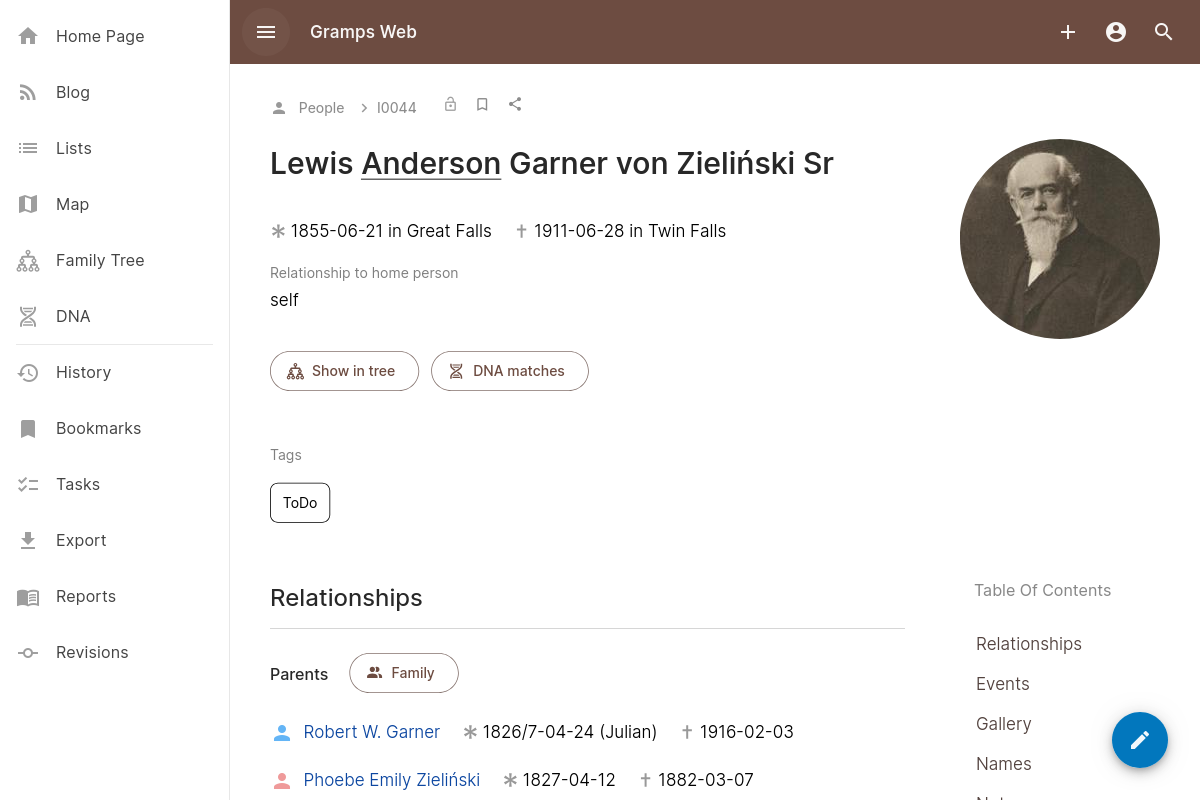
Screenshot
Try It Out
Live Demo
Experience Gramps Web with our demo deployment.
Login credentials: owner, editor, contributor, or member (same as password).
Note: some features (like AI chat) are not available in the demo deployment.
Documentation
The documentation of Gramps Web is hosted at www.grampsweb.org:
- Features: Explore the key capabilities of Gramps Web.
- Install/Setup: Step-by-step guide to setting up Gramps Web.
- Administration: Learn how to manage and maintain your Gramps Web instance.
- User Guide: Detailed instructions for everyday users.
- Developers: Dive into the codebase and technical details.
- Contribute: Find out how you can support the project.
- Get Help: Access support resources and FAQs.
Contribute
We'd love your feedback and contributions! Star this repository, fork it, and join us in making family history more accessible to everyone. Check out the contribution guidelines to get started.
Reporting issues
Note that this Github repository contains the source code of the Gramps Web user interface (frontend). For issues with the server-side code, please see the Gramps Web API (backend) repository. See Get Help for more details.
Roadmap
Gramps Web does not follow a fixed-date roadmap. However, you can explore prioritized feature requests and ongoing development efforts via our development board. This board provides an up-to-date view of what the developers are working on and what's coming next. Note that the roadmap reflects the current priorities of existing developers, not a restriction on what can be contributed.
Categories
Related apps
Explore more like this
Explore allLinks
Details
ghcr.io/gramps-project/grampswebRuntime arguments
- Web UI
http://[IP]:[PORT:5000]/- Network
bridge- Privileged
- false
Template configuration
Container Port: 5000
- Target
- 5000
- Default
- 5000
- Value
- 5000
Name of the Gramps tree
- Target
- GRAMPSWEB_TREE
- Default
- Gramps Web
Users database path
- Target
- /app/users
- Default
- /mnt/user/appdata/gramps/users
- Value
- /mnt/user/appdata/gramps/users
Search index path
- Target
- /app/indexdir
- Default
- /mnt/user/appdata/gramps/indexdir
- Value
- /mnt/user/appdata/gramps/indexdir
Thumbnail storage path
- Target
- /app/thumbnail_cache
- Default
- /mnt/user/appdata/gramps/thumbnail_cache
- Value
- /mnt/user/appdata/gramps/thumbnail_cache
Export and report storage path
- Target
- /app/cache
- Default
- /mnt/user/appdata/gramps/cache
- Value
- /mnt/user/appdata/gramps/cache
Secrets storage path
- Target
- /app/secret
- Default
- /mnt/user/appdata/gramps/secret
- Value
- /mnt/user/appdata/gramps/secret
Database path
- Target
- /root/.gramps/grampsdb
- Default
- /mnt/user/appdata/gramps/database
- Value
- /mnt/user/appdata/gramps/database
Media storage path
- Target
- /app/media
- Default
- /mnt/user/appdata/gramps/media
- Value
- /mnt/user/appdata/gramps/media
Temporary storage path
- Target
- /tmp
- Default
- /mnt/user/appdata/gramps/tmp
- Value
- /mnt/user/appdata/gramps/tmp