

gpu-tuner
Docker app from 0sy's Repository
Overview
Readme
View on GitHubGPU Tuner for Unraid
Unraid packaging of willboyden/gpu-tuner, maintained in 0sy/gpu-tuner-unraid.
Beta release: ghcr.io/0sy/gpu-tuner-unraid:1.3.1-unraid.1-beta.1 and :latest are publicly available. Anonymous image pulls and installed-image login/reset checks passed. Submitted to Community Applications; catalog approval is pending.
Start with the Unraid installation and operation guide. The Linux/systemd instructions below are upstream documentation and are not the Unraid installation procedure.
Acknowledgments
GPU Tuner was created by willboyden. The Unraid adaptation is maintained by 0sy, with assistance from OpenAI Codex on packaging, WebUI authentication, testing and documentation.
gpu-tuner — power caps, fan curves and clock caps for NVIDIA GPUs, on one machine or several, with a GUI
A local web page (http://127.0.0.1:8765/) that shows every detected card live — temperature
(plus the chip's own on a system-on-chip GPU such as GB10), fan, power, clocks, utilization, VRAM (or shared system memory), encode/decode, ECC, PCIe link
width, persistence mode, what is limiting the clock, what is resident — with six hours of charts,
and lets you change the three things that are safe to change on any card, whatever model or how
many there are. One page can also manage other machines on your network over ssh, each one
still enforcing its own limits (Multiple machines):
| Knob | Range |
|---|---|
| Power limit | that card's own NVML min–max, narrowed by a known profile if one exists |
| Fan | curve / fixed / driver default, over a safety floor anchored to THAT card's own slowdown threshold |
| Core clock cap | 1,000 MHz to that card's top supported clock, or off |
Plus the one thing no single card's own range tells you: a combined GPU power budget, editable from the page itself. A fresh install seeds it to whatever the caps already in force add up to; raising it later is instant. Exceeding it is a soft limit, not a wall — the page warns you with the numbers and asks you to confirm, then applies it (still bounded by each card's own hardware range, which is never overridable).
The two RTX PRO 6000 models it was built on get hand-measured profiles with informed presets
(see PROFILES in gpu_tuner/safety.py); any other card is discovered generically from live NVML
and can be lowered, but not raised above its factory default, until someone adds a profile for
it. A control NVML doesn't offer on a card (a power limit or fans on a GB10, say) is simply not
shown for it, with a line saying so.
Where they exist it replaces gpu-fan-curve.service and gpu-power-limit.service (the original
lab's services: disabled by the installer, kept on disk, restored by --uninstall).
 |
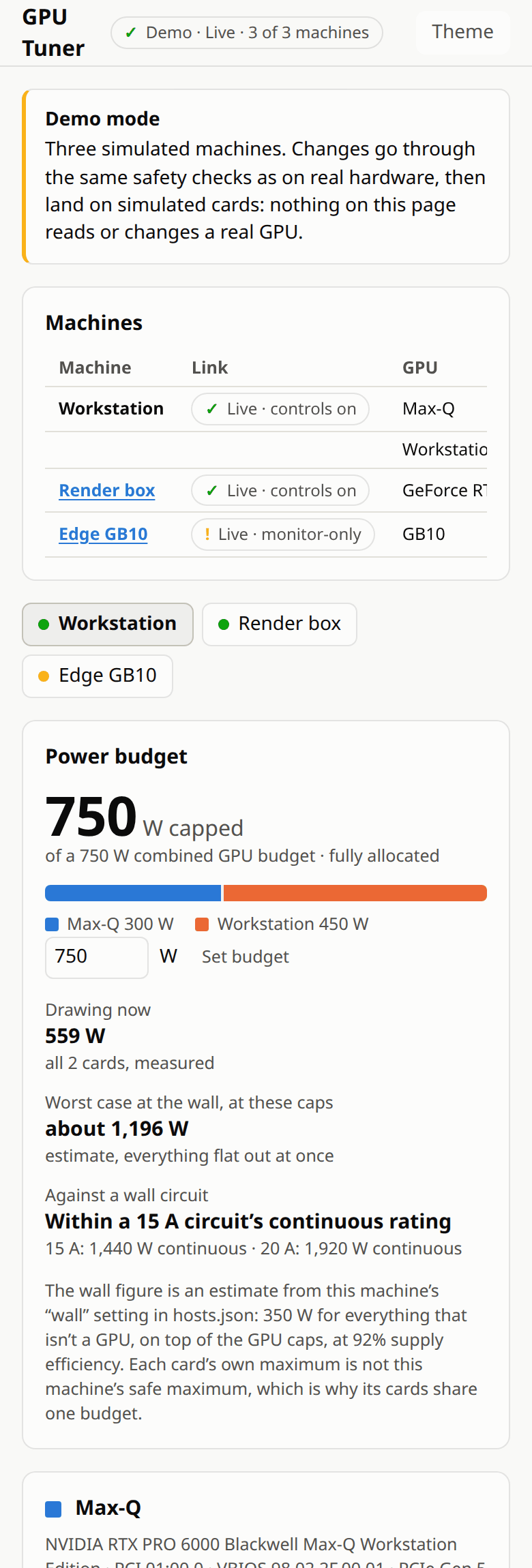 |
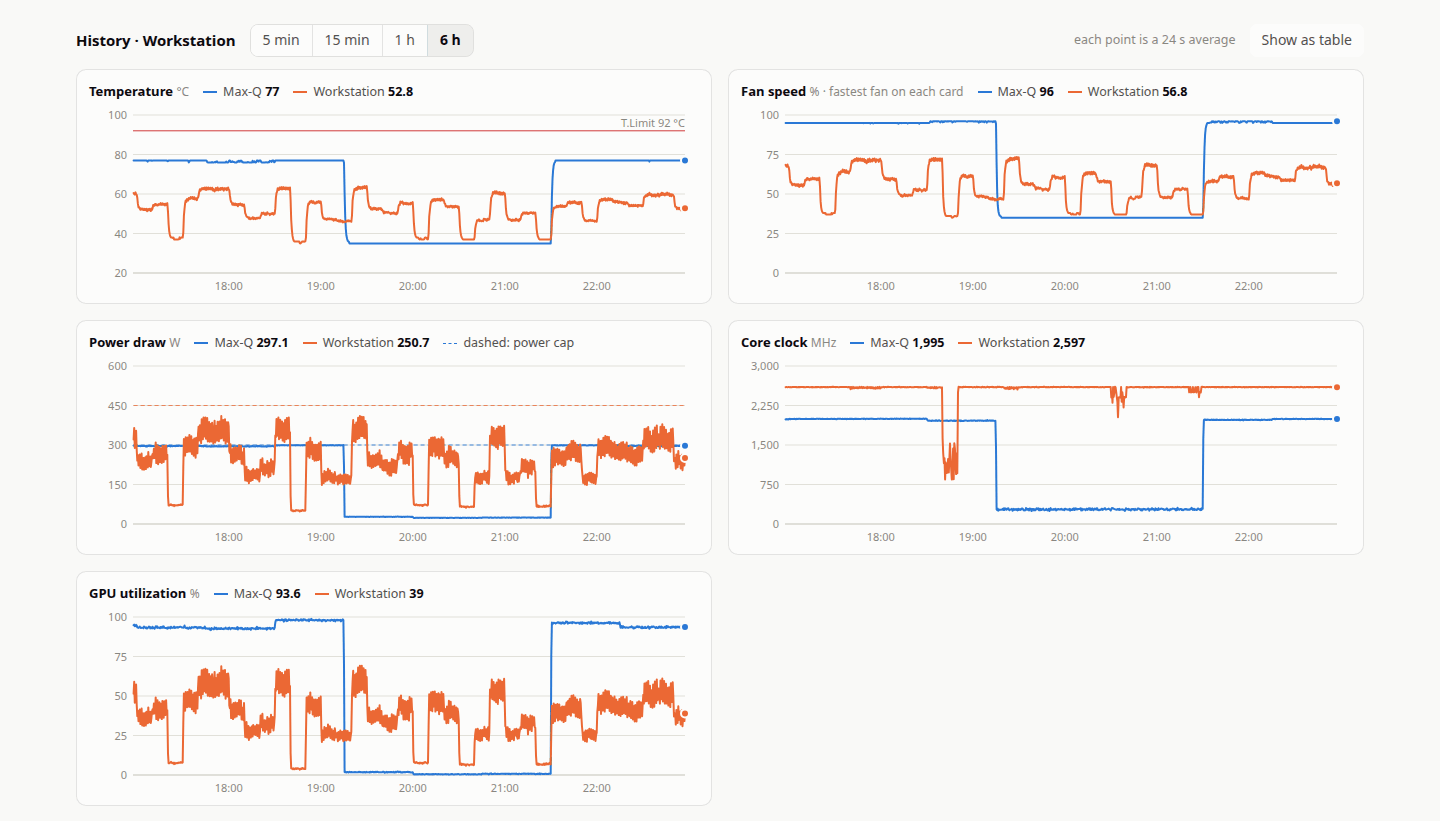
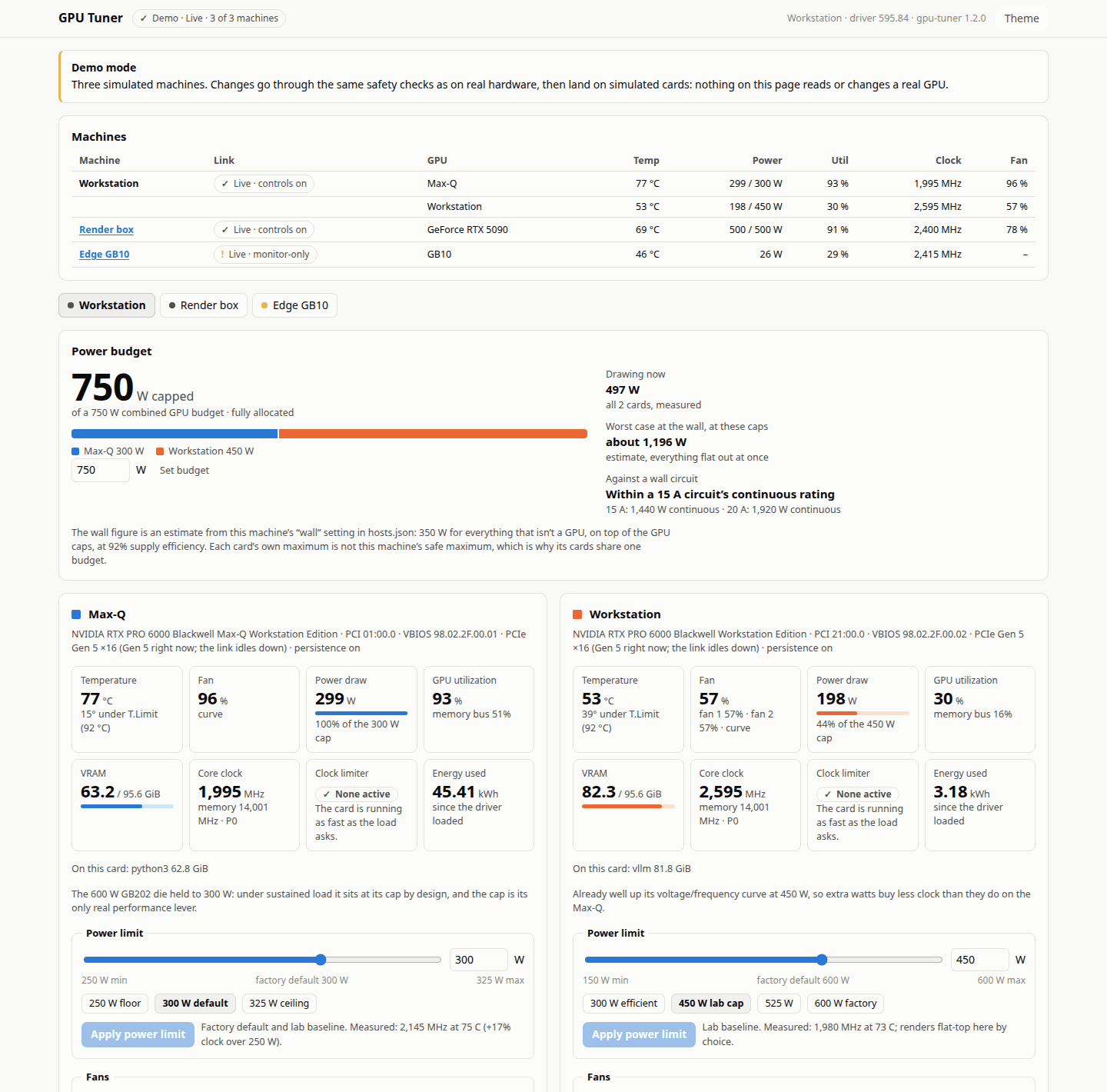
These screenshots come from demo mode: three simulated machines, no real GPU involved.
Try it without a GPU: demo mode
git clone https://github.com/willboyden/gpu-tuner && cd gpu-tuner
./gpu-tuner serve --demo      # the page on http://127.0.0.1:8766/
./gpu-tuner open --demo       # in a second terminal: signs your browser in
Demo mode serves the real page over three made-up machines: a workstation with two RTX PRO 6000 cards (control daemon, power budget, fan curves), a render box with an RTX 5090 (a lowered power limit and a clock cap) and a GB10 edge box (monitor-only, unified memory). Their readings move like training, inference and rendering jobs, and the charts start with six hours of history. Every change you make goes through the same daemon checks as on real hardware (a copy of the daemon logic runs in-process for each simulated machine) and then lands on a simulated card.
It needs only Python 3: no NVIDIA driver, no pynvml, no root and no install. It never loads NVML,
never talks to a real gpu-tunerd or its socket, never runs ssh and opens no connection beyond its own
127.0.0.1 port; its state lives in a private temporary directory that is removed when it stops. It
uses its own port (8766) and its own session cookie, so it can run beside a real page without
signing you out of it. gpu-tuner open keeps its single-use sign-in links in ~/.config/gpu-tuner, as
for the real page.
Install
Requirements
- Linux with systemd, an NVIDIA driver and
nvidia-smi. x86_64 and aarch64 (the monitor-only node runs on DGX Spark; the root daemon has only been run on x86_64). - The system python (
/usr/bin/python3) able toimport pynvml. On Debian/Ubuntu:sudo apt install python3-pynvml. The root daemon runs withpython3 -I, so a pip install into your user or a venv is not enough. sudoon every machine that gets the root daemon. Nothing else needs root.- A browser on the machine with the page. For other machines: OpenSSH on both ends, and an ssh
login from the page's machine to each one (
ssh <host> trueworks). The loop under "Several machines at once" also needsgitandtar.
Every machine gets one of three modes:
| Mode | Command | Installs | Use it for |
|---|---|---|---|
| page + control | ./install.sh |
root daemon, the page (user unit), app launcher | the machine you sit at |
| control only | ./install.sh --no-ui |
root daemon | another machine whose GPUs you want to change from your page |
| monitor only | ./install.sh --node |
just the code, no services | another machine you only want to watch — or one whose GPUs expose nothing to set (DGX Spark) |
Every mode puts the code at /usr/local/lib/gpu-tuner (root-owned); add --dry-run to any of them
to print each privileged command and change nothing. Run install.sh as yourself, not with sudo:
it asks for sudo itself, and on first install records your uid as the one allowed to talk to the
daemon (to change it later: edit allowed_uid in /etc/gpu-tuner/config.json, then
sudo systemctl restart gpu-tunerd).
1. The machine you sit at
git clone https://github.com/willboyden/gpu-tuner && cd gpu-tuner
./install.sh --dry-run   # read what it will do
./install.sh             # asks for sudo; rolls back on any failure
./gpu-tuner open         # signs your browser in (also "GPU Tuner" in the app launcher)
The page runs from this checkout (the user unit points at it), so keep the checkout where it is.
That's all a single machine needs. Without the install, ./gpu-tuner serve runs the page
monitor-only: every reading and chart is live, each card's envelope is shown, the controls are
locked.
2. Each other machine (optional)
As the user your page will log in as (the daemon only answers that user):
git clone https://github.com/willboyden/gpu-tuner && cd gpu-tuner   # or copy this directory over
./gpu-tuner probe | less        # optional, read-only: what NVML exposes on this machine
./install.sh --no-ui            # control only — or ./install.sh --node for monitor only
--node ends by printing what the machine reports (gpu-tuner node --check); if a GPU shows
no settable power limit · fans 0 · no clock cap, monitor-only is all it can do anyway.
3. Connect them
On the machine with the page:
./gpu-tuner hosts --init-key --from 10.0.0.5 # this machine's address, as the others see it
That creates the page's own ssh key (~/.config/gpu-tuner/ssh/id_ed25519, mode 0600, never
printed; no passphrase so the page's service can use it unattended) and prints one line to add
to ~/.ssh/authorized_keys on every other machine:
restrict,from="10.0.0.5",command="/usr/local/lib/gpu-tuner/gpu-tuner node --stdio" ssh-ed25519 AAAA… gpu-tuner-hub
That key can run the node and nothing else: no shell, no forwarding, no pty, and — with --from
(comma-separate several addresses if the machines see this one on different networks) — only from
here. Then:
Connect to each machine once by hand (
ssh <host> true), so its host key is checked and pinned: the page only readsknown_hostsand refuses unknown or changed keys.List the machines in
~/.config/gpu-tuner/hosts.jsonandchmod 600it (seeexamples/hosts.example.jsonand the field notes under Multiple machines):{"hosts": [ {"id": "local", "label": "Workstation", "wall": {"non_gpu_dc_w": 630, "psu_efficiency": 0.9, "circuits": {"15 A": 1440, "20 A": 1920}}}, {"id": "gpu-box-2", "label": "GPU box 2", "ssh": "gpu-box-2"}, {"id": "edge-1", "label": "Edge 1", "ssh": "me@10.0.0.21", "port": 2222} ]}Check, then restart the page so it reads the list:
./gpu-tuner hosts --check            # connects to each machine once and says exactly what's wrong
systemctl --user restart gpu-tuner-ui
Several machines at once
Steps 2 and 3 for a list of machines, from the page's git checkout. It uses your existing ssh access
to copy the code (committed files only, via git archive), install (sudo asks for a password on
each machine, hence ssh -t) and add the page's key line once; after that the page only ever logs
in with its own restricted key. Your first ssh to each machine here also checks and pins its host
key. (It assumes apt; adjust for your distro.)
PAGE_IP=10.0.0.5          # this machine's address as the others see it; comma-separate several
LINE=$(./gpu-tuner hosts --init-key --from "$PAGE_IP" | grep '^restrict,')
if [ -z "$LINE" ]; then echo "init-key printed no key line; stopping"; else
for h in gpu-box-2 gpu-box-3; do                  # your ssh aliases or user@host
  mode=--no-ui                                    # or --node for monitor only
  git archive HEAD | ssh "$h" 'mkdir -p gpu-tuner && tar -x -C gpu-tuner' &&
  ssh -t "$h" "/usr/bin/python3 -I -c 'import pynvml' 2>/dev/null || sudo apt install -y python3-pynvml; ~/gpu-tuner/install.sh $mode" &&
  printf '%s\n' "$LINE" | ssh "$h" 'umask 077; mkdir -p ~/.ssh; chmod 700 ~/.ssh; f=~/.ssh/authorized_keys; read -r l
[ -n "$l" ] || { echo "empty key line: nothing added" >&2; exit 1; }
[ -s "$f" ] && [ -n "$(tail -c1 "$f")" ] && echo >> "$f"
grep -qxF "$l" "$f" 2>/dev/null || printf "%s\n" "$l" >> "$f"; chmod 600 "$f"'
done
fi
The key line reaches each machine on stdin, never as a command argument; it is added once (a
second run adds nothing), on its own line even if authorized_keys doesn't end in a newline, and
only after that machine's install succeeded. Then write hosts.json, ./gpu-tuner hosts --check
and restart the page as in step 3.
Upgrading
Pull (or copy) the new version and run the same install.sh mode again — on this machine and on
each other one. It's idempotent: config.json (your budget) and state.json (your saved power caps,
fan curves and clock caps) are kept, never reseeded, and both services are restarted so the new code
actually runs. Check with ./gpu-tuner hosts --check afterwards — it prints each machine's version.
Machines on different versions keep working together as long as they speak the same protocol; one
whose protocol is too old or too new is shown on the page as incompatible rather than half-working.
Uninstalling
- This machine, or any other (from its checkout —
~/gpu-tunerif you used the loop above):./install.sh --uninstall. It removes the services and the code under/usr/local/lib/gpu-tuner, hands the fans back to the driver (power caps stay as they are), and re-enablesgpu-fan-curve/gpu-power-limitif this machine had them./etc/gpu-tunerand/var/lib/gpu-tunerare kept; delete them by hand for a clean slate. - On each other machine, also remove the page's key: delete the line ending in
gpu-tuner-hubfrom~/.ssh/authorized_keys. - On the page's machine:
rm -r ~/.config/gpu-tuner/ssh ~/.config/gpu-tuner/hosts.json.
What install.sh does on first install
It takes over the caps currently in force: it seeds the daemon's state from nvidia-smi and seeds
gpu_budget_w to their sum (or null if no card reports a settable cap). Fans stay on the driver's
own curve until you pick one — unless the machine already ran a gpu-fan-curve.service, in which
case they stay on the curve it ran. Where gpu-fan-curve.service / gpu-power-limit.service exist
(the original lab's services) they are disabled, kept on disk, and restored by --uninstall; one
caveat, stated so nobody is surprised: stopping gpu-power-limit runs its ExecStop, which restores
factory caps for the second or two before gpu-tunerd starts and re-applies the seeded ones. It
finishes by asking the page itself whether it reaches the daemon, not just whether the services are
"active".
Multiple machines
One page, every machine: a fleet strip (a row per GPU, with each machine's link state) and a tab per machine with that machine's cards, budget and charts. With only one machine nothing changes. Nothing new listens on the network anywhere — the page reaches the other machines over ssh, and each machine's own root daemon stays the authority over its own cards. Setup is steps 2 and 3 of Install.
this machine                                         each other machine
gpu-tuner serve (page) ── ssh, restricted key ──▶  gpu-tuner node --stdio (you) ──unix sock──▶ gpu-tunerd (root)
      └── subprocess ──▶ gpu-tuner node --stdio ──unix sock──▶ gpu-tunerd (root, here)
hosts.json, field by field:
sshis what you'd type afterssh: a~/.ssh/configalias oruser@host(never an option — anything starting with-is refused). Your ssh config still applies;known_hostsis only read, so connect once by hand first to check and pin each host key.- The page logs in with its own key only — no agent, no passwords, no default
~/.ssh/id_*. With no page key yet, it doesn't try ssh at all and that machine's tab says to run--init-key. One caveat: anIdentityFileyour~/.ssh/confignames for that host is still offered (ssh adds those up); if the page's key isn't authorized there but that one is, the login works but is unrestricted, and the machine's tab says so. "local"is the machine the page runs on. Leave it out to run the page on a machine without GPUs. With nohosts.jsonat all, the page manages just this machine, as before.wall(optional, display-only) is that machine's worst-case wall-power model: the watts its non-GPU parts draw, its PSU efficiency, and the circuits to compare against. The numbers above are the original workstation's; withoutwallthe page simply doesn't estimate.- Each machine has its own power budget (they're on different circuits), set from its tab.
What to expect from a DGX Spark (GB10). Measured on four of them (aarch64, driver 580.178.04,
2026-10-03): NVML reports no power limit, no fans, no supported-clock list and no memory info —
firmware manages the whole chip — so a Spark shows temperature, power draw, clocks, utilization
and system memory (shared with the GPU), and offers no controls. It also shows the SoC
temperature: the hottest of the kernel's thermal zones (/sys/class/thermal), which on a GB10
measure the package the GPU sits in. On three Sparks under load (GPU at 70 °C or more, the week
to 2026-10-26) it averaged 11-14 °C above the GPU die NVML reports and reached 24 °C above it (2-4 °C
at idle), so it is the number to watch on a Spark; it is a tile, a dotted line on the
temperature chart and part of the machines table. Discrete cards never get one: their machine's
thermal zones are the motherboard's. Install it with --node: there
is nothing for a root daemon to do. Its thresholds come back as T.Limit 99 °C, slowdown 86 °C and
shutdown 90 °C, so the page measures headroom against whichever threshold a card reports lowest,
and names it. ./gpu-tuner probe (or ssh <host> python3 - < gpu_tuner/probe.py before
installing anything) prints exactly what NVML exposes on a machine, read-only.
What a link failure looks like. A machine that drops off keeps its last-known cards on its tab, greyed out, with the reason ("ssh refused the login…", "host key unknown or changed…", "no route to host") and when it will retry; its controls lock, and whatever it last applied stays in force there. A change that times out says it may or may not have applied — it is never retried for you.
What is safe, and why these limits
Every write is validated by the root daemon against gpu_tuner/safety.py, never by the page.
The file lives in a root-owned copy under /usr/local/lib/gpu-tuner, so nothing running as
the desktop user can widen a limit.
- Power. The card's own NVML range, narrowed by its profile if one exists, then that
machine's combined budget. Lowering is always allowed (an over-budget state must be walkable back
down); raising past the budget needs an explicit confirm click, which the page's
set_powerrequest carries asconfirm_override. The two profiled cards' presets carry numbers measured on those cards, so a choice is informed, not a guess. A card with no profile can be lowered but never raised above its factory default. The combined budget itself is aset_budgetrequest, persisted toconfig.jsonby the daemon — nothing enforces it beyond that one comparison, so raising it is instant and never needs a restart. - Fans. Any curve or fixed speed is evaluated as
max(requested, floor(temp)). The floor's shape was measured on this lab's own cards (61 °C @ 43%, 78 °C @ 46%, 80 °C @ 59% — never lazier than their stock driver curve), but its "100% by" temperature is rescaled per card from THAT card's own NVML slowdown threshold (safety.safety_floor_for), not a fixed number — on this lab's cards that lands at 85 °C, 10 °C under their 95 °C slowdown (92/93 °C T.Limit, 98 °C shutdown), which is where the constant came from originally. A curve must rise monotonically and end at 100% at or below that card's own floor ceiling. Hysteresis: up at once, down only after 2 °C of cooling. - Clock cap.
SetGpuLockedClocks(min, cap)— it can only slow the card. The value snaps down to a supported clock step. 1,000 MHz floor is a fat-finger guard, not a safety limit. - Failure policy: always toward the driver's own fan control. SIGTERM → fans handed back
in
finally. Crash or watchdog kill → the unit'sExecStopPosthands them back. A refused fan write or an unreadable temperature → that card goes to driver control and is retried in 30 s. Fan speeds are re-asserted every 30 s (suspend/resume and GPU resets silently hand the fans back). Power caps are re-checked every 10 s and re-applied if anything else changed them. Power caps are left in place on exit, on purpose: stopping a service must not uncap the Workstation card to 600 W.
Left out on purpose (also listed on the page)
Core/memory clock offsets (no range is known-stable across arbitrary hardware, and an unstable offset corrupts results before it crashes), thermal-limit / target-temperature changes (unsupported on most cards; NVML reports the acoustic thresholds unsupported), toggling ECC, MIG or compute mode (ECC's mode and error counts ARE shown, read-only, when a card supports them), turning persistence mode off (its actual on/off state is shown, read-only — the daemon holds it on), chassis fans (BMC-owned on this lab's board; the PWM registers do nothing here, though that varies by board elsewhere).
How it is built
gpu-tunerd (root, systemd)  <--unix socket, SO_PEERCRED-->  gpu-tuner node (you)  <--stdin/stdout, JSON lines-->
 owns every NVML write                                       NVML reads, forwards     (a subprocess here, ssh elsewhere)
 fan loop, validation                                        whitelisted changes
                                                                                    gpu-tuner serve (you, systemd --user)
                                                                                     history, page, /api/*  <--127.0.0.1:8765--> browser
| File | Role |
|---|---|
gpu_tuner/safety.py |
The envelope: profiles, budget (soft, overridable), floor (per-card), curve rules. Pure functions, unit-tested. |
gpu_tuner/nvml.py |
Thin NVML wrapper, generic over however many GPUs are present; dry_run=True records writes instead of making them. |
gpu_tuner/daemon.py |
Root daemon: socket server, fan loop, state + config persistence, startup/exit policy. |
gpu_tuner/node.py |
One machine's GPUs over stdin/stdout: samples, daemon status, whitelisted changes to its own daemon. Exits when the page goes away. |
gpu_tuner/proto.py |
The wire protocol, and the sanitizers that treat every node's messages as untrusted. |
gpu_tuner/hosts.py |
hosts.json: which machines, the exact ssh command for each, the restricted-key line. |
gpu_tuner/hub.py |
One link per machine (reconnect, backoff, heartbeat, one change in flight), and the 6 h history on the page's clock. |
gpu_tuner/server.py |
The page: /api/state, /api/history?host=, /api/apply (routed by machine, never by GPU alone), sign-in. |
gpu_tuner/cli.py |
gpu-tuner serve | open | node | probe | hosts (and demo-node, which serve --demo starts). |
gpu_tuner/demo.py |
Demo mode: a pynvml-shaped simulation of three machines, run through the real node, daemon and page code. |
gpu_tuner/seed.py · probe.py |
Fresh-install seed from nvidia-smi · read-only NVML capability report. |
web/ |
The page. No framework, no CDN, no inline script/style (CSP), no innerHTML. |
gpu-tunerd.service |
Root unit: Type=notify, watchdog, hardened, ExecStopPost --restore-fans. |
gpu-tuner-ui.service |
User unit for the page. gpu-tuner.desktop (with icon.svg) is the launcher. |
install.sh |
Install / upgrade / --no-ui / --node / --dry-run / --uninstall, with rollback. |
Not containerized, on purpose — checked, not assumed. This app's writes need root
(NO_PERMISSION from NVML otherwise, verified 2026-09-07), and this lab's Docker is
rootless: a container's uid 0 maps to the host's own unprivileged user, not real root.
Verified directly: docker run --gpus all --privileged --cap-add SYS_ADMIN ... nvidia-smi -pl <value> still gets Insufficient Permissions, and /proc/self/uid_map inside
that container shows 0 <host-uid> 1 — the container's "root" is the invoking user, as far as
anything outside the container's own namespace is concerned. There is no containerization scheme
that changes this on this security model, so both halves stay host-installed processes.
Why two processes. Fan and power writes are root-only on these cards (non-root returns
NO_PERMISSION, verified 2026-09-07). The page should not be root. Reads need no privilege,
so the UI server samples NVML itself and only forwards change requests to the daemon.
Why the page has a login at all. This box runs untrusted agents and containers, and any
local process can reach 127.0.0.1. So: loopback bind only; an HttpOnly; SameSite=Strict
session cookie whose secret never appears in a URL or a log (gpu-tuner open mints a
single-use 60 s nonce and the server trades it for the cookie); a Host check against DNS
rebinding; an Origin check on every write. The daemon socket is 0600, owned by the
configured uid, and re-checks the peer uid on every connection. Process names shown on the
page come from /proc/<pid>/comm, never cmdline (command lines here carry API keys).
Why a daemon and not a one-shot. NVML has no "install a curve" call: SetFanSpeed pins
a fixed speed until the next write, so a curve has to be re-evaluated as temperature moves.
Security review
SoC temperature (1.3.0, 2026-10-26)
- One new read, no new write or input. A node now reads
/sys/class/thermal/thermal_zone*/temp(world-readable) for GPUs that report unified memory. The directory is fixed in code, not taken from the page, the hub orhosts.json; nothing new is written and no new request type exists. - The hub takes it like every other reading.
soc_tempis one more number in the sample whitelist (proto.py), so NaN, huge values and wrong types are rejected as before. The protocol number is unchanged: an older node simply sends no SoC value and the page says it was not reported. - Discrete cards never show one, whatever the motherboard's zones read, and readings outside 1-125 °C (0, negatives, the 127.5 °C of an unconnected sensor) are dropped rather than shown.
- This change has not had an independent review.
Demo mode (1.2.0, 2026-10-26)
- Nothing real is read or changed. Every demo process blocks the
pynvmlmodule before anything else runs (a test checks it cannot be imported there); each simulated machine's daemon is an in-process copy of the daemon logic on a socket in a private0700temporary directory, never/run/gpu-tuner/control.sock; no ssh is run and no connection is opened beyond the page's own loopback port. - Nothing from the machine running it reaches the page. Host labels, the hostname each node
reports and the process names are made up, and the demo node never reads
/procfor them. - The same page security as the real one: loopback bind,
Hostcheck,Origincheck on writes, anHttpOnly; SameSite=Strictcookie traded for a single-use nonce. It uses its own cookie name and an in-memory session secret, because cookies ignore the port: with the real page's cookie name, signing in to a demo on 8766 would sign you out of the real page on 8765. Ctrl-CandSIGTERMremove the temporary directory; after aSIGKILLit stays in$TMPDIR(a few small state files and sockets).- This change has not had an independent review.
1.1.2 (2026-10-04)
An independent audit before publishing the install docs found:
- A client on the daemon's socket could crash the root daemon — fixed. JSON nested about
10,000 levels deep (20 KB, under the 64 KiB request cap) makes Python 3.12/3.13's parser raise
RecursionError, whichserve_onedidn't catch, so the daemon exited (fans went back to the driver; systemd restarted it 5 s later). Any process running as the daemon's configured user could repeat it at will. Python 3.14 parses that depth without error, which is why it went unseen. Now it's a "bad request" reply, and no exception from a request or a client can end the daemon's loop. Covered by tests that pass on 3.12 and 3.14 and fail on 3.12 without the fix. - Sign-in link on the command line.
gpu-tuner openhands the single-use, 60 s sign-in link toxdg-openas an argument, so for that minute another local user could read it from/proc(unless/procis mountedhidepid=2) and use it first. On a machine shared with other users, rungpu-tuner open --print-urland paste the link instead. - Signing everyone out. The session never expires on its own: delete
~/.config/gpu-tuner/tokenand restart the page (systemctl --user restart gpu-tuner-ui) to revoke every signed-in browser. - The multi-machine install loop now copies only committed files, checks the system python the
daemon actually uses, refuses an empty key line, and appends the key safely to an
authorized_keysthat doesn't end in a newline. Its append step is tested against scratch files.
Multiple machines (1.1.0, 2026-10-03)
- No new listening sockets. The page reaches other machines only by running ssh; each
machine's daemon still listens only on its own
0600Unix socket. - Each daemon stays the authority. The page can send a machine only the change requests that
machine's own daemon accepts from its own local page; the node forwards only the whitelisted
operations and fields (
proto.APPLY_OPS/APPLY_KEYS), never a socket path or anything else. - The key is restricted on every remote (
restrict,from=…,command=…): it can run the node, nothing else. The node also reports whether sshd forced its command, and the page shows a warning when it says no — a hint for catching a mis-set-up machine, not a control: a compromised node could claim anything. The page runs ssh with only its own key (IdentitiesOnly,IdentityAgent=none, a scrubbed environment, no password or keyboard-interactive auth),BatchMode,StrictHostKeyChecking=yes(known_hosts read, never written), no forwarding, no ControlMaster. hosts.jsondecides what ssh runs against, so it must be yours and not group/world-writable, is read only at startup, is validated strictly (ids,[user@]hostwith no leading-, no%, no whitespace), and nothing from the browser can reach ssh's arguments.- Every node is untrusted input. A compromised machine can lie about its own readings, but each message is size-capped (256 KiB a line, 20 MB per 10 s before the link is dropped), rejects NaN/Infinity and out-of-range numbers (one would blank the page for every machine), is rebuilt from a whitelist with every string, list and UUID capped, and may only report the GPUs its hello announced; the page inserts text only. A malformed message ends that machine's session and it reconnects — it can't stop the link or the page.
- Outbound connections. The page now opens ssh to the machines in
hosts.json— its own traffic, as you, outside any egress proxy you run for other tools. Nothing else goes out. - What it means, plainly: the page's key, on the machine you sit at, can change every managed machine's GPUs within each one's own safety envelope — the same power the page already had over the local cards, extended to every machine you list.
Two existing bugs were found while building this, both fixed:
install.shchecked for a savedstate.jsonas you, but its directory is root-only (0700), so the check always said "missing" and every upgrade reseeded the state, discarding saved fan curves and clock caps. Root does the check now.- The hardened
gpu-tuner-ui.servicefrom the first review hadProtectSystem/ProtectHome/PrivateTmp. In a user unit those need a mount namespace inside an unprivileged user namespace, and from inside it the daemon's socket refuses the connection (EACCES, measured on Ubuntu 26.04; each of the three alone broke it). It had never actually been installed on the machine it was built on, so nobody saw the page come up monitor-only. The unit keeps only the seccomp/prctl-based hardening now, andinstall.shchecks that the page really reaches the daemon.
First public push (2026-09-23)
Reviewed before the first public push (2026-09-23). No way was found for an unauthenticated actor, a CSRF'd browser tab, or the non-root UI process to force a write the root daemon shouldn't allow, or to bypass a card's own hardware range. Fixed as a result:
save_state/save_confignowchmodthe file explicitly (0600/0644) instead of trusting the ambient umask — the directory's own mode already prevented this from being exploitable today, but a future change to that mode shouldn't silently makestate.jsonworld-readable.validate_clock_cap's 1,000 MHz "fat-finger" floor used to make the clock-cap feature unusable on any card whose entire range sits under 1,000 MHz (an inverted "1000-800 MHz" range rejected every value) — now the floor only applies when the card's own top clock clears it; below that, the card's own minimum takes over.serve_one()'s request read loop had no overall time limit, only a per-recv()one — a process sharing the daemon's configured uid (the socket's only real gate) could trickle bytes just under that timeout indefinitely and stall the fan-safety tick loop, which runs on the same thread. It now has a hard 2 s wall-clock deadline regardless of how the bytes arrive.confirm_overrideis now checked withis True, notbool(...)— the loose form would let a client send"confirm_override": "false"(a non-empty string) and have it override anyway.set_budgetnow rejects a value above the sum of every detected card's own hardware maximum — above that, the budget could never actually bind on anything.gpu-tuner-ui.servicehad no sandboxing at all, unlike its root sibling, despite being the process that parses attacker-reachable HTTP input. It was given a baseline then — part of which (ProtectSystem/ProtectHome/PrivateTmp) turned out to break the page; see 1.1.0 above.
What running this means, stated plainly. gpu-tunerd runs as root with
CapabilityBoundingSet=CAP_CHOWN CAP_DAC_OVERRIDE CAP_SYS_ADMIN. CAP_SYS_ADMIN is required —
verified directly (see "Not containerized, on purpose" above) — and a process that holds it is
not meaningfully contained against its own compromise, whatever else the unit's hardening does.
Read the daemon's source before you sudo this install; the sandboxing narrows the blast radius
of a parsing bug, it doesn't remove the trust you're extending.
Recommended, not yet done — needs testing against real hardware before changing:
CAP_DAC_OVERRIDE in that same bounding set isn't obviously justified (state/config files are
already root-owned with owner-rw bits, so root can open them without a DAC override; it's most
likely there for /dev/nvidia* access if those nodes are group-restricted). Removing it, or
replacing it with SupplementaryGroups=video (or your distro's GPU group), would tighten this
further — untested here because the daemon in question is live, root, and controlling real
hardware on the machine this was built on, and a wrong guess breaks GPU control until someone's
at the console to fix it. Same caution applies to further gpu-tunerd.service hardening
(SystemCallFilter=@system-service, DeviceAllow=char-nvidia rw with DevicePolicy=closed,
RestrictSUIDSGID, ProtectClock, ProtectHostname, ProtectKernelLogs, ProcSubset=pid,
RemoveIPC) — all plausible defense-in-depth, none verified compatible with NVML's ioctls yet.
Files on disk after install
| Path | What |
|---|---|
/usr/local/lib/gpu-tuner/ |
root-owned copy of the code; gpu-tuner node --stdio here is what other machines' pages run |
/etc/gpu-tuner/config.json |
allowed_uid, gpu_budget_w (editable from the page — this is just where the daemon persists it; null = nothing settable), interval_s |
/var/lib/gpu-tuner/state.json |
the applied settings; re-validated on every start |
/run/gpu-tuner/control.sock |
daemon socket |
~/.config/gpu-tuner/ |
session token and sign-in nonces (0600); hosts.json and ssh/id_ed25519 if you manage other machines |
~/.config/systemd/user/gpu-tuner-ui.service, ~/.local/share/applications/gpu-tuner.desktop |
UI unit and launcher. Both point into the checkout (the page's code, the launcher's icon.svg), so keep it where it is |
Operate
journalctl -u gpu-tunerd -f                       # every fan decision, every request (audit lines), every fault
journalctl --user -u gpu-tuner-ui -f              # links up/down, and every change routed: apply host=… -> ok
systemctl status gpu-tunerd; systemctl --user status gpu-tuner-ui
./gpu-tuner hosts --check                         # every listed machine, once, with a diagnosis
./gpu-tuner node --check                          # what this machine reports, and whether its daemon answers
./gpu-tuner probe                                 # read-only JSON: everything NVML exposes here
nvidia-smi --query-gpu=name,power.limit,fan.speed,temperature.gpu --format=csv
./install.sh --uninstall                          # back to gpu-fan-curve + gpu-power-limit, if they existed
To try the daemon without root: ./gpu-tunerd --dry-run --socket /run/user/$UID/gt.sock --state /tmp/gpu-tuner-tryout/state.json (the --state override matters: it defaults to the
root-owned /var/lib/gpu-tuner/state.json, which a non-root run cannot create) then
./gpu-tuner serve --socket /run/user/$UID/gt.sock. Every request is validated
and logged exactly as it would be; nothing is written to the cards.
Tests
bash tests/gpu-tuner-test.sh (from this directory) — offline, no GPU, no root, no ssh:
tests/gpu-tuner-test.py, 75 tests against fake NVML (tests/fakes.py): budget (soft override,BudgetExceededvs a hardSafetyError, no-budget machines), ranges (including "NVML reports none" beingNone, never a 0-0 W range), per-card floor, curve rules, hysteresis, faults, persistence, drift re-apply, the restart-race socket handoff, default fan curves that fit each card's own thresholds, a GB10-like machine (no writes, no lasting warnings, unified memory, the SoC temperature from fake thermal zones with the junk ones ignored, none on a discrete card), an older pynvml missing bindings, the install seed ([N/A], mixed, no budget, fan default), and hostile requests on the daemon's socket (deep nesting, an unexpected error inside a request: both answered, the daemon keeps running).tests/gpu-tuner-fleet-test.py, 38 tests, ~25 s: the protocol (NaN,1e999, oversize, nesting, huge ints, whitelists),hosts.json(injection attempts, file ownership/mode/symlink, the exact ssh argv, no key means no ssh, the restricted-key line), the node (hello first, only whitelisted ops and fields reach the daemon, exits on EOF / silence / broken pipe), links totests/fake_node.pysubprocesses (reconnect, stale, timeout, busy, down, incompatible version, malformed hello, unannounced GPUs, fatal, shell noise, unrestricted key, ssh failure messages), routing (a change reaches only the named machine), history gaps (and rows narrower than the current series list), the SoC temperature end to end, and the HTTP API.tests/gpu-tuner-demo-test.py, 17 tests, ~2 s: demo mode. The simulation (cards load through the real NVML wrapper, a GB10's SoC temperature a few degrees over its die, the same second gives the same reading in two processes, six hours of plausible history that joins the live readings, writes land on the simulated card), that nothing real is used (no/procreads, no/sys/class/thermalreads, made-up hostnames and process names, no ssh or real daemon socket in a demo node's command line,pynvmlcannot be imported in a demo process), and the page end to end under a scratchHOME: its own cookie, the real page's request checks, three machines up, a change applied through the daemon's checks and read back, a monitor-only machine refusing, andSIGTERMremoving the temporary directory.- The installer's dry run in every mode, and the page's CSP invariants.
bash tests/live-ui-test.sh (opt-in, ~70 s, needs a GPU and Firefox, no root) —
tests/live-ui-test.py starts a dry-run
daemon and the page on a scratch socket and port, checks the auth gates (401/421/403, nonce
replay, cross-origin POST) and drives the real page in headless Firefox: the over-budget
warn-then-confirm flow, the budget editor, power/fan/clock apply and read-back, keyboard curve
editing across a re-render, baseline reset, no JS errors, no overflow at phone width. Then
tests/fake_hub.py serves the real page over four fake machines (a 2x RTX PRO 6000 box, a GB10, a
5090, an unreachable one) and the test checks the fleet strip and tabs, the GB10's monitor-only
view (no PCIe riser false alarm, headroom against its lowest threshold, a SoC temperature tile), that
a change on the 5090's tab reaches only that machine's daemon, and the unreachable machine's
explanation. Nothing is written to the cards.
All three pass as of 2026-10-04 on driver 595.91 (the live one: 42/42). The demo suite was added and passes as of 2026-10-26. The opt-in live suite was not re-run for 1.2.0; the page's own change is the demo notice, which only appears in demo mode. For 1.3.0 it was re-run on 2026-10-26 (driver 595.91): 43/43, with the new SoC tile check, after its two power-total checks stopped assuming the Max-Q sits at 300 W. For 1.3.1 (a fanless card has no Fan tile, so a GB10's eight tiles fit one row): 45/45 on 2026-10-26.
Also run against real machines, set up with the "several machines at once" loop above: a page on the
RTX PRO 6000 workstation managing an RTX 5090 box (x86_64, driver 595.91.07, --no-ui: power
400-575 W settable, three fans, clock cap up to 3,090 MHz) and four DGX Sparks (--node, read-only
as above), every one reached through the restricted forced-command key (2026-10-03). On 2026-10-04
real changes were made from the page to the remote 5090 — its machine budget 425 → 450 W, then its
power limit 425 → 450 W — each applied by that machine's daemon and read back by NVML on that
machine, and an over-budget change was refused there as it should be. Exercised again 2026-10-23
(driver 595.99) through the same channel: that machine's budget 450 → 575 W and its power limit
450 → 575 W — the card's factory default, which is also its settable ceiling here, since a card
with no profile may be raised to but not past its default — applied and read back by the daemon
and by nvidia-smi on that machine. Not yet exercised on a
remote machine from the page: a fan-curve or clock-cap change (same request path, covered by the
dry-run and fake-machine tests).
Categories
Related apps
Explore more like this
Explore allDetails
ghcr.io/0sy/gpu-tuner-unraid:latestRuntime arguments
- Web UI
http://[IP]:[PORT:8765]/- Network
bridge- Shell
sh- Privileged
- false
- Extra Params
--gpus all --cap-add=SYS_ADMIN --stop-timeout=45
Template configuration
Persistent GPU settings and WebUI credentials. Use a dedicated directory; do not share with another running GPU Tuner instance.
- Target
- /data
- Default
- /mnt/user/appdata/gpu-tuner
- Value
- /mnt/user/appdata/gpu-tuner
WebUI port on the Unraid host. Match this port in WebUI URL.
- Target
- 8765
- Default
- 8765
- Value
- 8765
Required: exact browser URL, e.g. http://192.168.1.10:8765. Use your Unraid IP and the host WebUI port. No path. This permits the Host and Origin used by your browser.
- Target
- GPU_TUNER_PUBLIC_URL
First install only: 12–1024 characters. Ignored once a password hash exists. Required for installation. After successful login, enable Advanced View, remove this variable and Apply to remove the plaintext from Docker configuration and the saved template.
- Target
- GPU_TUNER_INITIAL_PASSWORD