
All apps · 0 apps

golang-kanban
Docker app from Twixii's Repository
Overview
Readme
View on GitHubSimple Kanban Board
A no-nonsense, lightweight Kanban board built with Golang and HTMX. I couldn't find a reasonable self-hosted Kanban board that wasn't using some JavaScript monstrosity like Node or Next.js, I don't need the next 9.1 CVE on my server, so I decided to build my own. This project is my sweet little solution to manage tasks simply while learning and sharing a project with the community.
It's a small Go app you can read in an evening. The web part is Go's standard library (net/http, html/template, log/slog), the frontend is HTMX and SortableJS, and the only direct Go dependencies are the two database drivers.
Features
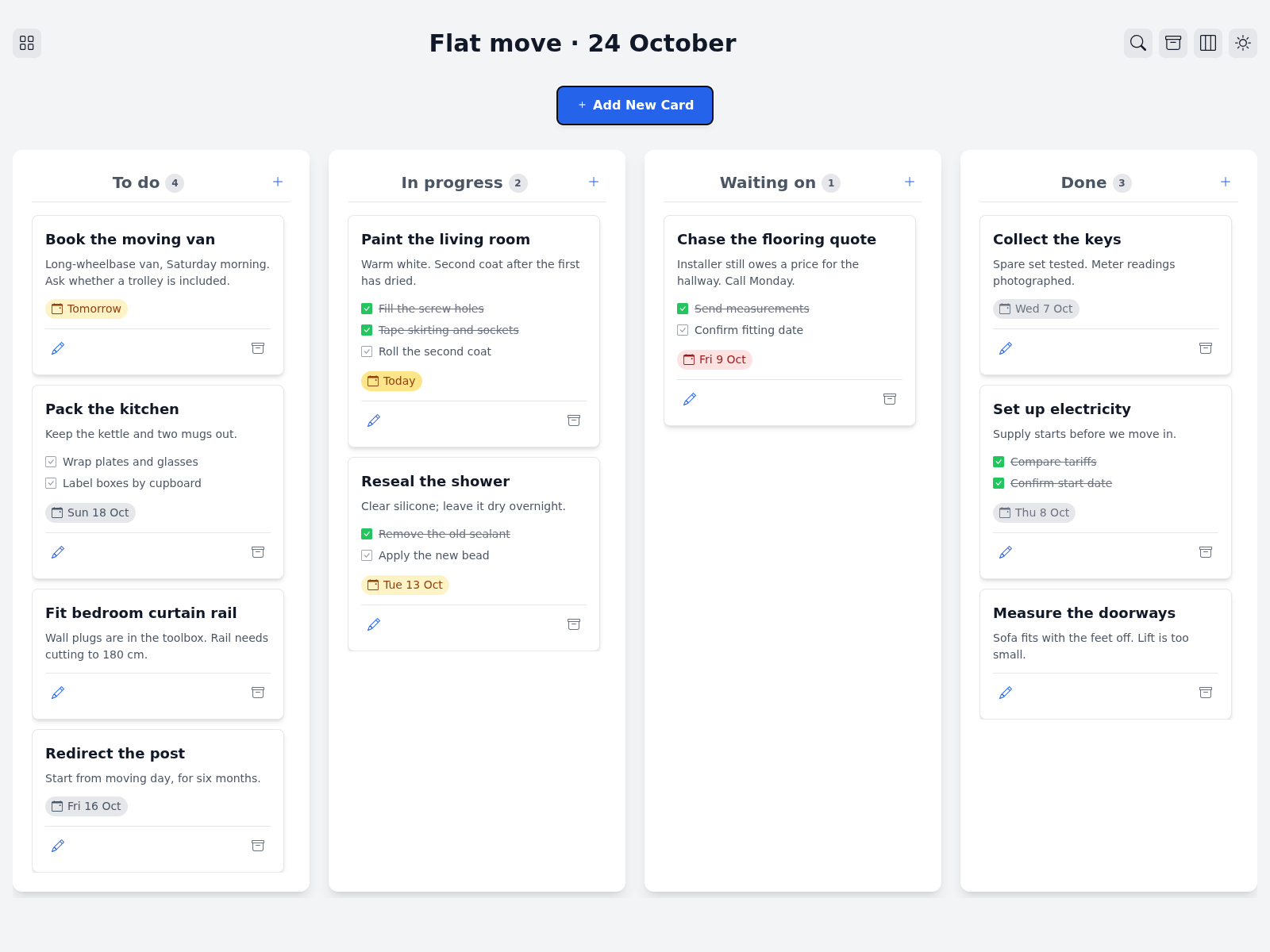
- Multiple boards. Each board has its own columns, which you can add, rename, reorder and delete. A new board starts with To Do, In Progress and Done.
- Cards with a description, subtasks you can tick right on the card, and a due date. Links in the description are clickable.
- Due dates show as Today, Tomorrow or a date, amber when close and red when overdue. The right-most column counts as done, so nothing there turns red.
- Drag and drop on desktop. On a phone the columns are tabs, cards move with the arrow buttons, and a press and hold reorders them.
- Archive instead of delete. An archived card can be brought back with Undo, or later from the board's archive page. Deleting for good only happens there.
- Search on one board or across all of them.
- Dark mode.
- PostgreSQL or SQLite. SQLite is a single file and needs nothing installed.
- Export and import of all boards as one JSON file, the same for both databases.
- Assignees, if you put a login like oauth2-proxy in front (see below).
How it looks
Run it
The quickest way is Docker with SQLite, so you don't need a database:
docker run -p 17808:17808 -e STORAGE=sqlite -v kanban:/data ghcr.io/nicolashaas/golang-kanban:latest
Then open http://localhost:17808. The board lives in the kanban volume.
With PostgreSQL, the docker-compose.yml starts both, the board waits until the database is healthy:
docker compose up --build
Or against your own PostgreSQL:
docker run -p 17808:17808 -e DB_HOST=your-postgres -e DB_USER=... -e DB_PASS=... ghcr.io/nicolashaas/golang-kanban:latest
The image only contains the binary (distroless, non-root) and is built for amd64 and arm64, so a Raspberry Pi works too.
PostgreSQL setup
Create a database and a user that owns it. The app creates its tables on start, there is nothing else to run.
CREATE USER kanban WITH PASSWORD 'your_password_here';
CREATE DATABASE kanban OWNER kanban;
Upgrading from 1.x
Make a pg_dump first. On the first start the old cards table gets migrated, and all your cards end up on a board called "main", in the column that matches their old status.
Environment variables
STORAGE=postgres       # postgres or sqlite
SQLITE_PATH=kanban.db  # sqlite only, /data/kanban.db in the image
DB_USER=user
DB_PASS=password
DB_HOST=postgres
DB_PORT=5432
DB_NAME=kanban
DB_SSLMODE=disable     # require or verify-full if the database is somewhere else
SERVER_PORT=17808
TZ=Europe/Zurich       # due dates are counted in this time zone
AUTH_HEADER=           # see "Users and login"
/healthz answers when the process runs, /readyz when the database answers too.
Users and login
The board has no accounts or passwords. Without a login in front, everyone who can reach it can use it, which is fine at home or behind a VPN.
If you want a login, put oauth2-proxy (or Authelia, Cloudflare Access, ...) in front with whatever OIDC provider you have, and set AUTH_HEADER to the header that carries the user's email. For oauth2-proxy that's X-Forwarded-Email.
oauth2-proxy --provider=oidc --oidc-issuer-url=https://login.example.com \
  --client-id=kanban --client-secret=... --cookie-secret=... \
  --email-domain=example.com --upstream=http://kanban:17808 --http-address=0.0.0.0:4180
# and on the board: AUTH_HEADER=X-Forwarded-Email
With AUTH_HEADER set, every request without that header gets a 403, everyone who logged in once can be assigned to cards, and the board shows who you are. The app trusts the header, so only the proxy may reach the board's port. Publish the proxy, not the board, and make sure the proxy overwrites the header instead of passing on one a client sent.
All users see all boards.
Backups and moving boards
kanban export -o boards.json        # all boards, -board main for one, without -o it goes to stdout
kanban import -dry-run boards.json  # shows what's in the file, writes nothing
kanban import boards.json           # refuses boards that already exist
kanban import -replace boards.json  # replaces them
In Docker: docker exec kanban /kanban export > boards.json and docker exec -i kanban /kanban import - < boards.json. The file is the same for SQLite and PostgreSQL, so that's also how you move from one to the other. It contains every card, so don't leave it lying around.
Building and testing
You need Go 1.26 or newer.
go build .
go test ./...    # runs against SQLite, PostgreSQL only with the variable below
node tests/frontend_test.js # optional Node.js check; no npm install needed
KANBAN_TEST_POSTGRES_URL=postgres://user:pass@localhost:5432/kanban_test?sslmode=disable go test ./...
The frontend libraries are in static/vendor, versions and checksums are in static/vendor/VERSIONS.
Todo's
If I feel like it I might work on some of these things:
- darkmode
- remove/add/edit collums
- make it pretty
- add sqlite option for people too lazy to setup a db
- tls and oidc, with a proxy in front (see "Users and login")
- ...
Thanks
A big thank you to Sebastian Winterberger (sapn95), whose fork took this board much further than I ever did. Almost everything new in 2.0 he built first: SQLite, multiple boards, own columns, archive, due dates, search, export and import, the security headers. I rebuilt it smaller here, keeping the initial reason for the repo alive, but the ideas are his. Have a look at his fork if you want more than this one does.
Contributing
Contributions are welcome! If you have ideas, bug fixes, or enhancements, feel free to fork the repository, open an issue, or submit a pull request. I'd just like to keep it small, so please open an issue first for bigger features.
License
This project is open-sourced under the MIT License.
Categories
Related apps
Explore more like this
Explore allDetails
ghcr.io/nicolashaas/golang-kanban:latestRuntime arguments
- Web UI
http://[IP]:[PORT:17808]- Network
bridge- Shell
sh- Privileged
- false
Template configuration
Container Port
- Target
- 17808
- Value
- 17808
Your database user
- Default
- user
- Value
- kanban
Password for your database user
- Default
- password
- Value
- your_password_here
Your database host
- Default
- postgres
- Value
- 192.168.1.50
Your database port
- Default
- 5432
- Value
- 5432
Your database name
- Default
- kanban
- Value
- kanban_db
Which port the app should listen on inside the container
- Default
- 17808
- Value
- 17808