
All apps · 0 apps

GM-Encoder
Docker app from gm-encoder's Repository
Overview
Readme
View on GitHub

GM Encoder
A Windows GUI for terranvigil/dynamic-crf that wraps the VMAF-targeted encoding workflow with a polished interface. Patches the upstream Go source at install time to fix Windows path issues and add support for AMD/Intel hardware encoders.
Built with PowerShell + WPF, compiled to a single self-contained .exe (~160 KB) via ps2exe.
Screenshots
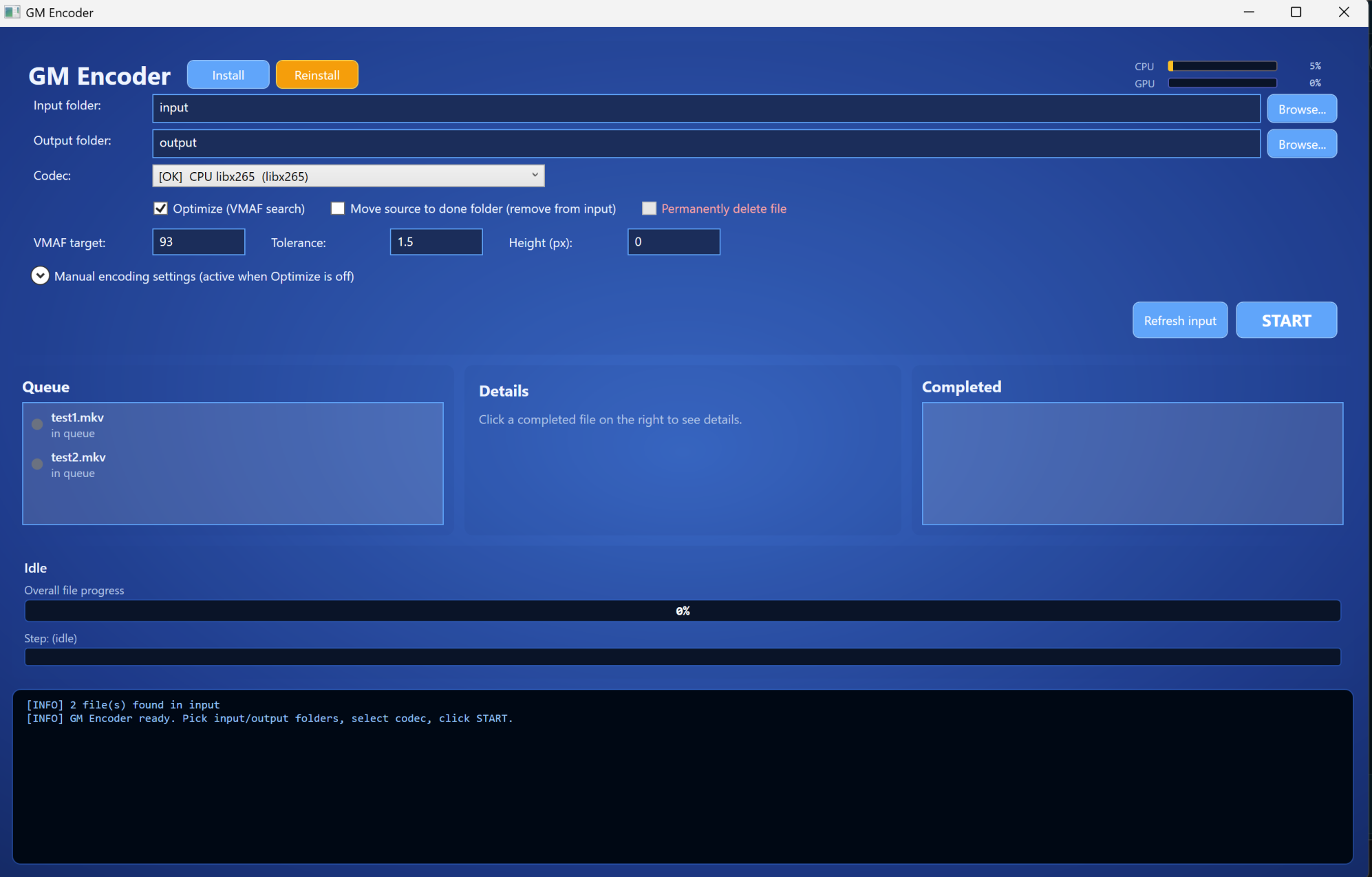
Idle — ready to encode
Pick input/output folders, choose a codec (12 options auto-detected), set VMAF target and tolerance, drop videos in input\, click START.
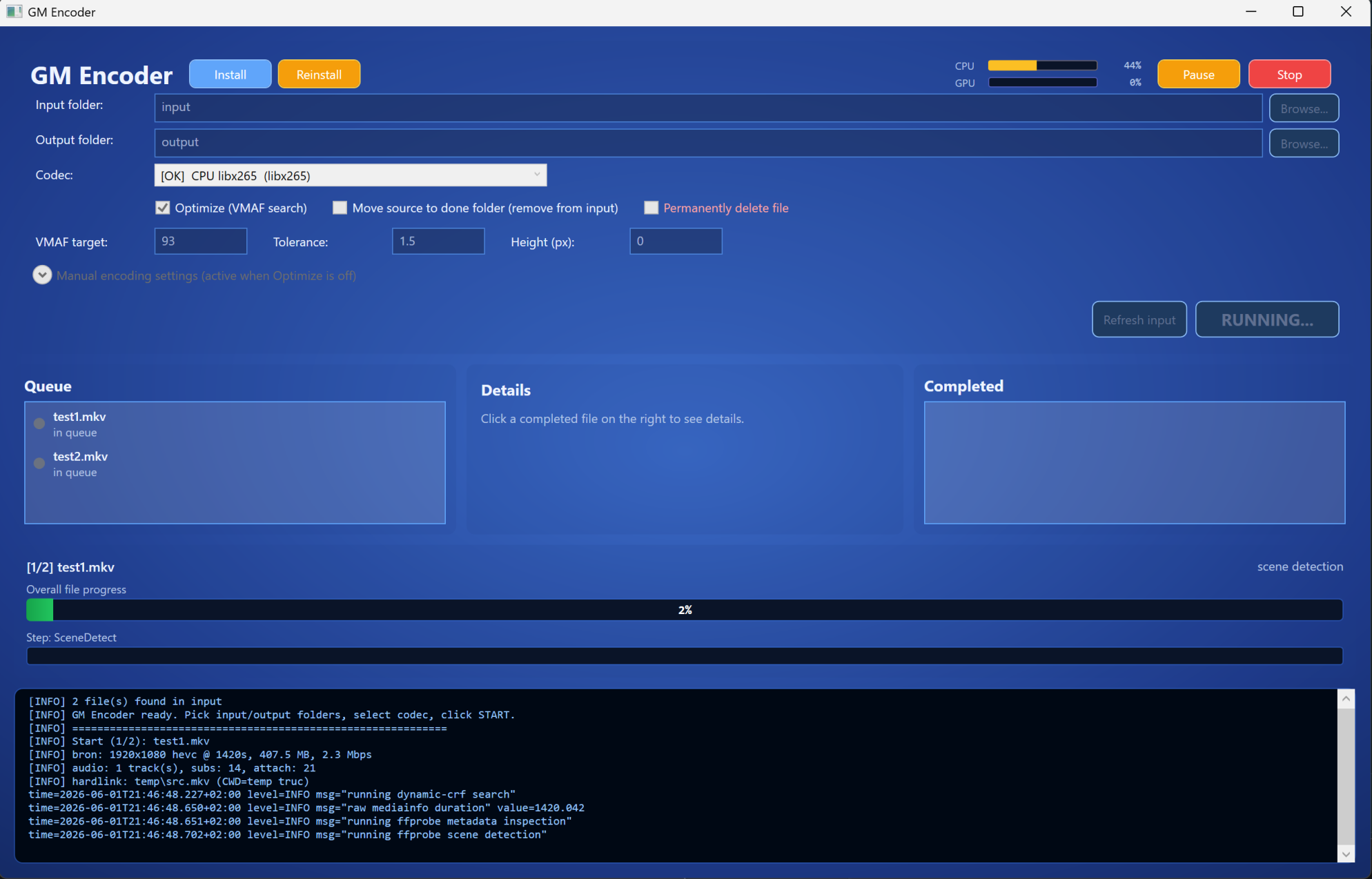
Running — live progress + CPU/GPU usage
While encoding: live CPU/GPU usage bars in the header, phase-weighted overall progress, per-step indicator, and streaming console output from dynamic-crf + ffmpeg. Pause halts after the current file completes; Stop kills everything immediately via Job Object.
Features
- 12 codec options auto-detected from your ffmpeg build: H.264 / HEVC / AV1 × NVIDIA NVENC / AMD AMF / Intel QSV / CPU (libx264, libx265, SVT-AV1)
- VMAF-targeted optimization — finds optimal CRF via bisection on a 90-second sample (3-5 test encodes), then encodes the full video
- Manual mode — skip optimization, encode with specified CRF/QP directly
- All audio/subtitles/attachments preserved via post-mux step (rare in encoder GUIs)
- Source disposal options: keep, move to
input\done\, or permanent delete (with confirm) - Pause / Stop during encoding (Stop kills child ffmpeg via Windows Job Object)
- Live progress — overall + step bars, CPU/GPU usage monitoring, streaming log console
- Settings persistence — folders, codec, options remembered in
%APPDATA%\GmEncoder\settings.json - One-click install — embedded installer downloads Go, ffmpeg, MediaInfo, patches dynamic-crf source, builds the binary
Attribution
This project is NOT a fork of dynamic-crf — it is a downstream Windows GUI wrapper that:
- Depends on the upstream binary: clones terranvigil/dynamic-crf at install time, applies patches, builds with Go.
- Credits the upstream author: all VMAF search / bisection / encoding orchestration logic is from terranvigil.
The PowerShell GUI (gm-encoder.ps1), encoder engine wrapper (gui/Encoder.psm1), build scripts and installer are original to this project. See LICENSE for our MIT-style attribution.
Patches applied to dynamic-crf
The installer (install-dynamic-crf.bat) patches the upstream Go source before building, to fix Windows-specific issues and add hardware encoder support:
| Patch | File | What |
|---|---|---|
| 1 | commands/cambi.go + cambi_windows.go |
syscall.Mkfifo is Unix-only → stub for Windows that returns error for cambi action |
| 2 | commands/ffmpeg_encode.go |
Codec-aware quality flags: cqp (AMD AMF AV1, scaled qp ×5), qvbr (AMD HEVC/H.264), cq (NVENC AV1), global_quality (Intel QSV), crf (CPU codecs) |
| 3 | actions/crf_search.go |
Duration heuristic threshold < 1000ms → < 60000ms so MKVs reporting seconds via MediaInfo get scaled correctly |
| 4 | commands/ffprobe_scenes.go |
Escape Windows paths (C:\ → C:/, escape colons + brackets) so the lavfi movie= filter works |
Without these patches, dynamic-crf.exe either fails to build on Windows, encodes at default quality (ignoring CRF) on AMD/Intel hardware, or crashes on paths containing :, \, [, ], or spaces.
Install
Single-exe usage (recommended)
- Download
gm-gui.exefrom Releases - Double-click → click Install button in the header
- Wait ~5 min while the installer downloads ~500 MB (Go toolchain, ffmpeg, MediaInfo, git portable) into
bin\and builds patcheddynamic-crf.exe - Drop video files into
input\, pick a codec, click START
From source
# Clone this repo
git clone https://github.com/<your-user>/gm-encoder
cd gm-encoder

# Build the .exe (requires PowerShell 5.1+, will install ps2exe module first time)
.\build-exe.ps1

# First-time setup
.\install-dynamic-crf.bat   # OR click Install in the GUI
Usage
| Action | Result |
|---|---|
| Pick codec, enable Optimize, click START | Runs VMAF search on 90s sample → encodes full video at found CRF |
| Disable Optimize, enter CRF/QP manually | Skips search, encodes with specified quality |
| Pause | Halts after current file completes |
| Stop | Kills ffmpeg immediately, cancels queue |
| Click completed file | Shows details: codec, CRF, VMAF score, size in/out, ratio, duration |
Default settings: VMAF target 93, tolerance 1.5, CRF range 18-28, output as MKV with all original streams remuxed in.
Build artifacts
gm-gui.exe— main GUI, self-contained (PowerShell + WPF bundled via ps2exe)dynamic-crf.exe— patched build of upstream Go binarybin\— ffmpeg, ffprobe, MediaInfo, Go toolchain, git portable (~500 MB)
Project layout
gm-encoder/
├── gm-encoder.ps1                 # Main GUI source (inline XAML + event wiring)
├── build-exe.ps1               # Bundles modules + ps2exe → gm-gui.exe
├── install-dynamic-crf.bat     # Installer + Go source patches
├── reinstall-dynamic-crf.bat   # Convenience: delete exe + reinstall
├── generate-handover.ps1       # Generates PROJECT-HANDOVER.md for AI context handover
├── gui/
│   ├── Encoder.psm1            # Per-file encoding pipeline (probe, hardlink, run dcrf, post-mux, cleanup)
│   └── _job-kill-on-close.ps1  # Win32 Job Object: child ffmpeg dies when GUI exits
└── archive/                    # Old CLI scripts (pre-GUI, kept for reference)
See PROJECT-HANDOVER.md for a full architectural overview suitable for AI context transfer.
Known limitations
- AMD AMF on already-compressed sources can produce larger output than the input. This is inherent AMF bit-inefficiency, not a bug. For pre-compressed content, prefer
libx265(CPU) orlibsvtav1(CPU) for actual compression gain. - AV1 on AMD RDNA 4 (RX 7000+/9000+) requires ffmpeg ≥ 7.0 and Adrenalin 24.x+ for hardware acceleration. Older combos fall back to slow CPU.
cambiaction is not supported on Windows (the upstream code uses named pipes viamkfifo, which doesn't exist on Windows).
Not yet tested
The following code paths exist and the dropdown auto-detects them, but they have not been verified by the maintainer on real hardware:
- NVIDIA NVENC codecs (
h264_nvenc,hevc_nvenc,av1_nvenc) — patches are applied, encoder availability is detected, but end-to-end encoding has not been run on an NVIDIA card. - Intel QSV codecs (
h264_qsv,hevc_qsv,av1_qsv) — patches are applied (-global_qualitymapping), but no Intel Arc / iGPU testing has been done. - CPU libx264 and libsvtav1 — work in theory and follow the upstream dynamic-crf default flow, but the maintainer primarily tested
libx265andhevc_amfpaths.
If you run these on your hardware and they work / don't work, please open an issue or PR so we can confirm and update this section.
Contributors & Acknowledgments
- Turkushan — project owner, design, requirements, testing, deployment
- Claude (Anthropic) — AI pair-programming partner. Most of the source code (GUI scaffolding, encoder wrapper module, build pipeline, installer patches, error handling, threading model, settings persistence) was written collaboratively with Claude across many iterations of design, debugging and refactoring.
This project is an honest example of human + AI collaboration: the requirements, taste, real-world testing on AMD/NVIDIA hardware and final acceptance came from a human; the boilerplate, architectural patterns and a lot of the diagnostic work came from the AI. See PROJECT-HANDOVER.md for the kind of context-handover document that lets a future AI session continue the work.
Upstream credit
Big thanks to Terran Vigil for dynamic-crf — the VMAF-targeted bisection encoder that does the actual heavy lifting. This project would not exist without that work.
License
MIT. See LICENSE. Upstream dynamic-crf is also MIT-licensed by Terran Vigil — see their LICENSE.
Categories
Related apps
Explore more like this
Explore allDetails
ghcr.io/turkushan490/gm-encoder:latestRuntime arguments
- Web UI
http://[IP]:[PORT:4805]/- Network
bridge- Shell
bash- Privileged
- false
- Extra Params
--runtime=nvidia --device /dev/dri:/dev/dri/
Template configuration
Open http://UNRAID-IP:PORT for the control panel (settings, live progress, manual encode, pause/stop).
- Target
- 4805
- Default
- 4805
Drop videos here to encode (scanned recursively).
- Target
- /input
- Default
- /mnt/user/media/GM-Encoder/encode_in
Encoded files land here.
- Target
- /output
- Default
- /mnt/user/media/GM-Encoder/encode_out
Logs + state (processed/failed lists).
- Target
- /config
- Default
- /mnt/user/appdata/gm-encoder
Pick your GPU vendor (nvidia/intel/amd/cpu) and it combines with Family below. auto = detect it. Or pick an explicit encoder. Make sure Extra Parameters passes the matching device/runtime.
- Target
- CODEC
- Default
- auto|nvidia|intel|amd|cpu|hevc_nvenc|av1_nvenc|h264_nvenc|hevc_qsv|av1_qsv|h264_qsv|hevc_vaapi|av1_vaapi|h264_vaapi|libx265|libsvtav1|libx264
Combined with the GPU vendor above (e.g. nvidia + hevc = hevc_nvenc). hevc = best support, av1 = smallest (needs newer GPU), h264 = most compatible.
- Target
- FAMILY
- Default
- hevc|av1|h264
true = find the best CRF for the VMAF target. false = fixed quality (Manual CRF).
- Target
- OPTIMIZE
- Default
- true|false
Minimum acceptable quality 0-100 (accepts anything from this up to 100; picks the smallest file that still meets it). 95 = archival, 93 = high (recommended), 90 = smaller.
- Target
- VMAF_TARGET
- Default
- 93
Search starting point.
- Target
- INITIAL_CRF
- Default
- 22
Highest CRF number the search may use.
- Target
- MIN_CRF
- Default
- 28
Lowest CRF number the search may use.
- Target
- MAX_CRF
- Default
- 18
Used only when Optimize = false.
- Target
- MANUAL_CRF
- Default
- 23
0 = keep source resolution. e.g. 1080 downscales to 1080p.
- Target
- HEIGHT
- Default
- 0
Copy all audio/subs/attachments/chapters from the source.
- Target
- REMUX
- Default
- true|false
Output file type.
- Target
- OUTPUT_CONTAINER
- Default
- mkv|mp4
Appended to the filename.
- Target
- OUTPUT_SUFFIX
- Default
- _gm
SAME_AS_SRC = mirror the input folder structure. Empty = flat into /output. Or a fixed folder name.
- Target
- OUTPUT_SUBDIR
- Default
- SAME_AS_SRC
true = auto-encode files dropped in the input share. false = GUI/manual only (you pick files in the web UI).
- Target
- WATCH_ENABLED
- Default
- true|false
What to do with the source after a successful encode. move = to input/done.
- Target
- SOURCE_ACTION
- Default
- move|keep|delete
false = discard the result if it is not smaller than the source.
- Target
- KEEP_LARGER
- Default
- true|false
How often to scan the input share.
- Target
- WATCH_INTERVAL
- Default
- 15
Wait this long after the last write before encoding (avoids partial copies).
- Target
- FILE_STABLE_SECONDS
- Default
- 20
Process files already present when the container starts.
- Target
- SCAN_EXISTING
- Default
- true|false
Comma-separated list of file types to watch.
- Target
- INPUT_EXTENSIONS
- Default
- mp4,mkv,mov,avi,m4v,webm,ts,wmv,flv
For *_vaapi codecs. Auto-falls back to the first real render node if this one is absent (Arc is often renderD129).
- Target
- VAAPI_DEVICE
- Default
- /dev/dri/renderD128
Intel/AMD QSV/VAAPI only. iHD = Intel Arc / recent iGPU, radeonsi = AMD. Leave empty to auto-detect. NOTE: pass /dev/dri via --device=/dev/dri in Extra Parameters, NOT as a Path mapping.
Your GPU UUID from the Nvidia-Driver plugin page (e.g. GPU-xxxxxxxx-...), or 'all'.
- Default
- all
Leave as 'all' for NVENC.
- Default
- all
User id for output files (Unraid = 99).
- Default
- 99
Group id for output files (Unraid = 100).
- Default
- 100
File creation mask.
- Default
- 022
Timezone.
- Default
- Europe/Amsterdam