
Glovebox
Docker app from matthewjackson446's Repository
Glovebox keeps track of your vehicles: MOT, road tax, insurance, servicing (by date or mileage), breakdown cover, warranty and finance, colour-coded by when they are due.
Overview
Readme
View on GitHub
Glovebox
A self-hosted tracker for your vehicles: MOT, road tax, insurance, servicing, breakdown cover, warranty and finance, all in one place and colour-coded by when they're due.
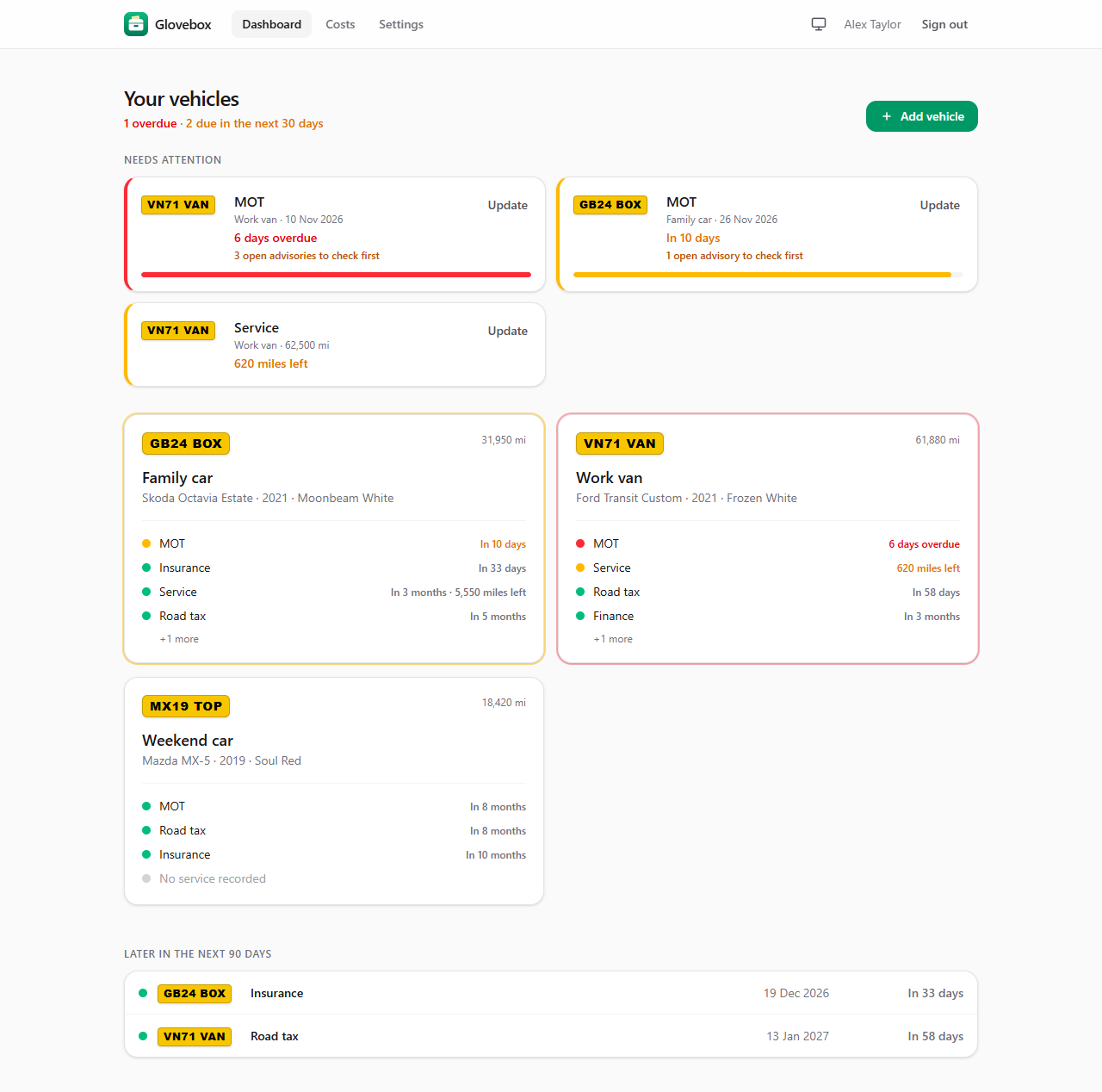
- Dashboard. A Needs attention list at the top gathers everything overdue (red) or due within 30 days (amber) across all your vehicles, with a one-tap Renew or Update button for each item. Below it, every vehicle at a glance.
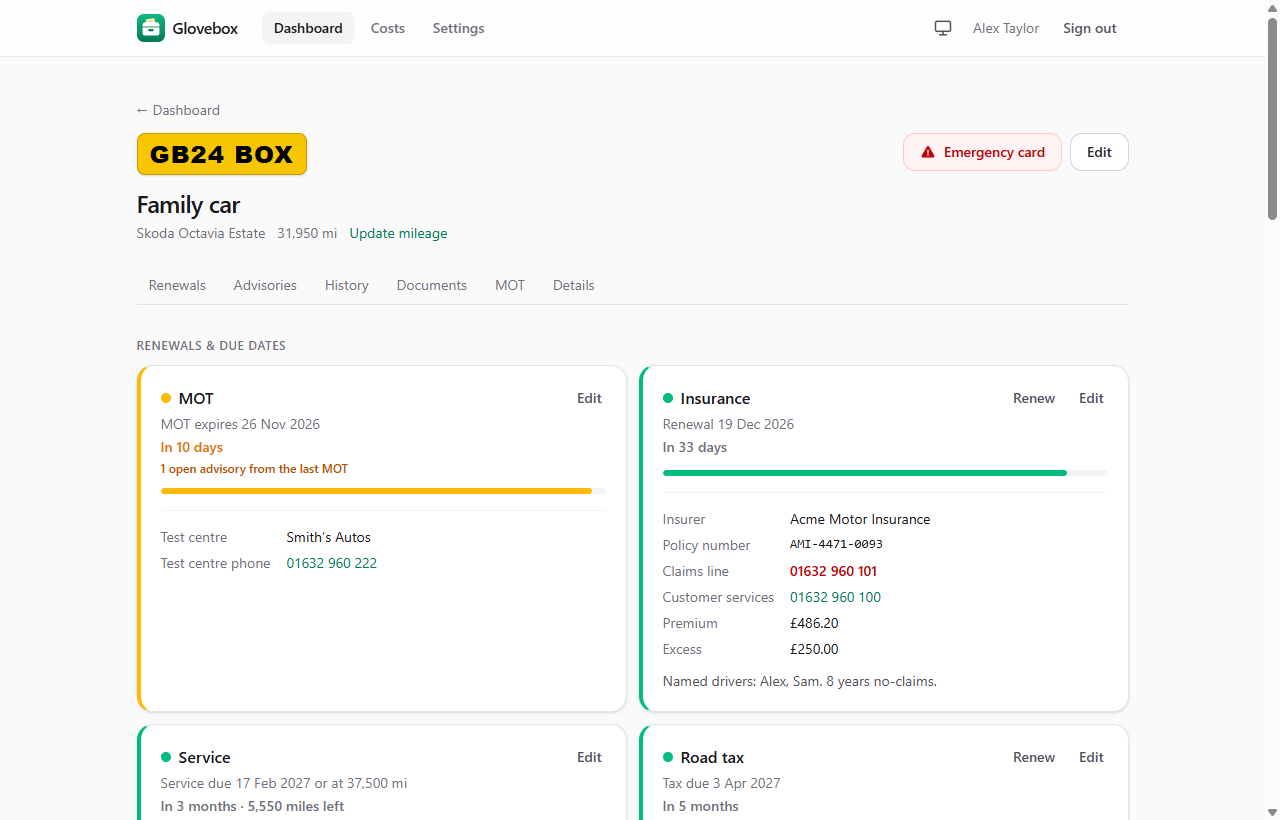
- Renewals and due dates. Store providers, policy and membership numbers, phone numbers, premiums and excesses alongside the dates. A progress bar shows how far through each policy, MOT year or service interval you are.
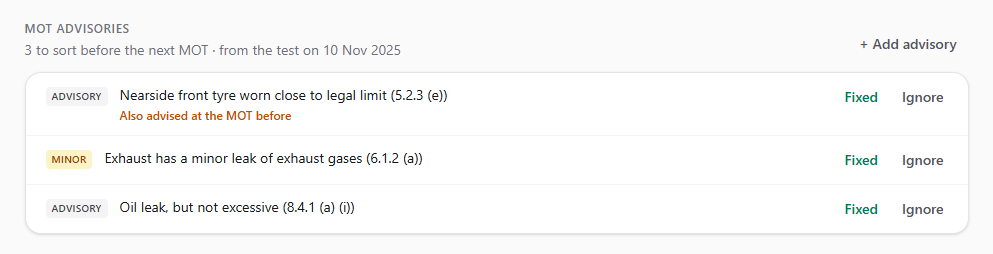
- MOT advisories to-do list. Advisories from the last MOT become a checklist to tick off before the next one, with repeat advisories highlighted. They appear in your MOT reminders too. With DVSA keys they're filled in for you; without them, add them by hand.
- Service by date or mileage. Update the mileage and service reminders work out the rest.
- Calendar feed. A private link per user for Google, Apple or Outlook Calendar.
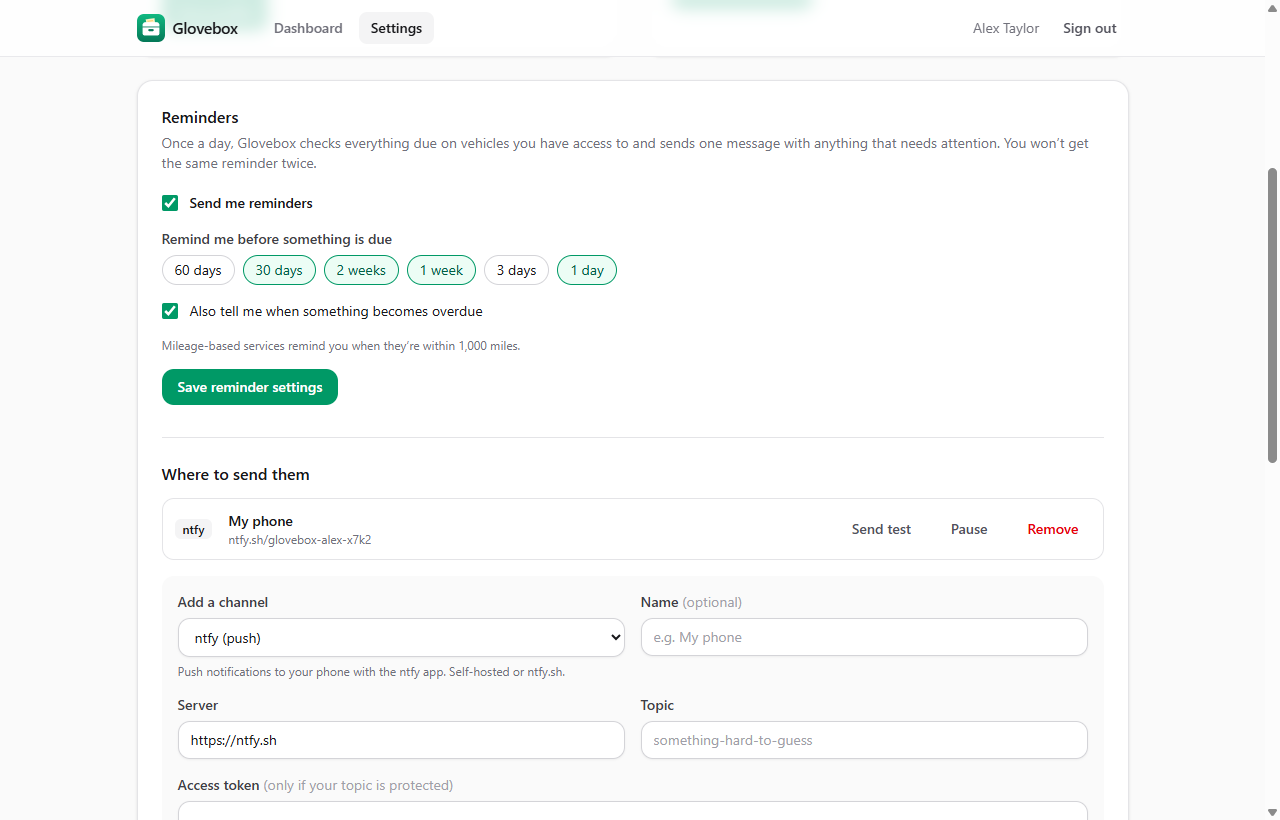
- Reminders. A daily digest by email, ntfy, Gotify, Discord or webhook (e.g. Home Assistant). Each user picks when (60/30/14/7/3/1 days before, and when overdue) and where. You never get the same reminder twice, and renewing an item starts its reminders afresh.
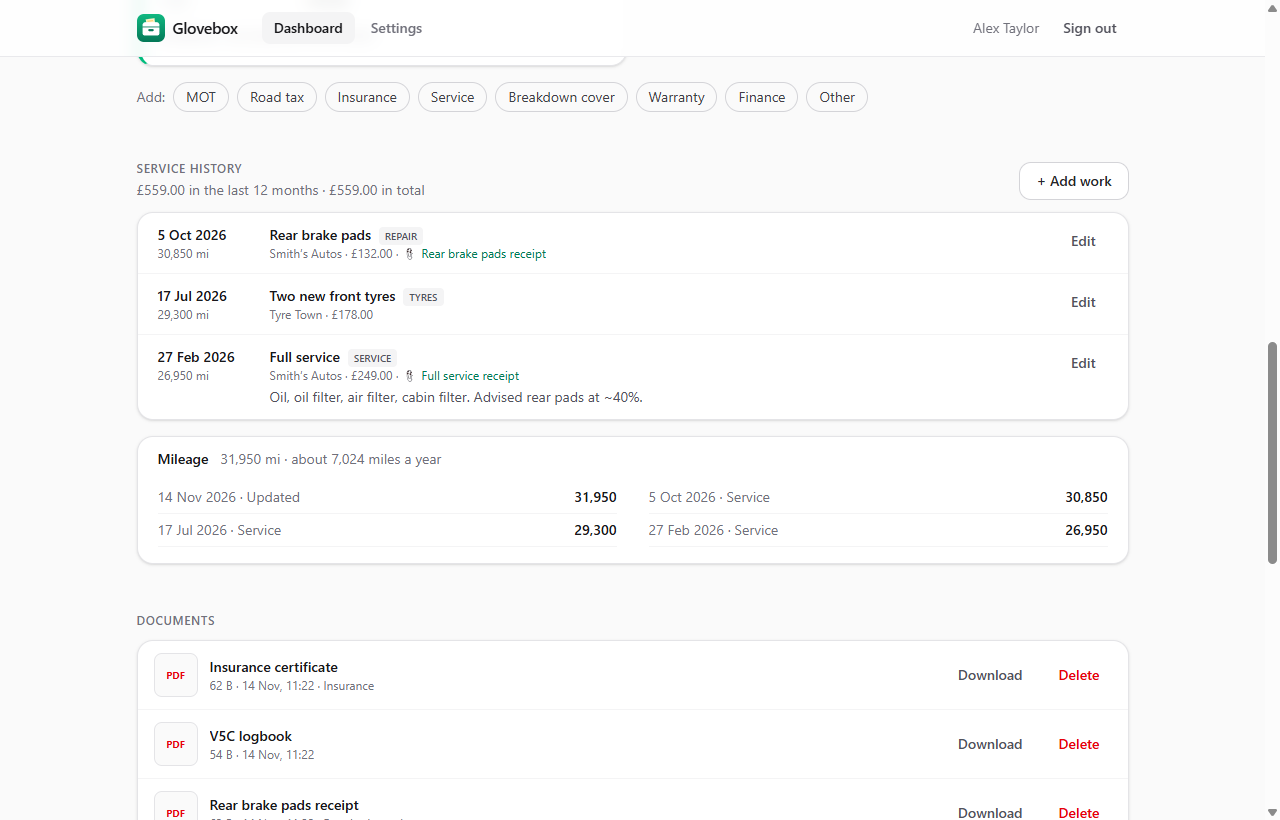
- Service history and documents. Log services, repairs and tyres with cost, garage and mileage. Upload PDFs and photos (V5C, certificates, receipts) and attach them to a renewal or a job. Mileage readings give an annual average and an estimated date for mileage-based services.
- Running costs. A Costs page totals each year by vehicle and category (insurance, tax, servicing and repairs, breakdown, warranty, finance), built from what you already record.
- Archive sold vehicles. They leave the dashboard, reminders and calendar but keep their history, costs and documents, and can be restored.
- Renew with price history. Roll an insurance, breakdown, warranty or tax period on a year and see how the price compares with previous years.
- Clean air zones and road tax band. See at a glance whether London's ULEZ and the UK's Clean Air and Low Emission Zones are likely to charge each vehicle, and which road tax band it's in. These are worked out from the fuel, first registration date, CO₂ and Euro status, with links to the official checkers and current GOV.UK rates.
- DVLA and DVSA lookups (optional). Bring your own free keys to fill in vehicle details from the registration and refresh tax and MOT dates, SORN status and MOT history every night.
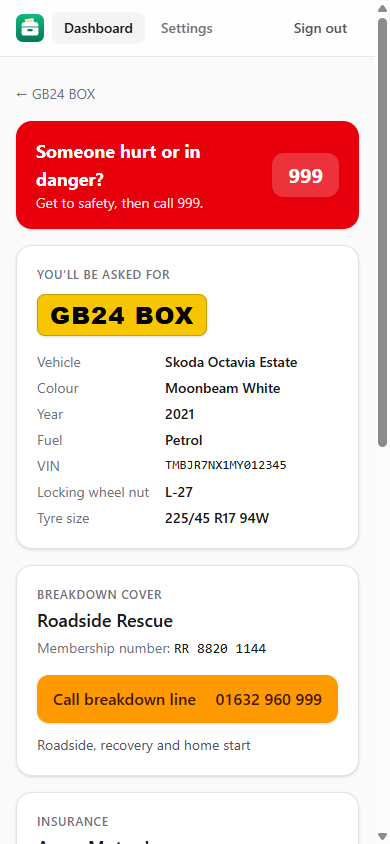
- Emergency card that works with no signal. A one-tap page with your breakdown line, insurer's claims line, policy numbers, locking wheel nut code and emergency contacts. Add Glovebox to your phone's home screen and every vehicle's card is saved on the phone, so it still opens at the roadside with no signal (needs HTTPS; see below). Saved cards are wiped when you sign out.
- Two-factor sign-in. Optional 6-digit codes from any authenticator app, with recovery codes. Recommended if your instance is on the internet.
- Backup download. Admins can download a ZIP of the database and all documents from Settings → Server.
- Light and dark mode. Follows your device, or pick one from the header.
- Multi-user. The admin creates accounts. Each vehicle can be shared with other users as owner, can edit or can view.
- One container, one SQLite file. All data lives in
/config. Images are built for x86-64 and ARM64 (Raspberry Pi 4/5, Apple Silicon, ARM NAS boxes).
| Vehicle | Service history and documents |
|---|---|
 |
 |
| Reminders | Emergency card (phone) |
 |
 |
MOT advisories
See CHANGELOG.md for what's in each release.
Running on Unraid
Until Glovebox is listed in Community Apps, install the template by hand:
- Open Unraid's terminal (the >_ icon) and save the template to your flash drive:
wget -O /boot/config/plugins/dockerMan/templates-user/my-Glovebox.xml https://raw.githubusercontent.com/matthewjackson446/glovebox/main/unraid/glovebox.xml - Go to Docker → Add Container, pick Glovebox from the Template list, check the port and appdata path, then click Apply.
- Open the WebUI and create the admin account.
Updating: when Unraid's Docker tab shows an update for Glovebox, click Apply Update. Your data in /config is kept and the database upgrades itself.
Docker / Compose
services:
  glovebox:
    image: ghcr.io/matthewjackson446/glovebox:latest
    ports: ["8080:8080"]
    environment:
      - PUID=99
      - PGID=100
      - TZ=Europe/London
    volumes:
      - /mnt/user/appdata/glovebox:/config
    restart: unless-stopped
| Variable | Default | |
|---|---|---|
PORT |
8080 |
Port inside the container |
PUID / PGID |
99 / 100 |
User and group that own files in /config |
UMASK |
022 |
|
TZ |
Europe/London |
Decides what "today" is for due dates, and when the daily reminder run happens |
GLOVEBOX_DISABLE_SCHEDULER |
unset | Set to true to stop automatic daily reminders |
SMTP_HOST, SMTP_PORT, SMTP_SECURITY, SMTP_USER, SMTP_PASS, SMTP_FROM |
unset | Optional email settings. If SMTP_HOST is set, these take priority over Settings → Server and are shown read-only there. SMTP_SECURITY is starttls (default), tls or none. |
Reverse proxy: Glovebox works on plain http://<lan-ip>:8080 and behind a reverse proxy over HTTPS. Pass X-Forwarded-Proto and X-Forwarded-Host through; Nginx Proxy Manager and SWAG do this by default. Cookies are only marked Secure when the request came in over HTTPS.
Using it on your phone: open Glovebox over HTTPS, then choose Add to Home Screen (Safari) or Install app (Chrome). Long-press the icon for a shortcut straight to your emergency cards. Browsers only allow offline use over HTTPS, so over plain http://<lan-ip> the emergency cards still work but need a connection.
Reminders: in Settings → Server, an admin sets the daily send time, an optional public URL (for links in notifications) and SMTP details if anyone wants email. Each user then adds their own channels under Settings → Reminders.
Calendar: each user can create a private subscription link under Settings → Calendar and add it to Google, Apple or Outlook Calendar. All due dates appear there and update by themselves. Set the Public URL first so the link works from outside your network. Anyone with the link can read the dates, so it can be reset or turned off at any time.
Vehicle lookups (optional): DVLA and DVSA
With your own free keys, typing a registration fills in the vehicle's details, and Glovebox refreshes tax and MOT dates, MOT history and mileage every night (just before reminders go out). Without keys, everything still works with dates entered by hand.
Glovebox doesn't ship with any keys. Each install uses keys issued to whoever runs it; they're stored only in that install's /config database. Never commit or share them.
DVLA Vehicle Enquiry Service: make, colour, fuel, engine, year, live tax status and due date, MOT expiry.
- Apply at register-for-ves.driver-vehicle-licensing.api.gov.uk (about the API).
- Describe personal use, e.g. "Self-hosted app to keep track of tax and MOT dates for my own household's vehicles", and choose the lowest monthly volume. Glovebox makes about one lookup per vehicle per day.
- DVLA emails you an API key, usually within a few working days.
- In Glovebox, open Settings → Server → Vehicle lookups, paste the key, save and press Test DVLA.
DVSA MOT History: every MOT test with result, mileage, advisories and failures, plus model and first MOT due date.
- Apply at documentation.history.mot.api.gov.uk/mot-history-api/register.
- DVSA emails you a client ID, client secret, API key, scope URL and token URL.
- Paste each into Settings → Server → Vehicle lookups (the scope is normally
https://tapi.dvsa.gov.uk/.default, already filled in), save and press Test DVSA. - Client secrets expire after 2 years; keys unused for 90 days are revoked. The nightly refresh keeps them in use.
Glovebox never overwrites details you've typed. It only fills blanks, keeps tax/MOT due dates current (turn this off per vehicle with Keep tax and MOT dates up to date automatically), and only ever moves mileage forwards.
Backups: an admin can download a ZIP from Settings → Server → Backup (restore steps are inside). Everything is also in /config: the database (glovebox.db) and uploaded files (documents/). Stop the container and copy the folder, or include it in your appdata backup.
Development
Requires Node 22. No Docker needed locally.
npm install
npm run dev        # http://localhost:5173, data in ./data
npm run check      # type-check
Testing the container on Unraid without building locally
docker context create unraid --docker "host=ssh://root@<unraid-ip>"
docker --context unraid compose up -d --build   # builds on Unraid, serves on :8090
Releasing
Pushing to main publishes ghcr.io/<owner>/glovebox:edge. Pushing a tag such as v0.1.0 publishes :0.1.0, :0.1 and :latest.
Roadmap
- Vehicles, renewals and due dates, dashboard, emergency card, multi-user sharing
- Reminders by email (SMTP), ntfy, Gotify and Discord/webhooks
- Look up by registration via DVLA (tax and MOT dates) and DVSA (MOT history), with nightly refresh
- Service history, mileage log, document uploads (V5C, certificates, receipts), renewals with price history
- Calendar (
.ics) feed - Community Apps listing
Licence
MIT
Categories
Related apps
Explore more like this
Explore allLinks
Details
ghcr.io/matthewjackson446/glovebox:latestRuntime arguments
- Web UI
http://[IP]:[PORT:8080]/- Network
bridge- Shell
sh- Privileged
- false
Template configuration
Port for the Glovebox web interface.
- Target
- 8080
- Default
- 8080
- Value
- 8080
Database and uploaded documents. Back this up.
- Target
- /config
- Default
- /mnt/user/appdata/glovebox
- Value
- /mnt/user/appdata/glovebox
Timezone, used for working out what's due today and when reminders are sent.
- Default
- Europe/London
- Value
- Europe/London
User ID to run as.
- Default
- 99
- Value
- 99
Group ID to run as.
- Default
- 100
- Value
- 100
Optional. Email settings can be entered here or in Glovebox under Settings, Server. If set here, they take priority and are locked in the app. e.g. smtp.gmail.com
- Target
- SMTP_HOST
587 for STARTTLS, 465 for TLS.
- Target
- SMTP_PORT
- Default
- 587
- Value
- 587
starttls, tls or none.
- Target
- SMTP_SECURITY
- Default
- starttls
- Value
- starttls
- Target
- SMTP_USER
For Gmail, an app password.
- Target
- SMTP_PASS
e.g. Glovebox glovebox@example.com
- Target
- SMTP_FROM
File permission mask for created files.
- Default
- 022
- Value
- 022