
All apps · 0 apps

gantry
Docker app from smidley's Repository
Overview
Readme
View on GitHubGantry
A Docker and server monitor built for Unraid. One container. Set a username and password the first time you open it.


Install it, open the web UI, set a username and password the first time, and the dashboard is live: every container's CPU, memory, network, disk IO and GPU; your array and pools; and cross-container insights that explain, in plain language, when one container is slowing another or the array.
Most self-hosted monitors are a hub plus a per-host agent you deploy and pair — Beszel, for example. Gantry is a single container. Nothing to pair, no agent to install, no cloud account, no external database. The one login is a single local account stored on your own box. It reads your Docker socket, /sys, and the same Unraid state files the webGUI reads, and keeps its own small history in SQLite.
Gantry monitors read-only — it reads your containers, disks and array and never changes your array configuration. The one thing it can change, only when you ask, is Docker housekeeping from the Maintenance view (clearing stopped containers and unused images), behind a confirmation and disabled entirely by a single switch.
Gantry is pre-release and under active development. Install it from Unraid Community Applications, or use the
docker runcommand below.
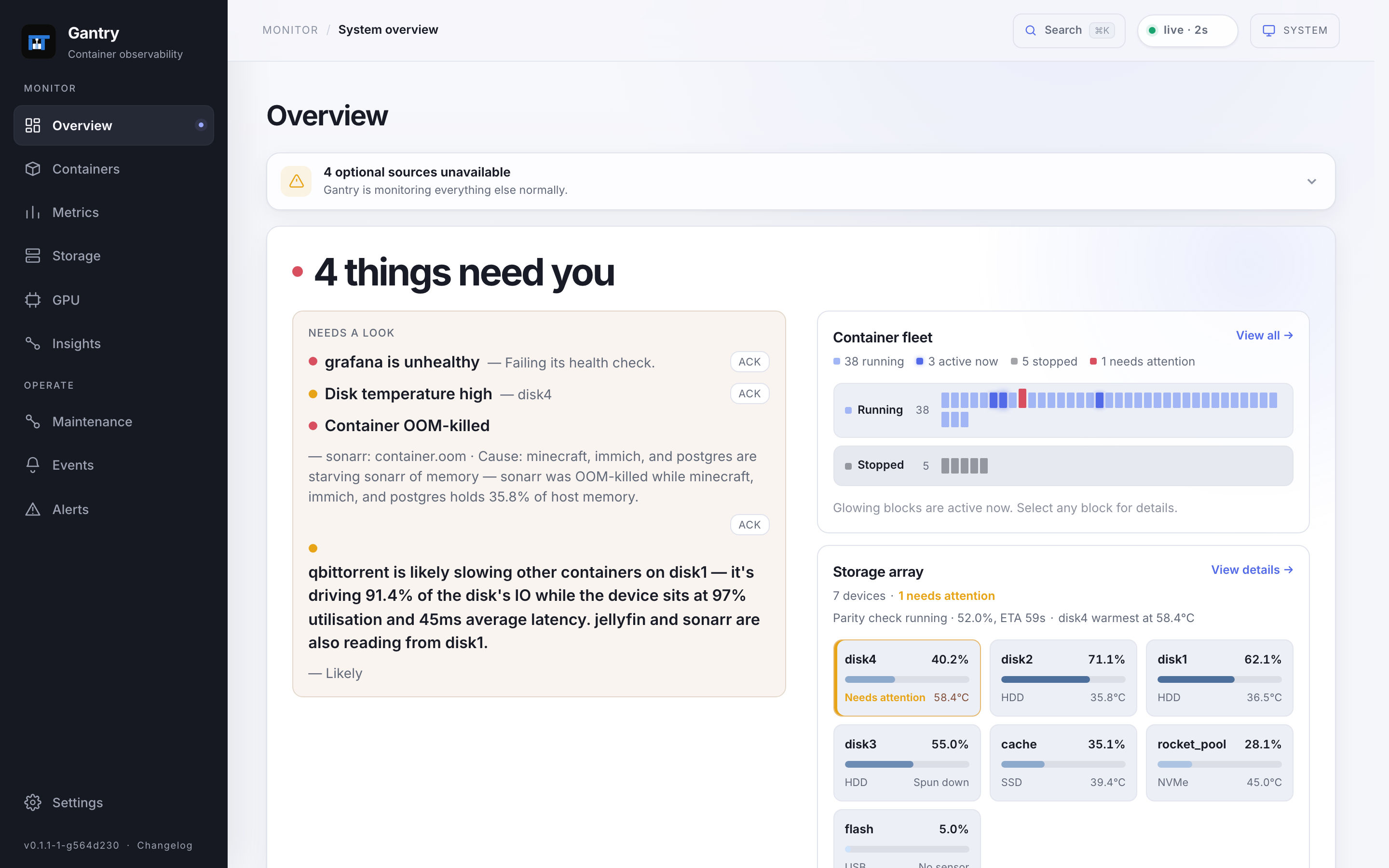
More screenshots
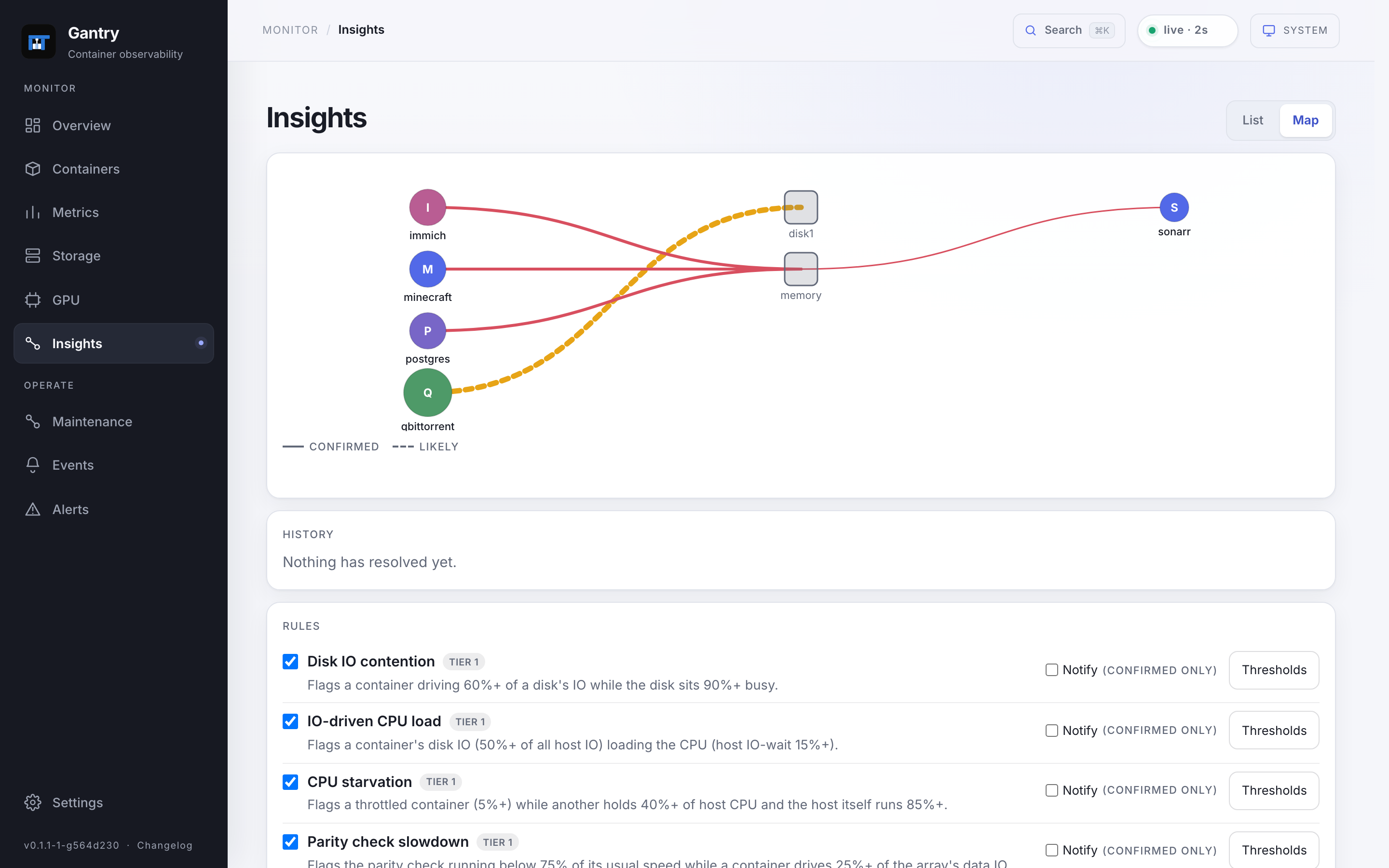
Insights — the interaction map names which container is slowing another, with the evidence behind it.
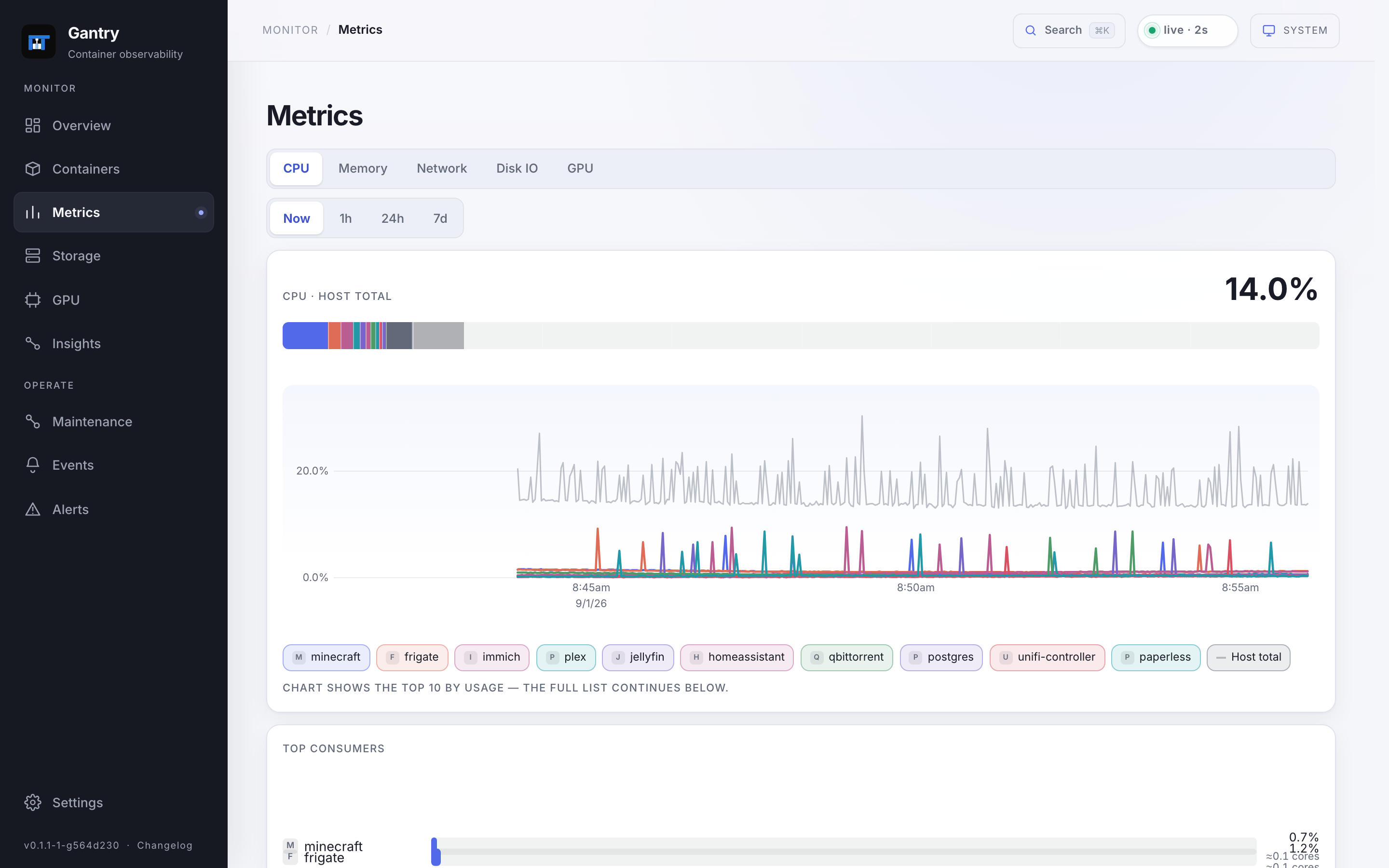
Metrics — per-resource leaderboards over a multi-line chart of every container against the host total.
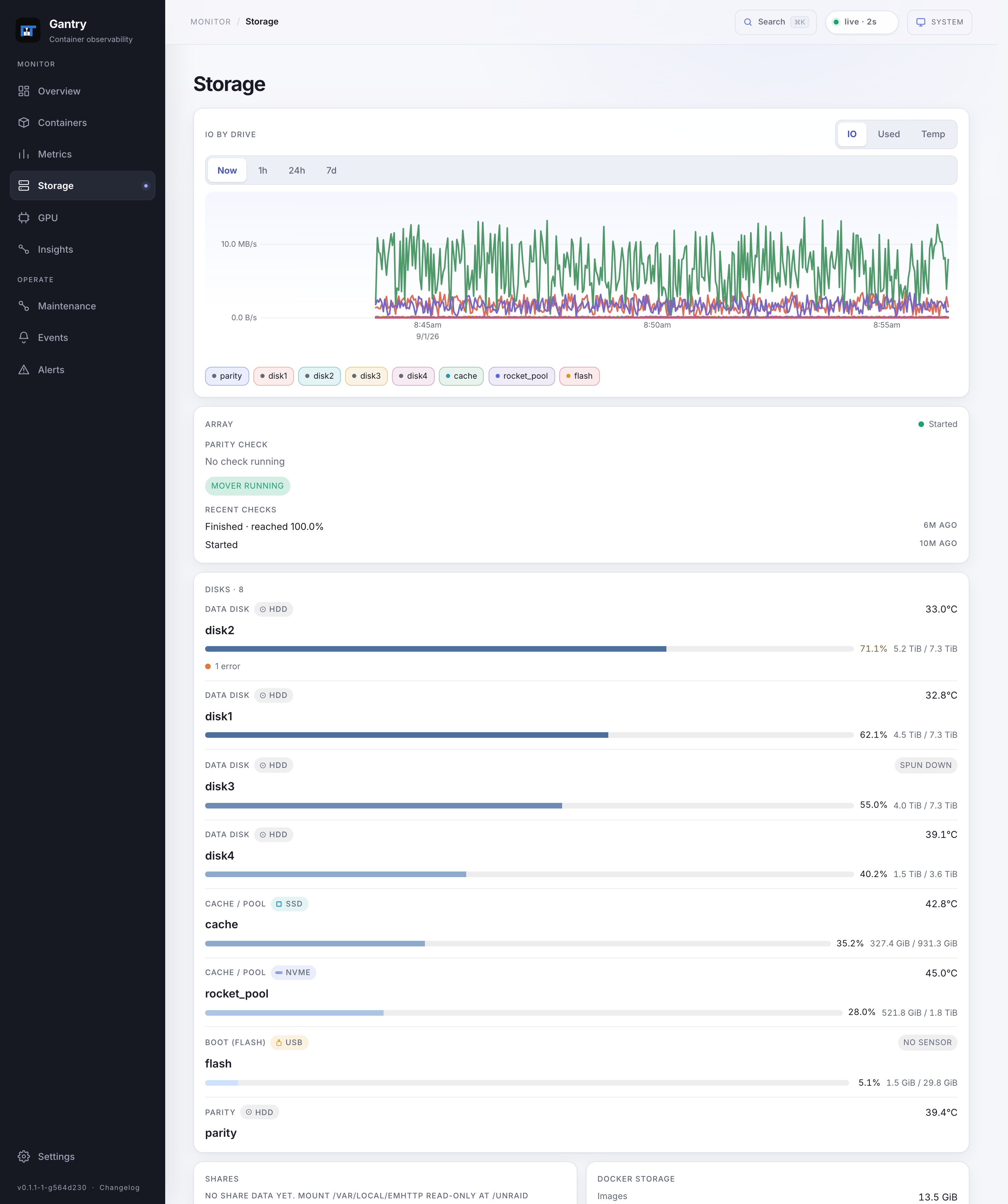
Storage — the array and pools with parity status, and every drive as a card with usage, temperature and errors.
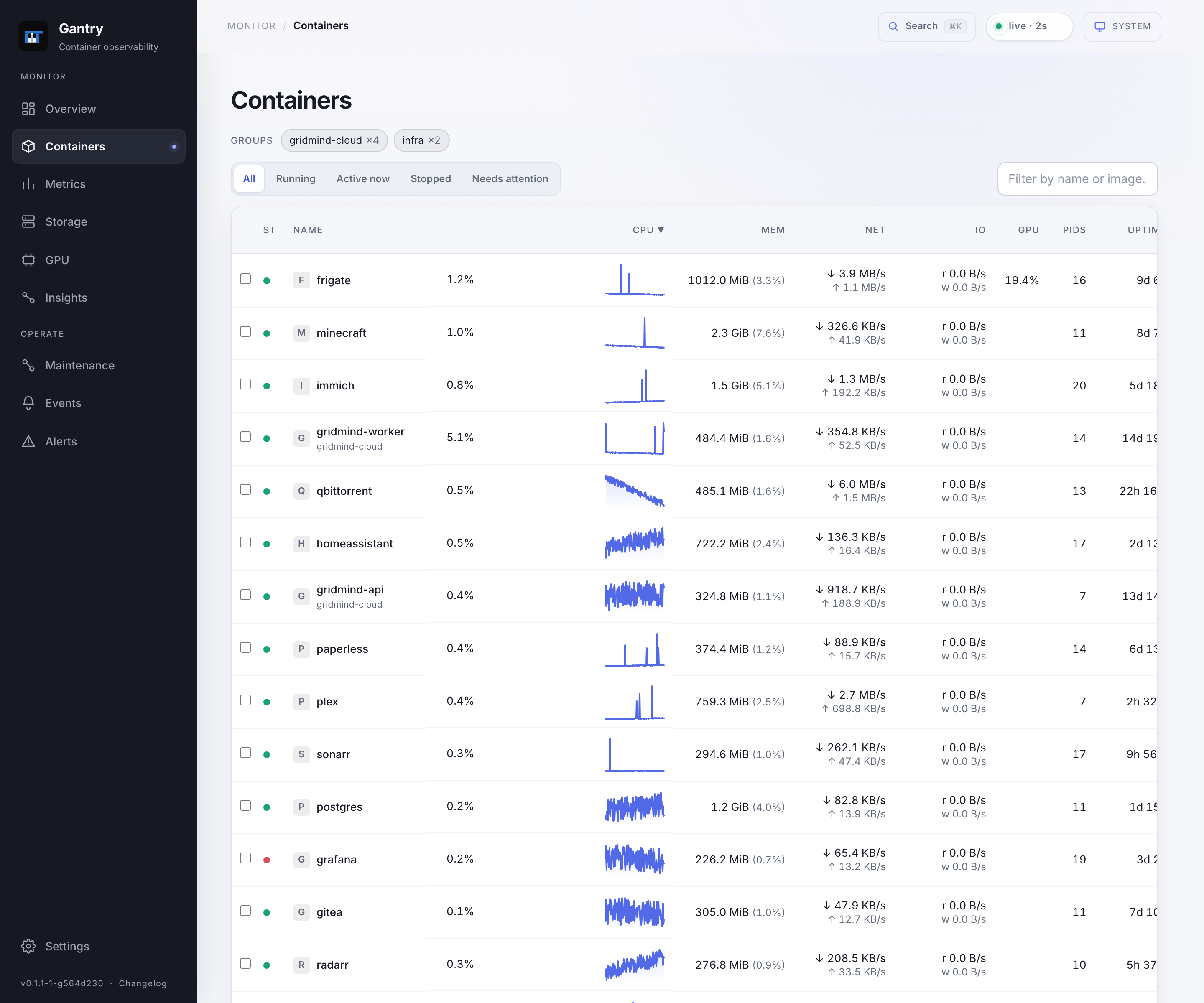
Containers — the sortable, filterable fleet with per-container CPU, memory, network, disk IO and GPU.
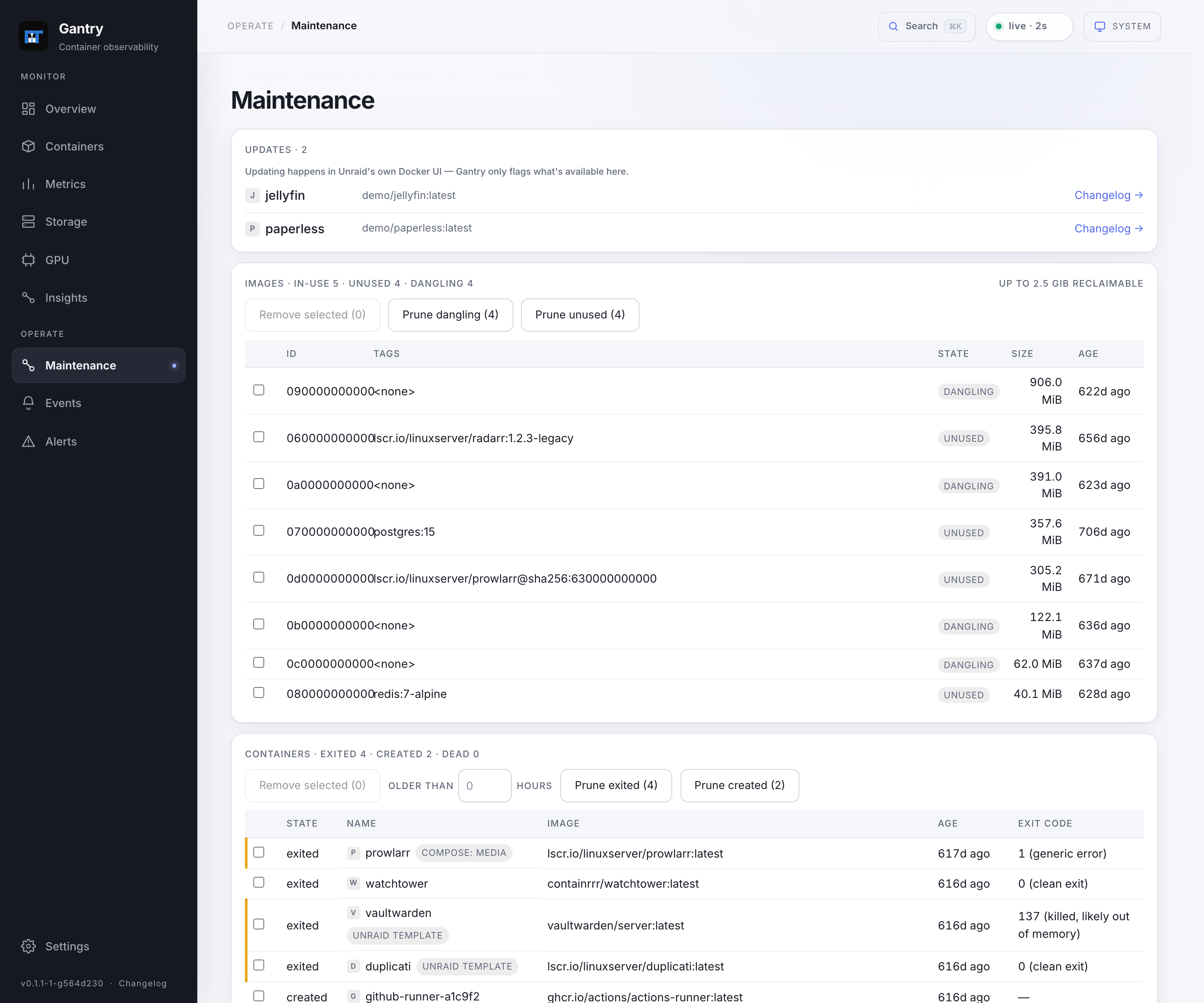
Maintenance — reclaim space from unused images and clear stopped containers, every deletion behind a confirmation.
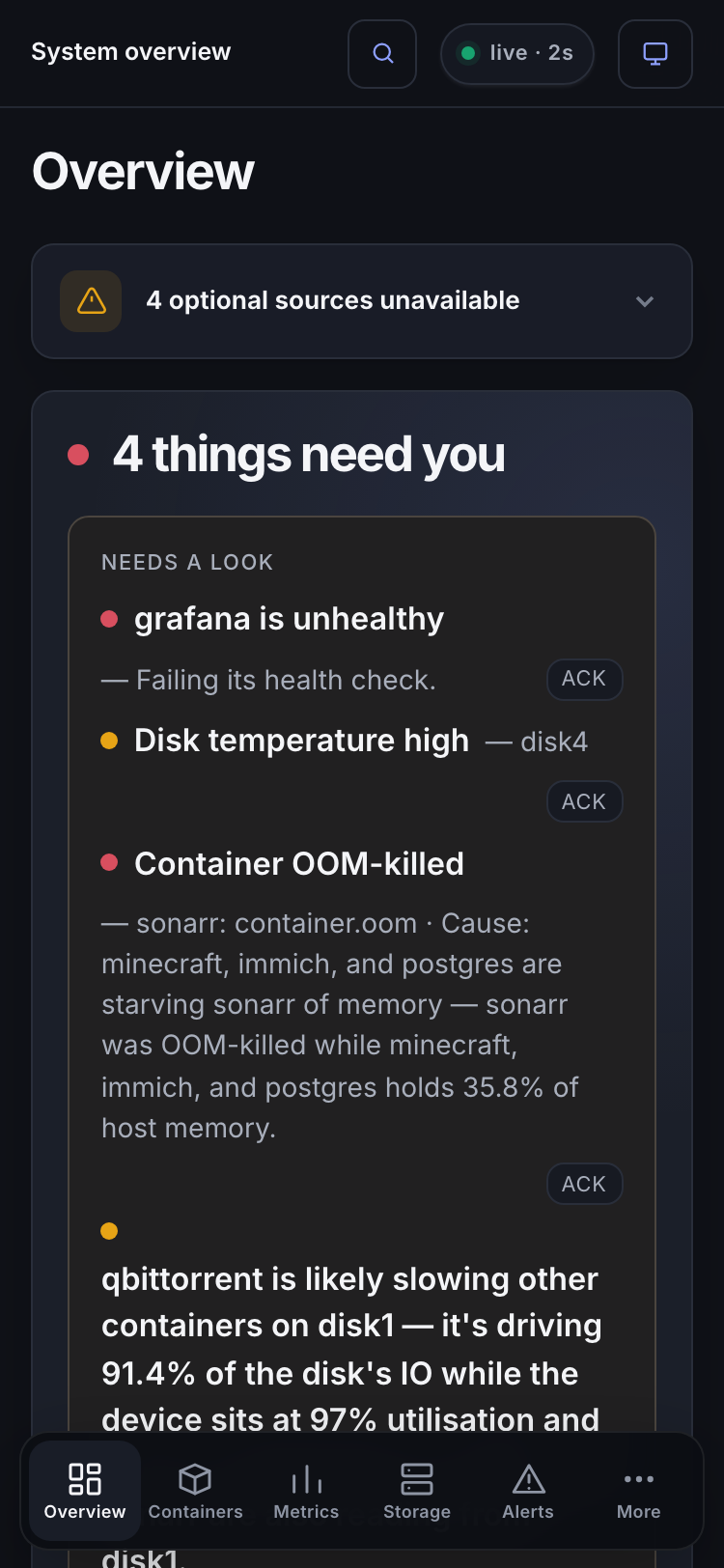
Mobile — the overview as cards, with a bottom nav, on a phone.
Features
- Live fleet view. Every container's CPU, memory, network, disk IO, PIDs, uptime and GPU in one sortable, filterable table — cards on mobile — each with an inline sparkline and a health dot. Compose projects group automatically; save your own custom groups.
- Per-container drill-down. Click any container for multi-line history — CPU (with throttling and allocation limits), memory, network, disk IO, per-engine GPU and PSI — from live down to 30 days, with event markers, an anomaly banner, its storage placement, and an embedded log viewer.
- Metrics. Per-resource leaderboards (CPU, memory, network, disk IO, GPU) over Now / 1h / 24h / 7d, average or peak, above a multi-line chart that overlays every container against the host total.
- Storage. Array and pools with parity status, ETA, speed and recent history; every drive as a card with its role, media type, capacity, temperature and error count; shares and Docker storage; per-drive charts for IO, usage or temperature.
- GPU. Per-engine utilization (render, video, video-enhance, copy) with per-container attribution — Intel and AMD work out of the box via DRM
fdinfo, no/dev/dripassthrough; host PID access andSYS_PTRACEare used for attribution; Nvidia is optional and adds VRAM. - Insights. An explainable cross-container engine that states, in a full sentence, when one container is likely slowing another or the array — with a confidence level, an interaction map, and an evidence drawer showing the actual numbers (culprit IO share, device utilization, await, victim stall). It runs on proxy signals without PSI, and uses kernel-measured stall when you enable
psi=1. - Alerts. Threshold and event rules with real hysteresis — separate trip and clear thresholds, and separate sustain and clear windows — delivered to Unraid's own notification center and/or outbound webhooks, with dedup, re-notify, silencing and flap-guard. A firing alert quotes the matching insight when one exists. Filter brief unhealthy-container notifications during backups with a configurable health delay.
- Maintenance. See which images have an update available (with changelog links; Unraid's own tooling does the actual update), reclaim space from unused and dangling images, and remove stopped containers — every deletion behind a confirmation dialog that itemizes exactly what will go.
GANTRY_READ_ONLY=1turns all of it off. - Compare. Select any set of containers and chart them together — synced multi-line charts per metric, always-live group totals, and groups you can save.
- The rest. A command palette, an always-on connection-health indicator, acknowledge / silence / dismiss with preset durations, a first-run username and password login, light and dark themes, a reduced-motion preference, and Gantry graphing its own CPU and memory so you can see exactly what it costs.
Install
Community Applications
Open the Apps tab in Unraid, search Gantry, and click Install. The template pre-fills every mount and flag below, so a stock install needs no edits — install it, open the web UI, done.
docker run
Everything the Community Applications template does, spelled out, so it can be reproduced or audited by hand:
docker run -d \
  --name=gantry \
  --label net.unraid.docker.icon=https://raw.githubusercontent.com/smidley/gantry/main/template/gantry-icon.png \
  --pid=host \
  --cap-add=SYS_PTRACE \
  -p 8380:8380 \
  -v /var/run/docker.sock:/var/run/docker.sock:ro \
  -v /sys:/host/sys:ro \
  -v /var/local/emhttp:/unraid:ro \
  -v /tmp/notifications:/notify:rw \
  -v /var/lib/docker/unraid-update-status.json:/updates/unraid-update-status.json:ro \
  -v /mnt/user/appdata/gantry:/config:rw \
  --restart=unless-stopped \
  ghcr.io/smidley/gantry:latest
Then open http://<your-unraid-ip>:8380/. On first run, copy the setup code from docker logs gantry, then create a username and password.
What each mount is for
| Purpose | Host path | Container path | Mode | Why |
|---|---|---|---|---|
| Web UI | — | — | TCP 8380 |
The dashboard. |
| Docker socket | /var/run/docker.sock |
/var/run/docker.sock |
ro | Container inventory, stats, health, logs and events — and the channel for the opt-in Maintenance cleanup you trigger yourself. |
| Host sysfs | /sys |
/host/sys |
ro | hwmon sensors, GPU/DRM info, and the cgroup v2 fast path for per-container accounting. |
| Unraid state | /var/local/emhttp |
/unraid |
ro | Array status, parity progress, disk/pool/share info — the same files the Unraid webGUI reads. |
| Notifications | /tmp/notifications |
/notify |
rw | Lets Gantry hand alerts to Unraid's own notification center. |
| Update status | /var/lib/docker/unraid-update-status.json |
/updates/unraid-update-status.json |
ro, optional | Container update-available flags. Missing or omitted: the flags just don't show, nothing else breaks. |
| Config | /mnt/user/appdata/gantry |
/config |
rw | Gantry's own SQLite database and settings — the only place it stores anything persistent. |
/notify and /config are the only writable mounts; everything else is mounted read-only. The extra parameters are --pid=host (so Gantry can attribute GPU and resource usage to the right container) and --cap-add=SYS_PTRACE (to read other containers' /proc/<pid>/fdinfo). Gantry runs with Docker's default capabilities plus SYS_PTRACE; it writes its database into the appdata folder (owned by the array, not root) using DAC_OVERRIDE, which is part of that default set. Gantry does not run --privileged and does not use host networking.
The update-status line is the one mount you can drop if that file doesn't exist on your system. Images are linux/amd64; every tagged release publishes semver-tagged images to ghcr.io/smidley/gantry.
See docs/install.md for the line-by-line reference.
Sign in
Gantry requires a login. The first time you open it, a one-time setup screen asks for the owner code from local startup logs, then a username and password; every visit after that is a normal login. It's a single local account stored on your own box (the password is argon2id-hashed, never stored in the clear) — no cloud, no external service. Sessions expire after 8 hours idle or 24 hours total; browser session restoration can preserve a cookie after closing. See docs/install.md for the full reference.
- Preseed it (headless / Community Applications). Set both
GANTRY_USERNAMEandGANTRY_PASSWORD(the password masked in the CA form) to create the login at first boot and skip the setup screen. Minimum 8 characters. Changing either later changes the login and signs out every session; removing them never turns authentication off. - Run it open.
GANTRY_AUTH=noneturns authentication off entirely — only for a fully trusted network.GANTRY_AUTH=proxyturns Gantry's own login off for installs already behind an authenticating reverse proxy (authelia, SWAG, nginxauth_request). Any other value keeps the login required.
Optional setup
All optional — Gantry works with none of them.
- PSI. Add
psi=1to your flash boot device's syslinux append line and reboot. Optional; it sharpens the Insights engine with kernel-measured stall data. See docs/psi.md. - Nvidia GPU. Add
--runtime=nvidiato Extra Parameters and setNVIDIA_VISIBLE_DEVICES=all— nothing else, and no special image tag; the standard image already carries the loadernvidia-smineeds. Without both, the GPU panel simply shows an enable hint — never an error. (Intel and AMD need nothing extra.) See docs/nvidia.md. GANTRY_READ_ONLY=1. Disables Docker cleanup and webhook-target changes. Local settings and account management remain available.
Security
- Read-only for monitoring. Gantry reads container stats, logs and container/disk state, and never touches your array configuration.
- Maintenance is the only exception, and it's opt-in. The only Docker mutations Gantry exposes are the cleanup you trigger from the Maintenance view: removing dangling and unused images, and stopped containers. Every deletion is behind a confirmation dialog, never force-removes, never touches a running container, and never removes volumes. Setting
GANTRY_READ_ONLY=1disables all of it. - Privileged integration. The full installation runs as root with Docker's default capabilities plus
SYS_PTRACEand host PID visibility. A read-only Docker socket mount does not restrict Docker API writes: raw socket access is a host-level trust boundary.GANTRY_READ_ONLYguards Gantry's handlers; it cannot contain a compromised process holding that socket. - Owner-bound login. Initial setup requires a code from local logs or preseeded credentials. Passwords are argon2id-hashed. Live and log streams end when a session is revoked or expires. Mutations require a custom request header, bodies and queries have resource budgets, and browser security headers apply to every response.
- Isolated monitoring and TLS. Use the monitoring deployment for a non-root web process with a restricted Docker intermediary. Bind native installations with
GANTRY_BIND_ADDRESS=127.0.0.1; bind Docker's published port to127.0.0.1. The TLS proxy example keeps built-in authentication. Proxy-auth mode requires authentication at the proxy and an unreachable direct application port.
How it's built
Gantry is a single static Go binary on a minimal distroless base (gcr.io/distroless/base-debian12) — no shell, no package manager, nothing to log into, about 35 MB. The base is there for one reason: it carries a glibc dynamic loader, so the nvidia-smi the Nvidia runtime mounts into the container has an interpreter to run under (a bare scratch image has none — see docs/nvidia.md). Intel, AMD and CPU-only boxes don't need it and aren't affected. Gantry embeds a Svelte SPA, streams updates over Server-Sent Events instead of polling, and keeps history in an embedded SQLite database with configurable retention. It also graphs its own CPU and memory in Settings, so its footprint is never a mystery.
Documentation
- docs/install.md — the full install reference: every mount and flag, the required login and first-run setup, PSI, Nvidia, read-only, and the proxy/none auth modes.
- docs/nvidia.md — how Nvidia support works (why the image is built on a glibc base), how to enable it, and how to validate per-container GPU stats on real hardware.
- docs/psi.md — what Pressure Stall Information is, what Gantry uses it for, and how to enable it on Unraid.
- CHANGELOG.md — what shipped in each release.
License
MIT — see LICENSE. Gantry is a personal open-source project. Bug reports and questions are welcome in the issue tracker.
Categories
Related apps
Explore more like this
Explore allDetails
ghcr.io/smidley/gantry:latestRuntime arguments
- Web UI
http://[IP]:[PORT:8380]/- Network
bridge- Shell
sh- Privileged
- false
- Extra Params
--pid=host --cap-add=SYS_PTRACE
Template configuration
The Gantry web UI. After the container starts, open http://your-unraid-ip:8380/.
- Target
- 8380
- Default
- 8380
- Value
- 8380
Mounted read-only. Lets Gantry list containers and read their stats, health, logs, and start/stop/health events. The socket is also how the Maintenance view removes dangling images and stopped containers when you explicitly ask it to (confirmable, and disabled by GANTRY_READ_ONLY); nothing else is written through it.
- Target
- /var/run/docker.sock
- Default
- /var/run/docker.sock
- Value
- /var/run/docker.sock
Read-only. Gives Gantry hwmon sensor readings (fan speed, voltages, temperatures), GPU/DRM info, and the cgroup v2 fast path for per-container accounting. Gantry never writes to /sys.
- Target
- /host/sys
- Default
- /sys
- Value
- /sys
Read-only. The same emhttp state files the Unraid webGUI itself reads -- array status, parity check progress, disk and pool assignments, and shares. Gantry never modifies your array configuration through this mount.
- Target
- /unraid
- Default
- /var/local/emhttp
- Value
- /var/local/emhttp
Read-write -- the only other read-write mount besides Config below. Gantry drops alert notifications here so they show up in Unraid's own notification center (and anywhere you already route Unraid notifications: email, Pushover, Discord, etc). If this mount is missing or unwritable, Gantry keeps running; it just can't deliver Unraid-native alerts, and the Alerts view says so plainly instead of failing silently.
- Target
- /notify
- Default
- /tmp/notifications
- Value
- /tmp/notifications
Read-only and optional. Unraid's own record of which containers have an update available. If this file doesn't exist on your system, or you remove this mount, Gantry simply won't show update-available flags -- nothing else is affected. Safe to delete if Docker Manager complains about it.
- Target
- /updates/unraid-update-status.json
- Default
- /var/lib/docker/unraid-update-status.json
- Value
- /var/lib/docker/unraid-update-status.json
Read-write. Gantry's own SQLite database and settings -- the only place it stores anything persistent. This is the second of the two read-write mounts; everything else above is read-only.
- Target
- /config
- Default
- /mnt/user/appdata/gantry
- Value
- /mnt/user/appdata/gantry
Optional, only if you have an Nvidia GPU passed through with the Nvidia Driver plugin. Set to all, and also add --runtime=nvidia to Extra Parameters above, to enable per-container GPU utilization. Leave both blank/absent for a CPU-only box -- the GPU panel shows a plain enable hint, never an error.
Optional, for a hands-off install. Set this together with GANTRY_PASSWORD below to create the login automatically at first boot and skip the one-time setup screen. Leave both blank to choose the username and password yourself the first time you open the web UI. Both must be set together; only one is ignored (Gantry falls back to the setup screen). Changing it later changes the username and signs out all sessions. This is the login username, not a secret -- it is stored as entered.
Optional, for a hands-off install. Set this together with GANTRY_USERNAME above (at least 8 characters) to create the login at first boot and skip the setup screen. Applied at every container start: changing it here changes the password and signs out all sessions. IMPORTANT: removing this variable later does NOT turn authentication off -- Gantry keeps the stored login so a template edit can never reopen the dashboard. You can change the login any time in Settings > Access. Only the derived argon2id hash is stored, never the password itself.
Optional. Leave blank (or set to auto) for the normal behavior: Gantry requires a login, set on first run or preseeded via GANTRY_USERNAME/GANTRY_PASSWORD above. Set to none to turn authentication OFF entirely -- only for a fully trusted network. Set to proxy if a reverse proxy (authelia, SWAG, nginx auth_request...) already authenticates every request in front of Gantry, which switches Gantry's own login off. Any other value is ignored and treated as auto (login required).
Off by default. Set to 1 to make Gantry's write-capable paths (docker mutations, webhook-target configuration) refuse to run -- a kill switch for anyone who wants a strictly read-only monitor. Independent of authentication: read-only limits what a logged-in user can do, the login limits who gets in at all. Leave blank for normal use.