
All apps · 0 apps
fritzfluxdb
Docker app from GillBates' Repository
Overview
Readme
View on GitHub

fritzFluxDB
Lightweight daemon that collects metrics from your FRITZ!Box and pushes them into InfluxDB or QuestDB.




[!NOTE] Built on the shoulders of giants. This project is a fork of and would not exist without bb-Ricardo/fritzinfluxdb by Ricardo Bartels. The original laid the entire foundation for collecting FritzBox metrics into InfluxDB — a huge thank you for the years of work behind it. 🙏
✨ Why fritzFluxDB?
- Three storage backends — InfluxDB v1, InfluxDB v2, and QuestDB, with optional server-side downsampling on QuestDB so long-term history doesn't cost full-resolution storage forever.
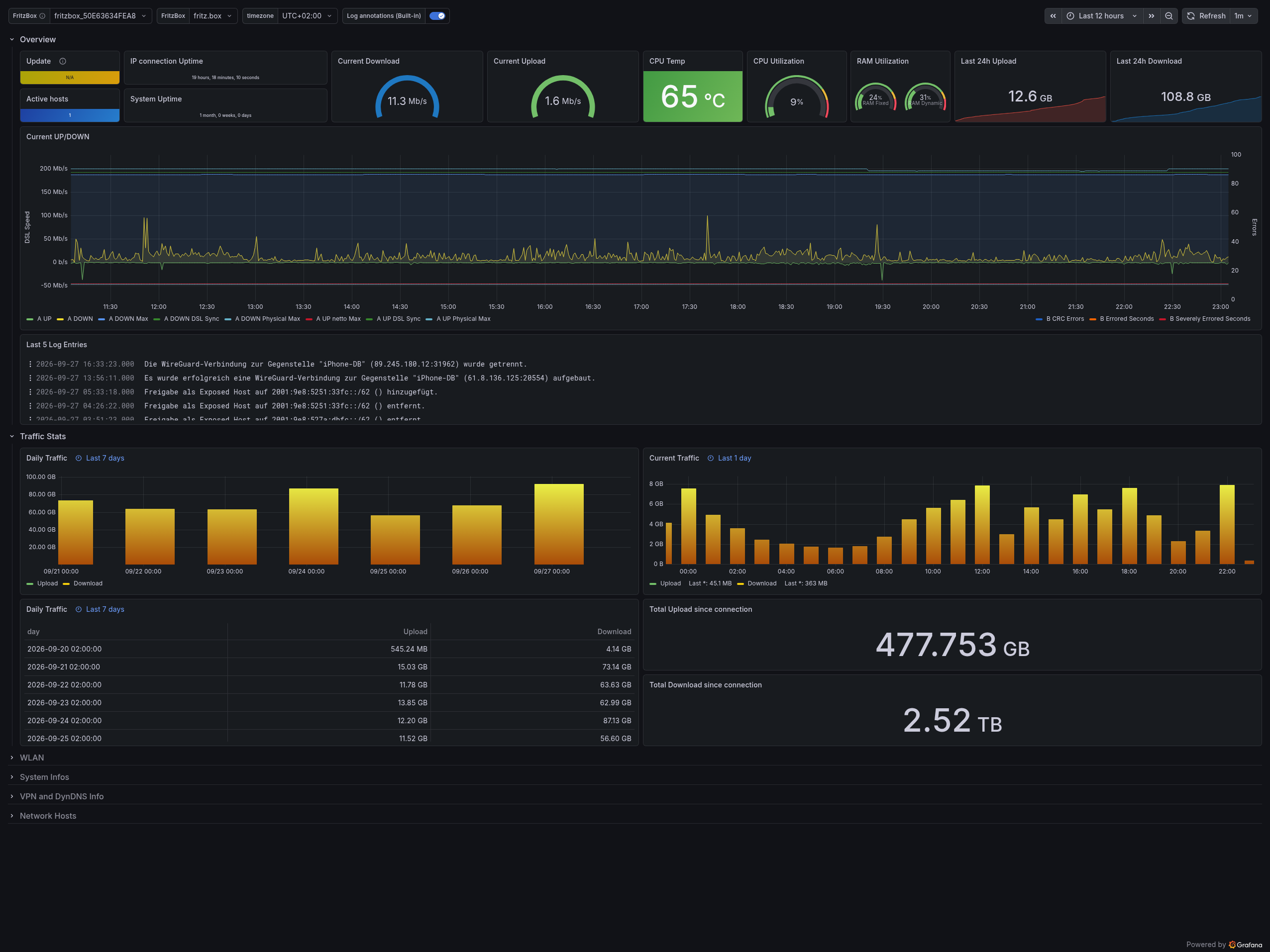
- Sees more of your box — TR-064 and Lua service data, home automation devices, call logs, VPN, network hosts, and system stats, all in one daemon.
- Built for containers — a small multi-arch (
amd64/arm64) image, non-root, Tini as PID 1, with a watchdog and graceful shutdown that flushes buffered measurements instead of dropping them. - Ready-made Grafana dashboards — system, call log, router log, and home automation dashboards ship in the repository for every supported backend.
🔀 Why this fork?
This fork modernises the original codebase around operational reliability, a smaller,
container-first footprint, and QuestDB as a third storage backend. It runs on Python 3.13,
writes database data through a single lightweight httpx client rather than dedicated InfluxDB
clients, buffers and flushes measurements on shutdown, and backs off exponentially on HTTP errors
instead of retrying at a fixed interval.
See the full comparison in the documentation, including what the original still does that this fork intentionally dropped.
🚀 Quick Start
test -e .env || cat .env.example .env.influxdb.example > .env
# edit .env with your FRITZ!Box settings and an existing InfluxDB endpoint
# use INFLUXDB_TLS_ENABLED=true for HTTPS, or explicitly allow HTTP credentials on a trusted network
docker compose -f docker/docker-compose.influx2.yml up -d
The Compose file starts fritzfluxdb only. An InfluxDB v2 instance must already be running and reachable from its container; credential transmission over plaintext is disabled by default. For QuestDB, InfluxDB v1, or a local Python run instead, see Installation and Docker Compose.
📚 Documentation
Configuration reference, QuestDB downsampling, the polling model, Grafana dashboard setup, and the architecture all live in the docs site — this README stays short on purpose.
- Installation
- Environment variables
- Storage backends (InfluxDB, QuestDB, downsampling)
- Grafana dashboards
- Local development
- Changelog
📄 License
MIT — © 2026 Gill-Bates
Disclaimer: This project is an independent open-source tool and is not affiliated with, endorsed by, or in any way associated with FRITZ.com GmbH, Alt-Moabit 95, 10559 Berlin, or the FRITZ!Box product line. FRITZ!Box is a registered trademark of FRITZ.com GmbH.

Categories
Download Statistics
Related apps
Explore more like this
Explore allDetails
giiibates/fritzfluxdb:latestRuntime arguments
- Network
bridge- Shell
bash- Privileged
- false
- Extra Params
--restart unless-stopped
Template configuration
Container timezone (e.g. Europe/Berlin, Etc/UTC). Fritz!Box timezone is auto-detected at startup.
- Target
- TZ
- Default
- Europe/Berlin
- Value
- Europe/Berlin
Log level.
- Target
- LOG_LEVEL
- Default
- INFO|DEBUG|WARNING|ERROR
- Value
- INFO
Hostname or IP of the Fritz!Box on your LAN.
- Target
- FRITZBOX_HOSTNAME
- Default
- 192.168.178.1
- Value
- 192.168.178.1
Fritz!Box login username.
- Target
- FRITZBOX_USERNAME
Fritz!Box login password.
- Target
- FRITZBOX_PASSWORD
Fritz!Box TR-064 port.
- Target
- FRITZBOX_PORT
- Default
- 49000
- Value
- 49000
Connection timeout in seconds.
- Target
- FRITZBOX_CONNECT_TIMEOUT
- Default
- 10
- Value
- 10
Seconds between TR-064 poll cycles (minimum 10).
- Target
- FRITZBOX_REQUEST_INTERVAL
- Default
- 10
- Value
- 10
Custom tag to identify the Fritz!Box.
- Target
- FRITZBOX_BOX_TAG
- Default
- fritz.box
- Value
- fritz.box
Fallback timezone for Fritz!Box log timestamps if auto-detection fails.
- Target
- FRITZBOX_TIMEZONE
- Default
- Europe/Berlin
- Value
- Europe/Berlin
Leave empty to exclude VPN address metrics; enter 1, true, yes, or on to include them.
- Target
- FRITZFLUXDB_INCLUDE_VPN_ADDRESS_METRICS
Target database. InfluxDB v1 needs a database name; InfluxDB v2 needs token, organization and bucket; QuestDB needs a host and optionally HTTP basic credentials.
- Target
- DB_TYPE
- Default
- influxdb_v1|influxdb_v2|questdb
- Value
- influxdb_v1
Hostname or IP of the target database (InfluxDB or QuestDB). A full URL is also accepted, e.g. https://questdb.example.com, in which case TLS and port are taken from the URL.
- Target
- INFLUXDB_HOSTNAME
Leave EMPTY to use the correct default for the selected Database Type (8086 for InfluxDB, 9000 for QuestDB). Only set this if your database listens on a non-standard port.
- Target
- INFLUXDB_PORT
Enable TLS (HTTPS) for the database connection.
- Target
- INFLUXDB_TLS_ENABLED
- Default
- false|true
- Value
- false
Verify the database TLS certificate.
- Target
- INFLUXDB_VERIFY_TLS
- Default
- true|false
- Value
- true
Allow sending credentials/token over plain HTTP to a remote host (trusted networks only).
- Target
- INFLUXDB_ALLOW_PLAINTEXT_CREDENTIALS
- Default
- false|true
- Value
- false
InfluxDB measurement resp. QuestDB table name (overridden by the Fritz!Box serial number if available).
- Target
- INFLUXDB_MEASUREMENT_NAME
- Default
- fritzbox
- Value
- fritzbox
InfluxDB v1 database name. Required for DB_TYPE=influxdb_v1, ignored otherwise.
- Target
- INFLUXDB_DATABASE
Username for InfluxDB v1 or QuestDB basic authentication (optional). For InfluxDB v1 it must be set together with the password.
- Target
- INFLUXDB_USERNAME
Password for InfluxDB v1 or QuestDB basic authentication (optional). For InfluxDB v1 it must be set together with the username.
- Target
- INFLUXDB_PASSWORD
InfluxDB v2 API token (required for DB_TYPE=influxdb_v2). QuestDB Open Source does not support API tokens.
- Target
- INFLUXDB_TOKEN
InfluxDB v2 organization name. Required for DB_TYPE=influxdb_v2, ignored otherwise.
- Target
- INFLUXDB_ORGANIZATION
InfluxDB v2 bucket. Required for DB_TYPE=influxdb_v2, ignored otherwise.
- Target
- INFLUXDB_BUCKET
QuestDB only: TTL in days, applied only to a table without an existing TTL; 0 disables it (requires QuestDB 8.2.2+). Ignored for InfluxDB.
- Target
- INFLUXDB_DATA_RETENTION_DAYS
- Default
- 365
- Value
- 365
Optional QuestDB rollup profile: low (30 days raw, 1-minute rollup), medium (7 days raw, 1-minute rollup), or high (1 day raw, 5-minute rollup). Leave empty to disable.
- Target
- QUESTDB_DOWNSAMPLING