
FriRSS
Docker app from Fripix's Repository
FriRSS is a modern, self-hosted, customizable web frontend for FreshRSS.
Requirements
Overview
Readme
View on GitHub
FriRSS
Your FriRSS, your rules.
A self-hosted, customizable web frontend for FreshRSS.
Français English Deutsch Español Italiano Português Nederlands Polski Українська 简体中文
GHCR Docker pulls Unraid Community Apps amd64 and arm64
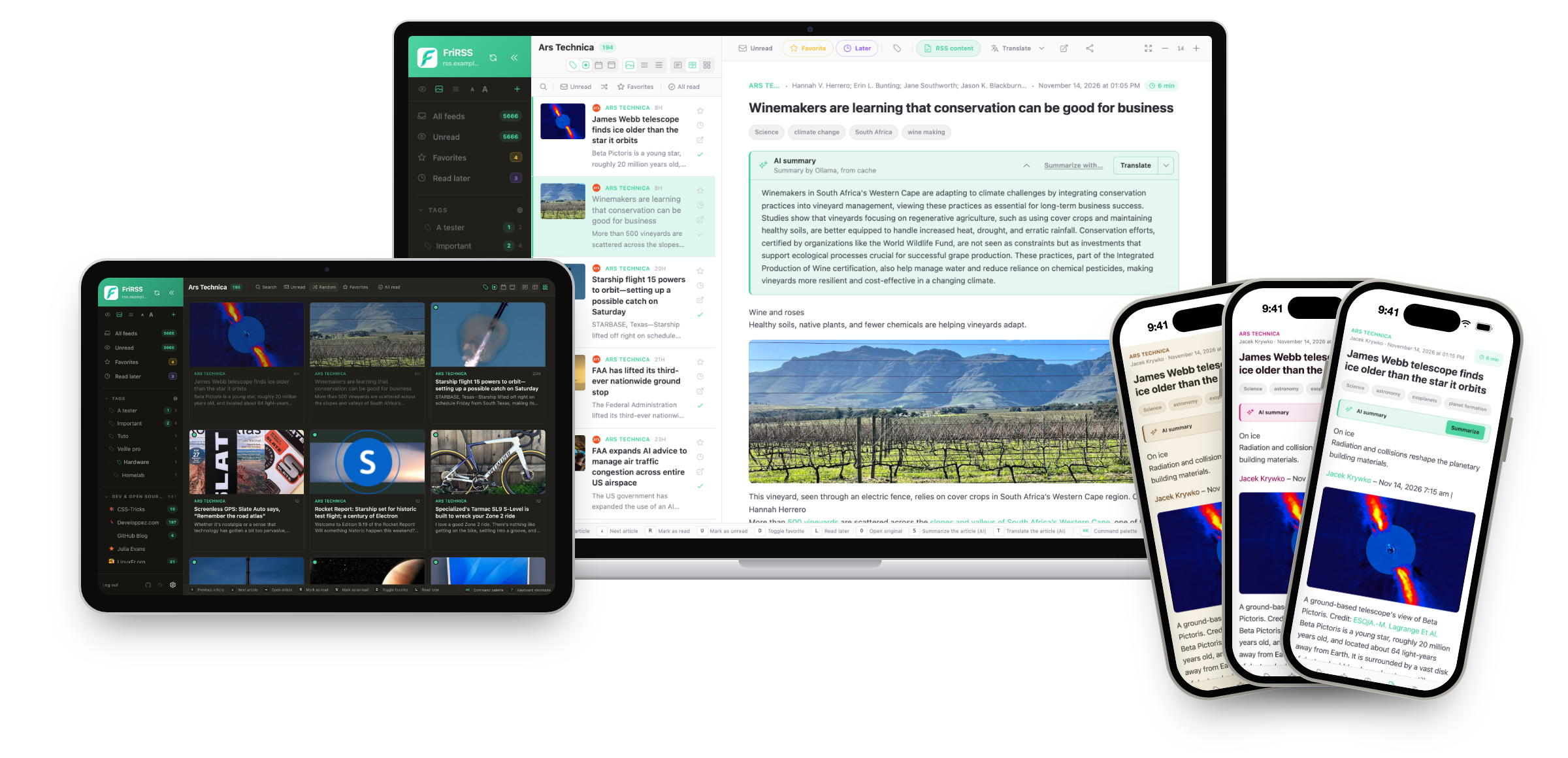
FriRSS is a new interface for your FreshRSS: FreshRSS keeps fetching and storing your feeds, FriRSS is where you read them.
[!IMPORTANT] FriRSS needs a working FreshRSS. It is an interface only: it does not fetch feeds and cannot run on its own. Install FreshRSS first, turn its API on, then install FriRSS.
Preview
Website
Live demo

Username
fridemo· Password6wVQj3Q@2Qz@
- Runs on a small server.
- Feeds cannot be added or removed, and no FreshRSS server can be connected.
- Preferences reset every 30 minutes, so themes and layout return to their defaults.
- Read state and favorites are shared with everyone else visiting.
- AI features (summaries, translations) are turned off.
The demo is there to try the interface.
About
FreshRSS has an excellent engine: solid, self-hosted, great at fetching and storing feeds. Its built-in interface just wasn't for me, and none of the alternatives fit what I wanted — so I built my own.
FriRSS sits on top of FreshRSS through its Google Reader API and replaces only the interface.
A note in the interest of honesty: this is a personal project and I'm not a developer. FriRSS was built largely by "vibe coding" — describing what I wanted to an AI assistant and iterating. Use it in that spirit.
Features
- Three panes on desktop, an app on your phone — install it as a PWA, with swipe gestures and pull-to-refresh.
- The full article, even when a feed only sends a summary.
- Offline reading, images included.
- Search that really filters the view you are in, read articles included.
- Mark everything as read — with Undo. Nothing destructive happens in one click.
- Optional AI summaries and translations with the provider you choose, a local Ollama or a cloud one. Nothing is sent anywhere by default.
- Three columns, two or a grid, oldest first or at random, chosen feed by feed.
- Keyboard first — a command palette (⌘K / Ctrl+K) and twelve reassignable shortcuts.
- Make it yours — six themes, your own colors and font sizes, your app name and logo.
- Tags and sub-tags, categories and feeds, organised from the preferences.
- Several users, single sign-on (OIDC) and several FreshRSS servers.
- 10 languages, and one Docker image for amd64 and arm64.
Every feature in detail: the website, and docs/FEATURES.md (in French).
Installation
You need:
- a working FreshRSS — FriRSS does nothing without it — with API access on (Settings → Authentication) and an API password (Settings → Profile);
- a machine with Docker.
FreshRSS on your home network (192.168.x.x, a container name)? Add -e PROXY_INTERNAL_HOSTS=192.168.1.20 — its host or IP only — to the command below, or connecting fails.
mkdir -p frirss-data
docker run -d --name frirss \
  --restart unless-stopped \
  -p 8080:80 \
  -v "$PWD/frirss-data:/app/data" \
  -e TZ=Europe/Zurich \
  ghcr.io/fripix/frirss:latest
- Open
http://localhost:8080and create the first account — it becomes the administrator. - Connect your FreshRSS: its address, your FreshRSS username and the API password.
Install with an AI assistant. Paste this into ChatGPT, Claude or the assistant you use. It reads a guide written for it and walks you through, one step at a time:
Read https://raw.githubusercontent.com/Fripix/Frirss/main/docs/INSTALL-WITH-AI.md and help me install FriRSS step by step.
Docker Compose, Unraid, reverse proxy, updating and backups: the installation guide.
Configuration
Every setting is optional. The environment variables — time zone, user, FreshRSS on a private network, reverse proxy, Redis cache, limits — are listed by need in docs/CONFIGURATION.md.
Security
FreshRSS credentials are encrypted at rest and never reach the browser; all FreshRSS traffic goes through an authenticated same-origin proxy with an anti-SSRF guard; registration is closed by default. The full list, and how to report an issue: SECURITY.md.
Feedback & Contributing
FriRSS is a personal project, but feedback, ideas and contributions are welcome.
- Found a bug, or have an idea? Open an issue — there are guided forms for both.
- A question, or something to talk through? Start a discussion
- Want to contribute code? Pull requests are welcome.
- Wondering what changed?
CHANGELOG.md
License
Categories
Download Statistics
Related apps
Explore more like this
Explore allLinks
Details
ghcr.io/fripix/frirss:latestRuntime arguments
- Web UI
http://[IP]:[PORT:80]- Network
bridge- Shell
sh- Privileged
- false
Template configuration
Port used to access the FriRSS web interface.
- Target
- 80
- Default
- 8787
- Value
- 8787
Persistent FriRSS data, including the SQLite database.
- Target
- /app/data
- Default
- /mnt/user/appdata/frirss
- Value
- /mnt/user/appdata/frirss
User ID the FriRSS process runs as. Unraid uses 99 (nobody).
- Default
- 99
- Value
- 99
Group ID the FriRSS process runs as. Unraid uses 100 (users).
- Default
- 100
- Value
- 100
Node.js environment.
- Default
- production
- Value
- production
Internal FriRSS data directory.
- Default
- /app/data
- Value
- /app/data
Container timezone, for example Europe/Zurich or America/New_York. Leave empty to use UTC.
- Target
- TZ
Public URL of your FriRSS instance, for example https://rss.example.com.
- Target
- FRIRSS_BASE_URL
Optional Redis connection URL for shared caching.
- Target
- REDIS_URL
Background sync interval in minutes, for pre-filling the cache with no browser open. Requires the Redis URL above: without it, this value does nothing. Set 0 to disable.
- Target
- CACHE_SYNC_INTERVAL
- Default
- 15
- Value
- 15
Set this if FreshRSS runs on a private address - 192.168.x.x, 10.x.x.x, or a container name on a shared Docker network. FriRSS blocks private targets by default so that a logged-in user cannot aim it at your NAS, your database or a cloud metadata endpoint; listing your FreshRSS host here allows that one address. Comma-separated. Leave empty when your FreshRSS URL is public. Without it, connecting fails and the container log shows: POST /api/proxy 403
- Target
- PROXY_INTERNAL_HOSTS
Optional. Rewrites a public FreshRSS URL to an internal one, as from=to, comma-separated. Useful when FriRSS and FreshRSS share a Docker network: it cuts the round trip through your reverse proxy. Hosts listed here are trusted automatically.
- Target
- PROXY_REWRITES