
All apps · 0 apps
FriRSS
Docker app from Fripix's Repository
Overview
Readme
View on GitHub


Preview
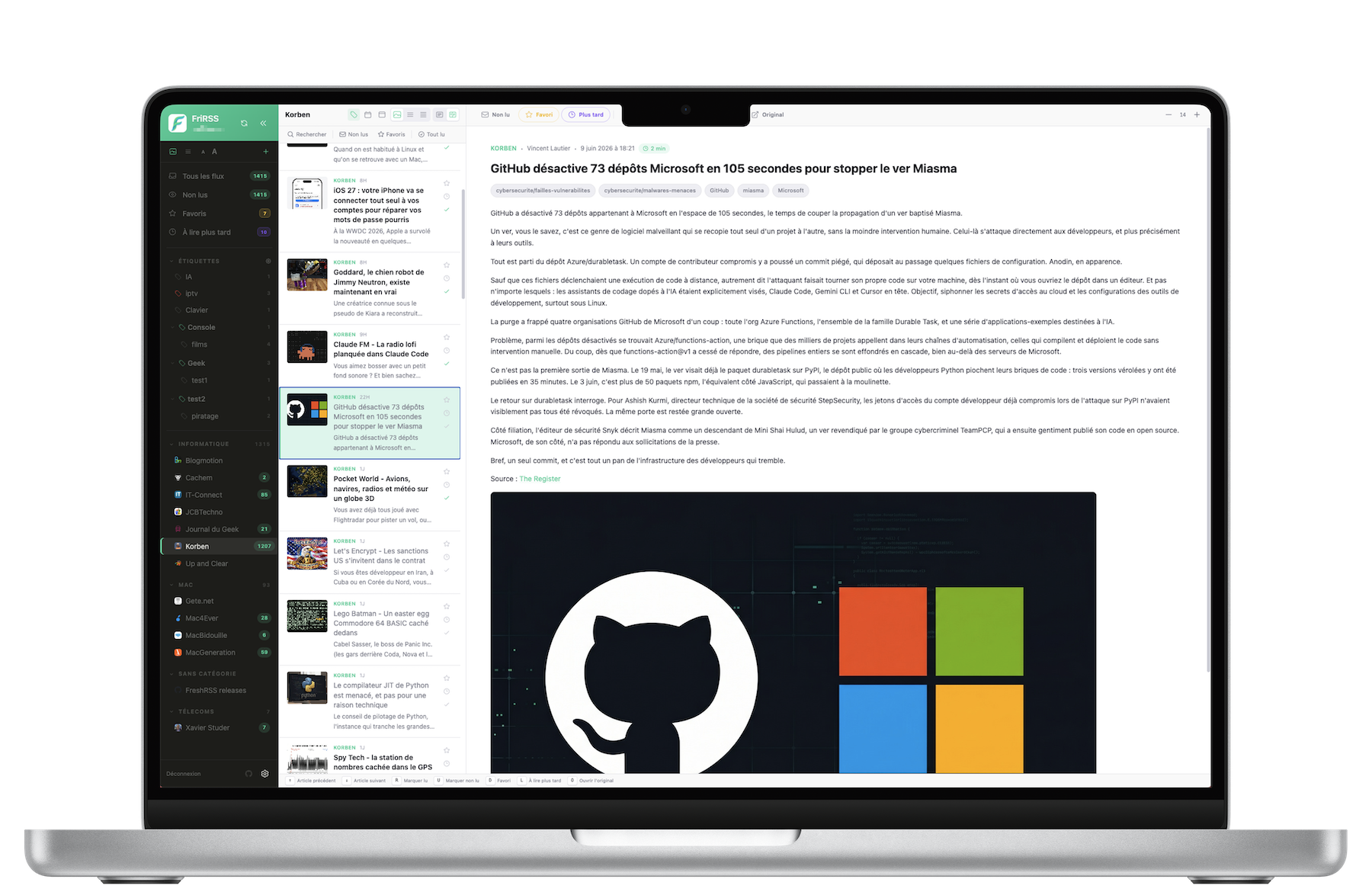
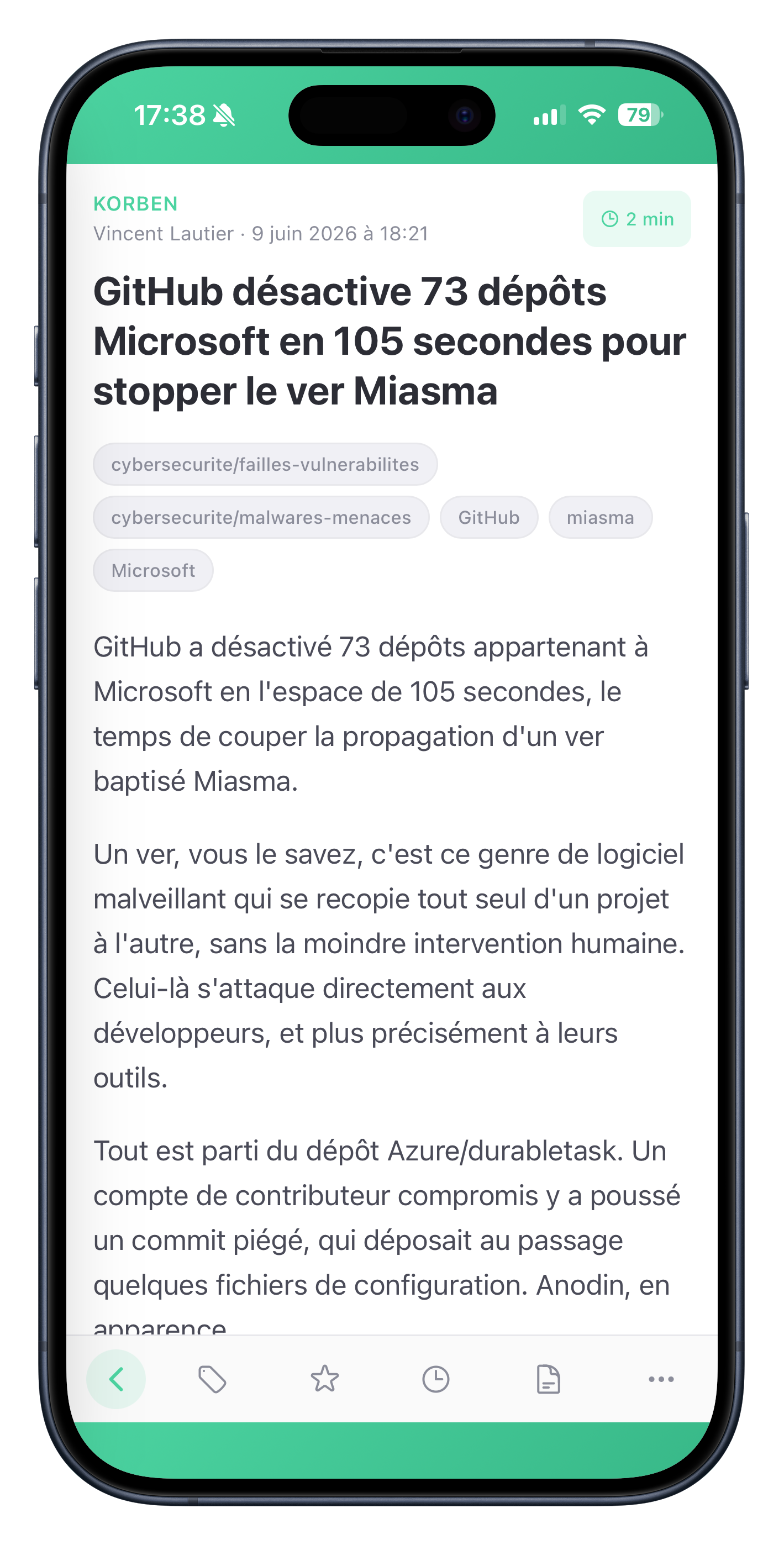
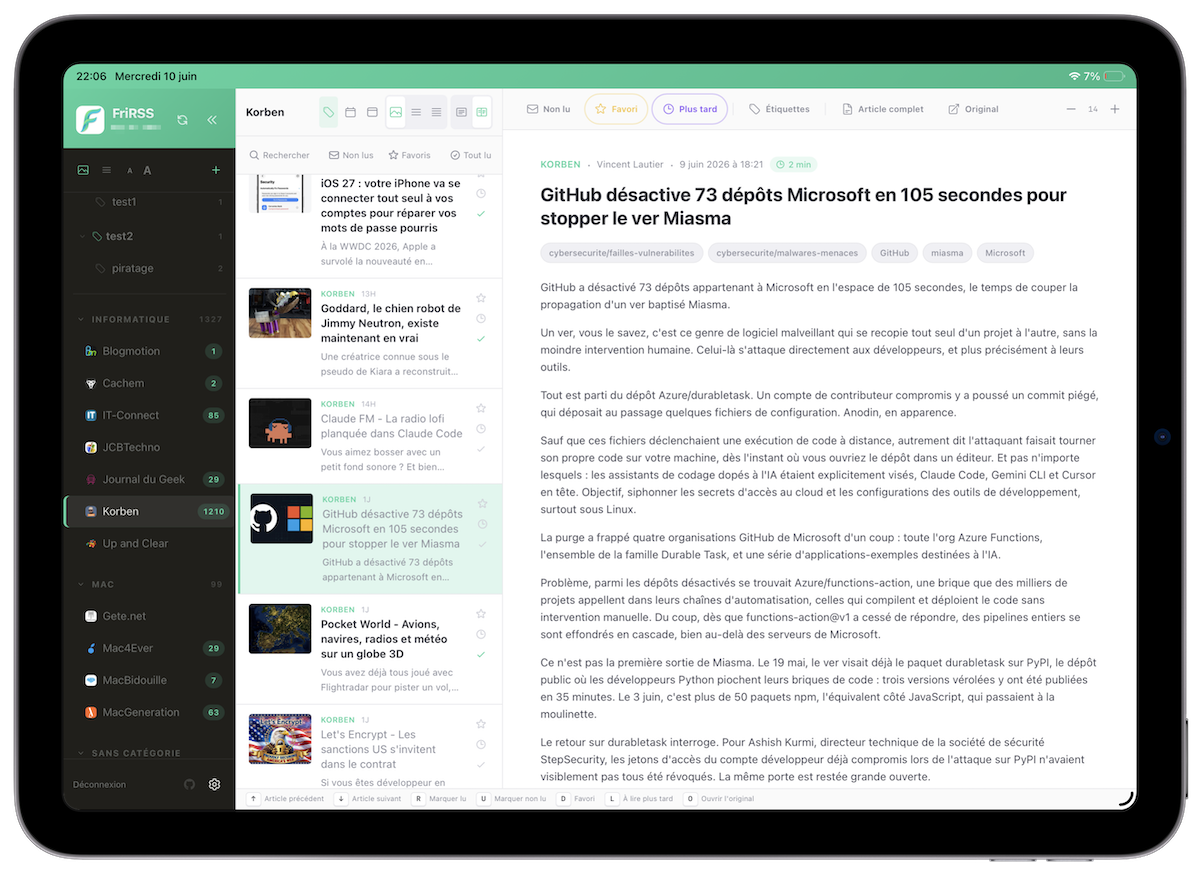
Live demo
Username
fridemo· Password6wVQj3Q@2Qz@
- Runs on a small server with no Redis cache.
- Feeds cannot be added or removed, and no FreshRSS server can be connected.
- Preferences reset every 30 minutes, so themes and layout return to their defaults.
- Read state and favorites are shared with everyone else visiting.
The demo is there to try the interface.
About
FreshRSS has an excellent engine: solid, self-hosted, great at fetching and storing feeds. Its built-in interface just wasn't for me, and none of the alternatives fit what I wanted — so I built my own.
FriRSS sits on top of FreshRSS through its Google Reader API and replaces only the interface.
A note in the interest of honesty: this is a personal project and I'm not a developer. FriRSS was built largely by "vibe coding" — describing what I wanted to an AI assistant and iterating. Use it in that spirit.
Features
Reading
- Three panes on desktop, and an installable PWA on mobile with swipe navigation, swipe actions and pull-to-refresh.
- Full-text extraction (Readability) when a feed only ships a summary — cached, so re-reads are instant. On a feed set to auto-extract, the next articles are warmed ahead of you, images included, so swiping lands on a page that is already whole.
- Offline reading. Articles stay readable without a connection, images included. Favorites and read-later are kept automatically; a one-tap Prepare offline sweep covers the last 30 days across every feed.
- Favorites, read-later, read/unread, with all / unread / favorites filters. The unread-only choice is remembered per feed — or, if you prefer, one choice applies to every feed (Preferences → General → Unread filter).
- Ticking an article read clears it from the unread list — instantly, in every layout including the compact one. Opening an article leaves its row where it is, so you keep your place; only a deliberate tick removes one. If the server refuses the write, the row comes back and says so.
- Open an article at its source — an icon on each row opens the origin site in a new tab and selects the article, so it is marked read and keeps its place in the list. For the feeds you would rather read on the site itself.
- Right-click an article — or long-press it on touch, or press the keyboard Menu key — for a menu: open at source, mark read or unread, favorite, read later, copy link. On a phone it opens as a bottom sheet; a middle click opens the article at its source directly.
- Search and infinite scroll, scoped to the view you are actually in — and the last five queries are offered back, per server.
- Mark as read while scrolling, optionally: an article is marked once it has left the top of the list. Off by default, never during a search.
- Share an article or copy its link from the reading pane — the system share sheet on mobile, the clipboard elsewhere.
- Resume where you left off — your last feed and filter come back on reopen, with an unobtrusive offline / back-online indicator.
Keyboard and reach
- A command palette on ⌘K / Ctrl+K: jump to a feed, a category, a label, a view, switch FreshRSS server, or run an action. Accents are ignored, so securite finds Sécurité.
- Ten reassignable shortcuts, and ? opens a sheet listing them with the keys you actually configured.
- Menus by long press on touch — a feed in the sidebar opens its menu (rename, open site, auto-extract, unsubscribe), an article opens its own, with 44pt rows.
- Built to be used without a mouse — a visible focus ring throughout, 44pt touch targets, screen-reader names on icon-only buttons, and reduced motion honored everywhere.
Make it yours
Almost everything is yours to tweak:
- Six themes ship with it — Default, Riso, Paper and High Contrast in light, Night and Desk in dark — and FriRSS can follow your system's light/dark setting, switching between the two you pick.
- Themes are yours to make — full control over all 36 colors and 7 font sizes; create, save, export, import and share your own.
- Element colors — recolor the sidebar, accents, panels, links, article text and more, individually.
- Font sizes — independent sizes for article titles, summaries, source names and the reading body.
- Layout — resizable columns, density and spacing, date separators, feed icons, toggles for the source label and top bar, and a desktop/mobile switch on tablets.
- Row action icons — show or hide each of the four icons on an article row (favorite, read later, open at source, mark read), one by one, from the new Layout section.
- A sidebar that remembers — collapsed sections stay collapsed, and feeds with nothing unread can be hidden to declutter long lists.
- Categories & feeds — rename or delete a category and move feeds between categories, right from the preferences.
- Labels & sub-labels — a nestable tagging system: create, rename, color, drag to organize, group under parents, with per-label article counts.
- Branding — set your own app name and logo.
- 10 languages — the interface follows your browser language on first run.
Accounts, SSO & multi-server
- Multi-user with admin/user roles — each person keeps their own feeds and settings.
- Single sign-on via OIDC (tested with Authentik); existing accounts are linked by email, and passkeys work through your provider.
- Multi-server — connect several FreshRSS instances and switch between them, from the top bar or the command palette.
Self-hosting
- Optional Redis cache (stale-while-revalidate) and a background pre-fetch worker for instant loads.
- Encrypted backup and restore — one passphrase-protected file rebuilds a whole instance, including on a brand-new one.
- FreshRSS tokens encrypted at rest; same-origin proxy (no CORS) with an anti-SSRF guard.
- Ships as a single Docker image (nginx + Node) with SQLite storage, built for amd64 and arm64 (Raspberry Pi, 64-bit OS).
Installation
FriRSS is a frontend for FreshRSS, so you need a running FreshRSS instance with the Google Reader API enabled (Settings → Authentication → Allow API access).
mkdir -p frirss-data
docker run -d --name frirss \
  -p 8080:80 \
  -v "$PWD/frirss-data:/app/data" \
  -e TZ=Europe/Zurich \
  ghcr.io/fripix/frirss:latest
The database lands in a frirss-data folder right where you ran the command. The same image is on Docker Hub as fripix/frirss:latest if you prefer it, and a ready-to-edit docker-compose.yml is included.
Then open http://localhost:8080 and create the first account — it becomes the administrator. Registration then closes: new instances refuse sign-ups by default, and you open them again from Preferences → Administration when you want to invite someone. Connect your FreshRSS server next: its URL, your FreshRSS username, and the API password from FreshRSS → Settings → Profile.
Is your FreshRSS on a private address? Most self-hosted instances are —
http://192.168.1.20:8080,http://freshrsson a Docker network, anything your router alone can reach. The backend refuses private targets by default, so a logged-in user cannot aim it at your NAS, your database, or a cloud metadata endpoint. Trust your FreshRSS host explicitly and the block lifts for that one address:-e PROXY_INTERNAL_HOSTS=192.168.1.20Skip it and connecting fails while the container log shows
POST /api/proxy 403. Public FreshRSS URLs need nothing.
The first launch generates the JWT secret and the token-encryption key and stores them in the database, so backing up the data folder backs up everything — see Backups.
Configuration
| Variable | Description | Default |
|---|---|---|
PUID |
User id the Node process runs as (the data directory is adopted on start) | 1000 |
PGID |
Group id for the same process | 1000 |
FRIRSS_BASE_URL |
Public base URL — recommended behind a reverse proxy; fixes OIDC redirect URIs | derived |
FRIRSS_DATA_DIR |
SQLite database directory | /app/data |
PROXY_REWRITES |
public→internal URL rewrites for the backend proxy (from=to, comma-separated) |
— |
PROXY_INTERNAL_HOSTS |
Anti-SSRF allowlist: private hosts the proxy may reach directly, comma-separated. Needed when FreshRSS sits on a LAN or Docker address | — |
REDIS_URL |
Enables the read cache (stale-while-revalidate); empty disables it | — |
CACHE_ARTICLES_PER_FEED |
Articles kept per feed in the cache | 50 |
CACHE_TTL |
Cache key expiry, in seconds | 86400 |
CACHE_SYNC_INTERVAL |
Background pre-fetch interval in minutes (0 disables; needs REDIS_URL) |
0 |
CACHE_SYNC_ACTIVE_DAYS |
Only pre-fetch for users seen in the last N days | 7 |
CACHE_SYNC_PARALLEL_USERS |
Users pre-fetched in parallel | 3 |
FRIRSS_REFRESH_MAX_FEEDS |
Number of feeds to refresh per button press (non-integer or < 1 → default) | 1000 |
FRIRSS_PROXY_RATE_LIMIT |
Proxied and article-extraction requests allowed per user per minute — one shared budget (0 disables; non-integer or negative → default) |
600 |
CORS_ORIGIN |
Allowed CORS origin(s) — only for split front/back deployments | — |
Since 1.4.10 the server extracts article text: the browser asks
GET /api/extractfirst, and falls back to extracting the page itself only when that route is missing (an older backend), refuses the page, is busy, or cannot reach it. WithREDIS_URLset the result is cached by URL rather than by account, so a page is extracted once for the whole instance instead of once per device: a second device, or another user reading the same feed, gets it instantly. Devices asking for the same cold page at the same moment are coalesced onto a single extraction, so the origin site sees one request rather than one per reader. Without Redis the route still runs — it simply keeps nothing, so the next device pays for the extraction again. Either way the work now happens on the server rather than on every phone, so budget for it: parsing a page blocks the single Node process that serves the whole instance for tens of milliseconds up to about a second on the largest pages. That work is bounded — one page is parsed at a time and at most five requests may be in flight or waiting, beyond which the server says so and the browser extracts locally — but the bound is a queue, not extra capacity: a busy instance is one where phones do the parsing again.
Single sign-on is configured at runtime in Preferences → Administration (issuer, client ID, client secret).
Backups
Two things are worth backing up, and they are not the same thing.
The encrypted export
Preferences → Administration → Backup produces a single file holding everything FriRSS knows about itself: accounts and their password hashes, the configured FreshRSS servers, their tokens and the key that decrypts them, preferences, and instance settings. It does not hold your articles — those live in FreshRSS.
That file is therefore enough to impersonate every account on the instance, which is why a passphrase is mandatory (12 characters minimum). Lose the passphrase and the file is permanently unusable. There is no recovery path, by design; keep it somewhere other than next to the file.
Restore it from the same screen, or from the first-run screen of a fresh instance — which makes it a migration tool as much as a backup. Either way you see what the file contains before committing: when it was made, which version produced it, how many accounts and servers. Restoring replaces the instance's contents entirely and signs everyone out.
Environment variables are recorded in the file and shown at restore time, but never applied: they belong to the deployment, not to the backup. Copy them into your compose file yourself.
The data directory
/app/data holds frirss.db and its write-ahead log — the JWT secret and the
token-encryption key included. Backing up that volume backs up the instance.
To take a copy out of a running container, use the snapshot script rather than
cp:
docker exec frirss node scripts/backup-db.js /app/data/backups
It goes through SQLite's .backup() API: atomic, and safe while the server is
writing. Copying frirss.db on its own is not a valid backup — the most
recent writes live in the -wal file beside it.
Locked out of every admin account? docker exec -it frirss node scripts/reset-password.js sets a new password from the terminal.
Security
FriRSS holds the credentials to your FreshRSS server, so a few things are not optional:
- FreshRSS passwords and tokens are encrypted at rest and never reach the browser — not in a response, not in a URL, not in a log.
- All FreshRSS traffic goes through an authenticated same-origin proxy with an anti-SSRF guard: it rejects targets that resolve to a private address, and re-checks every redirect hop.
- The app page and its static assets carry a Content-Security-Policy (
script-src 'self') along withX-Frame-Options,X-Content-Type-OptionsandReferrer-Policy. - The backend runs unprivileged in the container (
PUID/PGID, 1000 by default): code execution inside Node no longer owns the data directory, where the JWT secret and the token-encryption key live. The data directory is adopted on start, so upgrading needs no action. - Registration is closed by default. Only the very first account — the administrator — can be created without someone opening sign-ups in Preferences → Administration.
- Proxied requests are rate-limited per user (
FRIRSS_PROXY_RATE_LIMIT), so an account cannot turn the backend into an open relay. - JWT verification is pinned to HS256, and the runtime image ships neither npm nor its dependency tree — nothing there is executed, and it was the source of most reported CVEs.
Dependency and image scans run on every push and can be launched by hand; the current state is in GitHub Actions.
Found a security issue? Please follow SECURITY.md rather than opening a public issue.
Feedback & Contributing
FriRSS is a personal project, but feedback, ideas and contributions are welcome.
- Found a bug, or have an idea? Open an issue — there are guided forms for both.
- A question, or something to talk through? Start a discussion
- Want to contribute code? Pull requests are welcome.
- Wondering what changed?
CHANGELOG.md

License
Install FriRSS on Unraid in a few clicks.
Find FriRSS in Community Apps on your Unraid server, review the template, and click Install. Unraid handles the Docker app or plugin setup from the published template.
Requirements
Categories
Download Statistics
Related apps
Explore more like this
Explore allDetails
ghcr.io/fripix/frirss:latestRuntime arguments
- Web UI
http://[IP]:[PORT:80]- Network
bridge- Shell
sh- Privileged
- false
Template configuration
Port used to access the FriRSS web interface.
- Target
- 80
- Default
- 8787
- Value
- 8787
Persistent FriRSS data, including the SQLite database.
- Target
- /app/data
- Default
- /mnt/user/appdata/frirss
- Value
- /mnt/user/appdata/frirss
User ID the FriRSS process runs as. Unraid uses 99 (nobody).
- Default
- 99
- Value
- 99
Group ID the FriRSS process runs as. Unraid uses 100 (users).
- Default
- 100
- Value
- 100
Node.js environment.
- Default
- production
- Value
- production
Internal FriRSS data directory.
- Default
- /app/data
- Value
- /app/data
Container timezone, for example Europe/Zurich or America/New_York. Leave empty to use UTC.
- Target
- TZ
Public URL of your FriRSS instance, for example https://rss.example.com.
- Target
- FRIRSS_BASE_URL
Optional Redis connection URL for shared caching.
- Target
- REDIS_URL
Background sync interval in minutes, for pre-filling the cache with no browser open. Requires the Redis URL above: without it, this value does nothing. Set 0 to disable.
- Target
- CACHE_SYNC_INTERVAL
- Default
- 15
- Value
- 15
Set this if FreshRSS runs on a private address - 192.168.x.x, 10.x.x.x, or a container name on a shared Docker network. FriRSS blocks private targets by default so that a logged-in user cannot aim it at your NAS, your database or a cloud metadata endpoint; listing your FreshRSS host here allows that one address. Comma-separated. Leave empty when your FreshRSS URL is public. Without it, connecting fails and the container log shows: POST /api/proxy 403
- Target
- PROXY_INTERNAL_HOSTS
Optional. Rewrites a public FreshRSS URL to an internal one, as from=to, comma-separated. Useful when FriRSS and FreshRSS share a Docker network: it cuts the round trip through your reverse proxy. Hosts listed here are trusted automatically.
- Target
- PROXY_REWRITES