
All apps · 0 apps

FormCraft
Docker app from Sha The IT Guy's Repository
Overview
Readme
View on GitHub🏗️ FormCraft
The developer-first, self-hosted form builder. Deployable in seconds via Docker. Infinite fields, total privacy.




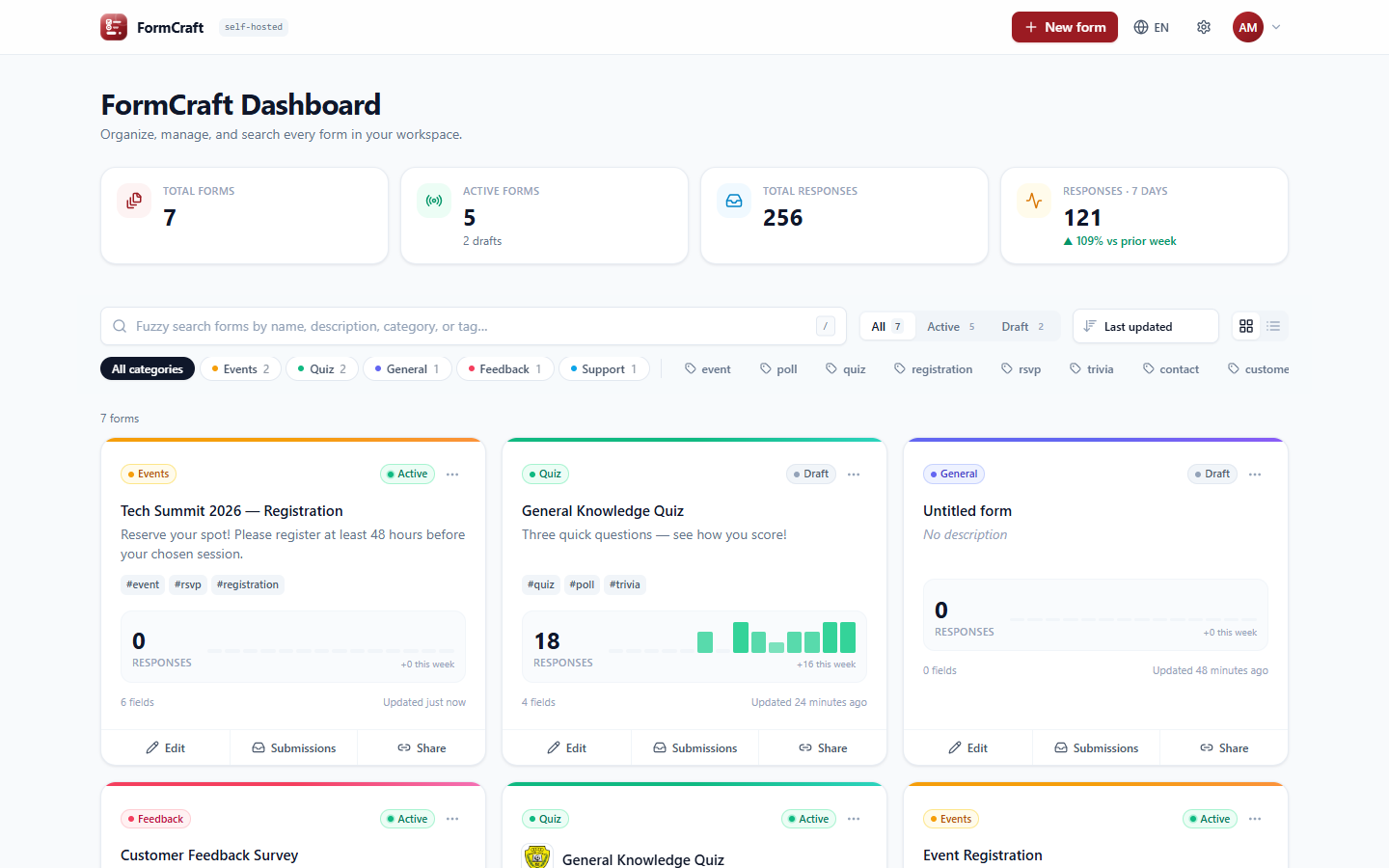
FormCraft is an open-source form builder you run on your own hardware. Build forms with a drag-and-drop editor, share a link, and review responses in a built-in data table. Your data stays in a database you control: a bundled PostgreSQL container, your own PostgreSQL server, or an embedded SQLite file.
🚀 Install
The installer checks Docker, asks a few questions, writes .env, and starts everything.
Linux / macOS
curl -fsSL https://raw.githubusercontent.com/shatheitguy/formcraft/main/install.sh | bash
Windows (PowerShell)
irm https://raw.githubusercontent.com/shatheitguy/formcraft/main/install.ps1 | iex
The installer downloads only the compose files and pulls the published image ghcr.io/shatheitguy/formcraft, so you don't need git or a source build. You can also run it from a checkout: ./install.sh or .\install.ps1.
Image tag: latest follows main, is multi-arch (amd64 and arm64) and works with both SQLite and PostgreSQL; it picks the engine from DATABASE_URL on start. Pin a release with e.g. 1.0.0 via FC_IMAGE_TAG in .env. (postgres is kept as an alias of the same image for older installs.)
Unraid: the template lives in shatheitguy/unraid-templates with my other Unraid templates (https://raw.githubusercontent.com/shatheitguy/unraid-templates/main/formcraft.xml). It uses SQLite in /mnt/user/appdata/formcraft with PUID 99 and PGID 100.
What the installer asks
1. Which database?
| Option | What happens |
|---|---|
| Install a PostgreSQL database for me (recommended) | Starts a separate formcraft-db container (PostgreSQL 16) with its own volume. You choose the database name and user; the password is generated (28 random characters) unless you type one. Optionally adds Adminer, a web UI for browsing the database, at :8080. |
| Use my own PostgreSQL server | You enter host, port, database, user, password and SSL mode. The installer tests the connection before continuing. The database must already exist, and the user needs permission to create tables. For a server on the same machine, use the host host.docker.internal. |
| Embedded SQLite | A single container; the database is one file on the formcraft-data volume. Fine for personal use and small teams. |
2. Network: the dashboard port (default 3000), and whether every form gets its own dedicated port (default range 4001-4050; see below).
3. Demo data: whether to load the four demo forms with sample responses.
When the installer finishes, open http://localhost:3000 and create the admin account. All tables are created automatically on first start.
Where things are stored
| What | Where |
|---|---|
| Your answers and database credentials | .env next to docker-compose.yml (permissions 600; a timestamped .env.bak.* is kept when you reconfigure) |
| Bundled PostgreSQL data | Docker volume formcraft-db |
| SQLite file and uploaded logos/covers | Docker volume formcraft-data (/app/data) |
| Admin and user accounts | the User table in your chosen database (passwords are scrypt hashes) |
Re-run the installer at any time to change the database or ports. Choosing No at "Reconfigure?" just rebuilds and restarts with the current settings. Switching engines doesn't migrate existing data, so download Settings → Database → JSON export first.
Without the installer
docker compose up -d starts a single container with embedded SQLite (pulling ghcr.io/shatheitguy/formcraft:latest). To build from source instead, swap image: for the commented build: block in docker-compose.yml. The other options are overlays, selected via COMPOSE_FILE in .env or with -f:
# bundled PostgreSQL (needs FC_DB_PROVIDER=postgresql, FC_DATABASE_URL and POSTGRES_PASSWORD in .env)
docker compose -f docker-compose.yml -f docker-compose.db.yml up -d
# add dedicated per-form ports
docker compose -f docker-compose.yml -f docker-compose.ports.yml up -d
Variable (.env) |
Default | Description |
|---|---|---|
FC_DB_PROVIDER |
sqlite |
sqlite or postgresql (informational; the image picks the engine from FC_DATABASE_URL). |
FC_DATABASE_URL |
file:/app/data/formcraft.db |
Connection string, e.g. postgresql://user:pass@host:5432/formcraft?schema=public (URL-encode special characters in the password) |
FC_PORT |
3000 |
Dashboard port on the host |
FC_FORM_PORTS |
4001-4050 |
Per-form port pool (used by docker-compose.ports.yml) |
FC_SEED_DEMO |
true |
Load demo forms into an empty database |
FC_UPDATE_CHECK |
true |
Check GitHub every 6 hours for a newer FormCraft and notify admins under the bell. false turns it off (nothing else is sent) |
POSTGRES_DB / POSTGRES_USER / POSTGRES_PASSWORD |
formcraft / formcraft / required |
Credentials for the bundled PostgreSQL container |
COOKIE_SECURE |
auto | true forces secure cookies; false disables them. By default this follows X-Forwarded-Proto. |
🔗 Unique links, dedicated ports & custom domains
Every form automatically gets:
- A unique link,
/f/<link-name>, generated from the title (for example/f/customer-feedback-survey-09039). You can rename it in Share. - A dedicated port from the form port range, assigned the moment the form is created. FormCraft listens on that port and serves only that form at
/. Admin pages, login and the API return 404 there. Ports start and stop live, with no container restart. - An optional custom domain. Point a hostname at the form's port with any reverse proxy (Cloudflare Tunnel example below).
- A QR code for any of these links, downloadable as PNG (1024 px) or SVG for print.
In Share, Test port checks that the port is inside the pool, not used by another form, free on the server (or served by FormCraft), returns this form, and is reachable from your own browser, which shows whether Docker or your firewall actually exposes it. Find free port suggests the next port that's free everywhere.
The whole port range is published up front (docker-compose.ports.yml). Docker can't add a port mapping to a running container, so every new form is reachable immediately on the next free port.
Cloudflare Tunnel example (cloudflared in the same Docker network):
ingress:
  - hostname: feedback.example.com
    service: http://formcraft:4002
  - hostname: forms.example.com      # the admin dashboard
    service: http://formcraft:3000
  - service: http_status:404
If you expose ports directly instead of through a tunnel, restrict the range with your firewall as needed.
Backups
- Full system backup (Settings → Database): one
.fcbackupfile with every table (users and roles with password hashes, forms, responses, settings including SMTP/Telegram credentials, alert log) plus all uploaded images. Restore previews the file's contents, requires typingRESTORE, saves a safety snapshot of the current data to/app/data/backups/first, then replaces everything in one transaction. Backups don't depend on the database engine, so they also move a SQLite install to PostgreSQL or back. Everyone is signed out after a restore. - Lighter exports: JSON (no passwords) and a raw SQLite
.dbsnapshot. - Bundled PostgreSQL:
docker compose exec db pg_dump -U formcraft formcraft > backup.sql - SQLite:
docker compose cp formcraft:/app/data/formcraft.db ./backup.db
To remove everything, including data: docker compose down -v.
Locked out? Reset a password
The sign-in page shows Forgot password? only when email (SMTP) is set up. Otherwise, another admin can set a new password in Settings → Users. If no admin can sign in, reset it from the server:
docker exec -it formcraft reset-password <username-or-email> <new-password>
Add --disable-2fa if the account's authenticator app or recovery codes are also lost. The user is signed out everywhere. From a source checkout, run node scripts/reset-password.js with the same arguments.
✨ Features
🎛️ FormCraft Dashboard
- A card for every form, showing total responses, a 14-day response sparkline, Active/Draft status, field count and last update
- Fuzzy search across title, description, category and tags (powered by Fuse.js, so it tolerates typos:
feedbak survystill finds the right form) - Category chips, tag filters (multi-select), status segments and sorting (updated, latest response, most responses, A–Z)
- Grid and list views (your choice is remembered)
- Quick actions: Edit, View submissions, Copy share link, plus Duplicate, Publish/Unpublish and Delete
- Workspace stats: total forms, active forms, total responses, and 7-day responses with week-over-week trend
- Keyboard shortcuts: / to search, N for a new form
🧩 Pre-built templates
| Template | Fields |
|---|---|
| Contact & Support | Name, Email, Priority dropdown, Message |
| Customer Feedback | NPS linear scale (1–10), product-rating multiple choice, open paragraph |
| Event Registration | Name, Email, Company, Phone, session date picker, food-preference checkboxes |
| Quiz / Poll | Radio questions with correct answers & per-option points, auto-scored |
Or start from a blank form.
🏗️ Visual form builder
- Drag and drop fields from the palette to any position, or click to add below the selected field
- Drag to reorder (mouse or keyboard), with move up/down, duplicate, delete and undo delete
- Inspector for each field: label, help text, placeholder, required, compatible type switching, and an option editor (press Enter to add the next option; duplicate and empty labels are flagged)
- Quiz mode: mark correct answers and assign points; respondents can see their score after submitting
- Autosave (plus Ctrl/⌘+S), a live preview with desktop and mobile widths, and one-click Publish
Field types: short text · paragraph · email (validated) · phone (validated) · multiple choice · checkboxes · dropdown · date picker · star rating (1–5 / 1–10) · linear scale (0/1 → 3–10, with end labels)
📊 Submissions viewer
- A sortable data table with one column per question, sticky columns, pagination and row selection
- Search all answers, filter by date range, and filter by a specific answer (for example Priority = Urgent)
- A row-detail drawer with keyboard navigation (↑/↓)
- An Insights tab: choice distributions, rating/scale histograms with averages, automatic NPS for 1–10 / 0–10 scales, and recent text answers
- CSV export of the filtered rows, and bulk delete
- Quiz scores per response, with an average score summary
👥 Users, roles & sign-in
- A login screen with first-run admin setup. Passwords are hashed with scrypt, sessions use HTTP-only cookies, and repeated failed logins are throttled
- Admin: everything, including Settings and Users
- Editor: create, edit, publish and delete forms and manage their submissions
- Viewer: read-only access to submissions and insights, plus CSV export
- Each editor or viewer can be limited to all forms or selected forms only. Forms an editor creates are added to their access automatically
- Admins can reset passwords (which signs the user out everywhere) and disable accounts. The last active admin can't be removed
- Forgot password by email: with email set up, the sign-in page offers Forgot password?, which emails a 6-digit code (10 minutes, 5 tries) to set a new password and signs the account out everywhere. It answers the same whether or not the account exists
- Two-factor sign-in for every user (My profile → Two-factor sign-in): an authenticator app (TOTP: Google/Microsoft Authenticator, 1Password, Authy…), a code by email, or both, plus 10 single-use recovery codes. Codes can't be replayed, wrong codes are limited, and turning a method off asks for the password. Admins can Reset two-factor for someone who lost their phone
- Notification bell in the top bar for every user: forms published, moved back to draft, created or deleted (by you or a teammate), new responses grouped per form ("12 new responses on …"), and — for admins — a notice when a newer FormCraft version is out, with the update command. Unread badge, mark as read, clear; updates every minute and in each user's language
⚙️ Settings
- Per-form logo & title (top of the builder's form settings): upload a form logo, choose its size (small/medium/large) and placement (above or beside the title), align the header left or center, and hide the title when the logo already shows the name.
- Per-form branding: a cover banner and a form color that overrides the workspace accent. Uploads accept PNG, JPG, GIF or WebP up to 2 MB, are checked by file signature, and are stored on the data volume
- Customization: app name, tagline, uploaded logo, accent color (8 palettes, previewed live), public URL for links, and the "Powered by" footer
- Notifications: SMTP email (with Gmail/Outlook/SendGrid/Mailgun presets) and a Telegram bot, test buttons, and a log of recent deliveries
- Database: connection status, engine and version, size, row counts, JSON export, SQLite snapshot download, purging old responses, optimize (VACUUM), session cleanup, and a guide to switching engines
- My profile (every user): profile photo (upload, change or remove), name, username, email, password change (signs out other devices), a notification email, Telegram chat ID, email/Telegram toggles, and alerts for all forms or selected ones
🌍 Languages & themes
- Whole app in English, العربية (Arabic) and தமிழ் (Tamil). Arabic switches every screen to right-to-left. Each user picks a language from the 🌐 menu in the top bar, the login page, or My profile, and it's saved to their account. Admins set the default language for new visitors in Settings → Customization.
- Multilingual forms. In the builder's form settings, choose the language a form is written in and the extra languages it's offered in. The Translate tab shows every text side by side (title, questions, help text, options, scale labels, button and confirmation message) with progress per language. Anything left empty falls back to the primary language.
- Respondents can switch language at any time while filling in. Answers are kept, because choice answers are stored under their primary-language value, so reports and charts stay consistent across languages. Each response records its language, which appears in the Submissions table and the CSV. Links can preselect a language with
?lang=ar; otherwise the respondent's browser language is used. - Light and dark mode. By default the app follows the device's setting; users can force Light or Dark from the account menu, the login page or My profile. Each form can be Auto, Light only or Dark only for respondents.
- Adding a language: add it to
LOCALESinlib/i18n/index.tsand its strings tolib/i18n/dict/*.ts(English text is the key; anything missing falls back to English).
🔒 Validation everywhere
The same validation runs in the browser and on the server: required fields, email and phone format, allowed option values and scale bounds. Quiz scores are always calculated on the server. Draft forms reject submissions.
🧱 Architecture
Next.js 14 (App Router, React 18, TypeScript)
├── app/
│   ├── page.tsx                      Dashboard (server data → client UI)
│   ├── forms/[id]/edit               Visual builder
│   ├── forms/[id]/submissions        Submissions table + insights
│   ├── f/[id]                        Public form (share link)
│   └── api/
│       ├── forms                     GET list · POST create (from template)
│       ├── forms/[id]                GET · PATCH · DELETE
│       ├── forms/[id]/duplicate      POST
│       ├── forms/[id]/submissions    GET · POST (public) · DELETE (bulk)
│       └── health                    Container health check
├── components/  hub · builder · form · submissions · ui
├── lib/         types, field registry, templates, validation, scoring, seed
└── prisma/      Prisma schema (SQLite or PostgreSQL)
- Storage: Prisma with SQLite or PostgreSQL (chosen at install time). A form's schema (fields and settings) is stored as JSON, so new field types never need a migration.
- Container: a multi-stage Alpine image with a Prisma client for both SQLite and PostgreSQL (the entrypoint picks one from
DATABASE_URL), running Next.jsstandaloneoutput as a non-root user. On start,prisma db pushcreates or updates the schema. - Drag and drop: dnd-kit. Search: Fuse.js. Icons: lucide. Styling: Tailwind CSS.
🛠️ Local development
Requires Node 18.18+.
npm install
npx prisma db push      # creates prisma/dev.db
npm run dev             # http://localhost:3000
Useful scripts: npm run build, npm run typecheck, npm run db:studio (opens Prisma Studio to browse the database).
Adding a field type
- Add the type to
FieldTypeinlib/types.ts - Register its label and defaults in
lib/fields.tsand its icon incomponents/icons.tsx - Render it in
components/form/field-input.tsxand validate it inlib/validation.ts
🚢 Releasing
Bump VERSION and package.json together (CI checks they match), then tag:
git commit -am "FormCraft 1.1.0"
git tag v1.1.0
git push origin main --tags
The docker-publish.yml workflow builds both variants for amd64 and arm64 and pushes 1.1.0, 1.1, the commit sha, plus latest / postgres from main.
📄 License
MIT. Powered by Sha The IT Guy.
Categories
Related apps
Explore more like this
Explore allLinks
Details
ghcr.io/shatheitguy/formcraftRuntime arguments
- Web UI
http://[IP]:[PORT:3000]/- Network
bridge- Shell
sh- Privileged
- false
Template configuration
The port you open FormCraft on.
- Target
- 3000
- Default
- 3000
- Value
- 3000
SQLite database, uploaded logos and cover images, and restore snapshots. Keep this folder in your backups.
- Target
- /app/data
- Default
- /mnt/user/appdata/formcraft
- Value
- /mnt/user/appdata/formcraft
Leave as is for SQLite. For PostgreSQL use postgresql://user:pass@host:5432/formcraft?schema=public
- Target
- DATABASE_URL
- Default
- file:/app/data/formcraft.db
- Value
- file:/app/data/formcraft.db
Load 4 demo forms with sample responses into an empty database.
- Target
- SEED_DEMO_DATA
- Default
- true|false
- Value
- true
Optional, e.g. 4001-4010: every form gets its own port that serves only that form. Also add each port to the container (or use Host networking).
- Target
- FORM_PORT_RANGE
User ID that owns the Data folder (99 = nobody on Unraid).
- Default
- 99
- Value
- 99
Group ID that owns the Data folder (100 = users on Unraid).
- Default
- 100
- Value
- 100