
All apps · 0 apps

Forgotten-Movies
Docker app from grtgbln's Repository
Overview
Readme
View on GitHub Forgotten Movies
Forgotten Movies keeps Plex requests from gathering dust. It watches Seerr for requests that have been fulfilled, checks Tautulli to see whether the requester actually watched them, and sends a friendly email reminder when something has been available for too long.
Features
Plex Rows: a private "Movies: Unwatched Requests - " / "TV: Unwatched Requests - " row on each user's Plex Home, kept in sync automatically (see below).
Automated reminders: Periodically scan Seerr, cross-reference Tautulli history, and sends emails via SMTP to the original requester.
Built-in email template editor: Edit the reminder email in the app with a variable reference, live preview, and test send — or fall back to the default at any time.
Dashboard: Kick off manual runs, review the upcoming reminder queue, see recently sent reminders, and manage unsubscribed addresses.
Stats: See the numbers of who requests stuff and who actually watches it.
Self-service unsubscribe (optional): Let users unsubscribe themselves via encrypted links in emails instead of managing the list manually. Works with any reverse proxy setup.
Scheduler toggle: Temporarily pause automated API calls and emails from the settings page.
Docker ready: Single-container deployment with persistent TinyDB data, logs, and template files.
Guided setup: A first-run wizard creates your admin login and connects Seerr, Tautulli, and SMTP — with built-in Test buttons.
Plex Rows (optional)
Emails are easy to ignore. With Plex Rows enabled, every user also gets a private "Movies: Unwatched Requests - " / "TV: Unwatched Requests - " row on their Plex Home screen (and a collection in the library) containing the requests they have not watched yet. Items drop off at the next sync once the requester watches them or marks them watched in Plex after they arrived. For a show, one watched episode of a requested season is enough; views from before the season was added don't count.
How it works: one collection per user per library (titles must differ per user because
Plex merges same-named collections within a library), labelled req_<username>; every
other shared user's share filters exclude that label, so only the owner can see it.
The movies and shows themselves stay visible to everyone. The row is promoted to
"Friends' Home" and moved to the top of the library's rows.
Requirements:
- Plex Pass on the server owner's account.
- Plex Media Server 1.43.2 or newer (label filtering of collections on Home was fixed there).
- Users invited as shared users (friends). The server owner cannot be filtered, so the admin sees every row collection in the library's Collections tab.
Set the Plex URL under Settings → Plex Rows, press Sign in with Plex as the server owner (this registers a "Forgotten Movies" device on your account and stores its token), press Test Plex, tick the enable box and save.
Never paste the server's own token (the PlexOnlineToken from Preferences.xml).
plex.tv rewrites a token's device record from the headers of every request; using the
server's token from another app flips the server to a non-server device and every user
loses access until Plex Media Server is restarted. The app refuses tokens it cannot map to
a listed device for exactly this reason. Rows sync on every scheduled run and from the Plex Rows page, which
also lets you hide individual items, check that every user's share filters are in place, and
remove everything (collections and filter entries) in one action.
Prerequisites
- Plex Media Server
- Tautulli
- Seerr. Important: make sure the "Web App URL" is set on your Seerr Plex settings page.
- SMTP email so Forgotten Movies can send reminder emails (other methods built out later).
- TheMovieDB API key (optional but recommended) if you want poster artwork in the reminders.
Preview
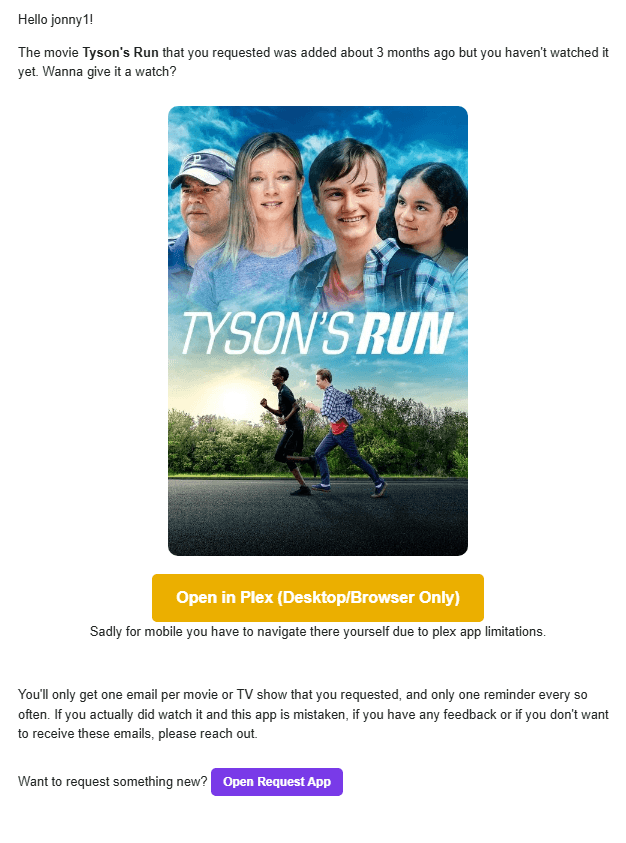
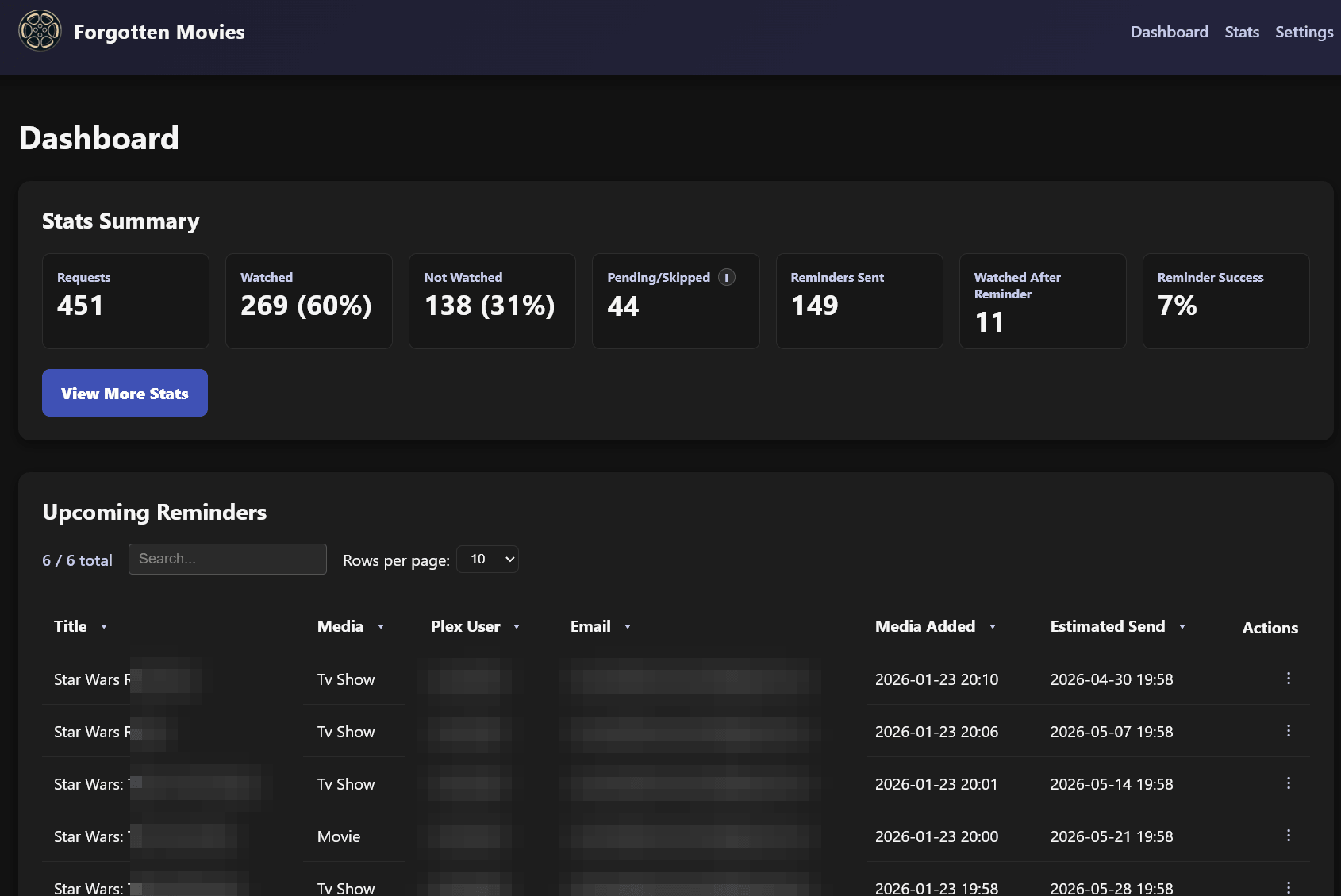
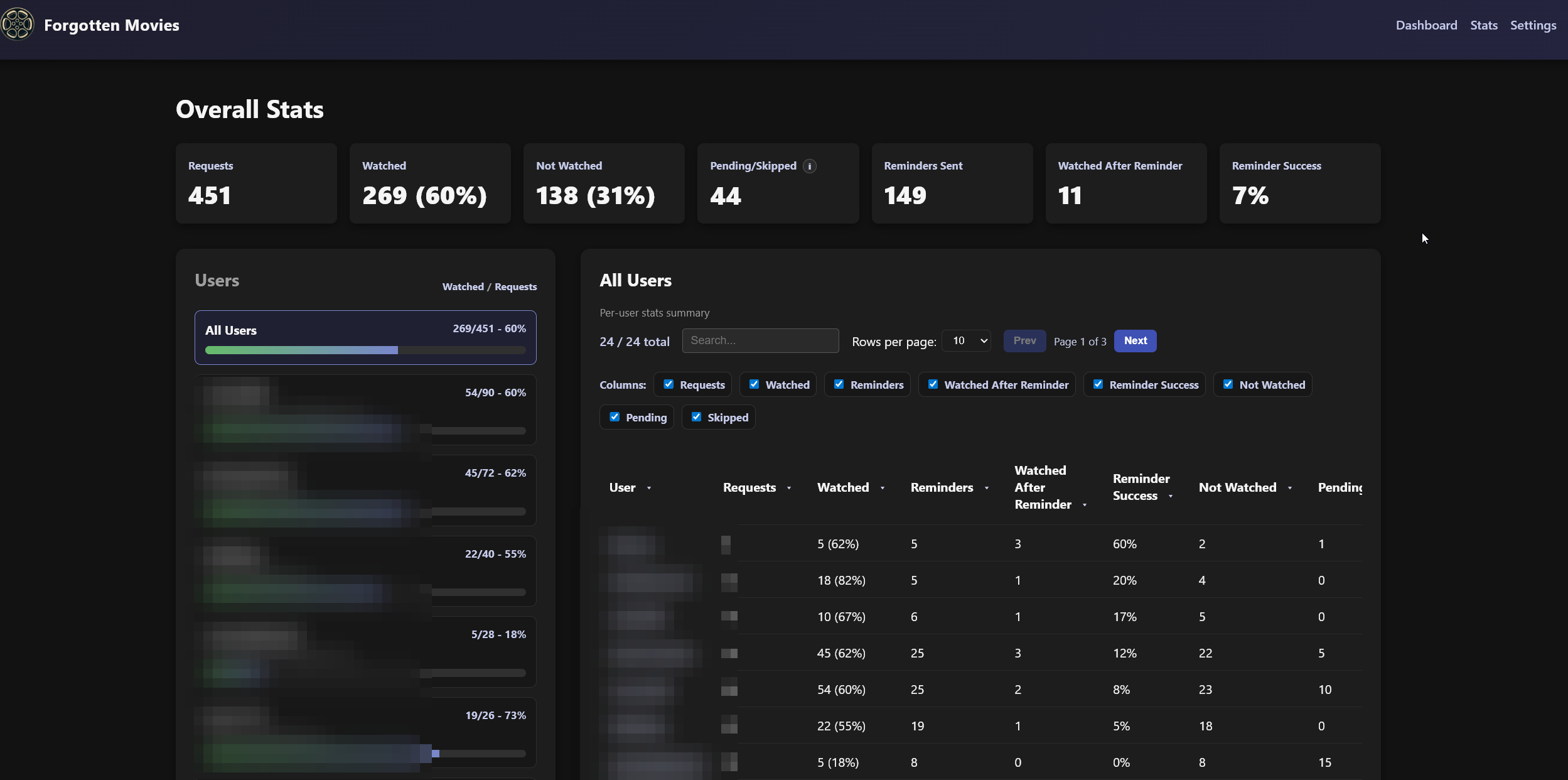
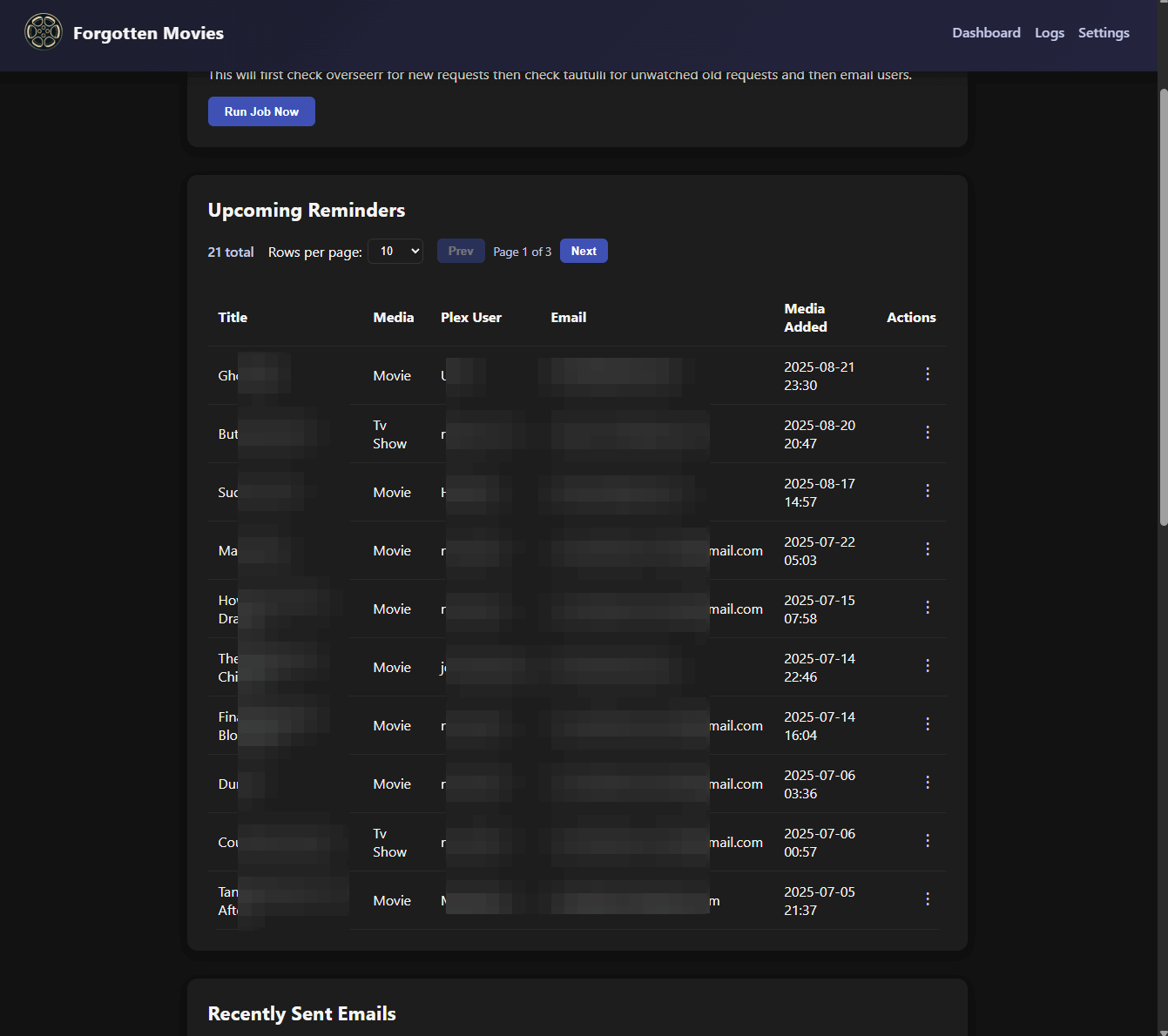
First-Run Setup
Start the container, then open http://<host>:8741 in a browser. A setup wizard walks you through everything — no docker-compose editing required:
- Create an admin account — a username and password to sign in to the dashboard.
- Connect your services — Seerr, Tautulli, and (optionally) TheMovieDB, each with a Test button.
- Configure email — SMTP settings, with a Send Test Email button to confirm delivery before you go live.
- Set your reminder rules — how old a request must be, how often to remind, and so on.
Configuration
All application settings are managed in the web UI — on the first-run wizard and afterward on the Settings page. There is nothing to configure in docker-compose anymore. Saved changes apply on the next scan; no restart is needed.
| Settings section | What it covers |
|---|---|
| Connections | Seerr URL + API key, Tautulli URL + API key, and an optional TheMovieDB API key for poster art. Each has a Test button. |
| SMTP server / port / encryption, username & password, From name & address, BCC, admin name, and your request-portal URL. Includes a Send Test Email button. | |
| Reminder Rules | How old a request must be before a reminder, per-recipient cooldown, how many Seerr records to scan per run, Tautulli metadata-lookup limits, the scan interval, and the startup delay. |
| Self-Service | Public base URL — set it to turn on one-click unsubscribe links (the signing secret is generated automatically). |
| Debug | Debug mode, debug address, and per-run send cap for safe testing. |
The scheduler on/off toggle and the email template editor also live on the Settings page.
Environment variables (optional)
Only deployment/infrastructure settings remain as environment variables, and all of them are optional.
| Key | Description |
|---|---|
FLASK_SECRET_KEY |
Session signing key. If unset, one is generated and persisted to the data directory automatically. |
DATA_DIR |
Where config, data, logs, and the email template live (default /app/data). |
TRUSTED_PROXIES |
Comma-separated IPs/CIDRs of trusted reverse proxies (e.g. 172.16.0.0/12,10.0.0.1). Required to trust REAL_IP_HEADER. |
REAL_IP_HEADER |
Header carrying the real client IP from your proxy (default X-Forwarded-For). Only trusted from TRUSTED_PROXIES. |
REDIS_URL |
Optional Redis URL for rate-limit storage (e.g. redis://localhost:6379/0). Defaults to in-memory. |
LOG_LEVEL |
DEBUG/INFO/WARNING/ERROR/CRITICAL (default INFO; also changeable in the UI). |
LOG_FILE_MAX_BYTES, LOG_FILE_BACKUP_COUNT |
Rotating log-handler settings (defaults: 1 MB, 3 backups). |
EMAIL_TEMPLATE_PATH |
Override path for the custom template (default /app/data/email_template.html, which the in-app editor writes to). |
JOB_LOCK_TIMEOUT |
Seconds to wait for the inter-process job lock (default 0.1). |
GUNICORN_WORKERS, GUNICORN_TIMEOUT, GUNICORN_BIND |
Web server tuning (defaults: 2, 120, 0.0.0.0:8741). |
ROOT, PUID, PGID, TZ |
Docker: bind-mount root, runtime UID/GID, timezone. The container starts as root only to remap the runtime user to PUID/PGID and fix data-dir ownership, then drops to that non-root user (default 1000:1000). |
Installation
There are no API keys or SMTP credentials to put in your compose file or run command — you provide those in the browser during first-run setup. Only the standard Docker settings (data volume, port, PUID/PGID/TZ) go here.
Docker Compose (recommended)
# 1. Copy docker-compose.yml-example to docker-compose.yml and set your data path.
# 2. Start it:
docker-compose up -d
# 3. Open the UI and complete the setup wizard:
open http://localhost:8741
Docker run
docker run -d \
  --name forgotten-movies \
  --restart unless-stopped \
  -e PUID=1000 \
  -e PGID=1000 \
  -e TZ=America/Denver \
  -p 8741:8741 \
  -v <your_data_path>:/app/data \
  pyroghostx/forgottenmovies:latest
# Then open http://localhost:8741 and finish setup in the browser.
Unraid docker run
docker run \
  -d \
  --name='forgotten-movies' \
  --net='unraid' \
  --pids-limit 2048 \
  -e 'PUID'='99' \
  -e 'PGID'='100' \
  -e 'TZ'='Europe/Berlin' \
  -l net.unraid.docker.managed=dockerman \
  -l net.unraid.docker.webui='http://[IP]:[PORT:8741]' \
  -l net.unraid.docker.icon='https://raw.githubusercontent.com/PyroghostX/ForgottenMovies/refs/heads/main/files/logo.png' \
  -p '8741:8741/tcp' \
  -v '/mnt/cache/appdata/mediaserver/forgotten-movies':'/app/data':'rw' \
  --restart=unless-stopped 'pyroghostx/forgottenmovies:latest'
# Then open the WebUI and finish setup in the browser.
Customising the Email Template
The easiest way is the built-in editor at Settings → Email Template: it has a live preview, a clickable variable reference, a test-send button, and one-click reset to the default.
Prefer editing files directly? Copy /app/data/email_template_original.html to /app/data/email_template.html and edit that copy — the app reloads it automatically when it changes, no restart required. If you change the Days before reminding setting, update the Days-since text setting so the copy matches the actual delay.
Important: A valid template is mandatory. If neither
/app/data/email_template.htmlnor/app/data/email_template_original.htmlcan be read or rendered with the placeholders below, the job raises an error and no reminders are sent — this prevents blank emails.
Helpful context variables available inside the template:
| Variable | Meaning |
|---|---|
plex_username |
Plex username of the requester. |
media_type |
"movie" or "tv show". |
title |
Title retrieved from Seerr/Tautulli. |
time_since_text |
Human-readable string such as "3 months". |
plex_url |
Deep link to the title on Plex (desktop/web). |
mobile_url |
Optional Plex mobile deep link. |
poster_url |
Poster artwork URL (if available). |
request_url |
Link back to your request portal (may be empty). |
admin_name |
The admin name configured under Settings → Email. |
unsubscribe_url |
encrypted unsubscribe link (empty when feature disabled). |
For example: The {{ media_type }} {{ title }} that you requested was added about {{ time_since_text }} ago but you haven't watched it yet.
Want to give it a watch?.
Because the template uses Jinja, you can wrap sections in {% if plex_url %}...{% endif %} to hide buttons or images when data is missing.
Self-Service Unsubscribe (Optional)
When enabled, reminder emails include an unsubscribe link that lets users manage their subscription without admin intervention. The feature uses cryptographically signed tokens so links can't be forged without the secret key.
Enabling the Feature
- Open Settings → Self-Service and set Public base URL to your instance's public HTTPS URL (e.g.
https://forgotten.example.com). - Save. That's it — the token-signing secret is generated and stored automatically, and reminder emails immediately begin including an unsubscribe link in the footer and headers. No restart needed.
When no base URL is set (default), emails send without unsubscribe links and the endpoints return 404.
Email Headers & Deliverability
When enabled, reminder emails include RFC 8058 compliant headers for one-click unsubscribe:
List-Unsubscribe: <https://forgotten.example.com/unsubscribe/token>
List-Unsubscribe-Post: List-Unsubscribe=One-Click
These headers allow Gmail, Apple Mail, and other clients/providers to display a native "Unsubscribe" button in their UI. The headers are only added when BASE_URL uses HTTPS (required by RFC 8058).
For optimal inbox placement, ensure your sending domain has proper email authentication, verfication, and policies:
- SPF - Authorizes your mail server to send on behalf of your domain
- DKIM - Cryptographically signs emails to verify authenticity
- DMARC - Policy telling receivers how to handle SPF/DKIM failures
Note: Even with proper configuration, email providers may not display the one-click unsubscribe button based on sender reputation, spam scores, or other filtering criteria. The in-email unsubscribe link will always work regardless.
References:
- RFC 8058 - One-Click Unsubscribe
- Google Email Sender Guidelines
- Apple iCloud Mail Postmaster Information
Reverse Proxy Configuration
The unsubscribe/resubscribe endpoints (/unsubscribe/<token> and /resubscribe/<token>) should be publicly accessible, but you probably want to hide the admin dashboard from the internet.
Example nginx configuration for subscription endpoints:
server {
    listen 443 ssl;
    server_name forgotten.*;
    include /config/nginx/ssl.conf;

    # Public endpoints - no auth required
    location ~ ^/(unsubscribe|resubscribe)/[^/]+$ {
        include /config/nginx/proxy.conf;
        include /config/nginx/resolver.conf;
        proxy_pass http://forgotten-movies:8741;
    }

    # Everything else returns 404 (hides admin interface)
    location / {
        return 404;
    }
}
Rate Limiting (Optional but Recommended)
If you're exposing the unsubscribe endpoints publicly via nginx or other, add rate limiting to prevent DoS attacks.
Example 1: Public unsubscribe endpoints only (admin hidden)
# Rate limiting zone - 20 requests per minute per IP
# Place this OUTSIDE the server block (at the top of the file)
limit_req_zone $binary_remote_addr zone=unsubscribe_limit:10m rate=20r/m;
limit_req_status 429;

server {
    listen 443 ssl;
    server_name forgotten.*;
    include /config/nginx/ssl.conf;

    client_max_body_size 0;

    # Public endpoints with rate limiting
    location ~ ^/(unsubscribe|resubscribe)/[^/]+$ {
        # Apply rate limiting (burst=5 allows brief spikes)
        limit_req zone=unsubscribe_limit burst=5 nodelay;

        include /config/nginx/proxy.conf;
        include /config/nginx/resolver.conf;
        proxy_pass http://forgotten-movies:8741;
    }

    # Everything else returns 404 (hides admin interface)
    location / {
        return 404;
    }
}
Example 2: Public unsubscribe endpoints + proxied admin (with auth)
# Rate limiting zone - 20 requests per minute per IP
limit_req_zone $binary_remote_addr zone=unsubscribe_limit:10m rate=20r/m;
limit_req_status 429;

server {
    listen 443 ssl;
    server_name forgotten.*;
    include /config/nginx/ssl.conf;

    client_max_body_size 0;

    # Public endpoints with rate limiting (no auth required)
    location ~ ^/(unsubscribe|resubscribe)/[^/]+$ {
        # Apply rate limiting (burst=5 allows brief spikes)
        limit_req zone=unsubscribe_limit burst=5 nodelay;

        include /config/nginx/proxy.conf;
        include /config/nginx/resolver.conf;
        proxy_pass http://forgotten-movies:8741;
    }

    # Admin interface (authenticated, NO rate limiting)
    location / {
        # Require authentication for admin pages
        include /config/nginx/proxy.conf;
        include /config/nginx/resolver.conf;
        proxy_pass http://forgotten-movies:8741;

        # Add your favorite auth provider or use basic auth
        auth_basic "Forgotten Movies Admin";
        auth_basic_user_file /config/nginx/.htpasswd;
    }
}
UI Tour
- Dashboard (
/) - Run the job manually, review the upcoming reminder queue (oldest requests first), see the most recent reminder emails, and manage the unsubscribe list. - Logs (
/logs) - Live tail of the application log with controls to change the log level, clear the log files, and toggle auto-refresh. - Settings (
/settings) - Configure connections, email, reminder rules, and debug options; toggle the background scheduler; run manual actions; and open the email template editor. All changes apply live. - Setup (
/setup) - Shown only on first launch, before any configuration exists: creates your admin login and collects the initial settings. After setup, the dashboard requires signing in.
Support
- For now keep all questions and suggestions in github, if this grows enough then I may make a subreddit or discord channel.
Debugging & Operations
- Turn on Debug mode under Settings → Debug to reroute mail to the debug address (or the From address if blank) and cap sends per run — handy for testing without emailing real users.
- Logs rotate when they reach
LOG_FILE_MAX_BYTES. Adjust rotation via environment variables if needed.
Reading the logs
"Registered email user": You'll see this for each new email it finds in the Seerr requests.
"smtplib.SMTPAuthenticationError: (535, b'5.7.8 Username and Password not accepted.": Your email or password is wrong, check email address and make sure you setup an app password https://myaccount.google.com/apppasswords
Architecture Overview
| Component | Purpose |
|---|---|
config_store.py |
Single source of truth for all application settings, plus the admin credentials and setup state. Persisted in /app/data/app_config.json and edited via the setup wizard and Settings page; file-locked writes and an mtime cache keep the web workers and scheduler in sync. |
forgotten_movies.py |
Core job. Reloads config from config_store at each run, loads Seerr requests, checks Tautulli watch history, builds emails from the template, tracks state in TinyDB. TinyDB writes are serialized with a cross-process lock. |
webapp.py |
Flask UI for the setup wizard, login, manual runs, queue visibility, logs, and settings. A before_request gate enforces onboarding then authentication; manual runs defer to an inter-process lock so they play nicely with the scheduler. |
scheduler_runner.py |
Standalone process that waits until setup is complete, wakes on the configured scan interval, respects the disable flag, and triggers the core job if the lock is free. |
job_runner.py |
Shared helpers that wrap the core job with logging, lock acquisition, and log flushing. |
entrypoint.py |
Supervisor that starts the scheduler process and Gunicorn, forwarding signals so the container restarts cleanly. |
docker-entrypoint.sh |
Remaps the runtime user to PUID/PGID, fixes data-dir ownership, and drops from root before launching. |
TinyDB (/app/data/*.json) |
Stores app config, Seerr request metadata, email history, and unsubscribe list. |
templates/email_template.html |
HTML reminder template. Copied to /app/data/email_template_original.html on start; /app/data/email_template.html overrides if present. |
templates/base.html et al. |
Shared layout plus dashboard, setup, login, settings, and email-editor templates for the web UI. |
Everything that changes at runtime lives under /app/data so you can back it up or mount it from the host.
Contributing
Issues and pull requests are welcome. If you add a new template placeholder, document it in this README. If you add a new setting, add it to CONFIG_SCHEMA in config_store.py so it appears in the setup wizard and Settings page automatically.
License
This is free software under the GPL v3 open source license.
Media gallery
1 / 3Download Statistics
Total Downloads Over Time
Related apps
Explore more like this
Explore allDetails
pyroghostx/forgottenmovies:latestRuntime arguments
- Web UI
http://[IP]:[PORT:8741]/- Network
bridge- Privileged
- false
Template configuration
Container Port: 8741
- Target
- 8741
- Default
- 8741
- Value
- 8741
Random secret key for Flask sessions
- Target
- FLASK_SECRET_KEY
Base URL to your request portal (e.g., https://overseerr.example.com)
- Target
- REQUEST_URL
API URL to your Tautulli instance
- Target
- TAUTULLI_URL
- Default
- http://IP_ADDRESS:8181/api/v2
- Value
- http://IP_ADDRESS:8181/api/v2
API Key for your Tautulli instance
- Target
- TAUTULLI_API_KEY
API URL to your Overseerr instance
- Target
- OVERSEERR_URL
- Default
- http://IP_ADDRESS:5055/api/v1
- Value
- http://IP_ADDRESS:5055/api/v1
API Key for your Overseerr instance
- Target
- OVERSEERR_API_KEY
Number of completed requests to fetch from Overseerr
- Target
- OVERSEERR_NUM_OF_HISTORY_RECORDS
- Default
- 200
- Value
- 200
API Key for The Movie Database (TMDb)
- Target
- THEMOVIEDB_API_KEY
SMTP server address for sending emails
- Target
- SMTP_SERVER
SMTP server port
- Target
- SMTP_PORT
- Default
- 587
- Value
- 587
SMTP encryption method
- Target
- SMTP_ENCRYPTION
- Default
- STARTTLS|SSL|NONE
Username for SMTP authentication
- Target
- SMTP_USERNAME
Name displayed in the 'From' field of the email
- Target
- FROM_NAME
- Default
- Plex Forgotten Movies
- Value
- Plex Forgotten Movies
Email address used in the 'From' field
- Target
- FROM_ADDRESS
Password for the email account
- Target
- EMAIL_PASSWORD
Optional BCC email address
- Target
- BCC_EMAIL_ADDRESS
What name in the email do you want shown
- Target
- ADMIN_NAME
Request age, in days, to trigger an email reminder
- Target
- DAYS_SINCE_REQUEST
- Default
- 90
- Value
- 90
Human readable version DAYS_SINCE_REQUEST for email body
- Target
- DAYS_SINCE_REQUEST_EMAIL_TEXT
- Default
- 3 months
- Value
- 3 months
Minimum hours between reminder emails to the same user
- Target
- HOURS_BETWEEN_EMAILS
- Default
- 168
- Value
- 168
Path to the application data folder
- Target
- /app/data
- Default
- /mnt/user/appdata/forgotten_movies/data
- Value
- /mnt/user/appdata/forgotten_movies/data
Interval, in seconds, between checking for forgotten movies
- Target
- JOB_INTERVAL_SECONDS
- Default
- 3600
- Value
- 3600
Delay, in seconds, before the first check for forgotten movies after container start
- Target
- INITIAL_DELAY_SECONDS
- Default
- 3600
- Value
- 3600
Maximum new Seerr requests per run that can ask Tautulli for title metadata when Seerr did not provide a title (default 50).
- Target
- TAUTULLI_NEW_REQUEST_METADATA_LIMIT
- Default
- 50
- Value
- 50
Maximum existing unknown-title requests per run that can ask Tautulli for title metadata/watch history (default 30)
- Target
- TAUTULLI_RECENT_UNKNOWN_METADATA_LIMIT
- Default
- 30
- Value
- 30
Logging level for the application
- Target
- LOG_LEVEL
- Default
- INFO|DEBUG|WARNING|ERROR|CRITICAL
Enable or disable debug mode
- Target
- DEBUG_MODE
- Default
- false|true
Email address to send to when in debug mode
- Target
- DEBUG_EMAIL
Maximum number of emails to send in debug mode
- Target
- DEBUG_MAX_EMAILS
- Default
- 2
- Value
- 2
Disable the internal scheduler, avoid hitting APIs or triggering emails
- Target
- DISABLE_SCHEDULER
- Default
- false|true
- Default
- 099
- Value
- 099
- Default
- 100
- Value
- 100