
All apps · 0 apps

FolderView3
Plugin from chodeus
Overview
Readme
View on GitHub FolderView3 for Unraid 7+
Organize your Docker containers and VMs into collapsible folders on the Docker, VM, and Dashboard tabs.
Features
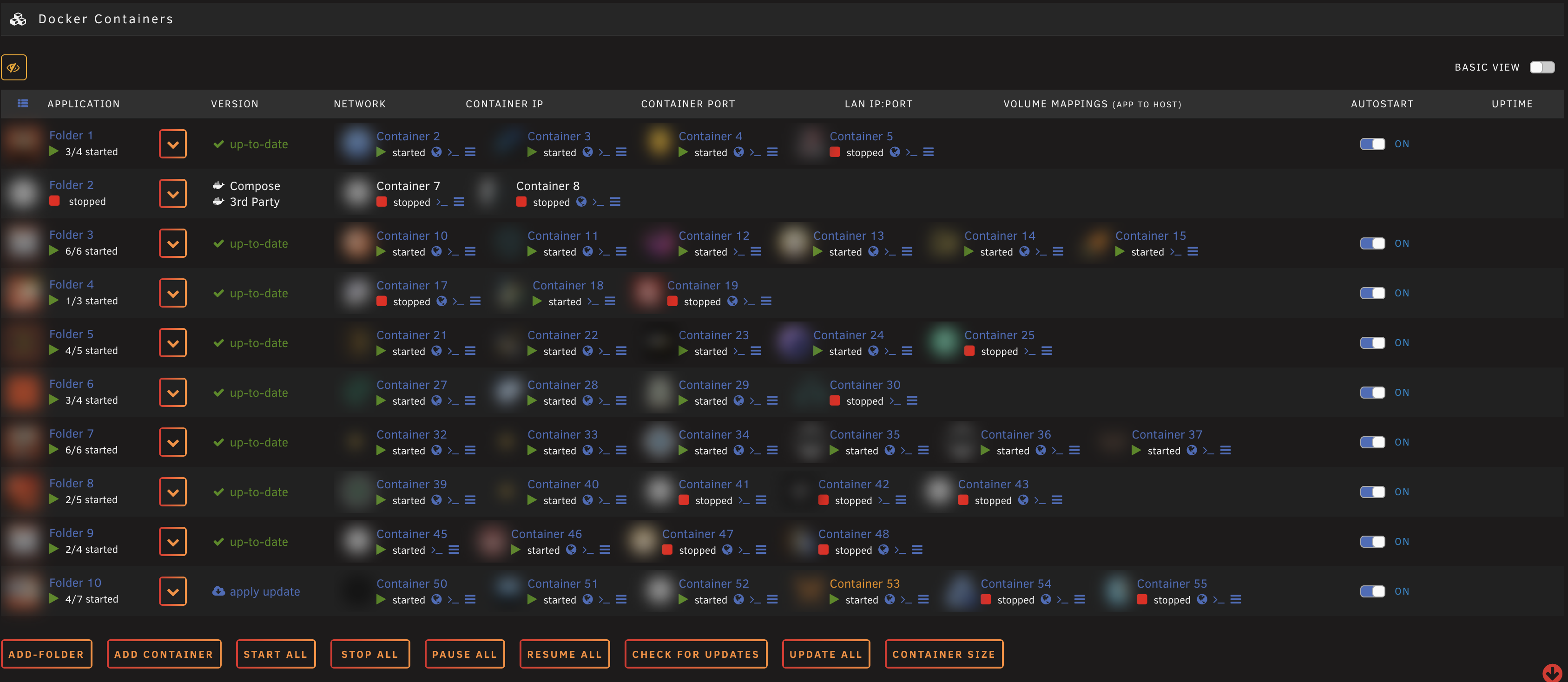
Collapsible folders on Docker, VM, and Dashboard tabs
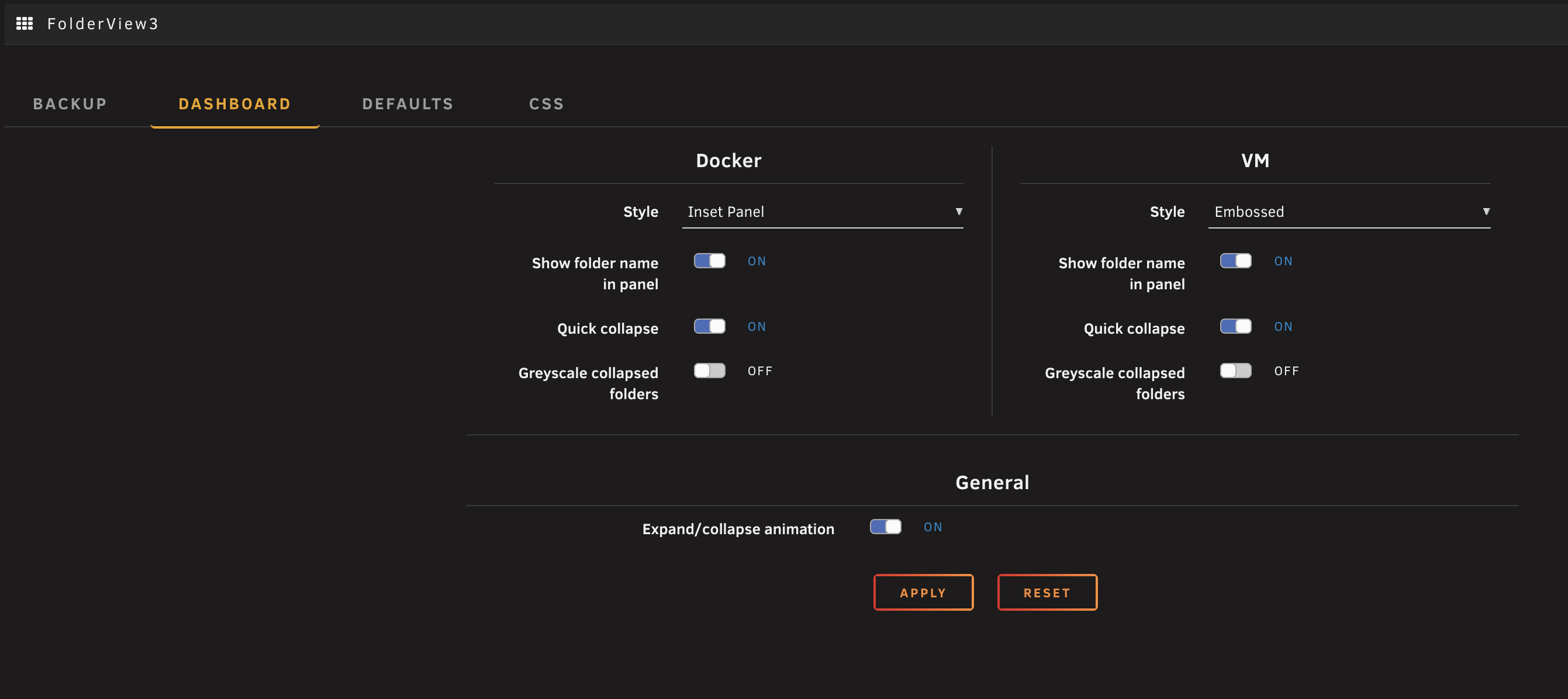
Dashboard layouts — Classic, Full-width Panel, Accordion, Inset Panel, and Embossed views with per-section settings for Docker and VMs
Accordion Full-width Inset Embossed 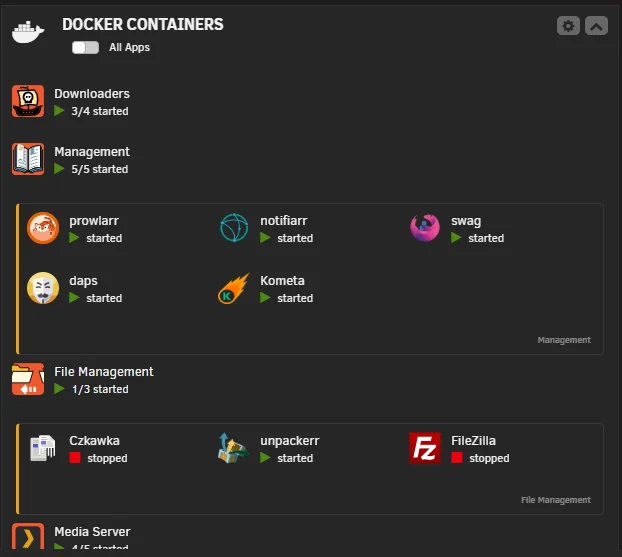
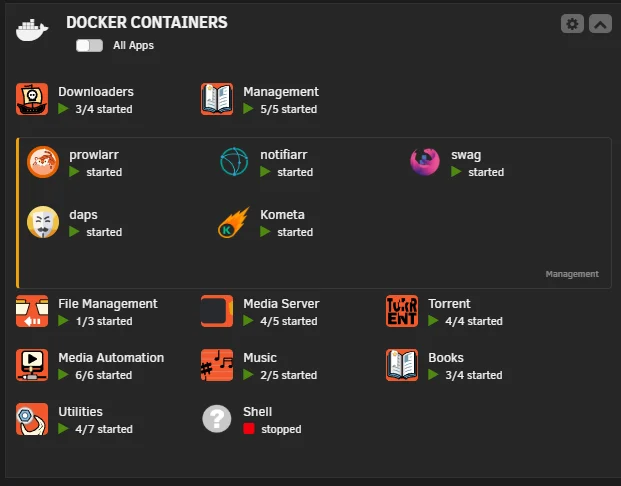
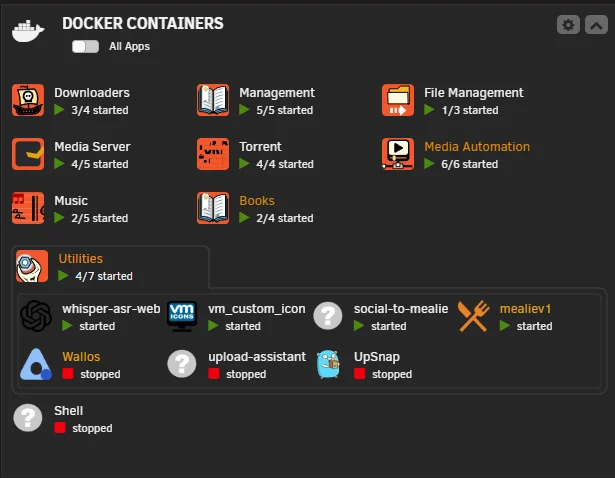
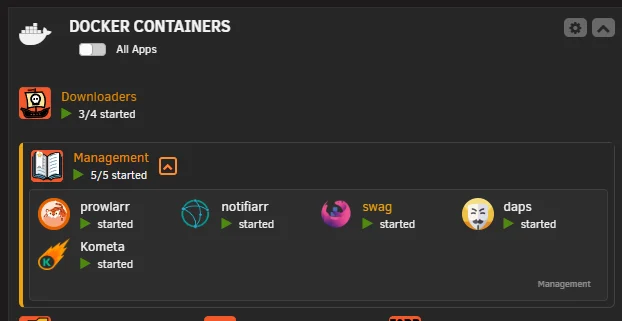
Expand/collapse animation with optional greyscale dimming of collapsed folders
Docker label assignment — add
folder.view3: "FolderName"to any container or Compose service to auto-assignPer-folder colors — customize border, vertical bar, and row separator colors with optional color locking
Custom actions — define folder-level actions (start, stop, cycle, restart, or run User Scripts) that appear in the right-click context menu
Folder WebUI — set a custom URL per folder that opens from the context menu
Preview overflow — Default, Expand Row, or Scroll behavior with row separators

Hide from preview — selectively hide containers from the collapsed preview while keeping them visible when expanded
Open WebUI preview context — clicking a container's icon in the collapsed preview opens its WebUI directly; containers without a WebUI fall back to the context menu
Catch-all folders — a folder whose regex is
^collects every container not assigned to or matched by another folder; explicit assignments always beat regex capturesReal-time stats — live CPU/memory graphs in Advanced Preview via WebSocket (7.2+) or SSE, with configurable graph modes (Combined, Split, CPU-only, MEM-only) and time frame
Drag-and-drop reordering — reorder containers within folders via drag (mouse and touch supported)
Unraid 7.2+ API integration — hybrid GraphQL/PHP with automatic fallback for older versions
Native organizer sync — folder structure automatically syncs to Unraid's built-in Docker Organizer when available
Bulk actions — start, stop, restart, pause all containers in a folder
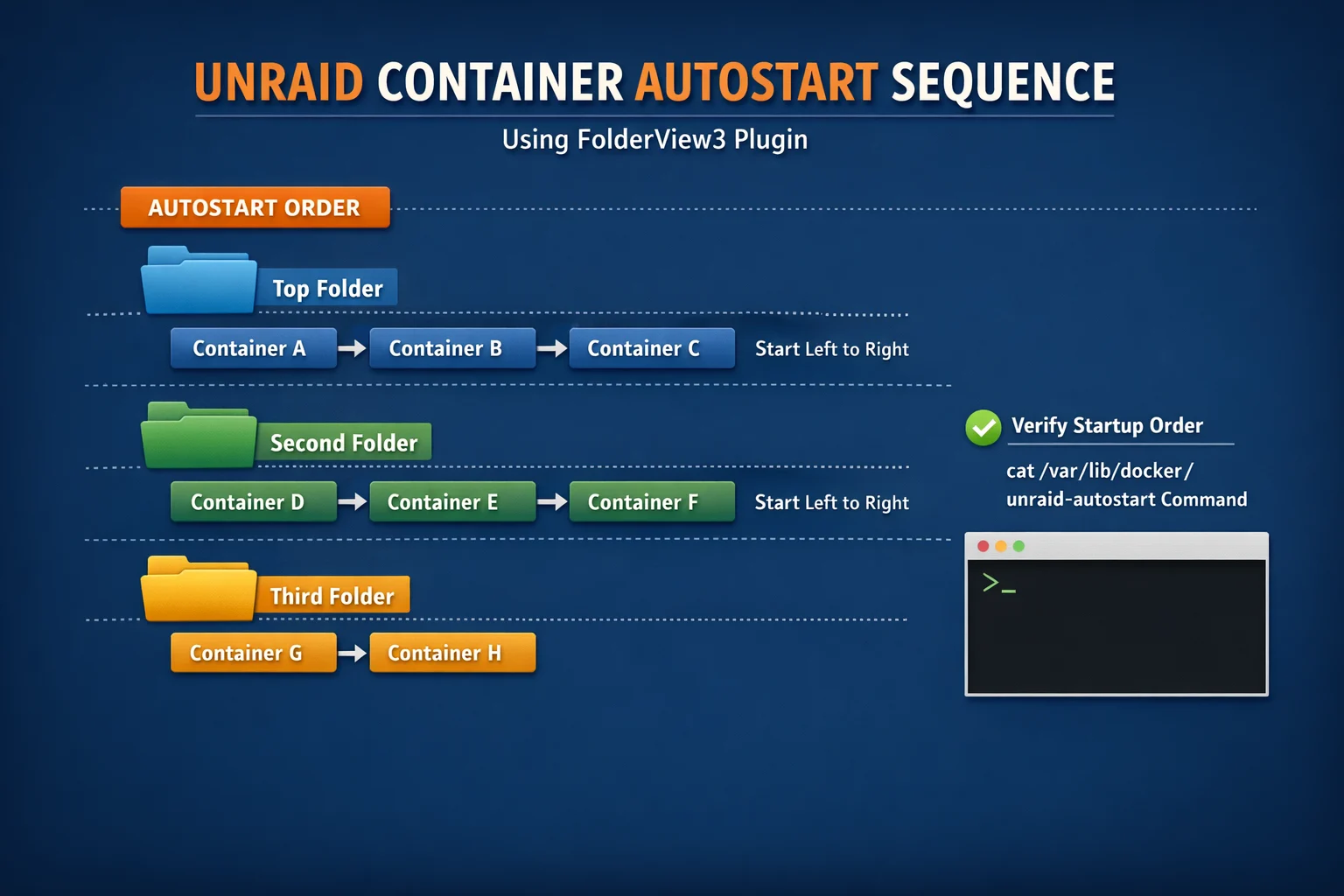
Autostart control — set a custom global container start order (Settings → FolderView3 → Autostart) that overrides the Docker page folder order, with per-container wait times and autostart toggles
Compose & 3rd Party awareness — handles Docker Compose and 3rd party containers
Folder name length warning — warns when names exceed 20 characters to prevent layout issues
CSS Tool — built-in theme manager with GitHub import, variable editor, presets, and advanced CSS
Theme update checker — detects when imported GitHub themes have updates, Docker-style indicators
Folder defaults — set global defaults for preview, overflow, context, and more — apply to all folders in one click
Full backup/restore — export everything (folders, settings, CSS config, themes) to a single JSON file
Custom CSS/JS extensions — full theming support with 40+ CSS variables
Security warnings — CSS imports are scanned for external URLs and flagged for user review
Incognito mode — blur container names, icons, Tailscale IPs, public IPv6 addresses, MAC addresses, and container references in volume paths for screenshot-safe sharing
7 languages — English, German, Spanish, French, Italian, Polish, Chinese
Debug mode — type
fv3debugon any page to toggle console logging
Installation
Paste this URL into Plugins → Install Plugin:
https://raw.githubusercontent.com/chodeus/folder.view3/main/folder.view3.plg
For the beta channel:
https://raw.githubusercontent.com/chodeus/folder.view3/beta/folder.view3.plg
Migrating from folder.view / folder.view2
- Export All (Docker + VM) from old plugin's settings page
- Backup custom CSS from
config/plugins/folder.view3/styles/ - Uninstall old plugin, install this fork
- Import exported files, restore custom CSS
Migrating from FolderView Plus
Only one FolderView plugin should be installed at a time. The import is for moving to FolderView3, so run it on a fresh FolderView3, before you create folders of your own.
- Export your Docker folders and your VM folders from FolderView Plus, or pick the backups from
config/plugins/folderview.plus/backups/, and copy the files to your computer. - Uninstall FolderView Plus, then install FolderView3.
- In Settings → FolderView3 → Import / Export (Backup), click Import Everything and choose a file.
- Check the preview, then confirm. Repeat for each file.
Import Everything works with every FolderView Plus file. FolderView Plus keeps Docker and VM folders in separate files: each export and each scheduled or manual backup holds one type, so a server with both has two files to import. An environment or rollback snapshot holds both types in one file, and a single-folder export holds one folder.
Import Docker Folders and Import VM Folders also accept these files, but take only their own type. The preview says when the file holds folders of the other type.
What the import does:
- Preview first. Nothing is saved until you confirm, and the preview lists each folder and everything that will be left out.
- Nested folders are merged. FolderView3 has no nesting, so every nested folder's containers or VMs move into its top-level folder. The top-level folder keeps its own name, icon and settings; a nested folder's name, icon, settings, regex and custom actions are not kept.
- Names: a folder with no usable name, or named
root(reserved by Unraid), is imported asImported folder, and a name already used is imported asName (imported). - Settings: only settings FolderView3 has, with valid values, are kept. Plugin preferences and themes are not imported.
- Icons: a local path, an
http(s)link or an embedded image is kept; anything else is dropped. - Regex: a folder's regex is kept only if it works the same way in FolderView3.
- Custom actions are kept when FolderView3 can run them as they are: a Docker or VM action may only target
its own folder's members, and a User Script action needs a plain script name and arguments without
&,#,%or?. - Newer formats: a file from a newer FolderView Plus version is refused rather than guessed at.
Getting Started
After installation, an Add Folder button appears at the bottom of the Docker and VM tabs.
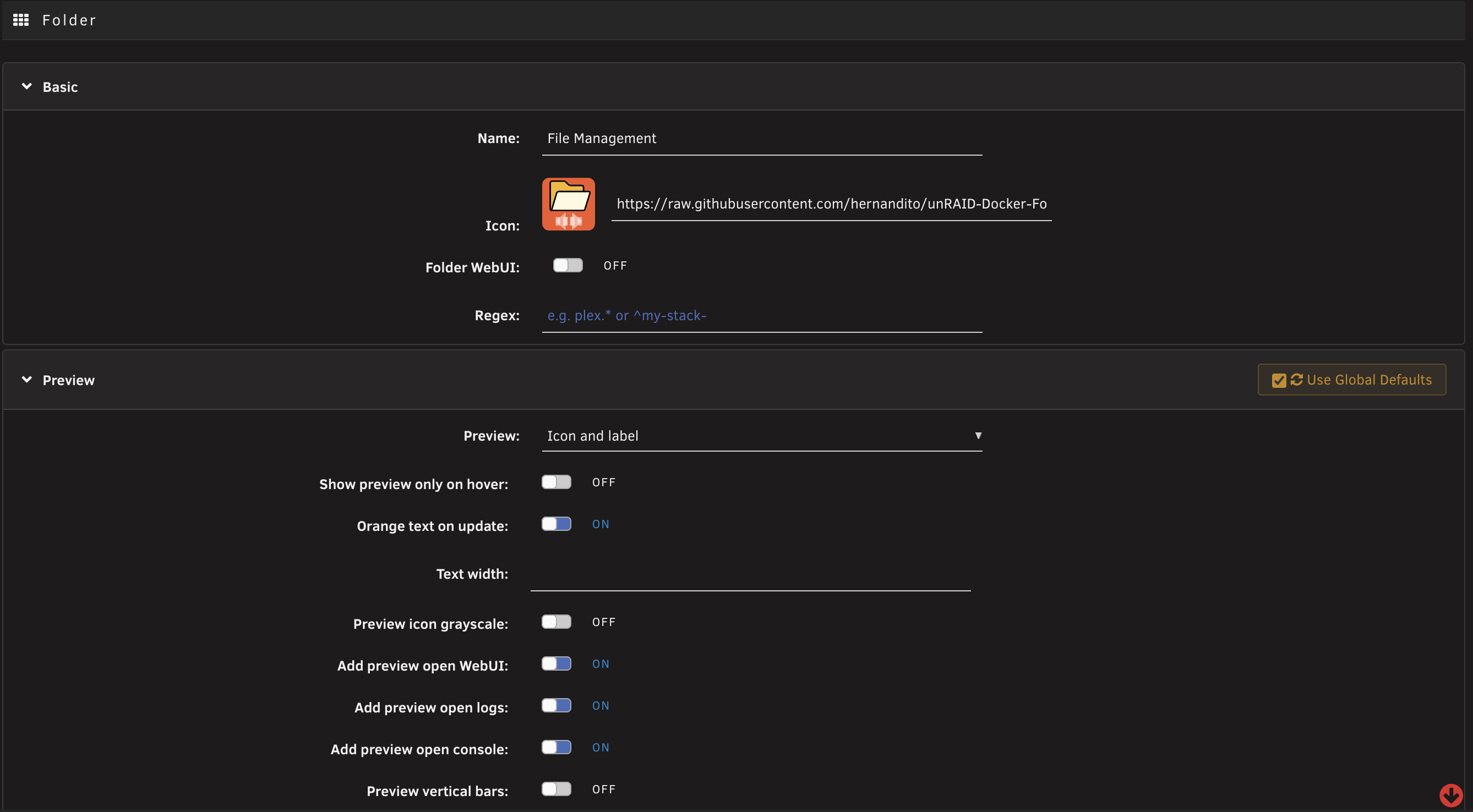
Assigning containers to folders
- Manual selection — pick containers when creating/editing a folder
- Regex matching — auto-assign containers whose names match a pattern (e.g.
^media-orarr$). A container explicitly assigned to (or label-claimed by) any folder is never captured by another folder's regex — explicit membership always wins - Docker label — add
folder.view3: "FolderName"to any container:services: myapp: labels: folder.view3: "MyFolder"
Tip: a folder whose regex is just
^matches every name — use it as a catch-all that collects any container not assigned to or matched by another folder (place it last in your folder order).
Settings Page
The plugin settings page (Settings > FolderView3) is organized into collapsible sections:
Dashboard Configuration — layout style, animation, greyscale, collapse toggles (per-section for Docker and VMs)
Folder Defaults — global defaults for preview mode, overflow, context, icons, borders, separators. New folders inherit these automatically. "Apply Defaults to All" updates every existing folder.
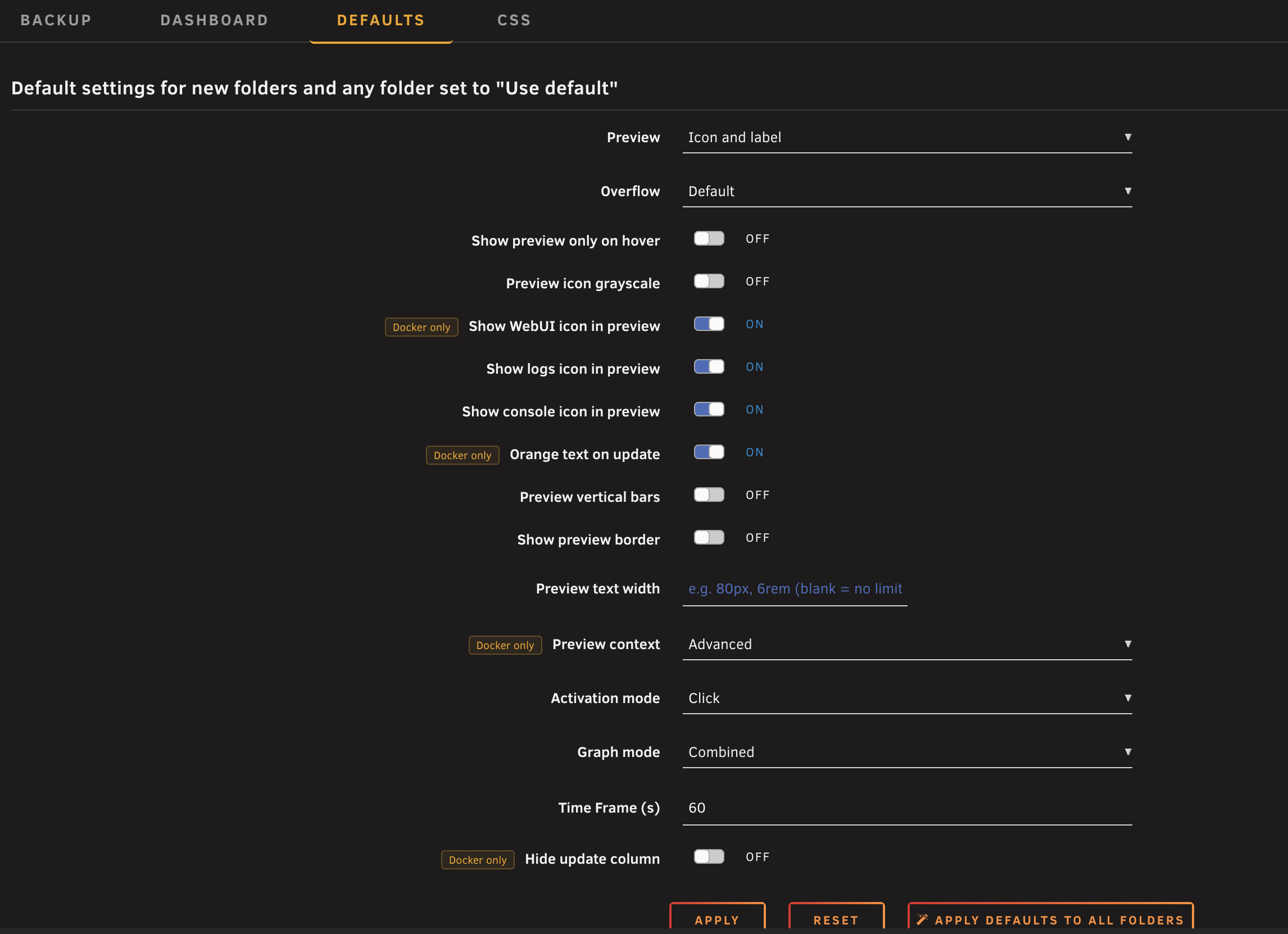
Import / Export (Backup) — full backup (everything in one JSON), individual Docker/VM export/import, danger zone (clear all)
Custom CSS — four tabs:
- Themes — import community CSS from GitHub, enable/disable, one-click updates with change detection
- Variables — edit 27 CSS variables with color pickers and sliders, scoped per page
- Presets — one-click theme presets (Default, Orange, Blue Accent, Muted)
- Advanced CSS — free-form CSS editor with live preview
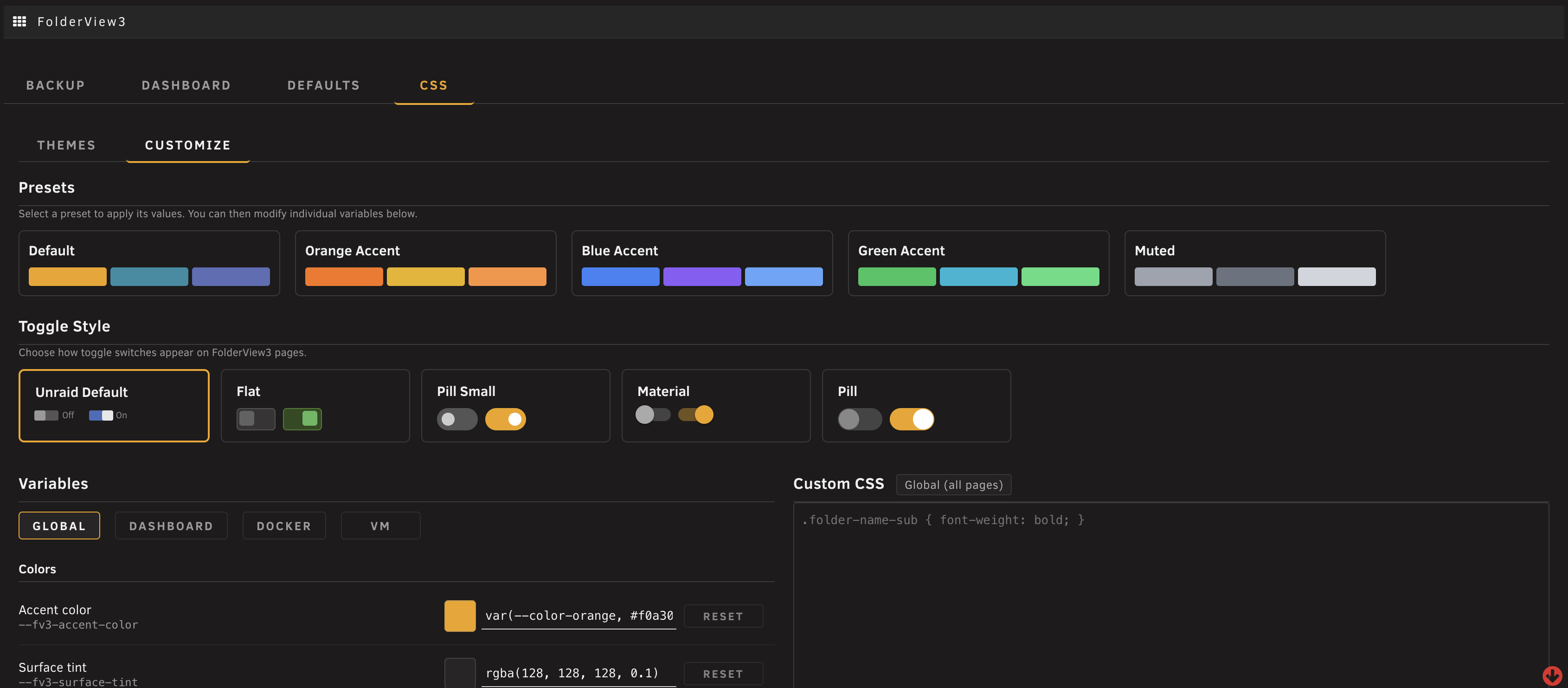
Importing Community Themes
Enter a GitHub repo (e.g. masterwishx/folder.view.custom.css) in the Themes tab. If the repo has multiple directories, a picker lets you select which to import. Imported themes show update status — green checkmark for up-to-date, blue cloud when updates are available.
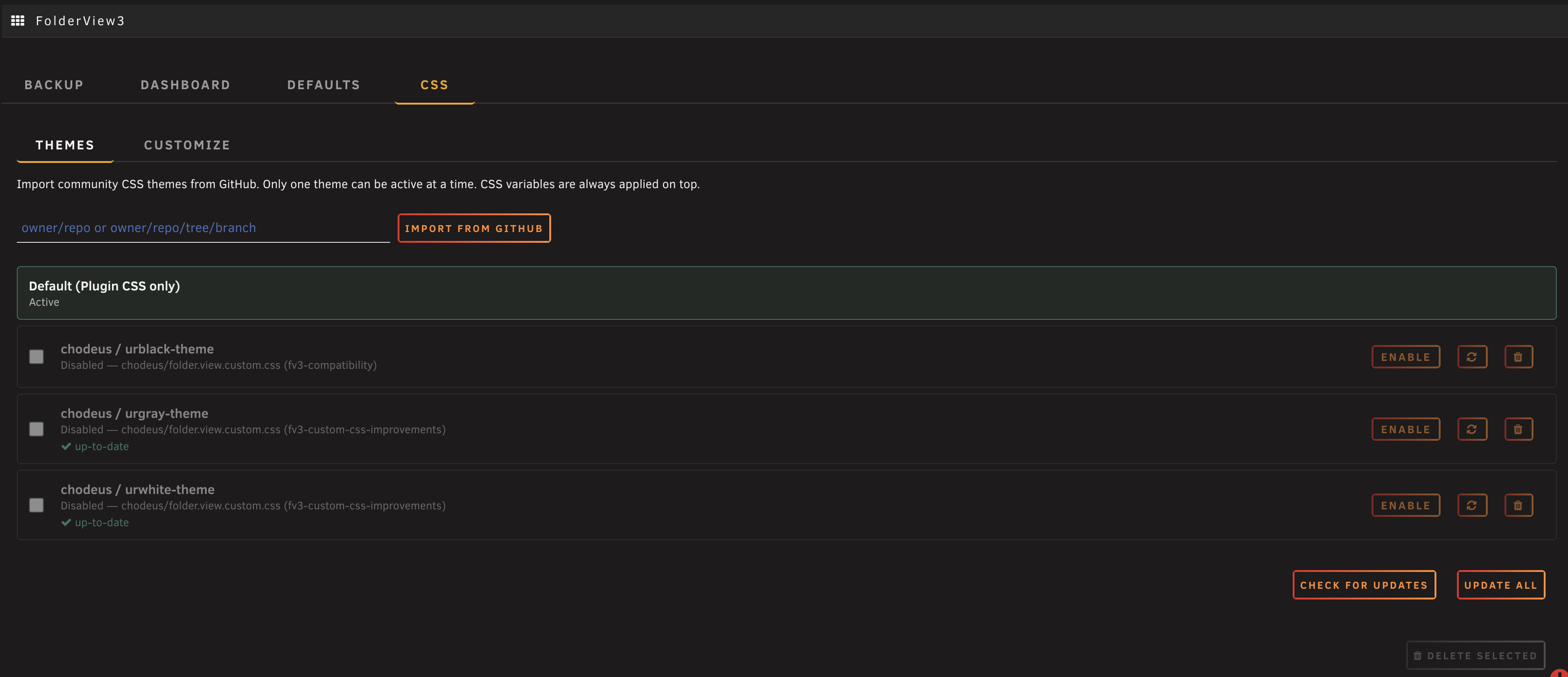
Custom CSS/JS
FolderView3 supports custom CSS and JavaScript extensions. Place files in:
- CSS:
/boot/config/plugins/folder.view3/styles/ - JS:
/boot/config/plugins/folder.view3/scripts/
Files follow the pattern name.tab.css where tab is docker, vm, dashboard (chain with - for multiple tabs).
A CSS template is included as a starting point. See the Developer Guide for the full CSS variables reference, DOM structure, and JS events API.
CSS Variables (Quick Reference)
:root {
    /* Colors */
    --fv3-accent-color: var(--color-orange, #f0a30a);
    --fv3-surface-tint: rgba(128, 128, 128, 0.1);
    --fv3-hover-bg: rgba(128, 128, 128, 0.2);
    --folder-view3-graph-cpu: #2b8da3;
    --folder-view3-graph-mem: #5d6db6;

    /* Folder appearance */
    --fv3-folder-preview-bg: transparent;
    --fv3-folder-name-bg: transparent;
    --fv3-folder-preview-height: 3.5em;
    --fv3-preview-icon-size: 32px;
    --fv3-scrollbar-color: rgba(255, 140, 47, 0.5);

    /* Dashboard */
    --fv3-toggle-color: #ff8c2f;
    --fv3-panel-border: rgba(128, 128, 128, 0.2);
    --fv3-panel-bg: rgba(128, 128, 128, 0.08);
}
Community Themes
- hernandito — Compact and Midsize designs
- Mattaton — urblack, urgray, urwhite themes
- masterwishx — urblack with CSS variables
Unraid 7.2+ API
On Unraid 7.2+, FolderView3 automatically detects and uses the GraphQL API for:
- Container actions — start/stop/restart/pause via GraphQL mutations with PHP fallback
- Real-time stats — WebSocket subscription replaces SSE for lower latency
- Update checking — container update status via API
- Organizer sync — folder structure automatically syncs to Unraid's native Docker Organizer when available
All features fall back gracefully on older Unraid versions — no configuration needed.
Compatibility
- Unraid 7.0.x — fully supported with layout and CSS compatibility fixes
- Unraid 7.2+ — enhanced with GraphQL API, WebSocket stats, and native organizer sync
Debug Mode
Type fv3debug on any FolderView3 page to toggle debug logging. Console shows folder creation, API calls, organizer sync activity, and stats updates with [FV3] prefix. State persists across page loads.
For PHP server-side debug: touch /tmp/fv3_debug_enabled on the Unraid console. Logs write to /tmp/folder_view3_php_debug.log.
Project History
Originally created by scolcipitato, ported to Unraid 7 by VladoPortos, actively maintained by chodeus.
Support
- Unraid Forum: FolderView3 Support Thread
- GitHub Issues: chodeus/folder.view3
Contributing Translations
Language packs live in src/folder.view3/usr/local/emhttp/plugins/folder.view3/langs/, one JSON file per language. en.json is the source, and anything missing from a pack shows in English. FolderView3 picks the pack from the first two letters of Unraid's display language (de_DE → de.json).
- Improve a language — edit the values only. Keep every key, the
$1/$2placeholders, any HTML tags, and names such as Docker, VM, WebUI and Unraid. - Plurals —
{{PLURAL:$1|file|files}}, with as many forms as the language needs (Polish:{{PLURAL:$1|plik|pliki|plików}}). - Add a language — copy
en.jsonto its two-letter code (e.g.pt.json), setlocaleandauthorsin@metadata, translate every value, and add it to the language list under Features. - Check before submitting — this compares every pack's keys, placeholders, HTML tags and plurals with
en.json, checks that every key the code uses exists, and CI runs it on every pull request:python3 .github/scripts/check-langs.py src/folder.view3/usr/local/emhttp/plugins/folder.view3/langs - Pull requests — target the
betabranch, one language per PR. Say whether you are a native speaker and whether any of it was machine- or AI-translated. - New UI text in code — use
fv3I18nOr('key', 'English text')in JavaScript or adata-i18nattribute in markup, and add the key to every language pack.
Libraries
- Chart.js
- chartjs-adapter-moment
- Moment.js
- chartjs-plugin-streaming
- jquery.i18n
- jQuery UI MultiSelect
Credits
- scolcipitato — original creator
- VladoPortos — Unraid 7 port and maintenance
- bmartino1 — testing and feedback
- Masterwishx — testing and feedback
License
The original codebase (scolcipitato/folder.view, VladoPortos/folder.view2) is unlicensed. This license applies to contributions made in this fork only.
Categories
Download Statistics
Downloads by Month
Related apps
Explore more like this
Explore allDetails
https://raw.githubusercontent.com/chodeus/folder.view3/main/folder.view3.plg