floppy

floppy

Docker app from dannyvfilms' Repository

Overview

Floppy is a self-hosted, all-in-one media tracker: movies, TV, anime, manga, books, comics, games, board games, music, and podcasts in one library, history, and set of stats. A broader alternative to Trakt, Letterboxd, and TV Time. Requires a reachable Redis instance (used for caching and as the Celery broker). This is not bundled - run a Redis container on this same Unraid server (for example redis:8-alpine) with port 6379 published to the host. REDIS_URL defaults to host.docker.internal, which resolves to this server automatically, so no IP address needs to be entered - just make sure Redis' port is published to the host and matches the port in REDIS_URL. SQLite is used by default; PostgreSQL is supported via the DB_* variables. Set SECRET to a long random string before first run. See the README for the full environment variable list: https://github.com/dannyvfilms/Floppy#configuration-and-deployment

Floppy — everything in one place

Self-hosted media tracking for people who miss Trakt and TV Time.
Movies, TV, anime, manga, books, comics, games, board games, music, and podcasts.
One library, one history, and one set of stats for everything you watch, read, play, or listen to.

Demo · Docker Image · Wiki · Releases

Floppy is a self-hosted, all-in-one media tracker and personal media diary, a broader alternative to Trakt, Letterboxd, and TV Time for people who want one place for everything they watch, read, play, or listen to. It gives you a real progress view that tells you what to watch next, a unified history you can actually scan, recap-style statistics, shareable lists, owned-media collections, and integrations that sync instead of asking you to upload a file every few months.

It runs in Docker, keeps your data on your own hardware, and treats music and podcasts as first-class media rather than bolt-ons.

Try it first: the demo instance is open with demo / demodemo.

Floppy was formerly published as the dannyvfilms/Yamtrack fork. Old links redirect here.

Install

One stack, app plus Redis. Save it as docker-compose.yml and run docker compose up -d, or paste it straight into a Portainer stack.

services:
  floppy:
    image: ghcr.io/dannyvfilms/floppy:latest
    container_name: floppy
    restart: unless-stopped
    depends_on:
      redis:
        condition: service_healthy
    environment:
      - SECRET=change_me_to_a_long_random_string
      - REDIS_URL=redis://redis:6379
      - REGISTRATION=True
      - DEMO_ACCOUNT_ENABLED=False
      - TZ=America/Chicago
      - TMDB_API=your_tmdb_api_key
    volumes:
      - floppy_db:/floppy/db
    ports:
      - "8000:8000"

  redis:
    image: redis:8-alpine
    container_name: floppy-redis
    restart: unless-stopped
    command: ["redis-server", "--appendonly", "yes"]
    healthcheck:
      test: ["CMD", "redis-cli", "ping"]
      interval: 10s
      timeout: 3s
      retries: 10
    volumes:
      - redis_data:/data

volumes:
  floppy_db:
  redis_data:

Open http://localhost:8000, create your account, then set REGISTRATION=False and redeploy so strangers can't sign up.

DEMO_ACCOUNT_ENABLED=False is set above on purpose: it otherwise defaults to True and provisions a publicly known demo / demodemo login after migrations. Leave it off unless you actually want a shared demo account.

That's the whole install. SECRET is the only variable you truly must set; TMDB_API is what makes movie and TV metadata work, and every other API key is optional until you want that media type. Everything else — Postgres, reverse proxies, the full environment variable list, Docker Run, Portainer specifics — is in Configuration and deployment further down.

What Floppy does

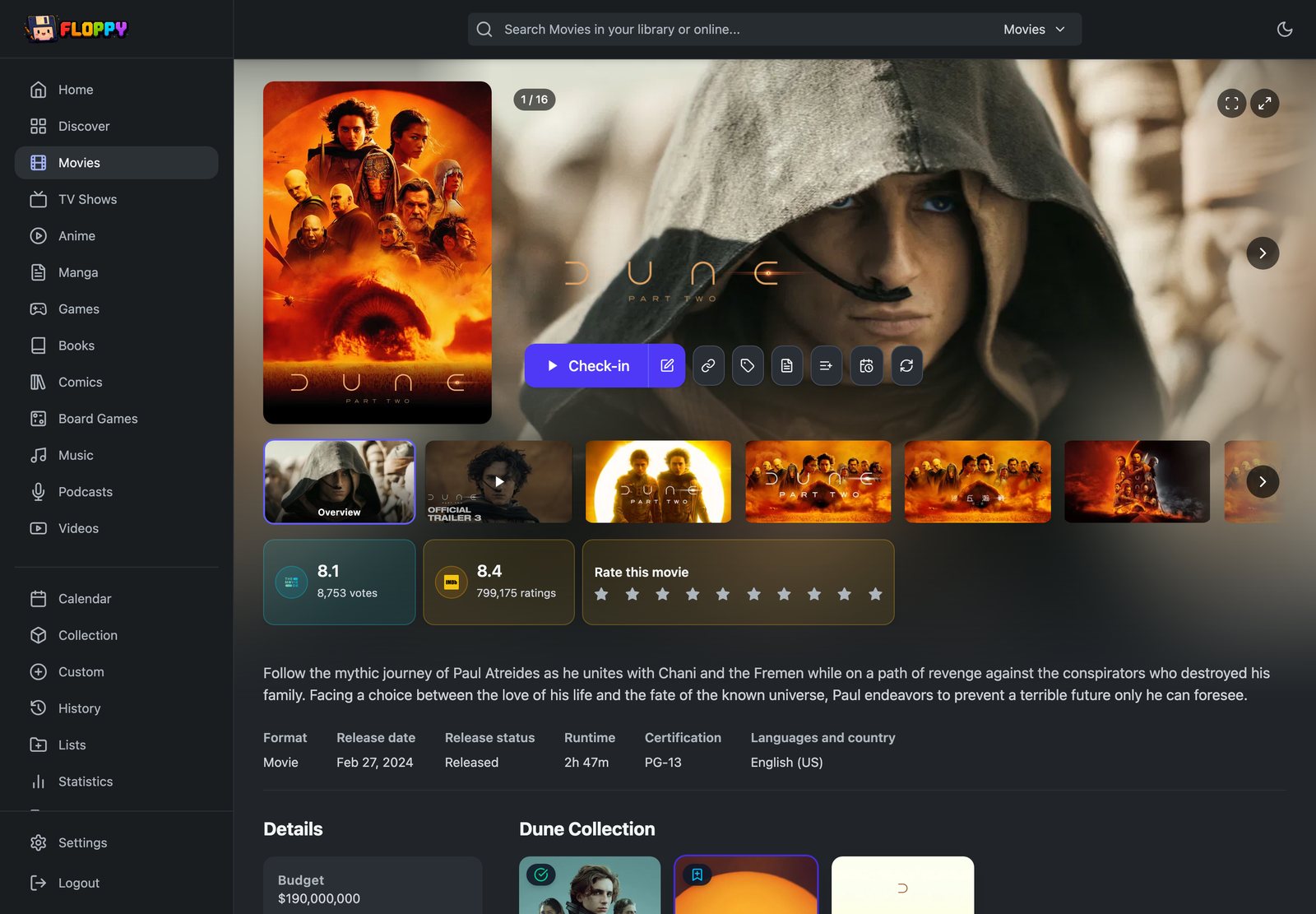
Floppy combines the jobs people often split between a watchlist, a media diary, and an owned-media collection: Time Left progress, a unified history feed, recap-style stats, public list sharing, and all-in-one tracking across every media type you care about.

The big pieces

  • Music: artist and album pages, track-level history and scoring, play-count and listening-time statistics, bulk save and mark-all-listened; MusicBrainz-backed metadata with discography sync and cover art; fully native in history, search, home rows, and collection, not a thin importer.
  • Podcasts: dedicated show and episode pages, episode-level tracking, mark-all-played; Pocket Casts account sync as a live integration, not a one-shot file import; podcast listening appears naturally in history, runtime stats, and search.
  • Collections / owned media: track what you physically or digitally own with copy-level detail: source, resolution, HDR, format, codec, and bitrate; filtered collection views, per-item collection status tied into detail pages and list/smart-list rules; supports Plex collection sync.
  • Discover: personalized recommendation rows that improve with use: genre, studio, cast, and tag affinity built from your library; not-interested and hide feedback that sticks; background refresh so rows stay current, individually refreshable from the UI, not a static recommendations page.
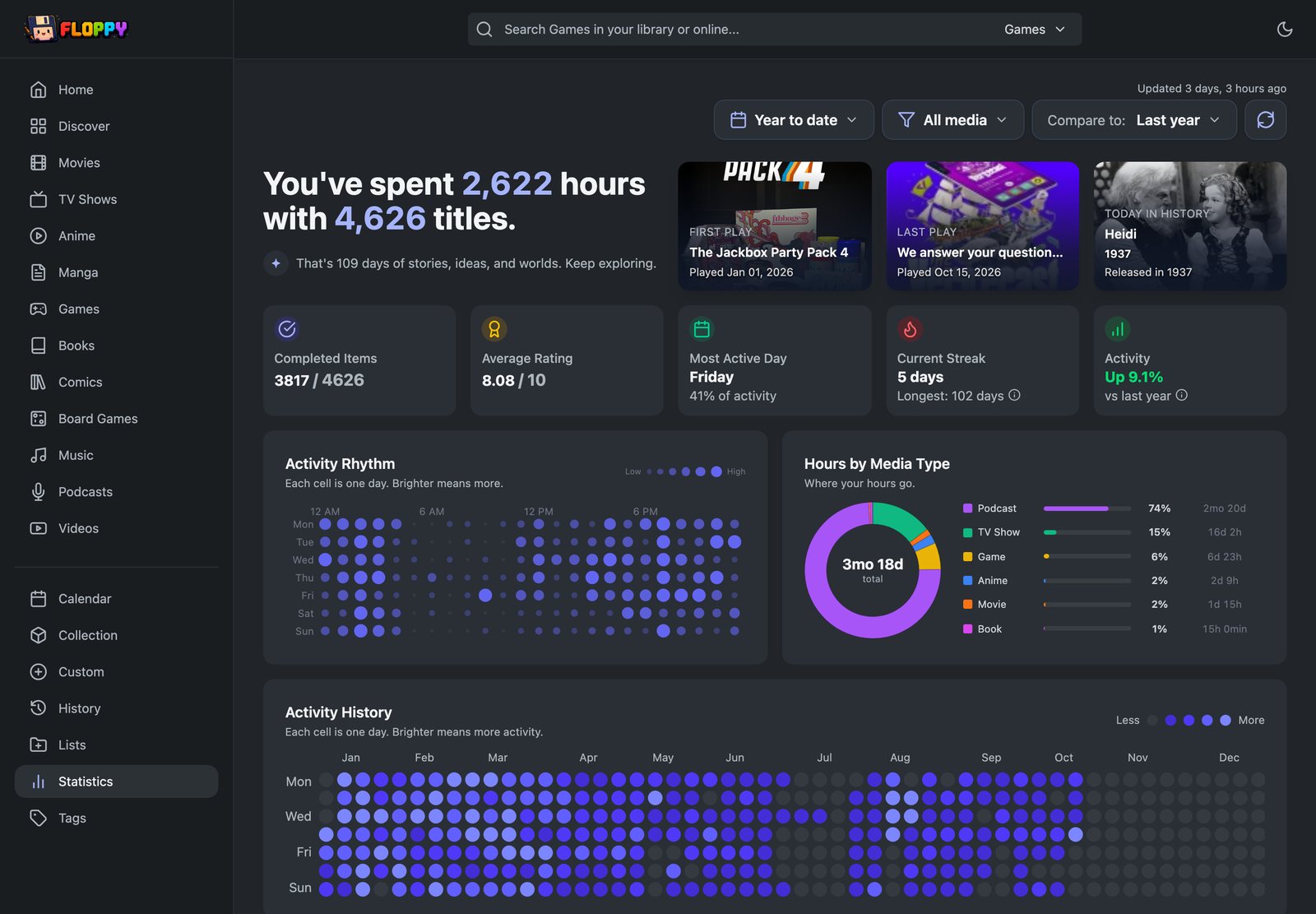
  • History and statistics: history is a filterable feed with month navigation, media-type and genre filters, inline duplicate-play cleanup, and a delete flow; statistics offer explicit refresh, compare mode, custom date ranges, top-talent breakdowns, and per-type splits covering TV, film, music, podcasts, and reading with pages read, top authors, reading streaks, and listening time.
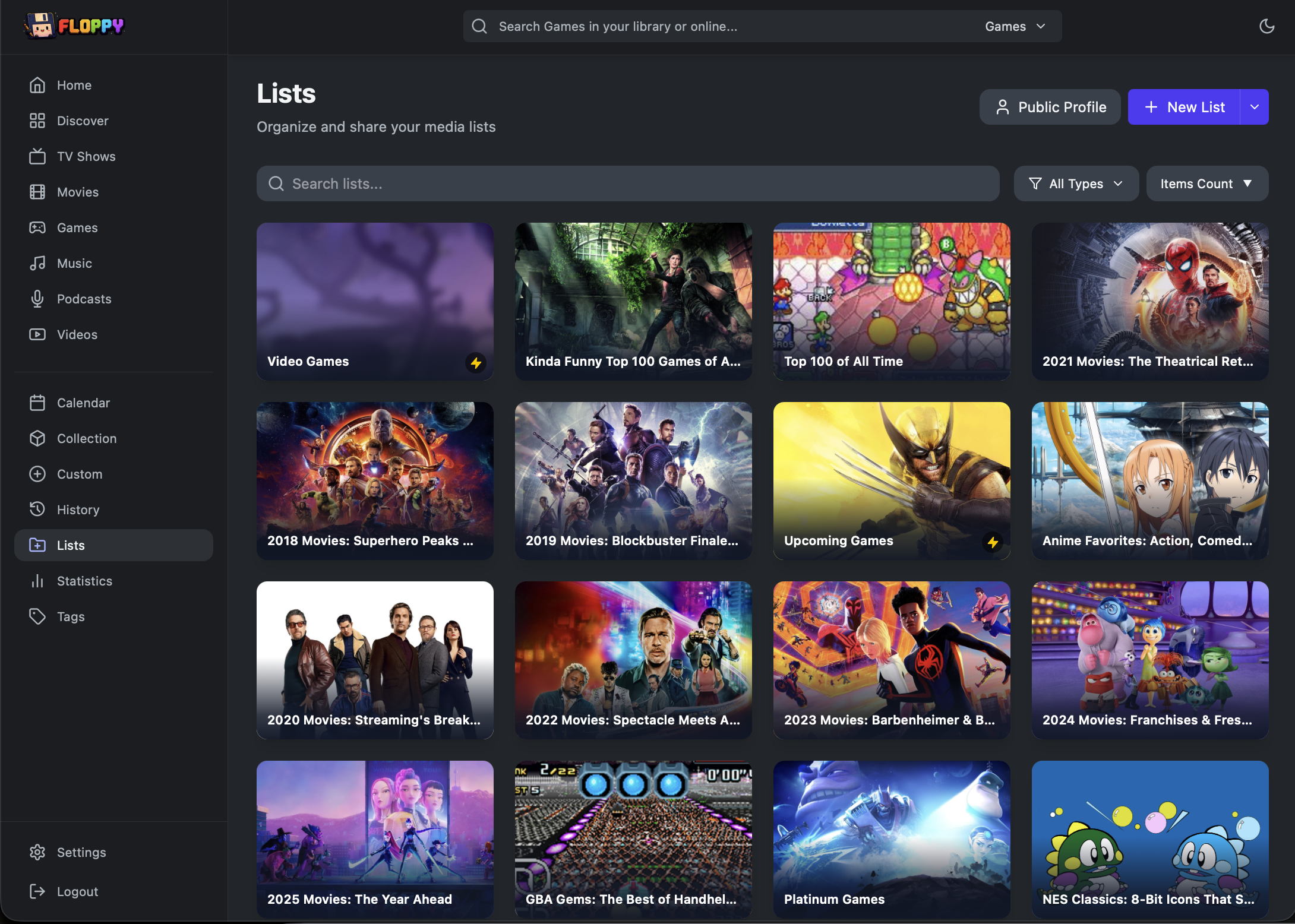
  • Lists: public, social, and smart: public and private lists, custom slugs, public profile pages; RSS and JSON feeds per list; smart-list rules for collection status, release state, platform, origin, author, and tags; recommendations with approval flow; list completion percentages and media-type breakdowns in the index; Trakt list and watchlist import; sort by rating, progress, release date, last watched, or custom manual order.
  • Integration coverage: Plex full library import, watchlist sync, and ratings sync; Pocket Casts account sync; Last.fm history import and live poll; Audiobookshelf account import; Radarr and Sonarr scheduled library sync; Jellyseerr webhook auto-add, each with dedicated settings and status display.

Beyond the basics

  • Richer metadata and title control: localized and original titles switchable per user preference; critic ratings and popularity scores displayed; game-length data; manual metadata overrides; metadata-provider preference; image refresh flows.
  • People, studios, and credit browsing: actor, director, author, and studio pages with filmographies and top works; person credits visible from detail pages rather than hidden as tooltip data; author pages with top-read breakdowns.
  • Careful anime handling: proper separation of anime and TV library concerns so mixed libraries stay organized; anime-specific season and episode navigation; grouped-anime routing for franchise-spanning series.
  • Richer episode and book workflows: episode detail pages with individual scoring; bulk episode save; drop an episode without logging it to history; book-specific: barcode and ISBN scanning from a photo, percentage-based reading progress, top-authors stats, and more resilient import flows.
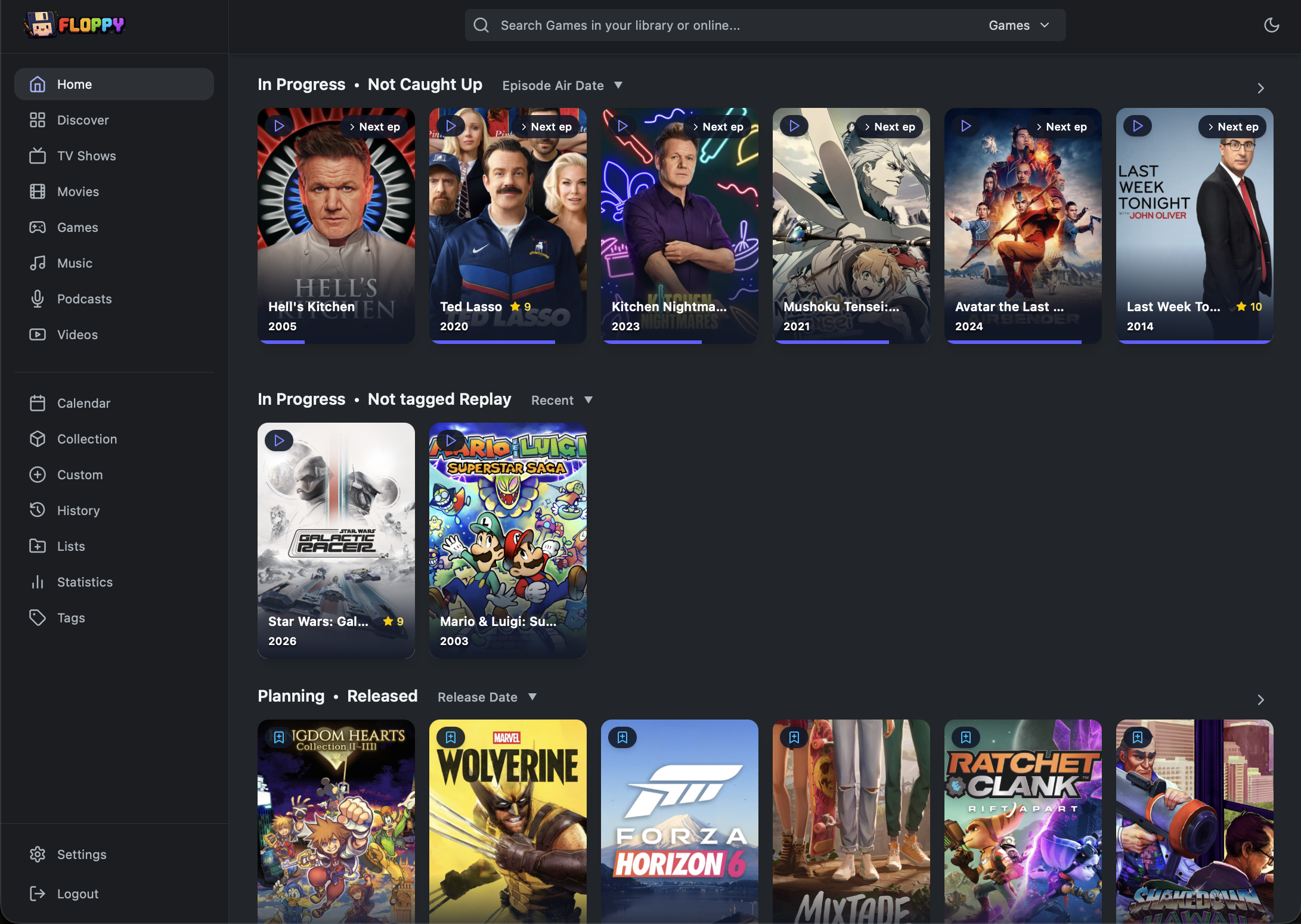
  • Configurable home screen: choose what rows appear and in what order; rows from library queries, custom lists, smart lists, or recently played but not rated; direction and media-type filters stored per user.
  • Configurable table columns: choose and reorder visible columns per view, with media tables and list-detail tables configured independently; available columns include critic rating, episodes left, time left, time to beat, runtime, time watched, last watched, next air date, date added, popularity, and more.
  • Scheduled backups and export management: recurring export scheduling with media-type and list inclusion options; export history and backup destination visible in settings.
  • Account security: TOTP authenticator setup and management; recovery codes; password recovery via authenticator or recovery code; session duration as a per-user preference.

Day-to-day polish

  • Deep preferences: sort modes for critic rating, popularity, runtime, time to beat, plays, time watched, release date, last watched, next air date, and time left; display preferences for duration format, rating scale, stats default range, compare mode, mobile grid density, subtitle visibility on cards, localized vs. original title display, progress-bar visibility, planned-item home visibility, and obfuscating unseen episode titles.
  • A livelier UI: a now-playing card showing what is actively playing via Plex, Jellyfin, or Emby webhook; explicit stale and refreshing indicators on history and stats with one-click refresh; lazy-loaded covers and asynchronous fragments throughout.
  • Better search and add flows: music-native search that creates artist and album entries from search results; improved anime and localized-title search results.
  • Deeper filters: rated and unrated, collected and not collected, caught-up and not-caught-up, no-status, language, country, platform, origin, format, author, tag inclusion, and tag exclusion; smart-list rules use the same expanded vocabulary, making them meaningfully programmable.
  • More reliable under load: WAL mode and timeout configuration for SQLite; retry logic for lock and I/O failures; prioritized background task queues for a smoother experience with large libraries.
  • Integration settings and import UX: import history and status visible per integration in settings; watchlist-only and collection-update-only import modes; Jellyseerr allowed usernames and defaults persisted as preferences; per-user Plex webhook library selection.

Also included

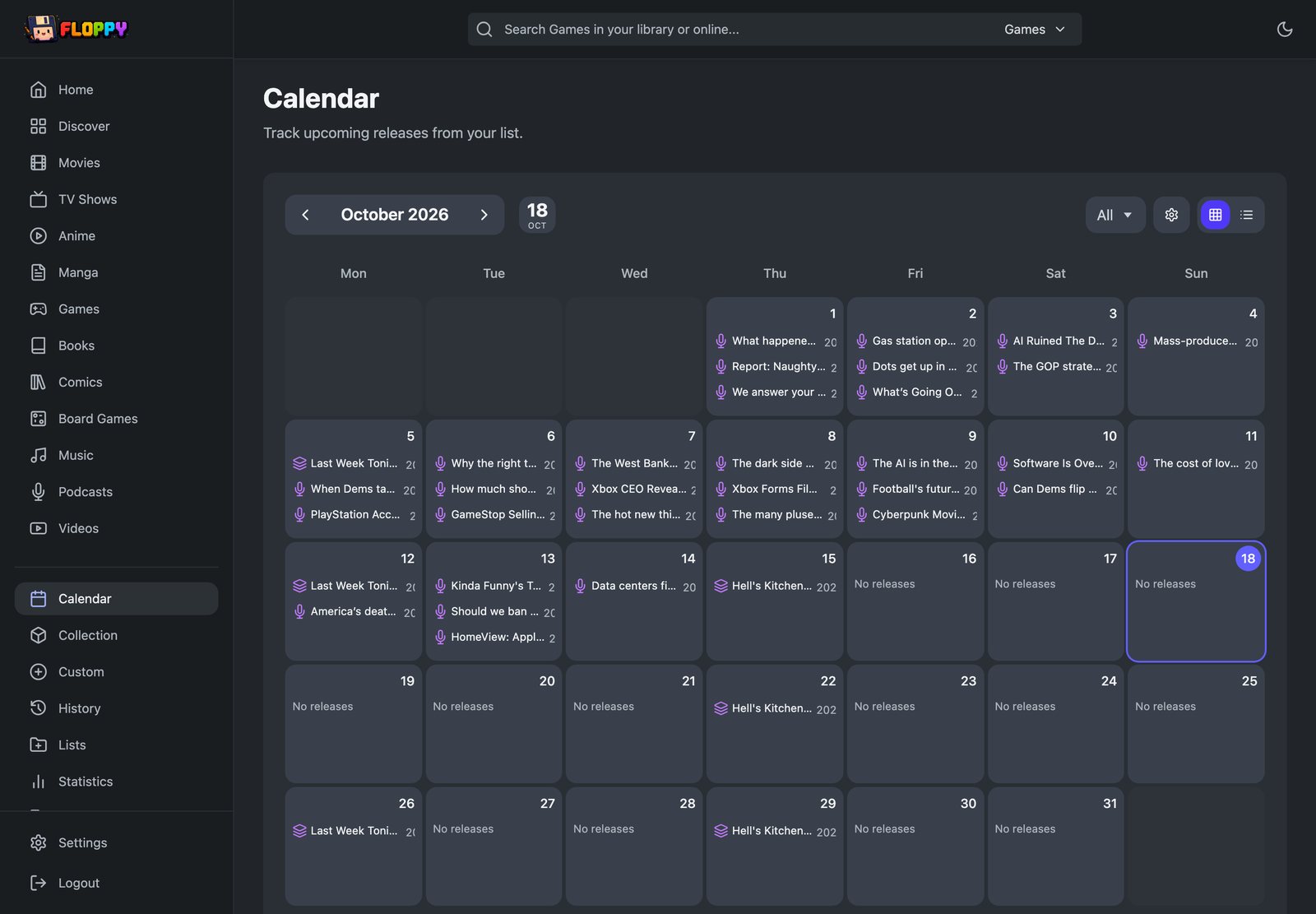
Multi-user accounts with OIDC and social login; calendar and iCalendar feeds for upcoming releases; release notifications through Apprise; Jellyfin, Plex, and Emby playback integrations; imports from Trakt, Simkl, MyAnimeList, AniList, Kitsu, Steam, Goodreads, StoryGraph, Hardcover, IMDb, HowLongToBeat, Grouvee and more; a REST API at /api/v1 with an MCP server; and CSV export/import so your data is always yours to take elsewhere.

Screenshots

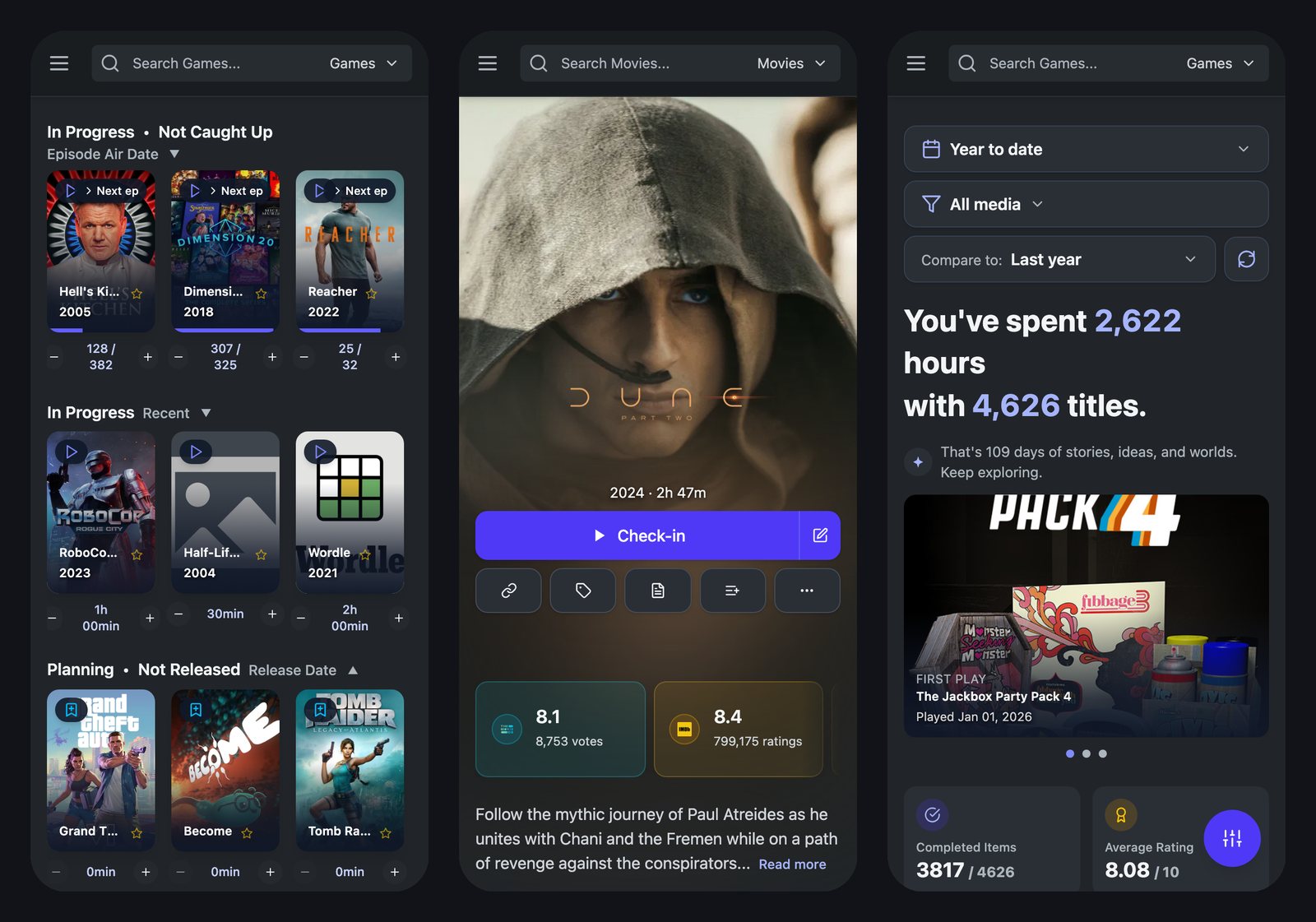
Customizable Home Screen

Change and configure what content is most important to you, making things faster and more tailored to your needs.

Floppy home screen

Statistics

Statistics are designed for recap-style browsing across time ranges and media types.

Screenshot 2026-07-30 at 10 31 12 PM

History

History keeps watches and listens in one place so recent activity is easy to scan.

Screenshot 2026-07-30 at 10 31 48 PM

Shareable Lists

Lists can be shared publicly, surfaced on profiles, and used as more than a private backlog.

Screenshot 2026-07-30 at 10 32 37 PM

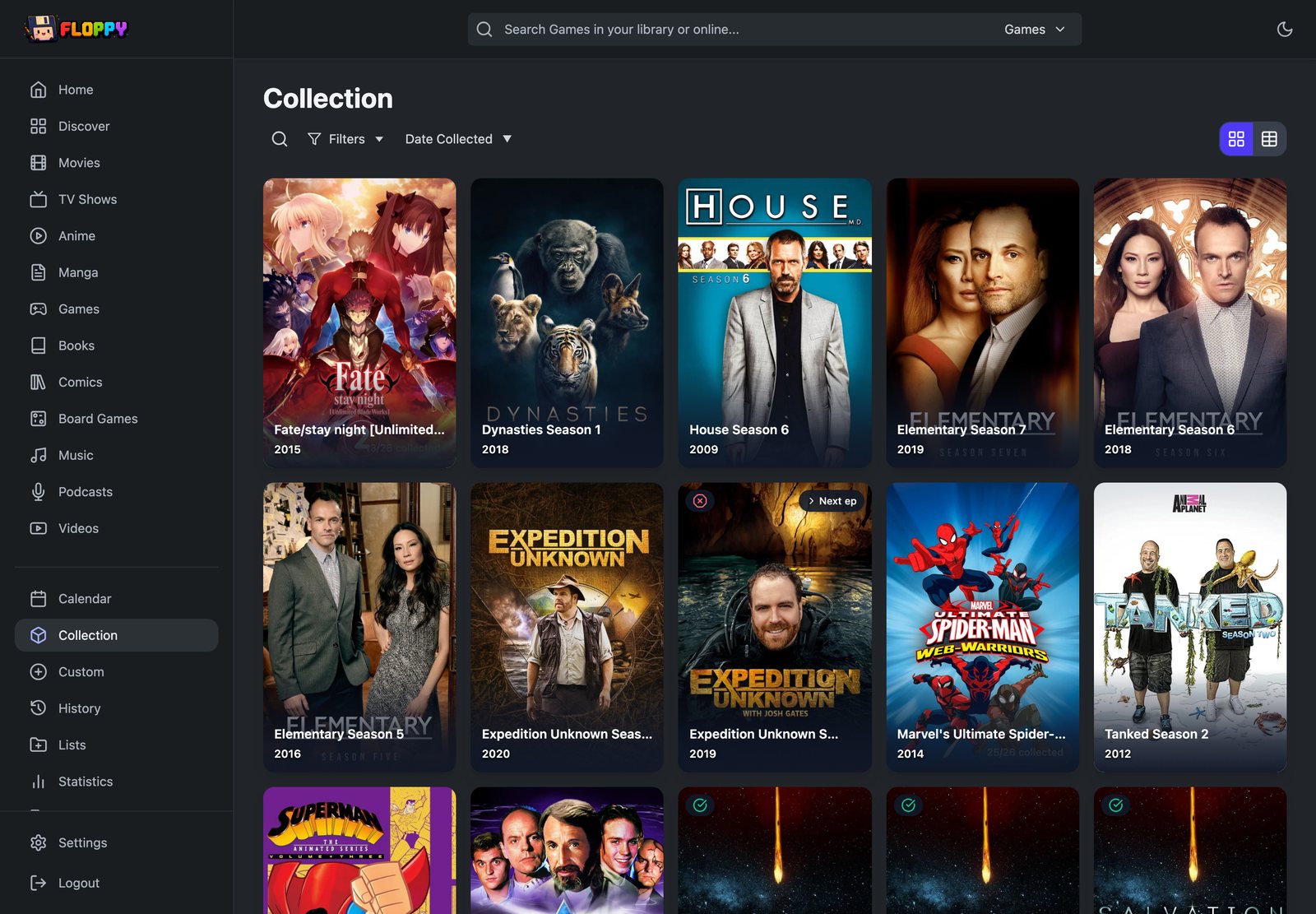
Collections / Owned Media

Collections add ownership context alongside tracking, with room for copy-level detail.

Collection view Copy-level collection detail

Coming from Yamtrack?

Floppy started as a fork of Yamtrack and has diverged substantially since — the rename exists so the two projects stop being confused for each other. The upgrade path is intentionally boring:

  • Your data moves over as-is. Export a CSV from Yamtrack and import it under Settings → Import; the formats are identical. Floppy's own backups export as floppy_<date>.csv and use the same format, so nothing is one-way.
  • Your existing container keeps working. If you already run this project's image, the rename doesn't break your compose file: the old /yamtrack/db mount path still resolves inside the image, and pre-rename YAMTRACK_* environment variables are still read.
  • One thing to update: the image moved to ghcr.io/dannyvfilms/floppy. Point your compose file at the new path when convenient — the old path stops receiving new builds.

Floppy retains Yamtrack's core tracking, import, and self-hosting workflows, with the additional capabilities described above.

Building an integration?

Floppy exposes a REST API at /api/v1 and ships an MCP server. Integrations meant for Floppy should target this repository and the ghcr.io/dannyvfilms/floppy image — upstream Yamtrack does not carry Floppy's API surface, media types, or integration workflows, so "compatible with Yamtrack" and "compatible with Floppy" are not interchangeable claims.

  • Interactive docs: /api/docs/ on any instance · raw schema: /api/schema/
  • Auth: Authorization: Bearer <token> or X-API-Key: <token>, from Settings → Advanced
  • Full reference: API and MCP Server

Configuration and deployment

PostgreSQL

Floppy uses PostgreSQL only when DB_HOST is set. Without it, it uses SQLite at /floppy/db/db.sqlite3. DATABASE_URL is not supported — set the individual DB_* variables.

services:
  floppy:
    image: ghcr.io/dannyvfilms/floppy:latest
    container_name: floppy
    restart: unless-stopped
    depends_on:
      - db
      - redis
    environment:
      - SECRET=your-secret-key-here-change-this
      - REDIS_URL=redis://redis:6379
      - DEMO_ACCOUNT_ENABLED=False
      - TZ=America/New_York
      - DB_HOST=db
      - DB_NAME=floppy
      - DB_USER=floppy
      - DB_PASSWORD=change-this-password
      - DB_PORT=5432
    ports:
      - "8000:8000"

  db:
    image: postgres:16-alpine
    container_name: floppy-db
    restart: unless-stopped
    environment:
      - POSTGRES_DB=floppy
      - POSTGRES_USER=floppy
      - POSTGRES_PASSWORD=change-this-password
    volumes:
      - postgres_data:/var/lib/postgresql/data

  redis:
    image: redis:8-alpine
    container_name: floppy-redis
    restart: unless-stopped
    volumes:
      - redis_data:/data

volumes:
  postgres_data:
  redis_data:

Already running Postgres with DB_NAME=yamtrack? Leave those values alone. Renaming the database, role, or password against an existing volume breaks the deployment.

Docker Run

No compose file needed:

docker network create floppy-net

docker run -d \
  --name floppy-redis \
  --network floppy-net \
  --restart unless-stopped \
  -v floppy-redis-data:/data \
  redis:8-alpine \
  redis-server --appendonly yes

docker run -d \
  --name floppy \
  --network floppy-net \
  --restart unless-stopped \
  -e ALLOWED_HOSTS=floppy.yourdomain.com,your.lan.ip.address \
  -e DEBUG=False \
  -e DEMO_ACCOUNT_ENABLED=False \
  -e GUNICORN_THREADS=4 \
  -e IGDB_ID=your_igdb_client_id \
  -e IGDB_SECRET=your_igdb_client_secret \
  -e LASTFM_API_KEY=your_lastfm_api_key \
  -e MAL_API=your_mal_client_id \
  -e PGID=1000 \
  -e PUID=1000 \
  -e REDIS_URL=redis://floppy-redis:6379 \
  -e REGISTRATION=True \
  -e SECRET=your_django_secret_key \
  -e TMDB_API=your_tmdb_api_key \
  -e TVDB_API_KEY=your_tvdb_api_key \
  -e TZ=America/Chicago \
  -e WEB_CONCURRENCY=2 \
  -v floppy-db:/floppy/db \
  -p 8000:8000 \
  ghcr.io/dannyvfilms/floppy:latest

Leave REGISTRATION=True for your first run, then recreate the container with False once your account exists.

Portainer and Unraid

Prefer Stacks over Containers → Add container. Stacks let you paste a complete Compose configuration and avoid missing required volumes or environment variables. This is also the recommended path for Unraid: rather than installing from a Community Applications template and standing up Redis separately, paste one compose file into a stack via the Portainer plugin and both containers come up together.

  1. Go to StacksAdd Stack
  2. Name it floppy
  3. Paste one of the compose configurations above
  4. Set SECRET to a secure random string, and fill in whichever metadata API keys you have
  5. Deploy the stack
  6. Create your account while REGISTRATION=True, then set it to False and redeploy

If you use Containers → Add container anyway: always set SECRET and REDIS_URL; for SQLite mount persistent storage to /floppy/db; for PostgreSQL set the DB_* variables on the Floppy container and persist /var/lib/postgresql/data on the Postgres container; publish port 8000; and leave Command and Entrypoint empty.

Environment variables

The only universally required variable is SECRET. For Docker installs you should also set REDIS_URL.

Optional but recommended:

  • TMDB_API - movie and TV metadata from TMDB
  • TVDB_API_KEY / TVDB_PIN - TVDB-backed metadata and grouped anime support (TVDB_PIN is your Subscriber PIN, only required for user-supported API keys)
  • MAL_API - MyAnimeList Client ID for anime metadata (register here)
  • IGDB_ID / IGDB_SECRET - game metadata from IGDB
  • STEAM_API_KEY - Steam game imports
  • BGG_API_TOKEN - board game metadata from BoardGameGeek
  • HARDCOVER_API - Hardcover book metadata/imports
  • COMICVINE_API - comic metadata
  • LASTFM_API_KEY - Last.fm integration and scrobble polling
  • TRAKT_API / TRAKT_API_SECRET - Trakt private-profile OAuth imports
  • URLS - your public URL if using a reverse proxy, for example https://floppy.mydomain.com
  • ADMIN_ENABLED - set to True to enable the Django admin interface at /admin/ (see the Admin Guide)
  • WEB_CONCURRENCY / GUNICORN_THREADS - web server concurrency (defaults: 2 worker processes x 4 threads). Total concurrent requests = workers x threads; keep at least 2 workers so one slow request never blocks the whole UI
  • DEBUG - leave unset or False in production; enabling it slows every request (debug toolbar, no template caching) and is only meant for troubleshooting
  • REGISTRATION - set to True to allow new signups (needed for your first account), then set to False afterward
  • DEMO_ACCOUNT_ENABLED - defaults to True, provisioning the built-in demo / demodemo account after migrations. The examples above set it to False; only turn it on if you want a shared demo login
  • ALLOWED_HOSTS / PUID / PGID - ALLOWED_HOSTS is a comma-separated list of hostnames/IPs Django will accept requests for; PUID / PGID set the file-ownership user/group inside the container (match your host user, e.g. Unraid's 99/100, if you hit permission errors)

For the complete list, see the Environment Variables documentation.

Example .env file:

TMDB_API=API_KEY
TVDB_API_KEY=TVDB_API_KEY
TVDB_PIN=SUBSCRIBER_PIN (Optional, only for user-supported keys)
MAL_API=CLIENT_ID
IGDB_ID=IGDB_ID
IGDB_SECRET=IGDB_SECRET
STEAM_API_KEY=STEAM_API_SECRET
BGG_API_TOKEN=BGG_API_TOKEN
HARDCOVER_API=HARDCOVER_API
COMICVINE_API=COMICVINE_API
LASTFM_API_KEY=LASTFM_API_KEY
SECRET=SECRET
DEBUG=False
WEB_CONCURRENCY=2
GUNICORN_THREADS=4

Persistence checklist

  • SQLite stores the app database at /floppy/db/db.sqlite3; persist /floppy/db. (Pre-rename /yamtrack/db mounts still resolve, so existing setups keep working.)
  • PostgreSQL stores its database files at /var/lib/postgresql/data; persist that path on the Postgres container.
  • Redis stores sessions and background-task state; resetting Redis can log users out, but it should not delete accounts if the database is persisted.
  • Do not assume DATABASE_URL enables PostgreSQL. Floppy uses Postgres only when DB_HOST is set.

Trakt private profile import (OAuth)

If you import from a private Trakt profile, configure OAuth first:

  1. Create an app in Trakt API Apps.
  2. Add this Redirect URI in the Trakt app:
    • https://your_domain.com/import/trakt/private
  3. Set these environment variables:
    • TRAKT_API = your Trakt client ID
    • TRAKT_API_SECRET = your Trakt client secret

Behind a reverse proxy, also set URLS=https://your_domain.com so Floppy generates the correct external callback URL.

Reverse proxy setup

If you are behind a reverse proxy (Nginx, Traefik, Caddy, and so on) and see a 403 Forbidden, add your URL to the environment:

environment:
  - URLS=https://floppy.mydomain.com

Multiple origins can be comma-separated, for example https://floppy.mydomain.com,https://floppy-alt.mydomain.com.

If callback URLs for AniList and other imports come out wrong, add:

environment:
  - USE_X_FORWARDED=True

Note: With a Cloudflare Tunnel or any HTTPS-terminating proxy, also set USE_X_FORWARDED_PROTO=True — otherwise Django cannot detect the correct scheme and CSRF checks will fail.

Troubleshooting: I updated and my login is gone

  1. If you intended to use PostgreSQL, confirm DB_HOST is set. DATABASE_URL alone will not enable Postgres.
  2. If you intended to use SQLite, confirm /floppy/db (or the legacy /yamtrack/db) is mounted to persistent storage.
  3. If you were only logged out but can sign in again, Redis/session data was reset; your account database is still intact.
  4. Do not remove database volumes during updates unless you intentionally want a fresh install.

Docker image tags

The image lives at ghcr.io/dannyvfilms/floppy:

  • :latest - the latest commit on the latest branch
  • :release - builds published from GitHub release tags
  • :vX.Y.Z - versioned release builds
  • :dev - built from the fork's upstream branch (formerly named dev), kept aligned with upstream Yamtrack

Local development

For contributing or customizing locally:

git clone https://github.com/dannyvfilms/Floppy.git
cd Floppy
docker run -d --name redis -p 6379:6379 --restart unless-stopped redis:8-alpine
python -m pip install -U -r requirements-dev.txt

Create a .env with at least SECRET, DEBUG=True, and whichever API keys you need (same names as the Docker list above), then:

cd src
python manage.py migrate
python manage.py createsuperuser
python manage.py runserver

Celery and Tailwind run in separate terminals:

celery -A config worker --queues interactive --hostname celery-interactive@%h --loglevel DEBUG
celery -A config worker --queues celery --beat --scheduler django --hostname celery@%h --loglevel DEBUG
npx @tailwindcss/cli -i ./static/css/input.css -o ./static/css/main.css --watch

Visit http://localhost:8000. A demo / demodemo account is provisioned after migrations; set DEMO_ACCOUNT_ENABLED=False to disable it. See CONTRIBUTING.md before opening a pull request.

Support the project

  • Star the repository if you want to help more people find Floppy.
  • Open an issue for bugs, or for feature requests and ideas.
  • Open a pull request if you want to contribute code, docs, or polish.

License

AGPL-3.0.

Origins

Floppy began as a fork of FuzzyGrim/Yamtrack and still shares its foundation and data model — Yamtrack CSV exports import directly, and this repository will keep showing the fork link. Since then it has grown into a distinct project with its own direction: a Trakt-replacement daily driver for people who want something more opinionated and more feature-dense. Thanks to FuzzyGrim and Yamtrack's contributors for the groundwork.

Install Floppy on Unraid in a few clicks.

Find Floppy in Community Apps on your Unraid server, review the template, and click Install. Unraid handles the Docker app or plugin setup from the published template.

Open the Apps tab on your Unraid server Search Community Apps for Floppy Review the template variables and paths Click Install

Requirements

A reachable Redis instance (cache + Celery broker). Not bundled - run a Redis container on this same Unraid server with port 6379 published to the host. REDIS_URL defaults to host.docker.internal:6379, which resolves to this server automatically.

Related apps

Explore more like this

Explore all

Details

Repository
ghcr.io/dannyvfilms/floppy:latest
Last Updated2026-08-03
First Seen2026-08-03

Runtime arguments

Web UI
http://[IP]:[PORT:8000]
Network
bridge
Shell
bash
Privileged
false
Extra Params
--add-host=host.docker.internal:host-gateway

Template configuration

WebUI PortPorttcp

Port the Floppy web UI listens on.

Target
8000
Default
8000
Value
8000
App DataPathrw

Persistent storage for SQLite database and local app data.

Target
/floppy/db
Default
/mnt/user/appdata/floppy/db
Value
/mnt/user/appdata/floppy/db
SECRETVariable

Long random string used as the Django secret key. Required.

REDIS_URLVariable

URL of a reachable Redis instance, used for caching and as the Celery broker. Defaults to this same server via host.docker.internal - just run a Redis container here with port 6379 published to the host. Change the port if you published Redis on a different one. Required.

Default
redis://host.docker.internal:6379
Value
redis://host.docker.internal:6379
TZVariable

Timezone used for scheduling and displayed dates.

Default
America/Chicago
Value
America/Chicago
REGISTRATIONVariable

Allow new account sign-ups. Set to False after creating your account.

Default
True
Value
True
DEMO_ACCOUNT_ENABLEDVariable

Provision the public demo/demodemo account after migrations. Leave False unless you want it.

Default
False
Value
False
TMDB_APIVariable

TMDB API key for movie/TV metadata. Optional but recommended.

DB_HOSTVariable

PostgreSQL host. Leave blank to use SQLite instead.

DB_NAMEVariable

PostgreSQL database name (only used when DB_HOST is set).

Default
floppy
Value
floppy
DB_USERVariable

PostgreSQL user (only used when DB_HOST is set).

Default
floppy
Value
floppy
DB_PASSWORDVariable

PostgreSQL password (only used when DB_HOST is set).

DB_PORTVariable

PostgreSQL port (only used when DB_HOST is set).

Default
5432
Value
5432
URLSVariable

Public URL if using a reverse proxy, e.g. https://floppy.yourdomain.com

ADMIN_ENABLEDVariable

Enable the Django admin interface at /admin/.

Default
False
Value
False
WEB_CONCURRENCYVariable

Gunicorn worker processes.

Default
2
Value
2
GUNICORN_THREADSVariable

Gunicorn threads per worker.

Default
4
Value
4
DEBUGVariable

Enable Django debug mode. Leave False in production - it slows every request.

Default
False
Value
False
PUIDVariable

User ID to run the container as.

Default
1000
Value
1000
PGIDVariable

Group ID to run the container as.

Default
1000
Value
1000