
All apps · 0 apps

FireSquire
Plugin from Junker der Provinz
Overview
Readme
View on GitHub





An Unraid plugin that answers one question before you reboot: will the box come back up clean?
FireSquire reads the live host state and gives you a single verdict (GO / CAUTION / NO-GO) with the exact findings, so you never reboot into a known landmine. Advisory only: it reads, it never touches anything.
A one-knight job: I build it, keep it running, work through the issues and add what people ask for, until nothing is missing. It is free, with no accounts, no telemetry, no ads and no paid tier. No asterisk anywhere. Nothing readable ever leaves your own walls. Forged on evenings and weekends, with heart and stubbornness.
If it has earned a place on your server or computer, toss a coin to your knight: it helps cover the costs and keeps the project alive. It also makes this knight's heart beat a little faster. Three ways below, whichever suits you.
))
))
))
Table of Contents
- What is this?
- Screenshots
- What it checks
- How it works
- Install
- Development
- License
- How AI is used here
- Support this project
1. What is this?
A reboot is never 100% guaranteed, but a large class of "it didn't come back right" is predictable from the current live state. FireSquire inspects that state before you reboot and gives you a single, honest verdict:
- GO: nothing found that should block a reboot
- CAUTION: non-fatal issues you should know about first
- NO-GO: conditions likely to make the reboot come back dirty
It is advisory only. It reads the system and reports. It never stops, mounts, unmounts, or changes anything, because acting on the host is exactly what tends to cause reboot trouble in the first place.
The plugin adds a FireSquire button next to Reboot on the Main tab, plus a Settings → User Utilities → FireSquire page with a short description. Click it and a live progress bar shows each check as it runs, then read the verdict and reboot. Each problem finding is a click-through link straight to the page where you fix it: syslog and disk/IO findings open the System Log viewer, array/parity/SMART/space findings open Main, running VMs open the VMs tab, and so on. The report follows your Unraid light/dark theme and the language configured in the Unraid UI (all 26 supported languages, English fallback).
2. Screenshots
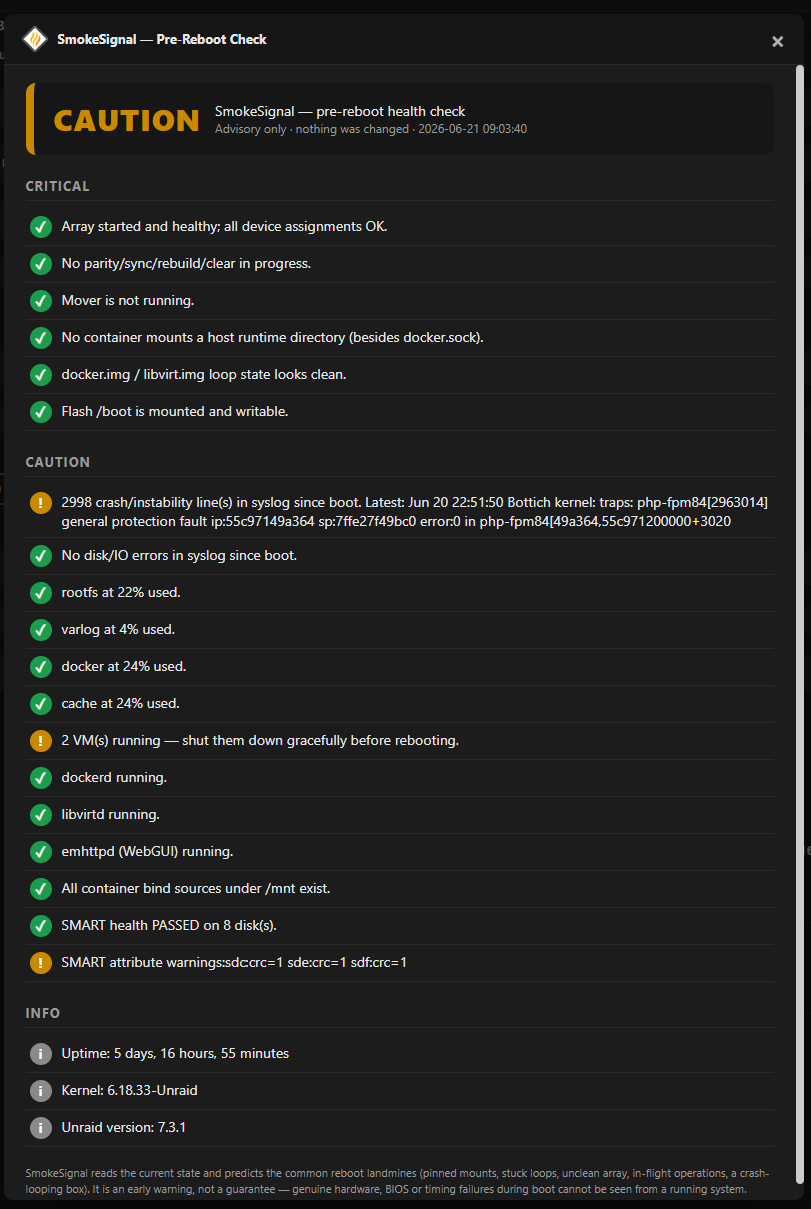
The pre-reboot report: a single GO / CAUTION / NO-GO verdict with the exact checks behind it. Advisory only: it never changes anything.
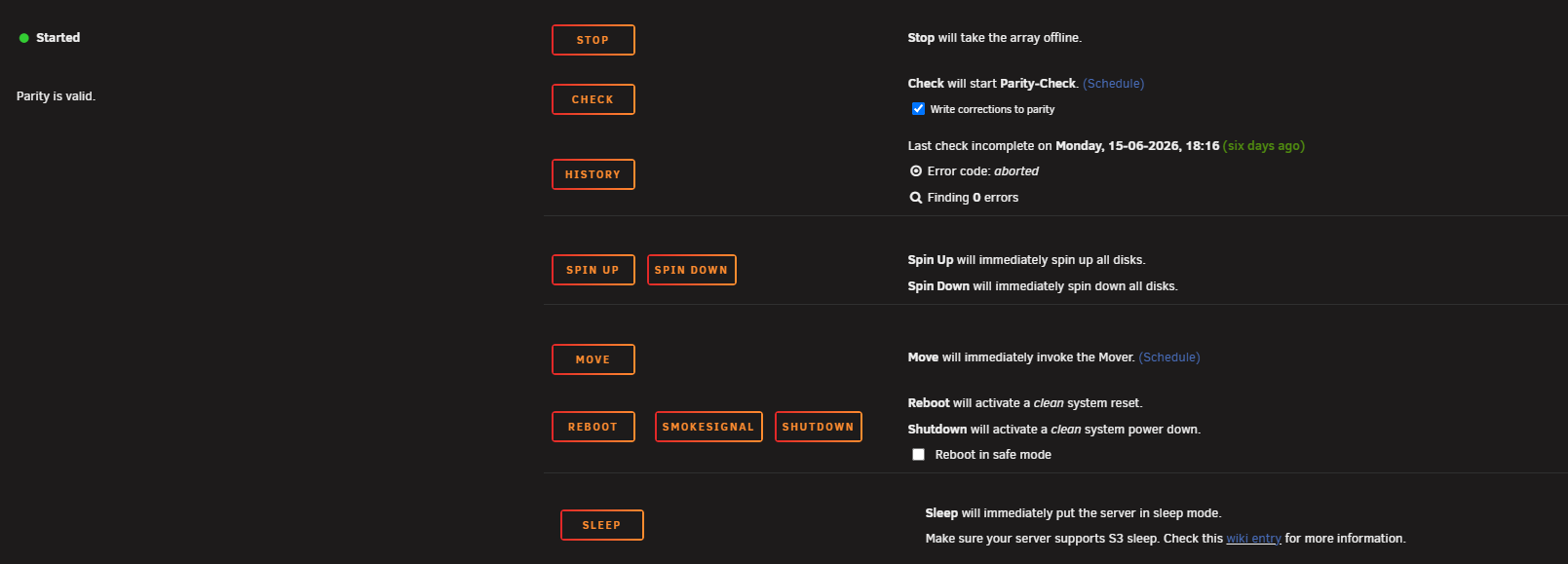
One click from the Main tab: the FireSquire button sits right next to Reboot.
3. What it checks
Critical: a failure here means NO-GO
- Array started and clean (no disabled / invalid / missing disks)
- No parity check / sync / rebuild / clear in progress, mover not running
- No container mounting a host runtime directory (
/var/run,/run,/var/run/libvirt, …, withdocker.sockexcepted), the bind class that can take libvirt/docker down on reboot - No stuck
docker.img/libvirt.imgloop (attached-but-not-mounted, or a loop backing a deleted file) - Flash
/bootmounted and writable
Caution: worth knowing before you reboot
- Crashes since last boot in the syslog (segfault, general-protection-fault, OOM, kernel panic, call traces)
- Low free space on
/,/var/log(both RAM),docker.img, cache - VMs currently running (a reboot force-stops them)
- A core service down right now (dockerd / libvirtd / emhttpd)
- Container bind sources under
/mntthat no longer exist - SMART health (
smartctl -H) on every disk
Info: uptime, kernel, Unraid version.
Honest limits
This is an early-warning check, not an oracle. Genuine hardware, BIOS or timing failures during boot cannot be seen from a running system. What it does cover reliably is the state-detectable class: pinned mounts, stuck loops, an unclean array, in-flight array operations, a low-on-RAM or crash-looping box.
4. How it works
A single Bash engine (firesquire-check.sh) runs the checks by querying the tools Unraid already ships: mdcmd, losetup, docker, smartctl, df, pgrep. No daemon, no dependencies. It prints a human-readable report on a console, or machine-readable JSON for the WebGUI:
firesquire-check.sh          # human-readable report
firesquire-check.sh --json   # machine-readable (used by the WebGUI)
Exit code mirrors the verdict: 0 = GO, 1 = CAUTION, 2 = NO-GO.
The WebGUI layer is a small PHP page (FireSquireReport.php) that runs the engine and renders the verdict in an Unraid modal.
5. Install
Community Apps (planned): search for FireSquire in the Apps tab.
By URL (today): Unraid → Plugins → Install Plugin, paste:
https://raw.githubusercontent.com/junkerderprovinz/firesquire/main/plugin/firesquire.plg
6. Development
The plugin files live under src/ mirroring the on-disk layout
(/usr/local/emhttp/plugins/firesquire/). The release .txz is built by CI on
a tagged push (v*), built on Linux so executable bits are preserved.
Assets (icon, banner) are generated with
.github/assets/render-assets.mjs.
7. License
Copyright (C) 2026 Junker der Provinz.
FireSquire is free software under the GNU Affero General Public License v3.0 (AGPL-3.0); see LICENSE. You may run, study, share and modify it. If you distribute it, or run a modified version as a network service, you must release your source under the same AGPL-3.0 terms and keep the existing copyright and attribution notices intact.
Name and branding are not licensed. The AGPL covers the source code only. "FireSquire", its logo and its branding remain reserved: a fork or derivative must use its own distinct name and branding, and may not present itself as FireSquire. This keeps it unambiguous which project is the original.
8. How AI is used here
One knight builds this, and AI is one of the tools I work with, the same way I work with an editor or a compiler. It helps me write code and documentation and it checks my work, and that saves me a good many evenings. It does not make the decisions, though. I read and understand everything before it ships, and if something here breaks, that is on me and not on the tool.
You do not have to take my word for it. The code is open and every release note is written by hand. The issue tracker shows how problems actually get handled, including the ones I got wrong the first time. If you find something that is not right, open an issue and I will look at it.
9. Support this project
Questions? Check the support thread. Bugs, ideas or feature requests? Please open a GitHub issue.
A one-knight job: I build it, keep it running, work through the issues and add what people ask for, until nothing is missing. It is free, with no accounts, no telemetry, no ads and no paid tier. No asterisk anywhere. Nothing readable ever leaves your own walls. Forged on evenings and weekends, with heart and stubbornness.
If it has earned a place on your server or computer, toss a coin to your knight: it helps cover the costs and keeps the project alive. It also makes this knight's heart beat a little faster. Three ways below, whichever suits you.
Install FireSquire on Unraid in a few clicks.
Find FireSquire in Community Apps on your Unraid server, review the template, and click Install. Unraid handles the Docker app or plugin setup from the published template.
Categories
Download Statistics
Downloads by Month
Related apps
Explore more like this
Explore allDetails
https://raw.githubusercontent.com/junkerderprovinz/firesquire/main/plugin/firesquire.plg