
All apps · 0 apps

FireSight
Docker app from Tjindarrr's Repository
Overview
Readme
View on GitHubFireSight
Self-hosted firewall log analyzer and syslog dashboard for UniFi routers. One container. No external services. SQLite + FTS5 under the hood for fast search even on weeks of logs.
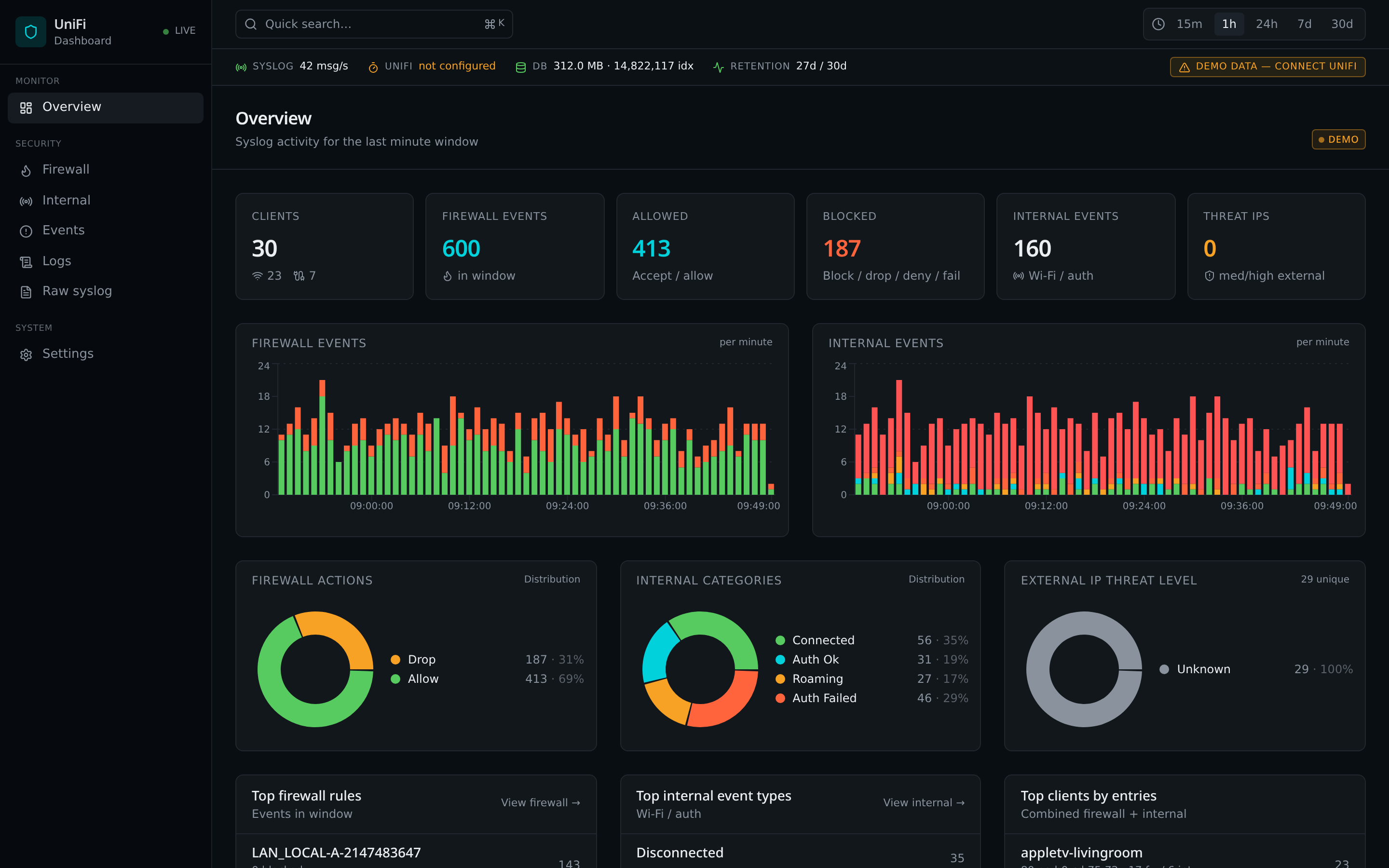
FireSight acts as a syslog server for your UniFi Dream Router / UDM / UXG / Cloud Gateway. It parses UniFi's firewall, STA-tracker and internal events, enriches external IPs with country / ASN / threat-level data, and serves a dark NOC-style web UI with first-class full-text search.
It's designed to run as a single Docker container on Unraid with one volume — and nothing else.
Table of contents
- Features
- Screenshots
- Architecture
- Install — Unraid (Community Apps)
- Install — Docker / Docker Compose
- Configure your UniFi router
- First login
- Timezone handling
- UniFi API (optional, read-only)
- Threat intelligence
- Retention & cleanup
- Environment variables
- Updating
- Development
- License
Features
- Syslog UDP/514 listener for UniFi devices (RFC3164 + CEF).
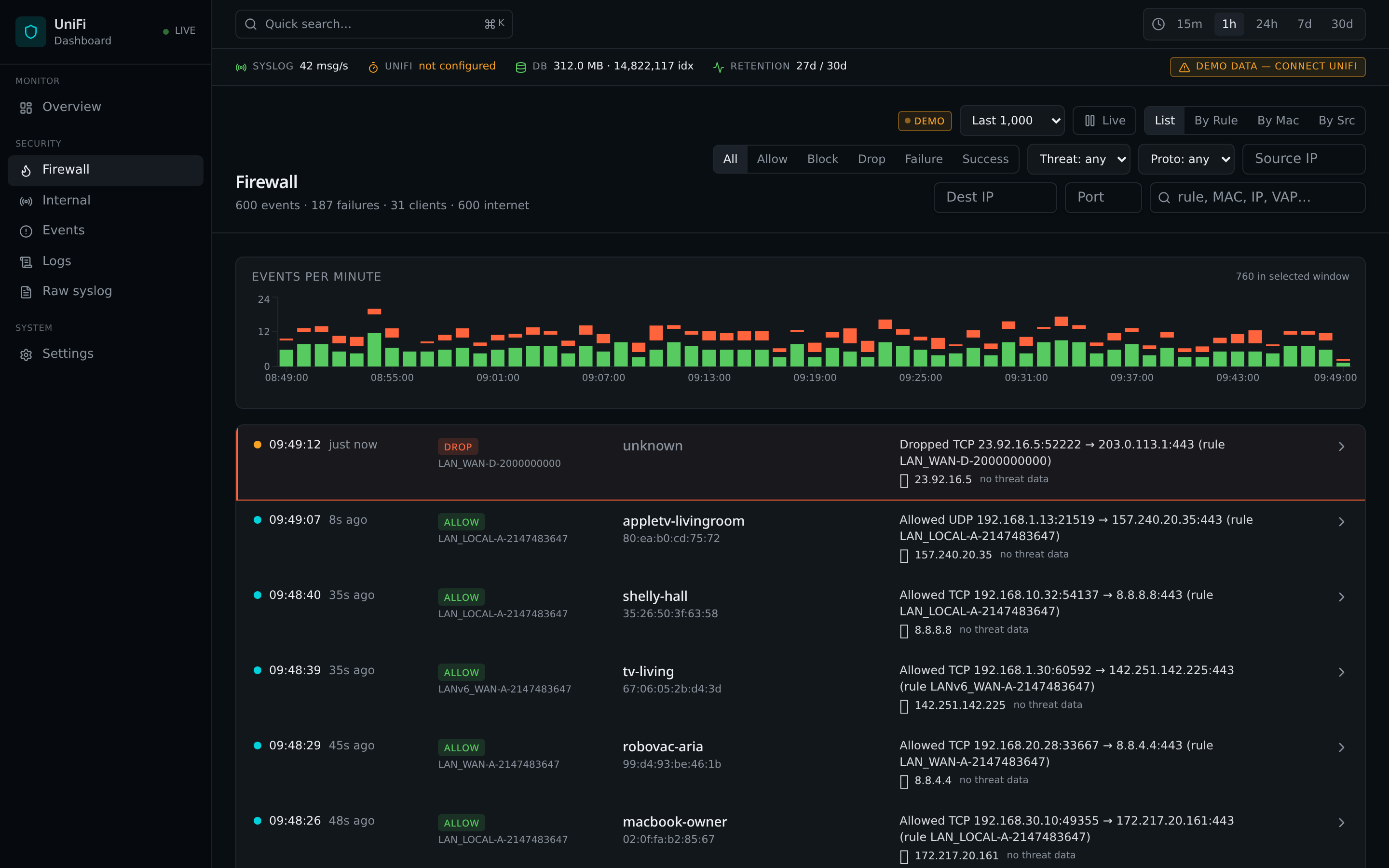
- Firewall view — parsed
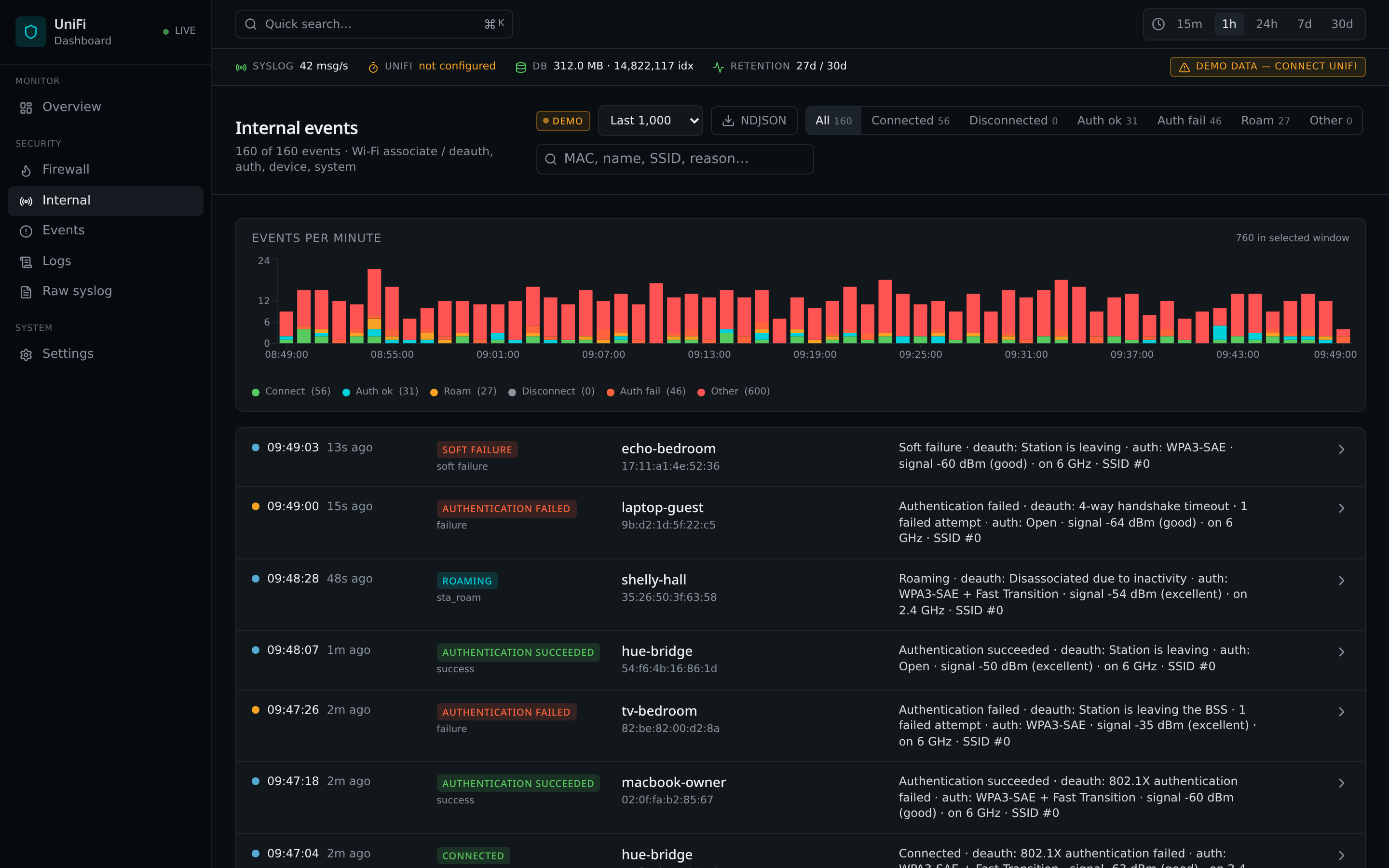
[WAN_LOCAL],[LAN_IN], … rules, action chips, per-row country flag + threat level, red banner ondeny/drop/reject/block, pause/resume so your search view doesn't get yanked out from under you. - Internal view — Wi-Fi roam, auth, DHCP, admin actions translated into
plain English instead of
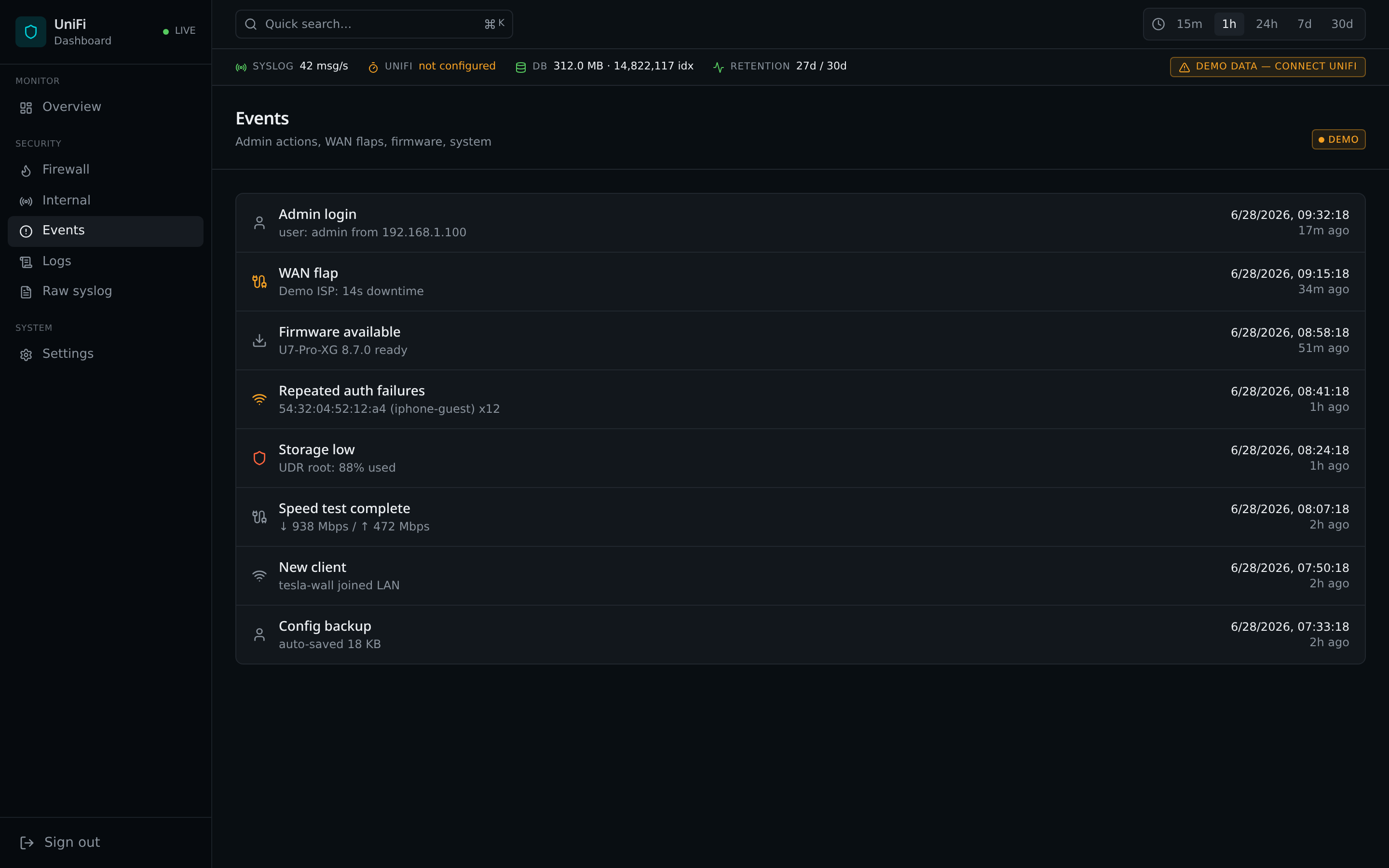
{ADMIN} {PLATFORM} sta_assoc_tracker. - Events view — high-level event timeline with severity colouring.
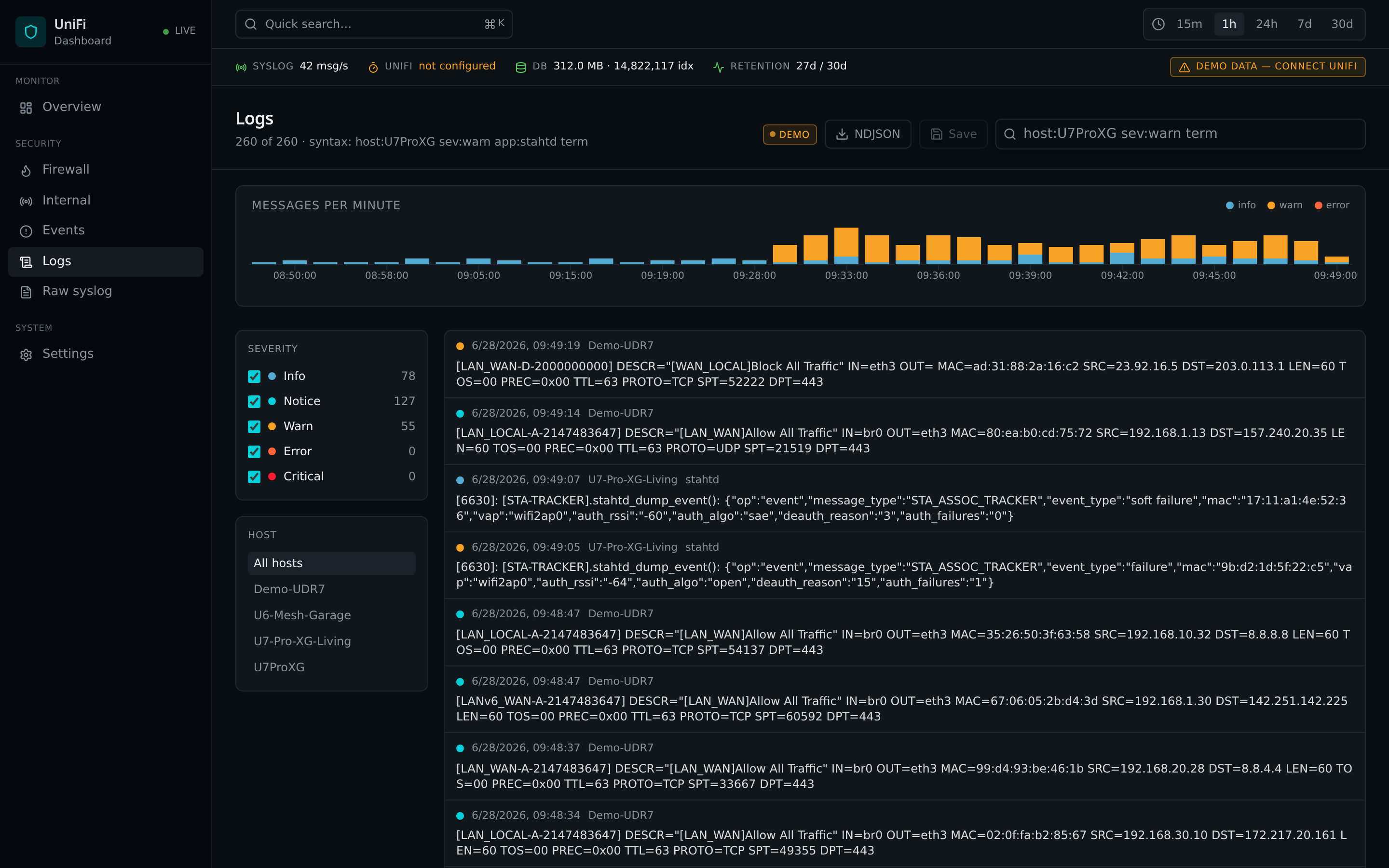
- Logs view — full-text search over raw syslog via SQLite FTS5, with a dedicated messages-per-minute chart driven by the global time range.
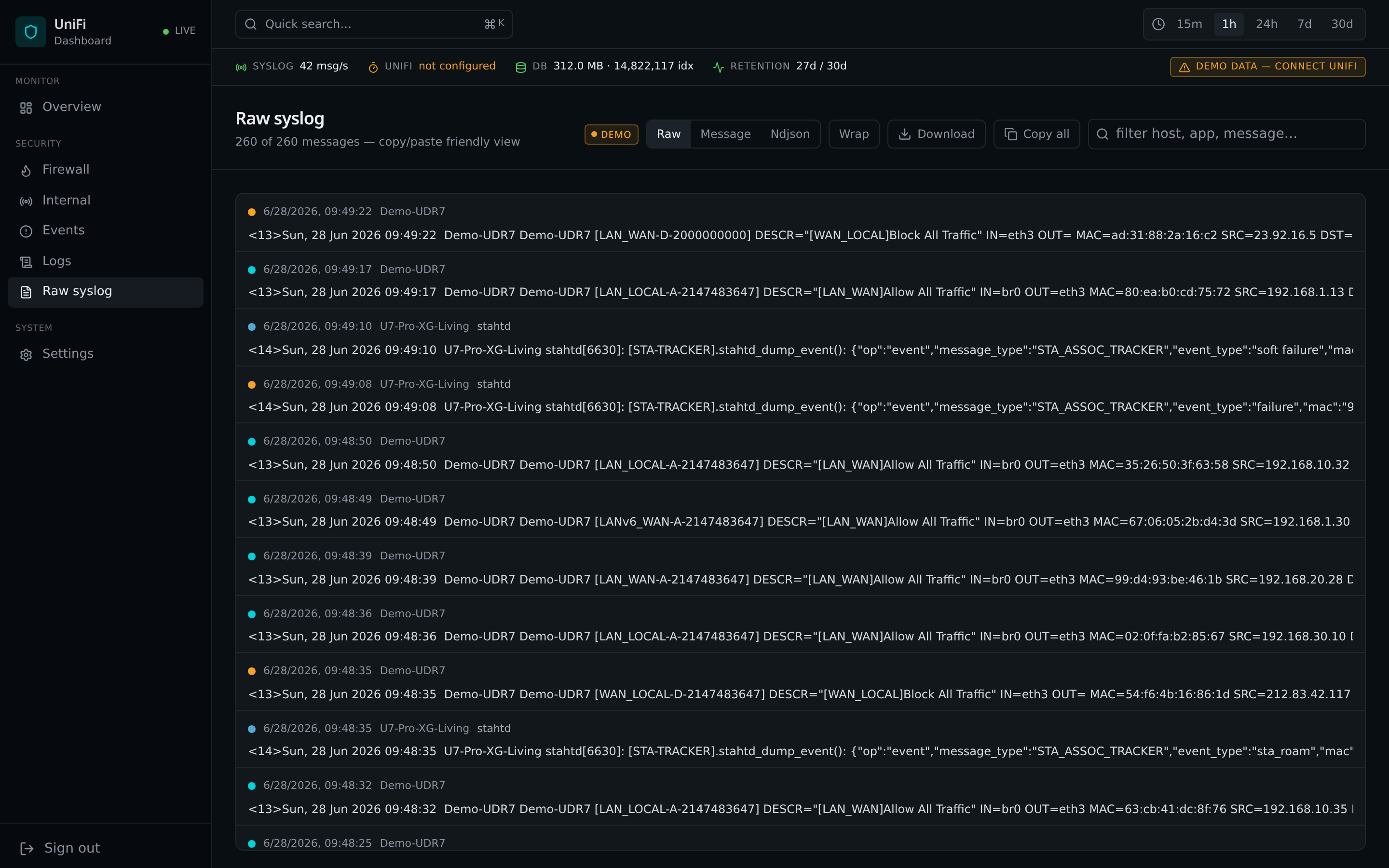
- Raw syslog view — paste-friendly inspector for any single message.
- Overview — wired/wireless client counts (from UniFi API), per-minute firewall + internal event charts, donut breakdown of firewall actions / internal categories / external-IP threat level, parsing-health widget.
- GeoIP & threat enrichment —
ip-api.comfor country/ASN, AbuseIPDB for reputation, and offline IP/CIDR feeds (FireHOL, Spamhaus) matched in SQLite. - Retention — by age, by firewall-age, and by hard DB size cap, with
scheduled
VACUUM. - Parsing health — counts of accepted / rejected / TZ-skewed / CEF-failed events over time so you notice when something stops parsing.
- Auth — session cookie, forced password change on first login.
Screenshots
| Overview | Firewall |
|---|---|
|
 |
| Internal | Events |
|---|---|
 |
 |
| Logs (FTS5) | Raw syslog |
|---|---|
 |
 |
Architecture
┌─────────────────────── firesight ───────────────────────┐
│  UDP :514   → parser → enrich → SQLite (WAL + FTS5)     │
│  HTTP :8095 → REST + WS + static React UI               │
│  worker     → UniFi controller poll (read-only, 10s)    │
│  worker     → threat-feed refresh (FireHOL/Spamhaus)    │
│  volume     → /data  (unifi.db + config.json)           │
└─────────────────────────────────────────────────────────┘
Frontend: React + TanStack Router + Tailwind v4 + Recharts.
Runtime: Node 22, Fastify, better-sqlite3, native dgram for UDP,
undici for the UniFi API (self-signed cert tolerated).
Install — Unraid (Community Apps)
FireSight ships as a Community Apps template.
- In Unraid: Apps → search for FireSight → click Install.
- Confirm the default ports and
Appdatapath (/mnt/user/appdata/firesight). - Set TZ to your router's timezone (e.g.
Europe/Stockholm). UniFi syslog timestamps have no timezone field — if this is wrong, your logs will appear 1–14 hours off. See Timezone handling. - Click Apply. The container will boot, bind UDP/514, and serve the UI
on
http://<unraid-ip>:8095.
Network mode is host by default so the syslog source IP matches the real UniFi device. If you need bridge mode, expose
8095/tcpand514/udpand accept that every message will look like it came from the Docker gateway.
If you maintain your own Unraid Community Apps repository fork, point it at
unraid/ca_profile.xml and
unraid/templates/firesight.xml.
Install — Docker / Docker Compose
Docker run
docker run -d --name firesight \
  --network host \
  -e TZ=Europe/Stockholm \
  -v /mnt/user/appdata/firesight:/data \
  --restart unless-stopped \
  ghcr.io/tjindarr/unifi-insights-hub:latest
Without host networking:
docker run -d --name firesight \
  -p 8095:8095/tcp -p 514:514/udp \
  -e TZ=Europe/Stockholm \
  -v /mnt/user/appdata/firesight:/data \
  --restart unless-stopped \
  ghcr.io/tjindarr/unifi-insights-hub:latest
docker-compose
See docker-compose.example.yml.
docker compose -f docker-compose.example.yml up -d
Build locally
git clone https://github.com/Tjindarr/unifi-insights-hub.git
cd unifi-insights-hub
docker build -t firesight:local .
Configure your UniFi router
In the UniFi console:
- Settings → System → Remote Logging / Remote Syslog
- Enable forwarding to your Unraid IP, UDP, port 514.
- Enable as many categories as you want (firewall is the most useful).
Within ~10 seconds you'll see events in Logs and Firewall.
Enable syslog on the built-in firewall rules
To see both outbound internet traffic and inbound connection attempts, turn on logging for UniFi's two default firewall rules:
- Settings → Security → Firewall & Port Forwarding
- Open the rule named Allow All Traffic (this is the default rule that lets all internal traffic go out to the internet).
- Click Edit → enable Syslog → Save.
- Open the rule named Block All Traffic (this is the default rule that blocks all incoming traffic on the external address).
- Click Edit → enable Syslog → Save.
With these two rules logging, FireSight will show every connection your clients make to the internet and every inbound probe blocked by the router.
Read-only UniFi user (optional but recommended)
For client-name resolution in firewall logs and wired/wireless counts on the Overview, create a UniFi local read-only admin:
- UniFi console → Admins & Users → Admins → Add Admin
- Choose Restrict to local access only and role View Only.
- In FireSight → Settings → UniFi controller, enter the host
(
192.168.1.1), site (default), username, password.
The API poller is disabled if you leave these blank. The syslog half works fine without it.
First login
Default credentials are admin / admin. You'll be forced to set a new
password on first login. The session cookie is signed with a per-instance
secret stored in /data/config.json.
Timezone handling
UniFi syslog uses RFC3164, which has no timezone field. The parser
interprets timestamps in the container's local timezone — so you must set
TZ to whatever your router is configured for.
docker run … -e TZ=Europe/Stockholm …
On Unraid, set the TZ variable on the template (default
Europe/Stockholm). You can also nudge by minutes in
Settings → Time correction without restarting the container.
UniFi API (optional, read-only)
When configured, the API poller runs every 10 seconds and caches:
- Clients (for MAC → hostname / alias resolution).
- Device status (gateway / AP / switch).
- WAN counters.
All credentials live in /data/config.json, never in env vars after the
first launch. Rotate by editing in the UI; restart not required.
Threat intelligence
- GeoIP lookups via
ip-api.com(free, batched, cached). - AbuseIPDB — paste an API key in Settings → AbuseIPDB to colour rows by abuse confidence score.
- Offline feeds — FireHOL Level 1 and Spamhaus DROP lists are pulled hourly and matched against firewall events using CIDR ranges stored in SQLite. No outbound calls per packet.
Retention & cleanup
Three layered policies (configurable from Settings):
| Policy | Default | What it does |
|---|---|---|
retentionDays |
30 | Drops syslog rows older than N days. |
retentionFirewallDays |
30 | Drops parsed firewall_events separately. |
maxDbMb |
2048 | Hard ceiling on on-disk DB size. Oldest rows pruned to fit. |
Cleanup runs every intervalMin (default 60). VACUUM runs every
vacuumHours (default 24) to actually return freed pages to the
filesystem. A Run cleanup now button lives in Settings and at
POST /api/retention/run.
Environment variables
Almost everything is configurable from the UI and persisted in
/data/config.json. Env vars only seed the file on first launch.
| Variable | Default | Purpose |
|---|---|---|
TZ |
container default | Timezone used to interpret RFC3164 syslog timestamps |
HTTP_PORT |
8095 |
HTTP port for the dashboard |
SYSLOG_UDP_PORT |
514 |
UDP port the syslog listener binds to |
DB_PATH |
/data/unifi.db |
SQLite database path |
CONFIG_PATH |
/data/config.json |
Persistent settings file |
DASH_USER |
admin |
Seed username (first launch only) |
DASH_PASSWORD |
admin |
Seed password (forced change on first login) |
RETENTION_DAYS |
30 |
Seed retention for syslog |
RETENTION_FIREWALL_DAYS |
RETENTION_DAYS |
Seed retention for firewall events |
RETENTION_MAX_DB_MB |
2048 |
Seed hard cap on DB size |
RETENTION_INTERVAL_MIN |
60 |
Seed cleanup interval |
RETENTION_VACUUM_HOURS |
24 |
Seed VACUUM interval |
Container image & releases
Images are built and published automatically by
.github/workflows/docker-publish.yml
to GitHub Container Registry:
ghcr.io/tjindarr/unifi-insights-hub:latest
Triggers:
| Event | Tags produced |
|---|---|
Push to main |
latest, main-<sha> |
Push of a vX.Y.Z git tag |
vX.Y.Z, X.Y, X, latest |
Manual workflow_dispatch |
latest |
All images are multi-arch (linux/amd64 + linux/arm64) so they run on
Unraid x86_64 boxes and on ARM hosts. The Unraid Community Apps template
(unraid/templates/firesight.xml) pins
the latest tag, so cutting a release is just:
git tag v1.2.3
git push --tags
GitHub Actions builds, pushes, and Unraid users get the update through Apps → Check for Updates.
One-time GHCR setup
The workflow uses the built-in GITHUB_TOKEN (no PAT needed). After the
first successful run, open the package on GHCR and set its visibility to
Public so Unraid users can pull it without authentication.
Updating
Unraid: Apps → Installed Apps → Check for Updates → Update.
Docker:
docker pull ghcr.io/tjindarr/unifi-insights-hub:latest
docker rm -f firesight
# re-run your `docker run …` command
The SQLite schema is migrated automatically on boot.
Development
# frontend (Vite, mock-data only)
bun install
bun run dev          # http://localhost:8080

# backend (real syslog + UniFi)
cd server
npm install
DASH_USER=admin DASH_PASSWORD=admin npm start
The frontend proxies /api and /ws to http://localhost:8095. When
backend endpoints are unreachable the UI falls back to anonymized mock data
so every screen is designable without a real router.
License
MIT — see LICENSE.
Media gallery
1 / 6Requirements
Categories
Related apps
Explore more like this
Explore allDetails
ghcr.io/tjindarr/unifi-insights-hub:latestRuntime arguments
- Web UI
http://[IP]:[PORT:8095]- Network
host- Shell
sh- Privileged
- false
Template configuration
HTTP port for the FireSight web UI. Host networking is used so this also binds on the host.
- Target
- 8095
- Default
- 8095
- Value
- 8095
UDP port the syslog listener binds to. Point your UniFi router's remote syslog here.
- Target
- 514
- Default
- 514
- Value
- 514
Persistent storage. Holds the SQLite database (unifi.db) and config.json (UniFi credentials, retention settings, auto-generated session secret).
- Target
- /data
- Default
- /mnt/user/appdata/firesight
- Value
- /mnt/user/appdata/firesight
Timezone for interpreting UniFi syslog timestamps (RFC3164 has no TZ field). Must match the timezone your router is configured in.
- Default
- Europe/Stockholm
- Value
- Europe/Stockholm
Seed username for the first login. You'll be forced to change the password on first login.
- Target
- DASH_USER
- Default
- admin
- Value
- admin
Seed password for the first login (forced change on first login).
- Target
- DASH_PASSWORD
- Default
- admin
- Value
- admin
Drop syslog rows older than N days. Can also be changed from Settings in the UI.
- Target
- RETENTION_DAYS
- Default
- 30
- Value
- 30
Hard cap on on-disk SQLite size. When exceeded, the oldest syslog rows are pruned to fit.
- Target
- RETENTION_MAX_DB_MB
- Default
- 2048
- Value
- 2048