
Filehub
Docker app from ericleung001's Repository
Overview
Readme
View on GitHubFilehub
Lightweight multi-user file manager — Go single binary + embedded web UI + SQLite.
License: Apache-2.0
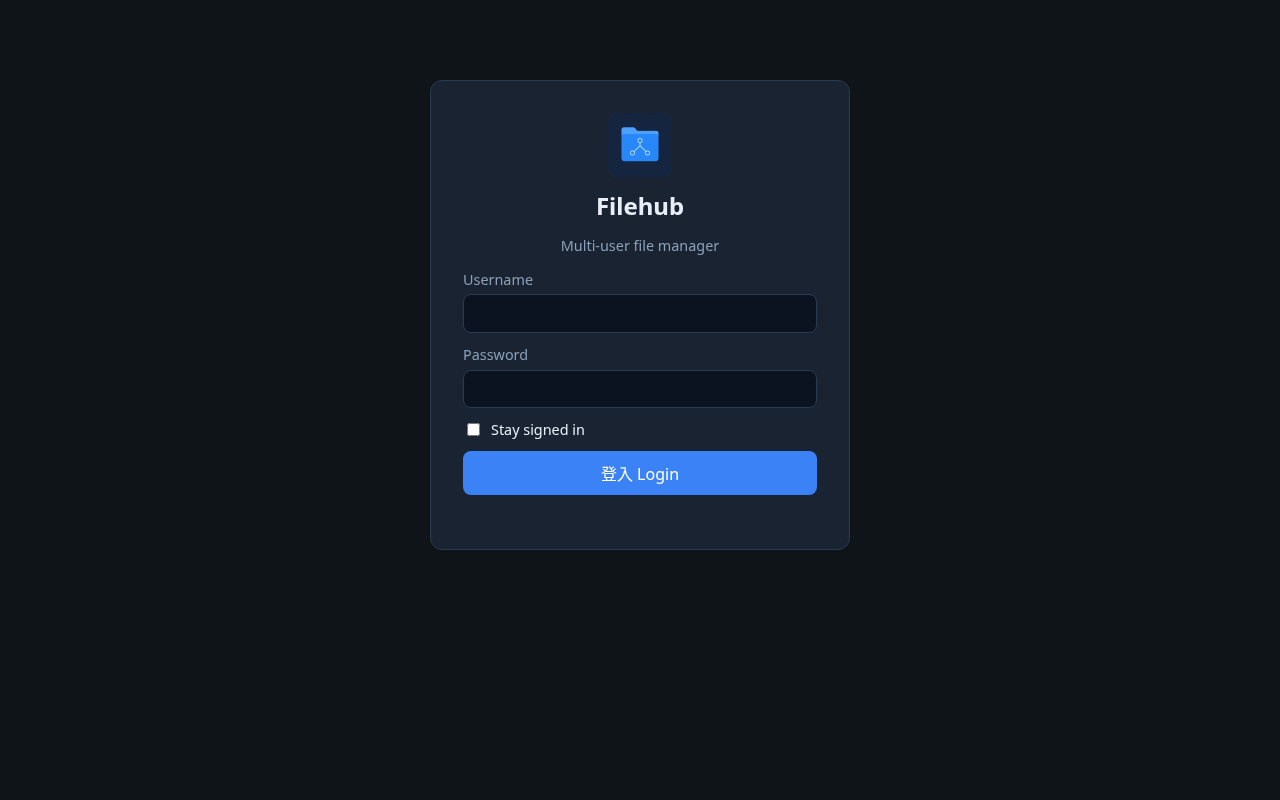
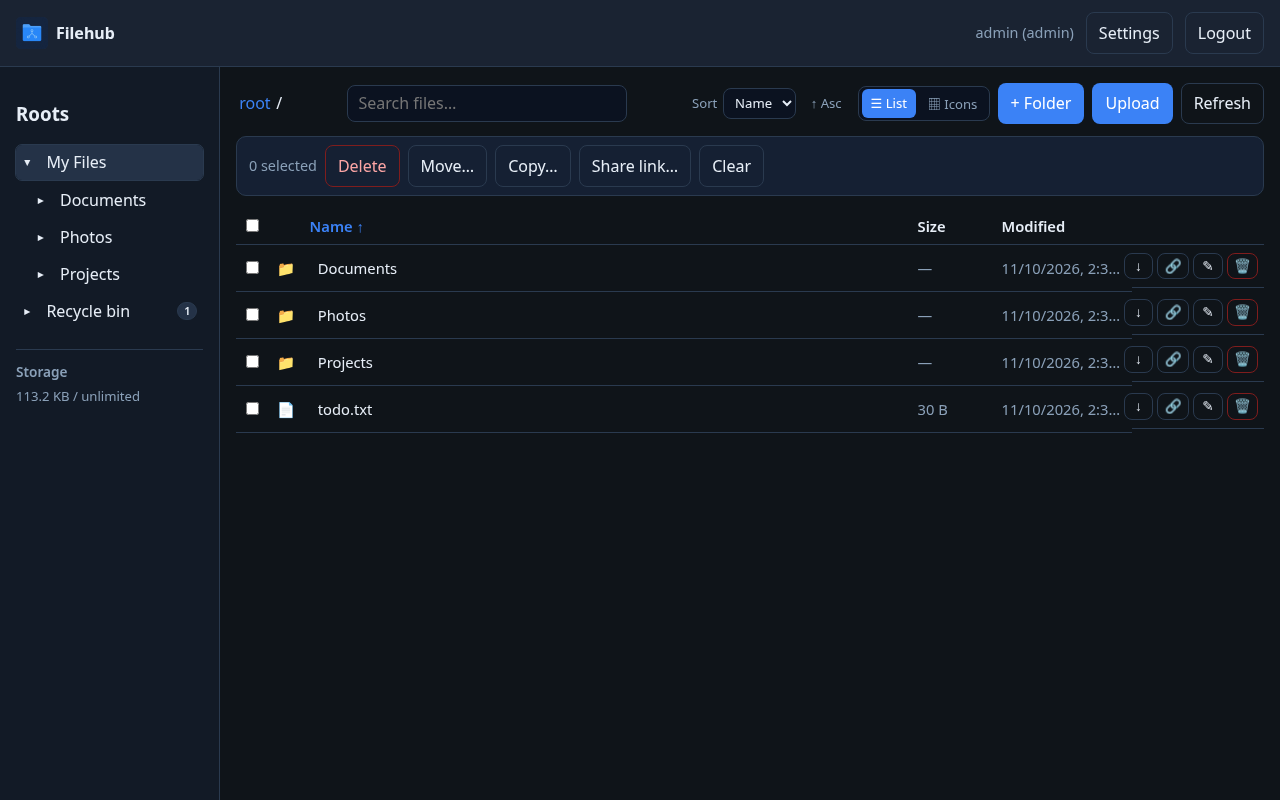
Screenshots
Where it runs
Filehub is not Unraid-only. It runs on any host that can run Docker or a Go binary:
- Linux VPS / bare metal
- TrueNAS Community Apps (official listing), plus Synology / QNAP / Unraid or any NAS with Docker
- Windows or macOS with Docker Desktop
- Local development via
go run/ a built binary (Linux, Windows, macOS)
Use Docker Compose (recommended) or the single binary from Quick start below. The Hardware thumbnail acceleration section is optional — it only enables hardware-accelerated ffmpeg thumbnails when a supported device is present. Software ffmpeg works everywhere by default.
Features
- Multi-user homes — each user gets
DATA_ROOT/homes/<username>; users cannot see each other’s homes - Shared folders — admin-created shares under
DATA_ROOTwith per-userread/writeaccess and an independent Allow delete flag (admin picks a user from a dropdown; existing grants can be changed or revoked) - Link shares — secret URLs for a file or folder (
/s/<token>); optional expiry and password (password form only when the link has one); recipients browse/download without an account and can preview images / PDFs / play videos inline; revoke (hard-delete) anytime from Settings → Link shares, or select several and Delete selected - File ops — browse, search file and folder names across My Files and shares you can read, upload (with per-file progress in a bottom-right floating Uploads panel showing
(done/total), hidden until uploads start), drag-and-drop into current folder or onto a folder, download, download a folder as a zip, mkdir, rename, delete (moves items to a Recycle bin instead of immediate permanent delete); multi-select with bulk Delete / Move / Copy (Move and Copy use a folder picker; writable shared folders are valid destinations); restore or permanently purge from the Recycle bin; list or icons view; sort by name / date / type / size (asc or desc, saved inlocalStorage); fixed-column list keeps columns aligned; long names ellipsize; compact action icons - Preview — image, PDF (blob-backed iframe; raw endpoints allow same-origin framing), and HTML5 video playback; icon view uses
/api/thumbfor image/video thumbnails; closing the dialog stops video/audio cleanly - Thumbnails — optional ffmpeg thumbs (software by default; hardware acceleration is selected from detected Intel VAAPI, AMD VAAPI, or NVIDIA NVDEC/CUDA devices, with software fallback)
- App icon — favicon and Apple touch icon; mark on the login / auth pages and in the top bar after sign-in
- Settings — one top-bar entry; left vertical menu, right content panel
- Account — username, home, quota used/limit
- Change password —
POST /api/me/password(enforces admin password policy) - 2FA — enable/disable TOTP
- Link shares — list, copy, or revoke (permanently delete) public links you created (admins see all); select multiple to delete together
- Users / Shares / Sessions / Registration / Security / Email / Storage quota / System (admins only) — user/share tables; Sessions (duration + Stay signed in); Registration; Security (Force 2FA + password policy); Email (SMTP); Storage quota (optional same quota for all users); System (DATA_ROOT notes, live CPU / RAM / storage status, and auto-detected GPU / hardware-decode type)
- About (everyone) — project description, GitHub, and Buy Me a Coffee
- Sidebar — expandable folder tree under My Files / shares / Recycle bin; a count badge appears to the right of Recycle bin when it has items (
99+after 99); storage used/limit bar - Two-factor authentication (TOTP) — voluntary per user; admin can require per user or force all (
FORCE_2FA_ALL/ System settings); login second step + forced enrollment; backup codes on enable - Password policy — admin-configurable min length and character classes; enforced on create user, admin reset, self-service change, and forgot-password reset; policy version forces remediation after tighten; login blocks the app until password/2FA requirements are met
- Forgot password — admin configures SMTP; users with an email can request a reset link at
/forgot(linked from login when ready; rate-limited; generic responses) - Open registration — optional admin toggle;
/register(linked from login) creates username/email/password accounts under the password policy. New sign-ups require admin approval by default (Settings → Registration and Users). Pending accounts cannot sign in until approved. Rejecting a pending account deletes it so the username can be reused. Already-active users are unchanged. Email notification is optional and is not required. - Session duration — admin sets normal login lifetime (default 7 days) and may allow Stay signed in (default 30 days); applies to new logins only; existing sessions keep their expiry
- Security defaults — no remote command/shell execution; bcrypt passwords; HttpOnly session cookies; login / reset rate limits; path-traversal guards; container drops to PUID/PGID (default 1000:1000); SMTP password never returned by the API;
X-Frame-Options: DENYexcept same-origin framing for/api/raw,/api/thumb, and public/rawpreview URLs
Quota counts the user’s home directory plus files in shared folders that this Filehub user wrote (upload, copy, or replace). Bytes are attributed to the acting writer; a whole share is never billed to every grantee. Existing share files with no recorded writer stay unbilled until a Filehub user writes or replaces them. Recycle-bin items still count toward the owner’s quota until they are permanently purged. Admins can turn on Apply the same quota to all users under Settings → Storage quota so every existing user and every new account uses one quota; per-user quota editing is disabled while that setting is on. Settings → System and the Users storage bar use this same definition.
Quick start
First boot — admin password (read this)
On first install, Filehub creates the seed admin from ADMIN_USER / ADMIN_PASSWORD. There is no emailed default password.
Docker (recommended): if you leave ADMIN_PASSWORD unset, the container entrypoint auto-generates a random ADMIN_PASSWORD and SESSION_SECRET once and writes them to:
| Path inside container | Host path (with default compose ./data:/data) |
|---|---|
/data/admin-credentials.txt |
./data/admin-credentials.txt ← read this for the password |
/data/.env |
./data/.env |
Those files are never overwritten on later starts. Open the credentials file, sign in as admin, then change the password under Settings → Change password.
Optional host helper (project-root .env + the same credentials file, also once-only):
./scripts/gen-env.sh
You may still set your own ADMIN_PASSWORD / SESSION_SECRET in a project .env or compose environment before first start; if you do, first boot will use your values (and still write the credentials file once when it is missing).
ADMIN_PASSWORD only seeds an empty database. Editing env later does not change an existing admin hash — use Settings (or recreate the DB during initial setup).
Docker Compose (recommended)
mkdir -p data/files data/db
# Optional: ./scripts/gen-env.sh   # writes ./.env + ./data/admin-credentials.txt once
docker compose up -d --build
# Read the generated password (first boot only):
cat ./data/admin-credentials.txt
Open http://127.0.0.1:8088 and sign in as admin with the password from ./data/admin-credentials.txt.
Compose binds 127.0.0.1:8088 only — put Nginx Proxy Manager (or another reverse proxy) in front.
Pull a published image
Pre-built linux/amd64 and linux/arm64 images are published to Docker Hub (ericleung001/nas-filehub) and GHCR (ghcr.io/ericleung001/nas-filehub). The Debian ffmpeg package in the image is multi-arch. Version tags omit the v prefix (use 0.4.7, not v0.4.7).
docker pull ericleung001/nas-filehub:0.4.7
# or
docker pull ghcr.io/ericleung001/nas-filehub:0.4.7
latest on the default branch tracks the latest build (currently 0.4.7). To run a published image with the same bind and volume layout as this repo's compose file, set image: ericleung001/nas-filehub:0.4.7 or image: ghcr.io/ericleung001/nas-filehub:0.4.7 on the filehub service (and drop build: . if you do not want to build locally).
Local development
./scripts/gen-env.sh   # once — creates ./.env and ./data/admin-credentials.txt
set -a && source .env && set +a
export DATA_ROOT=./data/files DB_PATH=./data/filehub.db THUMB_CACHE_DIR=./data/thumbs LISTEN_ADDR=:8080
go run ./cmd/server
Or set ADMIN_PASSWORD yourself and run make run / make smoke.
Environment variables
| Variable | Default | Description |
|---|---|---|
LISTEN_ADDR |
:8080 |
HTTP listen address |
DATA_ROOT |
/data/files |
File storage root |
DB_PATH |
/data/filehub.db |
SQLite database path |
ADMIN_USER |
admin |
Seed admin username on first boot only |
ADMIN_PASSWORD |
(auto on first Docker boot if unset) | Seed admin password — auto-written once to ./data/admin-credentials.txt + ./data/.env when unset; ignored after the admin already exists |
SESSION_SECRET |
(auto on first Docker boot if unset) | Auto-generated with the credentials file when unset; also used to encrypt TOTP secrets at rest. If unset at runtime, a key file is written next to the database. Session tokens are random values stored in SQLite |
CREDENTIALS_FILE |
/data/admin-credentials.txt |
Path for the one-time admin credentials file (Docker entrypoint) |
DOTENV_FILE |
/data/.env |
Path for the one-time generated env copy (Docker entrypoint) |
SECURE_COOKIES |
false |
Set true behind HTTPS. Required (with PUBLIC_BASE_URL) for public HTTPS deployments |
THUMB_ENABLE |
true |
Generate thumbs with ffmpeg |
THUMB_VAAPI |
false |
Legacy flag: true enables auto hardware thumbnail acceleration when THUMB_HWACCEL is unset |
THUMB_HWACCEL |
(empty) | auto, off, vaapi, or nvdec (cuda/cuvid/nvidia aliases map to nvdec). Empty defers to THUMB_VAAPI. Picks the detected render node; always falls back to software ffmpeg, then the original image |
PUID / PGID |
1000 / 1000 |
Docker only: UID/GID after start, and owner of /data. Unset keeps the previous 1000:1000 default |
UMASK |
— | Docker only, optional (for example 002) |
THUMB_CACHE_DIR |
/data/thumbs |
Thumbnail cache directory |
LOGIN_RATE_LIMIT |
10 |
Max login and share-link unlock attempts per client IP per minute |
TRUSTED_PROXIES |
(loopback only) | Extra comma-separated IPs or CIDRs allowed to set X-Forwarded-For / X-Real-IP. 127.0.0.1 and ::1 are always trusted |
LOGIN_LOCKOUT_LIMIT |
10 |
Failed logins per username before that account is temporarily locked |
LOGIN_LOCKOUT_MINUTES |
15 |
Account lock window; further attempts during the lock do not extend it |
MAX_UPLOAD_MB |
2048 |
Max upload size in MiB |
FORCE_2FA_ALL |
false |
If true, every user must enroll TOTP (overrides UI off) |
PUBLIC_BASE_URL |
— | Absolute site URL for password-reset emails (e.g. https://filehub.example.com). Required for public HTTPS deployments so reset links cannot follow a spoofed host |
SMTP_ENABLED |
false |
Env override: enable SMTP |
SMTP_HOST / SMTP_PORT / SMTP_USERNAME / SMTP_PASSWORD / SMTP_FROM |
— | Env overrides for SMTP (password never logged) |
Settings
Sign in → Settings (single top-bar button):
- Account (everyone) — username, email, admin badge (if any), home path, storage used / quota
- Change password — requires current password; must meet the admin password policy; other sessions cleared, current kept
- 2FA — enable/disable TOTP (Authenticator app + backup codes)
- Link shares — copy or revoke (permanently delete) public file/folder links, or select several and Delete selected; deleted rows leave the list
- Active sessions (everyone) — list signed-in devices, revoke one session, or revoke all other sessions
- Users (admins) — table list of users (home, storage used/quota, status); create / edit / delete; set email / quota (quota is read-only while Settings → Storage quota is on); reset passwords; disable accounts; per-user require 2FA
- Shares (admins) — table list of shared folders (path, grants); create shares; grant access with a user dropdown, Read or Write (write includes read), and Allow delete; change or revoke existing grants
- Sessions (admins) — normal session duration and optional Stay signed in (applies to new logins only)
- Registration (admins) — allow open registration; each sign-up email must be unique (including pending and disabled accounts). When admin approval is required, the sign-up page tells the user their account is waiting for approval
- Security (admins) — Force 2FA for all users; password policy (tightening bumps a version so existing users must change password on next login)
- Audit log (admins) — recent sign-in attempts, public link create/revoke, and shared-folder permission changes
- Email (admins) — SMTP for forgot-password
- Storage quota (admins) — optional Apply the same quota to all users setting and the quota value
- System (admins) — live server CPU, RAM, home-quota totals,
DATA_ROOTdisk usage, and auto-detected GPU / hardware-decode type (Intel VAAPI/QSV, AMD VAAPI, NVIDIA NVDEC, or none), plusDATA_ROOT/ homes / shares notes - About (everyone) — what Filehub is, Apache-2.0, GitHub, and Buy Me a Coffee
The left sidebar shows the same storage used/limit under Roots, plus an expandable folder tree for My Files and shared roots.
On phones, the file toolbar wraps so Upload/Refresh stay visible, and Settings uses a horizontal scrollable chip nav.
Disabled users cannot log in. Uploads / mkdir that would exceed home quota are rejected.
Nginx Proxy Manager
- Keep Filehub on loopback / LAN only (
127.0.0.1:8088) - Add a Proxy Host → your domain → forward to
http://<host>:8088(or the Docker network hostname) - Enable SSL (Let’s Encrypt)
- Prefer an Access List, Authelia, or Cloudflare Access in front
- Set
SECURE_COOKIES=trueandPUBLIC_BASE_URL=https://your.domain(required for public HTTPS so password-reset emails use a fixed origin) - If the reverse proxy is not on loopback, set
TRUSTED_PROXIESto the proxy’s address or CIDR - Set HTTP Strict-Transport-Security on the reverse proxy; Filehub does not enable HSTS itself (LAN HTTP and first-boot must keep working)
Do not port-forward the app port directly to the public internet.
Releases
Tagged releases are published on GitHub: ericleung001/nas-filehub/releases.
Each release includes:
- Changelog notes for that version
- Downloadable binaries for Linux (amd64 and arm64), macOS (amd64 and arm64), and Windows (amd64) when built for that tag
- Docker install notes (see Quick start —
docker compose up -d --buildfrom the tagged source, or pullericleung001/nas-filehub/ghcr.io/ericleung001/nas-filehub)
Install from a release binary
# example: Linux amd64 from the latest release assets
chmod +x nas-filehub-linux-amd64
# Once: write ./.env + ./data/admin-credentials.txt (or export ADMIN_PASSWORD yourself)
./scripts/gen-env.sh   # from a full clone; or: export ADMIN_USER=admin ADMIN_PASSWORD='your-strong-password'
set -a && source .env && set +a
export DATA_ROOT=./data/files DB_PATH=./data/filehub.db THUMB_CACHE_DIR=./data/thumbs LISTEN_ADDR=:8080
./nas-filehub-linux-amd64
Sign in as admin with the password from ./data/admin-credentials.txt (or the one you exported), then change it under Settings → Change password. Prefer Docker Compose for production (bind to loopback and put a reverse proxy in front) — first docker compose up auto-writes that credentials file when ADMIN_PASSWORD is unset.
Install on TrueNAS (Community Apps)
Filehub is listed in the official TrueNAS Apps Market on the Community train. The live catalog currently ships app version 0.4.4; an update to 0.4.7 is in PR #6466.
In TrueNAS, open Apps, search for Filehub, and install it. The install wizard asks for:
- An initial admin username and password (required; these seed the first admin on first boot)
- WebUI port (default 30568)
- Run-as user and group (default 568, the TrueNAS
appsuser)
The live catalog image is ghcr.io/ericleung001/nas-filehub:0.4.4 until that PR is merged. After install, sign in with the admin username and password you set, then change the password under Settings → Change password.
Notes:
- Prefer a reverse proxy with HTTPS, then set
SECURE_COOKIES=trueandPUBLIC_BASE_URL. Do not expose the WebUI port directly to the public internet. - If the TrueNAS host has an Intel or AMD GPU selected for the app, the catalog enables VAAPI thumbnail acceleration. See also Hardware thumbnail acceleration.
Install on Unraid (Community Apps)
Filehub can be installed on Unraid from a Community Apps template in this repository (templates/filehub.xml). The container image is ghcr.io/ericleung001/nas-filehub (the :latest tag is published from main). The template is categorized under Tools › Utilities and Productivity, and includes current login and file-browser screenshots.
This is not a claim that Filehub is already listed in the official Community Apps catalog — that listing is a separate submission step. Until the catalog accepts the repository, you can add it yourself in Apps → the CA settings / Add a new Repository URL, using:
https://github.com/ericleung001/nas-filehub
Then search for Filehub and install the template. After the official listing is accepted, searching Filehub in Community Apps should be enough.
First boot:
- Leave
ADMIN_PASSWORDempty so the entrypoint generates one. - Open
/mnt/user/appdata/nas-filehub/admin-credentials.txt(or the appdata path you chose) for the admin password. - Sign in, then change the password under Settings → Change password.
Notes:
- The WebUI listens on container port 8080 (template default host port 8088). Prefer a reverse proxy with HTTPS, then set
SECURE_COOKIES=true. Do not expose the WebUI port directly to the public internet. - The optional Unraid shares path is mounted at
/data/files/sharesso you can create shared folders with paths such asshares/Movies. Remove that mapping if you do not need it. - Optional Intel VAAPI thumbnails: keep the
/dev/dridevice mapping and setTHUMB_VAAPI=true. If/dev/driis not present, remove the device mapping and leaveTHUMB_VAAPI=false. See also Hardware thumbnail acceleration. - The GHCR package must be public so Unraid can pull
ghcr.io/ericleung001/nas-filehub:latestwithout a login.
Hardware thumbnail acceleration (optional)
This section is optional hardware acceleration for thumbnail generation only. Filehub itself does not require a GPU.
Browser playback uses client decode. The server may use hardware decode only to speed ffmpeg thumbnail generation.
Set THUMB_HWACCEL=auto (or the legacy THUMB_VAAPI=true, which means the same auto path). Filehub then selects a backend from detected devices:
- Intel or AMD: VAAPI on the matching
/dev/dri/renderD*node (not hardcoded torenderD128when another node is the right one) - NVIDIA: CUDA/NVDEC (
-hwaccel cuda). Stock Debianffmpegin this image usually includes VAAPI but not NVIDIA CUDA; if that backend is missing, ffmpeg falls back to software. Do not assume hardware decode works until Settings → System shows a selected hardware path and your ffmpeg build actually supports it.
Leave THUMB_HWACCEL empty and THUMB_VAAPI unset/false to stay on software.
In docker-compose.yml, uncomment the device mapping and set:
devices:
  - /dev/dri:/dev/dri
environment:
  THUMB_HWACCEL: "auto"
  # THUMB_VAAPI: "true"   # still works; treated as auto when THUMB_HWACCEL is unset
NVIDIA hosts also need the NVIDIA Container Toolkit / GPU runtime; this image does not bundle proprietary CUDA ffmpeg. If hardware decode fails, ffmpeg falls back to software; if that fails, the original image is used. Settings → System lists detected GPUs and whether the current thumbnail path can use one.
(Full transcode streaming belongs in products like Jellyfin; Filehub stays intentionally light.)
Security defaults
- No remote command / shell execution surface
- bcrypt password hashes
- Session cookie:
HttpOnly,SameSite=Lax, optionalSecure - Login rate limiting
- All file ops confined under the resolved scope root (path traversal protected)
- Container starts as root only to apply
PUID/PGID(default 1000:1000), chown/data, then drops privileges withgosu
API summary
Auth / session:
POST /api/login·POST /api/logout·GET /api/me·POST /api/me/password·GET /api/healthGET /api/me/sessions·DELETE /api/me/sessions/{id}·POST /api/me/sessions/revoke-othersGET /api/meincludesusedBytes(home + attributed share writes + trash) alongsidequotaBytes,email, andstatusGET /api/auth/features(openRegistration,registrationRequireApproval,allowRememberMe, password policy, forgotPassword) ·POST /api/register(may returnpending) ·POST /api/forgot-password·GET /api/reset-password/meta·POST /api/reset-passwordPOST /api/loginaccepts optionalrememberMe(honored only when admin allows Stay signed in)
Files:
GET /api/search?q=— filename search across My Files and granted sharesGET /api/zip?root=&path=— stream a folder (or file) as a zip (size/time limits apply)GET /api/trash·POST /api/trash/restore·POST /api/trash/purge— recycle bin (delete/move-to-trash isPOST /api/delete; link-share revoke stays a hard-delete of the link row)Recycle bin items live under
DATA_ROOT/.filehub-trash/<id>/(hidden from normal browsing)POST /api/admin/users/:id/approve·POST /api/admin/users/:id/reject(reject deletes a pending account)GET /api/roots(includestrashCountfor the current user’s visible recycle-bin items) ·GET /api/listPOST /api/mkdir·POST /api/rename·POST /api/delete·POST /api/uploadGET /api/download·GET /api/raw·GET /api/thumb
Admin (requires admin session):
GET|POST /api/admin/users(email on create)PATCH|DELETE /api/admin/users/{id}(email on patch)POST /api/admin/users/{id}/passwordGET|PUT /api/admin/settings(force2faAll,openRegistration,sessionTtlSeconds,rememberMeTtlSeconds,allowRememberMe,globalQuotaEnabled,globalQuotaBytes, password policy, SMTP — password write-only)GET /api/admin/system/status(CPU, RAM, user quota totals,DATA_ROOTdisk; admin only)GET /api/admin/audit(limit,offset) — append-only audit log (admin only)POST /api/admin/smtp/testGET|POST /api/admin/sharesDELETE /api/admin/shares/{id}- Share grants under
/api/admin/shares/{id}/grants
Contributing / release habit
After every intentional change:
- Update CHANGELOG.md (Keep a Changelog)
- Commit with a clear English message
- Push to
originmain
See CONTRIBUTING.md. Do not commit secrets, deploy env files, binaries, or screenshots.
Email and forgot password
- Admin → Settings → Email: enable, host, port, username, password, from address. Save. Optionally Send test email.
- Set each user’s email under Users → Create / Edit (required for that user to receive reset mail).
- Public HTTPS deployments must set
PUBLIC_BASE_URLto your public origin (andSECURE_COOKIES=true) so reset links cannot follow a spoofed host. - The login page links to Forgot password? (
/forgot) when SMTP is ready. The user enters username or email; if a matching account has an email, a one-hour link is sent. The/reset?token=…page enforces the current password policy.
SMTP credentials can also be supplied via env (SMTP_*); env values override the DB for the running process. The API never returns the SMTP password — only passwordSet: true|false.
Support
Filehub is open source: ericleung001/nas-filehub.
If Filehub is useful, you can buy me a coffee.
License
Apache License 2.0 — see LICENSE.
Two-factor authentication (2FA)
Uses standard TOTP (RFC 6238, 30s / SHA1 / 6 digits), compatible with Google Authenticator, 1Password, Authy, etc.
- User (voluntary) — Settings → Account → Enable 2FA → scan QR → confirm code. Backup codes are shown once. Disable with password or a current code (blocked if 2FA is required).
- Admin per user — Settings → Users → Edit → require 2FA.
- Admin all users — Settings → Security → Force 2FA for all users, or set env
FORCE_2FA_ALL=true. - Login — after a correct password, if 2FA is enabled the UI asks for a code (or backup code). If 2FA is required but not enrolled, enrollment (QR) is required before a session is issued.
- Storage — TOTP secrets are encrypted at rest with a key derived from
SESSION_SECRET. Backup codes are stored as bcrypt hashes.
API — 2FA
| Method | Path | Auth | Description |
|---|---|---|---|
| POST | /api/login |
— | {username,password,rememberMe?}; may return {needTotp,pendingToken} or {needTotpSetup,pendingToken} (rememberMe survives 2FA) |
| POST | /api/login/totp |
— | {pendingToken,code} → session |
| POST | /api/login/totp/setup |
— | {pendingToken} → {secret,otpauthUrl,qrDataUrl} (enroll challenge) |
| POST | /api/login/totp/enable |
— | {pendingToken,code} → session + {backupCodes} |
| POST | /api/me/totp/setup |
session | Start enrollment → QR/secret |
| POST | /api/me/totp/confirm |
session | {code} enable + {backupCodes} |
| POST | /api/me/totp/disable |
session | {password} or {code} |
| GET | /api/me/sessions |
session | current user’s sessions (no raw tokens) |
| DELETE | /api/me/sessions/{id} |
session | revoke one session |
| POST | /api/me/sessions/revoke-others |
session | revoke all other sessions |
| GET | /api/admin/audit |
admin | paginated audit log |
| GET/PUT | /api/admin/settings |
admin | {force2faAll,openRegistration,sessionTtlSeconds,rememberMeTtlSeconds,allowRememberMe,globalQuotaEnabled,globalQuotaBytes,…} |
| PATCH | /api/admin/users/{id} |
admin | accepts totpRequired |
SQLite: users.totp_secret, users.totp_enabled, users.totp_required; settings.force_2fa_all, session_ttl_seconds, remember_me_ttl_seconds, allow_remember_me; pending_logins (includes remember_me); totp_backup_codes.
Media gallery
1 / 2Requirements
Categories
Related apps
Explore more like this
Explore allDetails
ghcr.io/ericleung001/nas-filehub:latestRuntime arguments
- Web UI
http://[IP]:[PORT:8080]- Network
bridge- Shell
sh- Privileged
- false
Template configuration
HTTP WebUI port (container 8080). Prefer a reverse proxy; do not expose this port directly to the public internet.
- Target
- 8080
- Default
- 8088
Database, thumbnails, generated admin-credentials.txt, and default files under /data/files.
- Target
- /data
- Default
- /mnt/user/appdata/nas-filehub
Optional mapping so Shared folders can use paths like shares/Movies. You can remove this mapping if you do not need host shares.
- Target
- /data/files/shares
- Default
- /mnt/user
Optional GPU devices for thumbnail acceleration (Intel/AMD VAAPI via /dev/dri). If not present on the host, remove this mapping and leave THUMB_HWACCEL empty / THUMB_VAAPI=false.
- Target
- /dev/dri
- Default
- /dev/dri
- Value
- /dev/dri
Seed admin username on first boot only.
- Default
- admin
- Value
- admin
Optional. Leave empty on first boot so the entrypoint generates a password into /data/admin-credentials.txt. Only seeds the first boot; later changes must be made in Settings.
Set true when the WebUI is served over HTTPS (reverse proxy). Leave false so http://IP:port login works on a first Unraid install.
- Default
- false
- Value
- false
Generate image and video thumbnails with ffmpeg.
- Default
- true
- Value
- true
Legacy flag. true enables auto hardware thumbnail acceleration (same as THUMB_HWACCEL=auto). Honored when THUMB_HWACCEL is unset.
- Default
- false
- Value
- false
auto, off, vaapi, or nvdec. Empty defers to THUMB_VAAPI. ffmpeg always falls back to software on failure.
UID the container uses after start, and the owner of /data. Default 1000 matches previous images.
- Default
- 1000
- Value
- 1000
GID the container uses after start, and the group owner of /data. Default 1000.
- Default
- 1000
- Value
- 1000
Optional umask for created files (for example 002). Leave empty to use the default.
Public site URL used in password-reset emails (for example https://filehub.example.com). Required for public HTTPS deployments, together with SECURE_COOKIES=true.
Optional comma-separated IPs or CIDRs of reverse proxies allowed to set X-Forwarded-For. Loopback is always trusted. Set this if the proxy is not on localhost.
Max login and share-link unlock attempts per client IP per minute.
- Default
- 10
- Value
- 10
Failed logins per username before a temporary account lock.
- Default
- 10
- Value
- 10
Account lock duration in minutes. Further attempts during the lock do not extend the window.
- Default
- 15
- Value
- 15
Maximum upload size in MiB (application default is 2048).
- Default
- 2048
- Value
- 2048