
All apps · 0 apps

FileBrowserQuantum
Docker app from Masterwishx's Repository
Overview
Readme
View on GitHub




FileBrowser Quantum
The best free self-hosted web-based file manager.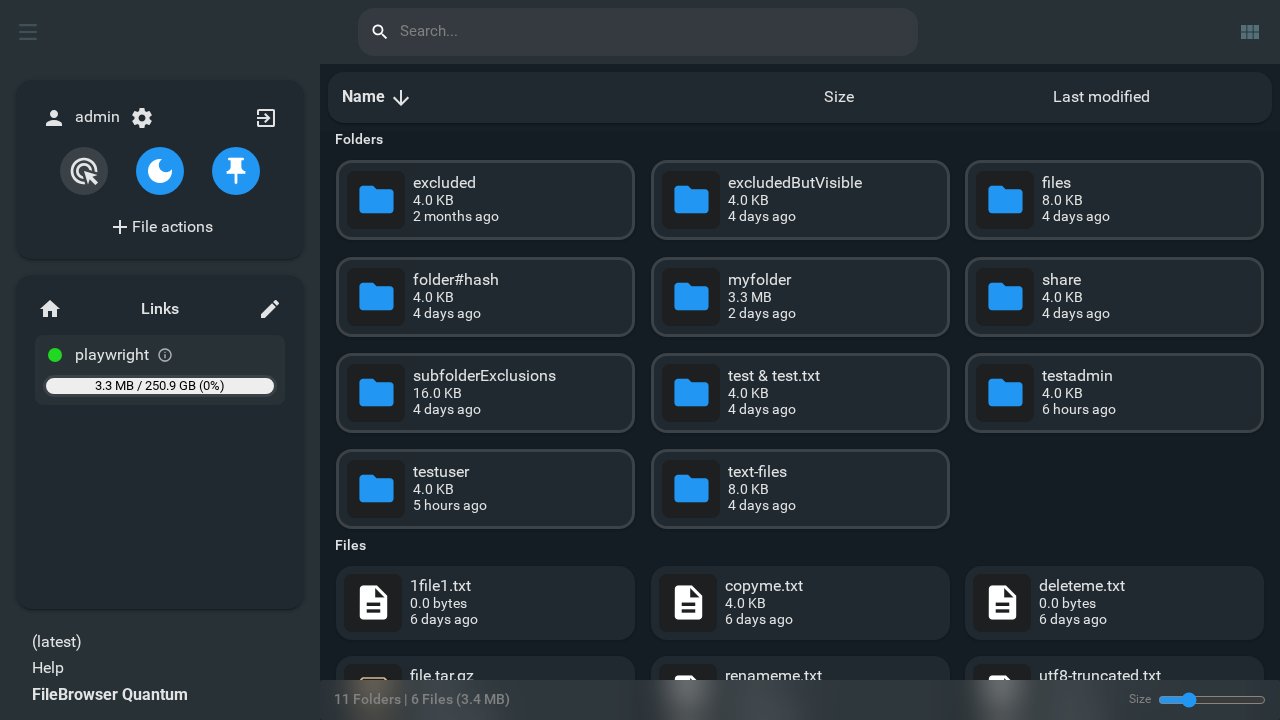
Pinned
:pushpin: Read The Official Docs (currently english-only)
:pushpin: v2.0.0 is now stable! --> See migration support discussion
About
FileBrowser Quantum provides an easy way to access and manage your files from the web. It has a modern responsive interface that has many advanced features to manage users, access, sharing, and file preview and editing.
This version is called "Quantum" because it packs tons of advanced features into a tiny and easy-to-run file. Unlike the majority of alternative options, FileBrowser Quantum is simple to install and easy to configure.
The goal for this repo is to become the best open-source self-hosted file browsing application that exists -- all for free. This repo will always be free and open-source.
Ready to try it out? See Getting Started Docs.
How its different
FileBrowser Quantum is a massive fork of the file browser open-source project with the following changes:
- ✅ Better source configuration - multiple sources, include/exclude rules, and more
- ✅ Login support for OIDC, LDAP, JWT, password + 2FA, and proxy.
- ✅ Beautiful, Responsive, and Customizable user interface.
- ✅ Streamlined configuration via
config.yamlconfig file. - ✅ Efficient search
- Real-time search results as you type.
- Real-time monitoring and updates in the UI.
- Search supports file and folder sizes, along with various filters.
- ✅ Better listing browsing
- Thumbnails support includes office, video, and album artwork, and 3D models.
- Faster and more responsive views with animations.
- Folder sizes are displayed and support thumbnails
- Navigating remembers the last scroll position.
- WebDAV support
- Granular permissions
- ✅ Highly configurable and customizable sharing options
- share expiration time
- users who can access share (including anonymous)
- styling and themes
- file viewing, editing, and uploading permissions
- ✅ Access control that can be scoped to user or group and source path.
- ✅ Developer API support
- Ability to create long-lived API Tokens.
- A helpful Swagger page is available at
/swaggerendpoint for API enabled users.
Notable features that this fork does not have (removed):
- ❌ shell commands are completely removed and will not be returned.
FileBrowser Quantum differs significantly from the original version. Many of these changes required a significant overhaul. Creating a fork was a necessary process to make the program better. There have been many growing pains, but a stable release is planned and coming soon.
The UI
The UI has a simple three-component navigation system:
- (Left) Multi-action button with slide-out panel.
- (Middle) The powerful search bar / title
- (Right) The view change toggle / overflow menu
All other functions are moved either into the action menu or pop-up menus. If the action does not depend on context, it will exist in the slide-out action panel. If the action is available based on context, it will show up as a pop-up menu.
Official Docs
See the Official Docs. Contributions are welcome and encouraged! See FilebrowserDocs Github.
Comparison Chart
| Application Name |  Filebrowser Filebrowser |
 Filestash Filestash |
 Nextcloud Nextcloud |
 Google_Drive Google_Drive |
 FileRun FileRun |
|
|---|---|---|---|---|---|---|
| Filesystem support | ✅ | ✅ | ✅ | ✅ | ❌ | ✅ |
| Linux | ✅ | ✅ | ✅ | ✅ | ❌ | ✅ |
| Windows | ✅ | ✅ | ✅ | ❌ | ❌ | ✅ |
| Mac | ✅ | ✅ | ✅ | ❌ | ❌ | ✅ |
| Self hostable | ✅ | ✅ | ✅ | ✅ | ❌ | ✅ |
| Has Stable Release? | ✅ | ✅ | ✅ | ✅ | ✅ | ✅ |
| S3 support | ❌ | ❌ | ✅ | ✅ | ❌ | ❌ |
| webdav support | ✅ | ❌ | ✅ | ✅ | ❌ | ✅ |
| FTP support | ❌ | ❌ | ✅ | ✅ | ❌ | ✅ |
| Dedicated docs site? | ✅ | ✅ | ✅ | ✅ | ✅ | ✅ |
| Multiple sources at once | ✅ | ❌ | ✅ | ✅ | ❌ | ✅ |
| Docker image size | 180 MB (with ffmpeg) | 31 MB | 240 MB (main image) | 250 MB | ❌ | > 2 GB |
| Min. Memory Requirements | 512 MB | 128 MB | 128 MB (main image) | 512 MB | ❌ | 512 MB |
| has standalone binary | ✅ | ✅ | ✅ | ❌ | ❌ | ❌ |
| price | free | free | free | free tier | free tier | $99+ |
| rich media preview | ✅ | ✅ | ✅ | ✅ | ✅ | ✅ |
| Upload files from the web? | ✅ | ✅ | ✅ | ✅ | ✅ | ✅ |
| Advanced Search? | ✅ | ❌ | ✅ | configurable | ✅ | ✅ |
| Indexed Search? | ✅ | ❌ | ✅ | configurable | ✅ | ✅ |
| Content-aware search? | ❌ | ❌ | ✅ | configurable | ✅ | ✅ |
| Custom job support | :construction: | ✅ | ✅ | ✅ | ❌ | ✅ |
| Multiple users | ✅ | ✅ | ✅ | ✅ | ✅ | ✅ |
| Single sign-on support | ✅ | ❌ | ✅ | ✅ | ✅ | ✅ |
| LDAP sign-on support | ✅ | ❌ | ✅ | ✅ | ✅ | ✅ |
| Long-live API key support | ✅ | ❌ | ✅ | ✅ | ✅ | ✅ |
| API documentation page | ✅ | ❌ | ✅ | ✅ | ✅ | ✅ |
| Mobile App | ❌ | ❌ | ❌ | ✅ | ✅ | ❌ |
| open source? | ✅ | ✅ | ✅ | ✅ | ❌ | ❌ |
| tags support | :construction: | ❌ | ✅ | ✅ | ❌ | ✅ |
| shareable web links? | ✅ | ✅ | ✅ | ✅ | ✅ | ✅ |
| Event-based notifications | :construction: | ❌ | ✅ | ❌ | ❌ | ✅ |
| Metrics | :construction: | ❌ | ✅ | ✅ | ❌ | ❌ |
| file space quotas | ✅ | ❌ | ✅ | ❌ | ✅ | ✅ |
| text-based files editor | ✅ | ✅ | ✅ | ✅ | ✅ | ✅ |
| Office file support | ✅ | ❌ | ✅ | ✅ | ✅ | ✅ |
| Office file previews | ✅ | ❌ | ❌ | ✅ | ✅ | ✅ |
| Themes | ✅ | ✅ | ✅ | ✅ | ❌ | ✅ |
| Branding support | ✅ | ✅ | ✅ | ❌ | ❌ | ✅ |
| activity log | ✅ | ❌ | ✅ | ✅ | ✅ | ✅ |
| Comments support | ❌ | ❌ | ✅ | ✅ | ✅ | ✅ |
| trash support | :construction: | ❌ | ✅ | ✅ | ✅ | ✅ |
| Starred/pinned files | ✅ | ❌ | ✅ | ✅ | ✅ | ✅ |
| Chromecast support | ❌ | ❌ | ✅ | ❌ | ❌ | ❌ |
| Share collections of files | :construction: | ❌ | ❌ | ❌ | ❌ | ✅ |
| Can archive selected files | ✅ | ❌ | ❌ | ❌ | ❌ | ✅ |
| Can browse archive files | :construction: | ❌ | ✅ | ❌ | ❌ | ✅ |
| Can convert documents | :construction: | ❌ | ✅ | ❌ | ❌ | ✅ |
| Can convert videos | :construction: | ❌ | ✅ | ❌ | ❌ | ❌ |
| Can convert photos | :construction: | ❌ | ✅ | ❌ | ❌ | ❌ |
Requirements
NOTE:
1. First make folders and set permissions:
mkdir -p /mnt/user/appdata/filebrowserQuantum/tmp
chown -R 1000:100 /mnt/user/appdata/filebrowserQuantum
chmod 755 /mnt/user/appdata/filebrowserQuantum
chmod -R 777 /mnt/user/appdata/filebrowserQuantum/tmp
2. Download config and put to "/filebrowserQuantum" folder.
https://github.com/masterwishx/unraid-templates/tree/main/configs/filebrowserQuantum/config.yaml
3. Make share for files "FileBrowser Files", then make folder for users.
mkdir -p /mnt/user/FileBrowser Files/users
chown -R 1000:100 /mnt/user/FileBrowser Files/users
4. Enjoy
Warning:
After the first login using admin:admin, change the password or create a new admin user.
If you do not update the credentials in the config file like this:
'adminUsername: "hidden"'
'adminPassword: ""'
Then the default admin values will be restored after a container restart.
Categories
Download Statistics
Total Downloads Over Time
Related apps
Explore more like this
Explore allLinks
Details
gtstef/filebrowser:stableRuntime arguments
- Web UI
http://[IP]:[PORT:80]/files- Network
bridge- Shell
sh- Privileged
- false
- Extra Params
--user 1000:100
Template configuration
- Target
- /srv
- Value
- /mnt/user/FileBrowser Files/
- Target
- /home/filebrowser/data
- Value
- /mnt/user/appdata/filebrowserQuantum
- Target
- 80
- Value
- 8890
- Target
- /home/filebrowser/data/tmp
- Value
- /mnt/user/appdata/filebrowserQuantum/tmp
- Value
- data/config.yaml