
All apps · 0 apps

Ferrite
Docker app from syntlyx's Repository
Overview
Readme
View on GitHubferrite
Self-hosted DNS that blocks ads & trackers — and routes any device through a tunnel. It's a Pi-hole-style sinkhole that goes further: send chosen domains, or whole devices, through WireGuard, SOCKS5, or Tor with DPI evasion and encrypted upstreams. Filtering and a privacy tunnel in one binary, no root, written in Rust.
Pi-hole keeps your DNS clean. ferrite keeps it clean and lets you decide, per device, what leaves your network and how.
Why ferrite
- Filtering and per-device routing in one box. No glue between a DNS blocker and a VPN — it's the same server.
- Anti-censorship built in. Route blocked domains through Tor or a tunnel, with TLS-ClientHello (SNI) fragmentation to defeat DPI — per device, your choice.
- Per-device profiles, up to default-deny. Different block/allow lists per device — or flip a profile to block everything except an allowlist (kid / IoT mode) while local network names keep resolving.
- No root, no TUN device. WireGuard runs in userspace (boringtun + smoltcp), fully in-process.
- Fast and small. Rust, single binary. ~60 MB RSS on an ARM board serving 30 clients off a 1.8M-domain blocklist, sub-2 ms cache/block decisions, tens-of-thousands of QPS.
- Self-hosted and private. No telemetry, no phone-home. Your queries stay on your box.
How it compares
| ferrite | Pi-hole | AdGuard Home | NextDNS | |
|---|---|---|---|---|
| Ad / tracker blocking | yes | yes | yes | yes |
| Per-device filtering profiles | yes | yes (groups) | yes (clients) | yes |
| Encrypted upstreams (DoT / DoH / DoQ) | built in | needs unbound or cloudflared | built in | n/a — it is the upstream |
| Per-device / per-domain egress via WireGuard, SOCKS5, Tor | yes | no | no | no |
| DPI evasion (TLS ClientHello / SNI fragmentation) | yes | no | no | no |
| Runs without root | yes (no TUN either) | no | needs a capability | n/a |
| Self-hosted, no third party sees your queries | yes | yes | yes | no |
| DHCP server | not yet | yes | yes | n/a |
| Maturity | v0.1.x, one developer | mature | mature | mature |
Short version: if you want a sinkhole and nothing else, Pi-hole and AdGuard Home are mature and excellent — use them. ferrite is for when you also want to decide per device which tunnel the traffic leaves through, without hand-wiring a DNS blocker to a VPN client and a proxy.
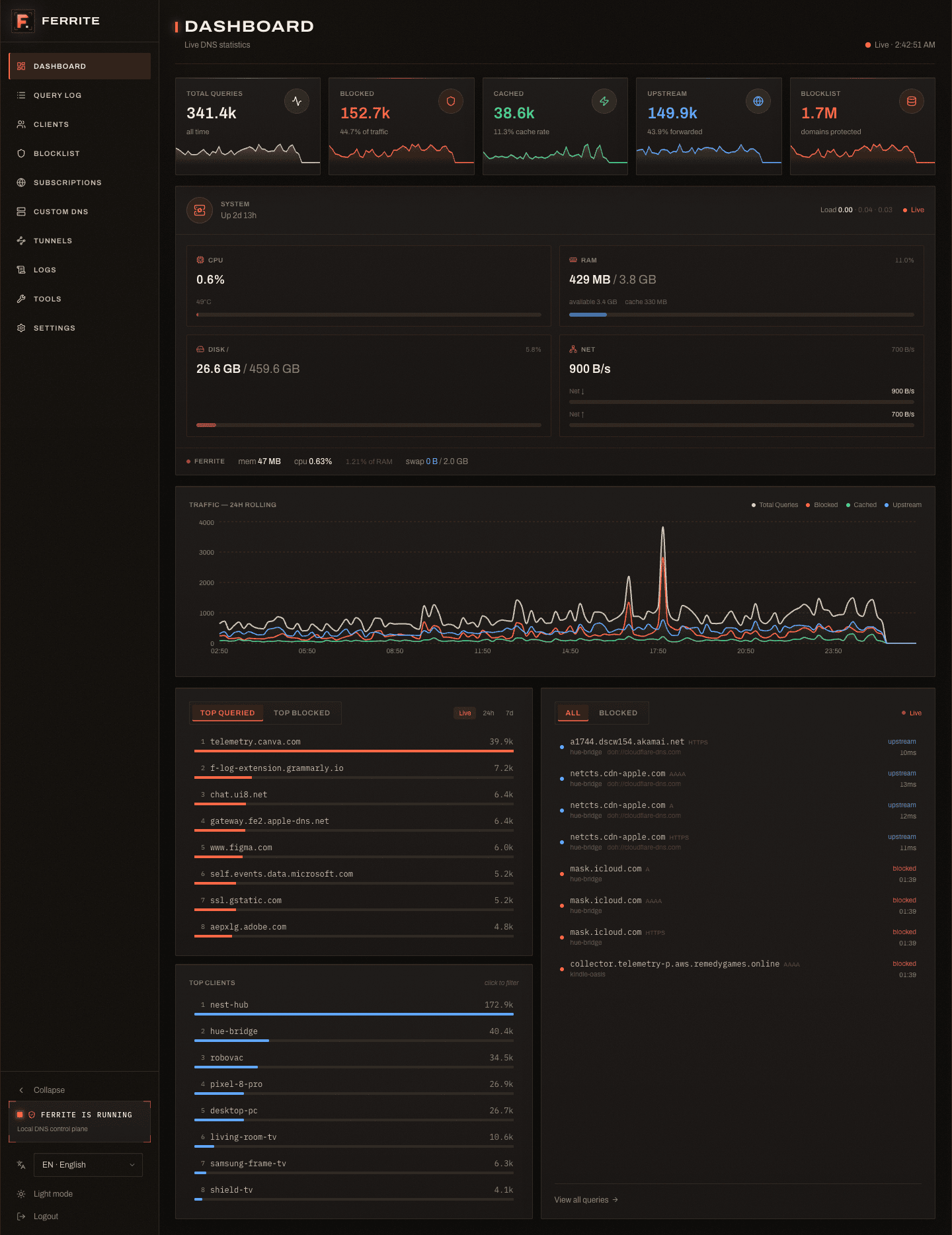
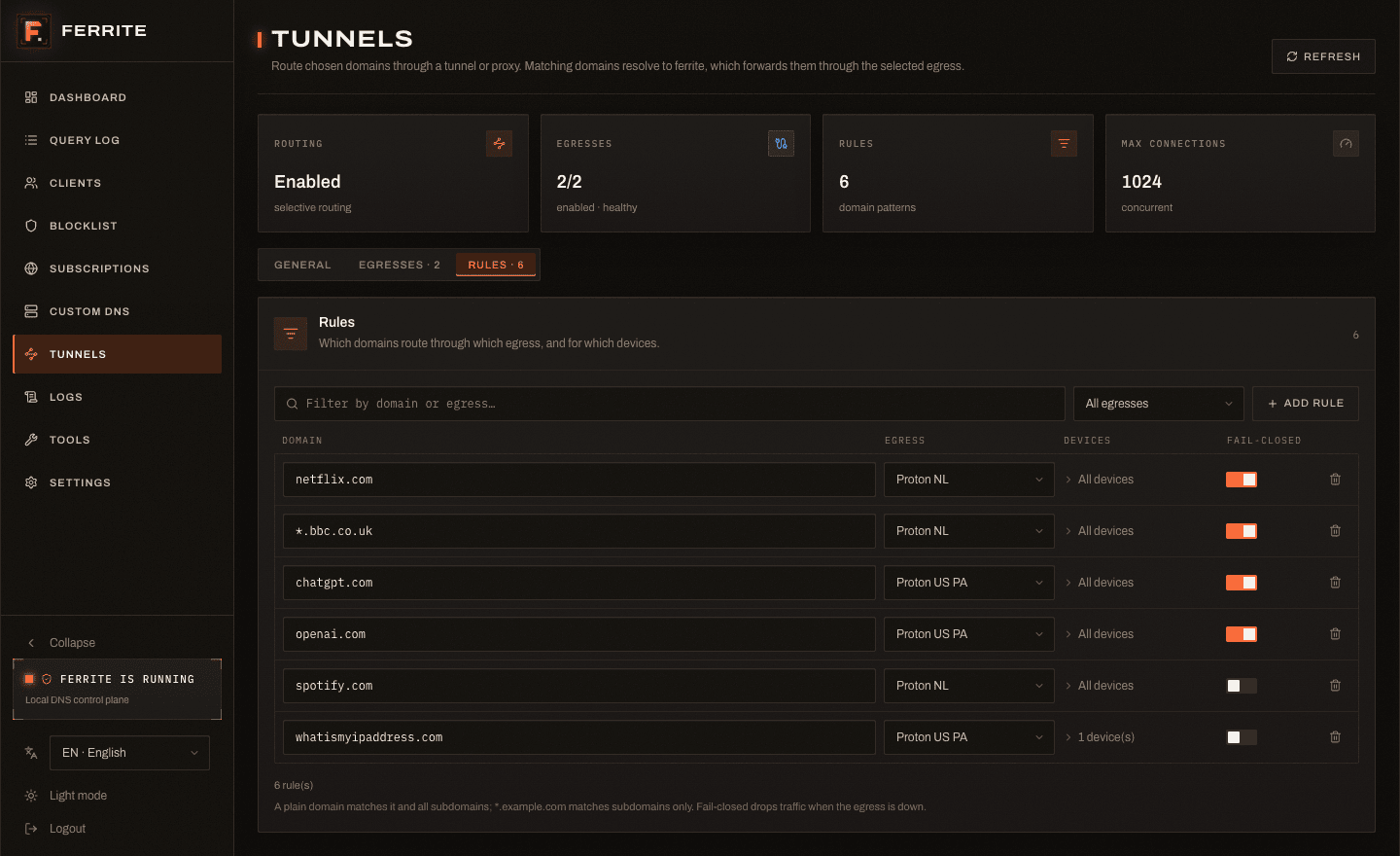
Screenshots
Images live in the web UI repo.
Privacy
ferrite is a privacy tool first. What that means concretely:
- No telemetry, no analytics, no phone-home. The only outbound call ferrite makes on its own is an hourly GitHub check for updates (and blocklist fetches you configure). Nothing about your queries ever leaves the box.
- Your DNS, encrypted upstream. Plain, DoT, DoH, and DoQ upstreams in one pool. A resolver's queries can also ride a tunnel (DNS-over-TCP or DoT through an egress) — so your ISP sees only WireGuard, not your lookups.
- No client-subnet leak. EDNS Client Subnet is stripped from outgoing queries, so the upstream never learns the client's subnet.
- DNSSEC requested. The DO bit is set and signatures are forwarded; pair with a validating resolver over DoT/DoH for end-to-end integrity.
- No TLS interception. For routed domains ferrite peeks the SNI/Host but never terminates TLS — the client validates the real certificate end-to-end.
- Local, optional logging — and switchable off. The query log is SQLite on your disk. Retention is configurable, verbose logging is a toggle, and the query log and statistics each have their own on/off switch (Settings → Privacy). Turn both off and ferrite keeps filtering while recording nothing about what was resolved: no per-query rows, no top lists, no per-device history, no host names on the Tunnels page, and no cached domains in the restart snapshot — the one already written is rewritten the moment you flip the switch. What was recorded earlier is not served back either, and a reboot does not undo the choice. Clearing the log vacuums the database, so the freed pages actually leave the disk.
- No auth by default is loopback-only. The panel binds
127.0.0.1until you expose it; if you bind it to the LAN without a password, ferrite warns you.
How it works
Every query runs the shortest useful path, stopping at the first stage that can answer:
client ──▶ ferrite
            1. custom records   → local A/AAAA/CNAME answer
            2. selective routing→ matches a rule? answer with ferrite's own IP
            3. blocklist        → blocked? NXDOMAIN
            4. cache            → fresh? cached answer
            5. upstream         → DoT/DoH/DoQ/plain (round-robin + failover)
Selective routing / tunnels. When a domain matches a routing rule, ferrite
answers DNS with its own LAN IP, so the client connects to ferrite. The
listeners peek the SNI (:443) or Host (:80) — without terminating TLS
— re-match the rule on the real hostname, and splice the connection through the
chosen egress:
| Egress | What it does |
|---|---|
direct |
Connect straight out (resolved via ferrite's upstream — no DNS leak). |
socks5 |
Forward through a SOCKS5 proxy (hostname sent as ATYP=domain). Point it at a local Tor (127.0.0.1:9050) to route over Tor. |
wireguard |
Built-in userspace WireGuard — paste a .conf. DNS for routed names resolves through the tunnel. |
evasion |
Like direct, but splits the TLS ClientHello at the SNI across TCP segments so DPI can't read the hostname. |
Rules can be scoped to specific devices (by name/MAC/IP) — route a kid's tablet through a tunnel while everything else goes direct. Routing decides how traffic leaves, blocking decides whether a name resolves: a blocklisted domain stays blocked even when a routing rule covers it (so routing a service through a tunnel doesn't unblock its tracker subdomains). To deliberately reach a blocklisted domain, whitelist it — it then routes as usual. Rules, egresses, and listener ports hot-reload — no restart.
Install
Docker Compose (recommended — see docker-compose.yml in the repo root):
services:
  ferrite:
    image: ghcr.io/syntlyx/ferrite-server:latest
    container_name: ferrite
    restart: unless-stopped
    network_mode: host          # so ferrite sees real client IPs (see note below)
    cap_add: [NET_BIND_SERVICE]
    volumes:
      - ferrite-data:/var/lib/ferrite
volumes:
  ferrite-data:
# Docker — image on GHCR (not Docker Hub)
docker run -d --name ferrite \
  --restart unless-stopped \
  --network host \
  --cap-add=NET_BIND_SERVICE \
  -v ferrite-data:/var/lib/ferrite \
  ghcr.io/syntlyx/ferrite-server:latest
Static binary. Every release ships musl binaries for x86_64 and aarch64
with a .sha256 next to each, so you can verify before running anything:
VER=v0.1.8; ARCH=$(uname -m)-unknown-linux-musl
BASE=https://github.com/syntlyx/ferrite-server/releases/download/$VER
curl -fsSLO $BASE/ferrite-$VER-$ARCH.tar.gz
curl -fsSL  $BASE/ferrite-$VER-$ARCH.tar.gz.sha256 | sha256sum -c -
tar -xzf ferrite-$VER-$ARCH.tar.gz && sudo install -m755 ferrite /usr/local/bin/ferrite
Install script — sets up a systemd/OpenRC service around that same binary. Read it before you run it; it is not piped into a shell here on purpose:
curl -fsSLO https://raw.githubusercontent.com/syntlyx/ferrite-server/main/install.sh
less install.sh          # see what it does
sudo sh install.sh
# From source (Rust 1.97+)
cargo build --release
cp target/release/ferrite /usr/local/bin/ferrite
Then point your network's DNS (router DHCP, or per device) at the ferrite host,
open http://fe.te on the LAN, and set a password.
- The Docker image is a small Alpine runtime; mount
/var/lib/ferriteso config, data, and updates survive restarts. If port 53 fails to bind, add--cap-add=NET_BIND_SERVICE. - Prefer host networking. Per-device profiles and routing rules match on the
client's LAN IP/MAC — behind a Docker bridge every query arrives from the
gateway, so all your devices look like one. If you must use bridge mode, set
FERRITE_PANEL_IP=<host LAN IP>so thefe.teshortcut resolves, and publish443/tcpas well if you use selective routing. fe.teis a built-in DNS record pointing at the detected (or configured) server IP, so the panel is easy to find.
Configuration
Config lives at ~/.config/ferrite/config.toml (user) or /etc/ferrite/config.toml
(system). The web UI is the primary editor — ferrite writes the file itself;
hand-editing is optional. With no config, ferrite starts with sane defaults (plain
UDP to 8.8.8.8/8.8.4.4, API on 127.0.0.1:8080).
[dns]
bind_addr = "0.0.0.0:53"
strip_ecs = true   # don't leak the client subnet upstream
dnssec    = true   # request DNSSEC (DO bit)

[api]
bind_addr = "0.0.0.0:8080"   # default 127.0.0.1 (loopback) — set a password before exposing
Upstreams (round-robin + failover). Each upstream may tunnel through an egress
via egress = "<id>" (plain/DoT only):
[[upstream]]
type = "plain"; address = "8.8.8.8"; port = 53

[[upstream]]
type = "tls"; address = "1.1.1.1"; port = 853; tls_name = "cloudflare-dns.com"

[[upstream]]
type = "https"; url = "https://cloudflare-dns.com/dns-query"; bootstrap_ip = "1.1.1.1"

[[upstream]]
type = "quic"; address = "94.140.14.14"; port = 853; tls_name = "dns.adguard-dns.com"
bootstrap_ipis needed for DoH when ferrite is the system resolver (it can't resolve the DoH hostname through itself). DoT/DoQ use a literal IP — no bootstrap.
Blocklists & allowlists — subscribe to any public list by URL (StevenBlack,
OISD, AdGuard, Hagezi…); formats (hosts / Adblock ||domain^ / plain) are
auto-detected and compiled into one fast FST. Allowlists work the same way in
reverse — subscribe to a community false-positive feed (e.g. anudeepND) and its
domains are never blocked; for Adblock-format lists the @@||domain^ exception
rules are the allow entries. Manage everything live in the UI.
[blocklist]
enabled = true
domains = ["*.doubleclick.net", "ads.example.com"]   # always blocked (manual entries)
client_bypass   = ["192.168.1.50", "aa:bb:cc:dd:ee:ff"]   # these clients skip filtering

[[blocklist.lists]]
name = "StevenBlack"
url  = "https://raw.githubusercontent.com/StevenBlack/hosts/master/hosts"
enabled = true

[allowlist]
domains = ["safe.example.com", "*.internal.corp"]   # never blocked (manual entries)

[[allowlist.lists]]
name = "anudeepND Whitelist"
url  = "https://raw.githubusercontent.com/anudeepND/whitelist/master/domains/whitelist.txt"
enabled = true
Per-device profiles — apply a subset of the block/allow subscriptions to
specific devices (by IP/MAC), with per-profile manual block/allow overrides. A
profile can also flip to default-deny: everything is blocked except what's
explicitly allowed. Local network names — PTR/reverse zones, .lan, .local,
your [[zones]] — stay resolvable automatically, no extra configuration.
[[blocklist.profiles]]
id = "iot"; name = "IoT Devices"
clients      = ["aa:bb:cc:dd:ee:ff"]
allowlists   = ["anudeepND Whitelist"]   # empty = all enabled allowlists apply
default_deny = true                      # block everything not explicitly allowed
Custom records (take priority over blocklist + upstream):
[[custom_records]]
domain = "router.lan"; type = "A"; value = "192.168.1.1"; ttl = 300

[[custom_records]]
domain = "*.home.lan"; type = "A"; value = "192.168.1.100"
Selective routing — an egress + a rule. Paste a standard WireGuard .conf:
[proxy]
enabled = true
max_connections = 256
# advertise_ipv4 / advertise_ipv6 auto-detect when unset

[[proxy.egresses]]
id = "nl-proton"; name = "NL Proton"; enabled = true
kind = "wireguard"        # direct | socks5 | wireguard | evasion
buffer_kb = 512           # wireguard per-connection window (throughput vs RAM; 256–1024 KiB)
config = """
[Interface]
PrivateKey = <your key>
Address = 10.2.0.2/32
DNS = 10.2.0.1
[Peer]
PublicKey = <peer key>
Endpoint = 146.70.86.114:51820
AllowedIPs = 0.0.0.0/0
PersistentKeepalive = 25
"""

[[proxy.rules]]
pattern = "example.com"   # exact = domain + all subdomains; "*.example.com" = subdomains only
egress  = "nl-proton"
fail_closed = true        # if the egress is down, refuse rather than leak the connection directly
clients = []              # empty = all devices; or restrict by IP/MAC
The HTTP listener is shared with the panel on :80 (demuxed by Host); TLS is
:443. Binding 80/443 needs privilege — ferrite already binds :53, so deploy
with CAP_NET_BIND_SERVICE.
Authentication
ferrite passwd # set a web UI password (Argon2id hash, stored in config)
If neither a password nor an api_key is set, the API/panel is open — fine on
loopback, set a password before binding to the LAN (ferrite warns you if you
don't). For scripts, set api_key and send Authorization: Bearer <key> or
X-Api-Key: <key>. Password login returns a 24 h session token:
TOKEN=$(curl -s -X POST http://localhost:8080/api/auth \
        -H 'Content-Type: application/json' -d '{"password":"…"}' | jq -r .token)
curl -s http://localhost:8080/api/stats/summary -H "Authorization: Bearer $TOKEN"
API
Everything in the web UI is this REST API — anything you do by hand, a script can
too. Base URL http://127.0.0.1:8080, all under /api, behind auth when configured.
GET/POST/DELETE  /api/auth                     session status · log in · log out

GET    /api/stats/summary                      live counters
GET    /api/stats/timeseries                   24 h, 144 × 10 min buckets
GET    /api/stats/top-blocked|top-domains|top-clients
GET    /api/stats/system                       host/process metrics
GET    /api/queries        DELETE /api/queries query log (filterable) · clear
GET    /api/logs                               recent in-memory server logs

GET    /api/clients                            clients grouped by name (IPs + MACs)
GET/POST/DELETE  /api/clients/aliases[/{ip}]   manual client aliases

GET/POST  /api/blocklist/whitelist|blacklist   list · add (exact or *.wildcard)
DELETE    /api/blocklist/whitelist|blacklist/{domain}
GET    /api/blocklist/check/{domain}           why-blocked: which list/rule matched
GET/PUT   /api/blocklist/profiles              per-device profiles (list subsets, default-deny)

GET/POST  /api/lists      PATCH/DELETE /api/lists/{name}    blocklist subscriptions
POST   /api/lists/refresh · /api/lists/{name}/refresh

GET/POST  /api/allowlists PATCH/DELETE /api/allowlists/{name}   allowlist subscriptions
POST   /api/allowlists/refresh · /api/allowlists/{name}/refresh

GET/POST  /api/custom-records   DELETE /api/custom-records/{domain}

GET    /api/proxy   PUT /api/proxy             selective-routing config (secrets redacted)

GET    /api/tools/resolve?name=&type=          DNS lookup (any record type)
GET    /api/tools/whois?query=                 WHOIS

GET    /api/settings   PATCH /api/settings      config (secrets redacted; restart-fields flagged)
GET    /api/update/check   POST /api/update/server|web
More
- Deployment & Docker, updates, service install → docs/DEPLOYMENT.md
- Build from source, the CI gate, contributing → docs/DEVELOPMENT.md
- Full guide & API reference → ferrite.me/docs · ferrite.me/api
- Web UI → ferrite-web
Data files
Configuration lives in config.toml and only there — settings, subscriptions,
manual block/allow entries, custom records, client aliases, tunnels. Everything
the UI changes is written straight back to it, so backing up that one file backs
up the whole setup. The database holds only what ferrite observed (the query log
and the device inventory): delete it and you lose history, never configuration.
All under ~/.local/share/ferrite/:
| File | Contents |
|---|---|
ferrite.db |
SQLite — query log, rollups, learned device inventory |
(absent entirely with storage.backend = "memory") |
|
blocklist.fst |
Compiled blocklist (rebuilt on list changes) |
allowlist.fst |
Compiled subscribed allowlists |
lists/<name>.* |
Per-blocklist parsed-domain cache |
allowlists/<name>.* |
Per-allowlist parsed-domain cache |
state.bin |
Warm-restart snapshot (DNS cache + counters) |
web/ |
Web UI static files |
License
MIT
Requirements
Related apps
Explore more like this
Explore allDetails
ghcr.io/syntlyx/ferrite-server:latestRuntime arguments
- Web UI
http://[IP]:[PORT:80]/- Network
bridge- Shell
sh- Privileged
- false
- Extra Params
--cap-add=NET_BIND_SERVICE --cap-add=NET_ADMIN
Template configuration
Stores Ferrite config, SQLite database, blocklist cache, snapshots, and web assets.
- Target
- /var/lib/ferrite
- Default
- /mnt/user/appdata/ferrite
- Value
- /mnt/user/appdata/ferrite
DNS TCP listener for name resolution.
- Target
- 53
- Default
- 53
- Value
- 53
DNS UDP listener for name resolution.
- Target
- 53
- Default
- 53
- Value
- 53
Ferrite API and web UI. Also intercepts HTTP for routed domains (demultiplexed by Host header).
- Target
- 80
- Default
- 80
- Value
- 80
HTTPS (SNI) intercept for the selective-routing/tunnels feature. Only bound while routing is enabled. Must stay 443:443 for routing to work; leave unmapped if tunnels are not used.
- Target
- 443
- Default
- 443
- Value
- 443
Use latest to install the newest Ferrite release on container start. Set a fixed version, for example 0.1.1, to disable automatic server release updates on restart.
- Target
- FERRITE_SERVER_VERSION
- Default
- latest
- Value
- latest
Optional web UI release version. Leave blank to follow Server Release Version; set a fixed version to pin the web UI separately.
- Target
- FERRITE_WEB_VERSION
Optional LAN IP for the built-in fe.te A record. In bridge networking set this to the Unraid host IP, for example 192.168.1.5. Leave blank to auto-detect.
- Target
- FERRITE_PANEL_IP
Optional override for the built-in panel shortcut domain. Leave blank for the default fe.te.
- Target
- FERRITE_PANEL_DOMAIN
Optional startup-log URL for the panel shortcut. If Web UI is mapped to a non-80 host port, set this to http://fe.te:port.
- Target
- FERRITE_PANEL_URL
Optional GitHub token used when the container downloads server and web releases on start. Leave blank for public releases. Set a token only if you hit GitHub API rate limits (anonymous requests are capped at 60/hour per IP) or pull from a private mirror.
- Target
- FERRITE_RELEASE_TOKEN