
All apps · 0 apps
Fast-Music-Remover
Docker app from grtgbln's Repository
Overview
Readme
View on GitHub
Fast Music Remover
Take control of the media you consume every day with Fast Music Remover!




We consume, willingly or not, large amounts of media everyday, and that includes content that is emposed on us. Fast Music Remover gives you the choice to opt-out of them without missing out on the core content.
We're building a feature rich media processor that is efficient, modular and cross platform. It's being built for you! That means clean APIs for programmers, containerized on GHCR for remote users, with a Web UI providing seamless access to anyone interested!
Today, we support background music filtering and noise removal to enhance audio quality. In the near future, we plan to expand our capabilities by adding support for more ML models and DSP modules, as well as introducing realtime processing to empower you with the tools to take control of the media you consume.
If this resonates with you, consider contributing!
UI & Demo Video
We offer a minimalistic UI to streamline access to the MediaProcessor's core features.
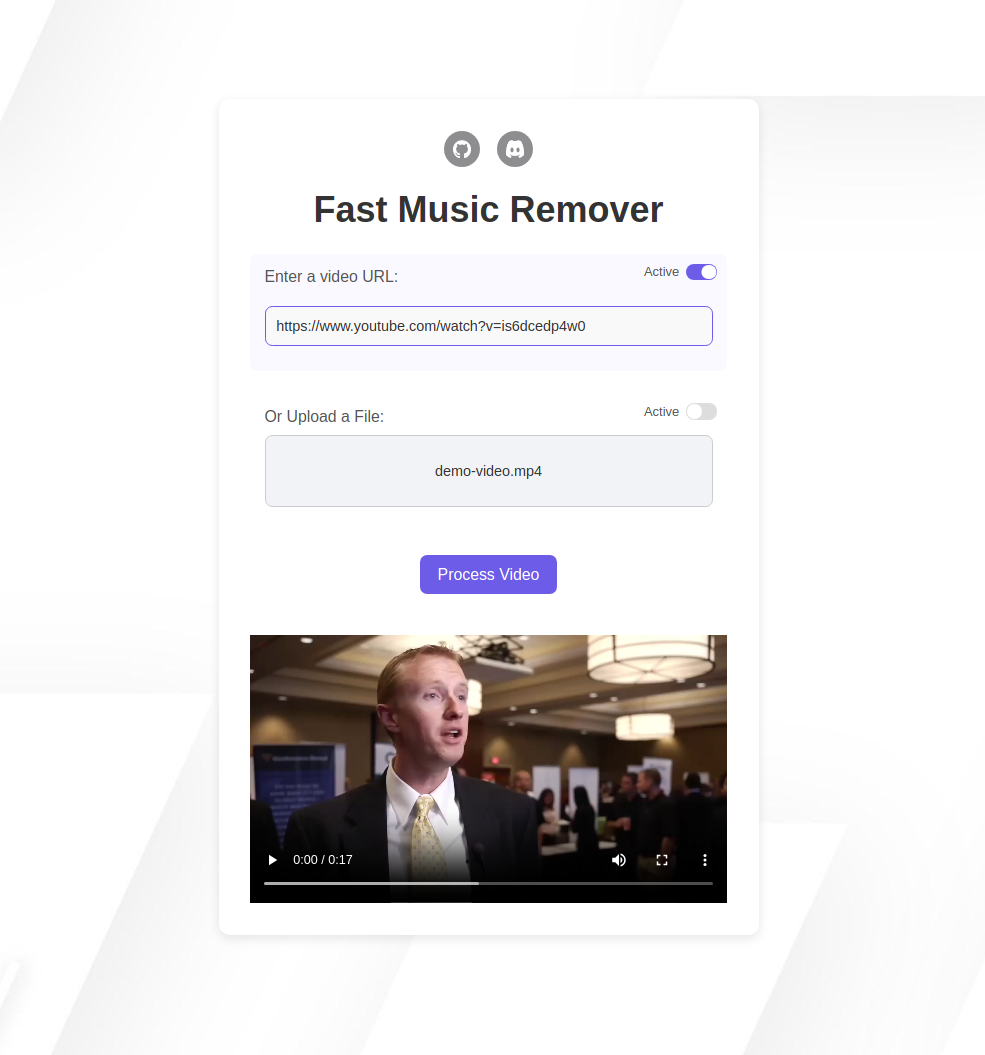
The original interview video is by Fisher College of Business, licensed under a Creative Commons Attribution license (reuse allowed).
Roadmap
Our immediate priority is to provide a stable first release with cross-platform support for Linux, macOS, and Windows. We’re focused on getting this early version out as soon as possible, and your feedback will help shape the direction of the project.
In parallel, we're developing cross-platform tooling to simplify manual setup for enthusiasts and contributors. The first release will feature a project launcher to manage dependency installation, project configuration, and starting the web application, handling all prerequisites locally for you. This will be offered in addition to our stable image on GHCR.
Following the first release, we plan to introduce a separate, unstable release with some features in alpha stage, such as realtime processing. At this stage, we'll also experiment with new ML models to expand the capabilities of our processing engine. Let us know if you have any requests!
Contributing
We have a wide array of interesting technical challenges spanning multiple domains. Take part in building a free and open tool that directly addresses real-world challenges!
Check out our contributing guidelines for details on how to get started.
Prerequisites
[!TIP] If you're just looking to test
Fast Music Remover, you can skip these prerequisites and jump straight to the Docker Quick Start below!
To get started with Fast Music Remover, ensure that you have the following software installed on your system. These dependencies are necessary for running the backend server, compiling the C++ processor, and handling media files.
- Python 3.9+: Required for running the backend server.
- FFmpeg: For extracting, probing, and processing audio files.
- CMake: Needed to compile the C++
MediaProcessor. - nlohmann-json: A JSON library required for parsing configuration files in the
MediaProcessor. - libsndfile: Required for sampled audio file operations in the
MediaProcessor. - Docker and Docker Compose (optional but recommended for a quick setup):
Click here for installation commands for Ubuntu/Debian and macOS
Installation Commands
FFmpeg:
On Ubuntu/Debian:
sudo apt update
sudo apt install ffmpeg
On macOS:
brew install ffmpegAfter installing FFmpeg, ensure the correct path is set in the
config.jsonfile. By default, it is set to/usr/bin/ffmpeg. If you are using macOS and installed FFmpeg via Homebrew, update the path inconfig.jsonto:"ffmpeg_path": "/opt/homebrew/bin/ffmpeg"
CMake:
- On Ubuntu/Debian:
sudo apt update sudo apt install cmake - On macOS:
brew install cmake
nlohmann-json:
- On Ubuntu/Debian:
sudo apt update sudo apt install nlohmann-json3-dev - On macOS:
brew install nlohmann-json
libsndfile:
- On Ubuntu/Debian:
sudo apt update sudo apt install libsndfile1-dev - On macOS:
brew install libsndfile
Docker and Docker Compose:
- On Ubuntu:
sudo apt install docker.io docker-compose - On macOS:
brew install docker
brew install docker-compose
[!IMPORTANT] Ensure all the above dependencies are installed before proceeding with the setup.
Getting Started
To get started with Fast Music Remover, you have two options: running it directly via the provided Docker image or installing all the necessary dependencies manually.
Option 1: Quick Start with Docker
[!IMPORTANT] Ensure Docker is installed by running:
docker --version
With Docker, you have two options to quickly try Fast Music Remover:
1. Using the Pre-Built Image:
Pull the prebuilt image from the registry:
docker pull ghcr.io/omeryusufyagci/fast-music-remover:latest
Run the container:
docker run -p 8080:8080 ghcr.io/omeryusufyagci/fast-music-remover:latest
2. Building the Image Locally:
docker-compose up --build
[!NOTE] You may need
sudoto run this command, depending on how your system is setup.
Once the container is running, open http://localhost:8080 on your browser, and you can test it right away by submitting a URL or uploading a file from your local machine.
What this Docker Setup Includes:
Whether you use the prebuilt image or build it locally, the containerized setup includes:
- A Flask backend to manage requests.
- The MediaProcessor (C++ binary).
- A minimalistic frontend for submitting and testing media, i.e. audio or video, both supported!
Once processing is finished, the frontend will provide a playback of the processed media.
Option 2: Manual Installation
For those who want more control or are looking to contribute, follow these steps to set up Fast Music Remover manually.
Step 1: Ensure Dependencies Are Installed
Ensure all dependencies mentioned in the Prerequisites section are installed before proceeding.
Step 2: Install Python Dependencies
Install the Python dependencies with:
pip install -r requirements.txt
Step 3: Compile the Media Processor
- Navigate to the
MediaProcessordirectory:
cd MediaProcessor
- Make a build directory and navigate into it:
mkdir build
cd build
- Run CMake and compile (release build by default)
cmake ..
make
[!NOTE] If you encounter errors here, double-check that all prerequisites are installed.
Step 4: Start the Backend Server
After setting up the dependencies and compiling the C++ project, navigate back to the project root and start the backend server:
python3 app.py
[!TIP] The server should be accessible at http://127.0.0.1:8080. Open this address in a web browser to get started.
License
Fast Music Remover is released under the MIT license.
Media gallery
Related apps
Explore more like this
Explore allDetails
ghcr.io/omeryusufyagci/fast-music-remover:latestRuntime arguments
- Web UI
http://[IP]:[PORT:8080]/- Network
bridge- Privileged
- false
Template configuration
Container Port: 8080
- Target
- 8080
- Default
- 8080
- Value
- 8080