
All apps · 0 apps

Factorio-Server-Control
Docker app from Tricade's Repository
Overview
Readme
View on GitHub




Factorio Server Control
A self-hosted web interface for operating one Factorio dedicated server safely: profiles, saves, fixed checkpoints, mods, game versions, Space Age, world creation, logs, users and server controls in one responsive UI.
[!NOTE] This repository is a modernized fork of the original Factorio Server Manager project, OpenFactorioServerManager/factorio-server-manager. The original project, its authors and its contributors remain the source of the manager this fork builds on. See Origin and attribution.
[!IMPORTANT] AI transparency: This fork is developed with generative-AI assistance for code, tests, documentation, interface work and selected visual assets. Every published change remains maintainer-directed, reviewed and tested. The manager itself contains no AI model and sends no runtime data to an AI provider. The exact scope and asset provenance are documented in AI-DISCLOSURE.md.
What this fork adds
Safer server operations
- Event-driven status updates without disruptive full-page polling.
- Start, save-and-stop and force-stop controls available throughout the active-profile UI.
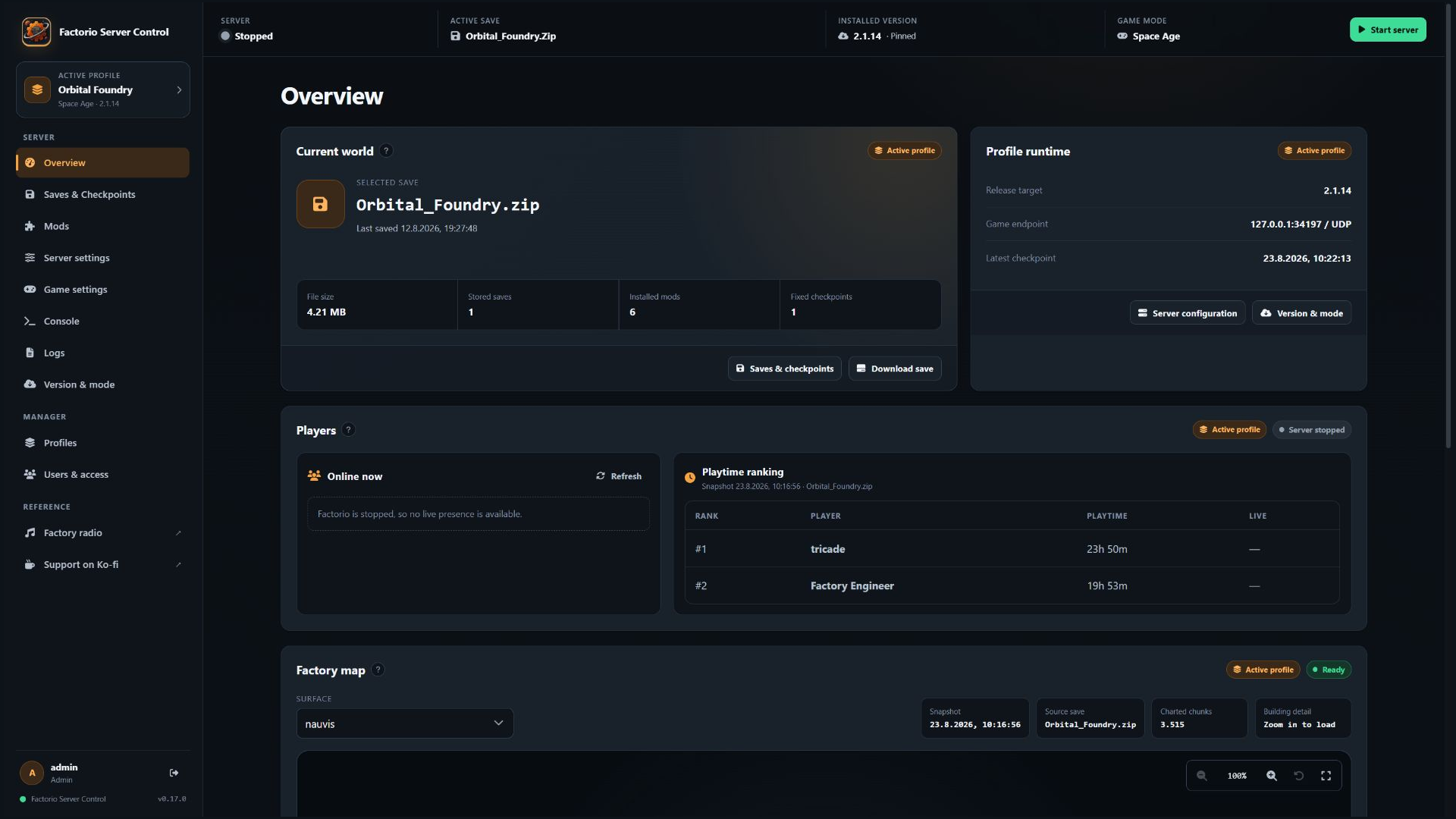
- Live connected-player state plus snapshot-derived playtime ranking with explicit offline and freshness states.
- Persistent internal autostart that restores the active profile after a container restart.
- Staged Factorio release replacement with validation and rollback while persistent game data stays mounted.
- Upload and path hardening, capped/redacted logs, local-only RCON and refusal to start with disposable manager or game-data paths.
Independent server profiles
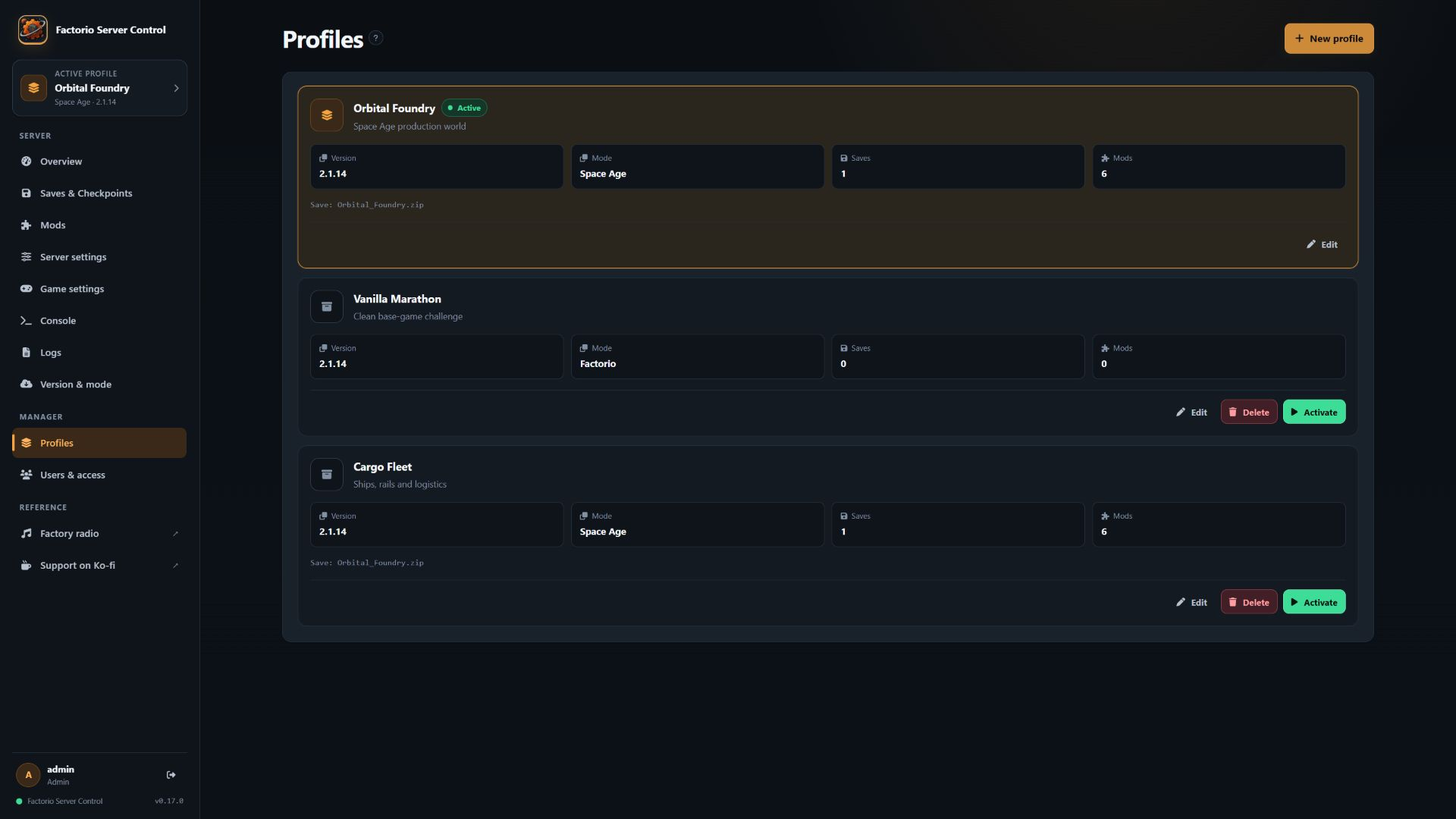
- Named profiles for switching one stopped Factorio runtime between different saves, mods, settings, game modes and exact Factorio versions.
- Automatic, idempotent migration of an existing installation into
Current setup. - Profile cloning, clean-profile creation, rename, activation and deletion.
- Transactional profile switching with staging, validation and rollback; switching never starts Factorio implicitly.
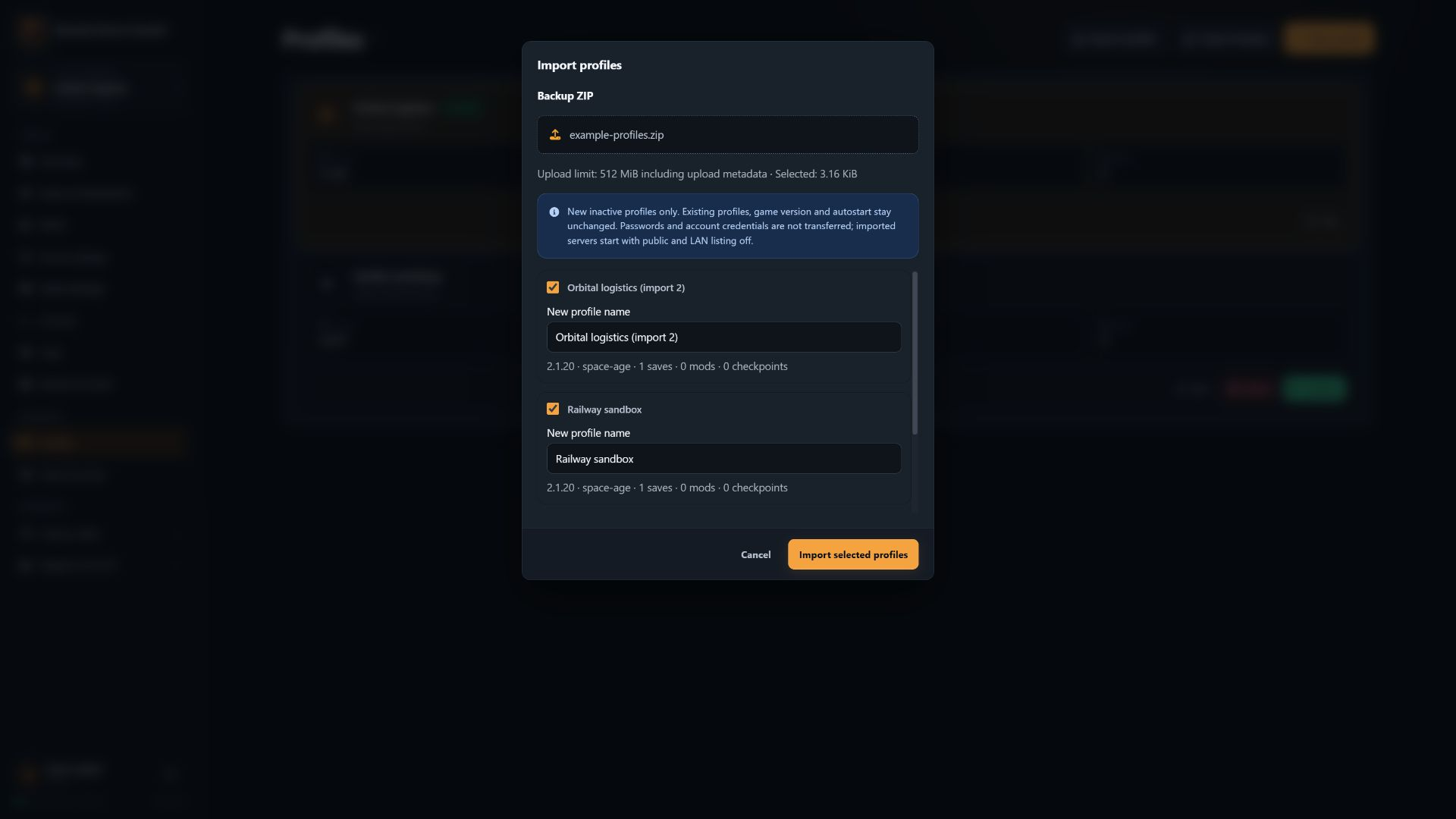
- Portable profile backups with an import preview, conflict-safe names and optional saves/checkpoints. Imports create new inactive profiles without modifying the existing installation.
Saves, worlds and checkpoints
- Upload, download, select and delete profile-scoped saves.
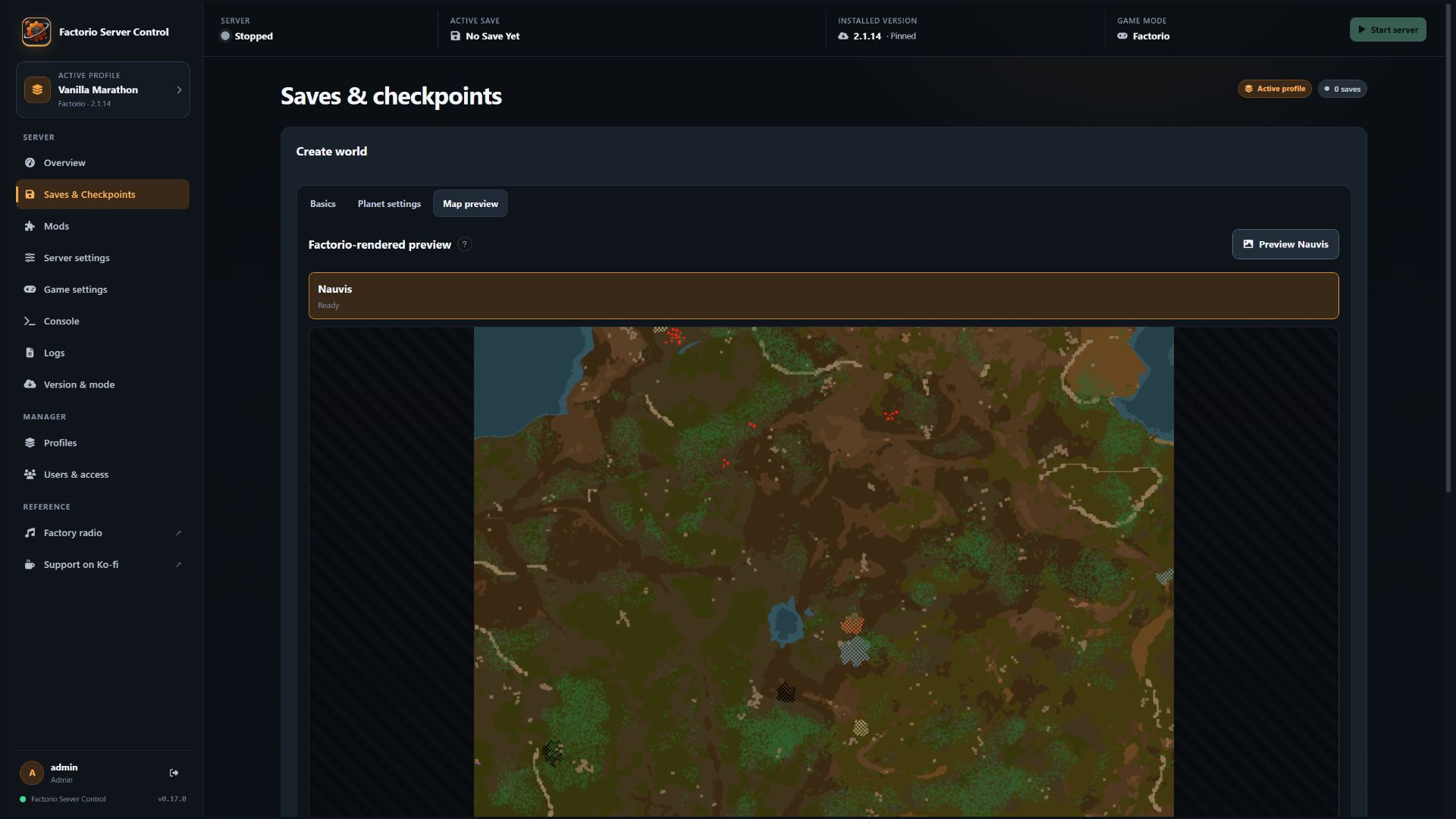
- A first-world wizard that uses Factorio itself to validate settings and render previews.
- Base Factorio and Space Age world generation with a shared seed, presets and per-planet controls.
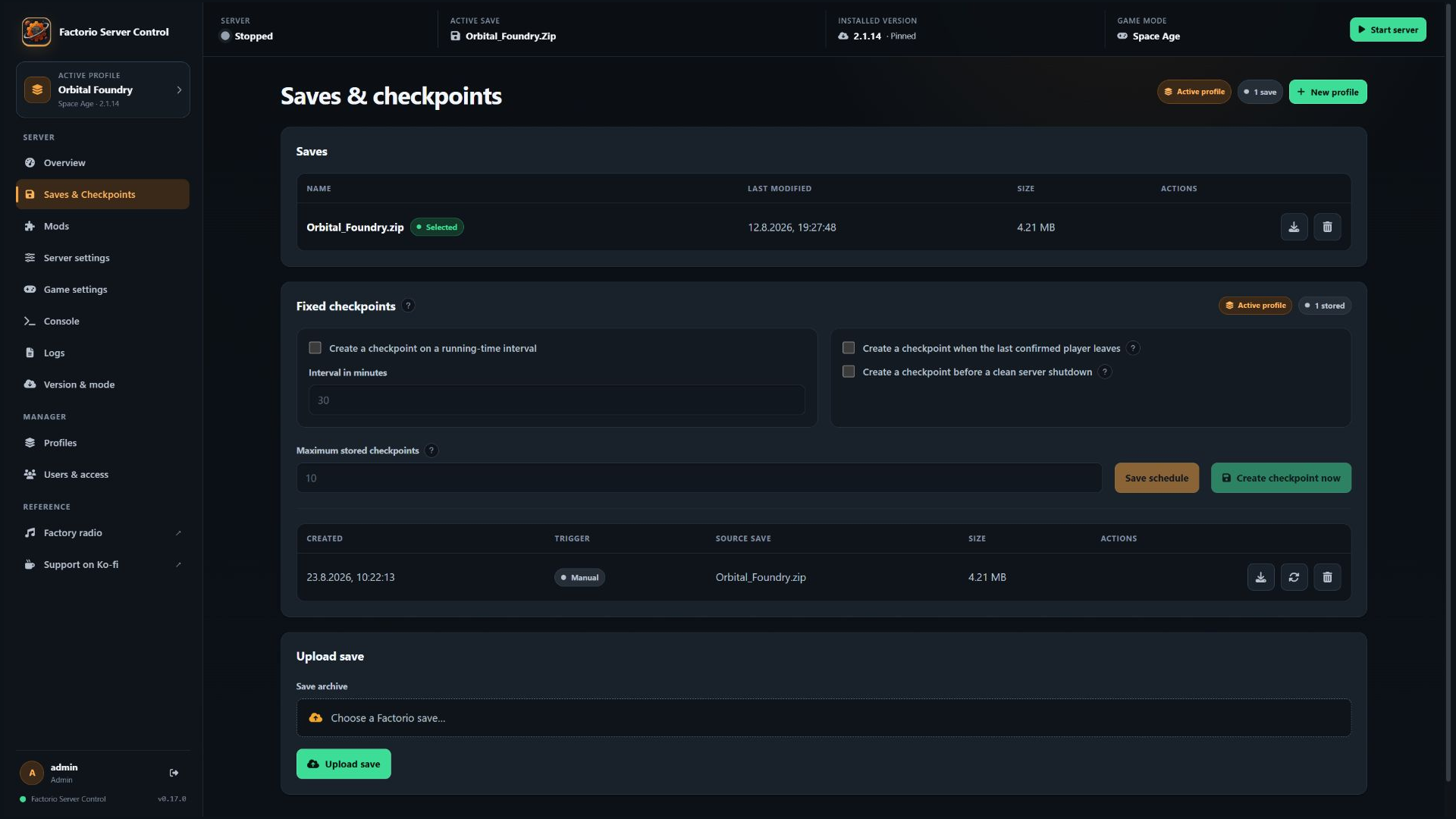
- Fixed checkpoints outside Factorio's rotating autosaves, created manually, on a schedule, when the final player leaves or before a clean shutdown.
- Verified retention and non-destructive checkpoint restore into a new playable save.
Factory-map snapshots
- Authenticated PNG snapshots generated from an isolated copy of the selected save and enabled mods.
- Nauvis, planets, space platforms and modded surfaces grouped separately in the selector.
- Player-visible platform names and framing around persistent player construction instead of all explored terrain.
- Optional manager-wide exclusion of space platforms before chart, image and building-detail export for saves with large platform fleets.
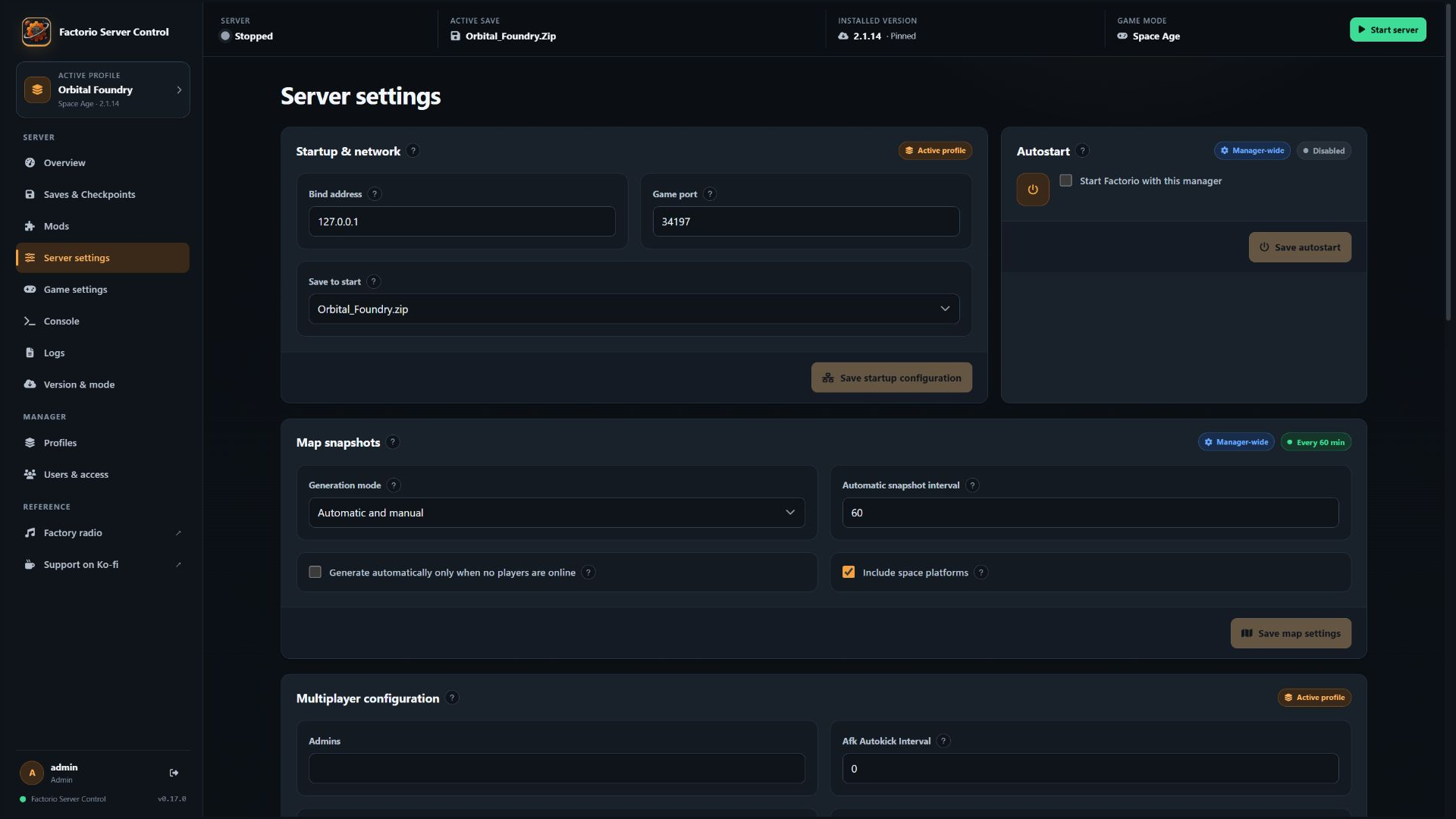
- Automatic, manual-only and fully disabled generation modes for resource-constrained hosts; disabling generation retains the last completed images.
- Optional postponement of automatic renders while players are online; manual generation remains available in manual-only and automatic modes.
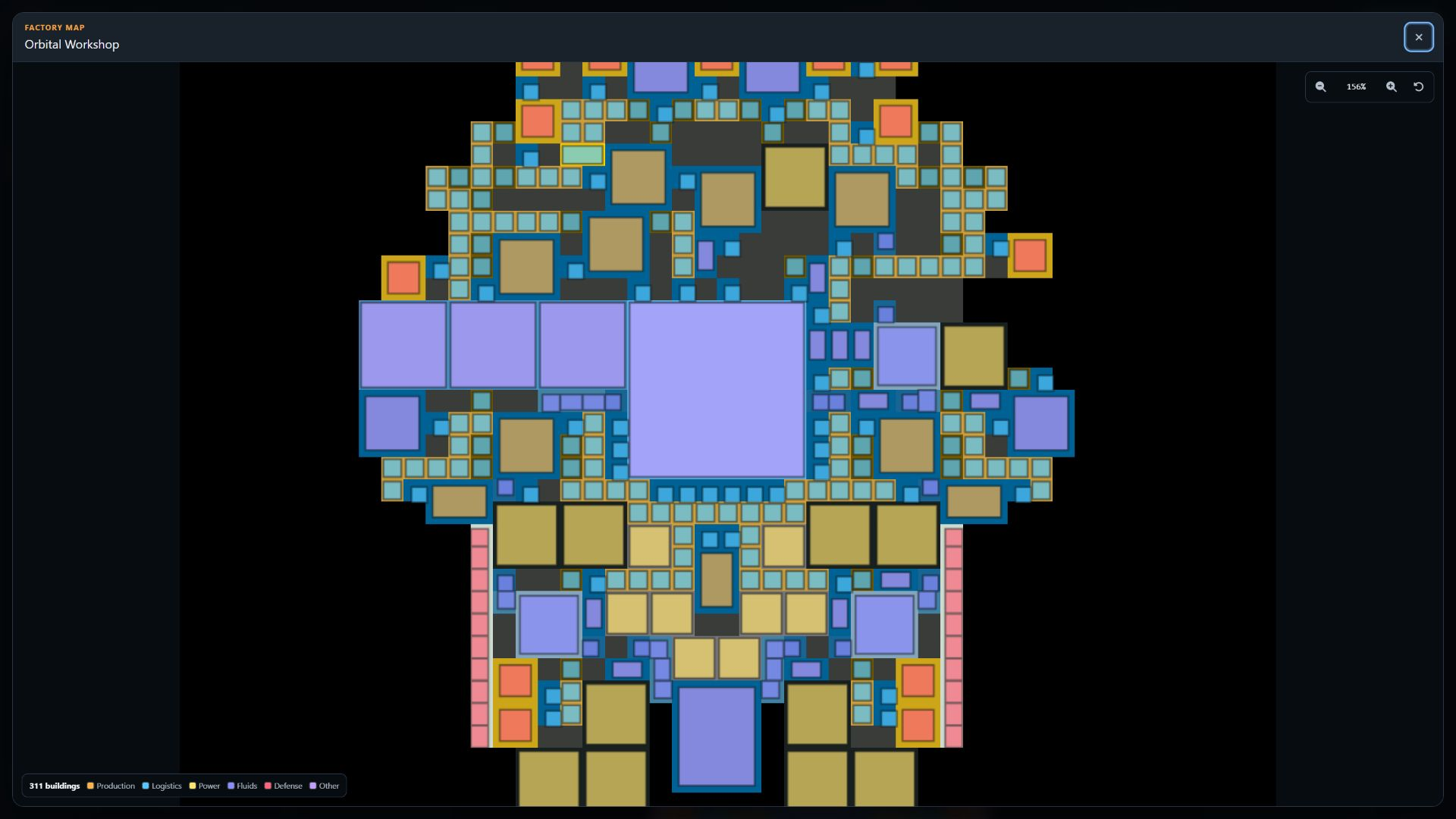
- Direct wheel/button zoom, drag-to-pan, reset-to-fit and a separate fullscreen lightbox.
- A sharp, categorized Canvas building-footprint layer and legend at detailed zoom levels; compact space-platform views use a bounded higher-resolution overlay while legacy snapshots retain a graceful fallback.
- Resource-aware manager-wide scheduling with a configurable interval, optional empty-server guard and an always-available manual action whenever map generation is enabled.
- No exporter mod is added to the playable profile, and the running game process, original save, active mod list and achievement state are not modified.
Versions, modes and mods
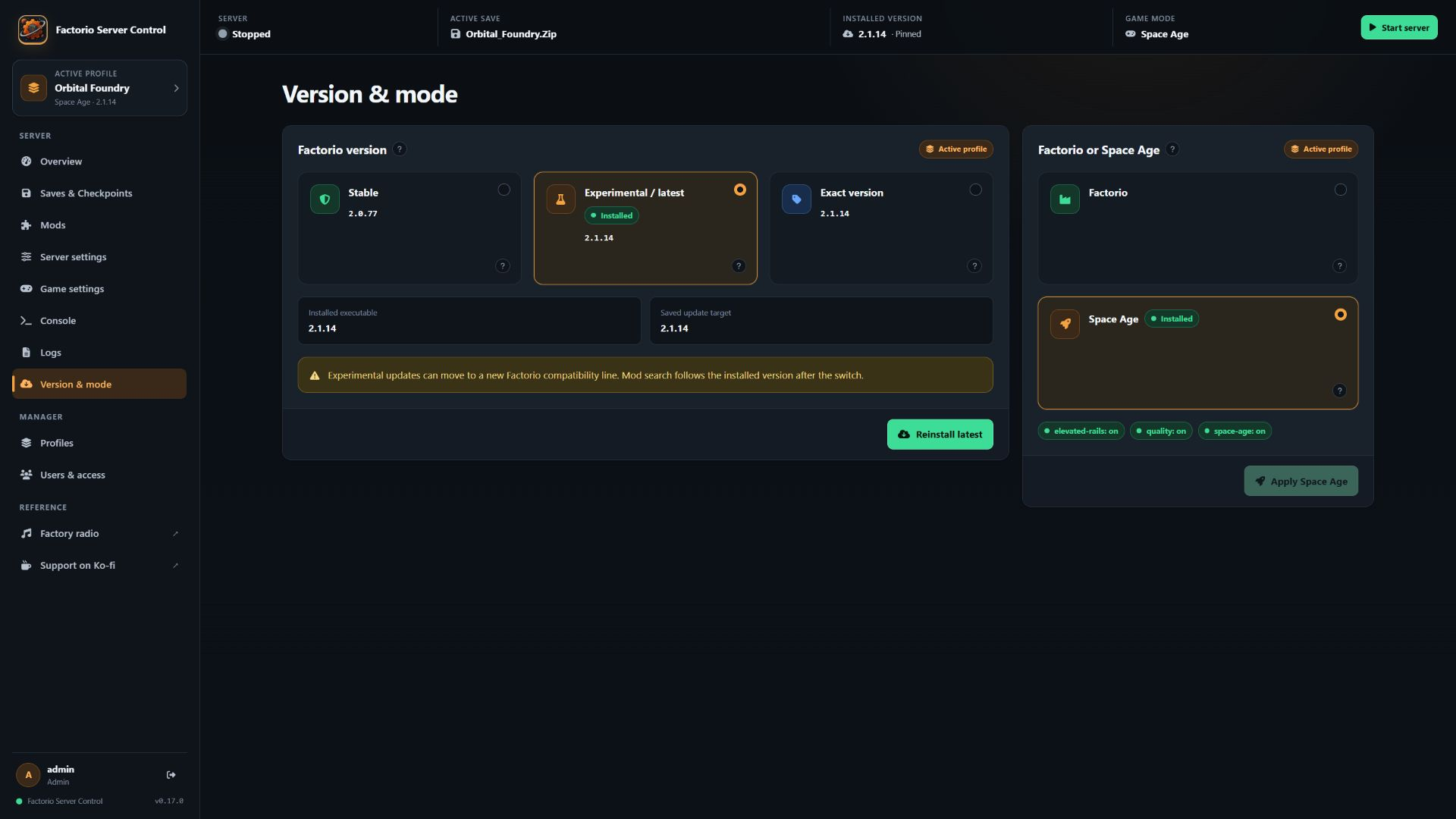
- Official Stable, Experimental/latest and exact Factorio archive selection while the server is stopped.
- Exact installed-version and selected-target persistence across container recreation.
- Explicit base Factorio/Space Age switching, including persistent built-in feature-mod state.
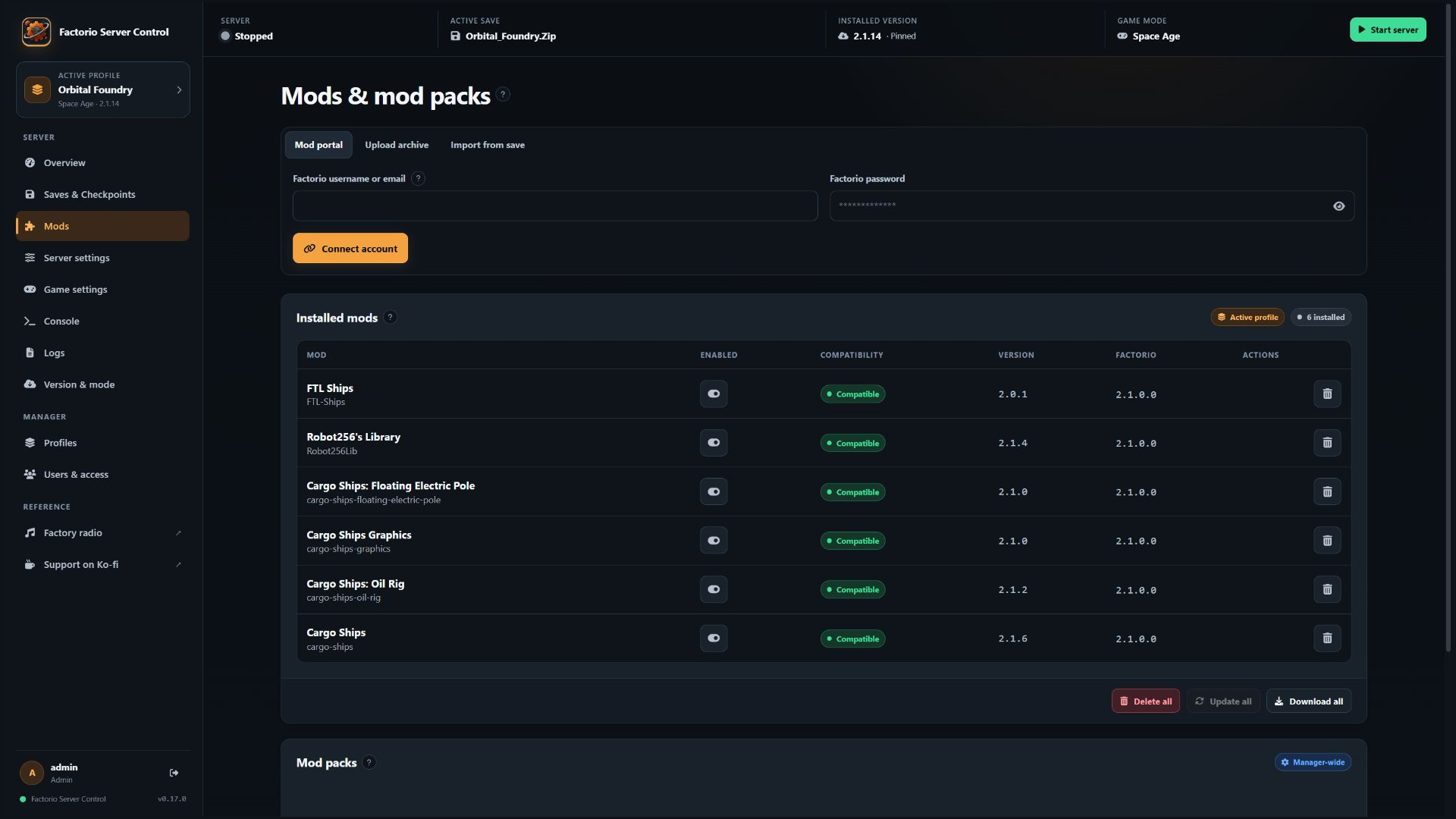
- Mod Portal search filtered to the active Factorio compatibility line.
- Recursive required-dependency resolution plus opt-in optional/recommended dependencies.
- Profile-scoped startup-setting controls evaluated by the active profile's exact Factorio engine, including localized labels, constraints, defaults and safe reset actions.
- Reusable mod packs with additive or full-replacement loading, plus engine-verified import from an existing save, including worlds created on an older Factorio release and later upgraded to Space Age or a different mod set.
- Optional/recommended Mod Portal dependencies can be preselected through a persistent manager-wide preference, with a review before downloading.
- Restore existing Download all mod ZIPs, including enabled/disabled states and
mod-settings.dat.
Modern interface and deployment
- Responsive Foundry Night UI for desktop and mobile.
- Persistent active-profile context, exact UI version/revision and cache-busted frontend assets.
- Docker and Docker Compose builds produced directly from this repository.
linux/amd64production image matching the official Factorio headless server platform.- Split-path Unraid support without an overlapping
/opt/factoriomount. - Linux and Windows backend/frontend CI plus a production-container persistence test.
The implementation details and deliberate boundaries are documented in TECHNICAL-NOTES.md. User-visible changes are recorded in CHANGELOG.md.
Screenshots
Profile backup and migration
Operational overview
Factory map and platform detail
Resource-aware map generation
Independent profiles
New world
Saves and fixed checkpoints
Compatible mods and dependencies
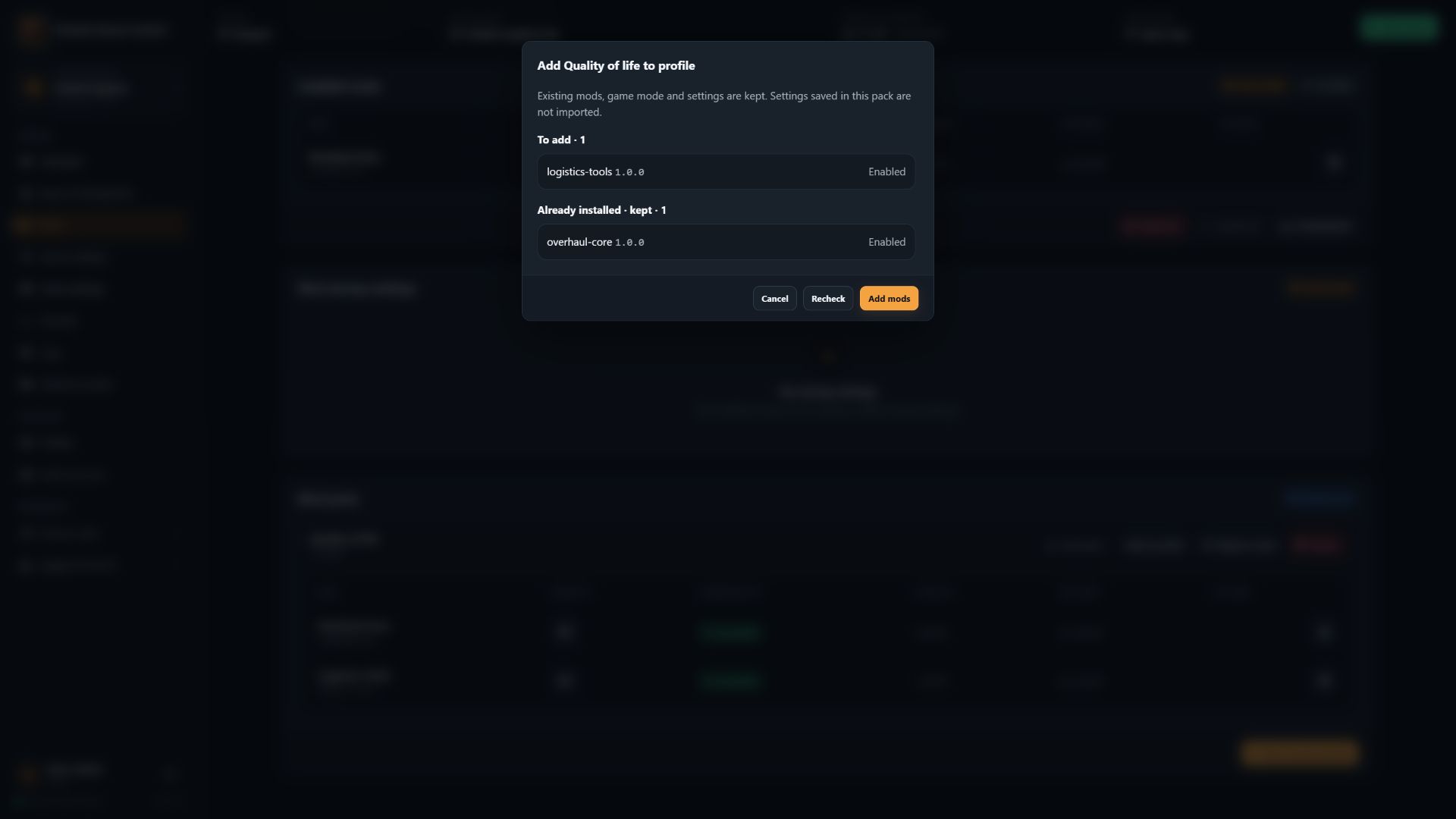
Add a saved pack while keeping the active profile's mods and settings (synthetic demonstration data):
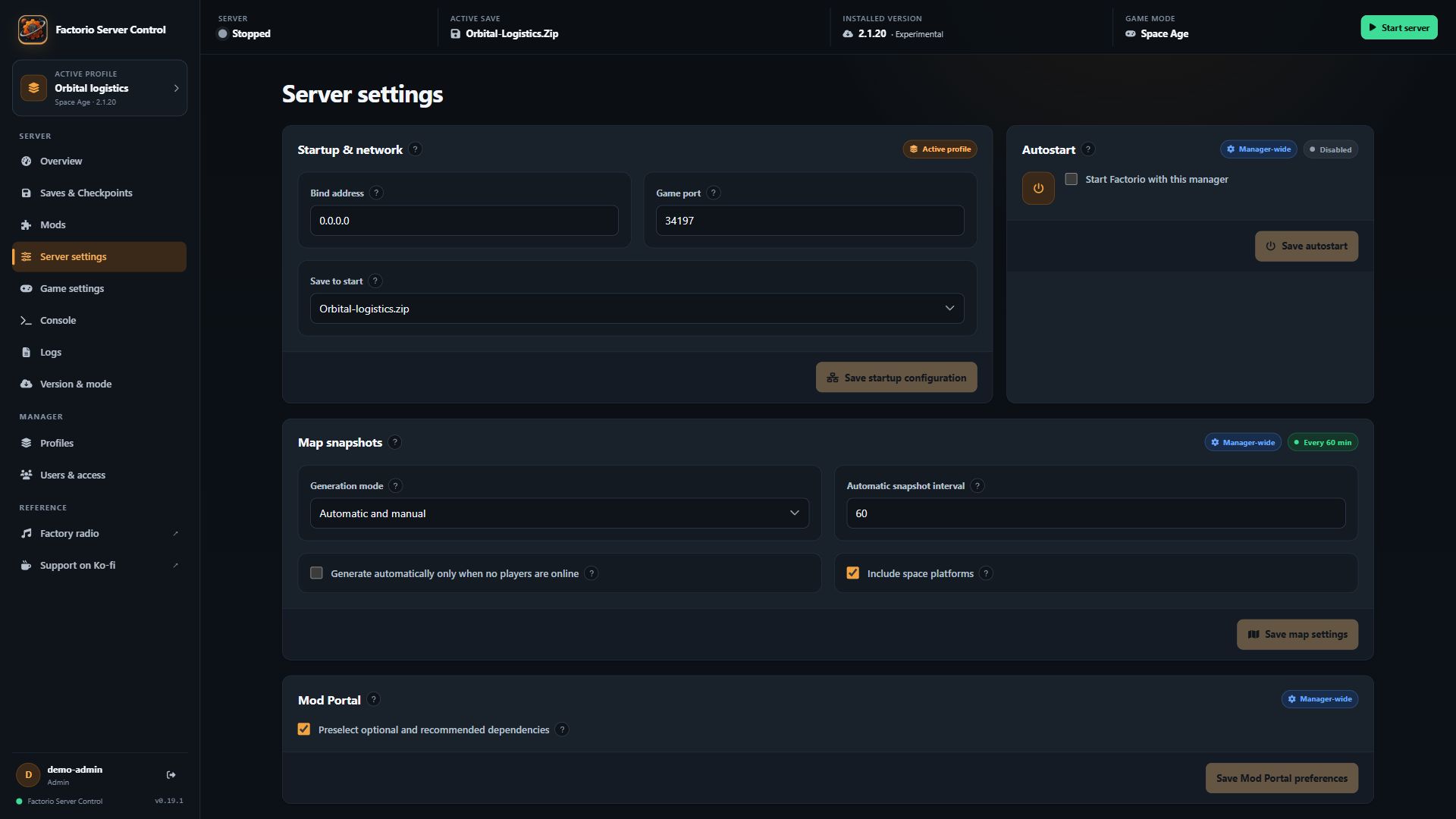
Manager-wide Mod Portal dependency defaults:
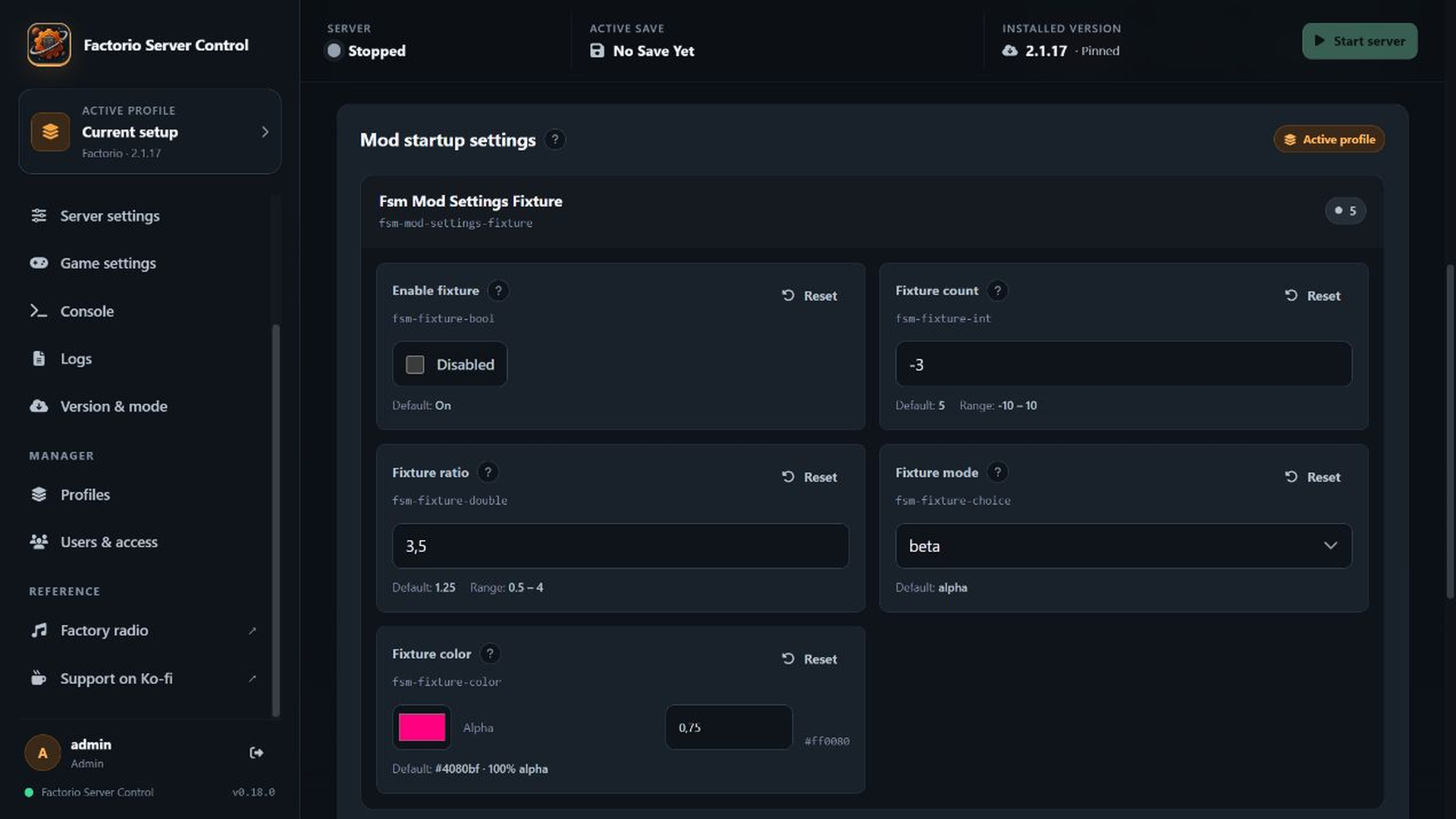
Profile-scoped mod startup settings
Factorio version and Space Age mode
Runtime model
One manager process deliberately controls one Factorio process and one active profile. Profiles are independent stored setups, not simultaneous game servers.
To run several Factorio servers at once, run several manager containers. Every container needs unique host TCP/UDP ports and completely separate manager and game-data mounts. Never point two live containers at the same /opt/fsm-data or /opt/factorio data.
Quick start with a published image
- Copy
docker/.env.registry.exampletodocker/.env.registry. - Set
FSM_IMAGEto a published image such asghcr.io/tricade/factorio-server-manager:latestor an immutable SemVer tag. - Choose the first-install
FACTORIO_VERSION:latest,stableor an exact three-part release.FSM_MAX_UPLOADdefaults to512MiB per save, mod or mod-pack upload. LeaveRCON_PASSempty to generate and persist a random localhost-only value, or supply your own long random value. - Start the container:
docker compose --env-file docker/.env.registry -f docker/docker-compose.registry.yaml pull
docker compose --env-file docker/.env.registry -f docker/docker-compose.registry.yaml up -d
The GHCR package is public and does not require a registry login for pulls. No registry credential belongs in this repository.
The example publishes:
| Purpose | Container port | Default host port |
|---|---|---|
| Manager UI | 80/tcp |
8080/tcp |
| Factorio game server | 34197/udp |
34197/udp |
The manager serves HTTP inside the container. The direct registry example sets FSM_COOKIE_SECURE=false so login works over a private HTTP connection. Put the UI behind a trusted TLS reverse proxy before exposing it beyond a trusted LAN or VPN, and set FSM_COOKIE_SECURE=true whenever users always enter through HTTPS. The fuller docker/docker-compose.yaml example does both through Traefik and requires a real domain and email address in an ignored local .env file.
Privacy and outbound connections
Factorio Server Control has no built-in analytics or telemetry. Manager accounts, configuration, logs, saves and map snapshots remain in the documented persistent mounts and are not sent to the fork maintainer. Release discovery and installation contact Factorio's official HTTPS services; mod search, authentication and downloads contact the official Factorio Mod Portal only when those features are used. When connecting a Factorio account, its password is submitted to auth.factorio.com over HTTPS but is not retained; the returned username/user key is stored with restrictive permissions in /opt/fsm-data/factorio.auth. Optional Factory Radio and Ko-fi links open their respective third-party sites only when selected in the browser. Review those services' own privacy terms before using them.
Development-time use of generative-AI tools is disclosed separately in AI-DISCLOSURE.md. Those tools are not part of the deployed application and receive no manager runtime data. Evaluating mod startup settings uses only the locally installed Factorio binary and enabled local mod files; it does not add another outbound service.
Required persistent storage
The production entrypoint refuses to start when manager credentials or game data would disappear during a container replacement.
| Container path | Purpose |
|---|---|
/opt/fsm-data |
Manager database, users, credentials, profiles, checkpoints, map snapshots, release state and autostart preference |
/opt/factorio |
Complete Factorio installation and game data when using one combined mount |
/opt/factorio/saves |
Saves when using the supported split-mount layout |
/opt/factorio/mods |
Downloaded and built-in mod state when using the split layout |
/opt/factorio/config |
Factorio server and map configuration when using the split layout |
Use either one complete /opt/factorio mount or all three split game-data mounts. Do not configure both layouts at once. A combined mount retains the installed program tree. With split mounts, /opt/fsm-data/runtime-state.json retains the exact installed version and selected target; after a container recreation the entrypoint downloads that same official version again instead of silently advancing a rolling channel. Split-mount recreations therefore require access to Factorio's official download service.
Compatibility with the original manager
The public product name changed, but the compatibility-sensitive folder structure and technical namespace deliberately remain compatible with the original manager. The repository/image slug, executable name and default Unraid root /mnt/user/appdata/factorio-server-manager/ are unchanged. The upstream Go module path, FSM_* environment names, /opt/fsm-data, /opt/factorio and existing database/config filenames also remain stable. This lets a stopped original Factorio Server Manager deployment be migrated without renaming its stored data solely for branding.
Compatibility does not make live storage shareable. Stop the original container, take a backup and give the replacement exclusive access to the copied manager data and either the complete Factorio mount or all three supported split mounts. Legacy anonymous Docker volumes must be located and copied manually; the new persistence guard will not accept missing mappings. Keep the original data until login, users, profiles, saves, mods, settings and the selected Factorio version have been verified. See Docker and Unraid migration for the read-only discovery steps.
First login
On a fresh persistent manager-data volume, the manager creates a one-time administrator credential file named initial-admin-password.txt with restrictive permissions. Sign in, change the administrator password, and the bootstrap file is removed. Container recreation keeps the existing database and does not generate a different password when /opt/fsm-data is mounted correctly.
Main workflows
Profiles
The first profile-capable start copies an existing unprofiled setup into Current setup. Creating or activating another profile requires Factorio to be fully stopped. Activation snapshots the current setup, stages and validates the target, restores its exact game version and leaves the game stopped until Start is pressed.
Profile and mod backups
Save and stop Factorio, then open Profiles → Export profiles. Select one, several or all profiles. Versions, modes, installed mod ZIPs, enabled states, mod-settings.dat, server settings and checkpoint schedules are included; save ZIPs and checkpoint files are optional. The active profile is exported from its current live files.
On the destination manager, choose Profiles → Import backup, select the ZIP and preview it. Choose profiles and names, then import. Each receives a fresh ID and remains inactive. Existing profiles, the active game version and global autostart are unchanged. Activate an imported profile separately; the existing version-switch mechanism installs its recorded exact official Factorio version if necessary. Importing itself does not download or start Factorio.
Server-settings passwords, usernames and tokens are removed. Manager users, sessions, portal/RCON credentials, host paths, engine files and reusable global mod packs are not exported. Imported profiles use the destination's bind address/port and have public/LAN listing disabled. Review credentials and visibility before starting them. Saves, player lists and opaque mod settings can still contain player names or custom mod data: treat backup ZIPs as private, not as shareable public archives.
For older mod-only backups, use Mods → Restore backup with a ZIP made by Download all. The preview shows versions and enabled states. Confirmation replaces the active profile's mods and mod settings, including built-in DLC selections; saves and the installed engine version remain unchanged. Download the current mods first if you need to undo this. Missing configuration in older archives is handled with base Factorio and the archived community mods enabled; review the preview before restoring.
Backup format 1 supports zipped mods, up to 256 profiles, 30,000 archive entries and 16 GiB total expanded outer-archive contents. Unpacked mod folders and unrelated files are not imported. The existing FSM_MAX_UPLOAD limit also applies (512 MiB by default, including multipart overhead; the backup endpoint caps it at 16 GiB). Export fewer profiles or omit saves/checkpoints if needed. Both hosts need temporary disk space for staging; an export can temporarily require approximately twice the selected data size. ZIPs with invalid paths, duplicates, incomplete saves or missing enabled mods are rejected before activation.
The import dialog shows the destination's effective upload limit and rejects oversized files before uploading, for both profile and mod backups. It reserves 68 KiB for multipart headers and profile selection, and rechecks the limit before preview and final import. If the limit cannot be checked, retry the size check before continuing. A reverse proxy can impose a lower limit independently.
Large collections: when a combined ZIP would exceed the destination's upload limit (512 MiB by default), export individual profiles or smaller groups instead of one all-profiles backup. Splitting by profile does not help if a single profile is already too large: omit saves/checkpoints if they are not needed, or increase FSM_MAX_UPLOAD on the destination (for example 2048 allows a 2 GiB request) and recreate the container to apply the setting. The 16 GiB request/expanded-content caps still apply; raising the upload limit does not provide extra temporary disk space. A large mod-only backup likewise needs a suitable destination limit. Keep your full offline backup as well.
These portable backups supplement full offline backups of /opt/fsm-data and the configured Factorio volumes. They do not replace them: full backups also preserve manager accounts, global settings and mod packs. Existing profile manifests and directory layouts stay at their current schema; no migration is required to install this feature.
New worlds
The world generator appears only while the active profile has no save. Once a save exists, the page becomes the normal save/checkpoint library. Create a fresh profile when another independently configured world is needed.
Factory maps
The manager renders chart pixels through the installed Factorio headless binary in a disposable workspace. Factorio 2.0.61 or newer is required. Completed images live below persistent /opt/fsm-data/map-snapshots/<profile-id> and are served only by authenticated routes. Manager-wide settings select automatic, manual-only or fully disabled generation, can postpone automatic work while players are online, and can exclude space platforms before export. Surface choices are grouped into planets, named space platforms and other/modded surfaces. Small platforms receive a higher-resolution categorized building-footprint overlay, while the underlying chart remains Factorio's one-pixel-per-tile map data. The next completed snapshot replaces any older platform images and metadata.
Mod startup settings
Stop Factorio, open Mods → Mod startup settings, then edit the effective startup settings exposed by the enabled mods. The manager runs the active profile's exact installed Factorio version in a disposable local workspace, validates the complete candidate and atomically replaces mod-settings.dat only after Factorio accepts it. Only administrators can read these values because mod string settings may contain private data. Runtime-global and per-player settings remain unchanged.
Each profile retains its own settings through activation and container recreation. Creating a mod pack includes the current mod-settings.dat; Replace mods activates its stored values together with its entire mod set. Add to profile and importing a mod set from a save instead preserve the active profile's existing settings byte for byte. A newly added mod with no stored entry uses its own Factorio default, while unknown entries are retained for compatibility.
Adding saved mod packs
Stop Factorio, open Mods → Mod packs, and choose Add to profile. The review lists new archives, already-installed mods that will be kept, and conflicts. Existing versions, enabled/disabled states, expansion mode and mod-settings.dat are preserved; pack settings and unrelated files are not imported. New mods use the enabled state saved in the pack unless the active mod list already has an entry for them. No additional downloads or game starts are performed.
Different versions of the same installed mod, incompatible Factorio versions, missing/disabled required dependencies and incompatible enabled mods block the operation before anything is changed. Align the versions or adjust the pack first. This check reads mod metadata; it cannot guarantee that arbitrary mods' Lua code will run successfully together. ZIP mods with one version per mod are supported by additive loading; unpacked mods, links and ambiguous multi-version directories must be resolved first. Replace mods keeps the previous full-replacement behavior, including restoring the pack's settings, with a separate confirmation.
The preview is tied to the active profile, Factorio version and mod files. If any change before confirmation, review the pack again. Changes are staged and validated inside the mods filesystem, so combined and split Docker persistence layouts are supported without replacing a mount root. Existing installations, profile formats and API replacement behavior are unchanged.
Mod Portal dependency defaults
In Server settings → Mod Portal, administrators can enable Preselect optional and recommended dependencies. It starts disabled for existing and new installations. The setting is manager-wide, can be changed while Factorio is running, and persists beside the manager configuration in mod-portal-preferences.json under /opt/fsm-data in Docker.
When opening a new download review, available optional/recommended dependencies of the selected mod and its required dependencies are checked. Their required dependencies are resolved as usual; optional integrations introduced by those extra mods remain unchecked. Every optional selection can still be changed before downloading, including clearing all of them. If the default selection cannot be resolved, the review remains available with a warning and manual selection. Existing mods, open reviews, saved packs, save imports and bulk updates are not changed by this preference.
Fixed checkpoints
When the game is running, checkpoint creation asks Factorio over local RCON to write a complete save first. Archives are validated before retention can remove an older checkpoint. Restoring is allowed only while Factorio is stopped and creates a new normal save without changing the source checkpoint.
Container and game-server autostart
Docker's restart policy controls the manager container. On SIGTERM, the manager stops accepting HTTP work, requests a clean Factorio shutdown and allows up to 165 seconds inside the configured 180-second container grace period. The manager-wide Autostart preference controls whether the active profile's Factorio process starts after manager initialization. Disable it when a deliberately stopped game server must remain stopped across container restarts.
Unraid
The submission-ready Community Applications metadata lives in ca_profile.xml, and the canonical Docker template is templates/factorio-server-manager.xml. Once the listing is approved, search for Factorio Server Control in the Unraid Apps tab.
For a manual installation before approval, download the raw template to:
/boot/config/plugins/dockerMan/templates-user/my-factorio-server-manager.xml
Then select Factorio Server Control under Docker → Add Container → User templates. Fork and maintainer attribution remains in the listing overview, project and support links instead of the visible product name. Every default host path lives below one appdata root:
/mnt/user/appdata/factorio-server-manager/
├── data/
├── saves/
├── mods/
└── config/
The public app name does not rename this technical appdata root. Its four container targets remain separate, and the template does not add a second overlapping /opt/factorio path. More migration and deployment detail is available in docker/README.md.
Build from source
Requirements:
- Node.js matching the CI setup
- Go matching
src/go.mod - Docker with Buildx for the production image
Build the frontend and backend release bundles:
npm ci
npm test
npm run build
cd src
go version
go test ./... -short -count=1
go vet ./...
go run golang.org/x/vuln/cmd/govulncheck@v1.7.0 ./...
On Windows, scripts/build-release.ps1 creates the release bundle. On Linux, use make build or make gen_release for the cross-platform archives. The maintained release checklist and user-facing GitHub notes template live in RELEASE.md.
Build a local production container without publishing it:
.\scripts\publish-image.ps1 -Image factorio-server-manager -Tag local
Publishing is deliberately opt-in through -Push. The local helper may push non-release tags such as edge; it refuses latest and SemVer pushes because the GitHub release workflow owns those aliases. Releases use matching SemVer Git tags, npm versions and immutable container tags; latest is a moving alias built from the same release commit.
Contributing
This fork releases from main. The historical upstream develop branch has a different history and is not the base for work here.
- Update
main:git switch main && git pull --ff-only origin main. - Create a focused
feature/...orfix/...branch. - Keep each change coherent and test it locally.
- Update
CHANGELOG.md, documentation and screenshots when behavior changes. - Open a pull request against
mainand merge only after CI passes.
Origin and attribution
Factorio Server Control is based on the original Factorio Server Manager project, OpenFactorioServerManager/factorio-server-manager, created by Mitch Roote and developed with contributions from knoxfighter, Jannaahs and the wider upstream contributor community. Its upstream origin and copyright notices are preserved, and the project continues under the MIT License.
This fork is independently maintained and is not affiliated with or endorsed by Wube Software. Factorio is a trademark of Wube Software.
Support
If this fork saves you time, you can support continued work through ko-fi.com/tricade.
License
Licensed under the MIT License.
Media gallery
1 / 7Requirements
Categories
Related apps
Explore more like this
Explore allDetails
ghcr.io/tricade/factorio-server-manager:latestRuntime arguments
- Web UI
http://[IP]:[PORT:80]/- Network
bridge- Shell
sh- Privileged
- false
- Extra Params
--restart=unless-stopped --stop-timeout=180
Template configuration
Host port used to open the Factorio Server Control web interface.
- Target
- 80
- Default
- 8080
UDP port used by Factorio clients to connect to the game server.
- Target
- 34197
- Default
- 34197
Persistent manager database, UI users, configuration, logs, credentials, profiles, checkpoints and map snapshots. Never remove this mapping during an update.
- Target
- /opt/fsm-data
- Default
- /mnt/user/appdata/factorio-server-manager/data
Persistent Factorio save files.
- Target
- /opt/factorio/saves
- Default
- /mnt/user/appdata/factorio-server-manager/saves
Persistent downloaded mods, built-in game-mode selection and mod-list.json.
- Target
- /opt/factorio/mods
- Default
- /mnt/user/appdata/factorio-server-manager/mods
Persistent Factorio server and map configuration.
- Target
- /opt/factorio/config
- Default
- /mnt/user/appdata/factorio-server-manager/config
Used only for the first installation: latest, stable or an exact version such as 2.1.14. Later UI choices are persisted across container updates.
- Target
- FACTORIO_VERSION
- Default
- latest
Maximum size in MiB for one uploaded save, mod, mod pack or profile backup. Export fewer profiles or omit saves/checkpoints when a backup exceeds this limit.
- Target
- FSM_MAX_UPLOAD
- Default
- 512
Use false for Unraid's direct HTTP Web UI. Set true only when the manager is always opened through an HTTPS reverse proxy.
- Target
- FSM_COOKIE_SECURE
- Default
- false
Optional internal Factorio RCON password. Leave empty to generate and persist a random password automatically.
- Target
- RCON_PASS