

Excaliself
Docker app from maciekzygmunt's Repository
Overview
Excaliself is a self-hosted Excalidraw for teams: the Excalidraw editor with accounts, live collaboration, a team space, folders, search, and share links. Every drawing is stored in PostgreSQL.
Before you install:
- Install a PostgreSQL container, for example postgresql17 from Community Applications. Set its POSTGRES_USER and POSTGRES_DB to excaliself, and its POSTGRES_PASSWORD to the output of: openssl rand -hex 24
- Generate the auth secret with: openssl rand -base64 32
Then open the WebUI. The first account you create is the admin.
Readme
View on GitHub

Excaliself
Your team's whiteboard, on your server.
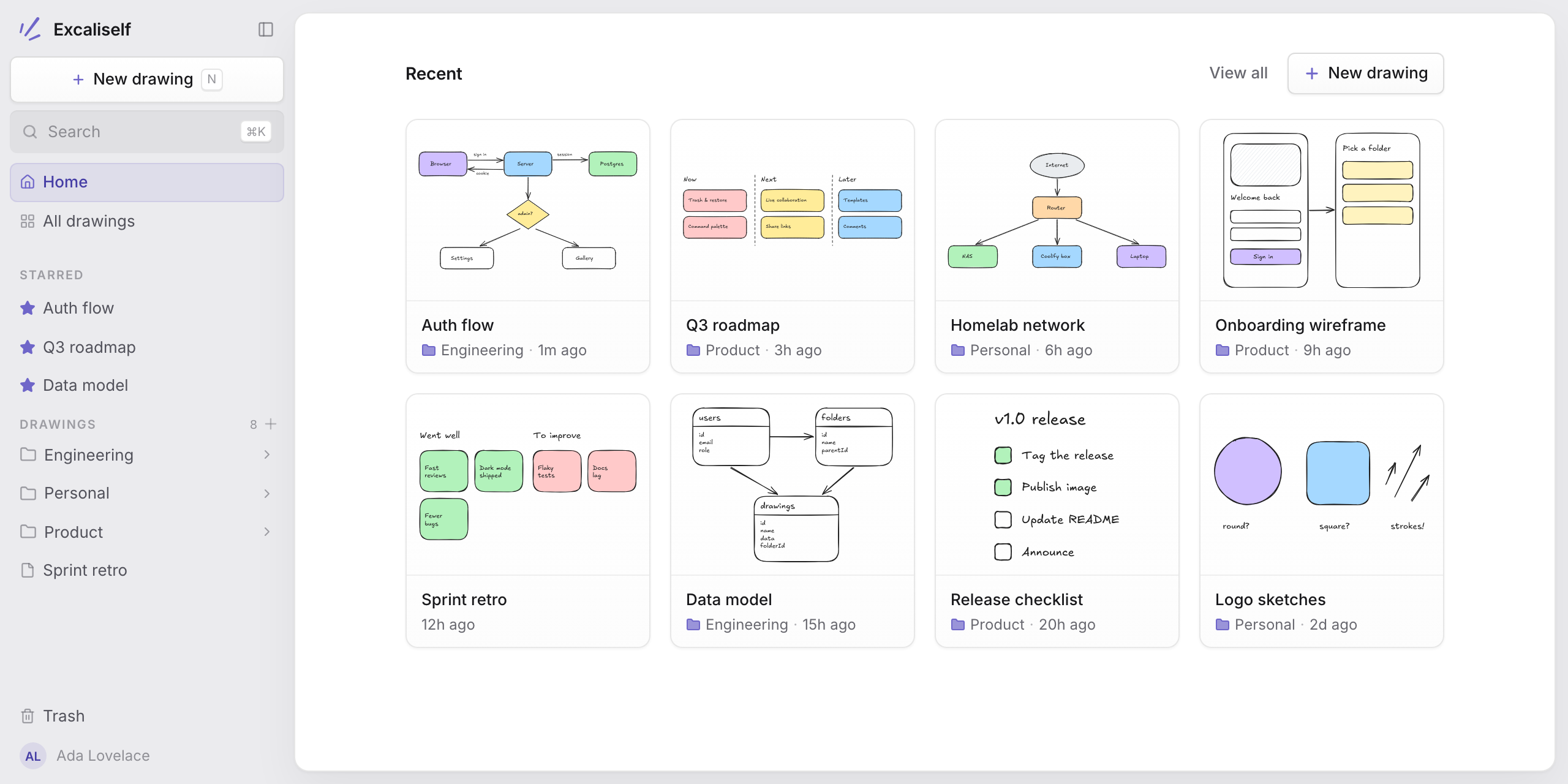
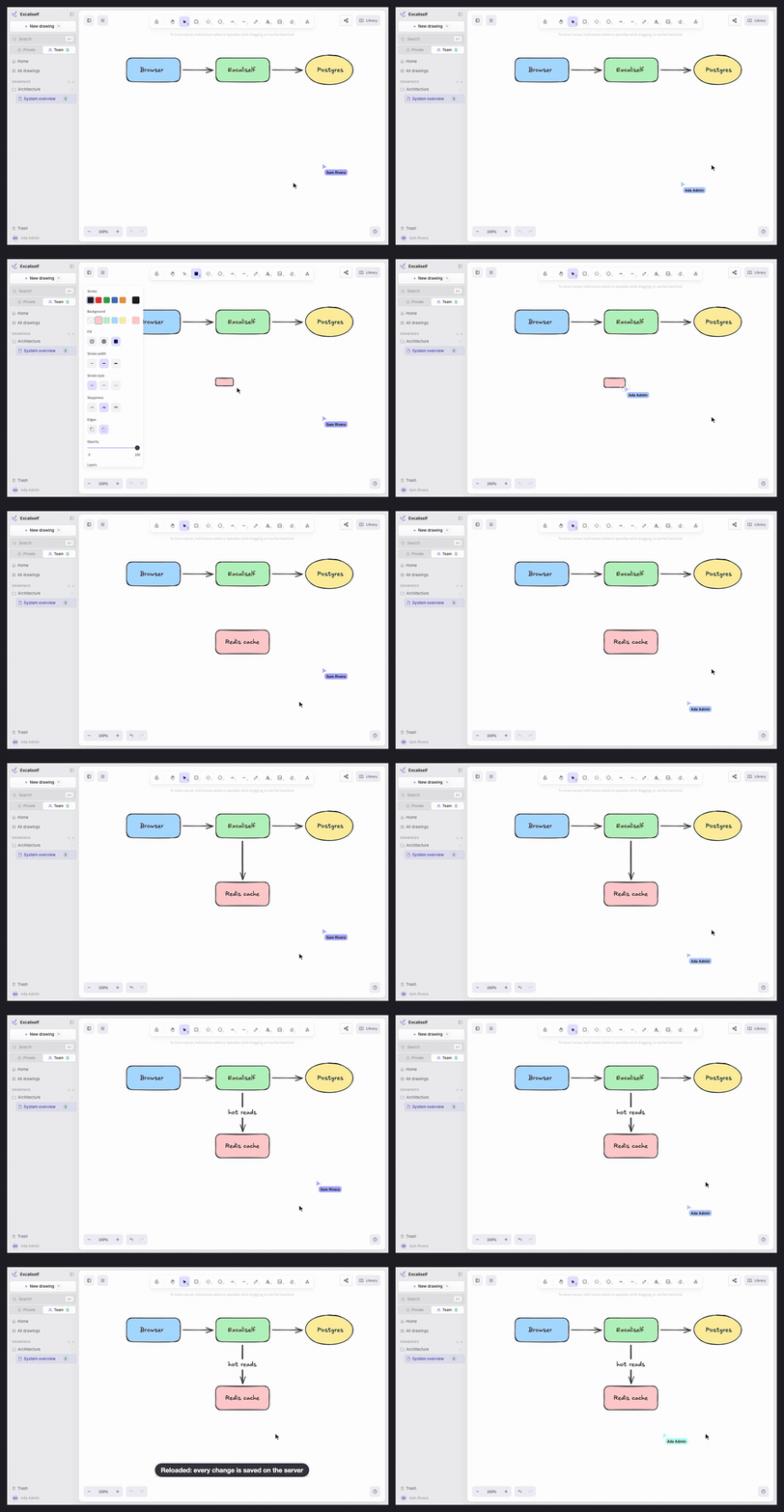
The Excalidraw canvas in a small self-hosted app: live collaboration,
a shared team space, folders, and search, with every drawing stored in your own Postgres.
As seen on Open Source Alternatives
Try it in 10 seconds
docker run --rm -p 127.0.0.1:3000:3000 -e PREVIEW_MODE=true ghcr.io/maciekzygmunt/excaliself
Open http://localhost:3000/preview/login to sign in as the admin, with example drawings. To test live collaboration, open http://localhost:3000/preview/login?account=new in a second browser: it signs in as a new member.
Data lives in memory and is gone when the container stops. For real use, see Deploy.
Features
- The full Excalidraw editor, with auto-save. Images pasted into a drawing are stored too.
- Live collaboration. Share a drawing by link and edit it together in real time, with live cursors and follow mode. Links can be for members only or for anyone, including guests without an account.
- Team space. A shared space every member can see and edit, next to each member's private space. Team drawings are always live.
- Team library. One Library panel of shapes and icons for the whole team, saved on the server and updated live. Libraries from libraries.excalidraw.com install into it.
- Folders, stars, and recents. Nest folders and drag drawings between them in the sidebar.
- Search by title and by the text inside drawings, in the gallery and the command palette (⌘K / Ctrl K), which also runs actions.
- Import from Excalidraw+ (beta). Bring your scenes, collections, and images over with an Excalidraw+ API key (Settings → Import).
- Drop files in. Drag
.excalidrawfiles (or.png/.svgexports with the scene) from your computer onto a folder in the sidebar. - Trash with restore. Deleted items are purged automatically after 30 days.
- Invite-only accounts. The first visitor creates the admin account; everyone else joins by invite link.
- Connect your AI client. Claude.ai, Claude Code, Claude Desktop, and other MCP clients can find, read, create, and export drawings, propose changes to them, and move them to the trash. A change waits on the canvas until you click Apply, and then everyone in the drawing sees it live. Clients sign in with OAuth or a personal access token. The instance needs no LLM API key.
- Single sign-on with Google Workspace, Microsoft Entra ID, or any OIDC provider (Okta, Authentik, Keycloak). People from your email domains join on their first sign-in, with no invite.
- Admin tools under Settings: manage members and roles, create password-reset links, and see instance stats.
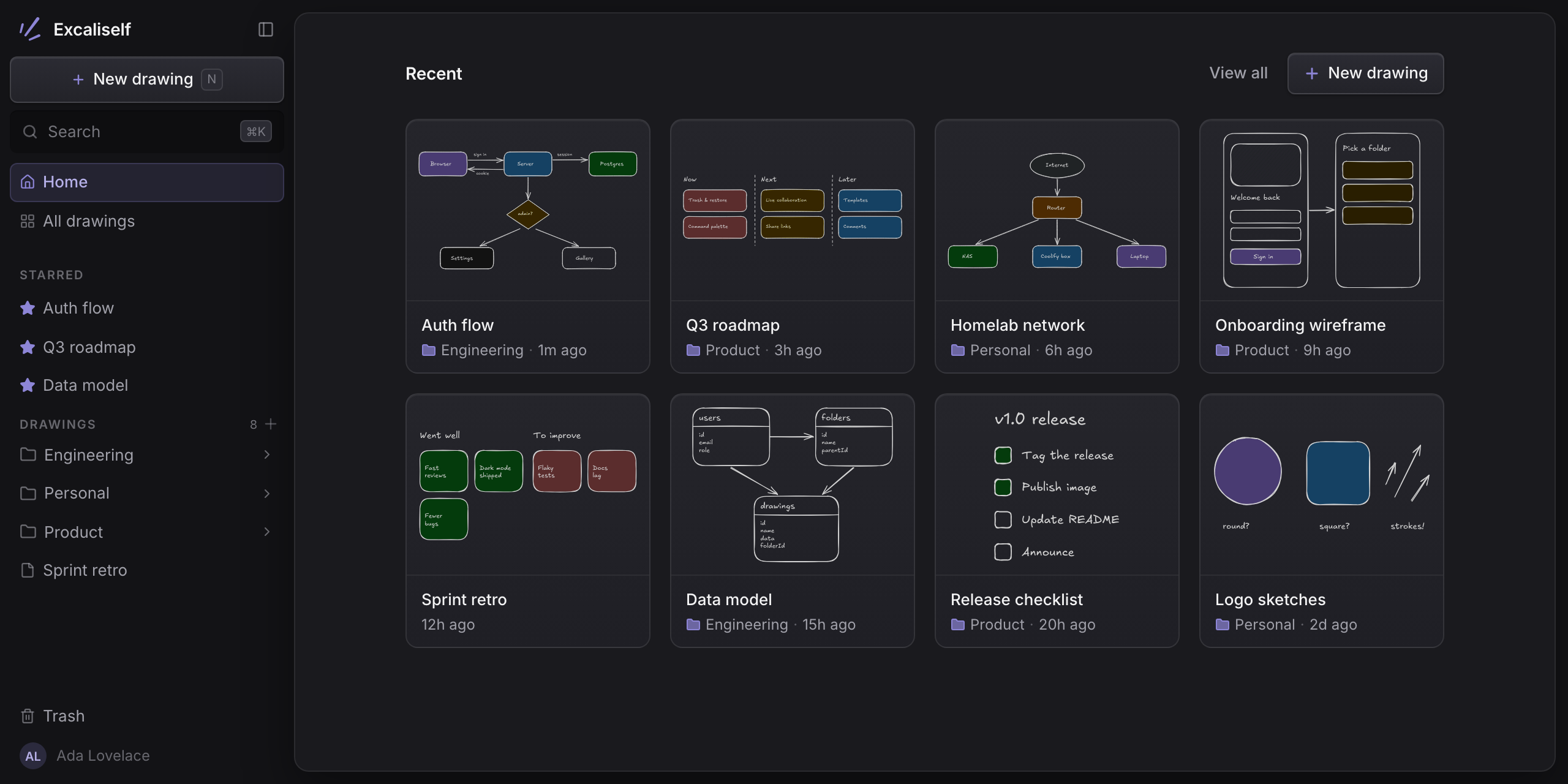
- Light and dark themes, or follow the system setting, with an optional separate theme for the canvas.
Deploy
Each path runs the app next to its Postgres database and pulls the prebuilt
image ghcr.io/maciekzygmunt/excaliself (amd64 and arm64), so nothing is built
on your server. The same image is on Docker Hub as
maciekzygmunt/excaliself.
latest is the newest release. The app applies database
migrations when it starts, so updating is running a newer image.
Docker Compose
mkdir excaliself && cd excaliself
curl -fsSLO https://raw.githubusercontent.com/maciekzygmunt/excaliself/main/docker-compose.yaml
curl -fsSL -o .env https://raw.githubusercontent.com/maciekzygmunt/excaliself/main/.env.example
# set POSTGRES_PASSWORD, BETTER_AUTH_SECRET, and BASE_URL in .env
docker compose up -d
Open BASE_URL (default http://localhost:3000). The first visit takes you to
/setup to create the admin account. Postgres is not published on the host.
Put a reverse proxy with HTTPS in front of port 3000 for anything public.
To update, run docker compose pull && docker compose up -d. To pin a release,
set EXCALISELF_VERSION (e.g. 1.0.0) in .env. To build the image from
source instead (needs about 4 GB of RAM), clone the repo and run
docker compose -f docker-compose.yaml -f docker-compose.build.yaml up -d --build.
The docs have the details.
Coolify
- Add a new resource from the public repository
https://github.com/maciekzygmunt/excaliself, branchmain. - Choose the Docker Compose build pack and set Docker Compose Location to
/docker-compose.coolify.yaml. - Click Deploy.
Coolify creates the database, generates the secrets, and assigns a domain, so
there is nothing to configure. If your server has no wildcard domain, first set a
domain on the excaliself service with the container port, e.g.
https://draw.example.com:3000. Open the domain to create the admin account.
To pin a release instead of latest, set
EXCALISELF_VERSION (e.g. 1.0.0) in the resource's environment variables.
Drawings live in the pgdata volume and survive redeploys.
Railway
The template runs the app next to a Railway Postgres database. It generates the auth secret and a domain, so there is nothing to configure. Open the domain to create the admin account. To set it up by hand or to upgrade, see the docs.
Hostinger
The button opens Hostinger's Docker Manager with docker-compose.yaml. Before
you deploy, set POSTGRES_PASSWORD, BETTER_AUTH_SECRET, and BASE_URL in the
project's environment, as for Docker Compose. Open BASE_URL
to create the admin account. See the docs.
Configuration
Docker Compose reads these from .env. Coolify sets them for you.
| Variable | Required | Description |
|---|---|---|
POSTGRES_PASSWORD |
Yes | Password for the bundled Postgres. Use hex (openssl rand -hex 24): it goes into a connection URL |
BETTER_AUTH_SECRET |
Yes | Session signing secret, at least 32 characters (openssl rand -base64 32) |
BASE_URL |
Yes in production | Public URL of the instance (default http://localhost:3000) |
EXCALISELF_VERSION |
No | Image tag to run: latest (default), a release like 1.0.0 or 1.0, or main |
EXCALISELF_PORT |
No | Host port for the app (default 3000). 127.0.0.1:3000 keeps it local to a reverse proxy |
POSTGRES_USER, POSTGRES_DB |
No | Bundled Postgres user and database (default excaliself) |
GOOGLE_*, MICROSOFT_*, OIDC_*, SSO_ALLOWED_DOMAINS |
No | Single sign-on. See Single sign-on |
PREVIEW_MODE |
No | true runs a throwaway instance for a pull request preview: an in-memory PGlite instead of Postgres, seeded with an admin and example drawings. It ignores DATABASE_URL and BASE_URL and makes BETTER_AUTH_SECRET optional. /preview/login signs in as the admin (admin@example.com / preview-password), /preview/login?account=new as a new member. Data is lost on restart. See PR previews |
PREVIEW_HOSTS |
With PREVIEW_MODE behind a domain |
Comma-separated hosts a preview answers on, e.g. *.draw.example.com. Auth refuses other hosts; localhost always works |
GET /api/health returns 200 when the app is up and can reach Postgres.
If the only admin loses their password, see Recover admin access.
Connect an AI client (MCP)
Excaliself has an MCP server at /api/mcp.
Your AI client brings the model, so the instance needs no LLM API key.
Claude.ai (web, desktop, and mobile) signs in with OAuth, with no token.
In Claude, open Settings, then Connectors, click Add custom
connector, and enter https://<your instance>/api/mcp. Then sign in to
Excaliself and click Allow. The instance must be reachable from the
public internet over HTTPS.
Other clients use an access token:
- In Excaliself, open Settings, then MCP, and click New token. Copy the token: you see it only once.
- Add the server to your client, with your instance's URL and the token.
Claude Code (the token dialog shows this command filled in):
claude mcp add --transport http excaliself https://draw.example.com/api/mcp \
  --header "Authorization: Bearer exs_..."
Claude Desktop cannot send a token to a remote server itself, so it
connects through mcp-remote,
which needs Node. Open Settings, then Developer, then Edit Config,
add this to claude_desktop_config.json, and restart Claude Desktop:
{
  "mcpServers": {
    "excaliself": {
      "command": "npx",
      "args": [
        "-y",
        "mcp-remote",
        "https://draw.example.com/api/mcp",
        "--header",
        "Authorization:${AUTH_HEADER}"
      ],
      "env": { "AUTH_HEADER": "Bearer exs_..." }
    }
  }
}
Other clients that use Streamable HTTP: the URL is
https://<your instance>/api/mcp. A client that supports OAuth with dynamic
client registration signs in by itself. Otherwise, send the header
Authorization: Bearer <token>.
The tools:
list_drawings,search_drawings, andlist_foldersfind drawings, with their space and folder.read_drawingdescribes a drawing: its shapes, text, and what the arrows connect. It does not send the raw Excalidraw JSON.export_drawingexports a drawing as a PNG or SVG image, for example for your documentation. An SVG contains the drawing's fonts.export_sceneexports it as an.excalidrawfile.create_drawingmakes a new drawing in your private space or in Team, optionally in a folder, from simple shapes and arrows or a Mermaid flowchart.edit_drawingproposes a change to a drawing: shapes, text, and arrows to add, change, or remove. Nothing changes until you click Apply on the drawing.get_drawing_edittells the client whether you applied it.create_foldermakes a folder in your private space or in Team, optionally inside another folder.move_drawingmoves a drawing into a folder, or to the top of its space. A drawing cannot move between your private space and Team.trash_drawingandtrash_foldermove a drawing, or a folder with everything in it, to the trash.restore_drawingandrestore_foldertake them out again.
A token or a connected app acts as you: it sees what you see, and it can trash what you can trash. It can create drawings and folders, and move drawings between folders. It cannot change what is in a drawing until you click Apply, and it cannot delete anything for good: trashed items stay in Trash for 30 days. Revoke a token or disconnect an app under Settings at any time. When an admin deletes a member, that member's tokens and apps stop working.
Stack
TanStack Start · React 19 ·
Better Auth · Postgres + Drizzle ·
Tailwind CSS 4 + shadcn/ui on Base UI ·
@excalidraw/excalidraw
Local development
Requires Node 22, pnpm, and Docker.
pnpm install
cp .env.dev.example .env                           # works as-is
docker compose -f docker-compose.dev.yaml up -d    # Postgres on 127.0.0.1:5432
pnpm dev                                           # http://localhost:3000
pnpm dev:preview needs no Postgres and no .env: it runs in preview mode
(see PREVIEW_MODE above). Open /preview/login.
pnpm test, pnpm typecheck, and pnpm lint run the checks.
pnpm db:generate creates a migration after a schema change.
Releases are cut from git tags; see docs/releasing.md.
Sponsors
Excaliself is free and MIT. If your team uses it, sponsoring pays for the time that goes into fixes and releases.
License
MIT. There is no promise of support or reviews for contributions, so feel free to fork it and make it yours.
Built on Excalidraw, MIT © Excalidraw.
Excaliself is not affiliated with Excalidraw. "Excalidraw" is a trademark of
its owner; this project uses the open-source @excalidraw/excalidraw package.
Requirements
Categories
Download Statistics
Related apps
Explore more like this
Explore allDetails
ghcr.io/maciekzygmunt/excaliself:latestRuntime arguments
- Web UI
http://[IP]:[PORT:3000]/- Network
bridge- Shell
sh- Privileged
- false
- Extra Params
--restart=unless-stopped
Template configuration
Port for the web interface.
- Target
- 3000
- Default
- 3000
- Value
- 3000
The address you open Excaliself at, with the port, for example http://192.168.1.10:3000 or https://draw.example.com. Sign-in refuses pages from any other address.
- Target
- BASE_URL
Optional. Other addresses you also open Excaliself at, separated by commas, for example http://tower.local:3000
- Target
- TRUSTED_ORIGINS
postgresql://excaliself:PASSWORD@SERVER-IP:5432/excaliself, with the PostgreSQL container's password and your server's IP.
- Target
- DATABASE_URL
At least 32 characters. Generate with: openssl rand -base64 32
- Target
- BETTER_AUTH_SECRET