
All apps · 0 apps

ESPHome-Enhanced
Docker app from digiblur's Repository
Overview
Readme
View on GitHubESPHome Enhanced Dashboard
A modern, dark-themed replacement for the stock ESPHome dashboard. Built as an overlay on top of the official ESPHome Docker image — your devices keep compiling, uploading, and connecting exactly as before, but the management UI gets a serious upgrade.
The original ESPHome dashboard is preserved and available at /classic.
Current base: ESPHome 2026.5.2
Docker image: heffneil/esphome-enhanced-dashboard
Upstream PR: esphome/esphome#15704
Overview
Screenshot: main dashboard view with device table, tags bar, and side panel Place image at:
docs/screenshots/overview.pngand update the link below
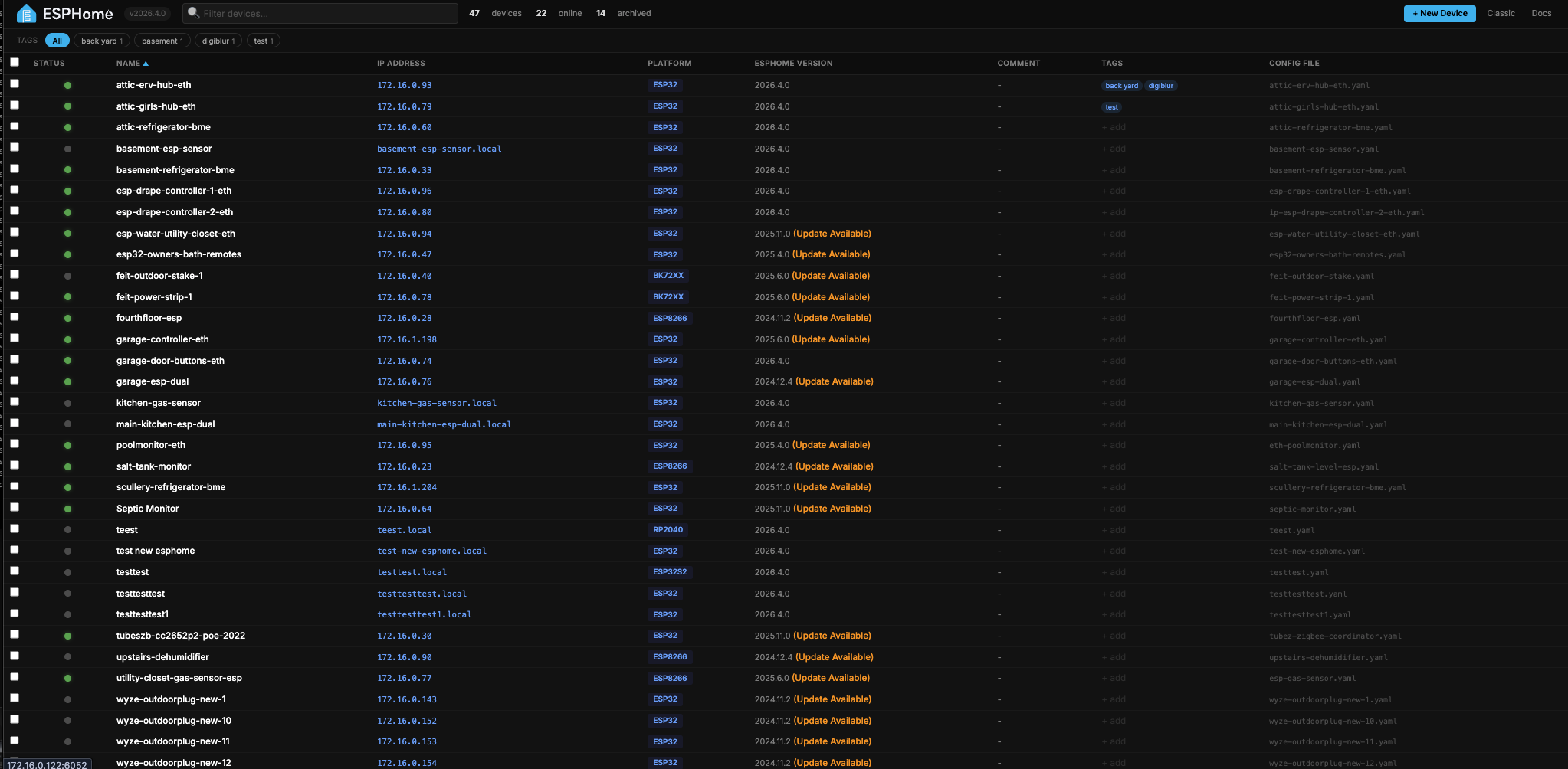
The enhanced dashboard replaces the stock card-based layout with a compact, sortable, searchable table that scales to dozens of devices without getting unwieldy. Click any row to open a side panel with every per-device action. Everything else you'd expect from ESPHome — compiling, OTA uploads, live logs, YAML editing — is wired into the new UI without losing any functionality.
Features
Device table
Screenshot: zoomed-in view of the table showing columns, status dots, tags, version indicators

- Compact sortable columns — Status, Name, IP Address, Platform, ESPHome Version, Comment, Tags, Config File
- Live status dots — green (online), gray (offline), orange (unknown), hollow (inactive)
- "Update Available" indicator next to the version when deployed version doesn't match
- Clickable IP — opens the device's web UI in a new tab (when the device has
web_serverenabled) - Click anywhere on a row to open the side panel with device details and actions
Search, filter, and sort
Screenshot: search bar filtering devices with tag pills highlighted

- Live search across name, friendly name, comment, IP, and config filename
- Sort by any column — click the header, click again to reverse
- Tag filter bar with quick-click pills (OR logic — click multiple tags to see devices matching any)
- Filter, sort, and search all compose together
Device tags
Screenshot: tag editor modal showing pills + "Existing tags" pool
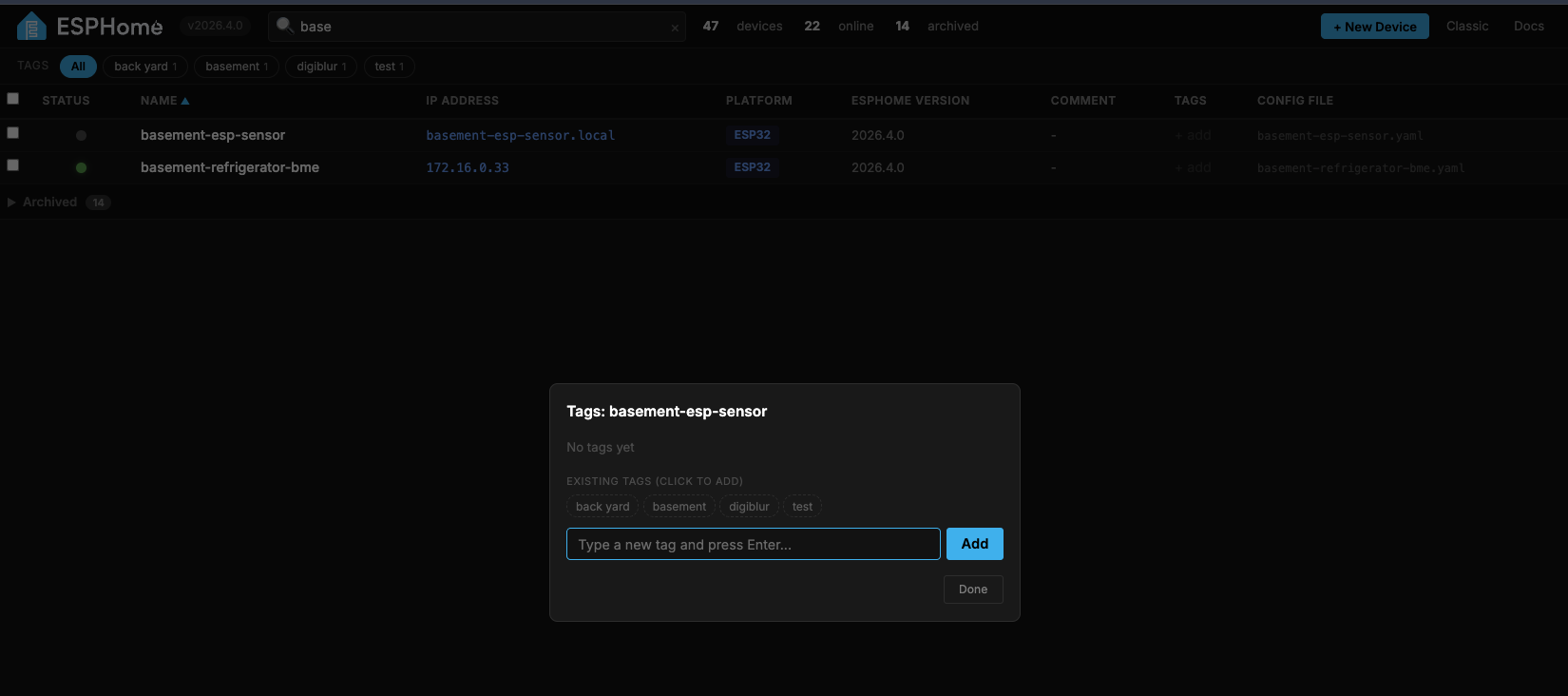
- Add custom tags to any device (e.g. "basement", "sensors", "outdoor")
- Pool of existing tags displayed when editing — click to reuse across devices
- Tags persist in
<config>/.esphome/device-tags.json - Quick-filter by tag via the tag bar below the topbar
Side panel actions
Screenshot: side panel open with a device, showing Actions + Utilities sections
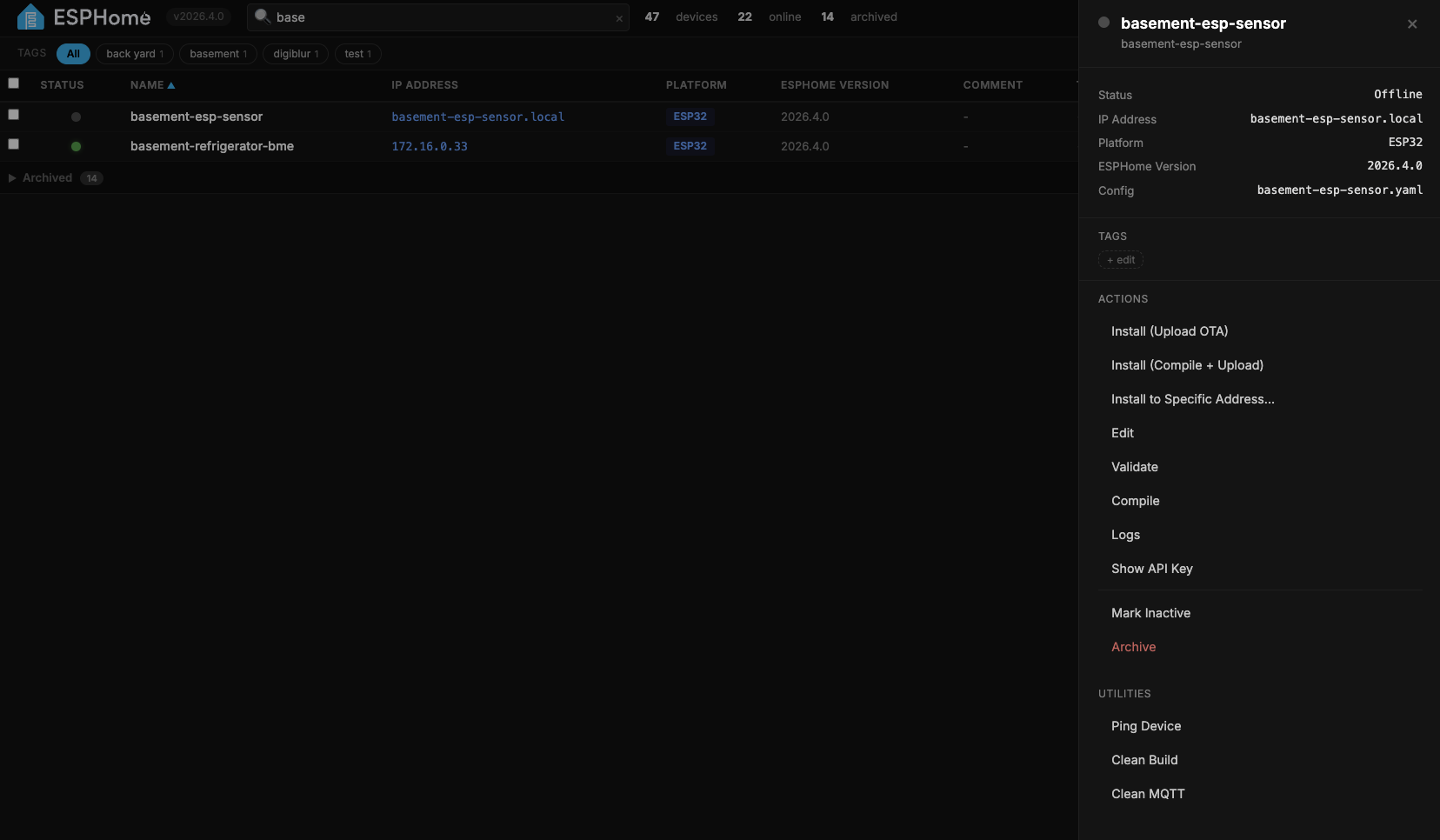
Click any device row and a panel slides in from the right with:
Actions
- Update — if an update is available, one-click compile + upload to the target version
- Install (Upload OTA) — OTA upload the existing build
- Install (Compile + Upload) — full compile then upload
- Install to Specific Address… — prompt for any IP/hostname and upload there (great for recovery or devices that moved)
- Edit — in-page Ace editor with YAML syntax highlighting
- Validate — check the config for errors
- Compile — build firmware without uploading
- Logs — live streaming serial/WiFi logs
- Visit Device — opens the device's web UI if it has one
- Show API Key — reveals the device's encryption key in a modal
- Mark Inactive / Mark Active — stop pinging a temporarily disconnected device
- Archive — move the config to the archive folder
Utilities
- Ping Device — ICMP ping with latency / packet loss / jitter results
- Clean Build — nuke the PlatformIO build cache
- Clean MQTT — remove MQTT discovery entries
Batch actions with checkboxes
Screenshot: multiple rows checked with the blue batch bar showing "3 selected"
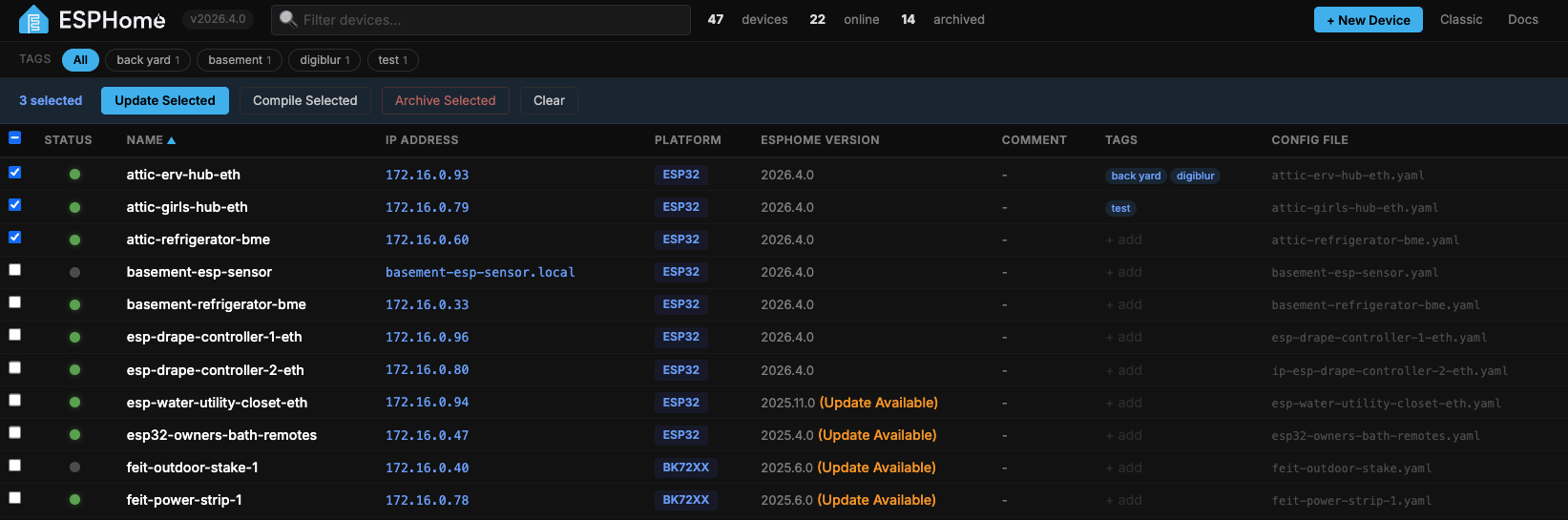
- Checkbox on the left of every active row
- Select all checkbox in the header
- Blue action bar appears when anything is selected
- Update Selected — compile + upload each device sequentially with live progress
- Compile Selected — compile-only batch
- Summary report at the end showing success/failure per device
In-page command output
- All commands (logs, compile, validate, install, ping) run in a modal overlay on top of the dashboard
- ANSI colors preserved — component names, errors, timestamps, all highlighted just like the classic dashboard
- DOWNLOAD LOGS button saves a full .txt of the output
- EDIT button jumps straight to the YAML editor
- Press
Escor click the backdrop to close
YAML editor
- Embedded Ace editor with tomorrow-night theme
- YAML syntax highlighting, auto-indent, line numbers
- Ctrl+S / Cmd+S to save
- Unsaved-changes warning if you try to close with pending edits
Mark Inactive
Screenshot: inactive device dimmed at the bottom of the list
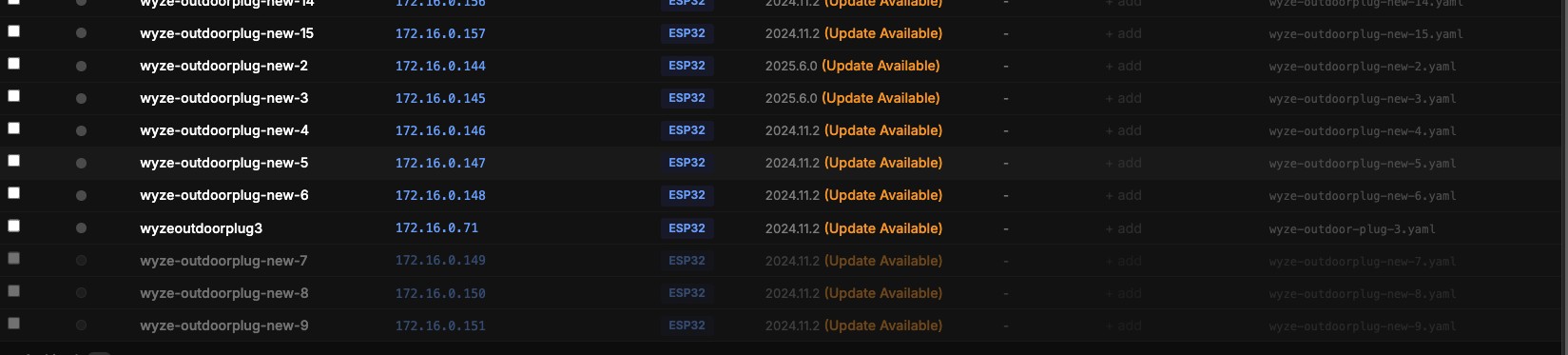
- Dims a device to 40% opacity
- Sorts it to the bottom of the list (below offline, above archived)
- Stops the ping loop from polling it — no more red/offline churn for devices you know are unplugged
- Perfect for seasonal devices, dev boards you're not using, or anything temporarily offline
Archive & restore
Screenshot: archived section expanded at the bottom of the table

- Archive a device → YAML moves to
<config>/archive/ - Archived devices appear in a collapsible section at the bottom
- Click an archived row → side panel shows Restore from Archive and View YAML
- One click to bring it back
New Device wizard
- Click + New Device in the topbar
- Fill in name, platform (ESP32 family, ESP8266, RP2040, BK72xx, RTL87xx, LN882x), board, WiFi credentials
- Optional device password for OTA security
- Backend auto-generates API encryption key and OTA password
- New device appears in the list immediately
Install
Option 1: Home Assistant add-on (for HAOS / HA Supervised users)
If you run Home Assistant OS or Home Assistant Supervised, you can install this as a drop-in replacement for the official ESPHome add-on.

Or manually:
- In Home Assistant, open Settings → Add-ons → Add-on Store
- Click the three-dot menu (⋮) in the top right → Repositories
- Paste:
https://github.com/heffneil/esphome-enhanced-dashboard-addon - Click Add, close the dialog, refresh the store
- Find ESPHome Enhanced Dashboard and click Install
- Start it and open via the sidebar
The add-on is built on top of the official ESPHome add-on image — discovery, ingress, auth, PlatformIO toolchains, and every other HA integration work exactly the same. Uninstall the official ESPHome add-on first to free port 6052.
Source: https://github.com/heffneil/esphome-enhanced-dashboard-addon
Option 2: Docker image (for Docker Compose / docker run users)
Swap your image name. No volume mounts, no file copying — everything is baked in.
Docker Compose:
services:
  esphome:
    image: heffneil/esphome-enhanced-dashboard:latest
    container_name: esphome
    restart: unless-stopped
    ports:
      - "6052:6052"
    volumes:
      - /path/to/your/config:/config
      - /etc/localtime:/etc/localtime:ro
docker compose up -d
Docker run:
docker run -d \
  --name esphome \
  -p 6052:6052 \
  -v /path/to/your/config:/config \
  --restart unless-stopped \
  heffneil/esphome-enhanced-dashboard:latest
Option 3: Volume mount overrides
Keep the official ESPHome image and overlay just the dashboard files:
git clone https://github.com/heffneil/esphome-enhanced-dashboard.git /opt/esphome-dashboard
services:
  esphome:
    image: esphome/esphome
    container_name: esphome
    restart: unless-stopped
    ports:
      - "6052:6052"
    volumes:
      - /path/to/your/config:/config
      - /etc/localtime:/etc/localtime:ro
      # Enhanced dashboard overrides
      - /opt/esphome-dashboard/overrides/models.py:/esphome/esphome/dashboard/models.py
      - /opt/esphome-dashboard/overrides/const.py:/esphome/esphome/dashboard/const.py
      - /opt/esphome-dashboard/overrides/web_server.py:/esphome/esphome/dashboard/web_server.py
      - /opt/esphome-dashboard/overrides/core.py:/esphome/esphome/dashboard/core.py
      - /opt/esphome-dashboard/overrides/status/ping.py:/esphome/esphome/dashboard/status/ping.py
      - /opt/esphome-dashboard/overrides/templates:/esphome/esphome/dashboard/templates
Option 4: Build from source
git clone https://github.com/heffneil/esphome-enhanced-dashboard.git
cd esphome-enhanced-dashboard
docker build -t my-esphome-dashboard .
Pin to a specific ESPHome version:
docker build --build-arg BASE_VERSION=2026.5.2 -t my-esphome-dashboard .
Option 5: Proxmox VE LXC (one-line installer)
Run on a Proxmox VE host. Creates a Debian 12 unprivileged LXC, installs Docker, and brings up the enhanced dashboard with a persistent config directory and a named PlatformIO cache.
bash -c "$(curl -fsSL https://raw.githubusercontent.com/heffneil/esphome-enhanced-dashboard/main/script/install-proxmox.sh)"
The script prompts for container ID, hostname, disk/RAM/cores, network bridge, IP (or DHCP), and storage pool — defaults are sensible. Set any value as an env var to skip the prompt:
CT_HOSTNAME=esphome CT_RAM_MB=4096 IMAGE_TAG=latest \
  bash -c "$(curl -fsSL https://raw.githubusercontent.com/heffneil/esphome-enhanced-dashboard/main/script/install-proxmox.sh)"
When it finishes you get the dashboard URL printed to the console. Configs live at /opt/esphome-enhanced/config inside the LXC.
Image tags
:latest— stable, only updated after testing:dev— development build, may contain unreleased features:2026.5.2— pinned to a specific ESPHome base version:v0.1.0,:v0.2.0— pinned release versions
Upgrading
HA add-on (Option 1): Home Assistant shows "Update available" in the add-on page — click Update.
Docker image (Option 2):
docker compose pull && docker compose up -d
Volume mounts (Option 3):
cd /opt/esphome-dashboard
git pull
docker restart esphome
Build from source (Option 4):
cd esphome-enhanced-dashboard
git pull
docker build -t my-esphome-dashboard .
docker compose up -d
Reverting
Docker image: Change image: back to esphome/esphome and restart.
Volume mounts: Remove the override volume lines and restart.
The classic dashboard is always preserved at http://your-host:6052/classic as long as the image is running.
How it works
ESPHome's Python package lives inside the container at /esphome/esphome/. Our image (or the volume-mount overrides) replaces these files:
| File | Changes |
|---|---|
web_server.py |
Routes / to new template; adds /classic, /device-tags, /toggle-inactive, /ping-host endpoints |
core.py |
Adds tag and inactive device storage (JSON in config dir) |
models.py |
Adds tags, inactive, archived fields to device API response |
const.py |
Adds entry_archived / entry_unarchived WebSocket events |
status/ping.py |
Skips polling for inactive devices |
templates/index.template.html |
New dashboard UI (self-contained, no build step) |
Everything else — PlatformIO, compile toolchains, OTA, mDNS, API auth, Home Assistant ingress — is untouched.
Storage
| Data | Location |
|---|---|
| Tags | <config>/.esphome/device-tags.json |
| Inactive devices | <config>/.esphome/inactive-devices.json |
| Archived configs | <config>/archive/ |
Everything lives in your config volume and survives container recreation.
Troubleshooting
Dashboard still shows the stock UI
- Hard refresh:
Ctrl+Shift+R(orCmd+Shift+Ron Mac) - Confirm the container restarted
- Verify the template inside the container:
docker exec esphome ls /esphome/esphome/dashboard/templates/
Compile fails with xtensa-lx106-elf-g++: not found
PlatformIO toolchains download on first compile. Add a named volume to persist them:
volumes:
  - esphome-platformio:/root/.platformio
Ping Device can't resolve .local names
.local hostnames use mDNS. If your Docker container is on a bridge network, it can't see mDNS. Either use the device's IP address directly, or put the container on the host network:
network_mode: host
WebSocket keeps reconnecting
Usually a reverse proxy issue. For nginx:
proxy_http_version 1.1;
proxy_set_header Upgrade $http_upgrade;
proxy_set_header Connection "upgrade";
Changelog
Versions below are HA add-on releases — the same overlay code ships in the Docker image (heffneil/esphome-enhanced-dashboard:latest).
0.2.20 — 2026-06-09
- Fix HA add-on stuck on ESPHome 2026.4.3 base despite the 0.2.18 bump. The GitHub Actions workflow hardcoded
BUILD_FROM=…:2026.4.3as a build-arg, silently overriding the Dockerfile. HA add-on users on 0.2.17–0.2.19 saw the new version label but their ESPHome was still 2026.4.3 inside. This release rebuilds against 2026.5.2 for real. Docker Hub users (who built locally) were unaffected. Closes #12.
0.2.19 — 2026-06-03
- Fix
ImportError: cannot import name 'platformio_api'against ESPHome 2026.5.x base. Overlay now imports the relocatedesphome.platformio.toolchainwith fallback to the old name. 0.2.18 crash-looped against 2026.5.2 — this fixes it.
0.2.18 — 2026-06-03
- Rebuild on ESPHome 2026.5.2 (was 2026.4.3). Picks up the 2026.5.0 minor release plus 2 patches — notable fixes include WiFi connection in safe mode,
!secretquoting in bundles, API VoiceAssistant crash loop,esphome.areapersistence in StorageJSON, ESP8266 timer/UART responsiveness, ESP-IDF hardening.
0.2.17 — 2026-06-03
- Friendly Name / Name columns now populate on first load for devices whose
esphome.namelives in!included packages (local or remote GitHuburl:packages). Root substitutions correctly override package defaults. Merges #9 from @dafal.
0.2.16 — 2026-05-16
- New Download Firmware... button on the device side panel (one-click
.bindownload, multi-artifact picker for ESP32 builds). Merges #8 from @dafal, closes #7 from @guy0nabuffalo.
0.2.15 — 2026-05-01
- Pin the topbar, tag bar, and selection bar to the top of the page. Only the device list scrolls — search, + New Device, Secrets, column toggle, and bulk-action buttons stay visible no matter how long the list is.
0.2.14 — 2026-04-29
- Tighten the Ace warning filter to allowlist only known ESPHome tags (
!secret,!include*,!lambda,!env,!extend,!remove). Typos are still flagged.
0.2.13 — 2026-04-29
- Suppress Ace editor false-positive
Unknown tag !<!secret>warnings (and!include,!lambda). Real YAML errors still flagged. Closes #8.
0.2.12 — 2026-04-28
- "(Update Available)" indicator only shows when the deployed version is older than the dashboard's. No more nagging on devices running newer betas.
0.2.11 — 2026-04-28
- Sort selection persists across reloads, browser restarts, and ingress sessions (per-browser
localStorage).
0.2.10 — 2026-04-28
- Rebuild on ESPHome 2026.4.3.
0.2.9 — 2026-04-24
- Fix Show API Key always reporting "No API key found". Reads encryption key (or legacy password) directly from device YAML, resolves
!secretagainstsecrets.yaml.
0.2.8 — 2026-04-23
- Merges #6 from @lilmansplace: populate Platform / Name / Friendly Name / Comment from YAML when StorageJSON is missing or stale; new sortable Friendly Name column.
0.2.7 — 2026-04-23
- Secrets button in the topbar opens
secrets.yamldirectly in the embedded Ace editor.
0.2.6 — 2026-04-23
- Expose
default_compile_process_limitadd-on option.
0.2.5 — 2026-04-23
- Column show/hide menu covers every column (Status and Name remain always-visible).
0.2.4 — 2026-04-23
- Fix Classic dashboard link 404 under HA ingress.
0.2.3 — 2026-04-22
- Fix fetch / WebSocket URLs when running behind Home Assistant ingress.
0.2.2 — 2026-04-19
- Rebuild on ESPHome 2026.4.1.
0.2.1 — 2026-04-19
- Add BT Proxy column (✓ for devices with
bluetooth_proxyconfigured) with hide/show toggle.
0.2.0 — 2026-04-18
- Initial public release. Dark dashboard with sortable table, live search, tags, archive, side panel, batch actions, install-to-IP, embedded Ace editor, in-page modals, new-device wizard. Classic dashboard preserved at
/classic.
Contributing
This repo tracks the upstream PR at esphome/esphome#15704. If you have ideas or bug reports, open an issue here or comment on the PR.
License
Same as upstream ESPHome — see LICENSE. The override files in this repo are derivatives of the ESPHome dashboard source.
Categories
Download Statistics
Related apps
Explore more like this
Explore allDetails
heffneil/esphome-enhanced-dashboardRuntime arguments
- Web UI
http://[IP]:[PORT:6052]/- Network
host- Shell
bash- Privileged
- false
- Extra Params
--restart unless-stopped
Template configuration
Container Path: /config - Where your yaml files will be stored
- Target
- /config
- Default
- /mnt/user/appdata/esphome-enhanced
Container Path: /data - Where your compiled binaries will be stored
- Target
- /data
- Default
- /mnt/user/appdata/esphome-enhanced-data
Container Path: /cache - Where the files used to compile builds are stored, ram drive preferred to reduce IO bottlenecks
- Target
- /cache
- Default
- /dev/shm/esphome-enh-cache
WebUI Port
- Target
- 6052
- Default
- 6052
Use ping instead of mdns for monitoring device status
- Default
- false
Environment variable for separated data from configs, you shouldn't need to change this
- Default
- /data