
All apps · 0 apps

ErgoNode
Docker app from mrlafontaine's Repository
Overview
Allows you to run a ERGO node on your Unraid server using the
OFFICIAL DOCKER.
**INSTALLATION GUIDE : https://github.com/Mrlafontaine/Unraid-ErgoNode
While syncing to the current height, your docker might crash
and it might take a wile (few hours to a day at most) depending
on your cpu and ram.
Once the sync is done you can setup your wallet following
the blog: https://ergoplatform.org/en/blog/2019_12_02_how_to_setup
- UI for the wallet can be found at [IP]:[PORT:9053]/panel
- For the swagger [IP]:[PORT:9053]/swagger
Readme
View on GitHubUnraid-ErgoNode
Allows you to run a ERGO node on your unRAID server using the OFFICIAL DOCKER.
While syncing to the current height, your docker might crash and it might take a wile (few hours to a day at most) depending on your cpu and ram.
Once the sync is done you can setup your wallet following the blog: https://ergoplatform.org/en/blog/2019_12_02_how_to_setup
- UI for the wallet can be found at [IP]:[PORT:9053]/panel
- For the swagger [IP]:[PORT:9053]/swagger
If you have any questions send me a message at https://forums.unraid.net/profile/163009-mrlafontaine/ or on discord mrlafontaine#0504
Support me
If you liked this guide and want to say thanks feel free to buy me a coffee: 9hWidxom5qCRtu4Bq3EjibVRSAhwMhvEC3DTf61jyzGapwvmTBRInstallation Guide
Before doing anything you will need to create a config file !Creating the config file using windows file explorer:
I have chosen to create the node in appdata/ergonode- Create a .txt file:

- Open the .txt file you just created and paste the following:
    ergo {
      node {
        mining = false
      }
    }

    scorex {
     restApi {
        ## Hex-encoded Blake2b256 hash of an API key.
        ## Should be 64-chars long Base16 string.
        ## below is the hash of the string 'hello'
        ## replace with your actual hash
        apiKeyHash = "324dcf027dd4a30a932c441f365a25e86b173defa4b8e58948253471b81b72cf"
      }
    }
- Save the file: crtl+s and close it.
- Now rename the txt file to 'ergo.conf' removing the .txt extention, click yes for the warning.
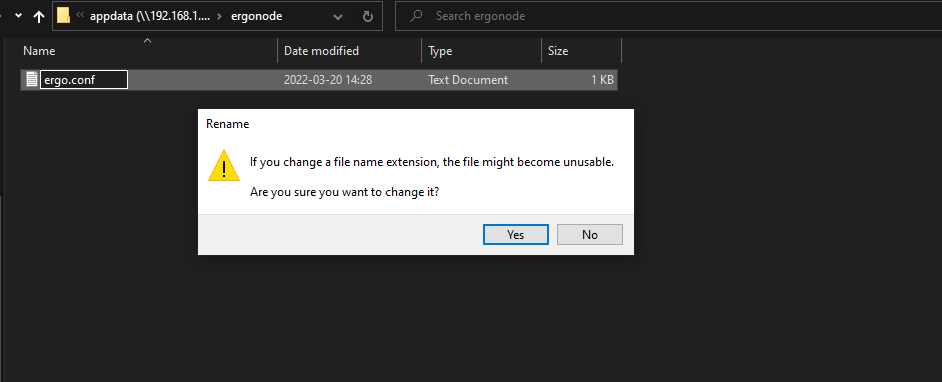
Creating the config file using the command line:
- Navigate to your appdata folder:cd /mnt/user/appdata
- Open unraid command line and create a folder in appdata named, in my case, ergonode:
mkdir ergonode
- Create a file named ergo.conf and paste the default config:
nano ergo.conf
and paste this inside:
    ergo {
      node {
        mining = false
      }
    }

    scorex {
     restApi {
        ## Hex-encoded Blake2b256 hash of an API key.
        ## Should be 64-chars long Base16 string.
        ## below is the hash of the string 'hello'
        ## replace with your actual hash
        apiKeyHash = "324dcf027dd4a30a932c441f365a25e86b173defa4b8e58948253471b81b72cf"
      }
    }
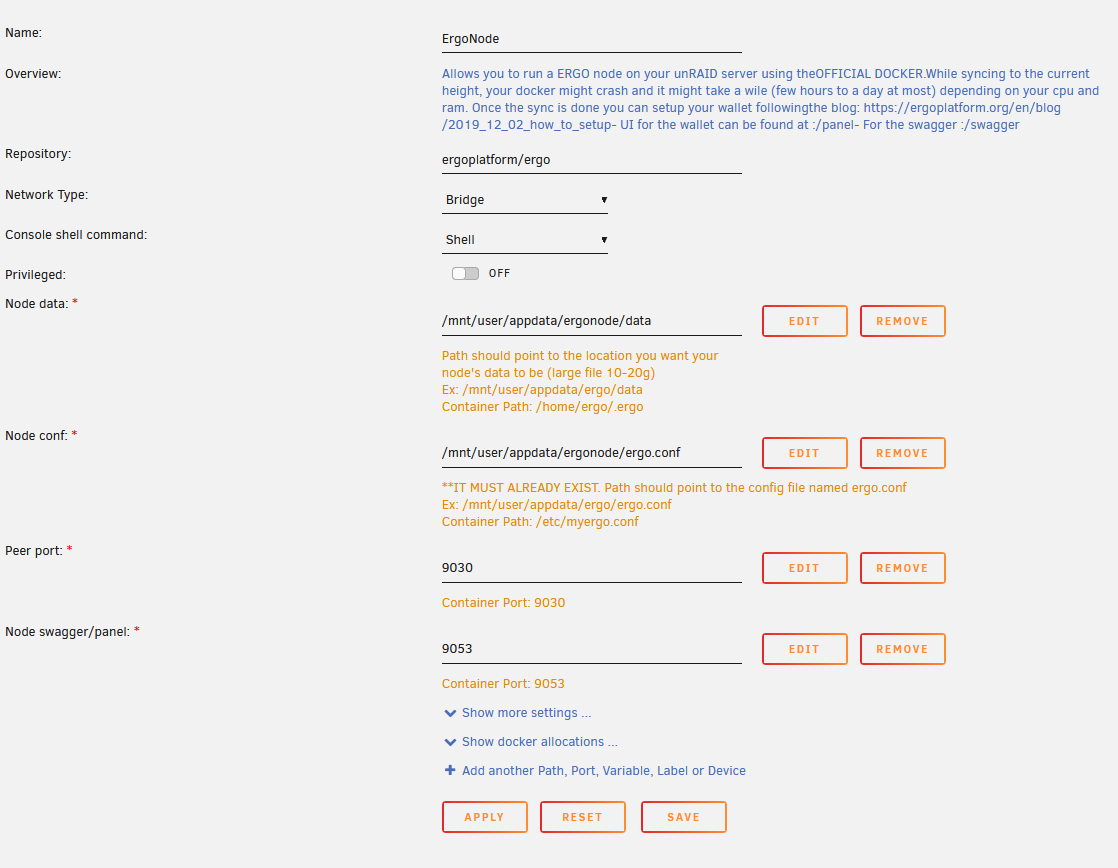
Now for the unraid template:
Categories
Download Statistics
Total Downloads Over Time
Related apps
Explore more like this
Explore allDetails
ergoplatform/ergoRuntime arguments
- Web UI
http://[IP]:[PORT:9053]/panel- Network
bridge- Shell
sh- Privileged
- false
- Extra Params
-e MAX_HEAP=3G --restart unless-stopped
Template configuration
Path should point to the location you want your br/ node's data to be (large file 10-20g) br/ Ex: /mnt/user/appdata/ergo/data br/ Container Path: /home/ergo/.ergo
- Target
- /home/ergo/.ergo
- Default
- /mnt/user/appdata/ergo/data
- Value
- /mnt/user/appdata/ergo2/data
**IT MUST ALREADY EXIST. Path should point to the config file named ergo.conf br/ Ex: /mnt/user/appdata/ergo/ergo.conf br/ Container Path: /etc/myergo.conf
- Target
- /etc/myergo.conf
Container Port: 9030
- Target
- 9030
- Default
- 9030
- Value
- 9030
Container Port: 9053
- Target
- 9053
- Value
- 9053