

Envoryx
OfficialDocker app from Seramos' Repository
Overview
Readme
View on GitHub
Development environments on your own server, set up from a web UI.
For Linux Docker hosts and Unraid, x86_64 and arm64.
Documentation · Installation · Changelog · Releases
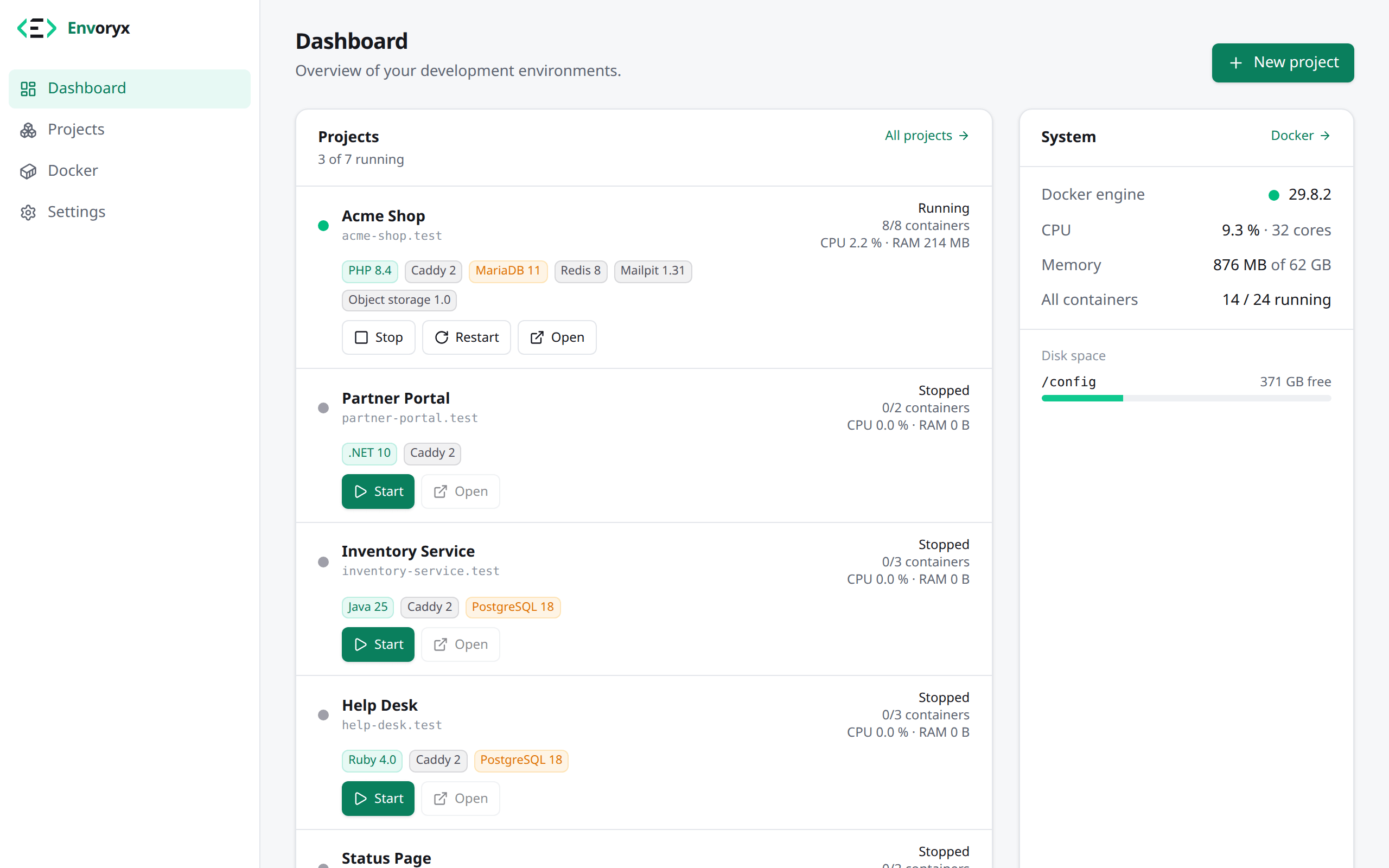
Envoryx is a single container that gives each of your projects its own little stack: a web
server, the runtime it needs (PHP, Node.js, Python, Go, Ruby, Java or .NET), a database and
whatever services you add. You click a project together instead of writing
docker-compose.yml files, and it answers at https://<project>.test with a trusted
certificate. Your editor connects over SSH, backups run on a schedule, and the whole thing
lives on a home server, a NAS or a cheap VM instead of your laptop.
Quick start
All it needs is Docker. This starts Envoryx with the web UI on port 8787:
mkdir -p ~/envoryx/config ~/envoryx/projects
docker run -d --name envoryx --restart unless-stopped --stop-timeout 90 \
  -p 8787:8787 -p 80:80 -p 443:443 -p 2222:2222 \
  -v /var/run/docker.sock:/var/run/docker.sock \
  -v ~/envoryx/config:/config -v ~/envoryx/projects:/projects \
  -e PUID=$(id -u) -e PGID=$(id -g) -e ENVORYX_SHUTDOWN_GRACE=80s \
  ghcr.io/envoryx/envoryx:latest
Open http://<your-server>:8787, create the admin account and click New project. Ports
80 and 443 are for reaching projects by name, 2222 for your IDE; leave them out if you don't
need that yet.
The installation guide has the same as a Compose file and explains the options. On Unraid there's a template with everything filled in.
What it does
Projects in a few clicks. Start from a template (Laravel, Symfony, WordPress, Drupal,
TYPO3, Shopware, Craft CMS, Vite + React, Next.js, Nuxt, Django, Flask, FastAPI, Gin, Echo,
Rails, Sinatra, Spring Boot, Quarkus, ASP.NET Core and more), clone a Git repository, upload
an existing website with its database dump, or start empty. An envoryx.yml in the
repository describes the environment, so a fresh clone comes up the same way.
The runtimes you work with. Each runs in its own container with the tools around it and, where it makes sense, a dev server with live reload and a debugger port:
| Runtime | Versions | Comes with |
|---|---|---|
| PHP | 8.2 - 8.5 | Composer, Xdebug, extensions to pick; Caddy, Apache or Nginx in front |
| Node.js | 22, 24, 26 | npm, pnpm, Yarn; dev server with HMR, inspector |
| Python | 3.11 - 3.15 | pip, uv, venv; runserver, uvicorn or gunicorn, debugpy |
| Go | 1.26, 1.27 | air live reload, Delve, gotestsum |
| Ruby | 3.3 - 4.0 | Bundler, Puma, rdbg |
| Java | 17, 21, 25 | Maven, Gradle, Spring Boot DevTools, Quarkus dev mode, JDWP |
| .NET | 8, 10 | dotnet watch, dotnet-ef |
A runtime can also come from your own image or a Dockerfile in the project.
Databases and services. MariaDB, MySQL, PostgreSQL or MongoDB per project (more than one if you need it, or your own existing server), plus Redis, Memcached, Mailpit, RabbitMQ, Meilisearch, Typesense, OpenSearch, Ollama and S3-compatible object storage. The connection details land in the project's environment. Anything else comes in as a small YAML addon.
Domains and HTTPS. Every project gets https://<project>.test from a local CA you trust
once, or a Let's Encrypt wildcard for your own domain. A built-in proxy handles extra
domains, basic auth, IP rules and redirects, and a project can be shared publicly for a few
hours through a Cloudflare tunnel.
Working on it. Live and searchable logs, a browser terminal, one-click actions
(composer install, php artisan migrate, npm run build …), a test runner for PHPUnit,
Pest, npm test scripts, Playwright, Cypress, pytest, go test, RSpec and Rails tests, workers for queues and schedulers, and
cron jobs. Duplicate a project, rename it, or let Envoryx keep a copy per Git branch
(shop-feature-login.test) that follows your pushes.
Your IDE stays local. PhpStorm, WebStorm, PyCharm, GoLand, RubyMine, IntelliJ, Rider and VS Code connect over the built-in SSH server for remote interpreters, SFTP and debugging, and JetBrains Gateway can run its backend next to the project.
Your data is safe. Database snapshots before a migration, scheduled project backups, backups of Envoryx itself, and offsite copies to S3, SFTP or WebDAV, encrypted if you like. Restoring a project, or a whole instance on a new machine, is a click.
For a team or a client. Users with roles (viewer, developer, admin) per project, sign-in through OpenID Connect, an audit log, notifications to ntfy, Discord, Slack, Telegram or e-mail, resource limits and health checks per project. The interface speaks English, German, French, Spanish, Italian, Dutch, Polish, Portuguese, Russian and Ukrainian.
Scriptable. A REST API with scoped tokens, a command line (the same binary) and an MCP server for AI assistants like Claude Code or Cursor.
How it works
Envoryx keeps what each project should look like in its database (/config/envoryx.db) and
makes Docker match it: on every change, at startup and every half minute. Each project gets
its own network and one container per service:
Browser ──▶ Envoryx (Go API + React UI, proxy, SSH) ──▶ Docker Engine
                                                         ├── envoryx-<project>        network
                                                         ├── envoryx-<project>-web    Caddy / Apache / Nginx
                                                         ├── envoryx-<project>-php    or -node, -python, -go, -ruby, -java, -dotnet
                                                         ├── envoryx-<project>-database
                                                         └── envoryx-<project>-redis, -mailpit, …
Your files live in /projects/<name> on the host and are mounted into the containers, owned
by your user. Envoryx only touches Docker resources it labelled itself
(envoryx.managed=true), so everything else on the host is left alone. Updating Envoryx
doesn't touch your projects either: their containers keep running while Envoryx is replaced.
Command line
The binary that runs the server is also the client. On the host:
docker exec -it envoryx envoryx project list
docker exec -it envoryx envoryx project exec shop -- php artisan migrate --force
From any other machine, after envoryx login --url https://envoryx.example.com:
envoryx project create "Shop" --php 8.4 --database mariadb --template laravel --start
envoryx project logs shop --follow
envoryx db snapshot shop --note "before the migration"
envoryx up        # in a clone: envoryx.yml becomes a project
See the command line docs for everything else.
Documentation
The user documentation, in English and German, is at envoryx.dev/docs. The reference material lives in this repository:
| Document | What's in it |
|---|---|
| DEPLOYMENT.md | every setting and environment variable, Unraid, domains and HTTPS, the API, backups, managed instances |
| SECURITY.md | the threat model, the Docker socket and how to harden a setup |
| ARCHITECTURE.md | design, data model and the project lifecycle |
| DEVELOPMENT.md | building, running and testing Envoryx locally |
| CHANGELOG.md | what changed in each release |
Contributing
Bug reports and ideas are welcome as issues. For code, see CONTRIBUTING.md; pull requests need a one-time signature of the Contributor License Agreement.
License
Envoryx is free software under the GNU Affero General Public License v3.0. You may use it freely, also commercially. If you change it and distribute it, or offer a changed version as a network service, you publish your changes under the same license. The projects you run inside Envoryx aren't affected by it.
Copyright (c) 2026 Stefan Mertens
Categories
Related apps
Explore more like this
Explore allDetails
ghcr.io/envoryx/envoryx:latestRuntime arguments
- Web UI
http://[IP]:[PORT:8787]- Network
bridge- Shell
sh- Privileged
- false
Template configuration
Port of the Envoryx web interface.
- Target
- 8787
- Default
- 8787
- Value
- 8787
Embedded reverse proxy: opens projects by domain (http://shop.test). Change the host port if 80 is taken on your server; Envoryx detects the mapping.
- Target
- 80
- Default
- 80
- Value
- 80
Embedded SSH server for PhpStorm/WebStorm/VS Code remote interpreters and SFTP into project containers. Optional.
- Target
- 2222
- Default
- 2222
- Value
- 2222
Embedded reverse proxy with certificates from Envoryx's local CA (https://shop.test). Change the host port if 443 is taken.
- Target
- 443
- Default
- 443
- Value
- 443
Envoryx database, generated configuration and caches. Holds an SQLite database: prefer the pool path (e.g. /mnt/cache/appdata/envoryx) or enable exclusive access for the appdata share; /mnt/user works but goes through FUSE.
- Target
- /config
- Default
- /mnt/user/appdata/envoryx
- Value
- /mnt/user/appdata/envoryx
Root folder of all development projects. Each project gets its own sub-folder.
- Target
- /projects
- Default
- /mnt/user/development
- Value
- /mnt/user/development
Optional: folder for project backups, e.g. /mnt/user/backups/envoryx on the array. Leave empty to keep backups under /config/backups (appdata).
- Target
- /backups
Required: Envoryx creates the project containers through the Docker engine. See SECURITY.md for the socket-proxy alternative.
- Target
- /var/run/docker.sock
- Default
- /var/run/docker.sock
- Value
- /var/run/docker.sock
User id project files are owned by (99 = nobody).
- Default
- 99
- Value
- 99
Group id project files are owned by (100 = users).
- Default
- 100
- Value
- 100
First host port assigned to project web servers.
- Target
- ENVORYX_PORT_RANGE_START
- Default
- 20000
- Value
- 20000
Last host port assigned to project web servers.
- Target
- ENVORYX_PORT_RANGE_END
- Default
- 20999
- Value
- 20999
IPv4 range each new project network gets a /24 of. off leaves it to Docker, whose default ranges run out after about 30 networks.
- Target
- ENVORYX_NETWORK_POOL
- Default
- 10.213.0.0/16
- Value
- 10.213.0.0/16
IP or host name browsers should use to open projects. Set this to the Unraid IP if Envoryx runs with its own IP (br0/macvlan) or behind a reverse proxy. Can also be changed in Envoryx's settings.
- Target
- ENVORYX_PUBLIC_HOST
Only needed if auto-detection fails: the host path you mapped to /projects, e.g. /mnt/user/development.
- Target
- ENVORYX_PROJECTS_HOST_PATH
How long running project operations (image pulls, backups) may finish after a stop signal. Must stay below Unraid's Docker stop timeout (Settings > Docker, default 10 s); raise both together if you want image pulls to survive an Envoryx update. With 'Stop projects with Envoryx' enabled in Settings > General, the stop timeout must also cover stopping all projects (60 s or more).
- Target
- ENVORYX_SHUTDOWN_GRACE
- Default
- 8s
- Value
- 8s
Only needed if auto-detection fails: the host path you mapped to /config, e.g. /mnt/user/appdata/envoryx.
- Target
- ENVORYX_CONFIG_HOST_PATH
Create the admin account automatically instead of via the setup page. Must be set together with the password.
- Target
- ENVORYX_ADMIN_USER
At least 10 characters.
- Target
- ENVORYX_ADMIN_PASSWORD
Key that encrypts the stored passwords and tokens: base64 of 32 bytes, e.g. from 'openssl rand -base64 32'. Leave empty to let Envoryx keep one in /config/secret.key; set here, it stays out of appdata backups. Keep a copy: without it, secrets can't be read back.
- Target
- ENVORYX_SECRET_KEY
Only for replacing the secret key: put the new key above and the current one here for one start. Envoryx re-encrypts everything with the new key; empty this field afterwards.
- Target
- ENVORYX_SECRET_KEY_OLD
Where the project ports (databases, Mailpit, debuggers) listen: 'all' on every interface (the default when empty), 'local' only on the server itself (127.0.0.1), for a server reachable from the internet. The projects stay reachable through the proxy.
- Target
- ENVORYX_HOST_PORTS