

Endfield-Check-in
Docker app from MrPatates' Repository
Overview
Readme
View on GitHub
Endfield Check-in for Unraid
A Docker container that automatically claims the Arknights: Endfield daily login rewards from the SKPORT sign-in page. Connect your account once in the web UI. The bot then claims the reward every day for every character bound to the account.
This is a community project, not affiliated with GRYPHLINE, Hypergryph or SKPORT.
Features
- Log in with the account token (
ACCOUNT_TOKENcookie) or with email + password. - Supports multiple accounts and every Endfield character of each account, with the server detected automatically.
- Checks every 2 hours by default and claims as soon as the reward is available, whatever the reset time of the server region. After a network or server error, it retries after 15 minutes.
- Web UI in the 27 languages offered by Unraid, picked automatically from the browser or fixed with
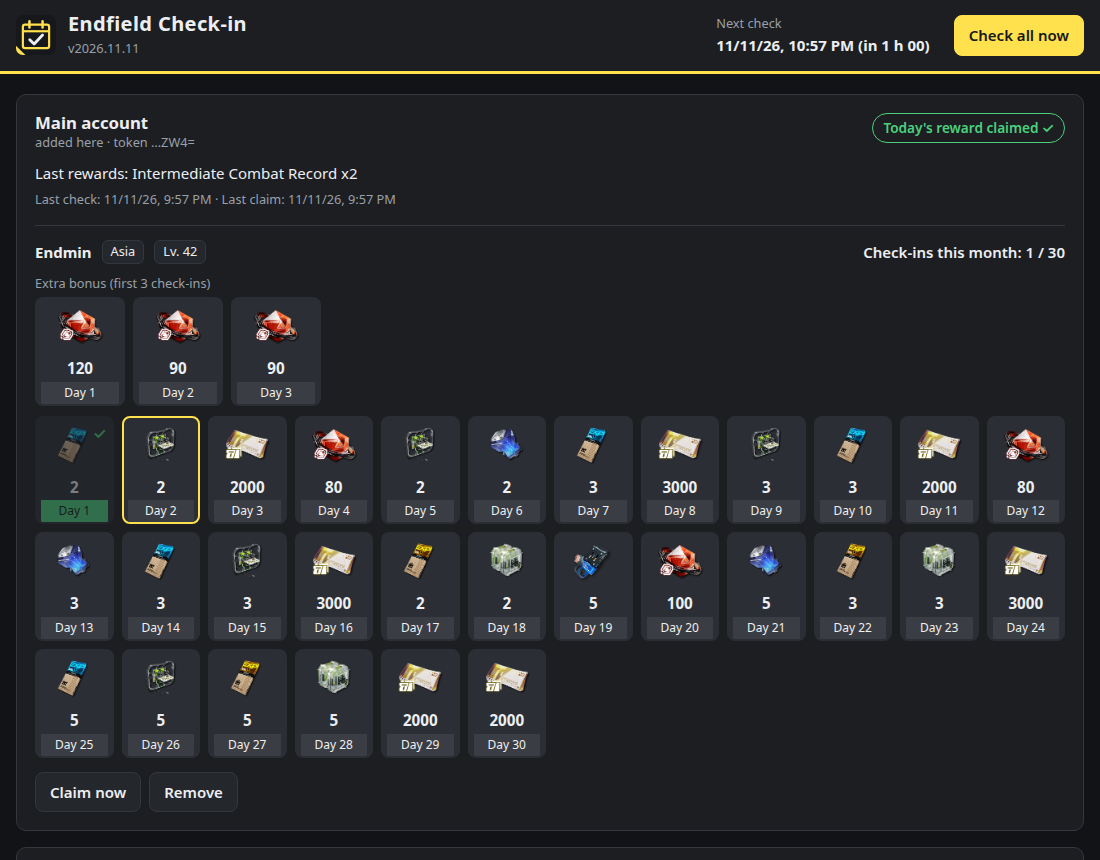
UI_LANGUAGE; Arabic is shown right-to-left. It shows the monthly calendar, the first-three-logins bonus, the last rewards, the history and a "Claim now" button. - Accounts are named automatically after the in-game nickname.
- Optional Discord notifications for claims, errors and expired tokens.
- Small image (~50 MB) with plain Python and no third-party packages. After startup the container switches to
99:100(nobody:users).
How it works
The bot makes the same calls as the official page:
- Exchange the
ACCOUNT_TOKENfor an OAuth code (as.gryphline.com). - Exchange the code for a
credand a signing token (zonai.skport.com). - List the Endfield characters bound to the account.
- Read the attendance status (
hasToday). If today's reward has not been claimed, send the signed check-in. Requests are signed with HMAC-SHA256 and then MD5, like the website does.
Each check costs one light request per character. The session is cached in memory and renewed from the token automatically.
Install on Unraid
- Open the Apps tab (Community Applications) and search for Endfield Check-in.
- Click Install. Optionally choose the reward language, a Discord webhook or a web UI password, then click Apply.
- Open the WebUI from the Docker tab (
http://<unraid-ip>:8080) and connect your account.
Updates are offered in the Docker tab like for any other container.
Connect an account
Token (recommended)
- Open https://game.skport.com/endfield/sign-in and log in.
- Press F12. In Chrome/Edge, open Application → Cookies. In Firefox, open Storage → Cookies.
- Select
https://game.skport.comand copy the value of theACCOUNT_TOKENcookie. - Paste it into the web UI and click Connect account. The token is validated before it is saved and the account is named after your in-game nickname, then a first check starts.
Email + password
The bot logs in once and keeps only the resulting token. If you tick "Remember", the email and password are also stored in /config, so the bot can log in again when the token expires. Accounts created through Google, Apple and similar providers have no password; use the token method for those.
If a token expires and no password is saved, the UI shows Action required and Discord notifies you once. Reconnect the account to fix it.
Settings (template variables)
| Variable | Default | Purpose |
|---|---|---|
CHECK_INTERVAL |
120 |
Minutes between checks (30–720). |
UI_LANGUAGE |
auto |
Language of the web UI and Discord notifications. auto follows each browser's language; or one of the Unraid locales: ar_AR, bn_BN, ca_CA, cs_CZ, da_DA, de_DE, el_GR, en_US, es_ES, fr_FR, hr_HR, hu_HU, it_IT, ja_JA, ko_KO, lv_LV, nl_NL, no_NO, pl_PL, pt_BR, pt_PT, ro_RO, ru_RU, sv_SE, uk_UA, zh_CN, zh_TW. With auto, notifications follow SKPORT_LANGUAGE. |
SKPORT_LANGUAGE |
en |
Reward name language, as supported by SKPORT: en, fr_FR, de_DE, it_IT, es_MX, pt_BR, ru_RU, ja, ko, zh_Hans, zh_Hant, id_ID, th_TH, vi_VN. |
DISCORD_WEBHOOK |
empty | Optional Discord webhook URL. |
NOTIFY |
all |
all sends claims and errors, errors sends problems only, none disables notifications. |
WEBUI_PASSWORD |
empty | Protects the UI with a password. Any user name is accepted. |
ACCOUNT_TOKEN |
empty | Advanced: comma-separated tokens, used instead of the web UI. |
ACCOUNT_NAME |
empty | Display name for accounts defined with ACCOUNT_TOKEN. Empty: the in-game nickname is used. |
RETRY_INTERVAL |
15 |
Minutes before retrying after an error (5–240). |
PUID / PGID |
99 / 100 |
Owner of the /config files. |
LOG_LEVEL |
INFO |
DEBUG, INFO, WARNING or ERROR. |
Unraid passes TZ automatically, so displayed times and logs use the server time zone.
Security
ACCOUNT_TOKENgrants access to your account, like a password. It is stored in/config/accounts.jsonwith mode0600and is never logged. The UI never returns it and shows only its last 4 characters.- The UI is meant for your local network. Do not expose it to the Internet. Set
WEBUI_PASSWORDif other people share your network. - UI actions are protected against CSRF: they require a token and a JSON body, and the request origin is checked. A strict CSP is applied.
- The container contacts only
as.gryphline.com,zonai.skport.comand your Discord webhook if one is configured. Your browser loads reward icons fromstatic.skport.com.
Translations
The interface catalogs live in app/endfield_checkin/static/lang/, one JSON file per Unraid locale, with en_US.json as the master. A missing or empty entry falls back to English. Most translations were generated automatically and have not been reviewed by native speakers, so corrections are welcome. Keep the keys and placeholders such as {n} or {name} unchanged, use plain text only, then run the tests.
Limitations
The bot relies on the undocumented API of the SKPORT website, reverse-engineered from the official page and from open-source projects. It may stop working if SKPORT changes that API. Automating sign-ins may also go against the service's terms of use, so use it at your own risk.
Development
Run the tests (they use a bundled fake SKPORT server) and build the image:
cd tests && python3 -m unittest discover -s . -t . -v
podman build --format docker -t endfield-checkin:dev .  # or: docker build
The docker.yml workflow runs the tests, then publishes ghcr.io/mrpatates/endfield-checkin for amd64 and arm64 on every push to main and on every v* tag. After the first publish, make the GHCR package public so Unraid can pull it without credentials.
License: GPL-3.0-or-later.
Media gallery
Requirements
Categories
Related apps
Explore more like this
Explore allDetails
ghcr.io/mrpatates/endfield-checkin:latestRuntime arguments
- Web UI
http://[IP]:[PORT:8080]/- Network
bridge- Shell
sh- Privileged
- false
Template configuration
Port of the web UI where you connect your SKPORT account and see the rewards.
- Target
- 8080
- Default
- 8080
- Value
- 8080
Accounts (tokens), last results and history. Keep it private: it contains your account tokens.
- Target
- /config
- Default
- /mnt/user/appdata/endfield-checkin
- Value
- /mnt/user/appdata/endfield-checkin
How often the sign-in status is checked (30-720). Each check is one light request per character; the reward is claimed as soon as it is available.
- Target
- CHECK_INTERVAL
- Default
- 120
- Value
- 120
Language of the reward names returned by SKPORT (only the languages SKPORT supports).
- Target
- SKPORT_LANGUAGE
- Default
- en|fr_FR|de_DE|it_IT|es_MX|pt_BR|ru_RU|ja|ko|zh_Hans|zh_Hant|id_ID|th_TH|vi_VN
- Value
- en
Language of the web UI and Discord notifications. auto: follows each browser's language (27 Unraid languages, English fallback; notifications then follow the reward language).
- Target
- UI_LANGUAGE
- Default
- auto|ar_AR|bn_BN|ca_CA|cs_CZ|da_DA|de_DE|el_GR|en_US|es_ES|fr_FR|hr_HR|hu_HU|it_IT|ja_JA|ko_KO|lv_LV|nl_NL|no_NO|pl_PL|pt_BR|pt_PT|ro_RO|ru_RU|sv_SE|uk_UA|zh_CN|zh_TW
- Value
- auto
Optional Discord webhook URL (https://discord.com/api/webhooks/...) to be notified of claims and errors.
- Target
- DISCORD_WEBHOOK
all: claims and errors. errors: only problems (e.g. expired token). none: no notification.
- Target
- NOTIFY
- Default
- all|errors|none
- Value
- all
Optional. When set, the web UI asks for it (any user name). Recommended if other people use your network.
- Target
- WEBUI_PASSWORD
Optional: SKPORT ACCOUNT_TOKEN cookie value(s), comma separated. Easier: leave empty and connect your account from the web UI.
- Target
- ACCOUNT_TOKEN
Optional display name for the account(s) defined with ACCOUNT_TOKEN. Empty: the in-game nickname is used.
- Target
- ACCOUNT_NAME
Delay before retrying after a network or server error (5-240).
- Target
- RETRY_INTERVAL
- Default
- 15
- Value
- 15
User ID owning the /config files (Unraid default: 99 = nobody).
- Default
- 99
- Value
- 99
Group ID owning the /config files (Unraid default: 100 = users).
- Default
- 100
- Value
- 100
Container log verbosity. Tokens are never written to the logs.
- Target
- LOG_LEVEL
- Default
- INFO|DEBUG|WARNING|ERROR
- Value
- INFO