

ebook2audiobook---Legacy
DeprecatedDocker app from grtgbln's Repository
This is a legacy version of ebook2audiobook.
Overview
Readme
View on GitHub📚 ebook2audiobook (E2A)
DrewThomasson%2Febook2audiobook | Trendshift
CPU/GPU Converter from E-Book to audiobook with chapters and metadata
using advanced TTS engines and much more.
Supports voice cloning and 1696 languages!
[!IMPORTANT] This tool is intended for use with non-DRM, legally acquired eBooks only.
The authors are not responsible for any misuse of this software or any resulting legal consequences.
Use this tool responsibly and in accordance with all applicable laws.
Thanks to support ebook2audiobook developers!
Run locally
Platform Docker Pull Count
Run Remotely
Hugging Face Free Google Colab Kaggle
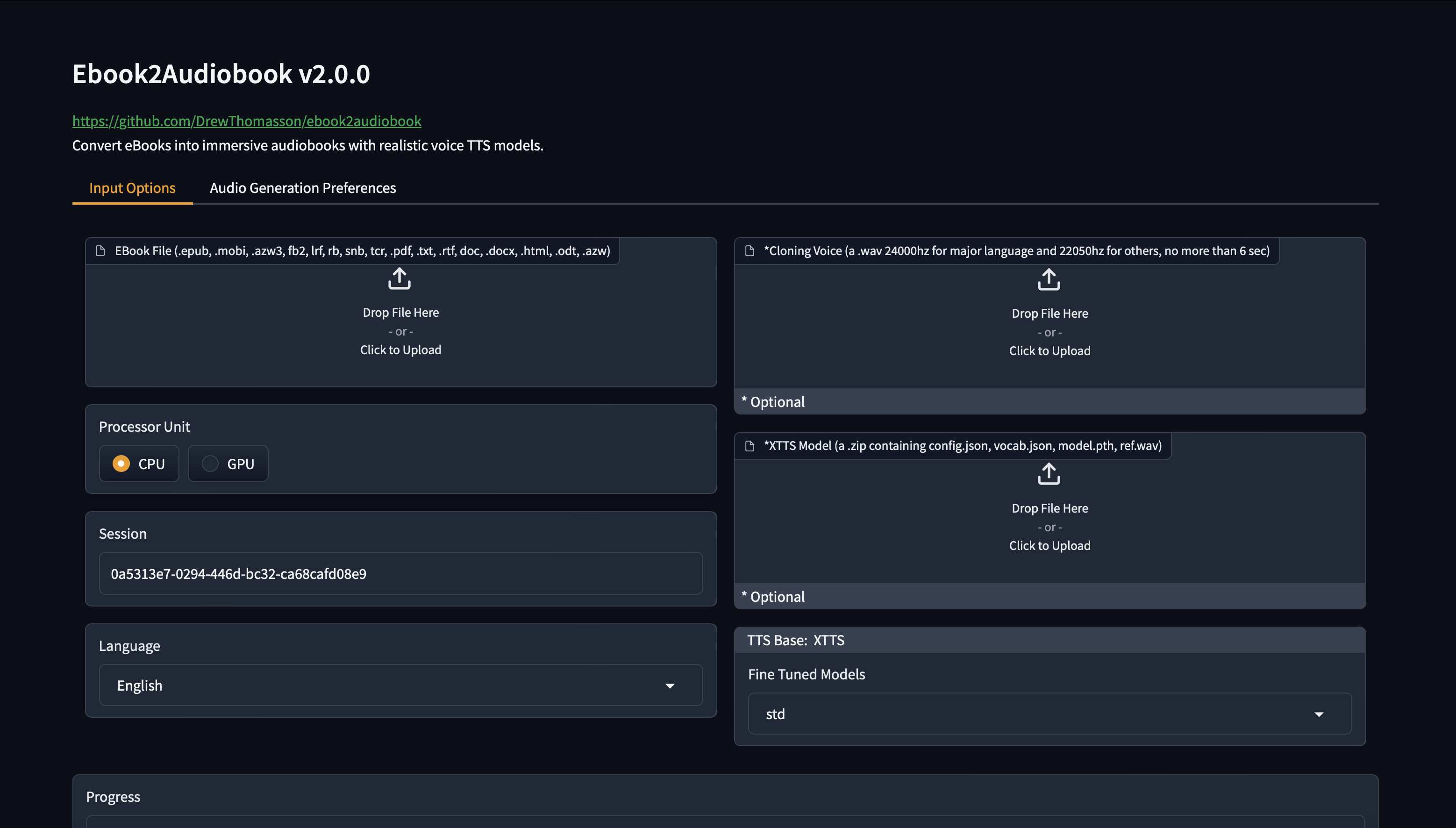
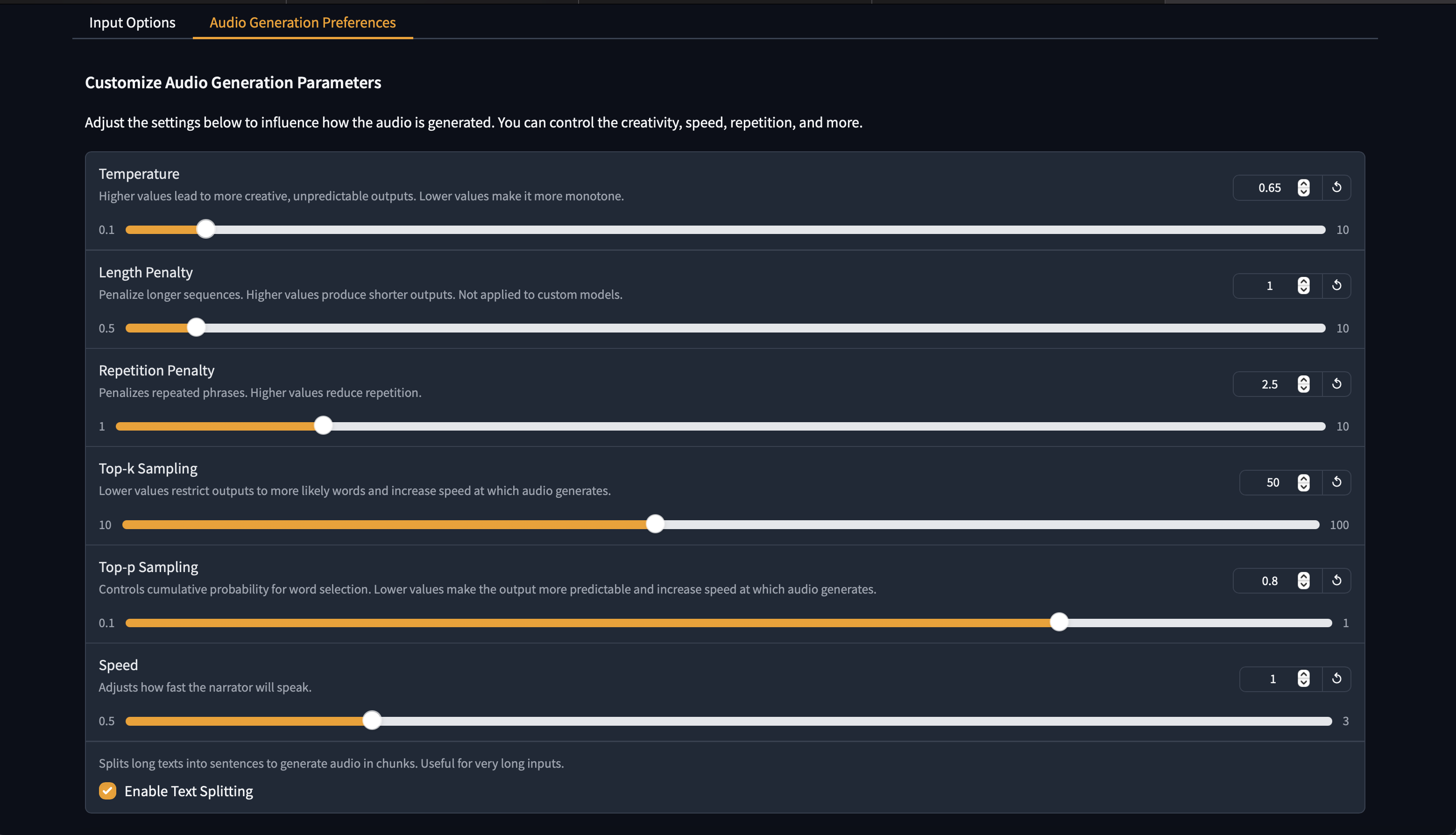
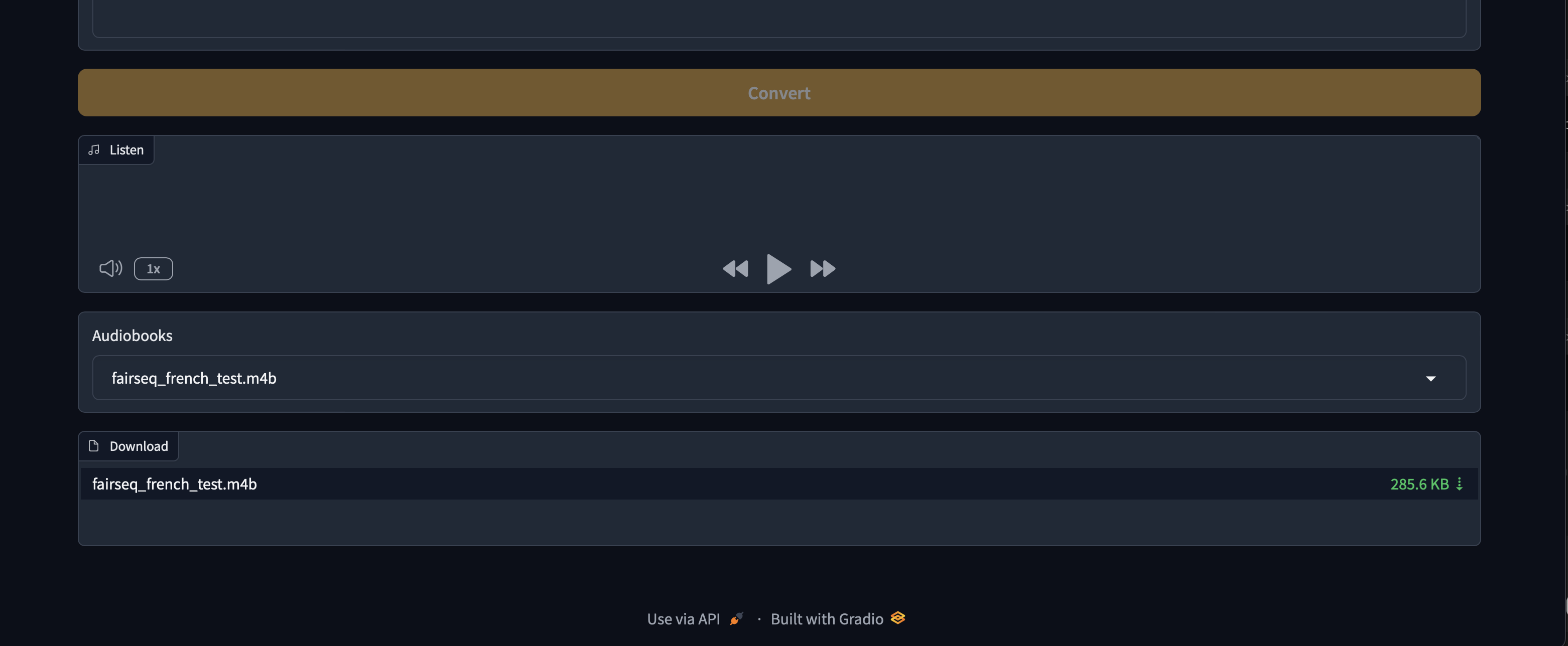
GUI Interface
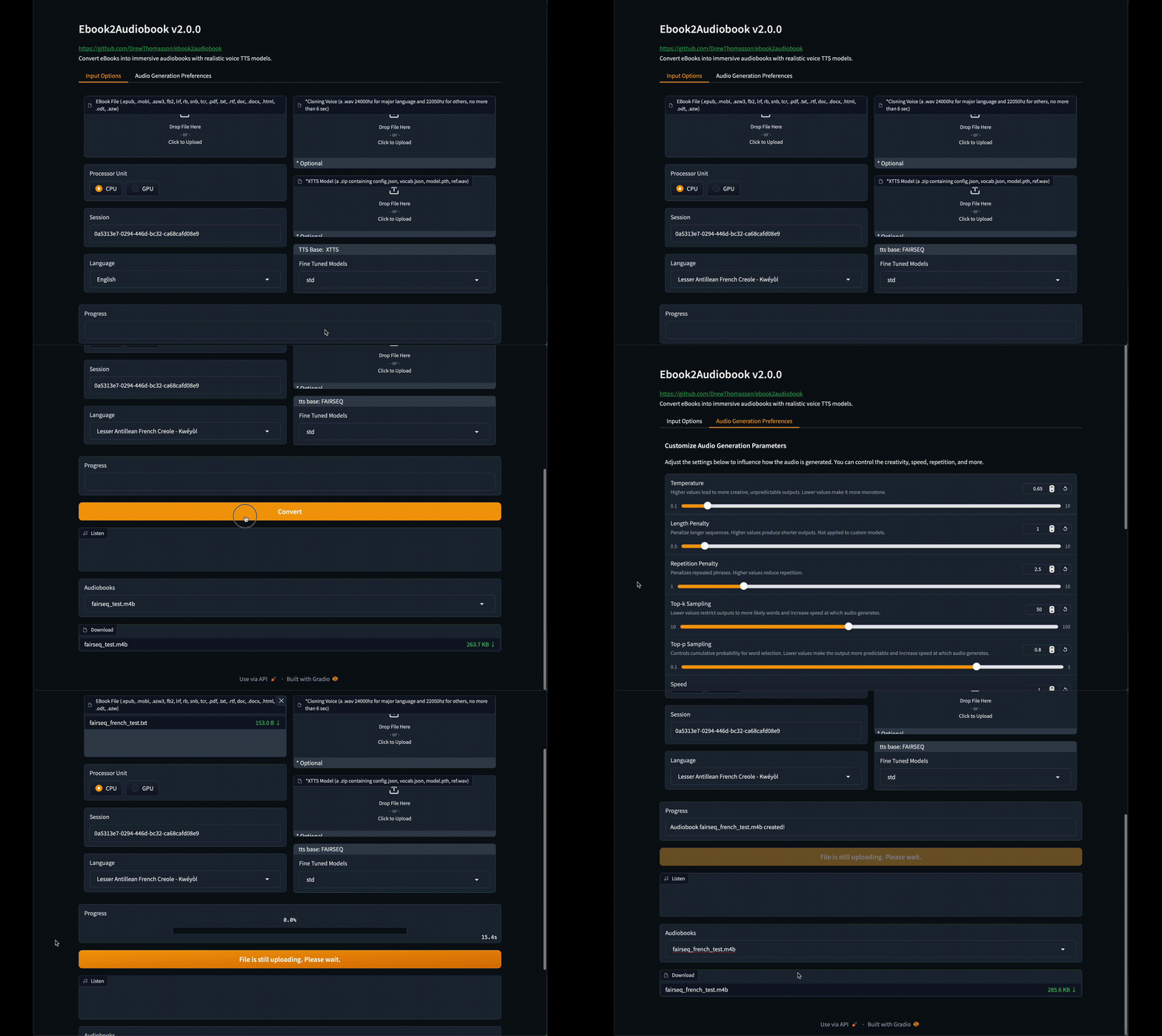
Click to see images of Web GUI
Demos
New Default Voice Demo
https://github.com/user-attachments/assets/750035dc-e355-46f1-9286-05c1d9e88cea
More Demos
ASMR Voice
https://github.com/user-attachments/assets/68eee9a1-6f71-4903-aacd-47397e47e422
Rainy Day Voice
https://github.com/user-attachments/assets/d25034d9-c77f-43a9-8f14-0d167172b080
Scarlett Voice
https://github.com/user-attachments/assets/b12009ee-ec0d-45ce-a1ef-b3a52b9f8693
David Attenborough Voice
https://github.com/user-attachments/assets/81c4baad-117e-4db5-ac86-efc2b7fea921
Example

README.md
Table of Contents
Features
- 🔧 TTS Engines supported:
XTTSv2, Bark, Fairseq, VITS, Tacotron2, Tortoise, GlowTTS, YourTTS, Piper, Zonos2, Zonos3, GPT-SoVITS, OmniVoice, Breeze TTS, Chatterbox, Confucius4 TTS, CosyVoice3, Dots TTS, DramaBox, FireRed Audio, FireRedTTS3, Fish Audio, Higgs Audio TTS, Index TTS2, Irodori TTS, Kokoro TTS, KugelAudio, Magpie TTS, Maya1, MioTTS, Moss TTS Local, Moss TTS Nano, NeuTTS, Pocket TTS, Qwen3 TTS, Supertonic, VibeVoice, VoxCPM2, Voxtral TTS, F5-TTS, Orpheus-TTS, ChatTTS, Spark-TTS, OpenVoice, MeloTTS, ZipVoice (LuxTTS) - 📚 Convert multiple file formats:
.epub,.mobi,.azw3,.fb2,.lrf,.rb,.snb,.tcr,.pdf,.txt,.rtf,.doc,.docx,.html,.odt,.azw,.tiff,.tif,.png,.jpg,.jpeg,.bmp,.zip - 💻 TextArea to convert directly a short text in audio
- 🔍 OCR scanning for files with text pages as images
- 🔊 High-quality text-to-speech from near realtime to near real voice
- 🗣️ Optional voice cloning using your own voice file
- 🌐 Supports 1696 languages (supported languages list)
- 💻 Low-resource friendly — runs on 2 GB RAM / 1 GB VRAM (minimum)
- 🎵 Audiobook output formats: mono or stereo
aac,flac,mp3,m4b,m4a,mp4,mov,ogg,wav,webm - 🧠 SML tags supported — fine-grained control of breaks, pauses, voice switching and more (see below)
- 🧩 Optional custom model using your own trained model (XTTSv2, VITS, FAIRSEQ, PIPER, others on request)
- 🎛️ Fine-tuned preset models trained by the E2A Team
(Contact us if you need additional fine-tuned models, or if you’d like to share yours to the official preset list)
Hardware Requirements
- 2GB RAM min, 8GB recommended.
- 1GB VRAM min, 4GB recommended.
- Virtualization enabled if running on windows (Docker only).
- CPU, XPU (intel, AMD, ARM)*.
- CUDA, ROCm, JETSON
- MPS (Apple Silicon CPU)
* Modern TTS engines are very slow on CPU, so use lower quality TTS like YourTTS, Tacotron2 etc..
Supported Languages
Supported eBook Formats
.epub,.pdf,.mobi,.txt,.html,.rtf,.chm,.lit,.pdb,.fb2,.odt,.cbr,.cbz,.prc,.lrf,.pml,.snb,.cbc,.rb,.tcr- Best results:
.epubor.mobifor automatic chapter detection
Output and process Formats
.m4b,.m4a,.mp4,.webm,.mov,.mp3,.flac,.wav,.ogg,.aac- Process format can be changed in lib/conf.py
SML tags available
[break]— silence (random range 0.3–0.6 sec.)[pause]— silence (random range 1.0–1.6 sec.)[pause:N]— fixed pause (N sec.)[voice:/path/to/voice/file]...[/voice]— switch voice from default or selected voice from GUI/CLI[emotion:sadness]...[/emotion]— Zonos2 and Zonos3 only: emotion for a passage (happiness, sadness, disgust, fear, surprise, anger, other, neutral; Zonos3 also calm, confused) or a mix like[emotion:sadness=0.7,neutral=0.3]; other engines ignore it
Check our other repo dedicated to add SML automatically in your ebook -> E2A-SML
[!IMPORTANT] Before to post an install or bug issue search carefully to the opened and closed issues TAB
to be sure your issue does not exist already.
[!NOTE] EPUB format lacks any standard structure like what is a chapter, paragraph, preface etc.
So you should first remove manually any text you don't want to be converted in audio.
Instructions
Clone repo
git clone https://github.com/DrewThomasson/ebook2audiobook.git
cd ebook2audiobook
Install / Run ebook2audiobook:
Linux/MacOS
./ebook2audiobook.commandNote for MacOS users: homebrew is installed to install missing programs.
Mac Launcher
Double clickMac Ebook2Audiobook Launcher.commandWindows
ebook2audiobook.cmdor Double click
ebook2audiobook.cmdNote for Windows users: scoop is installed to install missing programs without administrator privileges.
Open the Web App: Click the URL provided in the terminal to access the web app and convert eBooks.
http://localhost:7860/For Public Link:
./ebook2audiobook.command --share(Linux/MacOS)ebook2audiobook.cmd --share(Windows)python app.py --share(all OS, only once installed and with the python of its python_env folder)
[!IMPORTANT] If the script is stopped and run again, you need to refresh your gradio GUI interface
to let the web page reconnect to the new connection socket.
Install with pip / pipx
Another way to install and launch ebook2audiobook, without cloning the repo: pip installs the ebook2audiobook command
(all OS, any python 3.8+). The cloned repo with its launchers above keeps working the same way.
Install the command from PyPI
pipx install ebook2audiobookor with uv
uv tool install ebook2audiobookor with pip
pip install ebook2audiobookFor the latest code not released yet, use
git+https://github.com/DrewThomasson/ebook2audiobook.gitin place ofebook2audiobook.Install / Run ebook2audiobook, with the same options as the launchers:
ebook2audiobookebook2audiobook --headless --ebook <path_to_ebook_file> --voice <path_to_voice_file> --language <language_code>If the command is not found (pip's scripts folder is not in your PATH):
python -m ebook2audiobook
- The first start copies ebook2audiobook to
~/ebook2audiobook(%USERPROFILE%\ebook2audiobookon Windows) and installs it there
with its launcher, exactly like./ebook2audiobook.commandorebook2audiobook.cmdwould do. - To use another folder, set
E2A_HOMEbefore the first start and keep it set for the next ones
(i.e.export E2A_HOME=/data/ebook2audiobookon Linux/MacOS,setx E2A_HOME D:\ebook2audiobookthen a new terminal on Windows).
Keep its path short: 98 characters at most on Linux/MacOS, 179 on Windows, see Common Issues. - That folder is a regular ebook2audiobook folder:
./ebook2audiobook.command(./e2a.sh) andebook2audiobook.cmd(e2a.cmd) work in it too. - If that folder already holds a cloned or downloaded ebook2audiobook, it is started as it is and pip never changes it.
- Relative paths given to
--ebook,--ebooks_dir,--voice,--voice_map,--custom_modeland--output_dir
are read from the folder where you type the command. - No need to deactivate your venv or conda env: ebook2audiobook always runs in its own
python_env. - Docker:
ebook2audiobook --script_mode build_docker(optionally with--docker_mode composeor--docker_mode podman)
builds the image from that folder. Run thedocker run/docker composecommands it prints from that folder too:
their./ebooks,./audiobooks... mounts and the compose files are relative to it. The image takes the same options,
with paths inside the container (/app/...), see Docker. - Update:
pipx upgrade ebook2audiobook,uv tool upgrade ebook2audiobookorpip install -U ebook2audiobook.
The next start updates the app files and keepspython_env, models, voices, audiobooks and anything you added to the folder. - Uninstall:
pip uninstall,pipx uninstalloruv tool uninstallalone only remove the command:
the folder and its gigabytes of models stay. Uninstall ebook2audiobook with the command itself first:- Move your audiobooks out of the folder's
audiobookssubfolder: everything in the folder is deleted. ebook2audiobook --uninstall
It runs the uninstaller of the folder, which asks you to confirm then removes the shortcuts, the programs it installed
(listed in.installed) and the folder content, then it deletes the folder.- Run the command it prints last to remove
ebook2audiobookitself, which depends on how you installed it:
pipx uninstall ebook2audiobook,uv tool uninstall ebook2audiobookorpip uninstall ebook2audiobook. - If you built Docker images:
docker rmi athomasson2/ebook2audiobook:<tag>anddocker volume rm e2a_venvs
(with Podman:podman rmi localhost/athomasson2/ebook2audiobook:<tag>andpodman volume rm e2a_venvs).
- Move your audiobooks out of the folder's
Basic Usage
Linux/MacOS:
./ebook2audiobook.command --headless --ebook <path_to_ebook_file> --voice <path_to_voice_file> --language <language_code>Windows
ebook2audiobook.cmd --headless --ebook <path_to_ebook_file> --voice <path_to_voice_file> --language <language_code>pip / pipx install (all OS)
ebook2audiobook --headless --ebook <path_to_ebook_file> --voice <path_to_voice_file> --language <language_code>[--ebook]: Path to your eBook file
[--voice]: Voice cloning file path (optional)
[--language]: Language code in ISO-639-3 (i.e.: ita for italian, eng for english, deu for german...).
Default language is eng and --language is optional for default language set in ./lib/lang.py.
The ISO-639-1 2 letters codes are also supported.
Example of Custom Model Zip Upload
(must be a .zip file containing the mandatory model files. Example for XTTSv2: config.json, model.pth, vocab.json and ref.wav)
Linux/MacOS
./ebook2audiobook.command --headless --ebook <ebook_file_path> --language <language> --custom_model <custom_model_path>Windows
ebook2audiobook.cmd --headless --ebook <ebook_file_path> --language <language> --custom_model <custom_model_path>Note: the ref.wav of your custom model is always the voice selected for the conversion
<custom_model_path>: Path to
model_name.zipfile, which must contain (according to the tts engine) all the mandatory files
(see ./lib/models.py).
For Detailed Guide with list of all Parameters to use
- Linux/MacOS
./ebook2audiobook.command --help - Windows
ebook2audiobook.cmd --help - pip / pipx install (all OS)
ebook2audiobook --help - Or for all OS
python app.py --help
usage: app.py [-h] [--session SESSION] [--share] [--headless] [--ebook EBOOK] [--ebooks_dir EBOOKS_DIR]
              [--language LANGUAGE] [--voice VOICE] [--voice_map VOICE_MAP] [--device {CPU,CUDA,MPS,ROCM,XPU,JETSON}]
              [--tts_engine {XTTS,BARK,VITS,FAIRSEQ,TACOTRON,YOURTTS,xtts,bark,vits,fairseq,tacotron,yourtts}]
              [--custom_model CUSTOM_MODEL] [--fine_tuned FINE_TUNED] [--output_format OUTPUT_FORMAT]
              [--output_channel OUTPUT_CHANNEL] [--temperature TEMPERATURE] [--length_penalty LENGTH_PENALTY]
              [--num_beams NUM_BEAMS] [--repetition_penalty REPETITION_PENALTY] [--top_k TOP_K] [--top_p TOP_P]
              [--speed SPEED] [--enable_text_splitting] [--text_temp TEXT_TEMP] [--waveform_temp WAVEFORM_TEMP]
              [--output_dir OUTPUT_DIR] [--version]

Convert eBooks to Audiobooks using a Text-to-Speech model. You can either launch the Gradio interface or run the script in headless mode for direct conversion.

options:
  -h, --help            show this help message and exit
  --session SESSION     Session to resume the conversion in case of interruption, crash,
                            or reuse of custom models and custom cloning voices.

**** The following option is for gradio/gui mode only:
  --share               (Optional) Enable a public shareable Gradio link.

**** The following options are for --headless mode only:
  --headless            Run the script in headless mode
  --ebook EBOOK         Path to the ebook file for conversion. Cannot be used when --ebooks_dir is present.
  --ebooks_dir EBOOKS_DIR
                        Relative or absolute path of the directory containing the files to convert.
                            Cannot be used when --ebook is present.
  --text TEXT           Raw text for conversion. Cannot be used when --ebook or --ebooks_dir is present.
  --language LANGUAGE   Language of the e-book. Default language is set
                            in ./lib/lang.py sed as default if not present. All compatible language codes are in ./lib/lang.py

optional parameters:
  --translate ISO3      (Optional) Translate ebook to a target language (ISO 639-3 code, e.g. eng, fra, deu) before TTS synthesis.
                            Uses argostranslate. The target language becomes the effective TTS language for the run.
                            A copy of the source ebook is made with the _<iso3> suffix so translated and non-translated
                            outputs stay isolated (independent process folder, audio chunks, and final file).
  --voice VOICE         (Optional) Path to the voice cloning file for TTS engine.
                            Uses the default voice if not present.
  --voice_map VOICE_MAP
                        (Optional, --ebooks_dir only) Path to a JSON file mapping ebook path -> voice path.
                            Each entry overrides --voice for that specific ebook. Missing/null entries fall back to --voice.
                            Keys may be absolute paths or basenames. Example:
                            {"book1.epub": "/voices/eng/adult/female/alice.wav", "/abs/path/book2.epub": null}
  --device {CPU,CUDA,MPS,ROCM,XPU,JETSON}
                        (Optional) Processor unit type for the conversion.
                            Default is set in ./lib/conf.py if not present. Fall back to CPU if CUDA or MPS is not available.
  --tts_engine {XTTS,BARK,VITS,FAIRSEQ,TACOTRON,YOURTTS,xtts,bark,vits,fairseq,tacotron,yourtts}
                        (Optional) Preferred TTS engine (available are: ['XTTS', 'BARK', 'VITS', 'FAIRSEQ', 'TACOTRON', 'YOURTTS', 'xtts', 'bark', 'vits', 'fairseq', 'tacotron', 'yourtts'].
                            Default depends on the selected language. The tts engine should be compatible with the chosen language
  --custom_model CUSTOM_MODEL
                        (Optional) Path to the custom model zip file cntaining mandatory model files.
                            Please refer to ./lib/models.py
  --fine_tuned FINE_TUNED
                        (Optional) Fine tuned model path. Default is builtin model.
  --output_format OUTPUT_FORMAT
                        (Optional) Output audio format. Default is m4b set in ./lib/conf.py
  --output_channel OUTPUT_CHANNEL
                        (Optional) Output audio channel. Default is mono set in ./lib/conf.py
  --temperature TEMPERATURE
                        (xtts only, optional) Temperature for the model.
                            Default to config.json model. Higher temperatures lead to more creative outputs.
  --length_penalty LENGTH_PENALTY
                        (xtts only, optional) A length penalty applied to the autoregressive decoder.
                            Default to config.json model. Not applied to custom models.
  --num_beams NUM_BEAMS
                        (xtts only, optional) Controls how many alternative sequences the model explores. Must be equal or greater than length penalty.
                            Default to config.json model.
  --repetition_penalty REPETITION_PENALTY
                        (xtts only, optional) A penalty that prevents the autoregressive decoder from repeating itself.
                            Default to config.json model.
  --top_k TOP_K         (xtts only, optional) Top-k sampling.
                            Lower values mean more likely outputs and increased audio generation speed.
                            Default to config.json model.
  --top_p TOP_P         (xtts only, optional) Top-p sampling.
                            Lower values mean more likely outputs and increased audio generation speed. Default to config.json model.
  --speed SPEED         (xtts only, optional) Speed factor for the speech generation.
                            Default to config.json model.
  --enable_text_splitting
                        (xtts only, optional) Enable TTS text splitting. This option is known to not be very efficient.
                            Default to config.json model.
  --text_temp TEXT_TEMP
                        (bark only, optional) Text Temperature for the model.
                            Default to config.json model.
  --waveform_temp WAVEFORM_TEMP
                        (bark only, optional) Waveform Temperature for the model.
                            Default to config.json model.
  --output_dir OUTPUT_DIR
                        (Optional) Path to the output directory. Default is set in ./lib/conf.py
  --abs_url ABS_URL     Audiobookshelf server URL (e.g. http://localhost:13378).
  --abs_api_token ABS_API_TOKEN
                        Audiobookshelf API token.
  --abs_library ABS_LIBRARY
                        Audiobookshelf library ID.
  --enable_interlude    Add MusicGen music before the first chapter, between chapters, and at the end of the audiobook. Settings are in ./lib/conf_interlude.py
  --version             Show the version of the script and exit

Example usage:
Windows:
    Gradio/GUI:
    ebook2audiobook.cmd
    Headless mode:
    ebook2audiobook.cmd --headless --ebook '/path/to/file' --language eng
Linux/Mac:
    Gradio/GUI:
    ./ebook2audiobook.command
    Headless mode:
    ./ebook2audiobook.command --headless --ebook '/path/to/file' --language eng
pip/pipx install (all OS, python 3.8+, no clone needed):
    pipx install ebook2audiobook
    (or: uv tool install ebook2audiobook, or: pip install ebook2audiobook)
    Gradio/GUI:
    ebook2audiobook
    Headless mode:
    ebook2audiobook --headless --ebook '/path/to/file' --language eng
    Docker build image:
    ebook2audiobook --script_mode build_docker [--docker_mode compose|podman]
    The first start installs e2a in ~/ebook2audiobook, or in the folder set in E2A_HOME,
    where ./ebook2audiobook.command (e2a.sh) or ebook2audiobook.cmd (e2a.cmd) also work.
    Run the docker commands printed after a build from that folder.
    Uninstall: ebook2audiobook --uninstall (it deletes the audiobooks folder too), then the command it prints.

SML tags available:
	[break] — silence (random range **0.3–0.6 sec.**)
	[pause] — silence (random range **1.0–1.6 sec.**)
	[pause:N] — fixed pause (**N sec.**)
	[voice:/path/to/voice/file]...[/voice] — switch voice from default or selected voice from GUI/CLI
	[emotion:sadness]...[/emotion] — Zonos2 and Zonos3 only: emotion for a passage (happiness, sadness, disgust, fear, surprise, anger, other, neutral; Zonos3 also calm, confused) or a mix like [emotion:sadness=0.7,neutral=0.3]; other engines ignore it
NOTE: in gradio/gui mode, to cancel a running conversion, just click on the [X] from the ebook upload component. TIP: if it needs some more pause, add '[pause:3]' for 3 sec. etc.
Docker
- Clone the Repository:
   git clone https://github.com/DrewThomasson/ebook2audiobook.git
   cd ebook2audiobook
- Build the container
    Windows:
        Docker:
            ebook2audiobook.cmd --script_mode build_docker
        Docker Compose:
            ebook2audiobook.cmd --script_mode build_docker --docker_mode compose
        Podman Compose:
            ebook2audiobook.cmd --script_mode build_docker --docker_mode podman
    Linux/Mac
        Docker:
            ./ebook2audiobook.command --script_mode build_docker
        Docker Compose
            ./ebook2audiobook.command --script_mode build_docker --docker_mode compose
        Podman Compose:
            ./ebook2audiobook.command --script_mode build_docker --docker_mode podman
- Run the Container:
Docker run image:
    Gradio/GUI:
        CPU:
          docker run --security-opt label=disable -v "./ebooks:/app/ebooks" -v "./audiobooks:/app/audiobooks" -v "./models:/app/models" -v "./voices:/app/voices" -v "./tmp:/app/tmp" -v "e2a_venvs:/app/lib/classes/tts_engines/venvs" --rm -it -p 7860:7860 athomasson2/ebook2audiobook:cpu
        CUDA:
          docker run --security-opt label=disable -v "./ebooks:/app/ebooks" -v "./audiobooks:/app/audiobooks" -v "./models:/app/models" -v "./voices:/app/voices" -v "./tmp:/app/tmp" -v "e2a_venvs:/app/lib/classes/tts_engines/venvs" --gpus all --rm -it -p 7860:7860 athomasson2/ebook2audiobook:cu[118/122/124/126 etc..]
        ROCM:
          docker run --security-opt label=disable -v "./ebooks:/app/ebooks" -v "./audiobooks:/app/audiobooks" -v "./models:/app/models" -v "./voices:/app/voices" -v "./tmp:/app/tmp" -v "e2a_venvs:/app/lib/classes/tts_engines/venvs" --device=/dev/kfd --device=/dev/dri --rm -it -p 7860:7860 athomasson2/ebook2audiobook:rocm[6.0/6.1/6.4 etc..]
        XPU:
          docker run --security-opt label=disable -v "./ebooks:/app/ebooks" -v "./audiobooks:/app/audiobooks" -v "./models:/app/models" -v "./voices:/app/voices" -v "./tmp:/app/tmp" -v "e2a_venvs:/app/lib/classes/tts_engines/venvs" --device=/dev/dri --rm -it -p 7860:7860 athomasson2/ebook2audiobook:xpu
        JETSON:
          docker run --security-opt label=disable -v "./ebooks:/app/ebooks" -v "./audiobooks:/app/audiobooks" -v "./models:/app/models" -v "./voices:/app/voices" -v "./tmp:/app/tmp" -v "e2a_venvs:/app/lib/classes/tts_engines/venvs" --runtime nvidia --rm -it -p 7860:7860 athomasson2/ebook2audiobook:jetson[5/6/7 etc...]
    Headless mode:
        CPU:
          docker run --security-opt label=disable -v "./ebooks:/app/ebooks" -v "./audiobooks:/app/audiobooks" -v "./models:/app/models" -v "./voices:/app/voices" -v "./tmp:/app/tmp" -v "e2a_venvs:/app/lib/classes/tts_engines/venvs" -v "/my/real/ebooks/folder/absolute/path:/app/another_ebook_folder" --rm -it -p 7860:7860 athomasson2/ebook2audiobook:cpu --headless --ebook "/app/another_ebook_folder/myfile.pdf" [--voice /app/my/voicepath/voice.mp3 etc..]
        CUDA:
          docker run --security-opt label=disable -v "./ebooks:/app/ebooks" -v "./audiobooks:/app/audiobooks" -v "./models:/app/models" -v "./voices:/app/voices" -v "./tmp:/app/tmp" -v "e2a_venvs:/app/lib/classes/tts_engines/venvs" -v "/my/real/ebooks/folder/absolute/path:/app/another_ebook_folder" --gpus all --rm -it -p 7860:7860 athomasson2/ebook2audiobook:cu[118/122/124/126 etc..] --headless --ebook "/app/another_ebook_folder/myfile.pdf" [--voice /app/my/voicepath/voice.mp3 etc..]
        ROCM:
          docker run --security-opt label=disable -v "./ebooks:/app/ebooks" -v "./audiobooks:/app/audiobooks" -v "./models:/app/models" -v "./voices:/app/voices" -v "./tmp:/app/tmp" -v "e2a_venvs:/app/lib/classes/tts_engines/venvs" -v "/my/real/ebooks/folder/absolute/path:/app/another_ebook_folder" --device=/dev/kfd --device=/dev/dri --rm -it -p 7860:7860 athomasson2/ebook2audiobook:rocm[6.0/6.1/6.4 etc.] --headless --ebook "/app/another_ebook_folder/myfile.pdf" [--voice /app/my/voicepath/voice.mp3 etc..]
        XPU:
          docker run --security-opt label=disable -v "./ebooks:/app/ebooks" -v "./audiobooks:/app/audiobooks" -v "./models:/app/models" -v "./voices:/app/voices" -v "./tmp:/app/tmp" -v "e2a_venvs:/app/lib/classes/tts_engines/venvs" -v "/my/real/ebooks/folder/absolute/path:/app/another_ebook_folder" --device=/dev/dri --rm -it -p 7860:7860 athomasson2/ebook2audiobook:xpu --headless --ebook "/app/another_ebook_folder/myfile.pdf" [--voice /app/my/voicepath/voice.mp3 etc..]
        JETSON:
          docker run --security-opt label=disable -v "./ebooks:/app/ebooks" -v "./audiobooks:/app/audiobooks" -v "./models:/app/models" -v "./voices:/app/voices" -v "./tmp:/app/tmp" -v "e2a_venvs:/app/lib/classes/tts_engines/venvs" -v "/my/real/ebooks/folder/absolute/path:/app/another_ebook_folder" --runtime nvidia --rm -it -p 7860:7860 athomasson2/ebook2audiobook:jetson[5/6/7 etc.] --headless --ebook "/app/another_ebook_folder/myfile.pdf" [--voice /app/my/voicepath/voice.mp3 etc..]
Docker Compose (i.e. cuda 12.8:
        Run Gradio GUI:
               DEVICE_TAG=cu128 docker compose --profile cuda up --no-log-prefix
        Run Headless mode:
               DEVICE_TAG=cu128 docker compose --profile cuda run --rm ebook2audiobook-cuda --headless --ebook "/app/ebooks/myfile.pdf" --voice /app/voices/eng/adult/female/some_voice.wav etc..
Podman Compose (i.e. cuda 12.8:
        Run Gradio GUI:
               DEVICE_TAG=cu128 podman-compose -f podman-compose.yml --profile cuda up
        Run Headless mode:
               DEVICE_TAG=cu128 podman-compose -f podman-compose.yml --profile cuda run --rm ebook2audiobook-cuda --headless --ebook "/app/ebooks/myfile.pdf" --voice /app/voices/eng/adult/female/some_voice.wav etc..
- NOTE: MPS is not exposed in docker so CPU must be used
- NOTE: the named volume
e2a_venvskeeps the TTS engines installed in their own venv (GPT-SoVITS, Zonos2, Zonos3, OmniVoice, F5-TTS, ZipVoice, Orpheus, Spark-TTS, ChatTTS, OpenVoice, MeloTTS, CSM etc.) across container runs, so they are not reinstalled each time. To reset them:docker volume rm e2a_venvs
Tools
Standalone tools, run with e2a's own Python (python_env, created by the first launch of e2a).
Preload models for offline installs: tools/preload_models.py
Downloads every model e2a uses (TTS engines and their fine-tunes, voice conversion, stanza, pyannote, demucs,
music interludes, argos-translate packages, tesseract data, jieba, and the voices) into one folder laid out
exactly like ./models, i.e. a USB key. On the offline machine, copy that folder into e2a's ./models
and the voices folder written beside it into e2a's ./voices.
Every finished job is recorded in <models_dir>/.e2a_downloads.json: a rerun skips what is done and starts
again what was cut (ctrl-c, crash, unplugged key) after removing its partial files.
- Linux/MacOS
./python_env/bin/python tools/preload_models.py /media/user/KEY/models --languages eng,fra - Windows
python_env\Scripts\python.exe tools\preload_models.py E:\models --languages eng,fra --dry_runlists the jobs and their state (done, interrupted, todo) without downloading anything.
usage: preload_models.py [-h] [--only ONLY] [--skip SKIP] [--languages LANGUAGES]
                         [--audiocpp_packages AUDIOCPP_PACKAGES] [--refresh] [--dry_run]
                         models_dir

Download every model e2a uses into one folder laid out exactly like ./models (i.e. a USB key for offline
installs).

positional arguments:
  models_dir            Target folder, i.e. /media/user/KEY/models or E:\models

options:
  -h, --help            show this help message and exit
  --only ONLY           Comma list of categories: common,xtts,bark,tortoise,vits,fairseq,glowtts,tacotron,yo
                        urtts,piper,zonos2,zonos3,audiocpp,audiocpp_server,gptsovits,f5tts,zipvoice,omnivoic
                        e,orpheus,sparktts,chattts,csm,openvoice,melotts,phonon,stanza,pyannote,demucs,inter
                        lude,argos,tessdata,jieba,voices
  --skip SKIP           Comma list of categories to leave out
  --languages LANGUAGES
                        Comma list of e2a ISO-639-3 codes (eng,fra,ita...): single-language models and fine-
                        tunes for these only, multilingual models only for engines speaking one of them
  --audiocpp_packages AUDIOCPP_PACKAGES
                        audiocpp_server category: auto (the packages this machine runs, GPU and CPU), all
                        (every platform, for a key used elsewhere), or a comma list of audiocpp_packages
                        keys from lib/conf_models.py
  --refresh             Run every job again, even those already marked done (files already there are still
                        not downloaded twice)
  --dry_run             List every download job with its state (done, interrupted, todo) and exit
Translate ebooks out of e2a: tools/translate_ebook.sh / tools/translate_ebook.cmd
Translates EPUB/AZW3 files, a whole folder (-r for its subfolders) or a list of paths (@list.txt)
into translated ebooks, offline, with the Argos Translate calibre plugin shipped in
tools/argostranslate-calibre-plugin.zip. Independent of the audiobook conversion: it only writes ebooks.
It needs calibre (already required by e2a) and runs on e2a's python_env and argos-translate packages:
a language pair e2a already uses is not downloaded again, a missing one is downloaded on first use.
The plugin is installed on first use into e2a's own calibre profile (./run), your calibre is left untouched.
--to fra,ara,spa translates into several languages at once, one ebook per language, and --to all into every
language the source reaches (--from, else each book's own language; installed ones only with --no_download).
--list --from eng lists the languages English translates into (installed, downloadable, or through English for
another source).
Other formats calibre's ebook-convert reads (PDF, DOCX, MOBI, TXT, ...) are converted to EPUB once, before the
first language, and translated as EPUB: --from is needed when they carry no language, as PDF and TXT often do.
Without -o or --output_dir, each translation is saved beside its book as <name>.<lang>.<ext>,
and a book whose translation already exists is skipped (--overwrite to translate it again).
The launchers in tools/ run tools/translate_ebook.py with python_env, nothing to activate,
from any folder (relative paths are taken from where it is started):
- Linux/MacOS
./tools/translate_ebook.sh /path/to/books -r --to fra,spa --output_dir /path/to/books_translated - Windows
tools\translate_ebook.cmd C:\books -r --to fra,spa --output_dir C:\books_translated - Or directly with
python_env's Python:./python_env/bin/python tools/translate_ebook.py ...(Windows:python_env\Scripts\python.exe tools\translate_ebook.py ...). Started with any other Python, the script starts itself again withpython_env's. - Docker: run it inside the e2a container, e.g.
docker exec -it <container> python3 tools/translate_ebook.py ...with paths seen from the container. - Speed: argostranslate runs on its own defaults (CTranslate2 picks the threads and the fastest compute type,
int8 on CPU), not on e2a's 1 thread in float32. Set
ARGOS_INTRA_THREADSorARGOS_COMPUTE_TYPEto override them.
usage: translate_ebook.py [-h] [-t LANG[,LANG...]] [-f LANG] [-r] [-o OUTPUT] [--output_dir OUTPUT_DIR]
                          [--overwrite] [-m {replace,bilingual}] [--device {cpu,cuda,auto}]
                          [--batch_size BATCH_SIZE] [--no_cache] [--no_download] [--allow_changes] [--list]
                          [books ...]

Translate ebooks offline, out of e2a, with the Argos Translate calibre plugin
(tools/argostranslate-calibre-plugin.zip). EPUB/AZW3 are translated as they are, the other formats
calibre's ebook-convert reads (PDF, DOCX, MOBI, ...) are converted to EPUB once, before the first
language, and their translations saved as EPUB. It runs on e2a's python_env and argos-translate packages
(models/argos-translate): a language pair e2a already uses is not downloaded again, a missing one is
downloaded on first use (direct or through English). The plugin is installed into e2a's own calibre
profile (run/) on first use, your calibre setup is left untouched.
Translated paths are printed on stdout, progress and logs on stderr.

positional arguments:
  books                 Ebook files (EPUB, AZW3, or PDF, DOCX, MOBI... converted to EPUB first) or folders
                        to translate; @list.txt reads paths from a file, one per line

options:
  -h, --help            show this help message and exit
  -t, --to LANG[,LANG...]
                        Target language(s), ISO-639-1 or ISO-639-3 codes, comma separated for several (fr,
                        fra or fra,ara,spa): one translated ebook per language. all: every language the
                        source reaches (see --list --from), installed ones only with --no_download
  -f, --from LANG       Source language, ISO-639-1 or ISO-639-3 code (default: read from each book)
  -r, --recursive       Also look for books in the subfolders of the given folders
  -o, --output OUTPUT   Output file, single input only, same extension as the input, .epub for a converted
                        one (default: <name>.<lang>.<ext> next to the input)
  --output_dir OUTPUT_DIR
                        Write the translations into this folder (subfolders are mirrored with -r) instead of
                        next to each book
  --overwrite           Translate again even if the output file already exists (skipped otherwise)
  -m, --mode {replace,bilingual}
                        replace: the translation replaces the text. bilingual: each paragraph is followed by
                        its translation, saved as <name>.<lang>.bilingual.<ext> (default: replace)
  --device {cpu,cuda,auto}
                        Device argostranslate runs on (default: cpu)
  --batch_size BATCH_SIZE
                        Segments sent to the translation worker per request (default: 16)
  --no_cache            Neither read nor write the translation cache (run/argos_translate/cache.sqlite), the
                        one that makes a second run of the same book near instant
  --no_download         Never download a missing argos-translate package, fail instead
  --allow_changes       Only when argostranslate is missing from python_env: install it even if packages
                        already there would change version
  --list                List the installed and the downloadable language pairs, then exit. With --from
                        and/or --to: only their pairs, plus the targets a source reaches through English

examples:
  translate_ebook.py book.epub --to fr
  translate_ebook.py book.epub --to fra,ara,spa
  translate_ebook.py book.azw3 --from en --to deu -o /path/to/book_deu.azw3
  translate_ebook.py /path/to/books -r --to es,it --output_dir /path/to/books_translated
  translate_ebook.py book.epub --from eng --to all
  translate_ebook.py @books.txt --to ita --mode bilingual
  translate_ebook.py --list
  translate_ebook.py --list --from eng
Cloned Voices
You can upload any voice audio in any of the supported audio formats, the ideal duration is around 1 to 5 mn. It doesn't matter if the recording has a noisy background or music playing over it — E2A will clean up the voice for you.
The built-in cloned voices list is mainly in English. If you need voices in other languages to be officially added to the list, please contact us and we'll add them after review.
Fine Tuned TTS models
Fine Tune your own TTS model
De-noise training data
Fine Tuned TTS Collection
For an XTTSv2 custom model a ref audio clip of the voice reference is mandatory:
Your own Ebook2Audiobook customization
You are free to modify libs/conf.py to add or remove the settings you wish. If you plan to do it just make a copy of the original conf.py so on each ebook2audiobook update you will backup your modified conf.py and put back the original one. You must plan the same process for models.py. If you wish to make your own custom model as an official ebook2audiobook fine tuned model so please contact us and we'll add it to the presets list.
Reverting to older Versions
Releases can be found -> here
git checkout tags/VERSION_NUM # Locally/Compose -> Example: git checkout tags/v25.7.7
Common Issues:
- My NVIDIA/ROCm/XPU/MPS GPU isn't being detected?? -> GPU ISSUES Wiki Page
- CPU is slow (better on server smp CPU) while GPU can have almost real time conversion. Discussion about this (It doesn't have zero-shot voice cloning though, and is Siri quality voices, but it is much faster on cpu).
- "I'm having dependency issues" - Just use the docker, its fully self contained and has a headless mode,
add
--helpparameter at the end of the docker run command for more information. - "I'm getting a truncated audio issue!" - PLEASE MAKE AN ISSUE OF THIS, we don't speak every language and need advise from users to fine tune the sentence splitting logic.😊
- "The path of this ebook2audiobook folder is too long", or piper stops with
Error processing file '.../phontab'? Piper reads its espeak-ng data frompython_env/lib/python3.x/site-packages/piper/espeak-ng-data
(python_env\Lib\site-packages\piper\espeak-ng-dataon Windows) and cannot open it past 159 bytes (229 on Windows),
so the folder path itself must be 98 characters at most on Linux/MacOS, 179 on Windows (a non-ASCII character counts 2 to 4).
The launchers check it at every start, before installing anything, and stop in a longer folder, an installed one too.
Move the folder to a shorter path, itspython_envand models move with it (pip / pipx / Nix: then setE2A_HOMEto its new path).
***** ROADMAP *****
- All Features open to public Contributions ⭐
- Any help from people speaking any of the supported languages to help us improve the models ⭐
- Preview Blocks/Chapters before to start the conversion
- Edit by sentence converted for surgical text change
- Generate music intros, interludes, and endings; edit interludes and endings
- SML tags integration for voice, pause, break, and more changes
- -h -help parameter info in different languages
- OCR scanning for PDF / JPG / BMP / PNG / TIFF
- Notebooks Folder Talked about here
- Make Chinese text splitting not split words and improve pause timing Talked about here
- Dockerfile
- Docker compose
- Podman compose
- Kaggle Notebook
- Google Colab Notebook
- Audiobookshelf integration
- Ebook Translation option
- Output format choices
- Multiprocessing conversion
- Batch ebook folder conversion
- GPU Device detection
- Denoise any background reference audio for voice cloning upload
- Custom fine-tuned model upload
User Requests
- Add European Portuguese language model for xttsv2, fairseq, vits, piper at least (help welcome)
- Add Sindhi language model for xttsv2, fairseq, vits, piper at least (help welcome)
TTS engines
- DramaBox (https://github.com/dramabox-ai/dramabox)[cite: 1]
- FireRed Audio / FireRedTTS3 (https://github.com/FireRedTeam/FireRedTTS)[cite: 1]
- Fish-speech / Fish Audio (https://github.com/fishaudio/fish-speech)[cite: 1]
- Higgs Audio TTS (https://github.com/higgs-audio/higgs-audio)[cite: 1]
- Maya1 (https://github.com/maya-ai/maya1)[cite: 1]
- OmniVoice (https://github.com/k2-fsa/OmniVoice)[cite: 1]
- F5-TTS (https://github.com/swivid/f5-tts)[cite: 1]
- ZipVoice / LuxTTS (https://github.com/k2-fsa/ZipVoice)
- Qwen3-TTS (https://huggingface.co/spaces/Qwen/Qwen3-TTS)[cite: 1]
- VibeVoice (https://github.com/vibevoice-community/VibeVoice)[cite: 1]
- VoxCPM2 (https://github.com/voxcpm/voxcpm)[cite: 1]
- Voxtral TTS (https://github.com/voxtral/voxtral-tts)[cite: 1]
- Chatterbox (https://github.com/resemble-ai/chatterbox)[cite: 1]
- CosyVoice / CosyVoice3 (https://github.com/FunAudioLLM/CosyVoice)[cite: 1]
- Index-tts / Index TTS2 (https://github.com/index-tts/index-tts)[cite: 1]
- XTTSv2 (https://github.com/coqui-ai/XTTS)[cite: 1]
- Breeze TTS (https://github.com/FreedomIntelligence/Breeze-TTS)[cite: 1]
- Confucius4 TTS (https://github.com/confucius-tts/confucius4)[cite: 1]
- Dots TTS (https://github.com/dot-audio/dots-tts)[cite: 1]
- GPT-SoVITS (https://github.com/RVC-Boss/GPT-SoVITS)[cite: 1]
- Kokoro-TTS (https://github.com/hexgrad/kokoro)[cite: 1]
- KugelAudio (https://github.com/kugel-audio/kugelaudio)[cite: 1]
- Magpie TTS (https://github.com/magpie-tts/magpie-tts)[cite: 1]
- MioTTS (https://github.com/mio-tts/miotts)[cite: 1]
- Moss TTS Local / Nano (https://github.com/OpenBMB/MossTTS)[cite: 1]
- NewTTS / NeuTTS (https://github.com/neuphonic/neutts)[cite: 1]
- Pocket TTS (https://github.com/pocket-tts/pocket-tts)[cite: 1]
- Gradium Phonon (https://github.com/gradium-ai/xn-ptts)[cite: 1]
- Supertonic (https://github.com/supertone-inc/supertonic)[cite: 1]
- Irodori TTS (https://github.com/irodori-tts/irodori-tts)[cite: 1]
- Piper (https://github.com/rhasspy/piper)[cite: 1]
- VITS (https://github.com/jaywalnut330/vits)[cite: 1]
- Fairseq (https://github.com/facebookresearch/fairseq)[cite: 1]
- GlowTTS (https://github.com/jaywalnut330/glow-tts)[cite: 1]
- Tacotron2 (https://github.com/NVIDIA/Tacotron2)[cite: 1]
- Tortoise (https://github.com/neonbjb/tortoise-tts)[cite: 1]
- Zonos2 (https://github.com/Zyphra/zonos2.cpp)[cite: 1]
- Zonos3 (https://github.com/Zyphra/ZONOS3-Mini)[cite: 1]
- Bark (https://github.com/suno-ai/bark)[cite: 1]
- YourTTS (https://github.com/Edresson/YourTTS)[cite: 1]
- Orpheus-TTS (https://github.com/canopyai/Orpheus-TTS)
- OpenVoice (https://github.com/myshell-ai/OpenVoice)
- ChatTTS (https://github.com/2noise/ChatTTS)
- Spark-TTS (https://github.com/sparkaudio/spark-tts)
- MeloTTS (https://github.com/myshell-ai/MeloTTS)
- CSM (https://github.com/SesameAILabs/csm)
Readme Translation
- Arabic (ara)
- Chinese (zho)
- English (eng)
- Spanish (spa)
- French (fra)
- German (deu)
- Italian (ita)
- Portuguese (por)
- Polish (pol)
- Turkish (tur)
- Russian (rus)
- Dutch (nld)
- Czech (ces)
- Japanese (jpn)
- Hindi (hin)
- Bengali (ben)
- Hungarian (hun)
- Korean (kor)
- Vietnamese (vie)
- Swedish (swe)
- Persian (fas)
- Yoruba (yor)
- Swahili (swa)
- Indonesian (ind)
- Slovak (slk)
- Croatian (hrv)
💻 OS Compatibility
- 🪟 Windows x86
- 🪟 ARM Windows
- 🍎 Mac Intel x86
- 🍎 Apple Silicon Mac
- 🐧 Linux x86
- 🐧 ARM Linux
Contributing
Before opening an issue or a pull request, read CONTRIBUTING.md: Python code normalization rules, branch and pull request workflow, GUI legends and README translations, adding a TTS engine, testing.
Hardware donation for beta tests wanted
We accept any kind of hardware to test our development like:
- Nvidia supporting cuda >= 11.8
- XPU intel cards
- ROCm AMD cards supporting ROCm >=5.7
@DrewThomasson if you want to help out at all! 😃
Credits
- Coqui-tts -- A deep learning toolkit for Text-to-Speech, battle-tested in research and production.
- Piper-tts -- Fast and local neural text-to-speech engine.
- Zonos2.cpp -- ggml inference code for Zonos2.
- Zonos3.cpp -- ggml inference code for ZONOS3-Mini.
- Audio.cpp -- An all-in-one, pure C++ inference engine for audio models, powered by ggml.
Special Thanks
To all financial and code contributors, each contribution and suggestion helps to improve the quality of E2A.
Media gallery
Categories
Download Statistics
Total Downloads Over Time
Related apps
Explore more like this
Explore allLinks
Details
athomasson2/ebook2audiobookxtts:latestRuntime arguments
- Web UI
http://[IP]:[PORT:7860]- Network
bridge- Privileged
- false
- Extra Params
--platform=linux/amd64
Template configuration
Container Port: 7860
- Target
- 7860
- Default
- 7860
- Value
- 7860
Path to temporary files.
- Target
- /home/user/app/tmp
Path to audiobooks.
- Target
- /home/user/app/audiobooks
Path to models. Warning, this can consume a large amount of space.
- Target
- /home/user/app/models