
All apps · 0 apps
easynotes
Docker app from knex666's Repository
Overview
Readme
View on GitHubeasynotes Notebook
A modern web application that stores notes as Markdown files in folders/subfolders — every notebook is a folder, every page a .md file. No database: your notes are plain files on disk.
Features
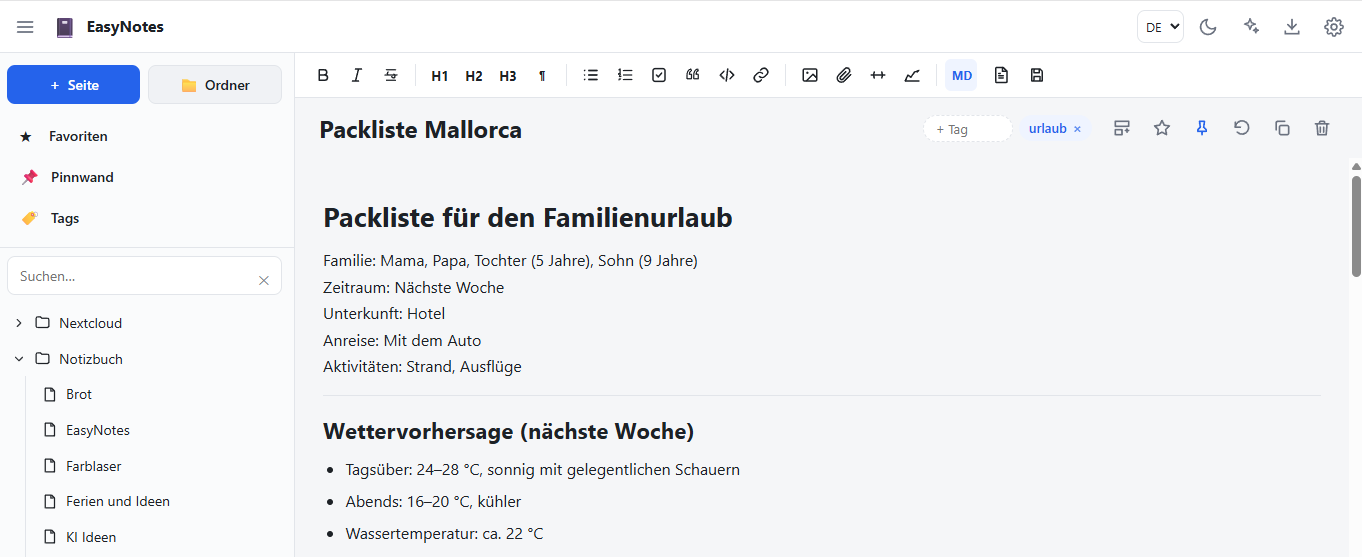
- WYSIWYG editor (w) with 1-click switching to the Markdown editor
- Responsive design for desktop and mobile
- Move & copy note pages and folders (via the context menu in the tree)
- Insert and upload images & attachments (via toolbar, drag & drop, or paste/image)
- Duplicate a page with a single click
- Language German ⇄ English (switchable)
- Dark mode (light/dark/auto)
- Tags per page (can optionally be disabled)
- AI assistant for note creation with DeepSeek, Claude (Anthropic) and ChatGPT (OpenAI) — API keys are stored in the app
- OneNote import from the tool alxnbl/onenote-md-exporter — including the assets folder (the
.assets/assetssubfolder in each folder is imported and displayed as well)
Quick start (local)
npm install
npm start
The app then runs at http://localhost:3500
Folder structure
data/notes/— your notebooks/notes (Markdown + assets)data/imports/— put the OneNote exports you want to import here (folder or.zip)data/settings.json— language, theme, tags, AI keys
Setting up AI
In the AI assistant at the top right: choose a provider, enter your API key (stored locally), optionally adjust the model, then enter a topic and click "Generate". The text can be inserted straight into the page.
Docker (Unraid)
Install via Community Apps on Unraid, or
docker pull knex666/easynotes:latest
Running permanently (Linux/systemd)
sudo cp onenote-md.service /etc/systemd/system/
sudo systemctl daemon-reload
sudo systemctl enable --now onenote-md.service
The app then starts automatically with the system and is restarted if it crashes.
After the import: click the page in the tree to see the imported content. Place the export .zip in data/imports/ and click "Import".
OneNote import
Use https://github.com/alxnbl/onenote-md-exporter together with the appSettings.json from this repository to export your OneNote notes.
These can then be imported into easynotes.
Categories
Download Statistics
Related apps
Explore more like this
Explore allDetails
knex666/easynotes:latestRuntime arguments
- Web UI
http://[IP]:[PORT:3500]/- Network
bridge- Shell
sh- Privileged
- false
Template configuration
Container-Pfad für persistente Notizen, Imports und Einstellungen. Auf einen Host-Pfad mappen (z. B. /mnt/user/appdata/easynotes).
- Target
- /app/data
- Default
- /mnt/user/appdata/easynotes
- Value
- /mnt/user/appdata/easynotes
Web-UI-Port von EasyNotes (WebUI auf http://[IP]:[PORT:3500]/).
- Target
- 3500
- Default
- 3500
- Value
- 3500
Interner Port, auf dem die App lauscht.
- Default
- 3500
- Value
- 3500
Zeitzone.
- Default
- Europe/Berlin
- Value
- Europe/Berlin
Optional: OpenAI-kompatibler API-Schlüssel (kann auch in der App-UI gesetzt werden).
Optional: Basis-URL für OpenAI-kompatible API.