
All apps · 0 apps

droppedneedle
Docker app from HabiRabbu's Repository
Overview
Readme
View on GitHub





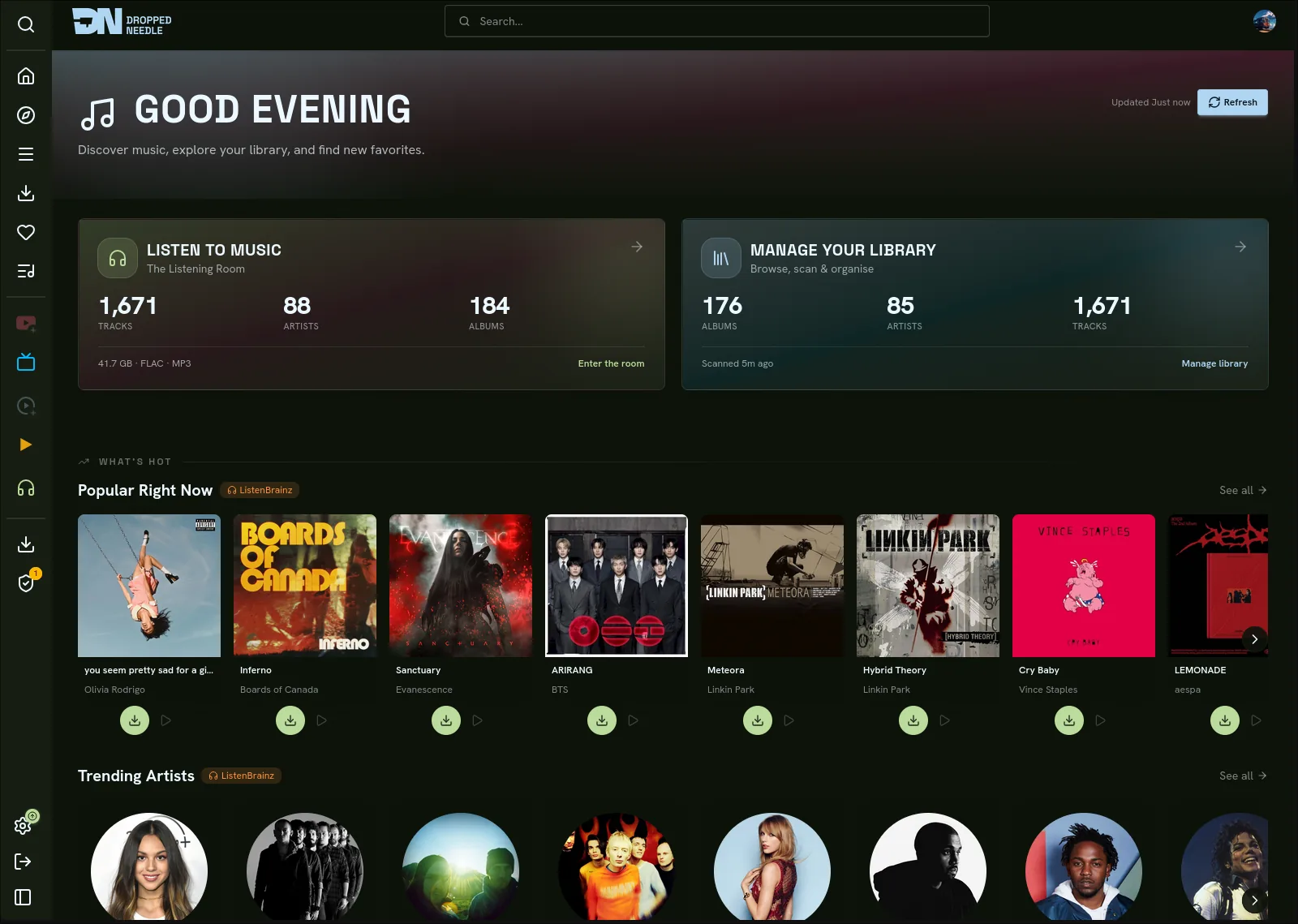
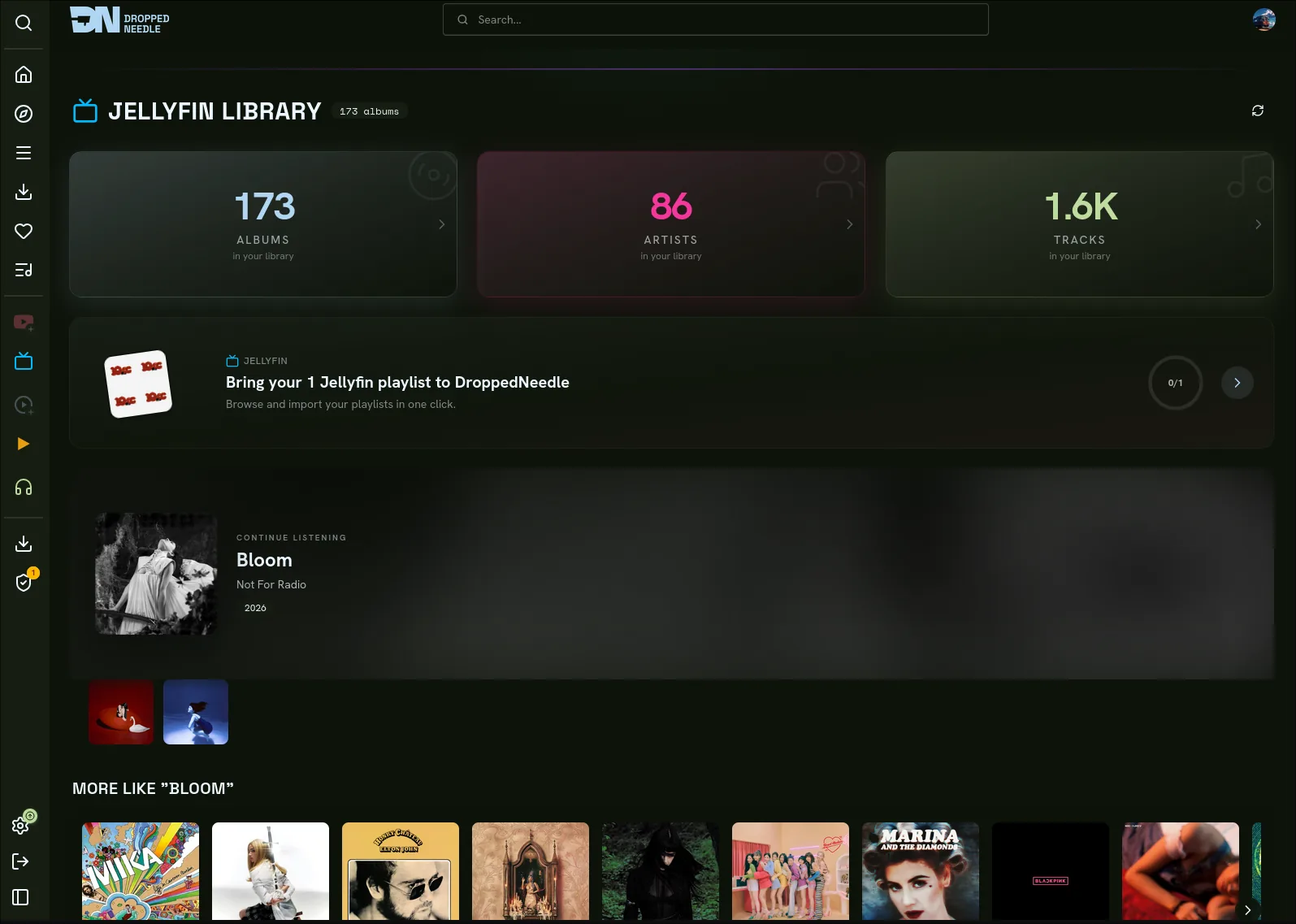
DroppedNeedle is a self-hosted music request and discovery app with a built-in native library and download engine (no Lidarr required). Search the full MusicBrainz catalogue, request whole albums or single tracks, and let the engine scan, tag, and organise your library while it drives downloads through your own slskd or Usenet/SABnzbd. Stream from Jellyfin, Navidrome, Plex, or your local files, get recommendations from your listening history, and scrobble to ListenBrainz and Last.fm. Play your library in third-party apps like Symfonium and Finamp over the OpenSubsonic and Jellyfin APIs. It all runs as a single Docker container, configured from the web UI.
Screenshots
Quick Start
You need Docker, a music library, and a download client. The example below uses slskd; SABnzbd with Newznab indexers works too. DroppedNeedle does not ship or run either for you - see slskd Setup and Usenet Setup.
DroppedNeedle only orchestrates a user-provided download client over its local HTTP API; it never joins or distributes on the Soulseek/P2P network. You supply, run, and are responsible for your own download client and, for slskd, its shared folders.
1. Create a docker-compose.yml
Images are available on Docker Hub (habirabbu/droppedneedle:latest).
services:
  droppedneedle:
    image: habirabbu/droppedneedle:latest
    container_name: droppedneedle
    environment:
      - PUID=1000            # Run `id` on your host to find your user/group ID
      - PGID=1000
      - PORT=8688
      - TZ=Etc/UTC           # Your timezone, e.g. Europe/London, America/New_York
      - SLSKD_DOWNLOADS_PATH=/slskd-downloads
    ports:
      - "8688:8688"
    volumes:
      - ./config:/app/config  # Persistent app configuration
      - ./cache:/app/cache    # Cover art and metadata cache
      - /path/to/music:/music:rw          # Your music library (read-write: the engine imports into it)
      # REQUIRED for imports: bind-mount slskd's COMPLETED-downloads dir read-write, on
      # the SAME filesystem as /music above. Use the EXACT path from slskd's
      # directories.downloads (Options -> Directories; often a .../complete folder), NOT a
      # parent like your media root - mount a parent and downloads finish in slskd but show
      # as "failed" here. The engine MOVES finished files into the library (atomic
      # os.rename), so both must share one filesystem. See slskd Setup below.
      - /path/to/slskd/complete:/slskd-downloads:rw   # == slskd's directories.downloads
    restart: unless-stopped
    healthcheck:
      test: ["CMD", "curl", "-f", "http://localhost:8688/health"]
      interval: 30s
      timeout: 10s
      start_period: 15s
      retries: 3
A
:devtag (habirabbu/droppedneedle:dev) is also available. It's built automatically frommainon every push and may be unstable. Pin to a specific commit with:dev-<short-sha>(e.g.:dev-a1b2c3d).
2. Start it
docker compose up -d
3. First-run setup
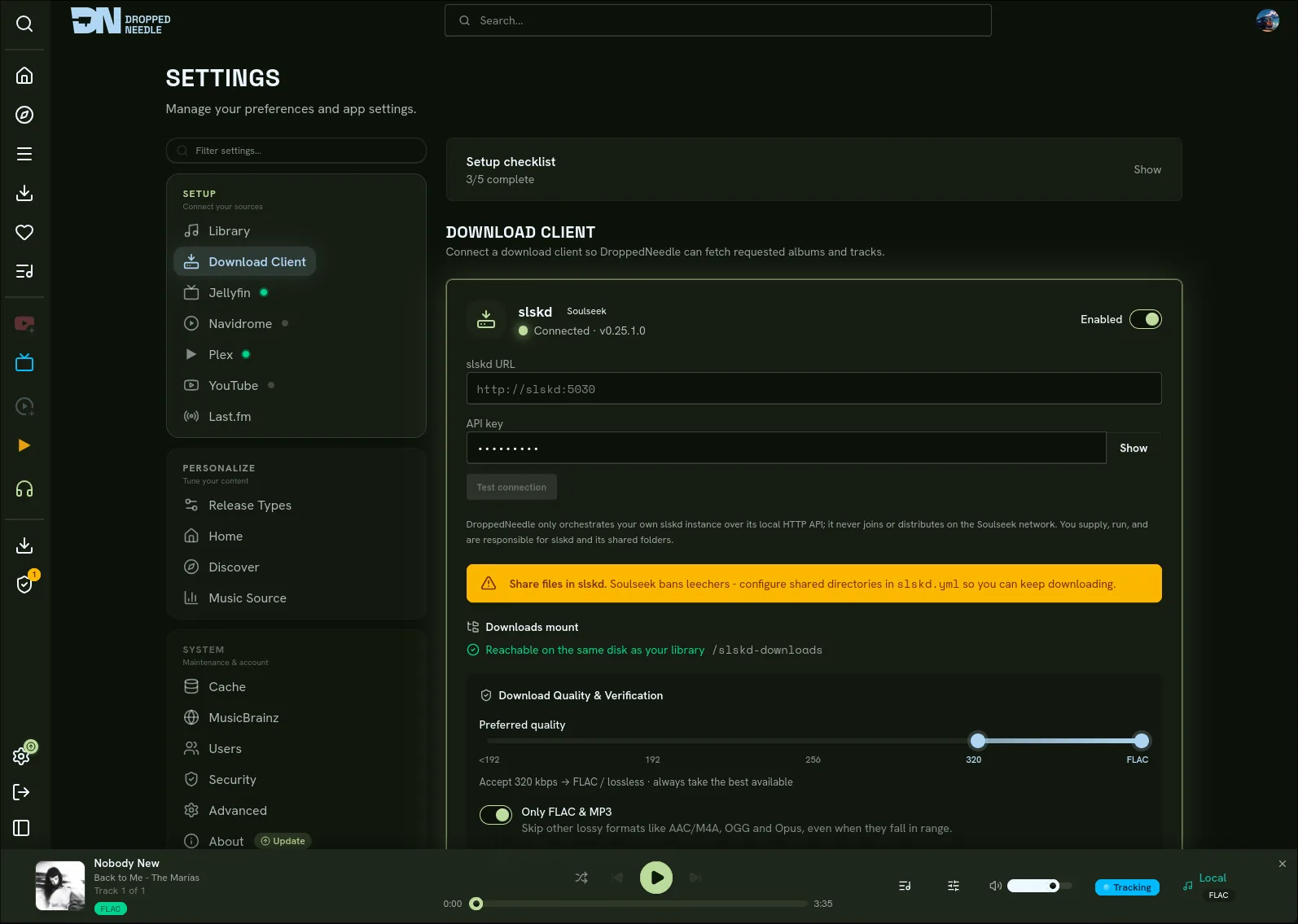
Open http://localhost:8688. On first launch you'll be prompted to create the first admin account (a username and password; email is optional); this only happens once. After that, add your library path under Settings > Library, add your slskd URL and API key under Settings > Download Client, then connect whichever streaming and discovery services you use. Run a library scan from Settings > Library.
Native Engine
DroppedNeedle replaces Lidarr with a built-in library and download engine. It scans your music, identifies each file, tags it with mutagen, and organises it. Requests for whole albums or individual tracks are searched against your own slskd, scored, verified, and moved into the library. There is no Lidarr, no coexistence, and no toggle.
The slskd downloads mount is required for imports. DroppedNeedle must bind-mount slskd's downloads directory read-write, on the same filesystem as your library, or finished downloads will succeed in slskd but never import (the import is an atomic
os.renamemove). See slskd Setup.
Legality boundary
The engine talks only to a user-supplied slskd instance over its local HTTP API. It never joins or distributes on the Soulseek/P2P network itself; it issues searches and download requests to slskd and imports the results. The operator supplies, runs, and is responsible for slskd and its shared folders. This is built into the architecture, not just the UI: the engine has no Soulseek protocol code, only an HTTP client for slskd.
Architecture
The backend is layered, and layers are never skipped:
Routes (api/v1/routes/)            thin HTTP wrappers, auth-postured
  -> Services (services/native/)   scanner, orchestrator, matcher, file processor
    -> Repositories                 external I/O: slskd, MusicBrainz
      -> Infrastructure             tagger (mutagen), fingerprinter (fpcalc/AcoustID),
                                    persistence (SQLite WAL), HTTP, SSE
Persistence is two SQLite (WAL) stores: LibraryDB (scanned and imported files, album metadata) and DownloadStore (download tasks, search jobs, quarantine). Progress is pushed to the frontend over SSE, which fetches with TanStack Query.
How identification works
LibraryScanner walks the configured library paths a folder at a time and identifies each file through four tiers, stopping at the first confident match:
- MBID in tags. The file already carries a MusicBrainz release-group and recording id. Trusted at confidence 1.0, no network call.
- Text match. Fuzzy match of artist, album, and title against MusicBrainz (
rapidfuzz.token_set_ratio), accepted at confidence >= 0.85. - AcoustID fingerprint.
fpcalcfingerprints the audio and AcoustID resolves a recording to a release group, accepted at score >= 0.70. - Manual review. Nothing confident matched, so the file is queued for an admin to resolve: accept the top candidate, supply an MBID, or reject.
The scan is resumable from a progress ledger, cooperatively cancellable, and incremental (an unchanged mtime and size is skipped). It ends with a soft-delete reconcile and a canonical-artist pass.
Download pipeline
DownloadOrchestrator owns the lifecycle: search, score, auto-pick, enqueue, poll, process, import, notify.
- A request creates a
download_tasksrow and dispatches the orchestrator. - It searches via the download client (slskd) and ranks the results with
AlbumPreflightScorer. Per-track requests useTrackMatcher. - The top candidate is auto-picked (score >= 0.70), parked for review (0.50 to 0.70), or the task fails (no candidate >= 0.50).
- A
DownloadManifest(source peer plus expected filenames and durations) is written tostaging/{task_id}/manifest.json, then the files are enqueued in slskd. - The orchestrator polls slskd for progress until the transfer completes.
FileProcessorimports each file on its own, continuing on failure so one bad file never aborts the rest of the album.- Status resolves to
completed(all imported),partial(some failed), orfailed.
Preflight scoring
Candidates are grouped by (peer, folder). Each group gets a coherence score, then a final score:
coherence = 0.40 * (file_count / expected_track_count)   # completeness
          + 0.20 * dir_name_similarity                    # folder vs "artist album year"
          + 0.15 * format_consistency                     # all FLAC = 1.0
          + 0.15 * bitrate_consistency                    # low stddev
          + 0.10 * no_junk_bonus                          # not "Various/Unknown"

final = 0.50 * coherence
      + 0.30 * avg_file_confidence
      + 0.10 * upload_speed_signal
      + 0.10 * free_slot_bonus
Per-file confidence weights title (0.55), artist-from-path (0.20), and duration tolerance (0.25). An off-version match (remix, live, or acoustic against the original on exactly one side) is penalised by x0.3. A quality gate drops candidates outside the configured codec and quality tier range, and ranking prefers the highest tier absolutely: any acceptable FLAC beats any MP3.
Verification, import, and quarantine
FileProcessor resolves each finished file in slskd's downloads directory and processes it on its own. For each file it:
- Verifies it: tags must read, the duration must be within tolerance of the manifest's expectation, and when AcoustID verification is enabled the fingerprint's release group must match. A wrong duration or fingerprint is a verification failure.
- Imports a good file: it writes MBID tags, computes the target path from the naming template, and moves the file into the library with an atomic
os.rename(a cross-mount case falls back to copy-then-remove), then inserts alibrary_filesrow. - Quarantines a bad source: a
verify_failed,corrupt,fingerprint_mismatch, orduration_mismatchfailure records adownload_quarantinerow keyed by(client_id, peer, filename, release_group). The scorer then excludes that(peer, filename)from every future ranking, so a known-bad source is never re-picked.
Environment faults, such as a missing or unavailable downloads mount, are not quarantined; they are not the source's fault. The file fails with a sanitised "downloads directory not accessible" reason instead.
Naming template
Imported files are placed using a template. The variables:
{artist} {album} {albumartist} {year} {track:02d} {title} {ext}
{disc} {genre} {medium} {musicbrainz_id} {artist_mbid}
The default:
{albumartist}/{album} ({year})/{disc:02d}{track:02d} {title}.{ext}
The template applies to downloaded imports only. v1 never renames files discovered by the scanner, and changing the template does not retroactively reorganise the library.
Pluggable download client
The engine speaks a DownloadClientProtocol, never slskd directly: client_name, is_configured, health_check, search_album, search_track, enqueue, get_status, cancel, get_file_path. Everything client-specific (slskd's X-API-Key, search-GUID polling, plain-array enqueue, (peer, filename) transfer correlation, Soulseek state-string parsing) lives inside the slskd repository; SABnzbd's API key, NZB enqueue, and history polling live in its own repository. Everything else (library layout, MusicBrainz identification, the atomic move, tag writing, persistence, ownership checks, quarantine, retry, scoring) lives outside both. Adding a new client requires zero changes to services/native/, and a protocol conformance test exercises this against the slskd mock plus a second mock client.
Cover art
With Lidarr removed, album covers resolve on demand through AlbumCoverFetcher: AudioDB, then local sources (an existing library or Jellyfin), then the MusicBrainz Cover Art Archive, then a best-release fallback. First success wins. Wikidata is part of the artist-image chain, not the album-cover chain.
Auth posture
- Library catalog reads and download status: any authenticated user.
- User-scoped download tasks and searches: owner or admin, with ownership checked in the service.
- Scan control, download-client config, quarantine, and tag editing: admin only.
- SSE endpoints require auth on subscribe and are ownership-scoped for download streams.
- API keys are masked on settings reads and never appear in logs. A security test suite enforces the auth matrix, the no-secrets-in-logs guarantee, and key masking.
Performance
Library reads aggregate from library_files (GROUP BY release_group_mbid) and are sub-second for a 10k-album library on SQLite WAL. An initial scan of a 10k-album library is roughly 50 minutes when about 30% of files need a MusicBrainz lookup (the MB client is rate limited to 1 req/s). Subsequent scans are incremental and far faster.
Setup
This walks you from a running container to a library that imports downloads. The Quick Start above covers the compose file and first boot; this covers what to configure in the app afterwards.
fpcalc and AcoustID fingerprinting are bundled in the image via libchromaprint-tools. An AcoustID API key is optional and enables Tier-3 identification.
1. Configure library paths
As admin, go to Settings > Library and add your library path(s), using the in-container path (for example /music). DroppedNeedle validates the path at startup and on save; a non-writable or missing path is reported there rather than crashing the app.
2. Configure the download client
Go to Settings > Download Client (admin):
- Enter your slskd URL (for example
http://slskd:5030). - Enter your slskd API key.
- Click Test, then Save.
The page shows the downloads-mount health (set, exists, writable, same filesystem). If it warns, fix the bind-mount before requesting downloads. See slskd Setup.
3. Run a library scan
On Settings > Library, click Scan (or POST /api/v1/library/scan/start). The scan walks your paths, identifies files through the tiered strategy, and populates the library. Progress streams live. Files it cannot confidently identify land in manual review.
4. Request and watch
Browse or search the MusicBrainz catalogue, open an album, and click Request. You can also request a single track from an album's track list. Admin and trusted users' requests start immediately; standard users' requests wait for admin approval. On the Downloads page the task moves through searching -> downloading -> processing -> completed live over SSE, and on completion the files appear under Library.
slskd Setup
Legality. DroppedNeedle only orchestrates a user-provided slskd instance over its local HTTP API; it never joins or distributes on the Soulseek/P2P network. You supply, run, and are responsible for slskd and its shared folders.
Share files in slskd. Soulseek bans leechers. You must configure at least one shared directory in slskd (
slskd.yml->shares.directories) or you will be unable to download. This is a slskd requirement, not a DroppedNeedle one.
slskd is one of two download sources DroppedNeedle supports. If you are using Usenet instead, skip this section and go to Usenet Setup.
DroppedNeedle does not download from Soulseek itself. It talks to your own running slskd instance over slskd's local HTTP API (X-API-Key), asks it to search and download, then imports the finished files into your library. You bring slskd; DroppedNeedle drives it.
Requirements
- slskd 0.25.0 or newer (0.25.1 is the version DroppedNeedle is verified against). Pin it:
slskd/slskd:0.25.1. - A Soulseek account configured inside slskd.
- At least one shared folder configured in slskd (see the warning above).
- slskd's HTTP API reachable from the DroppedNeedle container, with an API key.
The downloads bind-mount
This is the single most common misconfiguration, so read it carefully.
When slskd finishes a download it writes the file into its own downloads directory (slskd.yml -> directories.downloads), preserving the remote folder structure. DroppedNeedle imports a finished download by moving that file out of slskd's downloads directory into your library with an atomic os.rename: no copy, no leftover, no doubled storage.
For that move to work, DroppedNeedle must be able to see slskd's downloads directory, and it must be on the same filesystem as your music library:
- Bind-mount slskd's downloads directory into the DroppedNeedle container read-write. Use the exact path from slskd's
directories.downloads(often a.../completefolder) - not a parent of it. Mounting a parent (e.g. your whole media share) makes DroppedNeedle search the entire tree and give up: downloads finish in slskd but show as failed here. The settings page warns when it detects this. - Put it on the same filesystem as the library mount (a cross-filesystem rename fails with
EXDEV). - Point DroppedNeedle at the in-container path with
SLSKD_DOWNLOADS_PATH.
DroppedNeedle validates this at startup (set, exists, writable, same filesystem as the library) and marks the download client DEGRADED with a clear reason if it fails. It still boots to the UI so you can fix it, rather than refusing to start.
# In the droppedneedle service of your compose file:
environment:
  - SLSKD_DOWNLOADS_PATH=/slskd-downloads
volumes:
  - /path/to/your/music:/music:rw                  # library
  - /path/to/slskd/downloads:/slskd-downloads:rw   # MUST be the same filesystem as /music
API key
Configure an API key in slskd (slskd.yml -> web.authentication.api_keys) and give it to DroppedNeedle under Settings > Download Client (URL plus API key). DroppedNeedle sends it as the X-API-Key header on every request; it is stored encrypted and is never written to logs.
Example slskd.yml essentials
soulseek:
  username: your-soulseek-username
  password: your-soulseek-password

shares:
  directories:
    - /data/share   # REQUIRED: at least one folder of files you share, or you get banned

directories:
  downloads: /data/downloads   # the host path you also bind-mount into DroppedNeedle

web:
  authentication:
    api_keys:
      droppedneedle:
        key: choose-a-long-random-key   # give this to DroppedNeedle's Download Client settings
Usenet Setup
DroppedNeedle's second download source is Usenet through SABnzbd with Newznab-compatible indexers. The engine searches indexers for albums and tracks, enqueues NZBs in SABnzbd, and imports the finished files using the same verification and import pipeline it uses for slskd.
Requirements
- SABnzbd with an API key.
- One or more Newznab-compatible indexers (NZBGeek, NZBPlanet, NZB.su, Slug, and others) with API keys.
- SABnzbd's completed downloads directory and your music library must be on the same filesystem. The import uses an atomic rename, same as the slskd path.
Configuration
Go to Settings > Download Client (admin), enable Usenet, and enter your SABnzbd URL and API key. Add your Newznab indexers (each one's URL plus your API key) under Settings > Indexers; the engine searches all of them and merges the results. Click Test on each connection, then Save.
slskd and Usenet can be enabled side by side - the source priority control decides which is tried first. Every download goes through the same scoring, verification, quarantine, and import pipeline regardless of where it came from.
Troubleshooting
- Downloads complete in slskd but nothing imports. The slskd-downloads bind-mount is missing or misconfigured. Confirm it is mounted read-write, on the same filesystem as the library, and that
SLSKD_DOWNLOADS_PATHpoints at it. The Download Client settings page shows the mount status and the exact reason. - Download client shows DEGRADED. The startup validator could not confirm the downloads mount (unset, missing, not writable, or not the same filesystem). Fix the mount and restart.
- slskd connection fails or returns 401. The URL or API key is wrong, or the key is not configured in
slskd.yml. Re-check both under Settings > Download Client and use Test. - Searches return nothing or you get disconnected. Confirm slskd has shared folders and a healthy Soulseek connection. Leechers are banned.
- Scan finds nothing or files go to manual review. Confirm the library path is correct and readable. Files with no tags and no fingerprint match need manual identification.
- Tier-3 fingerprinting disabled. Set an AcoustID API key (optional). Without it, scans rely on Tier 1 and 2 only.
- MusicBrainz lookups are slow. MB calls are rate limited to about 1/s, so large first scans take a while (a 10k-album library is roughly 50 minutes). Subsequent scans are incremental.
Recommended Stack
DroppedNeedle brings its own library and download engine; you supply the download client. For playback, connect Jellyfin, Navidrome, Plex, or mount your music folder directly into the container.
| Service | Role |
|---|---|
| slskd (0.25.0+, operator-supplied) | Soulseek download client the native engine drives over its local HTTP API |
| SABnzbd (4.x+, operator-supplied) | Usenet download client with Newznab indexer support |
| MusicBrainz | Catalogue, identification, and matching |
Authentication
DroppedNeedle is a multi-user application. Every user has a role that controls what they can do.
Roles
| Role | Requests | Admin access |
|---|---|---|
| Admin | Downloaded immediately | Full: manage users, approve/reject requests, change all settings |
| Trusted | Downloaded immediately | None |
| User | Held for admin approval before downloading | None |
The first account you create at first-run setup is always an admin. After that, an admin manages the rest from Settings > Users, and anyone who signs in through an SSO provider for the first time gets an account automatically.
Login methods
You sign in with a username and password. Usernames are case-insensitive, and you can change yours later from your profile. Email is optional everywhere; add one if you want it for account linking, but it is never used to sign in.
You can also sign in through Jellyfin, Plex, or any OIDC-compatible provider (Authelia, Keycloak, Authentik, and so on); see Setting Up OIDC below. If one of those is your only login, you can add a password from your profile and then sign in by username as well.
Every login method is switched on or off from the web UI. No environment variables are needed.
Importing users
Instead of creating accounts by hand, an admin can bring in existing users from Jellyfin or Plex. Open Settings > Users, click Import, choose a service, and select the accounts to add; for Plex this includes your Home and managed users as well as your shared friends. No passwords are set during import. Each person signs in with their own Jellyfin or Plex login, and DroppedNeedle links that login to the account the import created for them. Imported users start with the User role, and re-running an import skips anyone already added.
Sessions
A session lasts 30 days from login and is not extended by activity. Signing out ends your current session. When an admin deletes a user, that user's sessions go with the account.
Features
Search and Request
Search the full MusicBrainz catalogue for any artist or album. Request a whole album or an individual track, and the native engine handles the download: it searches your download client, preflight-scores the candidates, picks the best, verifies the files, and imports them into your library. Admin and trusted users' requests start immediately; requests from standard users are held in an approval queue until an admin approves or rejects them. A persistent queue tracks all requests, and you can browse pending and fulfilled requests on a dedicated page with retry and cancel support.
Downloads the engine cannot confidently auto-accept land in a held-import review queue. An admin can preview the audio, accept or reject the import, and supply a MusicBrainz ID before the file is moved into the library.
When a download completes in your download client but DroppedNeedle cannot locate the file, you can trigger a manual reimport from the downloads page to finish the job.
Wanted
Failed and incomplete download requests are re-searched automatically by a background watcher on an age-based cadence. When it finds a verified match, the download is imported silently. The Wanted tab shows everything the watcher is tracking. You can stop or resume individual watches and mark new finds as seen.
Quality and Storage
Set a quality floor per format (FLAC, MP3, AAC, and others) under Settings > Download Client. Downloads below the cutoff are rejected. When a better copy of an album you already own turns up, the engine replaces the old files and moves the originals to a recycle bin.
A global storage cap and per-user quotas keep the library from filling the disk. Album edition pinning locks a request to a particular release: the engine fills missing tracks from that edition and upgrades individual files as better copies surface. An optional background scan re-checks your library against available sources and imports improvements.
Built-in Player
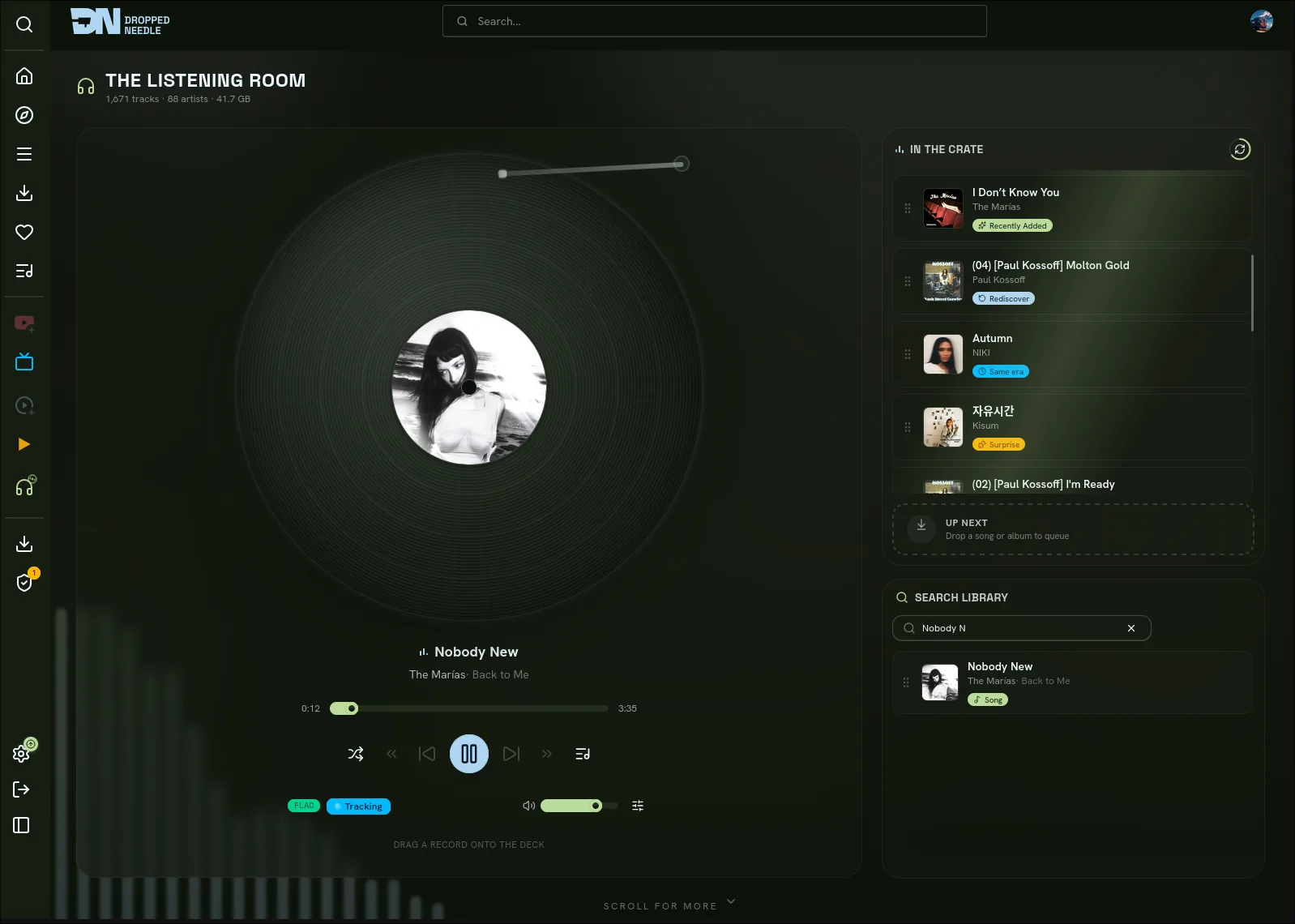
DroppedNeedle has a full audio player that supports multiple playback sources per track:
- Jellyfin, with configurable codec (AAC, MP3, FLAC, Opus, and others) and bitrate. Playback events are reported back to Jellyfin automatically.
- Navidrome, streaming via the Subsonic API.
- Plex Media Server, with direct-play audio streaming and native Plex scrobbling. Supports multi-library setups.
- Local files, served directly from a mounted music directory.
- YouTube, for previewing albums you haven't downloaded yet. Links can be auto-generated or set manually.
The player supports queue management, shuffle, seek, volume control, and a 10-band equalizer with presets.
What you are playing is broadcast live over SSE. Other signed-in users see the current track in real time.
Connect Apps
Third-party music apps can play your library straight from DroppedNeedle, which speaks both the OpenSubsonic and Jellyfin APIs. It is the inbound counterpart to the Jellyfin, Navidrome, and Plex sources: those let DroppedNeedle play from another server, while this lets other apps play from DroppedNeedle.
Turn on either protocol in Settings > Connect Apps and create an app-password, a separate revocable secret for one app so your account password stays private. In the app, enter your server URL with /subsonic or /jellyfin on the end (for example https://music.example.com/jellyfin), your username, and the app-password. Each user manages their own.
Tested with Symfonium, Feishin, and Amperfy over Subsonic, and Finamp, Jellify, Manet, and Symfonium's Jellyfin mode over Jellyfin. When a client asks for a codec the file isn't already in, DroppedNeedle transcodes on the fly if transcoding is enabled; otherwise it sends the original file.
Discovery
The home page shows trending artists, popular albums, recently added items, genre quick-links, weekly exploration playlists from ListenBrainz, and "Because You Listened To" carousels personalized to your history.
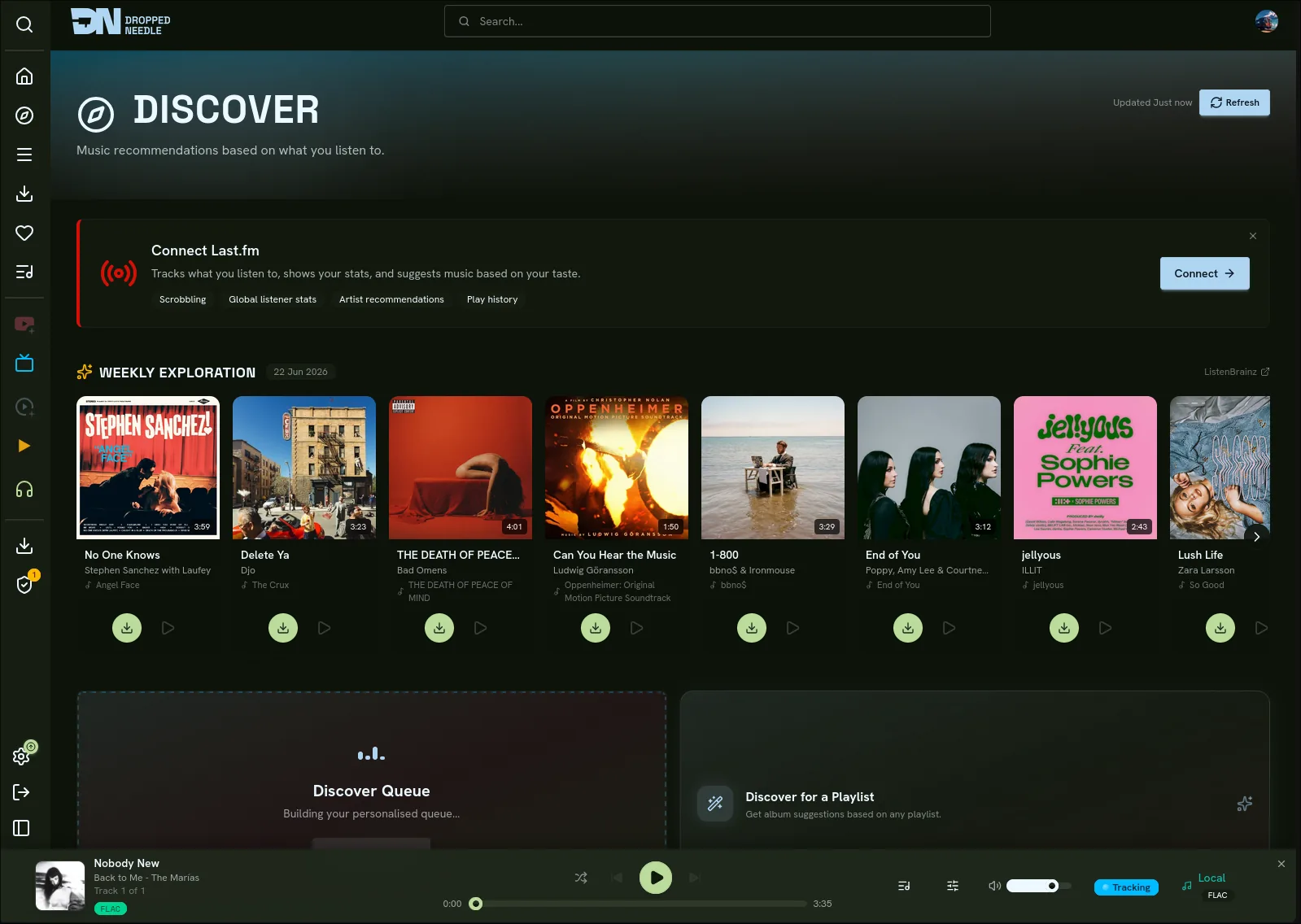
The discover page goes further with a recommendation queue drawn from similar artists, library gaps, fresh releases, global charts, and your listening patterns across ListenBrainz and Last.fm. Each album can be expanded to show the full tracklist and artwork before you decide to request or skip it. Every album has floating preview buttons that stream a short clip from Deezer and iTunes without leaving the page.
You can also browse by genre, view trending and popular charts over different time ranges, and see your own top albums.
Until you link Last.fm or ListenBrainz, the rows that need your listening history stay hidden. You see the shared trending and library sections, plus a prompt to connect an account; link one and your own recommendations fill in.
A per-user weekly mix playlist is built from your listening history and refreshed in the background. When auto-request is enabled (requires an admin standing grant), up to five missing albums from the mix are queued for download automatically.
Upcoming Events
Connect Ticketmaster and Skiddle (free API keys) and DroppedNeedle shows concerts near you. Each user picks as many cities as they like from a geocoded search, each with its own radius. A daily sweep pulls upcoming shows for the artists people follow - or, optionally, for every artist in the library - and a sidebar badge counts the gigs you have not seen yet.
Following Artists
Follow an artist to watch for new releases, and optionally auto-download them the moment they appear (standard users need a one-time admin grant per artist). Sidebar badges show how many releases and gigs you have not seen, backed by per-user seen markers that update via SSE; visiting the page clears them. The Following hub is a glanceable digest: a 30-day release log with in-library ticks, your next gigs, and your artist roster, each section one click from its full page.
Library
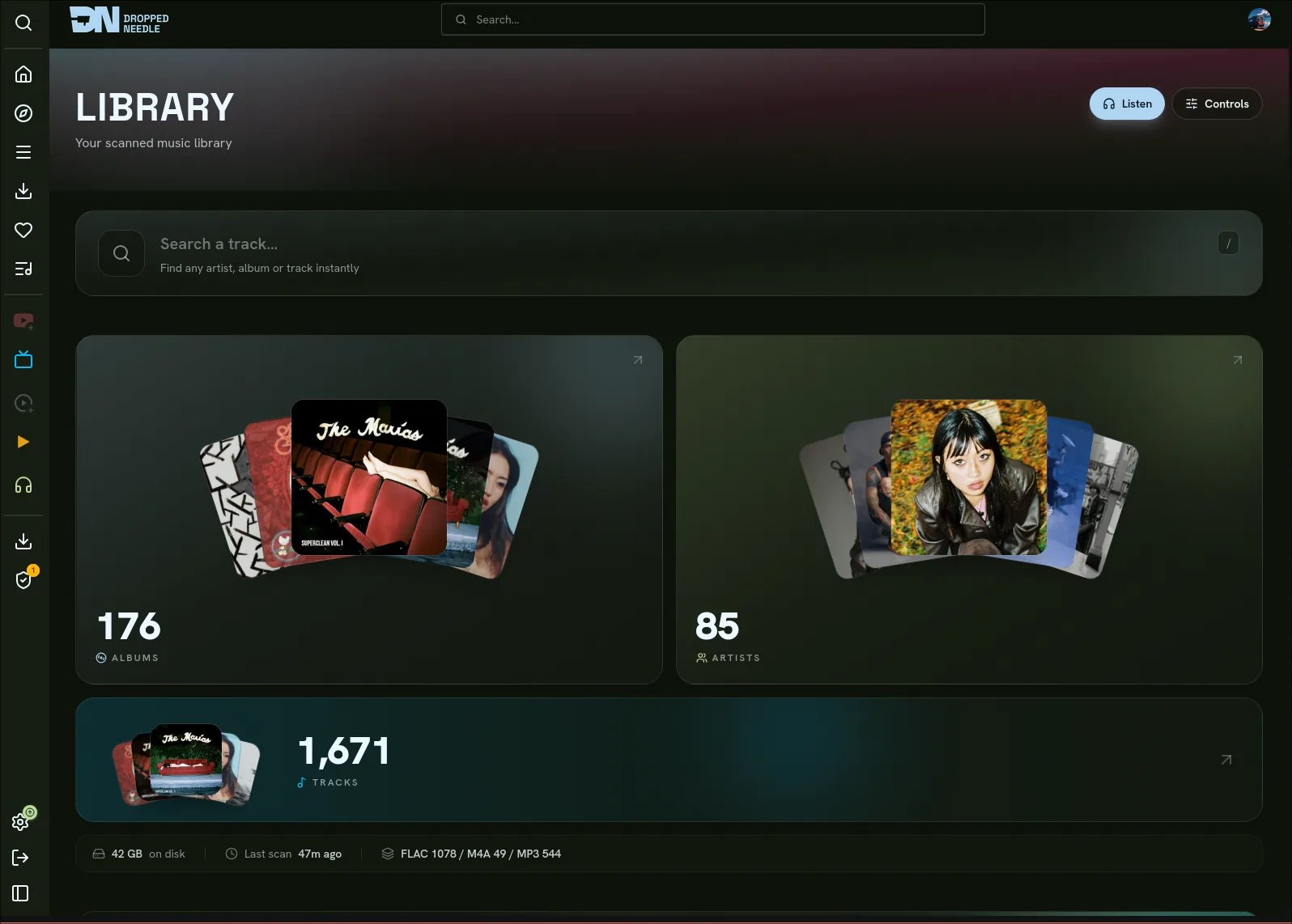
Browse your native library by artist or album with search, filtering, sorting, and pagination. View recently added albums and library statistics. Resolve unmatched files from the manual-review queue, edit tags, rescan albums, and remove albums directly from the UI. DroppedNeedle deletes the files, cleans up the database rows, and updates album and artist statistics.
Jellyfin, Navidrome, Plex, and local file sources each get their own library view with play, shuffle, and queue actions.
Scrobbling
Every track you play can be scrobbled to your own ListenBrainz and Last.fm accounts. Each user links their own accounts from their profile and toggles each service on or off independently. While scrobbling is on, your plays are also saved to a local listening history inside DroppedNeedle, which feeds the Recently Played row on your home page. A "now playing" update goes out when a track starts, and a scrobble is submitted when it finishes.
Playlists
Create playlists from any mix of Jellyfin, Navidrome, Plex, local, YouTube, and imported Spotify tracks. Reorder by dragging, set custom cover art, and play everything through the same player.
Import playlists from Spotify. Track metadata and album art are pulled on import, and the playlist stays live with periodic SSE refreshes so new tracks you add on Spotify appear automatically.
Playlists are private to you by default. Toggle one to public and it appears read-only for every other signed-in user under "Shared with you", with your name attached; switch it back to private whenever you like. Admins can see that a private playlist exists, along with its track count and owner, but not its name or its tracks.
Profile
Set a display name and avatar, change your username/email/password, link your own Last.fm and ListenBrainz accounts (with per-user scrobble toggles and a default discovery source), view connected services, and check your library statistics - all from your profile page.
Integrations
| Service | What it does |
|---|---|
| slskd (operator-supplied) | Soulseek download client the native engine drives over its local HTTP API |
| SABnzbd (operator-supplied) | Usenet download client with Newznab indexer support |
| MusicBrainz | Artist and album metadata, release search, scan identification |
| AcoustID | Audio fingerprinting for Tier-3 scan identification (optional API key) |
| Cover Art Archive | Album artwork |
| TheAudioDB | Artist and album images (fanart, banners, logos, CD art) |
| Wikidata | Artist descriptions and external links |
| Jellyfin | Audio streaming and library browsing |
| Navidrome | Audio streaming via Subsonic API |
| Plex | Audio streaming and library browsing via Plex Media Server |
| ListenBrainz | Listening history, discovery, scrobbling, weekly playlists |
| Last.fm | Scrobbling and listen tracking |
| YouTube | Album playback when no local copy exists |
| Local files | Direct playback from a mounted music directory |
| Spotify | Playlist import with live sync |
| Ticketmaster | Upcoming concert discovery |
| Skiddle | Upcoming concert discovery |
| Deezer | Short audio previews on the discover page |
| iTunes | Short audio previews on the discover page |
All integrations are configured through the web UI. No config files or environment variables needed beyond the basics listed below.
Configuration
DroppedNeedle stores its config in config/config.json inside the mapped config volume. Everything is managed through the UI.
Environment Variables
| Variable | Default | Description |
|---|---|---|
PUID |
1000 |
User ID for file ownership inside the container |
PGID |
1000 |
Group ID for file ownership inside the container |
PORT |
8688 |
Port the application listens on |
TZ |
Etc/UTC |
Container timezone |
SLSKD_DOWNLOADS_PATH |
/data/downloads/slskd |
In-container path where slskd's downloads dir is bind-mounted (read-write, same filesystem as the library). The import moves finished files from here into the library. |
Run id on your host to find your PUID and PGID values.
Unraid / NAS users: Unraid defaults to
nobody:users(PUID=99, PGID=100). If you seechown: Operation not permittedat startup, your volume mount is on a filesystem that rejects ownership changes (FUSE/shfs, NFS, CIFS). The container skipschownwhen the directories and their contents are already writable, so this is usually fine as long as the host paths are owned by the correct UID:GID.
In-App Settings
| Setting | Location |
|---|---|
| Library paths, naming template, scan schedule, AcoustID key | Settings > Library |
| slskd URL and API key, SABnzbd/Usenet URL and API key, Newznab indexers, quality tiers, verification, wanted watcher | Settings > Download Client |
| OpenSubsonic and Jellyfin APIs that let apps stream your library, app-passwords, transcoding | Settings > Connect Apps |
| Jellyfin URL and API key | Settings > Jellyfin |
| Navidrome URL and credentials | Settings > Navidrome |
| Plex URL, token (OAuth or manual), music libraries, scrobble toggle | Settings > Plex |
| Local files directory path | Settings > Local Files |
| Last.fm app key + shared secret (admin; one app for the whole instance) | Settings > Last.fm |
| YouTube API key | Settings > YouTube |
| Spotify client ID and secret, playlist import | Settings > Spotify |
| Ticketmaster and Skiddle API keys, sweep scope and daily check time | Settings > Live Events |
| Link your own Last.fm + ListenBrainz, per-user scrobble toggles, default discovery source | Profile > Scrobbling & Discovery |
| Home page layout preferences | Settings > Preferences |
| AudioDB settings and cache TTLs | Settings > Advanced |
| HSTS header and HIBP password breach checking | Settings > Security |
| User accounts, roles, and user import (Jellyfin/Plex) | Settings > Users |
Setting Up Last.fm
- Admin, once per instance: register an app at last.fm/api/account/create to get an API key and shared secret, and enter them in Settings > Last.fm.
- Each user: open Profile > Scrobbling & Discovery, click Connect on Last.fm, authorise in the popup, then choose Finish. Your account is linked and the scrobble toggle is yours.
Setting Up ListenBrainz
- Copy your user token from listenbrainz.org/profile.
- In Profile > Scrobbling & Discovery, click Connect on ListenBrainz and paste your username + token.
Setting Up OIDC
Any OIDC provider that supports the authorization code flow works (Authelia, Keycloak, Authentik, etc.).
- In your provider, create a new OIDC client / application. Set the redirect URI to
https://your-droppedneedle-url/api/v1/auth/oidc/callback. - In Settings > Security, enter your provider's Issuer URL, Client ID, and Client Secret.
- Save, an SSO button will appear on the login page.
Users who sign in via OIDC are created automatically on first login, given an auto-generated username, and assigned the User role by default. An admin can promote them from Settings > Users.
Security Settings
Settings > Security exposes two features (admin only):
Password breach checking (HIBP): When enabled, new passwords are checked against the Have I Been Pwned breach database using the k-anonymity API (api.pwnedpasswords.com). Only the first 5 characters of the password's SHA-1 hash are transmitted, the full password never leaves the server. This is on by default. For air-gapped or offline installs, you can either disable it or supply the path to a local copy of the HIBP hash file (download the "ordered by hash" version from haveibeenpwned.com/Passwords, typically ~35 GB). When a local path is configured, no outbound network calls are made.
HSTS (Strict-Transport-Security): Only relevant if you're serving DroppedNeedle over HTTPS via a reverse proxy. Leave this disabled for plain HTTP installs. Enabling it on HTTP will cause browsers to refuse to connect until the HSTS entry expires. When behind HTTPS, set a max-age to instruct browsers to always use HTTPS. Starting with a shorter value (e.g. 30 days) and increasing it once you're confident everything works is recommended.
TheAudioDB
AudioDB provides richer artist and album artwork from a fast CDN. It's enabled by default with the free public API key, which is rate-limited to 30 requests per minute. Premium keys from theaudiodb.com unlock higher limits.
Under Settings > Advanced, you can toggle AudioDB on or off, switch between direct CDN loading and proxied loading (for privacy), enable name-based search fallback for niche artists, and adjust cache TTLs.
Playback Sources
Jellyfin
Audio is transcoded on the Jellyfin server and streamed to the browser. Supported codecs include AAC, MP3, Opus, FLAC, Vorbis, ALAC, WAV, and WMA. Bitrate is configurable between 32 kbps and 320 kbps. Playback start, progress, and stop events are reported back to Jellyfin.
Local Files
Mount your music directory into the container and DroppedNeedle serves files directly. The mount path inside the container must match the Music Directory Path set in Settings > Local Files.
volumes:
  - /path/to/your/music:/music:ro
Navidrome
Connect your Navidrome instance under Settings > Navidrome.
Plex
Connect Plex under Settings > Plex. You can sign in with Plex OAuth or paste in a token yourself. Once you're connected, choose the music libraries you want to include. If you pick more than one, DroppedNeedle merges them into a single library view.
Tracks play directly from Plex with no server-side transcoding. The DroppedNeedle backend proxies the stream so your Plex token never reaches the browser.
Plex scrobbling is on by default. Turn it off in Settings > Plex or from the library page if you'd rather rely on Last.fm and ListenBrainz instead.
YouTube
Albums can be linked to a YouTube URL and played inline. This is useful for listening to albums before you've downloaded them. Links can be auto-generated with a YouTube API key or added manually.
A note on reliability: YouTube playback depends on the embedded player, which can be finicky. It works best in a browser where you're signed into YouTube, and VPNs tend to cause issues. Treat it as a convenience for previewing albums rather than a primary playback source.
Volumes and Persistence
| Container path | Purpose |
|---|---|
/app/config |
Application config (config.json) |
/app/cache |
Cover art cache, metadata cache, SQLite databases |
/music |
Music library root (read-write: the native engine imports into it) |
/slskd-downloads |
slskd's downloads directory, bind-mounted read-write on the same filesystem as /music (required for the move-import) |
Map both /app/config and /app/cache to persistent host directories so they survive container restarts. The /music and slskd-downloads mounts must share one filesystem - see slskd Setup.
API
Interactive API docs (Swagger UI) are available at /api/v1/docs on your DroppedNeedle instance.
All /api/v1/* routes require authentication (a Bearer token or the droppedneedle_session cookie), aside from a small public allowlist for setup, login, and provider discovery. Everything under /api/v1/settings/* additionally requires the Admin role.
A health check endpoint is at /health.
Development
See the CONTRIBUTING guide for instructions on setting up a development environment, running tests, and submitting contributions.
Support
Documentation is at droppedneedle.com.
For questions, help, or just to chat, join the Discord. Bug reports and feature requests go on GitHub Issues.
If you find DroppedNeedle useful, consider supporting development:
License
DroppedNeedle is licensed under the GNU Affero General Public License v3.0 (AGPL-3.0). Copyright (c) 2025 Harvey Bragg.
Commercial licensing options are available from the copyright holder.
Media gallery
1 / 4Install Droppedneedle on Unraid in a few clicks.
Find Droppedneedle in Community Apps on your Unraid server, review the template, and click Install. Unraid handles the Docker app or plugin setup from the published template.
Requirements
Categories
Download Statistics
Related apps
Explore more like this
Explore allDetails
habirabbu/droppedneedle:latestRuntime arguments
- Web UI
http://[IP]:[PORT:8688]- Network
bridge- Privileged
- false
Template configuration
Port the DroppedNeedle web interface listens on.
- Target
- 8688
- Default
- 8688
- Value
- 8688
Persistent application configuration and database.
- Target
- /app/config
- Default
- /mnt/user/appdata/droppedneedle/config
- Value
- /mnt/user/appdata/droppedneedle/config
Cover art and metadata cache.
- Target
- /app/cache
- Default
- /mnt/user/appdata/droppedneedle/cache
- Value
- /mnt/user/appdata/droppedneedle/cache
Your music library root. Imported downloads land here, so it is read-write. Keep it on the same filesystem as the downloads mounts below for fast atomic-rename imports.
- Target
- /music
- Default
- /mnt/user/Music
- Value
- /mnt/user/Music
slskd's COMPLETED-downloads directory (its Options > Directories > downloads path, often a .../complete folder). Must be the exact folder, not a parent. Keep it on the same filesystem as /music. Leave empty if you do not use Soulseek.
- Target
- /slskd-downloads
Container path where the slskd Downloads mount above appears. Must match that mount's container path (/slskd-downloads); imports fail if it does not. Leave as-is unless you change the mount.
- Target
- SLSKD_DOWNLOADS_PATH
- Default
- /slskd-downloads
- Value
- /slskd-downloads
Optional (Usenet): SABnzbd's completed-downloads directory (its complete_dir). Must match the Downloads mount set in Settings > Download Client > SABnzbd. Keep it on the same filesystem as /music. Leave empty if you do not use Usenet.
- Target
- /sabnzbd-downloads
User ID for file permissions inside the container. Run 'id' on your Unraid terminal to find your value.
- Default
- 99
- Value
- 99
Group ID for file permissions inside the container. Run 'id' on your Unraid terminal to find your value.
- Default
- 100
- Value
- 100
Your timezone. Examples: America/New_York, Europe/Berlin, Asia/Tokyo.
- Target
- TZ
- Default
- Europe/London
- Value
- Europe/London
Umask for file creation permissions inside the container.
- Default
- 002
- Value
- 002