

Dropbox
Docker app from itayar's Repository
Overview
Run the official Dropbox headless daemon in Docker. Built for reliability — handles large accounts (1M+ files), auto-restarts on crash, and stays up-to-date by pulling the latest Dropbox client on every startup.
Setup:
- Install and start the container
- Open the container log
- Wait for a Dropbox URL to appear
- Open the URL in your browser to link your account
- Sync starts automatically
IMPORTANT: The Dropbox client does not support FUSE filesystems. You MUST use a direct disk path for your sync folder:
If your Dropbox share uses cache "No": /mnt/disk1/Dropbox
If your Dropbox share uses cache "Only": /mnt/cache/Dropbox
Do NOT use /mnt/user — it will not work. The container log warns you if it detects this.
If Dropbox asks you to link again after every restart, put the config on a direct path too (e.g. /mnt/cache/appdata/dropbox).
Problems? Check the container log first: it reports a sync folder Dropbox can't write to, and where your account actually syncs to.
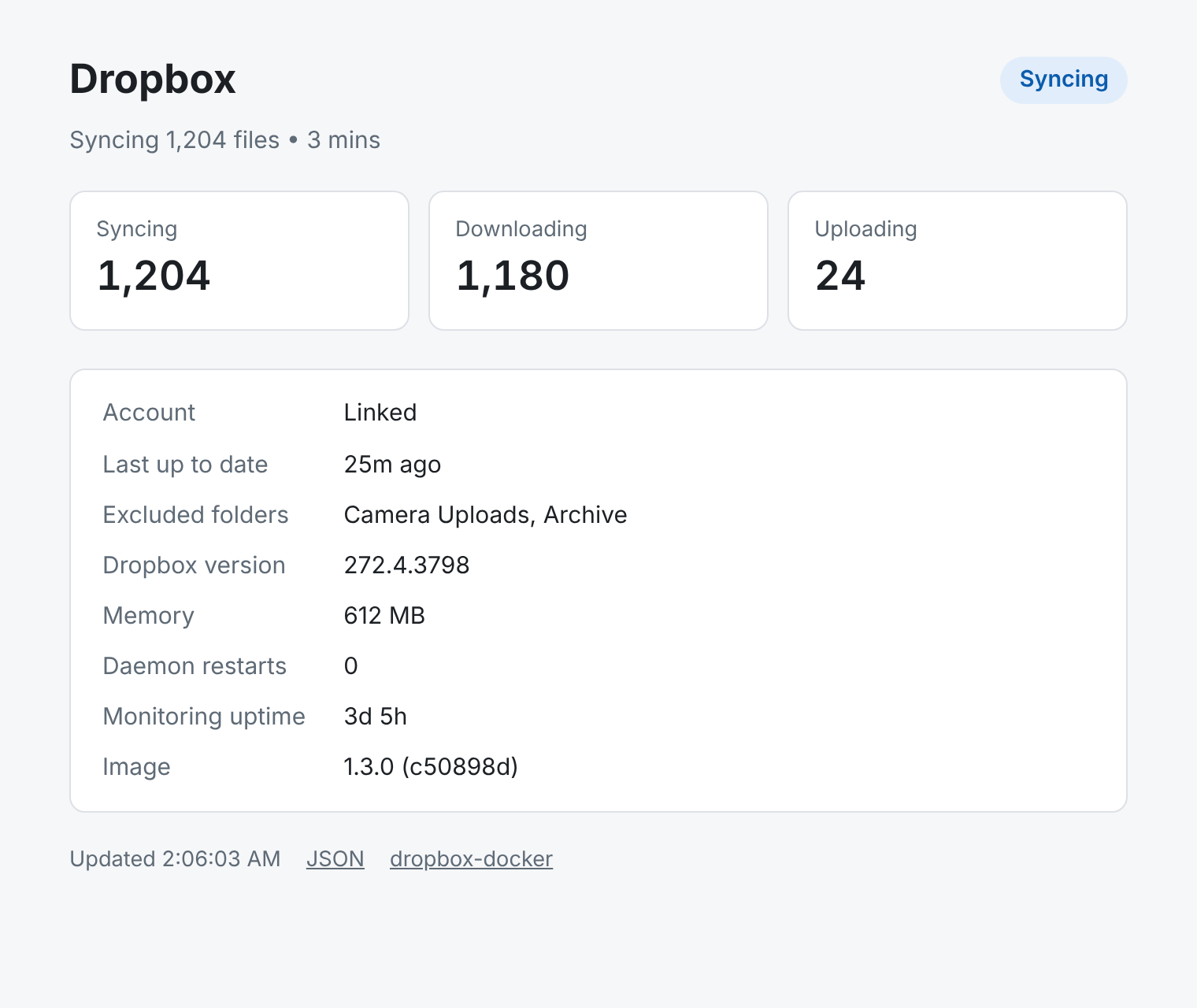
Open the WebUI for a status page showing sync progress, account link, memory and restarts.
Features: status page, process supervision, Docker HEALTHCHECK, JSON status API, Prometheus metrics, telemetry crash fix, graceful shutdown, large account support.
By Islam ElTayar — https://itayar.com
Readme
View on GitHubdropbox-docker
 Latest release
Docker Pulls
Docker Image
OpenSSF Scorecard
License: MIT
Run the official Dropbox client on your server, NAS or homelab, in Docker. It's built for unattended use, including accounts with a million files or more: it supervises and restarts the daemon, shuts down cleanly, fixes the permission problems that usually stop Dropbox from syncing in a container, and tells you in plain words when something is wrong.
Features
- Always the current Dropbox client. The official daemon is downloaded on every start, so it never falls behind.
- Supervised. If the daemon crashes it's restarted, up to a limit.
docker stopshuts it down cleanly in about a second. - Status page and metrics. A web page (shown above), a JSON API and Prometheus metrics.
- Permissions handled. The sync folder is made writable for the Dropbox user. Files that other users drop into it (root over SSH, scripts) are fixed so they sync, or left alone on shared NAS setups (
OWNERSHIP_FIX_MODE). - Telemetry crash fix. The daemon has a known Rust panic in its analytics code that crashes it while indexing large accounts. The container blocks the telemetry endpoint and locks the analytics folders, so it can't happen.
- Clear diagnostics. The log says when the sync folder isn't writable, when a path is on a filesystem Dropbox doesn't support (Unraid's
/mnt/user), and where each linked account actually syncs to. - Least privilege. The daemon runs as an unprivileged user, and the container works with
cap_drop: ALLplus five capabilities. - Tested. Unit and end-to-end tests run on every change, and every image is scanned for vulnerabilities before it's published.
Quick start
Unraid
- Download the template to your flash drive (Unraid terminal):
wget -O /boot/config/plugins/dockerMan/templates-user/my-Dropbox.xml \ https://raw.githubusercontent.com/islamdiaa/dropbox-docker/main/unraid-template.xml - Go to Docker → Add Container and pick Dropbox from the template list.
- Set Dropbox sync folder to a direct disk path such as
/mnt/disk1/Dropboxor/mnt/cache/Dropbox, not/mnt/user/.... See Running on Unraid. - Click Apply, then link your account. The WebUI entry in the container's menu opens the status page.
Docker Compose
services:
  dropbox:
    image: islamdiaa/dropbox-docker:latest
    container_name: dropbox
    restart: unless-stopped
    volumes:
      - dropbox-config:/opt/dropbox          # account link, settings, daemon
      - /srv/dropbox:/opt/dropbox/Dropbox    # your files: change this path
    environment:
      TZ: Europe/London
      DROPBOX_UID: "1000"                    # owner of /srv/dropbox
      DROPBOX_GID: "1000"
      ENABLE_MONITORING: "true"              # status page on port 8001
    ports:
      - "8001:8001"
    cap_drop:
      - ALL
    cap_add:
      - CHOWN
      - SETUID
      - SETGID
      - FOWNER
      - DAC_OVERRIDE

volumes:
  dropbox-config:
A fuller example with comments is in docker-compose.yml. Images before 1.2.0 also needed the KILL capability with cap_drop: ALL (#11); current images don't.
docker run
docker run -d --name dropbox --restart unless-stopped \
  -v dropbox-config:/opt/dropbox \
  -v /srv/dropbox:/opt/dropbox/Dropbox \
  -e DROPBOX_UID=1000 -e DROPBOX_GID=1000 \
  -e ENABLE_MONITORING=true -p 8001:8001 \
  islamdiaa/dropbox-docker
Link your account
The first time it starts, the container prints a link in its log:
docker logs -f dropbox
# This computer isn't linked to any Dropbox account...
# Please visit https://www.dropbox.com/cli_link_nonce?nonce=... to link this device.
Open the link in a browser and sign in. Syncing starts right away, and the link is remembered across restarts and updates. Don't share that link: anyone who opens it can link their own Dropbox account to your server.
Status page and monitoring
Set ENABLE_MONITORING=true (the Unraid template does this) and the container serves:
| Port | Path | What it returns |
|---|---|---|
| 8001 | / |
The status page |
| 8001 | /status |
JSON: sync state, transfer counts, account link, versions, memory, restarts, errors |
| 8001 | /health |
{"healthy": true} with HTTP 200, or {"healthy": false} with HTTP 503 when the daemon isn't running |
| 8000 | /metrics |
Prometheus metrics |
Example /status response:
{
  "healthy": true,
  "status": "syncing",
  "raw_status": "Syncing 1,204 files • 3 mins",
  "sync": {"syncing": 1204, "downloading": 1180, "uploading": 24},
  "account": {"linked": true},
  "daemon": {"version": "272.4.3798", "uptime_seconds": 277200, "memory_mb": 612.4, "restart_count": 0},
  "last_sync": 1791680000.0,
  "last_error": null,
  "excluded_folders": ["Camera Uploads"],
  "image": {"version": "1.3.0", "revision": "c50898d226606e10cbc82995bc3645c700151104"}
}
Prometheus metrics:
| Metric | Meaning |
|---|---|
dropbox_status |
Current state: starting, syncing, indexing, up to date, sync_error, not running, unknown |
dropbox_num_syncing, dropbox_num_downloading, dropbox_num_uploading |
Files in flight |
dropbox_daemon_up |
1 while the daemon process is running |
dropbox_daemon_memory_bytes |
Resident memory of the daemon |
dropbox_daemon_restarts |
Times the container has restarted the daemon |
scrape_configs:
  - job_name: dropbox
    static_configs:
      - targets: ['dropbox:8000']
The endpoints have no authentication and are meant for your LAN. They never show your email or name, but they do show file and folder names: the excluded folders, the file Dropbox is currently syncing, and the file named in the last sync error. To keep them off your network, don't publish the ports, or publish them on the host only (127.0.0.1:8001:8001). Don't expose them to the internet; put them behind a reverse proxy with authentication if you need remote access.
The image also has a Docker HEALTHCHECK that reports unhealthy when the daemon isn't running, whether or not monitoring is enabled.
Configuration
All configuration is through environment variables. None are required.
Identity
| Variable | Default | What it does |
|---|---|---|
DROPBOX_UID |
1000 |
User ID the daemon runs as. Match it to the owner of your sync folder. |
DROPBOX_GID |
1000 |
Group ID. Same idea. |
TZ |
UTC |
Timezone for log timestamps. |
Behavior
| Variable | Default | What it does |
|---|---|---|
SKIP_SET_PERMISSIONS |
true |
When true, skips the recursive chown of /opt/dropbox at startup. Turn it off only if you need everything re-owned: it takes a long time on large folders. |
DROPBOX_SKIP_UPDATE |
(unset) | Set to anything to keep the installed Dropbox client instead of downloading the latest on start. |
POLLING_INTERVAL |
5 |
Seconds between dropbox status checks. Status is logged only when it changes. |
OWNERSHIP_FIX_MODE |
full |
How the container repairs ownership in the sync folder. full: files not owned by DROPBOX_UID are changed to DROPBOX_UID:DROPBOX_GID. group-only: only the group is set to DROPBOX_GID; each file keeps its owner. disabled: ownership and permissions in the sync folder are never changed. |
OWNERSHIP_FIX_INTERVAL |
86400 |
Ownership is repaired at startup, whenever Dropbox reports a file it can't sync, and every this many seconds as a safety net (minimum 60). Each pass walks the whole sync folder in the background at idle CPU and disk priority. |
Reliability
| Variable | Default | What it does |
|---|---|---|
DROPBOX_MAX_RESTARTS |
5 |
How many times to restart a crashed daemon before the container gives up and exits (your restart policy then restarts the container). |
DROPBOX_RESTART_DELAY |
10 |
Seconds to wait between restart attempts. |
DROPBOX_STARTUP_TIMEOUT |
300 |
Seconds to wait for the daemon to initialize. Large accounts need more. |
Monitoring
| Variable | Default | What it does |
|---|---|---|
ENABLE_MONITORING |
false |
Serves the status page and JSON API on port 8001 and Prometheus metrics on port 8000. |
Volumes and ports
| Path / port | What it's for |
|---|---|
/opt/dropbox |
Home of the Dropbox user: config in .dropbox, the client in bin. Map it to keep everything in one place. |
/opt/dropbox/.dropbox |
Account link and settings. Map at least this, or /opt/dropbox, to stay linked across updates. |
/opt/dropbox/Dropbox |
Your synced files. |
/opt/dropbox/bin |
The Dropbox client (about 150 MB). Optional: map it when you map .dropbox and Dropbox separately and want to keep the client across image updates. Otherwise it is downloaded again after each update, which needs dropbox.com to be reachable. |
8001 |
Status page and JSON API (with ENABLE_MONITORING=true) |
8000 |
Prometheus metrics (with ENABLE_MONITORING=true) |
17500 |
Dropbox LAN sync (optional) |
Running on Unraid
- Map
/opt/dropbox/.dropbox(the account link and settings) to appdata, e.g./mnt/user/appdata/dropbox. If Dropbox asks you to link again after every restart, use a direct path such as/mnt/cache/appdata/dropboxinstead: Dropbox keeps SQLite databases there, which don't do well on Unraid's FUSE share layer. The log warns you about this. - Map
/opt/dropbox/Dropboxto a direct disk path (e.g./mnt/disk1/Dropboxor/mnt/cache/Dropbox). Do NOT use/mnt/user/Dropbox: Dropbox doesn't support FUSE filesystems and won't sync. The log warns you about this too. - Keep
DROPBOX_UID=99andDROPBOX_GID=100(Unraid'snobody:users). The container makes sure the sync folder is writable by that user, even if Docker created it as root. - Set the Dropbox share to Use cache: No. With caching on, files written to
/mnt/user/Dropboxland on the cache drive first, and the container, which mounts the disk path, won't see them until the mover runs. - If your Dropbox is large, make sure Docker's image file has room for the client and its index.
- Using a Dropbox Business account? See Dropbox Business and team folders.
Dropbox Business and team folders
The image maps a single sync folder at /opt/dropbox/Dropbox. A personal account always syncs there, but a Dropbox Business (team) account may use a differently named folder, such as /opt/dropbox/Acme Inc Dropbox. Once you've linked, the log shows where each account syncs to:
Dropbox business account (team) syncs to: /opt/dropbox/Acme Inc Dropbox
WARNING: /opt/dropbox/Acme Inc Dropbox is not the mapped sync folder /opt/dropbox/Dropbox, ...
If you see that warning, map /opt/dropbox itself to a folder on your storage instead of the two separate volumes. Config and the sync folder then both live under that one host folder, whatever Dropbox names it:
    volumes:
      - /mnt/tank/dropbox:/opt/dropbox   # sync folder appears as /mnt/tank/dropbox/<name>
Business accounts haven't been tested as widely as personal ones. A dedicated, non-admin team member account that can only see the folders you want on the NAS is the safest choice.
Shared NAS permissions (TrueNAS, Synology, multi-user SMB shares)
By default the container takes ownership of any file in the sync folder that isn't owned by DROPBOX_UID. That's what you want for a single-user folder. On a share where several users own files and Dropbox gets access through a shared group or ACL, set:
OWNERSHIP_FIX_MODE=group-onlyto keep each file's owner and only set its group toDROPBOX_GID, orOWNERSHIP_FIX_MODE=disabledto never touch ownership or permissions in the sync folder.
Example for TrueNAS SCALE, with a dedicated dropbox service user (UID 3001) in a shared media group (GID 3000) that the dataset ACL grants full access:
services:
  dropbox:
    image: islamdiaa/dropbox-docker:latest
    container_name: dropbox
    restart: unless-stopped
    environment:
      TZ: America/Detroit
      DROPBOX_UID: "3001"
      DROPBOX_GID: "3000"
      OWNERSHIP_FIX_MODE: "disabled"
    volumes:
      - /mnt/pool/apps/dropbox:/opt/dropbox
    cap_drop:
      - ALL
    cap_add:
      - CHOWN
      - SETUID
      - SETGID
      - FOWNER
      - DAC_OVERRIDE
Handling large accounts
With 500K+ files, a few things help:
- Give it memory. The daemon keeps an in-memory index; 4 GB is a reasonable starting point. The status page shows how much it uses.
- Increase the startup timeout, since initial indexing takes a while:
DROPBOX_STARTUP_TIMEOUT=600. - Make sure the host allows enough inotify watches. Dropbox needs one per folder in your account. The limit is set on the host, per user, and shared with every other container running as the same UID; the container log warns if it's below 100,000. Newer kernels scale the default with RAM, older ones use 8192.
- Unraid: set Max Watches in the Tips and Tweaks plugin (it survives reboots).
- Other hosts:
echo "fs.inotify.max_user_watches=1048576" | sudo tee /etc/sysctl.d/90-inotify.conf
sudo sysctl --system
- Keep
SKIP_SET_PERMISSIONS=true(the default). Achown -Rover a million files on every start is slow. - Use a longer polling interval to save CPU:
POLLING_INTERVAL=30. - Leave
OWNERSHIP_FIX_INTERVALat its daily default. Each ownership pass reads every file's metadata, so frequent passes keep disks busy and, on Unraid, awake.
Troubleshooting
The account linked but nothing syncs. Read the container log from the start:
ERROR: Sync folder /opt/dropbox/Dropbox is not writable by UID ...: the folder's permissions on the host don't letDROPBOX_UIDwrite. Fix its owner or permissions, or setDROPBOX_UID/DROPBOX_GIDto match its owner.WARNING: The sync folder is on a FUSE filesystem: on Unraid, use/mnt/diskX/...or/mnt/cache/...instead of/mnt/user/....WARNING: ... is not the mapped sync folder: see Dropbox Business and team folders.
You can also ask the daemon directly:
docker exec dropbox gosu dropbox dropbox status
Dropbox isn't responding! The command-line tool gives up after 5 seconds, which happens while the daemon is busy, e.g. indexing a large account. It isn't an error by itself; the log only warns if it lasts 5 minutes.
Dropbox asks to be linked again after a restart. Make sure the config (/opt/dropbox/.dropbox, or /opt/dropbox) is on a persistent volume, and on Unraid on a direct path rather than /mnt/user (the log warns about this). Since 1.2.0, docker stop shuts the daemon down cleanly; older images could kill it mid-write when POLLING_INTERVAL was longer than Docker's 10-second stop timeout.
Several Dropbox processes / new link URLs keep appearing. This was #11, fixed in 1.2.0. Update the image.
Reporting a problem. The first log line shows the image version, e.g. dropbox-docker 1.3.0 (revision c50898d). Include it, and the log from the start, in a bug report. Remove the cli_link_nonce link first.
FAQ
Does it run on ARM (Raspberry Pi, Apple Silicon)?
No. Dropbox only publishes its Linux client for x86_64, so the image is linux/amd64 only.
Can I choose which folders sync? Yes, with Dropbox's selective sync. Paths are inside the container:
docker exec dropbox gosu dropbox dropbox exclude add "/opt/dropbox/Dropbox/Camera Uploads"
docker exec dropbox gosu dropbox dropbox exclude list
docker exec dropbox gosu dropbox dropbox exclude remove "/opt/dropbox/Dropbox/Camera Uploads"
Can I sync more than one Dropbox account? Run one container per account, each with its own config and sync folder.
Which image tag should I use?
| Tag | What you get |
|---|---|
latest |
The newest release. The default, and right for almost everyone. |
stable |
The same image as latest. |
X.Y (e.g. 1.5) |
The newest release in that series, including monthly security rebuilds. |
X.Y.Z (e.g. 1.5.1) |
Exactly that release. Never changes, so it gets no security rebuilds. |
development |
Every change as soon as it is merged, before it is released. Tested by CI, but may contain unfinished work. |
How do I update?
Pull the new image and recreate the container (on Unraid: apply update). The Dropbox client itself updates every time the container starts, unless DROPBOX_SKIP_UPDATE is set. Your account stays linked as long as the config volume is kept.
How do I unlink or switch accounts?
Stop the container, delete the contents of the config folder (/opt/dropbox/.dropbox), start it again and link with the new account. Also remove the old device under Security in your Dropbox account settings.
How it works
flowchart TD
    start([Container starts]) --> validate[Validate settings, map UID and GID]
    validate --> perms[Make config and sync folder writable, warn about FUSE paths]
    perms --> telemetry[Block telemetry, lock analytics folders]
    telemetry --> update[Download the latest Dropbox client]
    update --> launch[Start dropboxd as the dropbox user]
    launch --> loop{Supervision loop}
    loop -- daemon running --> work[Log status changes, repair ownership in the background]
    work --> loop
    loop -- daemon exited --> restart[Restart it, up to DROPBOX_MAX_RESTARTS]
    restart --> loop
    stop([docker stop]) --> term[Forward SIGTERM, wait for the daemon, exit 0]
The entrypoint runs as root only to map IDs and fix permissions; the daemon runs as the unprivileged dropbox user via gosu. Nothing in the container needs the KILL capability: the daemon is watched through /proc, and signals are sent as the dropbox user when root can't.
Security
- The Dropbox daemon runs as an unprivileged user; the container needs no
--privileged, nodocker.sockand no host networking. - Every setting is validated before use.
- Images are scanned with Trivy before publishing; the code is analyzed by CodeQL; the repository is checked by OpenSSF Scorecard; all CI actions are pinned to commit SHAs.
- The Dropbox client is downloaded from
dropbox.comover HTTPS at runtime. Dropbox doesn't publish checksums for it, so its integrity can't be verified beyond TLS.
See SECURITY.md for the trust model and how to report a vulnerability privately.
Development
git clone https://github.com/islamdiaa/dropbox-docker.git
cd dropbox-docker
make lint        # ShellCheck and hadolint
make test-unit   # no Docker needed
make test        # unit tests, then build the image and run the E2E suite
The E2E tests start real containers and download the Dropbox client, so they need Docker and internet access. See CONTRIBUTING.md for details and the release process. Changes are listed in CHANGELOG.md.
Acknowledgments
Originally inspired by otherguy/docker-dropbox and janeczku/dropbox. This project is a ground-up rewrite focused on reliability for large-scale sync.
Author
Islam ElTayar. I built this for my own homelab, and I'm sharing it in case it helps yours.
License
MIT. See LICENSE.
Download Statistics
Related apps
Explore more like this
Explore allLinks
Details
islamdiaa/dropbox-dockerRuntime arguments
- Web UI
http://[IP]:[PORT:8001]/- Network
bridge- Shell
bash- Privileged
- false
- Extra Params
--restart unless-stopped --ulimit nofile=1048576:1048576 --add-host telemetry.dropbox.com:127.0.0.1
Template configuration
Where your Dropbox files live. Must be a direct disk path (not /mnt/user).
- Target
- /opt/dropbox/Dropbox
- Default
- /mnt/disk1/Dropbox
- Value
- /mnt/disk1/Dropbox
Persistent config and account data. If Dropbox asks you to link again after restarts, use a direct path such as /mnt/cache/appdata/dropbox.
- Target
- /opt/dropbox/.dropbox
- Default
- /mnt/user/appdata/dropbox
- Value
- /mnt/user/appdata/dropbox
Optional. Keeps the Dropbox client (about 150 MB) across container updates, e.g. /mnt/user/appdata/dropbox-client. Leave empty to download it again after each update.
- Target
- /opt/dropbox/bin
UID for file ownership (99 = nobody on Unraid).
- Target
- DROPBOX_UID
- Default
- 99
- Value
- 99
GID for file ownership (100 = users on Unraid).
- Target
- DROPBOX_GID
- Default
- 100
- Value
- 100
Container timezone.
- Target
- TZ
- Default
- America/New_York
- Value
- America/New_York
Skip recursive chown on startup. Recommended for large accounts.
- Target
- SKIP_SET_PERMISSIONS
- Default
- true
- Value
- true
Seconds to wait for daemon initialization. Increase for very large accounts.
- Target
- DROPBOX_STARTUP_TIMEOUT
- Default
- 600
- Value
- 600
How many times to restart the daemon on crash before giving up.
- Target
- DROPBOX_MAX_RESTARTS
- Default
- 20
- Value
- 20
Seconds between status checks.
- Target
- POLLING_INTERVAL
- Default
- 30
- Value
- 30
full: chown files in the sync folder not owned by User ID. group-only: only set their group. disabled: never change ownership.
- Target
- OWNERSHIP_FIX_MODE
- Default
- full
- Value
- full
Serve the status page and JSON API (port 8001) and Prometheus metrics (port 8000).
- Target
- ENABLE_MONITORING
- Default
- true
- Value
- true
Dropbox LAN sync discovery port.
- Target
- 17500
- Default
- 17500
- Value
- 17500
Prometheus metrics port (only if monitoring enabled).
- Target
- 8000
Status page (WebUI) and JSON API. Needs monitoring enabled.
- Target
- 8001
- Default
- 8001
- Value
- 8001