
All apps · 0 apps

dostalgia
Docker app from Selfhosters
Overview
Readme
View on GitHubDOStalgia 🕹️
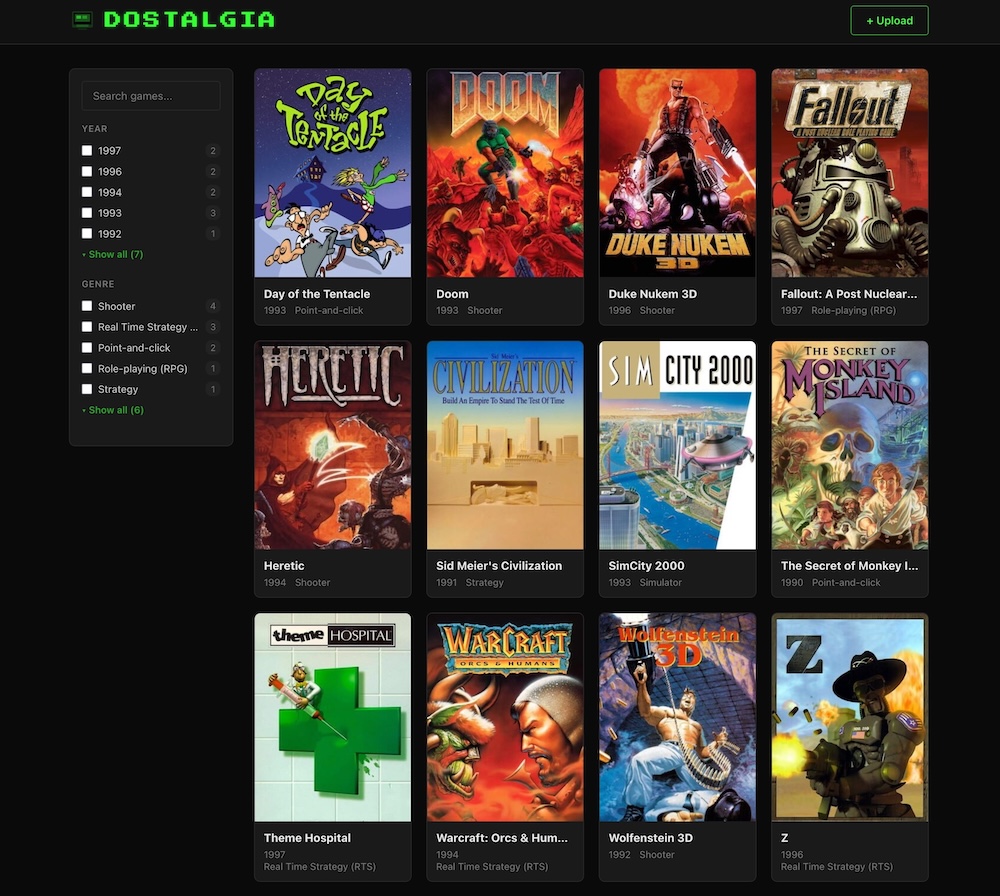
A nostalgic DOS game hub. Upload your old DOS games, auto-scrape artwork and metadata from IGDB, and play them directly in your browser via js-dos (DOSBox compiled to WebAssembly).
Library view
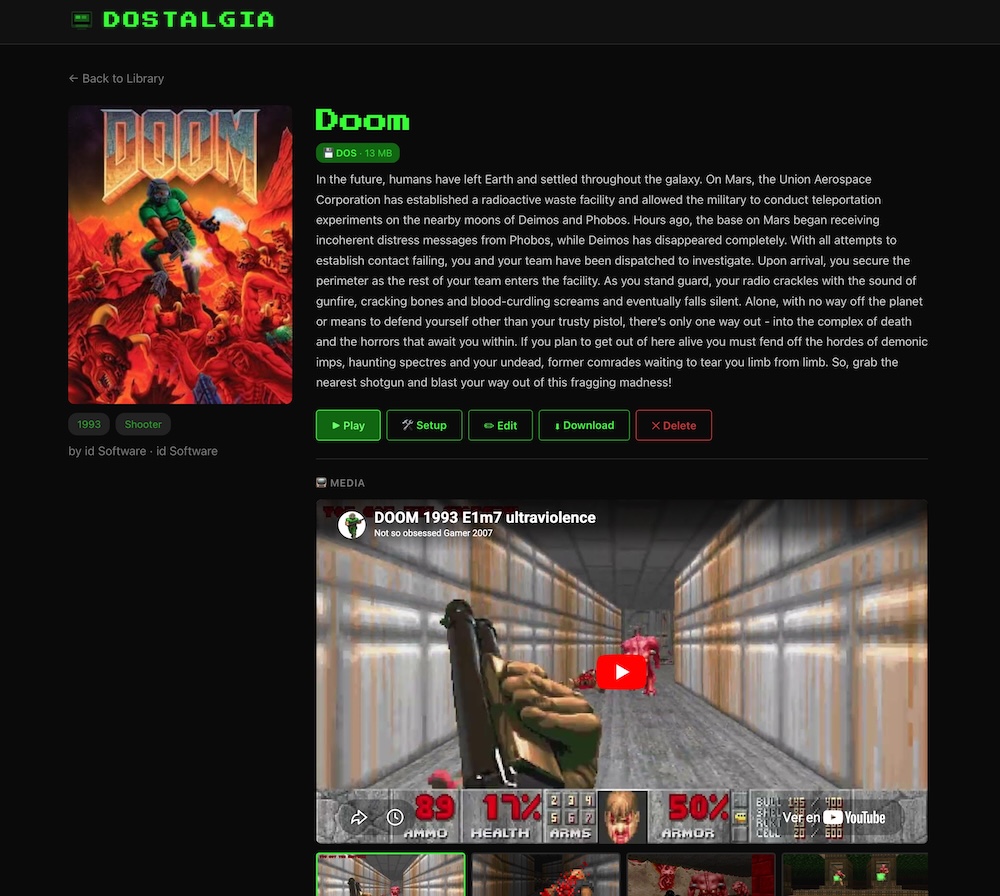
Game detail view
Features
🎮 Play in the browser
Every uploaded game is packaged into a .jsdos bundle — a standard ZIP with embedded DOSBox configuration. When you hit Play, js-dos v8 is loaded from CDN and starts the emulator instantly in your browser. No plugins, no native installs.
Saves are automatic — in-game saves (js-dos FS changes) are persisted to the server (data/saves/). Come back from any browser or device and pick up where you left off.
📦 Handles any file structure
DOS games come in all shapes. DOStalgia handles them transparently:
- Flattening — If your ZIP has a single root directory (e.g.
doom/with all files inside), the extractor flattens it so the game files sit at the bundle root. No extra nesting. - Subdirectory games — If files are deeper, the autoexec automatically
cds to the right directory before launching the executable. - CD images — Games shipped on CD-ROM often need the disc mounted. DOStalgia detects
.iso,.cue,.img,.ccd, and.binfiles, fixes broken CloneCD.cuereferences (where the referenced.binis actually.img), and mounts them in bothdosbox.confandjsdos.json. - CD-only games — If the archive contains only CD images with no executable, a CD-only bundle is created that mounts the disc and drops you at the DOS prompt.
- Hardcoded paths —
ConfigPatcherscans game config files for hardcoded absolute paths (e.g.C:\FALLOUT1\MASTER.DAT) that broke after flattening, and rewrites them to relative paths.
Other solutions such as RomM generate raw ZIP bundles and require you to write your own dosbox.conf with manual mount and imgmount commands. DOStalgia automates all of this for you.
🔍 Smart executable detection
On upload, DOStalgia scans every .exe, .com, and .bat file and picks the best candidate as the main executable using a scoring system:
- Not an installer — INSTALL/SETUP/CONFIG executables are deprioritised
- DOS executables — Pure DOS apps are preferred over Windows ones
- Larger files — Bigger executables are more likely to be the game
- Shallow depth — Files closer to the root are preferred
- Self-extractor filtering — PKZIP/PKSFX stubs are filtered out
All discovered executables are stored and available in the Edit page, where you can pick a different one via radio buttons.
Again, RomM requires you to manually specify the executable in a custom dosbox.conf, while DOStalgia detects and configures it for you.
⚠️ Cache note: If you change the executable, the
.jsdosbundle is patched in-place. Your browser may serve a cached version of the old bundle — if the game doesn't launch with the new executable, hard-refresh the play page (Ctrl+Shift+R / Cmd+Shift+R).
🛠 One-click Setup launcher
Many DOS games include a SETUP.EXE, INSTALL.EXE, or CONFIG.EXE used to configure sound, controls, and graphics. When DOStalgia detects one:
- A 🛠 Setup button appears on the game detail page
- Clicking it launches the setup executable without modifying the main game bundle
- The setup bundle is generated on-the-fly by the server — a modified
.jsdosis streamed with the setup executable in the autoexec, then discarded. Nothing is written to disk.
This is not supported in RomM, where you would have to run the setup manually from the DOS prompt every time.
🪟 Windows game detection
DOSBox can't run Windows executables. DOStalgia's PlatformDetector reads MZ/PE/NE headers to detect Windows executables:
- The game detail page shows a 🪟 Requires Windows 3.1 badge
- The Play button is disabled with "Unplayable" text
- If you click Play anyway, a warning overlay explains the limitation with a Try anyway fallback
- Setup executables that are Windows-native are also filtered out from the Setup button
📡 IGDB metadata & media
DOStalgia integrates with IGDB (via Twitch OAuth2) to auto-populate game info:
- Auto Scrape — On upload, DOStalgia searches IGDB by title and fills in year, genre, developer, publisher, description, and cover art. If IGDB finds a DOS result, it prioritises it.
- Manual Search — From the game detail page you can search IGDB by any query, browse results with cover thumbnails and DOS badges, and apply the one you want.
- Media — Videos (YouTube embeds) and screenshots (1080p) are fetched and displayed in a scrollable media gallery with a preview player.
Setup:
- Go to https://dev.twitch.tv/console/apps → Register Your Application
- Name:
dostalgia(or anything), OAuth Redirect URL:http://localhost, Category: Other - Copy the Client ID and generate a Client Secret
- Provide them via environment variables:
| Method | How |
|---|---|
| Docker run | -e TWITCH_CLIENT_ID=xxx -e TWITCH_CLIENT_SECRET=yyy |
| Docker Compose | Copy .env.example to .env and fill in the values |
| Local dev | export TWITCH_CLIENT_ID=xxx TWITCH_CLIENT_SECRET=yyy |
IGDB features degrade gracefully — if credentials aren't set, uploads and metadata editing still work, just without auto-scrape.
Quick Start
With Docker Compose (easiest)
# 1. (Optional) Enable IGDB metadata auto-scrape
cp .env.example .env
# Edit .env with your Twitch credentials (see IGDB section below)

# 2. Pull & run
docker compose up -d
With Docker
docker run -p 8765:8765 -v $(pwd)/data:/data \
  -e TWITCH_CLIENT_ID=your_id \
  -e TWITCH_CLIENT_SECRET=your_secret \
  droideparanoico/dostalgia
Development (without Docker)
Terminal 1 — Frontend dev server:
cd frontend && npm install && npm run dev
Terminal 2 — Quarkus dev server:
mvn quarkus:dev
Open http://localhost:5173 (Vite proxies API calls to Quarkus on port 8765)
Production build (local)
cd frontend && npm install && npm run build
mvn package -DskipTests
java -jar target/quarkus-app/quarkus-run.jar
Architecture
- Backend: Quarkus (Java 21, JAX-RS) — REST endpoints, zero external database
- Frontend: Svelte 5 SPA with hash-based routing
- Emulation: js-dos v8 loaded from CDN, runs DOSBox in WebAssembly
- Storage: JSON-per-game under
/data/games/{id}/game.json - Saves:
data/saves/on the server (js-dos FS-changes bundles, synced via/api/games/{id}/saves)
Install Dostalgia on Unraid in a few clicks.
Find Dostalgia in Community Apps on your Unraid server, review the template, and click Install. Unraid handles the Docker app or plugin setup from the published template.
Categories
Download Statistics
Related apps
Explore more like this
Explore allLinks
Details
droideparanoico/dostalgiaRuntime arguments
- Web UI
https://[IP]:[PORT:8765]/- Network
bridge- Privileged
- false
Template configuration
- Target
- /data
- Default
- /mnt/user/appdata/dostalgia
- Value
- /mnt/user/appdata/dostalgia
- Target
- 8765
- Default
- 8765
- Value
- 8765
- Target
- DOSTALGIA_DATA_DIR
- Default
- /data
- Value
- /data
- Target
- TWITCH_CLIENT_ID
- Target
- TWITCH_CLIENT_SECRET