
All apps · 0 apps

documenso
OfficialDocker app from Eurotimmy's Repository
Overview
Readme
View on GitHub
The Open Source DocuSign Alternative.
Learn more »
Discord
·
Website
·
Documentation
·
Issues
·
Upcoming Releases
·
Roadmap






About Documenso
Signing documents digitally should be fast and easy and should be the best practice for every document signed worldwide. This is technically quite easy today, but it also introduces a new party to every signature: The signing tool providers. While this is not a problem in itself, it should make us think about how we want these providers of trust to work. Documenso aims to be the world's most trusted document-signing tool. This trust is built by empowering you to self-host Documenso and review how it works under the hood.
Join us in creating the next generation of open trust infrastructure.
Recognition


Community and Next Steps 🎯
- Try Documenso by self-hosting it or signing up at documenso.com.
- Tell us what you think in the Discussions.
- Join the Discord server for any questions and getting to know other community members.
- ⭐ the repository to help us raise awareness.
- Open detailed issues to report bugs or propose features.
Contributing
Note: We no longer accept external pull requests, aside from a small group of trusted contributors we reach out to directly. The best way to contribute is through detailed issues. Read Why We're Pausing External Pull Requests for the reasoning.
- Documenso stays open source. You can read, audit, run, and fork the code.
- To report issues or propose changes, see our contribution guide.
Contact us
Contact us if you are interested in our Enterprise plan for large organizations that need extra flexibility and control.

Tech Stack


- TypeScript - Language
- React Router v7 - Framework
- Hono - Server
- Prisma - ORM
- Tailwind CSS - CSS
- shadcn/ui + Radix UI - Component Library
- react-email - Email Templates
- Lingui - Internationalization
- tRPC - API
- @libpdf/core - PDF Signatures
- pdf.js - Viewing PDFs
- @cantoo/pdf-lib - PDF manipulation
- Stripe - Payments
- Biome - Linting & Formatting
- Playwright - E2E Testing
Local Development
Requirements
To run Documenso locally, you will need
- Node.js (v24 or above)
- Postgres SQL Database
- Docker (optional)
Developer Quickstart
Note: This is a quickstart for developers. It assumes that you have both docker and docker-compose installed on your machine.
Want to get up and running quickly? Follow these steps:
- Fork this repository to your GitHub account.
After forking the repository, clone it to your local device by using the following command:
git clone https://github.com/<your-username>/documenso
Set up your
.envfile using the recommendations in the.env.examplefile. Alternatively, just runcp .env.example .envto get started with our handpicked defaults.Run
npm run dxin the root directory- This will spin up a postgres database and inbucket mailserver in a docker container.
Run
npm run devin the root directoryWant it even faster? Just use
npm run d
Access Points for Your Application
App - http://localhost:3000
Incoming Mail Access - http://localhost:9000
Database Connection Details
- Port: 54320
- Connection: Use your favorite database client to connect using the provided port.
Developer Setup
Manual Setup
Follow the manual setup guide to configure Documenso on your local machine.
Run in Gitpod
- Click below to launch a ready-to-use Gitpod workspace in your browser.

Run in DevContainer
We support DevContainers for VSCode. Click here to get started.
Video walkthrough
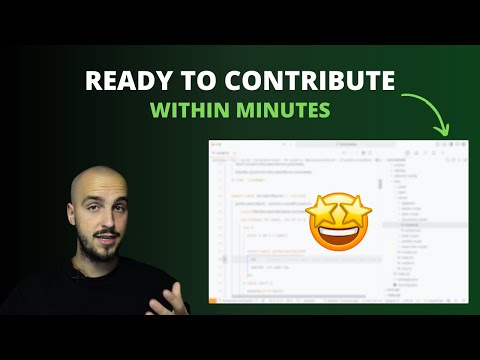
If you're a visual learner and prefer to watch a video walkthrough of setting up Documenso locally, check out this video:
Docker
We provide official Docker images on DockerHub and GitHub Container Registry.
For setup instructions, see the Docker Deployment and Docker Compose guides.
Self Hosting
We support a variety of deployment methods including Docker, Docker Compose, Railway, Kubernetes, and manual deployment.
For full instructions, requirements, and configuration details, see the Self Hosting documentation.
One-Click Deploys
[!NOTE] Want to see another provider listed here? Please open a provider request instead of a PR so the community can signal interest. PRs adding deploy badges without a prior issue will be closed.

|

|

|

|
Security
If you believe you have found a security vulnerability in Documenso, please report it through our Security Policy. We prioritize private reports via GitHub Security Advisories. See SECURITY.md for scope and details.
Troubleshooting
For troubleshooting self-hosted deployments, see the Troubleshooting guide and Tips & Common Pitfalls.
I'm not receiving any emails when using the developer quickstart.
When using the developer quickstart, an Inbucket server will be spun up in a docker container that will store all outgoing emails locally for you to view.
The Web UI can be found at http://localhost:9000, while the SMTP port will be on localhost:2500.
I can't see environment variables in my package scripts.
Wrap your package script with the with:env script like such:
npm run with:env -- npm run myscript
The same can be done when using npx for one of the bin scripts:
npm run with:env -- npx myscript
This will load environment variables from your .env and .env.local files.
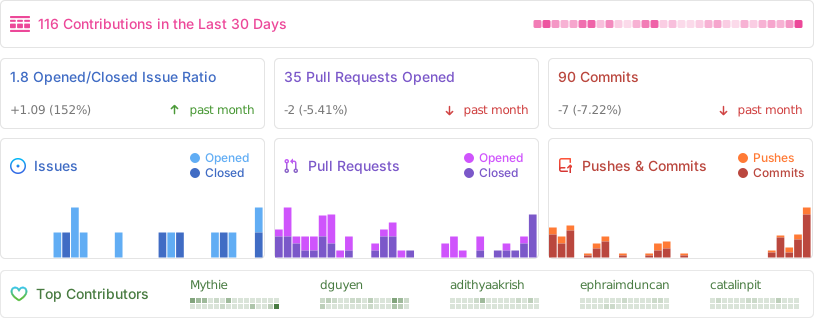
Repo Activity
Categories
Download Statistics
Total Downloads Over Time
Related apps
Explore more like this
Explore allDetails
ghcr.io/documenso/documenso:latestRuntime arguments
- Web UI
http://[IP]:[PORT:3000]/- Network
bridge- Shell
sh- Privileged
- false
- Extra Params
--restart unless-stopped
Template configuration
Web UI / API port (container 3000 → host)
- Target
- 3000
- Default
- 3000
- Value
- 3000
Public base URL used in links/emails (no trailing slash)
- Default
- https://documenso.example.com
Canonical public URL for Auth.js/NextAuth (no trailing slash)
Trust reverse proxy headers for Auth.js (true when behind NPM)
- Default
- true
- Value
- true
Disable self-service /signup (true = staff invite/guest signing only)
- Default
- true
- Value
- false
Long random secret for Auth.js/NextAuth (≥32 chars)
Primary encryption key for stored secrets (≥32 chars)
Primary DB URL (with pooling)
- Default
- postgresql://user:pass@host:5432/db?sslmode=prefer
- Value
- postgresql://user:pass@host:5432/db?sslmode=prefer
Direct DB URL (no pooling; migrations/long queries)
- Default
- postgresql://user:pass@host:5432/db?sslmode=prefer
- Value
- postgresql://user:pass@host:5432/db?sslmode=prefer
Email transport (smtp-auth | smtp-api | resend | mailchannels)
- Default
- smtp-auth
- Value
- smtp-auth
SMTP host (smtp-auth)
- Default
- smtp.example.com
- Value
- smtp.example.com
SMTP port (smtp-auth; 587 STARTTLS or 465 SSL/TLS)
- Default
- 587
- Value
- 587
SMTP username (smtp-auth)
SMTP password/app password (smtp-auth)
Email 'From' display name
- Default
- Documenso
- Value
- Documenso
Email 'From' address
- Default
- no-reply@example.com
- Value
- no-reply@example.com
Host path to PKCS#12 certificate
- Target
- /opt/documenso/signing
- Default
- /mnt/user/appdata/documenso/cert.p12
- Value
- /mnt/user/appdata/documenso/cert.p12
Signing transport (local or cloud provider)
- Default
- local
- Value
- local
Secondary encryption key (for key rotation; optional)
true = SSL/TLS (465), false = STARTTLS (587)
- Default
- false
- Value
- false
Passphrase for the .p12 signing certificate (if set)
Override signing cert path inside container (default /opt/documenso/cert.p12)
- Default
- /opt/documenso/cert.p12
Upload backend: database or s3
- Default
- database
- Value
- database
S3 endpoint URL (if using S3/compatible)
Force path-style S3 URLs (true/false)
- Default
- false
- Value
- false
S3 region
- Default
- us-east-1
- Value
- us-east-1
S3 bucket name
S3 access key ID
S3 secret access key
Internal listening port (normally 3000; don’t change)
- Default
- 3000
- Value
- 3000
Max document upload size shown in UI (MB)
- Default
- 25
- Value
- 25