
All apps · 0 apps

Docling-Serve
Docker app from xxBeanSproutxx's Repository
Overview
Docling is an open-source toolkit (from IBM Research) that converts documents (PDF, DOCX, images, HTML, etc.) into structured Markdown or JSON. It's great for RAG and local document processing.
Highlights
- Multi-format parsing with layout understanding and table extraction.
- Simple API + optional Web UI.
- Runs locally on your Unraid box; keep your data private.
Default Endpoints
- API:
http://[IP]:[PORT:5001] - Docs:
http://[IP]:[PORT:5001]/docs - Web UI:
http://[IP]:[PORT:5001]/ui(setDOCLING_SERVE_ENABLE_UI=1)
First-Run Model Download
- On a fresh install the models directory will be empty. Docling must download RapidOCR and other artifacts on first boot.
- Make sure
DOCLING_SERVE_ENABLE_REMOTE_SERVICESis set totruefor the very first start so downloads can reach upstream model hosts (e.g. modelscope.cn). - After the first successful start and model cache is populated, you may set
DOCLING_SERVE_ENABLE_REMOTE_SERVICESback tofalseif you prefer a fully local-only deployment. - Keep
DOCLING_SERVE_LOAD_MODELS_AT_BOOT=trueso any download failures show up immediately in startup logs rather than at first OCR request.
Persistent Paths
- Models/artifacts are persisted in appdata so restarts do not re-download everything.
- If logs show
artifacts_path is set to an invalid directory, verify the models path exists and matchesDOCLING_SERVE_ARTIFACTS_PATH.
Readme
View on GitHub

Docling Serve
Running Docling as an API service.
- Learning how to configure the webserver
- Get to know all runtime options of the API
- Explore useful deployment examples
- And more
[!NOTE] Migration to the
v1API. Docling Serve now has a stable v1 API. Read more on the migration to v1.
Getting started
Install the docling-serve package and run the server.
# Using the python package
pip install docling-serve
docling-serve run --enable-ui

# Using container images, e.g. with Podman
podman run -p 5001:5001 -e DOCLING_SERVE_ENABLE_UI=1 quay.io/docling-project/docling-serve
The server is available at
- API http://127.0.0.1:5001
- API documentation http://127.0.0.1:5001/docs
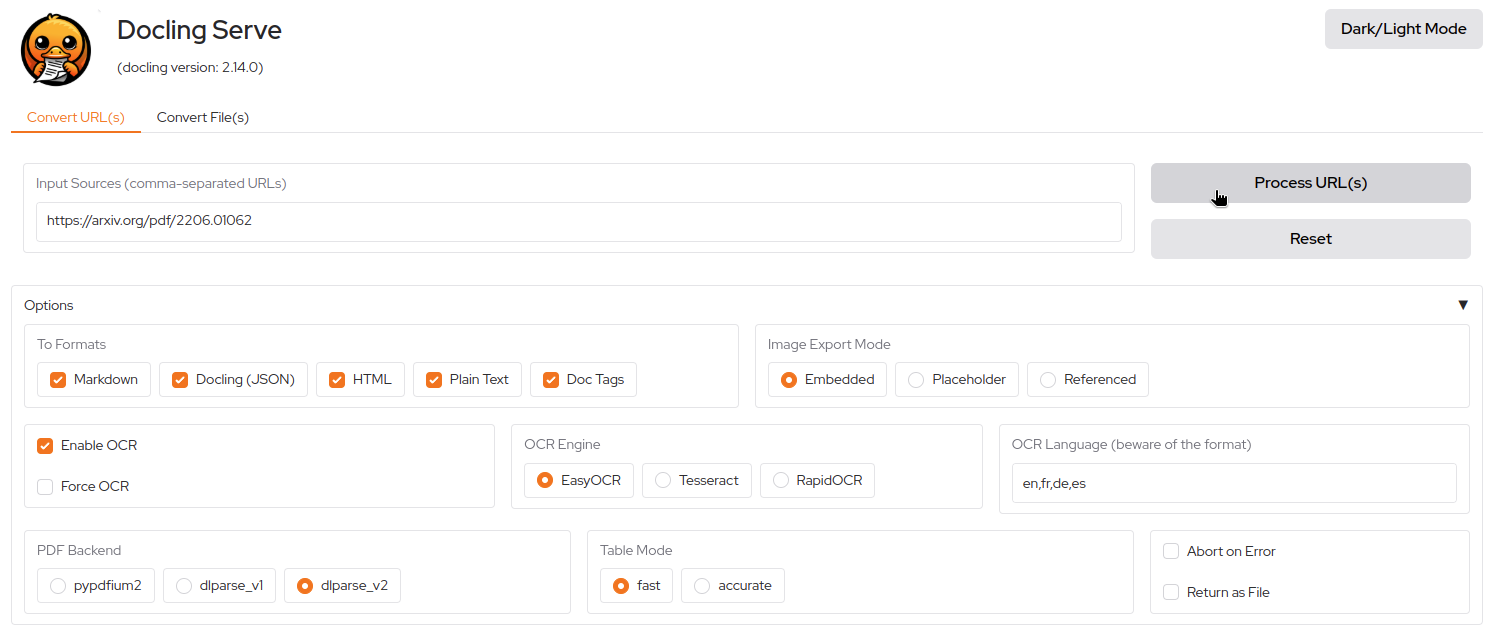
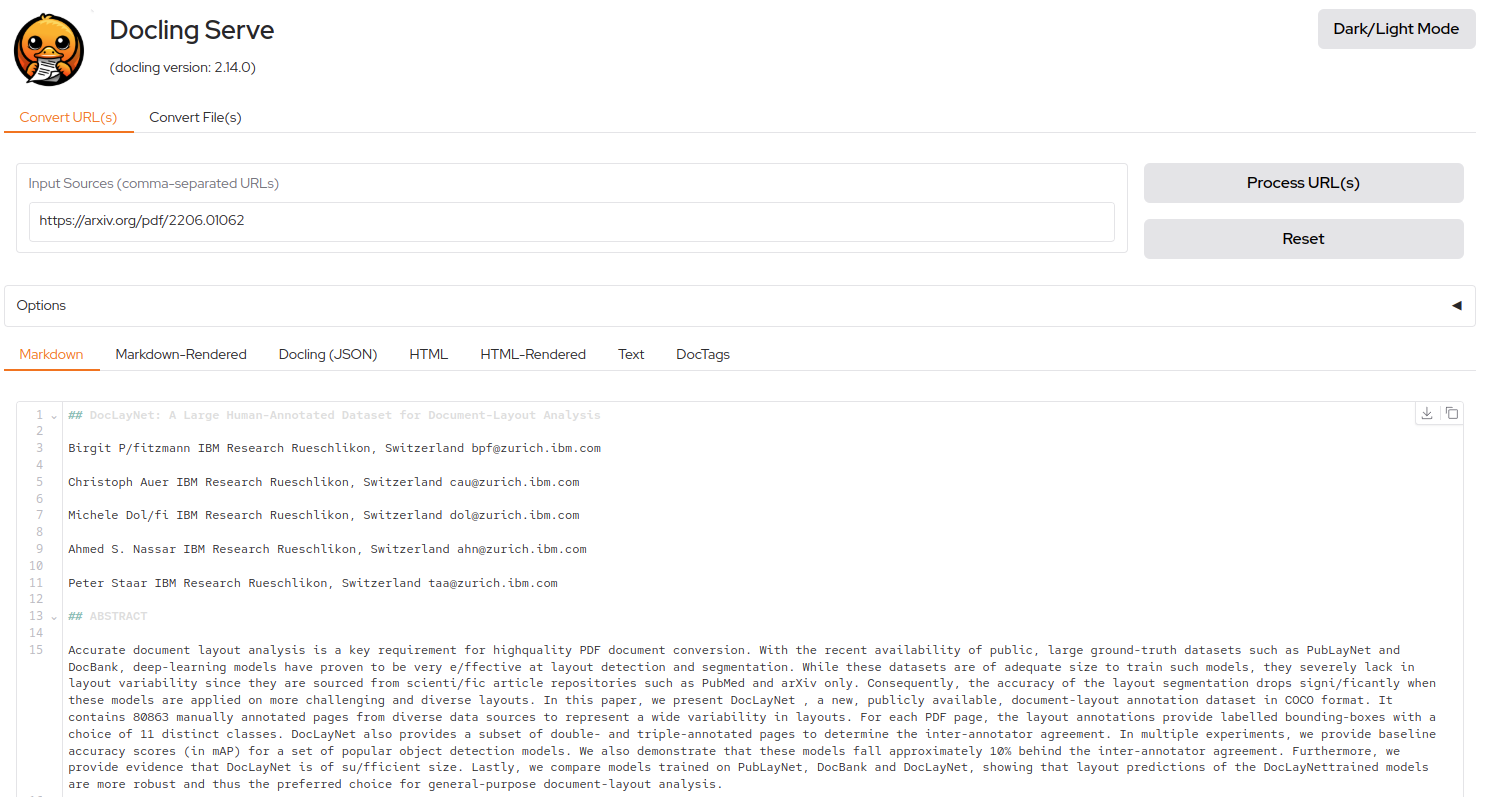
- UI playground http://127.0.0.1:5001/ui
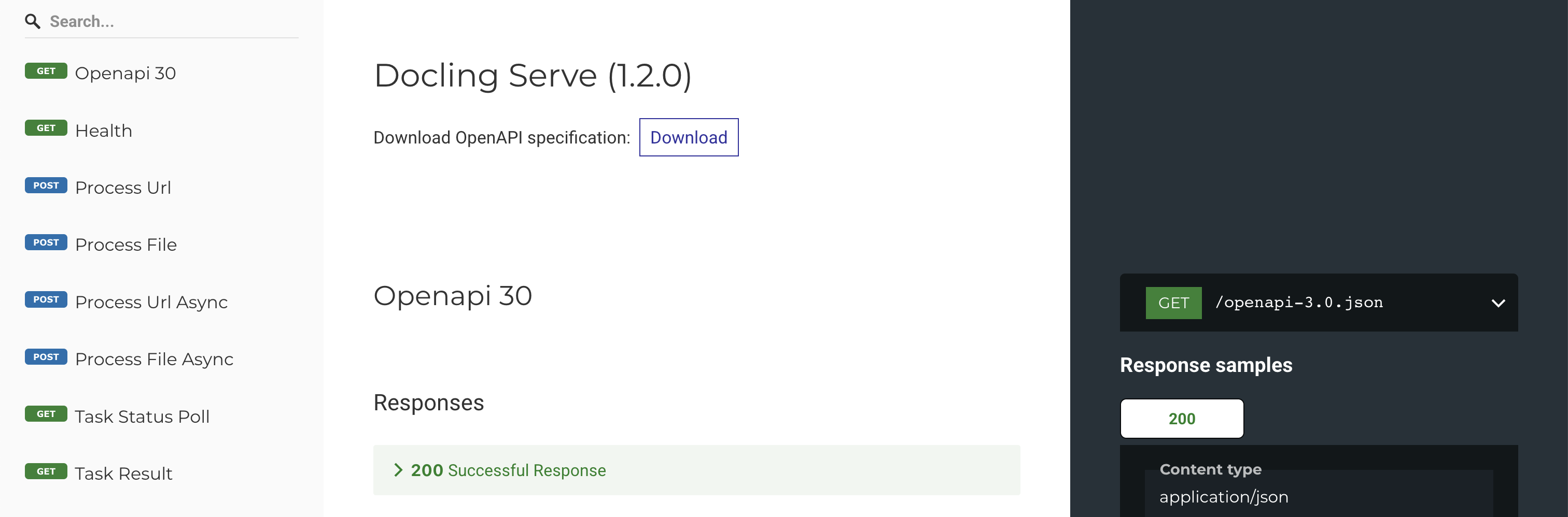
Try it out with a simple conversion:
curl -X 'POST' \
  'http://localhost:5001/v1/convert/source' \
  -H 'accept: application/json' \
  -H 'Content-Type: application/json' \
  -d '{
    "sources": [{"kind": "http", "url": "https://arxiv.org/pdf/2501.17887"}]
  }'
Container Images
The following container images are available for running Docling Serve with different hardware and PyTorch configurations:
📦 Distributed Images
| Image | Description | Architectures | Size |
|---|---|---|---|
ghcr.io/docling-project/docling-serve quay.io/docling-project/docling-serve |
Base image with all packages installed from the official PyPI index. | linux/amd64, linux/arm64 |
4.4 GB (arm64) 8.7 GB (amd64) |
ghcr.io/docling-project/docling-serve-cpu quay.io/docling-project/docling-serve-cpu |
CPU-only variant, using torch from the PyTorch CPU index. |
linux/amd64, linux/arm64 |
4.4 GB |
ghcr.io/docling-project/docling-serve-cu128 quay.io/docling-project/docling-serve-cu128 |
CUDA 12.8 build with torch from the cu128 index. |
linux/amd64 |
11.4 GB |
ghcr.io/docling-project/docling-serve-cu130 quay.io/docling-project/docling-serve-cu130 |
CUDA 13.0 build with torch from the cu130 index. |
linux/amd64, linux/arm64 |
TBD |
[!IMPORTANT] CUDA Image Tagging Policy
CUDA-specific images (
-cu128,-cu130) follow PyTorch's CUDA version support lifecycle and are tagged differently from base images:
- Base images (
docling-serve,docling-serve-cpu): Tagged withlatestandmainfor convenience- CUDA images (
docling-serve-cu*): Only tagged with explicit versions (e.g.,1.12.0) andmainWhy? CUDA versions are deprecated over time as PyTorch adds support for newer CUDA releases. To avoid accidentally pulling deprecated CUDA versions, CUDA images intentionally exclude the
latesttag. Always use explicit version tags like:# ✅ Recommended: Explicit version docker pull quay.io/docling-project/docling-serve-cu130:v1.18.0 # ❌ Not available for CUDA images docker pull quay.io/docling-project/docling-serve-cu130:latest
🚫 Not Distributed
An image for AMD ROCm 6.3 (docling-serve-rocm) is supported but not published due to its large size.
To build it locally:
git clone --branch main git@github.com:docling-project/docling-serve.git
cd docling-serve/
make docling-serve-rocm-image
For deployment using Docker Compose, see docs/deployment.md.
Coming soon: docling-serve-slim images will reduce the size by skipping the model weights download.
Demonstration UI
An easy to use UI is available at the /ui endpoint.
Get help and support
Please feel free to connect with us using the discussion section.
Contributing
Please read Contributing to Docling Serve for details.
References
If you use Docling in your projects, please consider citing the following:
@techreport{Docling,
  author = {Docling Contributors},
  month = {1},
  title = {Docling: An Efficient Open-Source Toolkit for AI-driven Document Conversion},
  url = {https://arxiv.org/abs/2501.17887},
  eprint = {2501.17887},
  doi = {10.48550/arXiv.2501.17887},
  version = {2.0.0},
  year = {2025}
}
License
The Docling Serve codebase is under MIT license.
IBM ❤️ Open Source AI
Docling has been brought to you by IBM.
Requirements
**CPU-only deployments**
- Select the `cpu` branch (`quay.io/docling-project/docling-serve-cpu`) for CPU-only operation.
- `DOCLING_DEVICE=cpu` is a runtime hint; it does NOT replace choosing the CPU image branch.
**GPU deployments (NVIDIA, optional)**
- Install the NVIDIA Driver plugin and reboot.
- Add `--gpus all` in Extra Parameters.
- If GPU is detected but jobs still run on CPU, try branch `cu126` (better compatibility on some older driver stacks) or update NVIDIA drivers.
- Optional: set `DOCLING_DEVICE=cuda` (or `cuda:0`) to force GPU execution.
Categories
Related apps
Explore more like this
Explore allDetails
quay.io/docling-project/docling-serveRuntime arguments
- Web UI
http://[IP]:[PORT:5001]/ui- Network
bridge- Shell
sh- Privileged
- false
Template configuration
Docling Serve API/UI port
- Target
- 5001
- Default
- 5001
Persistent Docling model artifacts (required; must exist and be writable; must match DOCLING_SERVE_ARTIFACTS_PATH)
- Target
- /opt/app-root/src/.cache/docling/models
- Default
- /mnt/user/appdata/docling/models
Persistent HuggingFace cache
- Target
- /opt/app-root/src/.cache/huggingface
- Default
- /mnt/user/appdata/docling/huggingface_cache
Caches OCR models
- Target
- /opt/app-root/.EasyOCR
- Default
- /mnt/user/appdata/docling/easyocr_cache
Enable the /ui playground (1/0)
- Target
- DOCLING_SERVE_ENABLE_UI
- Default
- 1
Preload/download models at startup (recommended for easier first-run diagnostics).
- Target
- DOCLING_SERVE_LOAD_MODELS_AT_BOOT
- Default
- true
Allow remote model/service calls. Enabled by default so first-run model downloads work automatically. Set to false after initial setup if you prefer fully offline operation.
- Target
- DOCLING_SERVE_ENABLE_REMOTE_SERVICES
- Default
- true
Directory used by Docling to load/store model artifacts
- Target
- DOCLING_SERVE_ARTIFACTS_PATH
- Default
- /opt/app-root/src/.cache/docling/models
Runtime device: auto, cpu, cuda, cuda:0, mps. Use 'auto' to let Docling decide. For CPU-only, select the cpu image branch above.
- Target
- DOCLING_DEVICE
- Default
- auto
VLM used for image-to-text
- Target
- DOCLING_SERVE_IMAGE_TO_TEXT_MODEL
- Default
- HuggingFaceTB/SmolVLM-256M-Instruct
Figure/diagram classifier
- Target
- DOCLING_SERVE_PICTURE_CLASSIFICATION_MODEL
- Default
- ds4sd/DocumentFigureClassifier
- Default
- 99
- Default
- 100
- Default
- all
- Default
- compute,utility