
DockMon
Docker app from TeeCodeDev's Repository
Overview
DockMon is a comprehensive, self-hosted Docker container monitoring and management platform. Monitor local and remote containers in real time with customizable dashboard widgets, intelligent auto-restart logic, multi-channel alerting (Discord, Slack, Telegram, Pushover, Gotify, SMTP), multi-container live log viewing, Compose stack management, and automatic container image updates.
Key Features:
- Multi-Host Monitoring: Monitor containers across unlimited local and remote Docker hosts with a lightweight Go agent.
- Real-Time Dashboard & Stats: Drag-and-drop customizable widgets with WebSocket-streamed CPU, memory, and network metrics.
- Intelligent Auto-Restart: Per-container auto-restart policy with exponential backoff and retry tracking.
- Multi-Channel Alerting: Real-time alerts to Discord, Slack, Telegram, Pushover, Gotify, or Email with customizable alert rules and blackout windows.
- Stack Management: Create, edit, and deploy Docker Compose stacks with image pull progress.
- Automatic Updates: Schedule automatic image updates or trigger one-click updates with webhooks.
- Multi-User & SSO/OIDC: Group-based RBAC with custom groups, granular permissions, and OIDC single sign-on (Authentik, Keycloak, Okta, Authelia).
Initial Setup:
- Open the WebUI at [inline]https://[IP]:[PORT:443]/[/inline] after starting the container (accept the self-signed SSL certificate).
- Create your administrator account on the initial setup screen. Local Docker socket access is pre-configured.
Credits & Support:
- DockMon is created by darthnorse ([url=https://github.com/darthnorse/dockmon]GitHub[/url]). Support the developer at [url=https://buymeacoffee.com/darthnorse]Buy Me a Coffee[/url].
- The donation link below specifically supports the maintenance of this Unraid template repository.
Readme
View on GitHubDockMon
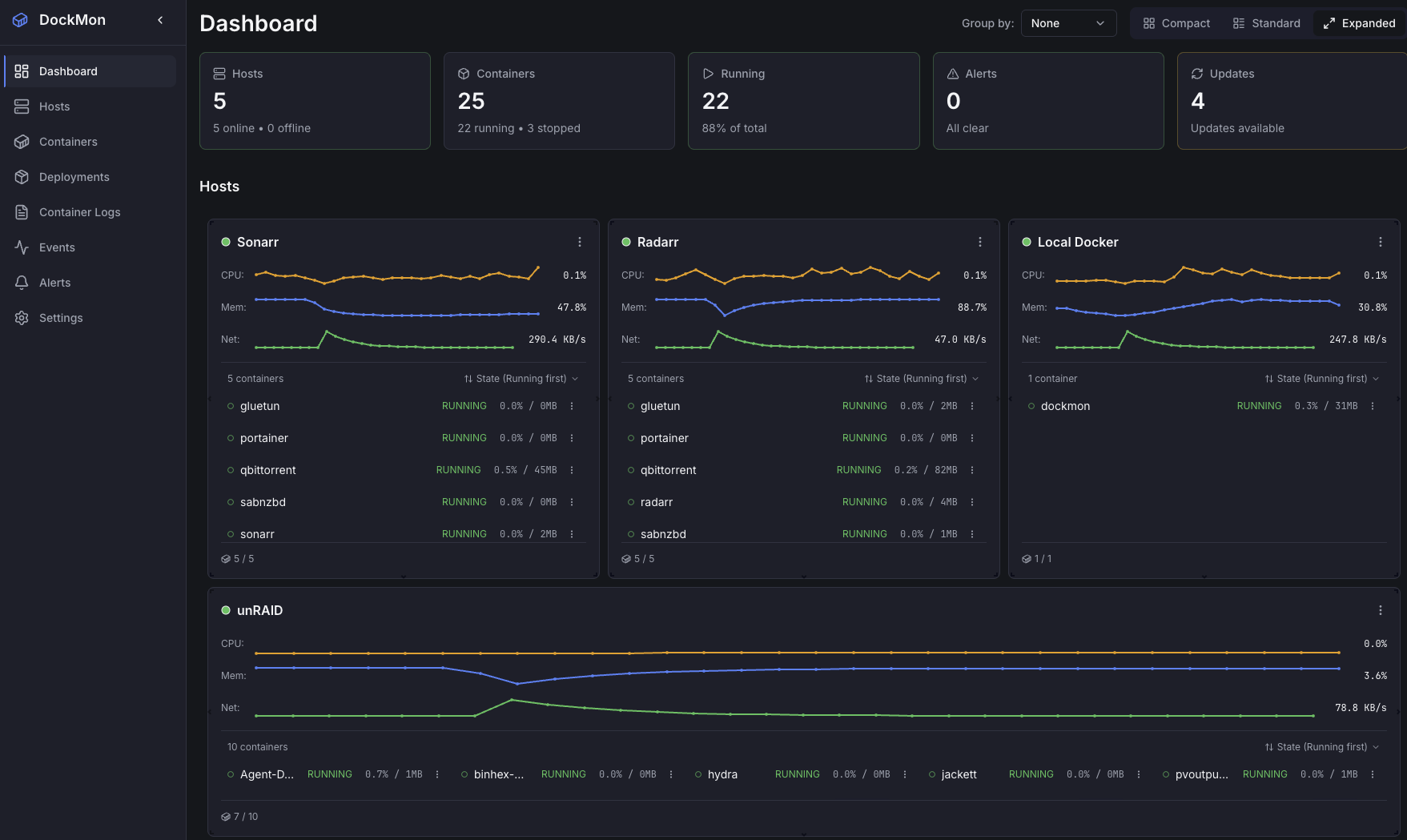
A comprehensive Docker container monitoring and management platform with real-time monitoring, intelligent auto-restart, multi-channel alerting, and complete event logging.







Key Features
- Multi-Host Monitoring - Monitor containers across unlimited Docker hosts (local and remote)
- Agent-Based Remote Monitoring - Lightweight Go agent for secure remote Docker monitoring without exposing Docker ports. Runs as a container or systemd service
- Real-Time Dashboard - Drag-and-drop customizable widgets with WebSocket updates
- Real-Time Statistics - Live CPU, memory, network metrics
- Historical Stats - Optional time-series persistence for CPU, memory, and network metrics with retention up to 90 days. Browse historical charts in host and container modals via a time-range selector (5m / 1h / 24h / 7d / 30d / 60d / 90d). Disabled by default (privacy); opt in from Settings → System
- Real-Time Container Logs - View logs from multiple containers simultaneously with live updates
- Event Viewer - Comprehensive audit trail with filtering, search, and real-time updates
- Intelligent Auto-Restart - Per-container auto-restart with configurable retry logic
- Advanced Alerting - Discord, Slack, Telegram, Pushover, Gotify, SMTP with customizable templates
- Container Tagging - Automatic tag derivation from Docker labels with user-defined tags
- Bulk Operations - Start, stop, restart multiple containers simultaneously with progress tracking
- Stack Management - Create, edit, and deploy Docker Compose stacks to local and remote hosts. Import existing stacks from running containers or host filesystems, with real-time deployment progress and layer-by-layer image pull tracking
- Automatic Updates - Detect and execute container image updates on schedule
- HTTP/HTTPS Health Checks - Custom endpoint monitoring with auto-restart on failure
- Blackout Windows - Schedule maintenance periods to suppress alerts
- Multi-User Support - Group-based RBAC with custom groups, granular capabilities, and user management
- OIDC/SSO Integration - Single sign-on with any OIDC provider (Authentik, Keycloak, Okta, Entra ID, Auth0), automatic group sync, and optional user approval workflow
- API Keys - Programmatic access with group-based permissions, optional IP restrictions, and expiration
- Secure by Design - Session-based auth, rate limiting, mTLS for remote hosts, Alpine Linux base
Documentation
- Complete User Guide - Full documentation
- Quick Start - Get started in 5 minutes
- Installation - Docker, unRAID, Synology, QNAP
- Configuration - Alerts, notifications, settings
- Multi-User & OIDC - Users, groups, SSO setup
- Security - Best practices and mTLS setup
- Remote Monitoring - Monitor remote Docker hosts
- Event Viewer - Comprehensive audit trail with filtering
- Container Logs - Real-time multi-container log viewer
- API Reference - REST and WebSocket APIs
- FAQ - Frequently asked questions
- Troubleshooting - Common issues
Support & Community
- Discord Server - Join the community, get help, share tips
- Report Issues - Found a bug?
- Discussions - Ask questions, share ideas
- Wiki - Complete documentation
- Star on GitHub - Show your support!
- Buy Me A Coffee - Support the project
Technology Stack
Backend
- Python 3.13 with FastAPI and async/await
- Alpine Linux 3.x container base (reduced attack surface)
- OpenSSL 3.x for modern cryptography
- SQLAlchemy 2.0 with Alembic migrations
- Go 1.23 stats service for real-time metrics streaming
Frontend
- React 18.3 with TypeScript (strict mode, zero
any) - Vite for fast development builds
- TanStack Table for data tables
- React Grid Layout for dashboard customization
- Tailwind CSS for styling
Infrastructure
- Multi-stage Docker build - Go stats + React frontend + Python backend
- Supervisor for process management
- Nginx reverse proxy with SSL/TLS
- WebSocket for real-time updates
- Health checks for all services
Upgrading from v1 to v2
Breaking Changes
- Alert Rules: Old alert rules must be recreated using the new alert system
- mTLS Certificates: Regenerate certificates due to Alpine's stricter OpenSSL 3.x requirements
- Database Schema: Automatic one-time migration from v1.1.3 to v2.0.0
Data Preserved
- ✅ Hosts and their configurations
- ✅ Containers and container history
- ✅ Event logs and audit trail
- ✅ User accounts and preferences
Post-Upgrade Steps
- Regenerate mTLS certificates for remote hosts (see mTLS Setup Guide)
- Recreate alert rules using the new alert system
- Verify host connections after upgrade
See the Migration Guide for detailed instructions.
Contributing
Contributions are welcome! No CLA required - just submit a PR!
- Report bugs via GitHub Issues
- Suggest features in Discussions
- Improve documentation (edit the Wiki)
- Submit pull requests (see Contributing Guide)
By contributing, you agree your contributions are licensed under the same BSL 1.1 terms as the project.
Development
Want to contribute code or run DockMon in development mode?
See Development Setup for:
- Local development environment setup
- Architecture overview
- Running tests
- Building from source
License
Business Source License 1.1 - see LICENSE file for full details.
What this means:
✅ You can use DockMon:
- For internal use in your company (any size)
- For personal projects
- To monitor your clients' infrastructure as part of consulting/MSP services
- Fork, modify, and customize for your own use
- Contribute improvements back to the project
❌ You cannot:
- Offer DockMon as a SaaS product to third parties
- Embed DockMon in a commercial monitoring platform sold to others
- Provide DockMon hosting as a standalone commercial service
Future Open Source:
After 2 years (Change Date: 2027-01-01), each version automatically converts to Apache License 2.0, becoming fully permissive open source with explicit patent grants.
Commercial Licensing:
Need to use DockMon in a way not permitted by BSL? Contact us for commercial licensing:
- Open an Issue
- Describe your use case
- We'll work with you on licensing terms
Why BSL?
BSL protects the project from direct commercial competition while remaining contributor-friendly:
- No CLAs required - standard GitHub workflow
- Eventually becomes open source - builds community trust
- Allows all legitimate uses - only blocks competitive SaaS offerings
- Used successfully by Sentry, CockroachDB, MariaDB, and other major projects
Author
Created by darthnorse
Acknowledgments
This project has been developed with vibe coding and AI assistance using Claude Code. The codebase includes clean, well-documented code with proper error handling, comprehensive testing considerations, modern async/await patterns, robust database design, and production-ready deployment configurations.
If DockMon helps you, please consider giving it a star or supporting the project!

Media gallery
1 / 4Download Statistics
Related apps
Explore more like this
Explore allDetails
darthnorse/dockmon:latestRuntime arguments
- Web UI
https://[IP]:[PORT:443]/- Network
bridge- Shell
sh- Privileged
- false
Template configuration
The WebUI port for DockMon (internal port is 443 HTTPS).
- Target
- 443
- Default
- 8001
Storage path for DockMon database, settings, SSL certificates, and stack configurations.
- Target
- /app/data
- Default
- /mnt/user/appdata/dockmon
Host Docker socket required for managing and monitoring local containers.
- Target
- /var/run/docker.sock
- Default
- /var/run/docker.sock
Timezone for the container (e.g. Europe/Amsterdam, America/New_York, UTC).
- Target
- TZ
- Default
- Europe/Amsterdam
Optional public URL (e.g. https://dockmon.yourdomain.com) included in alerts for one-click action buttons.
- Target
- DOCKMON_EXTERNAL_URL
Allowed CORS origins if accessing DockMon behind a reverse proxy (e.g. https://dockmon.yourdomain.com).
- Target
- DOCKMON_CORS_ORIGINS
Subpath if running behind a reverse proxy subfolder (e.g. /dockmon/).
- Target
- BASE_PATH
Emergency recovery flag: set to 'true' to force local login if SSO/OIDC misconfiguration locks you out.
- Target
- DOCKMON_FORCE_LOCAL_LOGIN
- Default
- false
Read-only mount of host /proc for accurate local CPU, memory, and IP detection.
- Target
- /host/proc
- Default
- /proc
Read-only mount of host root filesystem for disk space monitoring and low-disk alerts.
- Target
- /host/root
- Default
- /