
Docker Locker
Plugin from chemicalsno
Overview
Readme
View on GitHubDocker Locker for Unraid
 Latest release
License: GPL-2.0
Unraid 7.3+
Lock the Docker containers you don't want updated, then use Update All for everything else.
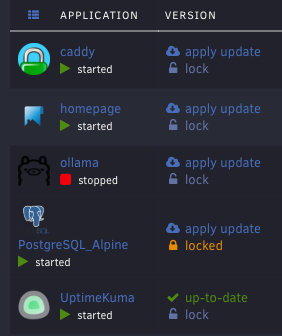
Docker Locker adds a lock toggle to every container on the Docker page. Update All skips locked containers, and updating a locked container on its own asks you to confirm first. You don't need to pin image tags or pick containers from a list every time.
Contents
- Features
- Requirements
- Install
- Use
- What locks don't cover
- Uninstall
- Troubleshooting
- FAQ
- How it works
- Development
- Changelog
- Disclaimer
- License
Features
- Lock toggle on every container. Locked containers show an orange locked label in the update column. Unlocked containers show a grey lock link.
- Update All skips locked containers. The button shows how many containers are locked, for example Update All (2 locked). To see which ones, hover over the button.
- Single updates ask first. If you update a locked container from its apply update link, from the right-click menu on the Docker page, or from the container menu on the Dashboard, a warning asks you to confirm.
- Locks stay current across browser tabs. Before any update, the plugin reads the lock list from the server, so a lock that you set in another tab still applies.
- Locks persist. Locks are stored on the flash drive and survive reboots, plugin updates, and reinstalls.
- Designed to fail closed. If a future Unraid release changes the code that the plugin depends on, the plugin is designed to stop modifying Update All and disable it while any container is locked. If the Docker page changes so much that the plugin can't attach to it, a warning banner says that locks may not apply.

Requirements
- Unraid 7.3.0 or later. The plugin was tested on Unraid 7.3.3 and 7.3.4. Unraid 7.4 betas aren't tested. If a beta changes the code the plugin depends on, the plugin is designed to disable Update All while containers are locked and show a warning banner, to help prevent locked containers from being updated without warning.
- Containers managed by Unraid's Docker page (containers created from an Unraid template). Unraid's own update routine can't update Docker Compose containers, so locks have no effect on them.
Install
From a URL
In the Unraid web UI, go to Plugins > Install Plugin.
Paste the following URL and click Install:
https://raw.githubusercontent.com/chemicalsno/unraid-docker-locker/main/docker.locker.plgReload the Docker page.
From a file
Copy
docker.locker.plgto the flash drive, for example to\\tower\flash\docker.locker.plg.Install it in one of these ways:
In the web UI, go to Plugins > Install Plugin, enter
/boot/docker.locker.plg, and click Install.In the Unraid terminal, run:
plugin install /boot/docker.locker.plg
Reload the Docker page.
The installer copies the plugin file to /boot/config/plugins/, so Unraid reinstalls the plugin at every boot.
Use
Lock a container
- Go to Docker > Docker Containers.
- In the container's update column, click lock.
The label changes to an orange locked. To unlock the container, click locked.
Update everything except locked containers
Click Update All at the bottom of the Docker page. The button and the update window title show how many containers are locked, for example Updating all Containers (2 locked). The count includes every locked container, whether or not it has an update waiting.
If every container with a pending update is locked, Update All is disabled.
Update a locked container anyway
If you click apply update on a locked container, or select Update from its menu on the Docker page or the Dashboard, the following warning appears:
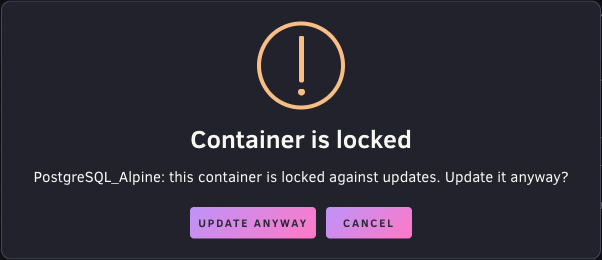
To update the container, click Update anyway. The container stays locked afterward.
What locks don't cover
Locks apply only to updates that you start from the Docker page or the Dashboard in the web UI. The following update paths ignore locks:
- The CA Auto Update Applications plugin.
- The Appdata Backup plugin's option to update containers after a backup.
- Unraid Management Agent and other tools that update containers through an API.
- Compose Manager and other Docker Compose tools.
- The
update_containerscript run from the terminal. docker pullfollowed by recreating a container by hand.
Locks also don't hide Unraid's update ready status or its update notifications for locked containers.
Uninstall
Use one of these methods:
In the web UI, go to Plugins > Installed Plugins and remove docker.locker.
In the Unraid terminal, run:
plugin remove docker.locker.plg
Uninstalling removes the plugin's web UI files. It keeps the lock list at /boot/config/plugins/docker.locker/locked.json, so reinstalling restores your locks. To delete the lock list too, run:
rm -r /boot/config/plugins/docker.locker
Troubleshooting
The lock toggles don't appear
Reload the Docker page to load the plugin's script.
Check that the plugin is installed:
ls /usr/local/emhttp/plugins/docker.lockerThe output lists
DockerLocker.page,include, andjavascript.Open your browser's developer console on the Docker page and look for errors that mention
lock.js.
Update All is disabled and shows a warning
If you hover over Update All and see "Docker Locker does not support this Unraid version", your Unraid release changed the code that the plugin depends on. The plugin disables Update All while any container is locked to help keep it from updating a locked container. To use Update All, unlock all containers or check for a plugin update.
A banner says Docker Locker doesn't support this version of Unraid
The banner appears on the Docker page when containers are locked but the plugin couldn't attach to the page, which happens if an Unraid release redesigns it. Locks might not apply from that page, so check each container before you update it, or check for a plugin update. The banner can't be dismissed. It goes away when you unlock all containers or install a version of the plugin that supports your Unraid release.
"Unable to read the lock list. Nothing was updated."
The plugin couldn't reach its lock endpoint before an update, so it stopped the update. Reload the page and try again. If the error continues, check that the following file exists:
/usr/local/emhttp/plugins/docker.locker/include/Lock.php
A renamed container lost its lock
Locks are stored by container name. If you rename a container, lock it again under its new name. The old name stays in the lock list but has no effect.
FAQ
Why not pin image tags instead?
Pinning a tag, such as postgres:16.4 instead of postgres:latest, changes which image the container runs. A lock leaves the container's configuration alone and only keeps Update All away from it. You can unlock the container at any time and update to whatever its current tag points to.
How is this different from CA Auto Update Applications?
CA Auto Update Applications updates containers on a schedule, and you select which containers it updates. Docker Locker works the other way around: you select which containers to skip, and you keep updating by hand with Update All. The two plugins don't share settings, so CA Auto Update Applications doesn't know about your locks.
Does a lock stop a container from starting or restarting?
No. A lock only affects updates.
How it works
The .plg file contains everything the plugin installs:
DockerLocker.pageis aMenu="Buttons"page. Unraid evaluates these pages in the head of every web UI page. The page outputs the lock list and loadslock.js.javascript/lock.jsreplaces Unraid'supdateAll()andupdateContainer()functions fromdynamix.docker.manager/javascript/docker.js. Before replacing them, it checks that they still match the Unraid 7.3 versions. It adds the lock toggles after each container list load by listening for jQuery'sajaxSuccessevent on theDockerContainers.phprequest.include/Lock.phpreads and writes the lock list at/boot/config/plugins/docker.locker/locked.json. It accepts only names that match Docker's container name rules, and it writes to a temporary file first so that a power loss can't leave a partly written list. The web UI's sign-in and CSRF protection cover the endpoint like any other plugin page.
Development
The tests run lock.js from the .plg file in jsdom against test/fixtures/docker.js, an unmodified copy of docker.js from the 7.3 branch of unraid/webgui.
cd test
npm install
npm test
The tests pin jQuery 3.7.1 because that's the version Unraid bundles in dynamix.js. Don't upgrade it on its own: if Unraid moves to a newer jQuery, the Watch Unraid workflow flags it, and the pin should follow. Dependabot, which opens weekly pull requests to update the GitHub Actions and the other test dependencies, is set to ignore jQuery for the same reason.
To check the plugin against a different Unraid release, point DOCKER_JS at that release's docker.js:
DOCKER_JS=/path/to/docker.js npm test
GitHub Actions runs the tests, checks that the .plg is well-formed XML, and checks the PHP syntax on every push and pull request.
Watching Unraid for changes
Once a week, the Watch Unraid workflow checks the unraid/webgui files that Docker Locker depends on, listed in upstream/watched.json, on the master branch and the newest release branch. If a file has a version that hasn't been reviewed, if code the plugin relies on is missing, or if the tests fail against that branch's docker.js, the workflow opens an issue that links to each change. If that issue is already open, it updates it instead.
To run the check without opening an issue:
node upstream/check.mjs --dry-run
After you review the changes, mark the current versions as reviewed, commit upstream/watched.json, and close the issue:
node upstream/check.mjs --accept
Both commands work without a GitHub token, but GitHub then allows only 60 API requests an hour. To use your token, prefix the command with GITHUB_TOKEN=$(gh auth token).
Before you install a changed .plg file on a server, increase the version entity at the top of the file. The Unraid plugin installer skips a reinstall when the version doesn't change, unless you run plugin install <file> forced.
Releasing a change
Installed copies check the .plg on the main branch for updates, so anything merged into main is offered to every user as an update. Make changes on a separate branch, and merge them into main through a pull request once the tests pass and the change is ready to ship.
- On your branch, increase the
versionentity indocker.locker.plgand add an entry for it to the<CHANGES>section. Versions use Unraid's date format,YYYY.MM.DD, with a letter for later releases on the same day, such as2026.10.25c. - Open a pull request into
main. The Test check fails if the pull request changesdocker.locker.plgwithout increasing the version or adding a<CHANGES>entry. Unraid compares versions as text, and offers an update only when the new version sorts after the installed one. - Merge the pull request after the checks pass. The Release workflow publishes a GitHub release for the new version, with
docker.locker.plgattached and notes taken from the<CHANGES>entries since the previous release.
Changelog
See the <CHANGES> section of docker.locker.plg. The Installed Plugins page shows the same changelog.
Disclaimer
A locked container stays on its current image, so it doesn't get the security fixes or bug fixes in newer images. You're responsible for checking locked containers and updating them when needed. Docker Locker is provided as is, without warranty of any kind. See sections 11 and 12 of the license.
License
Docker Locker is licensed under the GNU General Public License v2.0.
test/fixtures/docker.js is an unmodified copy from the 7.3 branch of unraid/webgui. The file has no license header of its own. Other files in that repository, such as DockerContainers.page, carry a Lime Technology copyright and a GPL-2.0 notice.
Media gallery
Categories
Download Statistics
Downloads by Month
Related apps
Explore more like this
Explore allDetails
https://raw.githubusercontent.com/chemicalsno/unraid-docker-locker/main/docker.locker.plg