
dmOffice
Docker app from Taloan's Repository
Overview
Readme
View on GitHubdmOffice
Deutsch · English
Website: dmoffice.de (in German) – features, guides and news · Source code and issues: here on GitHub
🎉 New in 1.5
- Files: your own file storage with sharing (people and links), previous versions, recycle bin, full-text search with text recognition, a Photos timeline – and Office editing in the browser (Collabora / ONLYOFFICE)
- Invitations to people inside and outside dmOffice, shared calendars, task and shopping lists, note folders
- Meal plan: breakfast, lunch and dinner per week, recipes from your notes, ingredients straight onto the shopping list
- Mail: attach from your files or as a share link, phishing warning, sortable mail list
- Android app: file storage and automatic photo upload, meal plan, drag to move events, checklists you can tick off offline
- Storage quota per user, update safety (backup before data changes), security audit
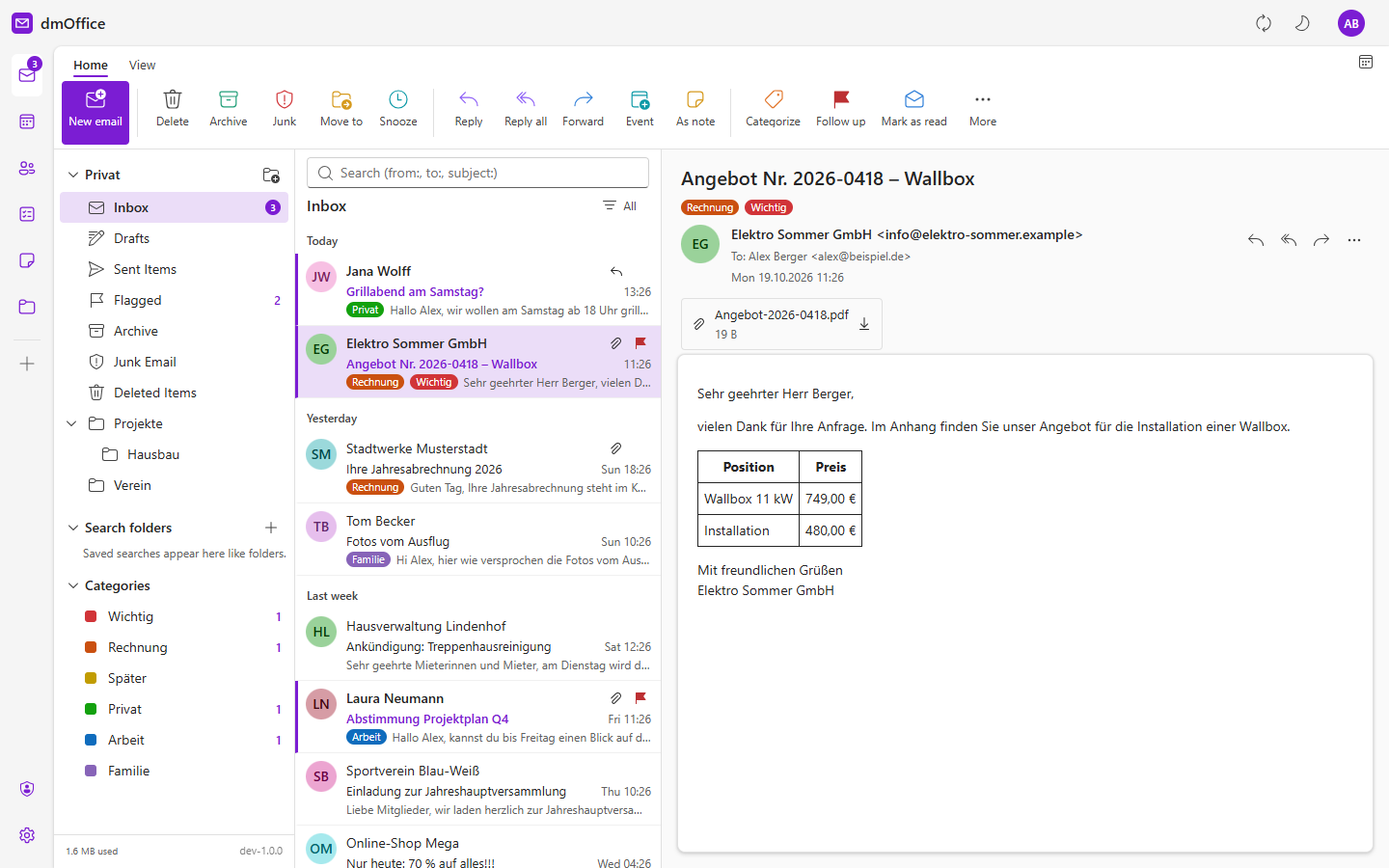
A self-hosted office suite in the browser: mail, calendar, contacts, tasks, notes and files – plus a server of its own. Everything lives in one container, with one encrypted database per user.
| Area | What it does |
|---|---|
IMAP/SMTP, any number of accounts. With local storage, each account keeps everything or the last N months, complete with attachments, in the database. Full-text search (from:, to:, subject:) across all folders and accounts, rules (move, copy, forward, flag, delete), categories, snooze, and a learning junk filter (SpamBayes). Drag and drop onto folders, familiar keyboard shortcuts, remote images blocked, drafts |
|
| Calendar | Day, work week, week, month and list views; recurring events (this one / whole series), reminders, several coloured calendars, invitations by email with replies, calendar subscriptions (webcal://), .ics import/export. Calendars can be shared with other users, and a calendar of type Meal plan gets a weekly planner |
| Contacts | Address books, photos, address suggestions while writing, .vcf import/export |
| Tasks | My Day, Important, Planned and lists – stored as VTODO, so they also show up in any tasks app on your phone. Lists can be shared with other users |
| Notes | The notes from notizi, through its end-to-end encrypted sync folder; dmOffice is one more device, like your phone. Note folders can be shared with other users |
| Files | Your own file storage in the browser and over WebDAV: previews, full-text search (with text recognition for scans and photos), recycle bin, previous versions, folders shared with other users, and share links (view, upload-only drop box, password, expiry). Word, Excel and PowerPoint files can be edited in the browser with an office server you run yourself (Collabora Online or ONLYOFFICE) |
| Android app | Calendar (with meal plan and drag to move), tasks and shopping lists, mail, contacts, notes and files on your phone, with home screen widgets, offline files, checklists you can tick off without a connection, automatic photo upload and “free up space” |
| Server | Its own CalDAV, CardDAV and WebDAV service with app passwords – no extra cloud server needed. Compatible with DAVx⁵, Thunderbird, Apple Calendar/Contacts, the Windows Explorer and Nextcloud desktop/mobile clients |
| Security | Multiple users, one encrypted database per user (SQLCipher), every stored file encrypted on its own, two-factor sign-in (TOTP) with recovery codes |
| Appearance | Light, dark, or follow the system; German and English interface; installable as a PWA |
Manual with screenshots: English · Deutsch · More guides and news (German) on dmoffice.de
Layout
DmOffice.Server/        ASP.NET Core (net10.0) – API, background services, DAV server
  Core/                 users, master key, encrypted per-user database, 2FA
  Mail/                 IMAP sync, local storage, search, rules, spam filter, sending
  Pim/                  calendars, tasks, contacts (storage and web API), sharing, subscriptions
  Dav/                  CalDAV/CardDAV/WebDAV (RFC 4918, 4791, 6352, 6578), files, links
  Notes/                notizi sync (Notizi.Core) over the built-in WebDAV
  Office/               WOPI and ONLYOFFICE integration for editing in the browser
  Search/               full-text index and text recognition (OCR)
web/                    React + Fluent UI 9, FullCalendar
apps/mobile/            Android app (Kotlin, Jetpack Compose)
vendor/Notizi.Core/     copy from notizi – tools/notizi-core-holen.ps1 updates it
DmOffice.Tests/         tests, including notizi as a second device over HTTP
unraid/dmoffice.xml     Unraid template (Community Applications), icon dmoffice.png
ca_profile.xml          Community Applications profile
.github/workflows/      builds the image to ghcr.io/taloan/dmoffice and the Android APK
.gitea/workflows/       builds the image into the registry of a self-hosted Gitea
Configuration
dmOffice is configured with environment variables. Only the master key is really needed.
| Variable | Meaning |
|---|---|
DMOFFICE_MASTER_KEY |
Master key that wraps the database keys, e.g. from openssl rand -hex 32. See Data and keys |
DMOFFICE_DATA |
Data directory. Default /data in the image (data next to the program on Windows) |
DMOFFICE_BLOBS |
Optional: store the contents of the file storage here instead of in <data>/blobs (e.g. a separate volume on the array). Back it up together with the data directory |
DMOFFICE_MS_CLIENT_ID |
Optional: client ID of your own Microsoft app registration for Outlook.com/Hotmail/Live accounts; empty uses the built-in registration, off disables Microsoft sign-in. See Microsoft accounts |
DMOFFICE_TRUSTED_PROXIES |
Optional: comma-separated networks (CIDR) whose X-Forwarded-* headers are trusted, e.g. 203.0.113.0/24,2001:db8::/32. Default: loopback and private networks |
DMOFFICE_ANON_LIMIT |
Optional: rising limit for requests without login, per address (IPv6 per /64). Default: 300 at once, then 240 per minute; whoever exceeds it is blocked for 30 s, and every further violation doubles the block (up to 1 hour). Logged-in requests are never limited. A number sets the requests per minute, off turns the limit off |
DMOFFICE_INDEX_THREADS |
Optional: parallelism of the full-text indexer and text recognition (1–8). Default 1, or 2 with four or more cores |
DMOFFICE_FCM_CREDENTIALS |
Optional: path to a Firebase service-account key for push notifications to the Android app (default <data>/keys/fcm.json). See apps/mobile/README.md |
DMOFFICE_DAV_LOG |
1 logs CalDAV/CardDAV requests for troubleshooting (not the file storage, no passwords) |
TZ |
Time zone of the container (logs) |
The container listens on port 8080 (ASPNETCORE_URLS) and keeps its data in the volume /data. The version shown in the interface is set by the image (DMOFFICE_VERSION).
Data and keys
/data/users.json        login names, password hashes, wrapped database keys, 2FA
/data/users/<id>.db     SQLCipher – everything of one user: settings, mail with attachments,
                        calendars, contacts, notes, app passwords (hashes only), names of the files
/data/blobs/<id>/       contents of the file storage (files, versions, recycle bin, thumbnails), each file
                        encrypted on its own with AES-GCM, key derived from the database's; with DMOFFICE_BLOBS
                        it can live elsewhere (e.g. its own volume on the array)
/data/keys/             keys for the sign-in cookie (and optionally fcm.json)
/data/master.key        only if DMOFFICE_MASTER_KEY is not set
/data/*.json            server settings, shares, share links
Each user database has its own random key. These keys are wrapped with the master key, which comes from the environment variable DMOFFICE_MASTER_KEY; in Unraid it is stored masked in the template on the USB flash drive, not in appdata. Anyone who copies appdata cannot read anything with it. If the variable is missing, dmOffice creates master.key in the data directory and warns in the admin area. If you set the variable later, the next start re-wraps all keys and deletes the file.
Older installations kept file contents inside the database. After an update dmOffice moves them to blobs/ in the background (interruptible; a restart continues). The space in the database is only released by Settings → Storage & statistics → Compact database – nothing starts that by itself. Before every data change dmOffice checks the free space and backs up the databases itself (pre-update/); if there is not enough space it changes nothing and says in the administration how much is missing. Details and the way back: Updating. An image of the whole data directory is still the best insurance.
Losing the master key means losing the data. Keep it safe, for example in a password manager.
Unraid
GitHub Actions builds the image on every push to master as ghcr.io/taloan/dmoffice:latest (a tag v1.2.3 additionally produces :1.2.3 and :1.2).
- Template – search for
dmOfficeunder Apps (Community Applications). Without Community Applications, copydmoffice.xmlfrom Taloan/unraid-templates to the USB flash drive asconfig/plugins/dockerMan/templates-user/my-dmoffice.xml, then Docker → Add Container → TemplatedmOffice. - Install – set
DMOFFICE_MASTER_KEY(openssl rand -hex 32), choose a port (default 8080), Apply. - Set up – open
http://<unraid>:8080/: the first visit creates the admin account.
With plain Docker, compose.yaml does the same: put DMOFFICE_MASTER_KEY in a .env file and run docker compose up -d.
Image from your own Gitea
.gitea/workflows/docker.yml builds the same image into the container registry of a Gitea on the same server. Docker pulls it via 127.0.0.1, because a registry without https is only accepted on localhost.
- Repository – create it in Gitea and enable Actions (Settings → Actions).
- Runner – an
act_runnerwith the labelubuntu-latest:docker://docker:cliand the host's Docker socket. - Token – in the repository under Settings → Actions → Secrets create
REGISTRY_TOKEN(an access token withwrite:package). - Build – push to
masteror Actions →docker→ Run. The packagedmofficethen appears under Packages. - Template – as above, but enter
127.0.0.1:<gitea-port>/<owner>/dmoffice:latestas Repository.
Reachable from outside
Phones on the move and the Windows Explorer need HTTPS. The easiest way is your existing reverse proxy (Nginx Proxy Manager, SWAG, Traefik) in front of dmOffice's port. dmOffice evaluates X-Forwarded-Proto and X-Forwarded-Host, so the addresses under Settings → Devices & sync are correct. For automatic discovery dmOffice redirects /.well-known/caldav and /.well-known/carddav itself.
Install as a PWA
dmOffice is an installable web app (PWA): on Windows, macOS, Linux, Android and iOS it then runs in its own window with its own icon. In dmOffice use Settings → General → Install as PWA (Chrome, Edge, Android); on iPhone/iPad use Safari’s Share → Add to Home Screen. HTTPS (or localhost) is required. Static files are kept on the device afterwards, while mail and events always come fresh from the server; without a connection a notice appears. After an update the app offers “Reload”. The icons are drawn by python tools/pwa-icons.py.
Android app
The native Android app (Android 8 and newer) is published as a signed APK in the GitHub releases (dmOffice.apk) and updates itself from there. In dmOffice, Settings → Account → Devices & sync → Pair phone app shows a QR code that sets up the app. Details: apps/mobile/README.md.
Outlook.com, Hotmail and Live
Personal Microsoft accounts (outlook.com, hotmail.*, live.*, msn.com) no longer accept a password for IMAP and SMTP, only OAuth2. dmOffice ships with an app registration of its own for this (“dm Mailsuite” – that is the name on Microsoft’s consent page), so there is nothing to set up.
If you prefer your own registration (for example in a company), create it in the Entra portal under App registrations: account types Accounts in any organizational directory and personal Microsoft accounts, no redirect URI, and under Authentication set Allow public client flows to Yes. The name must not contain Microsoft trademarks such as “Office” or “Outlook”. Then set the Application (client) ID as DMOFFICE_MS_CLIENT_ID (Unraid: advanced view of the template; Docker Compose: .env) and restart dmOffice. DMOFFICE_MS_CLIENT_ID=off turns Microsoft sign-in off completely.
After that, Settings → Account → Add account recognises the address and shows Sign in with Microsoft: copy the code, open microsoft.com/link, enter the code, sign in and allow access. dmOffice waits, checks IMAP and SMTP and creates the account. The refresh token is kept in the user’s encrypted database, like the passwords of other accounts. If it expires (for example after a password change at Microsoft), go to the account and choose Sign in again.
Connecting devices
In dmOffice, create an app password per device under Settings → Account → Devices & sync. The addresses are listed there too.
| Program | Setting |
|---|---|
| Android (DAVx⁵) | “Login with URL and user name”, URL https://<host>/dav/ |
| iPhone/iPad | Settings → Calendar → Accounts → Other → CalDAV; server: the host name only. CardDAV the same way |
| Thunderbird | Calendar: CalDAV address; address book: CardDAV address |
| Windows Explorer / Finder | Network drive or “Connect to server”: https://<host>/dav/files/<login>/ |
| notizi | Settings → Sync → Connection → WebDAV, address …/dav/files/<login>/notizisync/ |
The Nextcloud desktop and mobile clients work against /remote.php/dav/ and /remote.php/webdav/; see docs/nextcloud-clients.md.
Moving from Nextcloud
- In Nextcloud, download every calendar as
.icsand every address book as.vcf. - In dmOffice, use Import from the menu of the collection in the calendar or in the contacts.
- Switch notizi on every device to the new WebDAV address. The first device creates the sync folder anew (or upload the
notizisyncfolder from Nextcloud under Files beforehand). In dmOffice, enter the E2EE password under Settings → Notes and choose the database.
More documentation
| Topic | English | Deutsch |
|---|---|---|
| Manual | docs/manual.md | docs/handbuch.md |
| Editing Office files in the browser (Collabora, ONLYOFFICE) | docs/office.md | docs/office.de.md |
| Sharing calendars and task lists | docs/geteilte-kalender.md | docs/geteilte-kalender.de.md |
| Sharing note folders | docs/geteilte-notizen.md | docs/geteilte-notizen.de.md |
| Sharing file folders | docs/geteilte-ordner.md | docs/geteilte-ordner.de.md |
| Checksums and duplicates | docs/duplikate.md | docs/duplikate.de.md |
| Nextcloud clients | docs/nextcloud-clients.md | docs/nextcloud-clients.de.md |
| Connecting notizi | docs/notizi-verbinden.md | docs/notizi-verbinden.de.md |
| Web push | docs/web-push.md | docs/web-push.de.md |
| Android app | apps/mobile/README.md | apps/mobile/README.de.md |
Development
dotnet run --project DmOffice.Server
cd web && npm install && npm run dev
Vite runs on port 5173 and forwards /api and /dav to the server on 5099 (dmOffice.code-workspace sets the port and the data directory). Without DMOFFICE_DATA, the data lives under bin/…/data.
Tests:
dotnet test
NotiziInteropTests run against a running server when DMOFFICE_IT_URL, DMOFFICE_IT_USER, DMOFFICE_IT_TOKEN and DMOFFICE_IT_E2EE are set. DevSeed creates sample mail (DMOFFICE_SEED, DMOFFICE_SEED_USER). The screenshots in the documentation are produced by tools/docs/make.sh [de|en] from an empty database with made-up sample data (needs Edge or Chrome). On Windows the data path must be short: native SQLite fails on paths longer than 260 characters.
Contributions are welcome – see CONTRIBUTING.md.
Limitations
- The interface edits recurrences as Daily, Weekdays, Weekly, Every two weeks, Monthly or Yearly. Other rules created in other programs are preserved and displayed.
- Notes: paragraphs and lists can be edited. Tables, images and code blocks stay unchanged, as on the phone. notizi on the PC would otherwise not accept the version.
- vCard groups (
item1.EMAILwith Apple’sX-ABLabel) lose their label when edited in the browser. The value is kept. - Locks (WebDAV LOCK) are acknowledged but not enforced. Writing is atomic anyway.
- Editing office documents in the browser needs a separate office server (Collabora Online or ONLYOFFICE Docs); without one, the file storage works as before.
License
Copyright (C) 2026 Taloan
dmOffice is free software: it is licensed under the GNU Affero General Public License, version 3 (LICENSE). You may use, modify and share dmOffice. Anyone who offers a modified version as a network service must make its source code available to its users under the AGPL as well. dmOffice is provided without any warranty.
vendor/Notizi.Core comes from notizi by the same author and is included here under the AGPL-3.0 as well. The third-party libraries (MIT, Apache-2.0, ISC, BSD) and their licenses are listed in THIRD-PARTY-NOTICES.md; all are compatible with the AGPL-3.0.
Categories
Related apps
Explore more like this
Explore allDetails
ghcr.io/taloan/dmoffice:latestRuntime arguments
- Web UI
http://[IP]:[PORT:8080]/- Network
bridge- Shell
bash- Privileged
- false
- Extra Params
--restart unless-stopped
Template configuration
Port for the browser and DAV clients (CalDAV, CardDAV, WebDAV)
- Target
- 8080
- Default
- 8080
- Value
- 8080
Users and encrypted databases (mail, calendar, contacts, files, notes)
- Target
- /data
- Default
- /mnt/user/appdata/dmoffice
- Value
- /mnt/user/appdata/dmoffice
Master key that wraps the database keys, e.g. 64 characters from 'openssl rand -hex 32'. Empty: dmOffice stores a key file in appdata (weaker). Losing it means losing the data!
Optional: application (client) ID of your own Microsoft app registration for Outlook.com/Hotmail/Live accounts (OAuth2). Empty = the built-in dmOffice registration, off = disable. See README.
Time zone of the container (logs)
- Default
- Europe/Berlin
- Value
- Europe/Berlin