
All apps · 0 apps
diyHue
OfficialDocker app from cheesemarathon's Repository
Overview
Readme
View on GitHubMOVED TO DIYHUE ORGANISATION
Please only open new issues at diyhue/diyHue
This project has rapidly grown in size and has therefore moved to it's own organisation diyhue Don't worry though, this is not the end of the project, just the next step in its development. It has also grown enough that we have split the repo into four so each can focus on it's own subject, be that the main code, diy Lights or sensors and controllers. You can find the new diy organisation and its repos here!
To migrate your existing install to the new repo please run the following command from the diyHue install directory. This is /opt/hue-emulator if you used the easy install script:
curl -s https://raw.githubusercontent.com/mariusmotea/diyHue/master/migrate.sh | sudo bash /dev/stdin
If your using docker, please just pull the latest image.
Thank you for your support. :smile:









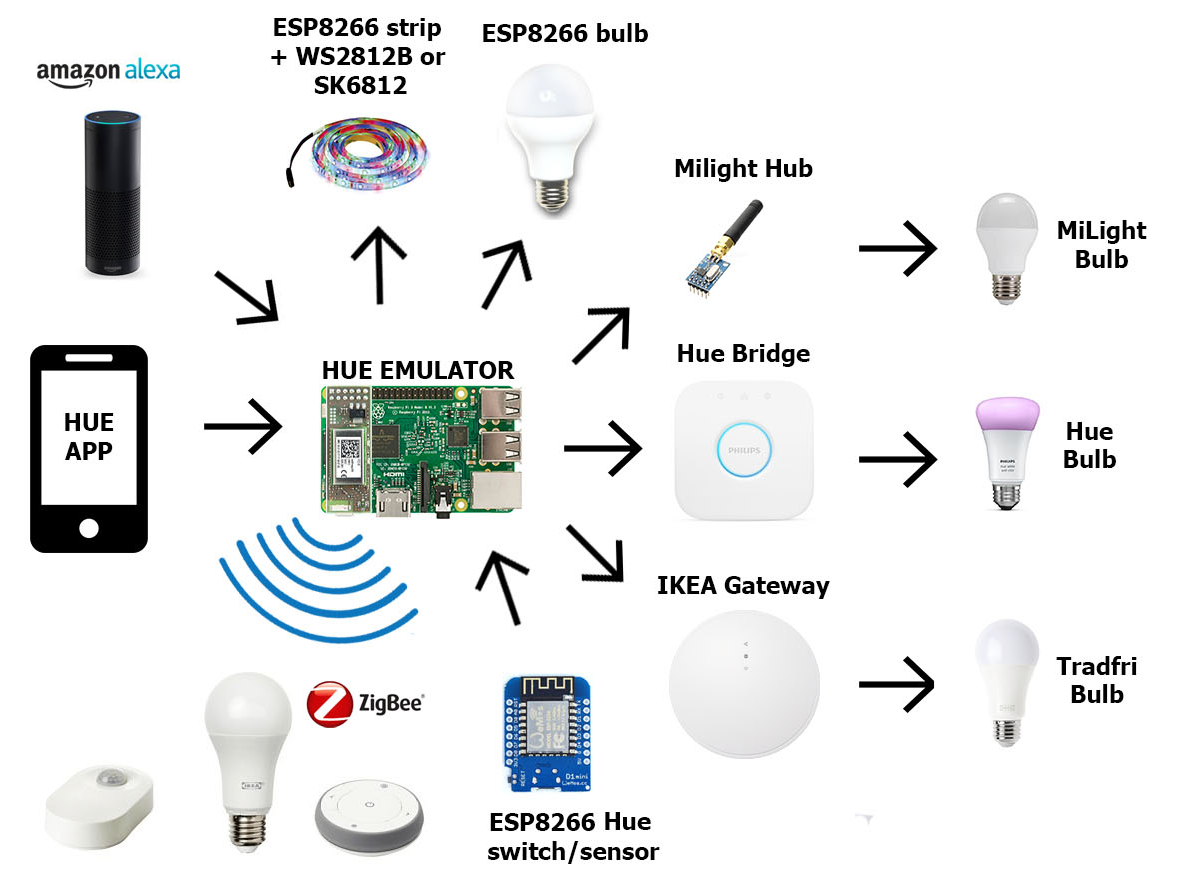
This project emulates a Philips Hue Bridge that is able to control ZigBee lights (using Raspbee module, original Hue Bridge or IKEA Tradfri Gateway), Mi-Light bulbs (using MiLight Hub), Neopixel strips (WS2812B and SK6812) and any cheap ESP8266 based bulb by replacing the firmware with a custom one. It is written in python and will run on all small devices such as the RaspberryPi. Arduino sketches are provided for the Hue Dimmer Switch, Hue Tap Switch and Hue Motion Sensor. Lights are two-way synchronized so any change made from original Philips/Tradfri sensors and switches will also be applied to the bridge emulator.
Requirements:
- python 3
- nmap package for esp8266 lights autodiscover
sudo apt install nmap - python ws4py package only if zigbee module is used
sudo pip install ws4py
To Do
Working directly with ZigBee lights, switches and sensors with RaspBee modulecontrol IKEA Trådfri lights from HUE applicationsCreate ESP8266 bridge device to add MI Lights to Hue Bridge emulator.On/Off control for other home devices using virtual lights- Alarm (
email notification+ eps8266 horn) Hue Entertainment support
Working HUE futures:
- Control lights (all functions)
- Control groups (all functions)
- Scenes (all functions)
- Routines
- Wake up
- Go to sleep
- Switches (custom esp8266 switches)
- Autodiscover lights
- Hue entertainment
Working devices and applications:
- Amazon Alexa (control only the lights)
- Logitech Harmony
- Tradfri Gateway
- Hue Bridge (original + other emulators)
- Home Assistant
- Domoticz
- Openhab
- Philips Ambilight TV's
- Kodi Hue Ambilight
- Jeedom
- Hue Sync for PC
Working smartphone applications:
- Hue (official application)
- Hue Essentials - recommended
- hueManic
- OnSwitch
- HueSwitcher
- LampShade
Not working:
- Home & Away future from Hue app (require remote api)
- Google Home (require remote api)
- Eneco Toon (very likely it use cloud service detection)
Supported lights:
- WS2812B and SK6812 smart led strips
- MiLight
- Yeelight
- LYT8266
- Phillips Hue
- Ikea Tradfri
- Pwm RGB-CCT
- Pwm RGBW
- Pwm RGB
- Pwm CCT
- Pwm Dimming (up to 6 lights for every esp8266)
- On/Off plugs/lights (up to 6 lights for every esp8266)
- On/Off 433Mhz devices (multiple devices for every esp8266)
Stability:
All the lights in my house are controlled by this solution so the stability is very important to me as there is no turning back to classic illumination (all switches were replaces with Ikea Tradfri Remotes and holes covered). However I don't use all the functions, so i'm unable to perform full tests on every change. What I do currently use is Deconz with all Tradfri devices (lights + sensors), Xiaomi Motion Sensor, native ESP8266 bulbs, ESP8266 + WS2812B strips and Xiaomi YeeLight color bulb.
Please submit in this issue or on our slack team any other device/application that is working with this emulator.
Check the Wiki page for more details
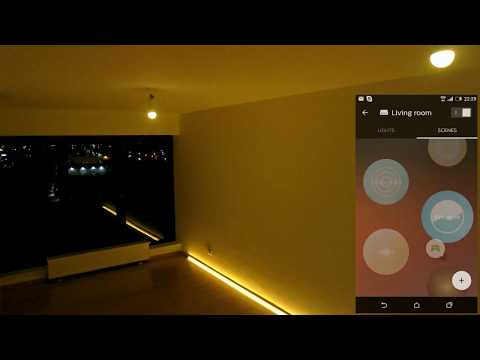
I push updates fast so if you want to be notified, just watch this repo
Contributions are welcome
Hue living color light project for 3D printing: https://www.thingiverse.com/thing:2773413
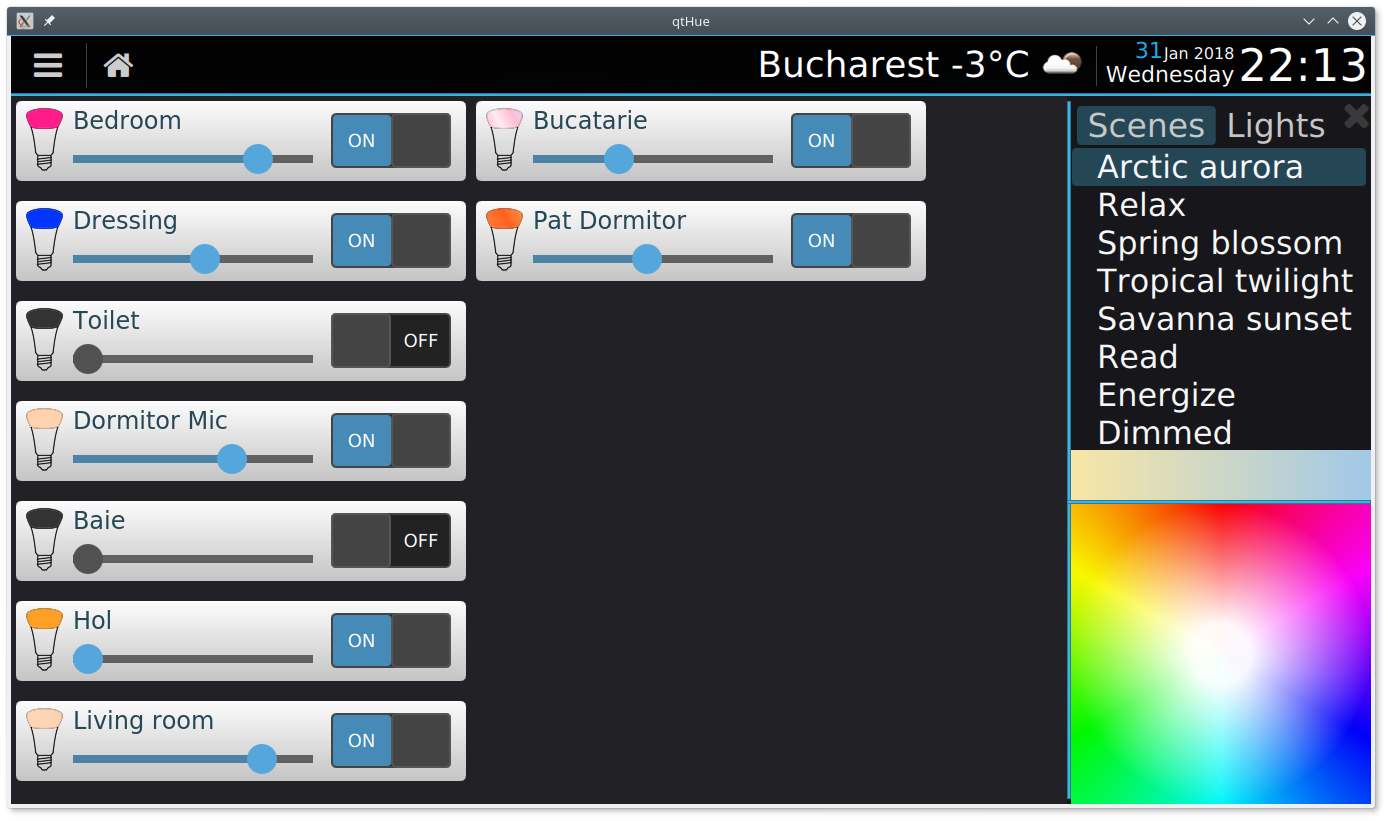
qtHue
You may want to see also my new project qtHue that provide a simple user interface for controlling the lights.
Credits:
- @avinashraja98 - Hue Entertainment server
- Federico Zivolo (@FezVrasta) Internal WebGUI
- @J3n50m4t - Yeelight integration
- Martin Černý (@mcer12) - Yeelight color bulb
- probonopd https://github.com/probonopd/ESP8266HueEmulator
- sidoh https://github.com/sidoh/esp8266_milight_hub
- StefanBruens https://github.com/StefanBruens/ESP8266_new_pwm
- Cédric @ticed35 for linkbutton implementation
- @cheesemarathon - Help with Docker images
- @Mevel - 433Mhz devices
- @Nikfinn99 - PCB designs
Categories
Download Statistics
Total Downloads Over Time
Related apps
Explore more like this
Explore allLinks
Details
diyhue/core:latestRuntime arguments
- Web UI
http://[IP]:[PORT:80]- Network
br0- Privileged
- false
Template configuration
Container Path: /opt/hue-emulator/config/
- Target
- /opt/hue-emulator/config/
- Value
- /mnt/user/appdata/diyHue
Container Port: 80
- Default
- 80
- Value
- 80
Container Port: 443
- Default
- 443
- Value
- 443
Container Port: 1900
- Default
- 1900
- Value
- 1900
Container Port: 2100
- Default
- 2100
- Value
- 2100
Container Variable: MAC
- Value
- bc:5f:f4:cd:c6:19
Container Variable: IP
- Value
- 192.168.1.4