

Disk Usage (duc)
Plugin from jamesfreeman959
Overview
Readme
View on GitHubDisk Usage (duc) for Unraid
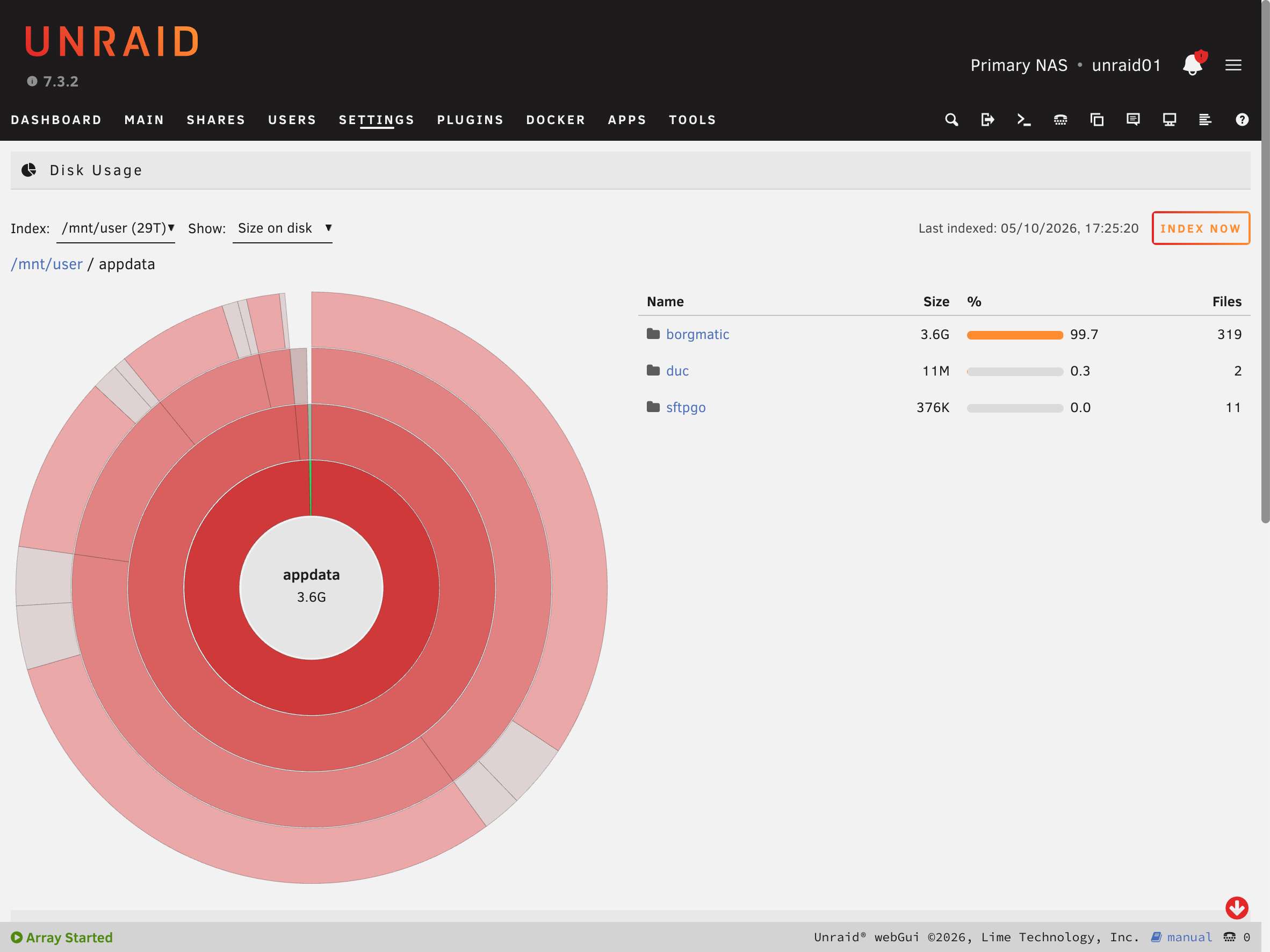
An Unraid plugin that packages duc, the disk usage indexer and browser, and adds a page to the webGUI for browsing the results.
duc works differently from du and ncdu. It scans the file system once, stores the results in an index database,
and then answers every query from that index straight away. The disks are not scanned again until the next index run.
With this plugin the index is rebuilt on a schedule (by default daily at 03:00, at low CPU and I/O priority), so you
can open Settings → User Utilities → Disk Usage at any time and browse instantly.
Features
- Scheduled indexing (hourly, daily, weekly, monthly or a custom cron expression) and an Index now button with live progress and cancel.
- A browser in the webGUI with a sunburst chart (click a ring to zoom in, click the centre to go up) and a sorted folder listing.
- Shows size on disk, apparent size or file count.
- Index several roots, for example
/mnt/userfor usage per share plus/mnt/disk1and/mnt/cachefor usage per disk. - The previous index stays browsable while a new one is built. The new database only replaces it once indexing has finished.
- Exclude patterns, one-file-system mode, counting hard links once (useful with the *arr apps), and Unraid notifications.
- The full
ducCLI from the terminal, including the ncurses browser:duc ui -d /mnt/user/appdata/duc/duc.db /mnt/user
Install
Search for Disk Usage (duc) in the Apps tab (Community Applications).
To install it manually instead, go to Plugins → Install Plugin and paste:
https://raw.githubusercontent.com/jamesfreeman959/unraid-duc/main/plugin/duc.plg
Requires Unraid 6.12 or later (x86_64). Tested on Unraid 7.3.
Support
Please ask questions in the Unraid forum support thread. Bug reports and feature requests are also welcome as GitHub issues.
Notes
- Spin-ups: an index run reads directory metadata on every disk it covers, so spun-down disks will spin up. Schedule it for a time when that doesn't matter.
- Database location: by default
/mnt/user/appdata/duc/duc.db. Keep it off the USB flash drive, because it is rewritten on every run. If the database folder isn't available (for example when the array is stopped) the run is skipped and nothing is written to RAM. - Paths in the settings are stored comma separated, so paths containing commas are not supported.
How it's built
build/Dockerfile builds a fully static x86_64 duc 1.4.6 binary on Alpine (musl) with the Tokyo Cabinet backend
and ncurses UI. Cairo and X11 are not included because the webGUI does its own rendering.
patches/0001-json-escaping-and-levels.patch fixes JSON
escaping in duc json (names containing quotes, backslashes or control characters produced invalid JSON) and adds
a --levels option. Both changes are suitable to send upstream.
The webGUI page never inserts names from the index as HTML. File names on a share are controlled by whoever writes to it, so they are always set as text.
docker buildx build --platform linux/amd64 -f build/Dockerfile --output out .
python3 build/package.py --version 2026.10.05      # -> dist/*.txz and plugin/duc.plg
Local testing without Unraid
test/setup.sh and test/harness.php install the package into a PHP container laid out like Unraid, with sample
shares and mocked update_cron and notify:
docker run -d --name duc-test --platform linux/amd64 -p 8089:8080 \
  -v "$PWD/dist:/dist:ro" -v "$PWD/test:/test:ro" php:8.3-cli sleep infinity
docker exec duc-test /test/setup.sh
docker exec duc-test /usr/local/emhttp/plugins/duc/scripts/duc-index manual
docker exec -d -w /usr/local/emhttp duc-test php -S 0.0.0.0:8080 -t /usr/local/emhttp /test/harness.php
# open http://localhost:8089/DiskUsage
Releasing
Run the Release workflow from the Actions tab with a version (YYYY.MM.DD) and changelog. It builds and
smoke-tests duc, publishes a GitHub release with the .txz, and commits the updated plugin/duc.plg.
Repository layout
The Community Applications listing (wrapper XML and maintainer profile) lives in
jamesfreeman959/unraid-plugins. Its <PluginURL> must keep
matching the pluginURL in plugin/duc.plg.in.
| Path | Purpose |
|---|---|
plugin/duc.plg |
Plugin manifest installed by Unraid (generated from plugin/duc.plg.in at release time) |
icon.svg, icon.png, docs/screenshot.png |
Icon and screenshot (also used by the Community Applications listing) |
src/ |
Files installed on Unraid (packaged into the .txz) |
build/, patches/ |
Static duc build and packaging |
test/ |
Local harness for testing without Unraid |
License
The plugin code is MIT licensed (see LICENSE). duc is LGPL-3.0 licensed (see LICENSE-duc); its source and the patch applied are referenced above.
Media gallery
Categories
Download Statistics
Downloads by Month
Related apps
Explore more like this
Explore allLinks
Details
https://raw.githubusercontent.com/jamesfreeman959/unraid-duc/main/plugin/duc.plg