
All apps · 0 apps
Digarr
Docker app from Selfhosters
Overview
Readme
View on GitHub
digarr







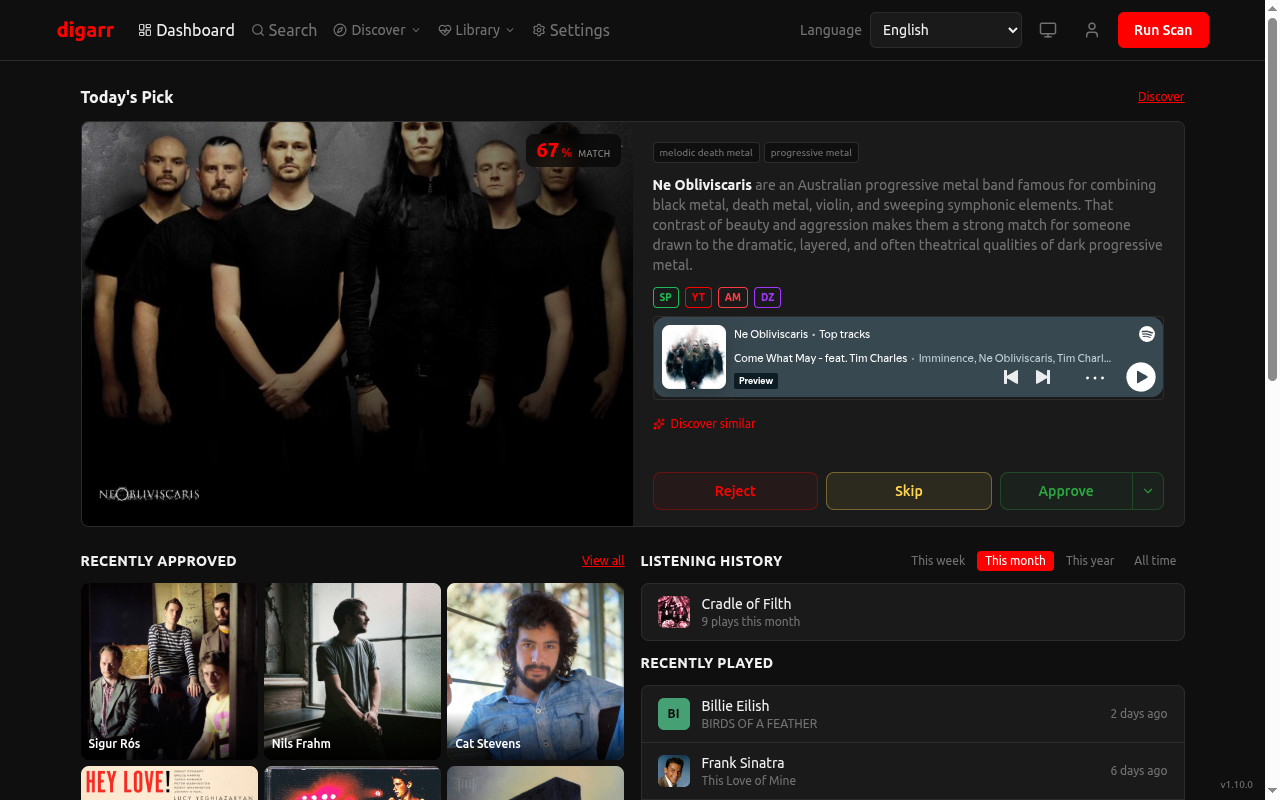
Self-hosted music discovery for your library. Find artists and albums from your listening history, explore a mood, and review recommendations before adding them to Lidarr or sending them to a playlist. Bring your own AI provider, including a local model. Lidarr is optional.
[!NOTE] v1.19.0 is out. This release adds optional genre priorities and playlist generation outcomes, improves discovery taste profiles and seed selection, and explains unavailable previews. See the changelog for release details.
More screenshots | Quick start | Configuration | Documentation
What you can do
- Find music from what you already enjoy. Connect listening services or a media library, run a scan, and review scored recommendations with an explanation. Adjust scoring weights, reject suggestions, or block artists you never want recommended again.
- Discover individual albums. Release Radar finds new releases from tracked artists; Library Gap-Fill finds missing studio albums. An optional setting turns an AI-suggested album by a new artist into an album recommendation. Album approval in Lidarr monitors and searches that album; it adds a new artist unmonitored and preserves an existing artist's other monitoring settings.
- Search by mood or starting artist. Try "something like Boards of Canada but darker," browse genres, or use focused modes such as ListenBrainz radio, artist relationships, labels, and charts. Save recurring searches as subscriptions.
- Listen before approving. Preview tracks in the review queue or use the Audition preview queue. Generated playlists can go to Spotify, Navidrome, Jellyfin, Emby, or Plex, or download as M3U/XSPF. Media-server exports need matching tracks already in that server's library; they do not download missing music.
- Choose where approvals go. Use Lidarr, queue releases through slskd, or keep a discovery-only setup. Auto-approval is available if you want high-scoring recommendations sent to targets without manual review.
- Share an instance. Each user has their own queue, connections, preferences, and assigned targets. Sign in with a local account or OIDC/SSO. The interface and AI discovery output support 15 languages, with light and dark themes.
Digarr manages recommendations and calls your connected services. It does not include a music downloader or a full music player. AI suggestions and MusicBrainz matches can be wrong; review the artist and release before approving. AI explanations may compare a recommendation with artists in your listening profile. The name-confusion check is a limited heuristic and cannot verify those claims.
AI profiles retain genre context for individual seed artists and separate raw source values from relative taste weights. Spotify uses personal top-artist order, and starred Subsonic artists contribute equal membership evidence. Each source's weights are normalized separately; overlapping artists keep their strongest contribution. Guidance supports several distinct interests without requiring a dominant genre; incomplete history cannot establish that an artist is unheard. These weights are estimates, and recommendation fit still needs listening review. Similarity scans rotate artists with exactly equal positive taste weights before applying the seed cap, so alphabetical order does not permanently exclude an equal interest. Stronger evidence stays ahead, and unavailable library seed slots are filled from the listening profile without exceeding the cap.
Name-only discovery accepts a MusicBrainz canonical name or catalog alias after Unicode, case, and whitespace normalization. Genre overlap distinguishes matching names; unrelated names and tied matches remain unresolved. This does not validate AI prose or repair older recommendations.
Dashboard listening history asks you to connect an account only when no eligible source is configured. An empty period suggests trying another period; a failed request shows a retry action. Recently Played also distinguishes empty history from a failure. A failed refresh keeps the last loaded entries visible with a failure notice.
Connections at a glance
| Use | Services |
|---|---|
| Scan taste-profile sources | ListenBrainz, Last.fm, Spotify, Plex, Jellyfin, Emby, Subsonic, Discogs |
| Deezer feeds | Flow discovery mode, favorites, followed artists, and playlist subscriptions |
| Library sync | Lidarr, Plex, Jellyfin, Emby, Subsonic |
| Approval and acquisition | Lidarr, slskd |
| Playlist export | Spotify, Navidrome, Jellyfin, Emby, Plex |
| Search | Spotify, Deezer, MusicBrainz, Bandcamp, TIDAL (experimental) |
| AI recommendations | Anthropic, OpenAI, Gemini, Ollama, OpenAI-compatible endpoints |
| Notifications | Webhooks, ntfy, Telegram, Apprise |
A connection's capabilities differ by service. Spotify Saved Albums and Followed Artists, Deezer Flow, and Subsonic Starred have focused discovery modes. TIDAL Favorite Artists is experimental: authorization, refresh, and retrieval have not been tested with a live account. Feedback is welcome through the TIDAL testing guide.
Privacy and credentials
Your database runs on your server. Connected services still receive requests: hosted AI providers receive discovery prompts, metadata services receive lookups, and embedded previews contact their providers. A local AI model keeps AI requests local, but does not make all of Digarr offline. Inside a container, localhost refers to that container; use a reachable address for a model running elsewhere.
Set and retain DIGARR_ENCRYPTION_KEY before saving service credentials. Without it, sensitive database fields are stored unencrypted. Back up the key separately from the database; losing it means re-entering encrypted credentials. See the key rotation guide before changing an existing key.
Quick start
Digarr ships with an embedded database (PGlite) -- no separate PostgreSQL required. The fastest way to run it is a single container with no database setup:
mkdir digarr && cd digarr
(umask 077 && printf 'DIGARR_ENCRYPTION_KEY=%s\n' "$(openssl rand -hex 32)" > digarr.env)
docker run -d --name digarr -p 127.0.0.1:3000:3000 \
  --env-file ./digarr.env \
  -e ALLOWED_ORIGIN=http://localhost:3000 \
  -e DIGARR_ALLOW_INSECURE_COOKIES=true \
  -v digarr-data:/app/data -v digarr-backups:/app/backups \
  docker.io/iuliandita/digarr:latest
This example binds to this computer only and explicitly allows HTTP cookies. For access from other devices, use HTTPS with the public-origin settings, or deliberately opt into HTTP on your trusted network. The command needs OpenSSL and saves the encryption key in digarr.env, readable only by your user. Keep that file and back it up separately; reuse it when recreating the container.
Open http://localhost:3000 and complete the setup wizard. Passwords need at least 12 characters. The first account becomes the admin; further self-registration is closed by default. You can start with Lidarr, Emby, or discovery-only mode. Database migrations run automatically on every startup.
The image pulls docker.io/iuliandita/digarr:latest, the newest tagged release and the recommended channel for first-time home installs. For maximum caution, :stable tracks only releases that have been live for at least seven days with no follow-up patch. Use a minor tag like :1.19 to stay on patch fixes for that line, or pin a specific patch like :1.19.0 when you want zero surprises. For bleeding-edge testing, :nightly (GHCR only) is rebuilt on each push to develop with an immutable :nightly-<sha> alongside it; the web footer and GET /health report the running gitSha so a nightly bug report can be pinned to a commit. Images are Alpine-based by default; a Debian/glibc variant ships alongside every release as :debian, -debian-suffixed version tags, and :stable-debian.
Database backend
Digarr picks its database backend at boot. The docker run line above and deploy/docker/docker-compose.pglite.yml use the embedded PGlite database (real PostgreSQL compiled to Wasm, in-process, single data directory) -- no separate PostgreSQL container. The default deploy/docker/docker-compose.yml instead runs an external PostgreSQL alongside the app; set DATABASE_URL or DB_HOST/DB_USER/DB_NAME/DB_PASS to point Digarr at your own PostgreSQL. External PostgreSQL stays fully supported everywhere.
The startup log and GET /health report the active backend. A missing or incomplete PostgreSQL configuration can select an empty embedded database instead; check the backend before assuming your data has disappeared. Keep one Digarr instance per database: external PostgreSQL does not make the app safe to run with multiple replicas.
To switch backends after initial setup, use the in-app migration tool under Settings -> Administration -> Migrate Database Backend. It copies all stateful data to the target without modifying the source. See Switching the Database Backend.
Docker Compose
Before starting either stack, edit .env: set ALLOWED_ORIGIN to the URL you will open and set DIGARR_ENCRYPTION_KEY to a generated, saved secret. For direct HTTP access, also set DIGARR_ALLOW_INSECURE_COOKIES=true; leave it false behind HTTPS. The origin has no path or trailing slash.
Embedded PGlite (single container, no separate database password):
mkdir digarr && cd digarr
curl -LO https://raw.githubusercontent.com/iuliandita/digarr/main/deploy/docker/docker-compose.pglite.yml
curl -o .env https://raw.githubusercontent.com/iuliandita/digarr/main/deploy/docker/.env.example
# Configure the public origin and encryption key in .env before starting.
docker compose -f docker-compose.pglite.yml up -d
External PostgreSQL (bundled database container):
mkdir digarr && cd digarr
curl -LO https://raw.githubusercontent.com/iuliandita/digarr/main/deploy/docker/docker-compose.yml
curl -LO https://raw.githubusercontent.com/iuliandita/digarr/main/deploy/docker/.env.example
mkdir -p secrets
chmod 700 secrets
# Set ONE database password -- both Postgres and the app read this single file.
(umask 077 && printf '%s\n' 'change-this-password' > secrets/postgres_password)
cp .env.example .env
# Edit secrets/postgres_password and .env before starting
docker compose up -d
Alternatively, fill in the service env vars in .env and setup completes automatically on first boot.
For zero-touch boot, set DIGARR_INITIAL_USERNAME, DIGARR_INITIAL_PASSWORD, AI_PROVIDER, and AI_MODEL. Listening sources stay optional, but connect at least one before running discovery. Lidarr stays optional: omit LIDARR_URL / LIDARR_API_KEY to run in discovery-only mode. In discovery-only mode the genre-overlap part of scoring uses native genres from connected sources, synchronized library metadata, and a bounded background MusicBrainz cache warmer with optional Last.fm fallback. Listening-profile genres split semicolon lists, discard numeric artifacts, and deduplicate valid names before weighting. Cold caches improve on later scans without blocking the current scan; Dashboard and Settings show profile coverage. Emby can be added during the setup wizard or later in Settings.
For local development, see CONTRIBUTING.md.
Your first recommendations
- Choose Lidarr, Emby, or discovery-only in the setup wizard and configure your AI provider.
- Connect a listening source in Settings, or import artists from CSV or a supported playlist. You can add targets later.
- Run a scan from Dashboard or Discover. Digarr builds a taste profile, gathers candidates, resolves MusicBrainz identities, scores them, and removes duplicates and blocked results.
- Preview and approve suggestions, reject them, or adjust the scoring weights. Optional genre priorities in Settings > Recommendations support multiple equally preferred genres. Discover keeps score ordering by default; choose Genre priorities to show priority matches first, or browse either preference group separately. Exact genre names match case-insensitively; missing or unmapped genres stay outside the groups. Ordering leaves scores, thresholds, and auto-approval unchanged. Use Release Radar or Library Gap-Fill for albums; the normal scan is artist-focused unless you enable net-new album discovery.
Admins can inspect failures in Settings > Job History and System Health. A source can fail while the scan completes using the remaining sources; check the job details if results look incomplete. Listening sources that do not support similar-artist discovery are skipped for that stage, while their taste-profile and library-sync functions remain available. A successful lookup with no matches reports zero artists. The architecture guide describes the pipeline stages.
Requirements
| Service | Required | Purpose |
|---|---|---|
| Lidarr | Optional | Music library management + auto-download |
| Listening source | Optional | ListenBrainz, Last.fm, Spotify, Plex, Jellyfin, Emby, Subsonic (Navidrome/Airsonic/Gonic), or Discogs |
| AI Provider | Yes | Anthropic, OpenAI, Gemini, Ollama, or any compatible endpoint |
| Database | Yes | Embedded PGlite by default (no setup); or external PostgreSQL via DATABASE_URL / DB_* |
Configuration
Most day-to-day configuration lives in the web UI after initial setup: connections, scoring weights, schedules, preferences, and the saved interface language. If you connect Spotify, Settings > Connections includes an Import Liked Songs action to seed recommendations for a faster first scan. Settings also includes Job History and System Health tabs; Library Health keeps the latest scan snapshot, shows when it last synced, auto-rescans on the configured library-sync interval, and still exposes a manual Sync Now action.
If a library source fails to return an artist's albums, the sync is marked failed and keeps the previous source snapshot. Fix the connection or permissions error, then retry the sync to refresh it.
Set AI_PROVIDER and AI_MODEL to complete service setup from the environment on first boot. To create the first admin automatically too, set DIGARR_INITIAL_USERNAME and a DIGARR_INITIAL_PASSWORD of at least 12 characters. Listening sources, Lidarr, and Emby can be added later in the UI or supplied during setup. slskd targets are added later in Settings > Targets and can be linked to a Lidarr target, so a single approval can add the artist to Lidarr first and then queue the matched Soulseek release. See .env.example for local development fallbacks and deploy/docker/.env.example for Compose deployments.
The web UI uses an HttpOnly session cookie; bearer sessions remain available
for API clients. Behind a reverse proxy or TLS terminator, set
ALLOWED_ORIGIN to the exact public https:// origin (for example,
https://digarr.example.com) so cookie security and CSRF checks use the
browser-visible scheme and host. Production cookies stay Secure even when the
proxy reaches Digarr over HTTP, so an HTTPS public origin needs no extra flag.
An HTTPS origin is strongly preferred; if you intentionally run the production
container directly over plain HTTP, copy the env example and set
DIGARR_ALLOW_INSECURE_COOKIES=true with a matching http:// ALLOWED_ORIGIN,
accepting that direct HTTP exposes the session cookie to network interception.
See Authentication for the browser migration and API
compatibility details.
Playlists and notifications
Add playlist destinations in Settings > Targets, then select those targets in each playlist. Digarr keeps the generated playlist locally if an export fails; admins can inspect the error in Job History. Spotify exports need a connected account with playlist permissions. Tracks without a matching destination track are skipped. Playlist details show the latest generation status, selected/resolved/included artist counts, and artists with no match, unavailable providers, lookup errors, or tracks excluded by the size limit. Search results must match the requested artist before selection. No-provider setups produce an explained empty result rather than invented track titles. The summary describes local generation, not verified remote coverage.
Audition playlists choose one track per pending artist without approving recommendations, and can refresh on demand or on a schedule. They are separate from the Audition preview queue in Discover, which plays short previews in the browser. The Discover queue retains a dismissible summary of unavailable previews, including missing links, empty or failed lookups, browser blocking, and playback failures. Starting a new queue resets that summary; retrying an item replaces its previous outcome. An embed starting is not proof of a successful listen.
Admins can add webhook, ntfy, Telegram, and Apprise channels in Settings > Notifications, with scan-complete and scheduled-digest subscriptions per channel. Private-network destinations are blocked by default; the per-channel LAN option permits private IPv4 destinations for self-hosted services. It does not override your container or Kubernetes network policy.
Large Lidarr libraries
Lidarr's artist API returns the entire library in a single response with no pagination, so a very large library can take well over a minute to serialize. Digarr allows 120 seconds for that fetch, which covers libraries into the thousands of artists. If library sync still reports a timeout, raise DIGARR_LIDARR_TIMEOUT_SECONDS and restart Digarr. The timeout applies only to the full-library fetch; every other Lidarr call keeps a short timeout so an unreachable Lidarr still fails fast.
MusicBrainz mirrors
To use your own MusicBrainz mirror, set these environment variables and restart Digarr:
DIGARR_MUSICBRAINZ_URL=http://musicbrainz:5006/ws/2
DIGARR_MUSICBRAINZ_INTERVAL_MS=100
Replace musicbrainz with your mirror's hostname as reachable from Digarr. No mirror is bundled: containers need access to your existing mirror's network; local development can use localhost if the mirror runs on the same host. Use the full web-service base URL, including /ws/2 (and any reverse-proxy path). This applies to all MusicBrainz lookups across users, discovery, library sync, and playlist imports. It is configured through the environment only. The Compose examples load these variables from their .env file; for Kubernetes, add them to the app container's environment.
The default remains https://musicbrainz.org/ws/2 with one request per second. Your mirror can use a shorter interval, including 0 for no delay; requests still run one at a time. Public MusicBrainz hosts require at least 1000 milliseconds. Invalid URLs or intervals prevent startup. URLs must use HTTP or HTTPS without credentials, query parameters, or fragments. Redirects are refused, so point directly at the final endpoint. There is no automatic fallback to the public service if your mirror fails.
Local and OpenAI-Compatible AI
For Open WebUI, choose OpenAI-Compatible and use a base URL ending in /api, such as http://<open-webui-host>:<port>/api. Digarr sends requests to Open WebUI's documented /api/chat/completions route. Other compatible servers can use their server root or a base ending in /v1. If a local model needs longer to load or generate, set DIGARR_AI_TIMEOUT_SECONDS to a suitable value, such as 180, and restart Digarr; the override applies to both connection tests and recommendation requests.
Connecting Plex listeners
In Settings > Your Connections, enter your Plex server URL and token, test the connection, select the music library and Plex listener, and save. Each Digarr user selects their own listener on the same shared server. Digarr uses that listener's playback history for recent and frequent artists, and Plex similarity metadata for discovery when available. Lidarr and a scrobbling service are optional; existing Charts and other sources can supplement Plex.
A listener selection is required for listening-based discovery. Existing Plex connections continue to sync their libraries, but need this selection before contributing listening history. Changing the server or token clears the selection. Digarr verifies the server identity and rejects history belonging to a different account instead of mixing profiles. A server or token that cannot expose the account list or playback history can still be used for library sync; Plex similarity data depends on the library's metadata agent. History analysis allows at most 5,000 entries (25 pages) per requested period. If that period cannot be read completely within the limit, top-artist analysis reports a failure instead of returning partial totals; choose a shorter period or another listening source.
Importing slskd downloads into Lidarr
For a linked slskd target, set Download root as seen by Lidarr to the completed-downloads folder that Lidarr can read, such as /downloads. Mount the same completed files into Lidarr or configure its path mapping. slskd stores each remote directory under its final folder name; multi-disc folders must be complete and unambiguous before import.
Digarr waits for every queued file to succeed, asks Lidarr to identify the files, and refuses rejected, partial, or ambiguous releases. It imports with move semantics and only reports completion after Lidarr's album tracks have files. Releases are limited to 500 files and 20 GiB, with paths no longer than 2,048 characters. Failed work retries after a one-hour cooldown using the same job; older duplicate failures remain as superseded history. Standalone slskd targets do not import into Lidarr.
If Digarr stops after submitting a download or import but before saving its confirmation, the next run may retry it or report a failure even though the external service accepted it. Check slskd transfers and Lidarr before retrying manually.
Connecting Spotify
Spotify uses your own Spotify app credentials over OAuth. Spotify requires the owner of a Development Mode app to maintain an active Premium subscription, and listeners must be added to the app's allowlist (up to five users). A normal Spotify sign-in or PKCE does not remove these app requirements; Digarr does not provide a shared Spotify app. See Spotify quota modes.
Without a qualifying Spotify app, use Plex, Jellyfin, Emby, Subsonic, Last.fm, or ListenBrainz listening data, or import artists from CSV. These paths do not require a Spotify subscription.
Create an app at the Spotify Developer Dashboard.
In the app's Redirect URIs, add the exact callback URL for your Digarr instance:
<your-digarr-url>/api/v1/auth/oauth/spotify/callbackSpotify does not accept
localhostredirect URIs. For local HTTP usehttp://127.0.0.1:3000/api/v1/auth/oauth/spotify/callback, open Digarr athttp://127.0.0.1:3000, and setALLOWED_ORIGINto that same origin. For a remote instance, use its public HTTPS URL, such ashttps://digarr.example.com/api/v1/auth/oauth/spotify/callback. See Spotify redirect URI requirements.In Digarr, open Settings > Connections > Spotify, paste your Client ID and Client Secret, then click Connect with Spotify. The connect form shows the exact Redirect URI to register (with a copy button), so you can match it without guessing.
Connecting TIDAL
[!WARNING] Experimental and unverified. Authorization, token refresh, and favorite-artist retrieval have not been tested against a live TIDAL account. We are shipping with that limitation and asking the community for feedback. The Experimental badges remain until live results establish that these flows work.
TIDAL uses a single app registered by an admin, which every user then authorizes with their own TIDAL account:
An admin creates an app in the TIDAL Developer Portal and adds the callback URL for your Digarr instance to its Redirect URIs:
<your-digarr-url>/api/v1/auth/oauth/tidal/callbackDigarr builds this URI from
ALLOWED_ORIGIN, not from the URL your browser happens to be on. SetALLOWED_ORIGINfirst, then register exactly the URI it produces -- a mismatched scheme or a trailing slash makes TIDAL reject the authorization with no useful error. Production requiresALLOWED_ORIGIN. Without it, only non-production loopback callback URLs are accepted.The admin pastes the Client ID and Client Secret into Settings > Connections > TIDAL (the same credentials that power experimental TIDAL search).
Each user then opens Settings > Your Connections > TIDAL and clicks Connect TIDAL. The flow is Authorization Code + PKCE and requests the
user.readandcollection.readscopes, which grant read-only access to your TIDAL collection.
Once connected, the TIDAL Favorite Artists discovery mode seeds recommendations from the artists in your collection. TIDAL's public API exposes no separate followed-artists list, so favorites are the only user-artist signal.
Each user's connection stores a copy of the app credentials it was made with, so rotating the shared TIDAL client ID or secret breaks every existing connection. A still-valid access token may continue to work until it expires; refresh can then fail and require reconnection. After rotating credentials, every user must disconnect and reconnect TIDAL once.
TIDAL feedback
Live TIDAL testing is deferred because we do not have an account available. This is an accepted release limitation, not a successful validation. The original validation request (#553) records the decision; please open a new issue with your results so failures can be investigated individually.
After connecting TIDAL, run Discover > Discovery Modes > TIDAL Favorite Artists. Try again after the connection's access token expires, without disconnecting first, to exercise refresh. The read-only GET /api/v1/auth/oauth/tidal/status endpoint reports expiresAt; a connected status alone does not prove refresh or discovery works.
Please include:
- Your Digarr version and, for nightly, the commit SHA from the footer or
GET /health. - Whether authorization, a later run after token expiry, and Favorite Artists each succeeded or failed. Say which steps you did not try.
- The Settings error message or relevant Job History error, with private details removed.
- Whether your TIDAL collection contains favorite artists, the artist count shown in Job History if available, and whether the run produced recommendations. Report an empty result or visible error as shown; it does not by itself identify a missing-name payload problem. Do not include actual artist names.
Do not post client secrets, access or refresh tokens, authorization codes, cookies, or full callback URLs. A successful catalog credential probe does not validate the per-user OAuth flow.
Backup & Restore
Digarr provides application-level backup and restore through the admin UI (Settings > Administration) or API.
Manual backup: POST /api/v1/admin/backup returns a JSON file with all configuration, users, targets, subscriptions, and recommendation history. Add ?includeCaches=true to include artist and genre caches. The file is larger, but restores do not need to fetch that data from MusicBrainz again.
Restore: POST /api/v1/admin/restore?confirm=true accepts backup JSON or a multipart file upload. It replaces the included tables in a transaction; it does not merge a backup into existing account data. Back up the destination first. An encryption-key mismatch returns 409 without restoring. Restore with the original key, or explicitly add &force=true and re-enter the affected credentials afterward.
Legacy OIDC data: Older backups may contain an obsolete oidcTokens table. An empty table is ignored; nonempty rows are skipped with a warning and are never restored.
Auto-backup before migrations: When Digarr detects pending database migrations on startup, it saves a backup to DIGARR_BACKUP_DIR (default: ./backups/). It keeps the last 14 auto-backups, counted by migration runs rather than days. Copy backups off the server as well; a local volume does not protect against disk loss. Disable this with DIGARR_AUTO_BACKUP=false.
Upgrading to v1.18.0: Startup migrations add Plex listener identity fields and consolidate duplicate slskd retry jobs, retaining superseded rows and accumulated attempts. Keep a pre-upgrade backup. Existing Plex connections need a listener selection for history; linked slskd targets need a completed-download path visible to Lidarr. See Plex setup and slskd imports.
Kubernetes / Helm note: Auto-backup needs a writable /app/backups volume. The bundled Helm chart and raw manifests use emptyDir by default, which is lost when the pod is replaced. Enable backups.persistence.enabled=true in Helm, or provide persistent storage in custom manifests.
Downgrading across the OIDC token-storage migration: Stop Digarr first, and never run an older image against a database that has already received the migration. Before changing the image tag, use the same Compose file set as the installation so the app service runs the current image with its mounted /app/backups volume. For example, a PGlite installation uses:
docker compose -f docker-compose.pglite.yml stop app
docker compose -f docker-compose.pglite.yml run --rm --no-deps app \
  bun dist/scripts/prepare-rollback-backup.js \
  '/app/backups/<automatic-pre-migration-v1.json>' \
  '/app/backups/<rollback-compatible-v1.json>'
For the external-PostgreSQL installation, use docker-compose.yml and include every override file used by that installation. From a source checkout at the same revision, the equivalent command is bun scripts/prepare-rollback-backup.ts <input> <output>.
The input must be the automatic pre-migration backup, use backup version 1, and have no existing data.oidcTokens key. The output path must not exist. Provision a separate fresh database with the older image so it creates the old schema, then restore the output copy; never point the old image at the migrated database. The helper writes the copy with mode 0600, adds only an empty data.oidcTokens key, refuses an existing output, and never overwrites the source. It cannot recover retired provider tokens.
Data Hygiene
Admin tools available under Settings > Administration > Data Hygiene:
- Clear Image Failures: reset failed image cache entries so Digarr can retry them
- Rebuild Genre Cache: regenerate cached genres from artist tags
- Re-score Recommendations: recalculate your recommendations with your current weights, preserving saved score evidence and album modifiers. Rows with incompatible evidence or concurrent changes are skipped.
- Dedupe Repair: merge duplicate recommendations
- AI Reasoning Audit: review and repair stored reasoning; this cannot guarantee that AI claims are correct
- Purge Sessions: clean out expired login sessions
Deployment
| Method | Path | Notes |
|---|---|---|
| Docker Compose | deploy/docker/ |
Recommended. Choose single-container PGlite or the bundled PostgreSQL stack. Also on Docker Hub. |
| Helm chart | deploy/helm/digarr/ |
Kubernetes. Embedded PGlite, bundled PostgreSQL, or your own database. Keep one app replica. |
| Raw k8s manifests | deploy/k8s/ |
Reference manifests for advanced setups. |
| Unraid | docs/guides/unraid.md |
In the Community Applications store (search "Digarr"); bundled template (deploy/unraid/digarr.xml) as manual fallback. Embedded PGlite by default; external PostgreSQL optional. |
| Synology NAS | docs/guides/synology.md |
DSM 7.1+ (Docker/Container Manager). SSH or GUI. |
| Docker Desktop | docs/guides/docker-desktop.md |
macOS and Windows (WSL 2). |
Verifying image signatures
Since v0.27.8, every release image is signed with cosign using GitHub OIDC (no long-lived keys). Signatures are stored alongside the image at both ghcr.io/iuliandita/digarr and docker.io/iuliandita/digarr. The generated SBOM is attached as a signed SPDX attestation bound to the same image digest.
Install cosign and verify a pulled image before running it:
# Replace <TAG> with the exact release version you pulled
cosign verify \
  --certificate-identity-regexp '^https://github\.com/iuliandita/digarr/\.github/workflows/release\.yml@refs/tags/v' \
  --certificate-oidc-issuer 'https://token.actions.githubusercontent.com' \
  'ghcr.io/iuliandita/digarr:<TAG>'

# Verify the signed SBOM
cosign verify-attestation \
  --type spdxjson \
  --certificate-identity-regexp '^https://github\.com/iuliandita/digarr/\.github/workflows/release\.yml@refs/tags/v' \
  --certificate-oidc-issuer 'https://token.actions.githubusercontent.com' \
  'ghcr.io/iuliandita/digarr:<TAG>'
A successful verify proves the image was built by this repo's release.yml workflow on a tagged push. Verify the exact version or digest you intend to run. A valid signature identifies the publishing workflow; it does not guarantee that the software is free of vulnerabilities.
Documentation
- Installation with Docker, Helm, Unraid, Synology, or Docker Desktop
- Authentication, SSO, and user management
- API reference and architecture
- Recommendation quality evaluation
- Switching database backends and encryption-key rotation
- Changelog, roadmap, and screenshots
- Other self-hosted music projects
Contributing
Bug reports, translations, documentation fixes, and code contributions are welcome. See CONTRIBUTING.md for development setup and checks. Report security problems through the private reporting process.
Most code and tests are AI-generated, with a human setting direction and reviewing changes.
License
MIT. See LICENSE.
Star History
Requirements
No separate database required -- uses a built-in embedded database by
default. The data folder (/mnt/user/appdata/digarr/data) must be
writable by the container user (uid 1000). Optionally point Database URL
at an external PostgreSQL instance.
Categories
Download Statistics
Total Downloads Over Time
Related apps
Explore more like this
Explore allDetails
docker.io/iuliandita/digarr:latestRuntime arguments
- Web UI
http://[IP]:[PORT:3000]- Network
bridge- Shell
sh- Privileged
- false
Template configuration
Port for the web interface
- Target
- 3000
- Default
- 3000
- Value
- 3000
Persistent storage for the built-in embedded database. Must be writable by the container user (uid 1000).
- Target
- /app/data
- Default
- /mnt/user/appdata/digarr/data
- Value
- /mnt/user/appdata/digarr/data
Container path for the built-in embedded database (matches the Data folder mapping)
- Target
- DB_PATH
- Default
- /app/data
- Value
- /app/data
Leave empty to use the built-in database. Set only to use an external PostgreSQL, e.g. postgresql://user:pass@host:5432/digarr
- Target
- DATABASE_URL
Auto-create this admin user on first boot
- Target
- DIGARR_INITIAL_USERNAME
Password for the initial admin user (min 8 chars)
- Target
- DIGARR_INITIAL_PASSWORD
AI provider: anthropic, openai, gemini, ollama, openai-compatible (or configure in UI)
- Target
- AI_PROVIDER
Model name, e.g. gpt-4o-mini, claude-sonnet-4-5-20250514
- Target
- AI_MODEL
API key for the AI provider
- Target
- AI_API_KEY
Base URL for openai-compatible or ollama (e.g. http://ollama:11434)
- Target
- AI_BASE_URL
Lidarr instance URL, e.g. http://lidarr:8686 (optional -- discovery works without Lidarr)
- Target
- LIDARR_URL
Lidarr API key (Settings > General in Lidarr)
- Target
- LIDARR_API_KEY
ListenBrainz username for taste analysis
- Target
- LISTENBRAINZ_USERNAME
ListenBrainz user token
- Target
- LISTENBRAINZ_TOKEN
Last.fm username for taste analysis
- Target
- LASTFM_USERNAME
Last.fm API key
- Target
- LASTFM_API_KEY
CORS allowed origin, e.g. https://digarr.example.com (required for reverse proxy)
- Target
- ALLOWED_ORIGIN
32+ char key for encrypting API keys, tokens, and connection passwords (blank stores those fields unencrypted)
- Target
- DIGARR_ENCRYPTION_KEY
Set to false to allow new user registration
- Target
- DIGARR_DISABLE_REGISTRATION
- Default
- true|false
Skip TLS certificate verification for Lidarr/Jellyfin connections
- Target
- SKIP_TLS_VERIFY
- Default
- false|true
Discord HTTPS webhook or public HTTPS endpoint that accepts Digarr JSON
- Target
- WEBHOOK_URL