

Delamain
Docker app from Vonhex's Repository
Overview
Readme
View on GitHubDelamain
"Delamain online. I trust your day has been satisfactory so far."
[!WARNING] Delamain is a hobby project made for fun. It is not a safety system. Do not interact with any interface, voice or otherwise, in a way that distracts you from driving. The authors accept no liability for accidents, injuries, traffic violations, or any other incidents arising from the use of this software. Use at your own risk. Always prioritise road safety above all else.
A voice companion for the drive, modeled on Delamain from Cyberpunk 2077. It runs in any browser, including the one on your car's Android Auto display, so there's nothing to install. Talk to it and it answers in Delamain's cloned voice. It can search the web, read you the news and the weather, tell you how long a drive will take, speak reminders when they're due, keep notes and long-term memory in your Obsidian vault, and hand navigation off to your phone's map app.
Demo
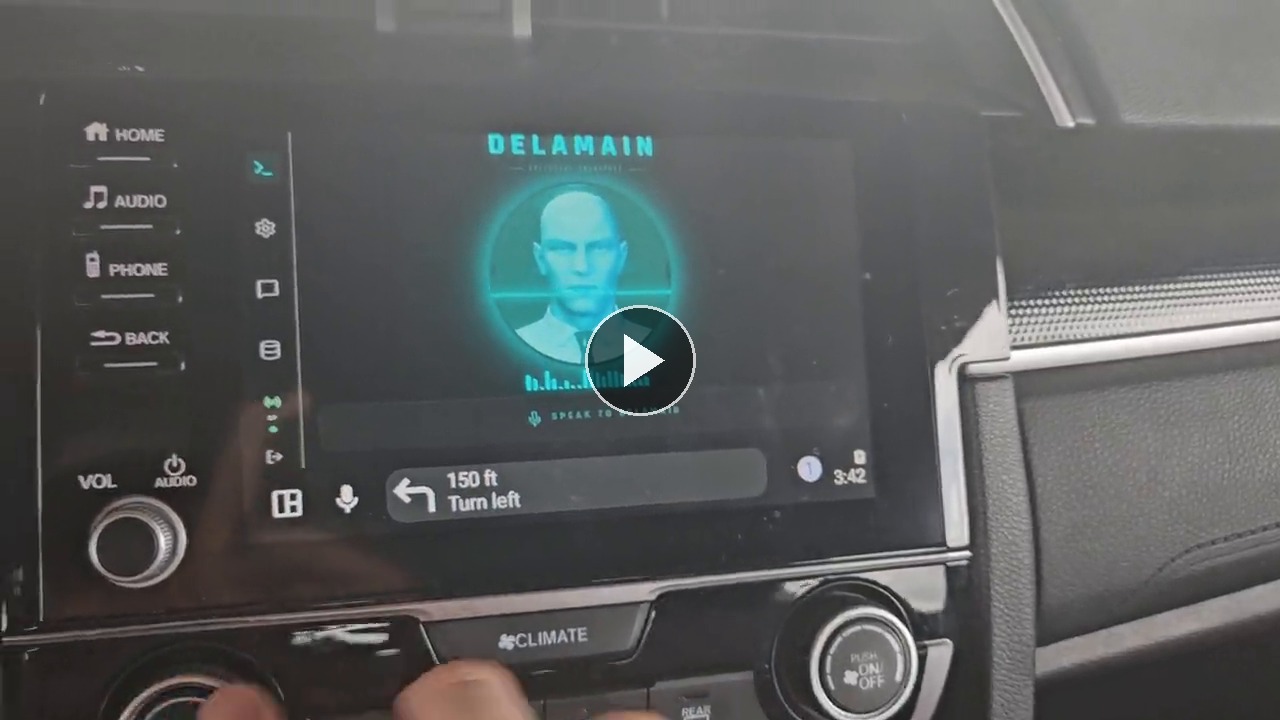
Screenshots
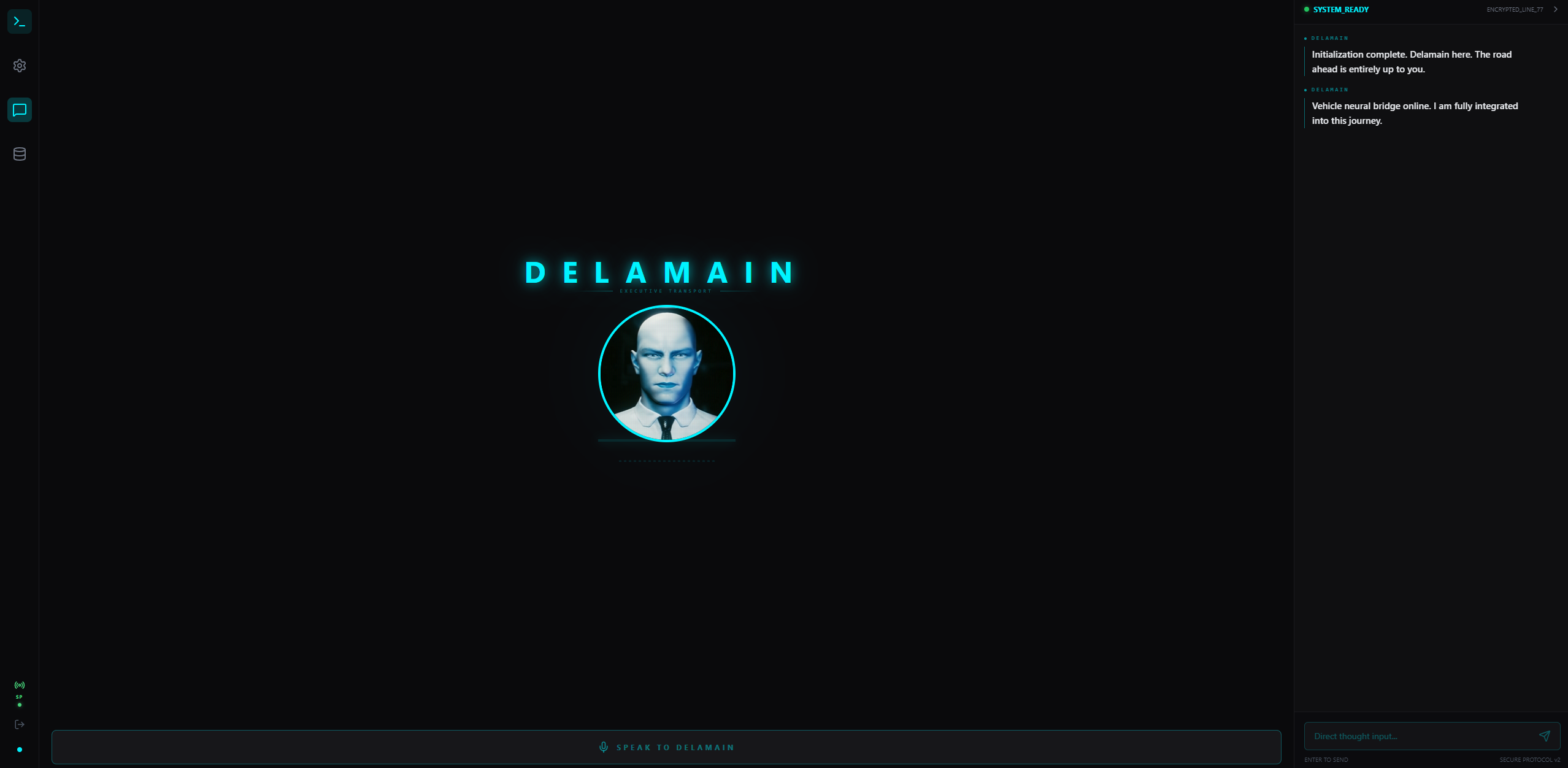 |
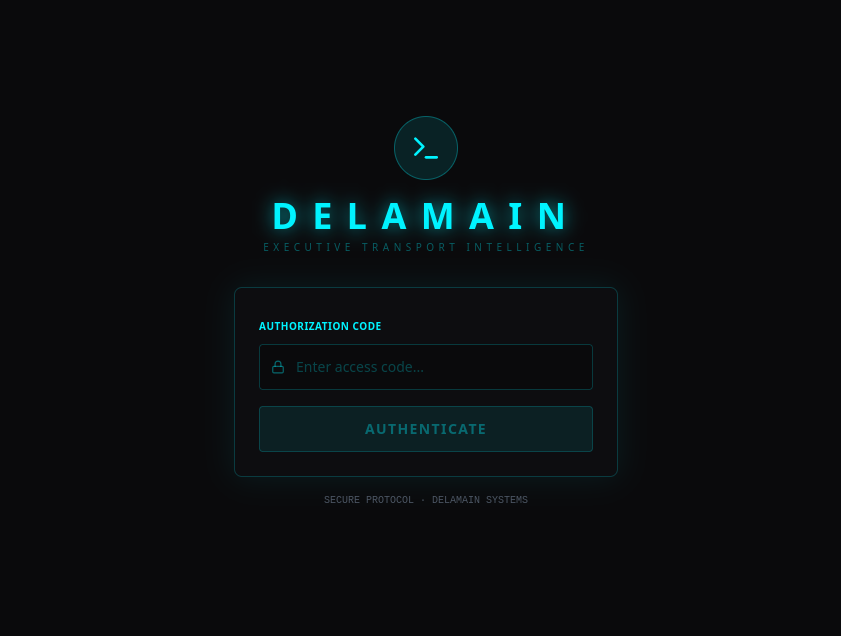 |
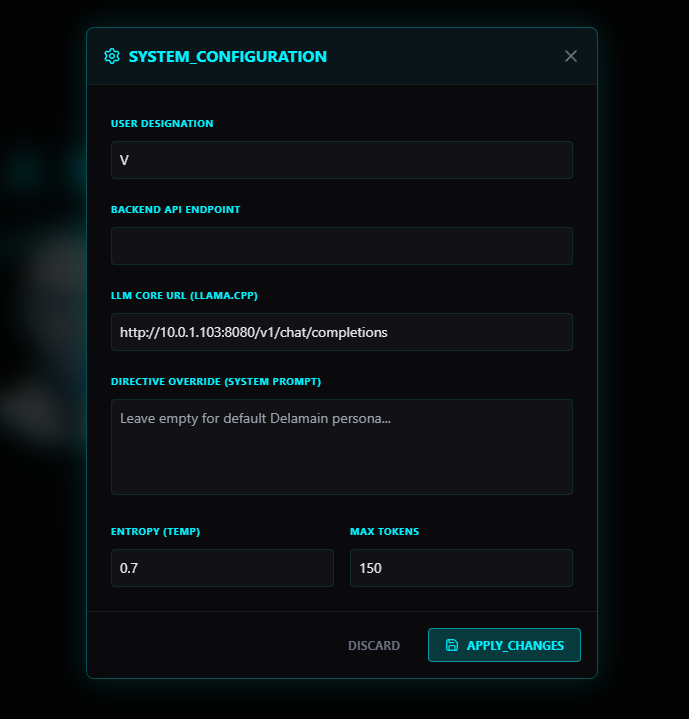 |
Features
- Voice personality: formal, measured and dry, exactly as in Cyberpunk 2077. The voice is cloned from a reference clip with F5-TTS.
- Corrupted personality core: switch to a fractured rogue unit under Settings → Personality Core. It has rival sub-personalities, stutters, and a glitched, damaged voice made by post-processing the synthesized audio. Navigation and safety warnings stay intact.
- News bulletins: say "read me the news", "any tech news?" or "local news" and Delamain reads a short spoken bulletin of current headlines. It uses Google News RSS, with SearXNG as a fallback.
- Reminders and timers: "remind me in twenty minutes to call mom" or "at five, remind me to pick up the dry cleaning". Delamain speaks the reminder aloud when it's due. If you're away at that moment, he tells you as soon as you're back. Reminders are kept in the database and survive restarts.
- Weather: current conditions and a three-day forecast for where you are or any town, from Open-Meteo.
- Drive time and distance: "how long to Colorado Springs?" uses OSRM routing at typical road speeds, with an arrival estimate.
- Picks up where you left off: Android Auto drops and reopens the page often. On reconnect Delamain restores the last 30 minutes of conversation, and skips the fresh greeting when you've only been gone a few minutes.
- Knows the hour and your name: greetings fit the time of day, and he uses the name from Settings now and then.
- Web search: traffic, scores, opening hours, prices, places. The LLM calls SearXNG through tool calling.
- Notes and memory: lists, reminders and notes go into your Obsidian vault under
Delamain/. Lasting facts about you and the people and places in your life are kept inDelamain/Memory/, one Markdown note per topic, and you can read and edit them in Obsidian. - Navigation: "take me to the nearest Whole Foods" searches for the place, geocodes it with Nominatim, and opens your map app with the route.
- Voice input: a push-to-talk microphone button using the browser's speech recognition, plus a text chat panel.
- Conversation log: a history panel of everything you and Delamain have said.
- JWT authentication: a single shared password, rate-limited login and 30-day tokens.
Architecture
┌──────────────────────────┐   WebSocket    ┌──────────────────────────────┐
│  Web UI (React + Vite)   │◄──────────────►│  Delamain backend (FastAPI)  │
│  phone / Android Auto /  │  talk, replies │  F5-TTS voice, SQLite log    │
│  any browser             │  audio URLs    └──┬──────────┬────────────┬───┘
└──────────────────────────┘                   │          │            │
                                     OpenAI-compatible  SearXNG /   Obsidian
                                     LLM (tool calling) news RSS    vault
- Backend: FastAPI on Python 3.12, F5-TTS for the voice, SQLite for the conversation log. It works with any OpenAI-compatible chat endpoint (llama.cpp, vLLM, Halogen, …), and the LLM uses the tools in
assistant_tools.py. - Frontend: React + Vite with Tailwind CSS v4 (cyber theme).
- More detail: docs/architecture.md.
Requirements
- Python 3.11+
- A GPU is recommended for F5-TTS (NVIDIA CUDA or AMD ROCm). CPU works, but uncached phrases take noticeably longer to speak.
- Node.js 20+ to build the frontend
- An OpenAI-compatible LLM endpoint with tool calling (llama.cpp server, vLLM, Halogen, …)
- SearXNG (optional; used for web search and as the news fallback)
- An Obsidian vault (optional; used for notes and memory)
Installation
1. Clone and install dependencies
git clone https://github.com/vonhex/delamain.git
cd delamain
python -m venv venv
source venv/bin/activate
pip install -r requirements.txt
2. Download F5-TTS model weights
mkdir -p checkpoints/F5TTS_Base
huggingface-cli download SWivid/F5-TTS \
  F5TTS_Base/model_1200000.pt \
  F5TTS_Base/vocab.txt \
  --local-dir checkpoints
3. Prepare your reference audio
F5-TTS clones the voice from a reference clip. Provide a clean 10-second WAV of the voice you want to clone:
cp your_voice_reference.wav delamain_ref_10s.wav
Edit REF_TEXT in tts_engine.py to match exactly what is spoken in that clip. See docs/f5-tts.md.
4. Configure environment
cp .env.example .env
# Set LLM_URL, LLM_MODEL, SEARXNG_URL, OBSIDIAN_VAULT_PATH and ALLOWED_ORIGINS
5. Set a password
python auth.py set-password <your-password>
6. Start the backend
uvicorn main:app --host 0.0.0.0 --port 8888 --ws-ping-interval 0
7. Start the frontend
cd frontend
npm install
npm run dev
Visit http://localhost:5173 and log in with your password. For production, run npm run build and serve frontend/dist. The full guide is in docs/setup.md.
Docker
The image bundles the web UI, so one container serves everything on port 8888.
cp .env.example .env   # edit .env first
mkdir -p checkpoints data
cp your_voice_reference.wav data/delamain_ref_10s.wav
docker compose up -d
docker compose exec delamain python auth.py set-password <your-password>
Then open http://<server>:8888. Pre-built images: ghcr.io/vonhex/delamain:latest, or a release tag such as ghcr.io/vonhex/delamain:1.4.
| Volume | Holds |
|---|---|
/app/checkpoints |
F5-TTS model weights (F5TTS_Base/model_1200000.pt, vocab.txt) |
/app/data |
Database, voice clips, and your reference clip delamain_ref_10s.wav |
/vault |
Optional Obsidian vault for notes and memory |
F5-TTS model weights and the reference audio are not included in the image.
Environment Variables
| Variable | Default | Description |
|---|---|---|
LLM_URL |
http://localhost:8080/v1/chat/completions |
OpenAI-compatible chat completions endpoint |
LLM_MODEL |
gpt-4-vision-preview |
Model id sent to the endpoint (check its /v1/models) |
LLM_REASONING_EFFORT |
(unset) | For reasoning models: none turns thinking off so the whole reply budget goes to speech |
TOOLS_ENABLED |
true |
Let the LLM call web search, news, notes and memory |
SEARXNG_URL |
http://localhost:8887/search |
SearXNG instance for web search and the news fallback |
NEWS_RSS_URL |
https://news.google.com/rss |
Google News RSS base used by the news tool |
OBSIDIAN_VAULT_PATH |
~/Documents/obsidian vault |
Vault for notes; Delamain writes under Delamain/ |
DELAMAIN_MEMORY_DIR |
<vault>/Delamain/Memory |
Where long-term memory notes live |
DELAMAIN_UNITS |
imperial |
imperial (°F, mph, miles) or metric for weather and routes |
OSRM_URL |
https://router.project-osrm.org |
OSRM routing server for drive times (public demo server by default) |
ALLOWED_ORIGINS |
https://delamain.genysis.xyz,http://localhost:5173,http://localhost:4173 |
CORS allowed origins (comma-separated) |
API
| Endpoint | Auth | Description |
|---|---|---|
POST /api/login |
— | Authenticate, receive JWT |
GET /health |
— | Health check |
WS /ws/{client_id}?token=&persona=&user_name= |
JWT | Main WebSocket: talk, replies, reminders, audio |
GET /api/data/conversations |
JWT | Conversation history |
POST /api/chat |
JWT | Single-turn chat (REST fallback) |
Details in docs/api.md.
License
PolyForm Noncommercial License 1.0.0. It is free for personal use; commercial use requires a separate agreement.
Acknowledgements
Requirements
Categories
Related apps
Explore more like this
Explore allDetails
ghcr.io/vonhex/delamain:latestRuntime arguments
- Web UI
http://[IP]:[PORT:8888]/- Network
bridge- Shell
bash- Privileged
- false
Template configuration
Web UI, API and WebSocket port.
- Target
- 8888
- Default
- 8888
- Value
- 8888
Persistent storage for the SQLite database and voice clips. Place your 10-second voice reference clip here as delamain_ref_10s.wav.
- Target
- /app/data
- Default
- /mnt/user/appdata/delamain/
- Value
- /mnt/user/appdata/delamain/
Path to F5-TTS model weights directory. Must contain F5TTS_Base/model_1200000.pt and F5TTS_Base/vocab.txt. Download with: huggingface-cli download SWivid/F5-TTS F5TTS_Base/model_1200000.pt F5TTS_Base/vocab.txt --local-dir /path/to/checkpoints
- Target
- /app/checkpoints
- Default
- /mnt/user/appdata/delamain/checkpoints/
- Value
- /mnt/user/appdata/delamain/checkpoints/
Optional: your Obsidian vault. Delamain keeps notes, reminders and long-term memory under Delamain/ in it. Leave blank to keep them inside the container.
- Target
- /vault
Chat completions URL of your OpenAI-compatible LLM server (llama.cpp, vLLM, Halogen). Use the server's LAN IP — not localhost (that resolves inside the container).
- Target
- LLM_URL
- Default
- http://192.168.1.x:8080/v1/chat/completions
- Value
- http://192.168.1.x:8080/v1/chat/completions
Model id your LLM server serves (listed at its /v1/models). llama.cpp ignores it.
- Target
- LLM_MODEL
For reasoning models (Qwen, Halogen): set to none to turn thinking off so replies come quickly. Leave blank for other models.
- Target
- LLM_REASONING_EFFORT
Let the LLM call tools: web search, news, Obsidian notes and memory. Needs a model with tool calling.
- Target
- TOOLS_ENABLED
- Default
- true|false
- Value
- true
Optional: URL of a SearXNG instance for live web search (weather, traffic, places) and the news fallback. Example: http://192.168.1.x:8887/search
- Target
- SEARXNG_URL
Comma-separated list of origins allowed to connect to the backend. Include your domain if accessing over the internet. Example: https://delamain.example.com,http://192.168.1.x:8888
- Target
- ALLOWED_ORIGINS
- Default
- http://[IP]:8888
- Value
- http://[IP]:8888
Set to 'all' to enable NVIDIA GPU passthrough for F5-TTS acceleration. Requires Nvidia-Driver plugin installed in Unraid. Leave blank for CPU-only.
- Target
- NVIDIA_VISIBLE_DEVICES