
Deckle
Docker app from Casa Vargas' Repository
Overview
Readme
View on GitHub
Deckle for Unraid
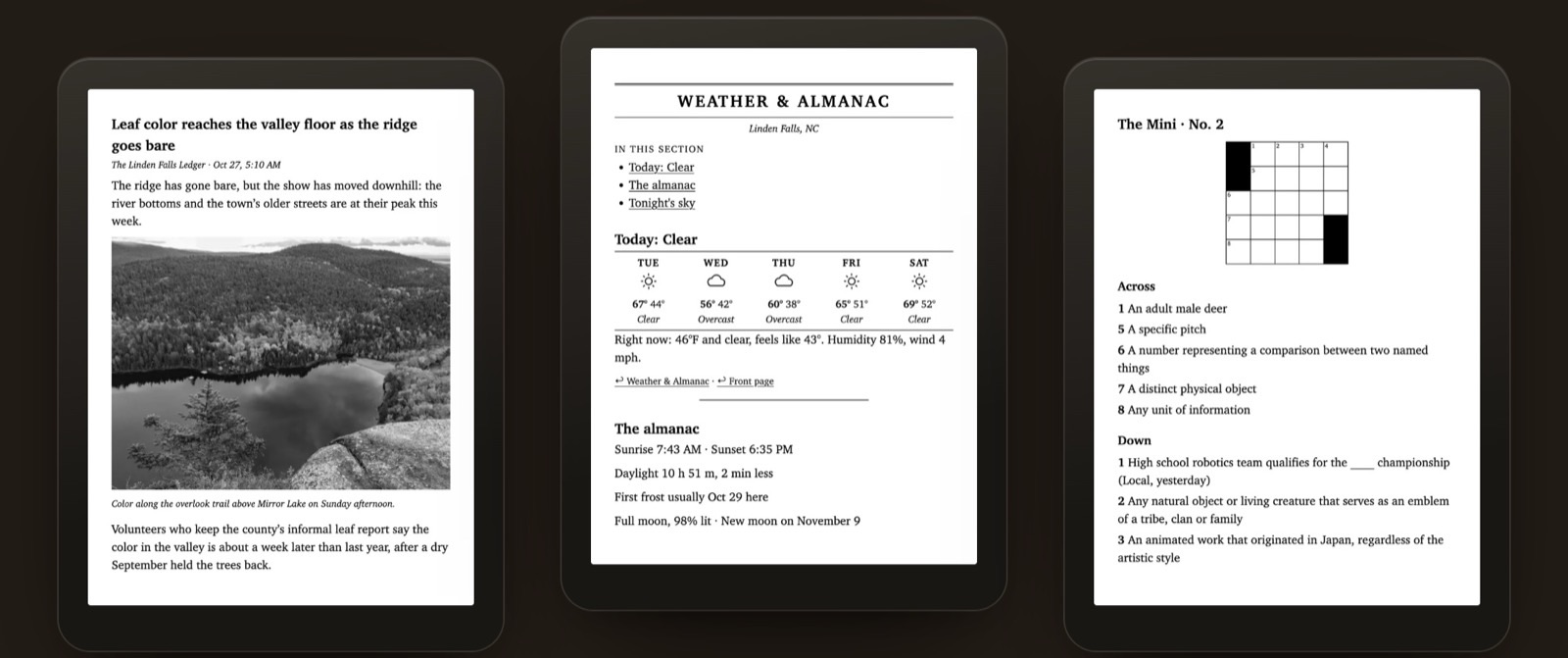
The Unraid Community Applications template for Deckle, a morning newspaper for your e-reader. Every morning it sets a real paper from your town's news and weather, your RSS feeds and the articles you saved, and has it waiting on your Kindle or KOReader before you're up.
Deckle · Container guide · Support
Install
Apps tab, search Deckle, then:
- Pick your TZ. Papers print on that zone's clock.
- Set a Web UI password (12 or more characters). Without one the web UI stays off and only the schedule runs.
- To email the paper to a Kindle, fill in Kindle email password.
- Apply, then open the WebUI on port 8080.
The first start writes a starter digest.toml in /config/deckle. Set your town, feeds, the
morning time and delivery in the web UI's Daily tab.
The two paths
| Mount | Holds | Default |
|---|---|---|
/config |
digest.toml, papers, state |
/mnt/user/appdata/deckle |
/data |
Deckle/: the Morgue, Inbox, uploads, exports |
/mnt/user/deckle |
Optional ports
Under Show more settings. KOReader over Wi-Fi and the calibre connection stay off until you turn them on in the Daily tab's Delivery.
| Port | For |
|---|---|
| 47219 | The bookmarklet: save a page to tomorrow's paper. Set Bookmarklet address too. |
| 47220 | KOReader over Wi-Fi: the paper and your books in KOReader's catalog. Set KOReader over Wi-Fi address too. |
| 9090 | KOReader's calibre connection. Readers find it by themselves only with Network Type: host. |
Worth knowing
- No Kindle book conversion. Enhanced Typesetting, X-Ray and Word Wise need Kindle Previewer, which only runs on Mac and Windows. The paper builds without it.
- Kindle by email only. There's no USB in the container. Add the
fromaddress to Amazon's Approved Personal Document E-mail List. - Plain HTTP. Beyond your home network, put the web UI behind a reverse proxy with TLS (SWAG, Nginx Proxy Manager). Never expose the bookmarklet or reader ports to the internet.
The full guide, including moving from the desktop app and running the AI editor beside Ollama, is docs/docker.md.
Keeping up
The template is edited in the Deckle repository at
docker/unraid/deckle.xml
and copied here. File issues at CasaVargas/deckle.
The MIT license in this repository covers these templates and docs. Deckle itself is GPL-3.0-or-later.
Media gallery
1 / 3Requirements
Categories
Related apps
Explore more like this
Explore allDetails
ghcr.io/casavargas/deckle:latestRuntime arguments
- Web UI
http://[IP]:[PORT:8080]/- Network
bridge- Shell
sh- Privileged
- false
- Extra Params
--stop-timeout 90
Template configuration
digest.toml, papers and state. Small; keep it on appdata.
- Target
- /config
- Default
- /mnt/user/appdata/deckle
- Value
- /mnt/user/appdata/deckle
The Morgue, library, Inbox, uploads and export folders (Deckle/ inside).
- Target
- /data
- Default
- /mnt/user/deckle
- Value
- /mnt/user/deckle
User id the files are written as (99 is nobody).
- Default
- 99
- Value
- 99
Group id the files are written as (100 is users).
- Default
- 100
- Value
- 100
Time zone. Papers print on this zone's clock.
- Default
- America/New_York
- Value
- America/New_York
The Deckle app in your browser.
- Target
- 8080
- Default
- 8080
- Value
- 8080
The password the web UI asks for; 12 or more characters. Without one the web UI stays off and only the schedule runs.
- Target
- DECKLE_WEB_PASSWORD
Password for the [email] account that sends the paper to your Kindle. Leave blank if you don't email it.
- Target
- DECKLE_SMTP_PASSWORD
Optional. Lets a browser bookmarklet save pages to tomorrow's paper.
- Target
- 47219
- Default
- 47219
- Value
- 47219
Optional. The address your browser reaches the bookmarklet port at, as scheme://host[:port] with no path, e.g. http://tower.local:47219.
- Target
- DECKLE_BOOKMARKLET_URL
Optional. The reader server: the paper and your books in KOReader's catalog, and its sync. Off until you turn it on in the Daily tab's Delivery.
- Target
- 47220
- Default
- 47220
- Value
- 47220
Optional. The address your e-readers reach that port at, e.g. http://tower.local:47220, so the app shows URLs that work.
- Target
- DECKLE_READER_SERVER_URL
Optional. KOReader's calibre connection. Readers find it by themselves only with Network Type: host.
- Target
- 9090
- Default
- 9090
- Value
- 9090