

Deckarr
Docker app from bjaane's Repository
Overview
Readme
View on GitHubDeckarr
A free, self-hosted iPhone web app for your media server. It runs as one small container on Unraid and you add it to your Home Screen like a normal app.
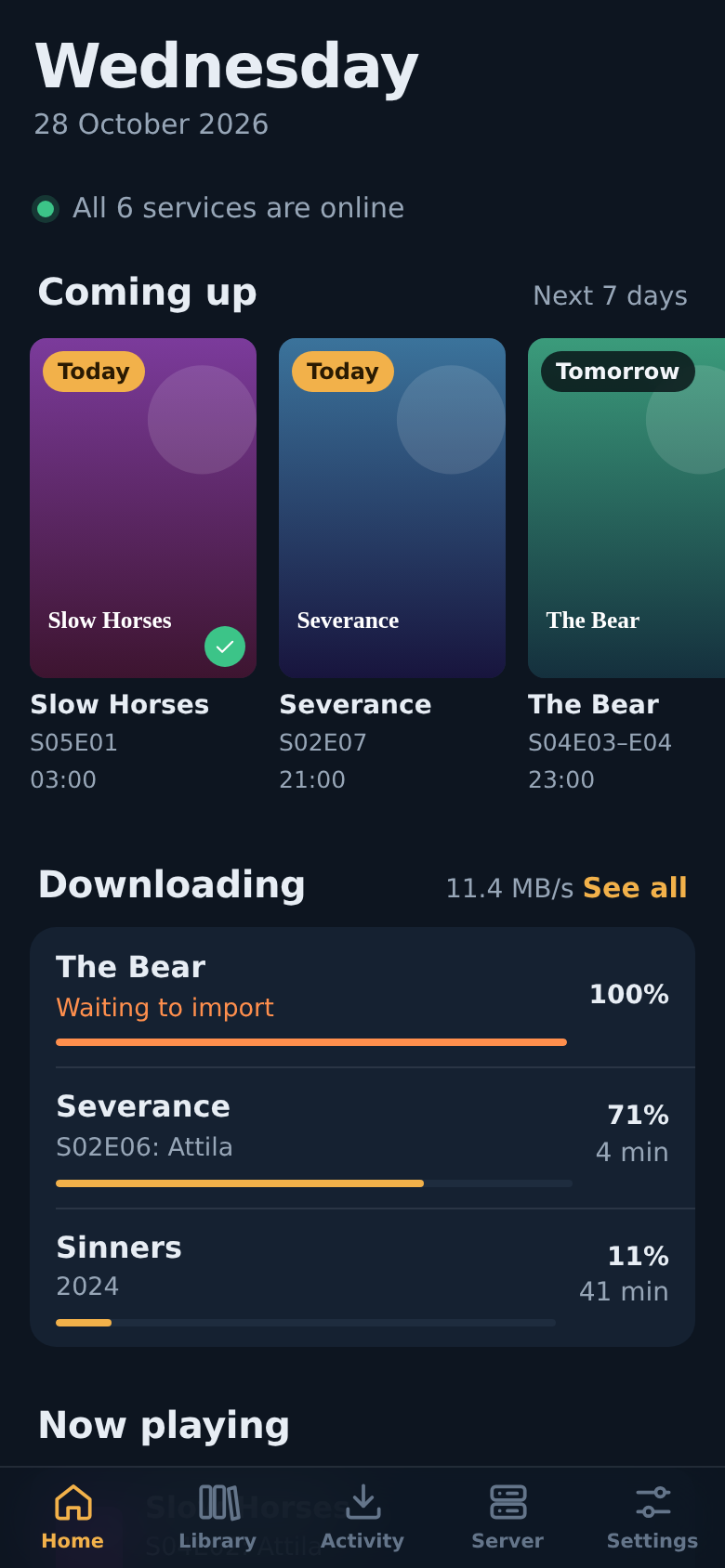
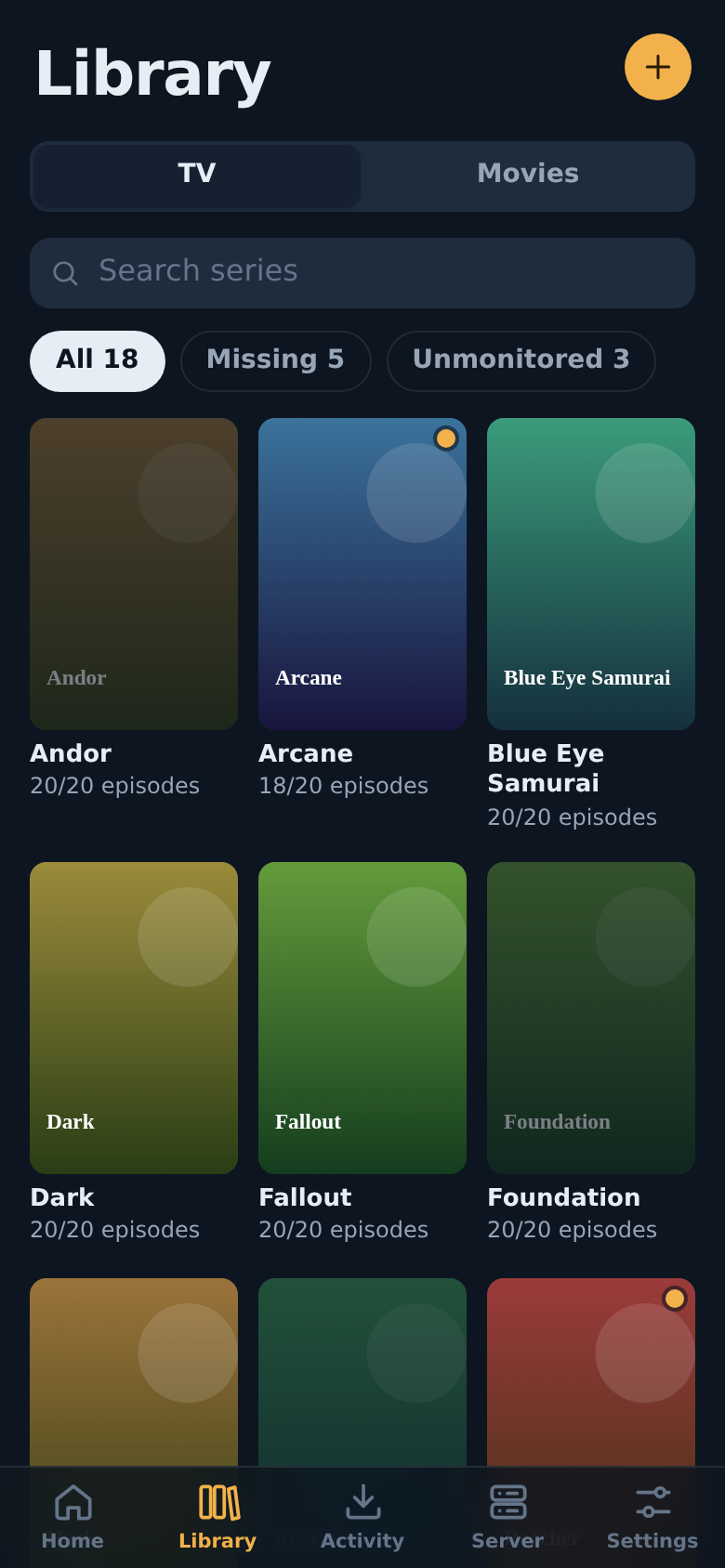
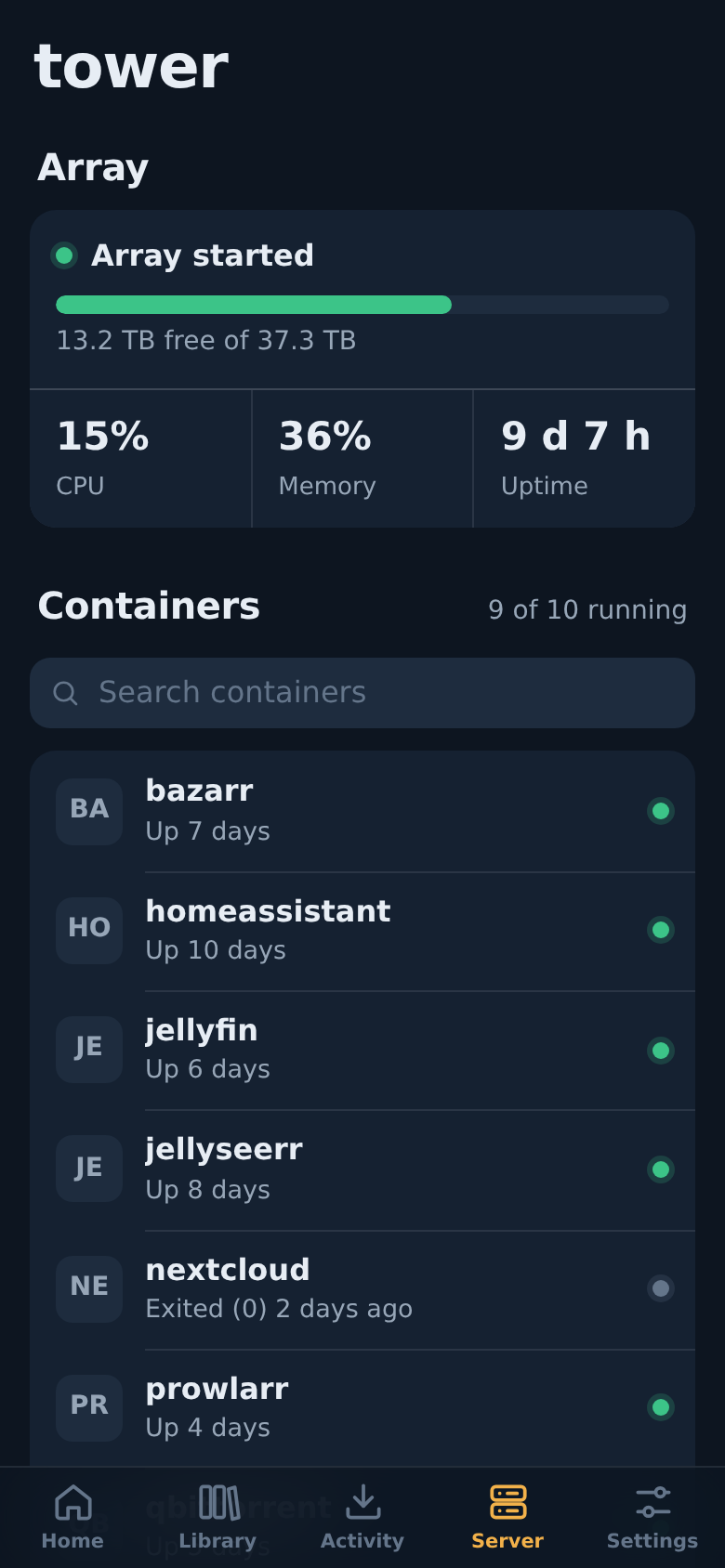
| Tab | What you can do |
|---|---|
| Home | Service status, the next 7 days of episodes, movies and albums, active downloads, and what's playing on Jellyfin |
| Library | Browse Sonarr, Radarr and Lidarr. Search for releases, monitor titles or seasons, remove titles, add new series, movies and artists |
| Activity | The *arr queue, qBittorrent (pause, resume, delete) and SABnzbd |
| Server | Unraid array, CPU and RAM, start, stop and restart containers and VMs, Jellyfin library scan, Prowlarr indexer status, health warnings |
| Settings | Add services, test connections, change the password |
Supported services: Sonarr, Radarr, Lidarr, Prowlarr, Bazarr, qBittorrent, SABnzbd, Jellyfin and Unraid 7.2+.
API keys are stored only on the server (/config/config.json, mode 600). The phone never sees them; it talks to Deckarr, and Deckarr talks to your services.
Install on Unraid
From the Apps tab (one click)
- Open Apps in Unraid and search for Deckarr.
- Click Install, then Apply. The defaults work for most servers.
- Continue with First run on the iPhone.
Before Deckarr is listed in Apps
Run this once in the Unraid terminal (the >_ icon top right):
wget -O /boot/config/plugins/dockerMan/templates-user/my-Deckarr.xml \
  https://raw.githubusercontent.com/bjaane/deckarr/main/templates/deckarr.xml
Then go to Docker > Add Container, choose Deckarr under Template, and click Apply.
Docker CLI or Compose
docker run -d --name deckarr --restart unless-stopped \
  -p 8484:8484 \
  -v /mnt/user/appdata/deckarr:/config \
  ghcr.io/bjaane/deckarr:latest
The container fixes the permissions of /config itself and then runs as PUID/PGID (default 99/100, Unraid's nobody:users).
First run on the iPhone
- Open Safari and go to
http://<your-unraid-ip>:8484. - Create a password. You type it once per device.
- Go to Settings > Add a service and add your apps. Use Test connection before saving.
- Tap Share > Add to Home Screen. Deckarr now opens full screen from its own icon.
Use your Unraid LAN IP for service addresses, for example
http://192.168.1.10:8989.localhostinside the Deckarr container points at Deckarr itself.
Where to find the keys
| Service | Where |
|---|---|
| Sonarr, Radarr, Lidarr, Prowlarr | Settings > General > Security > API Key |
| Bazarr | Settings > General > Security > API Key |
| SABnzbd | Config > General > Security > API Key (not the NZB key) |
| qBittorrent | Web UI username and password. Leave both blank if qBittorrent skips login for your subnet |
| Jellyfin | Dashboard > API Keys > New API key |
| Unraid 7.2+ | Settings > Management Access > API Keys. Use the Admin role, or read and update access to Docker, VMs and Array |
Access away from home
Don't forward port 8484 to the internet. Use one of these instead:
- Tailscale (recommended, free): install Tailscale on Unraid (built in from Unraid 7) and on the iPhone, then open
http://<unraid-tailscale-ip>:8484. - Reverse proxy with HTTPS (Nginx Proxy Manager, SWAG, Caddy): point it at port 8484. Sub-paths such as
https://example.com/deckarr/work. PassX-Forwarded-Protoso the session cookie is marked secure.
Add the Home Screen icon from the address you'll use most, because the icon remembers that address.
Settings
| Variable | Default | Purpose |
|---|---|---|
PORT |
8484 |
Port inside the container |
CONFIG_DIR |
/config |
Where config.json and auth.json are stored |
APP_PASSWORD |
not set | Optional fixed password. If set, the in-app password setup and change are disabled |
PUID / PGID |
99 / 100 |
User and group the app runs as |
Forgot the password? Stop the container, delete auth.json in the appdata folder (/mnt/user/appdata/deckarr), and start it again. You'll be asked to create a new one. Your services are kept.
Update
Unraid shows Update ready on the Docker tab when a new version is published. Click it. Your settings are kept.
Back up
Back up /mnt/user/appdata/deckarr. It contains your API keys, so treat it like a password file.
Tip: let Jellyfin pick up new files immediately
In Sonarr and Radarr, go to Settings > Connect > + > Emby / Jellyfin:
- Turn on On Import and On Upgrade.
- Turn on Update Library.
- Enter the Jellyfin address and an API key.
If Sonarr and Jellyfin see the media at different paths (/tv vs /data/tv), fill in the path mapping.
Troubleshooting
| Message | Fix |
|---|---|
| Nothing is answering at … | Wrong IP or port, or the app is stopped. Use the Unraid LAN IP, not localhost |
| … rejected the API key | Copy the key again. For SABnzbd, use the API key, not the NZB key |
| … redirected to … | The app forces HTTPS or a different path. Use the address it redirects to |
| … uses a certificate Deckarr doesn't trust | Turn on Allow self-signed certificate for that service |
| Unraid: Cannot query field … | Update Unraid. The API needs Unraid 7.2 or newer |
| qBittorrent has temporarily blocked this server | Too many failed logins. Wait, then fix the username and password |
The container log in the Docker tab shows server-side errors.
For tinkerers
server/         Node.js server, no dependencies
  index.js      routes, sign-in, static files
  upstream.js   talks to each service, injects credentials
  types.js      list of supported services
public/         the app (plain JavaScript, no build step)
  js/services.js  one adapter per service
  js/views/       Home, Library, Activity, Server, Settings
To add another Sonarr-style app, add an entry to SERVICE_TYPES in server/types.js and to ARR and API_VERSION in public/js/services.js.
Build the image yourself:
docker build -t deckarr .
Run locally without Docker (Node 20+):
npm run dev # stores settings in ./config, serves on http://localhost:8484
Media gallery
1 / 3Requirements
Categories
Related apps
Explore more like this
Explore allDetails
ghcr.io/bjaane/deckarr:latestRuntime arguments
- Web UI
http://[IP]:[PORT:8484]/- Network
bridge- Shell
sh- Privileged
- false
Template configuration
Port for the web app. Open http://[your-unraid-ip]:[this port] on your phone.
- Target
- 8484
- Default
- 8484
- Value
- 8484
Settings, password hash and service API keys.
- Target
- /config
- Default
- /mnt/user/appdata/deckarr
- Value
- /mnt/user/appdata/deckarr
Optional. Leave blank to create a password in the app on first launch (recommended).
- Target
- APP_PASSWORD
User ID the app runs as.
- Default
- 99
- Value
- 99
Group ID the app runs as.
- Default
- 100
- Value
- 100