All apps · 0 apps
Dbackup
Docker app from ZappyZap's Repository
Overview
Readme
View on GitHubDBackup
Self-hosted database backup automation with encryption, compression, and smart retention.
Website • Documentation • Quick Start • API Reference • Changelog • Roadmap
What is DBackup?
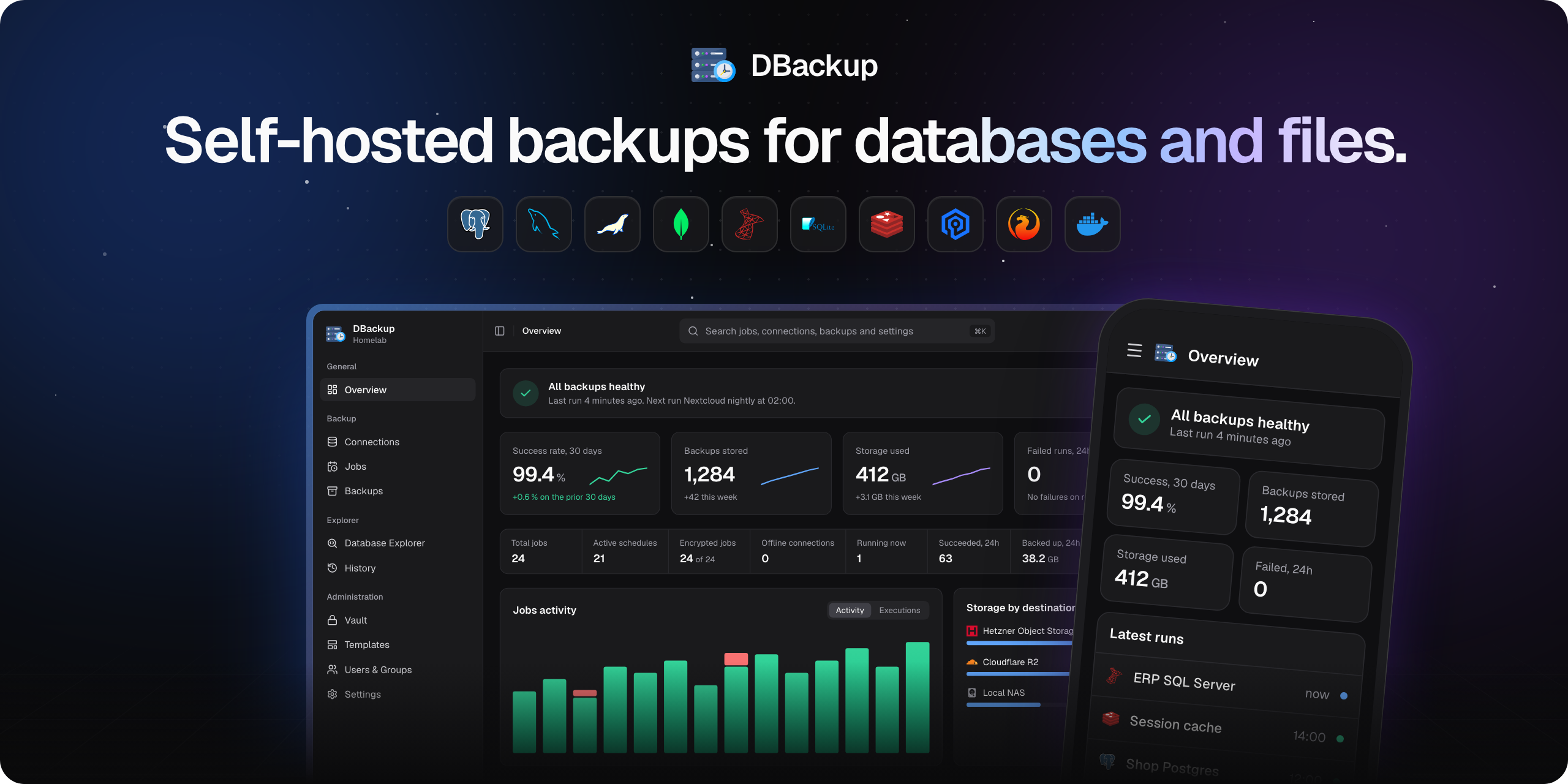
DBackup is a comprehensive, self-hosted backup solution designed to automate and secure your database backups. It provides AES-256-GCM encryption, flexible storage options, and intelligent retention policies to ensure your data is always protected and recoverable.
Whether you're running a single MySQL database or managing multiple PostgreSQL, MongoDB, and SQL Server instances, DBackup offers a unified interface with real-time monitoring, granular access control, and seamless restore capabilities.
No vendor lock-in by design - every backup is a standard database dump (SQL, BSON, RDB, etc.) encrypted with open AES-256-GCM. If DBackup is ever unavailable, you can decrypt and restore your backups with a single Node.js script and the key from your Recovery Kit. No proprietary formats, no dependencies on DBackup itself.
✨ Features
🗄️ Database Backup
- 9 Database Engines - MySQL, MariaDB, PostgreSQL, MongoDB, SQLite, Redis, Valkey, Microsoft SQL Server, and Firebird (beta)
- Selective Database Backup - Choose exactly which databases to back up per job instead of creating separate sources for each database
- Multi-Database Jobs - Back up multiple databases from a single source in one job with a unified TAR archive format
- AES-256-GCM Encryption - Encrypt backups with managed Encryption Profiles, key rotation, and downloadable Recovery Kits for offline decryption
- GZIP & Brotli Compression - Reduce backup size and storage costs with built-in compression
- SSH Remote Execution - Run backup tools directly on the remote database host via SSH, eliminating the need to expose database ports to the DBackup server
☁️ Storage & Destinations
- 13+ Storage Adapters - S3, Cloudflare R2, Hetzner, Google Drive, Dropbox, OneDrive, SFTP, FTP, WebDAV, SMB, Rsync, and local filesystem
- Multi-Destination Jobs - Upload each backup to multiple storage destinations simultaneously for redundancy or off-site copies
- Storage Explorer - Browse backup files across all destinations, inspect metadata, download files, or generate secure direct download links
- Storage Monitoring & Alerts - Per-destination alerts for usage spikes, storage limit warnings, and missing backups within a defined time window
🔄 Restore & Recovery
- One-Click Restore - Restore directly from the Storage Explorer to any configured database target
- Database Remapping - Restore databases under different names or map multiple databases to new targets
- Version Compatibility Check - Pre-restore validation warns about version mismatches before execution
- Integrity Verification - Post-upload SHA-256/MD5 checksum validation after every backup, plus scheduled full integrity scans across all stored backups (Jobs mode or full storage scan)
- No Vendor Lock-In - Backups are standard database dumps encrypted with open AES-256-GCM. Decrypt and import manually with just Node.js, no DBackup required
- Recovery Kit - Downloadable ZIP with your encryption key and a standalone decryption script for disaster recovery without DBackup
📊 Monitoring & Visibility
- Live Backup Progress - Real-time progress tracking shows exactly what's happening during backup and restore operations
- Interactive Dashboard - Activity charts, job status overview, KPI cards, and auto-refreshing activity feeds
- Backup Calendar - GitHub-style 12-month heatmap showing backup activity and success/failure patterns at a glance
- Database Explorer - Browse databases, tables, and live data directly from DBackup with server-side pagination, full-text search, schema inspection, and deep-link URL support across all 8 database engines
- Database Version History - Automatic tracking of database engine version changes over time with a timeline chart and change log
- Storage Usage History - Track storage growth over time with area charts and trend indicators
- Execution History - Full log of every backup and restore with duration, file size, status, and error details
🔔 Notifications
- 9 Notification Channels - Discord, Slack, Teams, Telegram, Gotify, ntfy, Webhook, SMS (Twilio), and Email (SMTP)
- Per-Job Notification Settings - Configure which notification channels fire for each backup job individually
- System Event Notifications - Get notified about user logins, account creation, restore results, storage alerts, update availability, and system errors across all channels
- Repeat Intervals - Configurable reminder intervals for recurring alerts (storage warnings, update notices)
⏰ Scheduling & Retention
- Cron-based Scheduling - Flexible job scheduling with a visual Schedule Picker (Simple Mode + Cron Mode)
- Retention Policy Templates - Reusable named GFS (Grandfather-Father-Son) retention policies with per-destination assignment
- Naming Templates & Schedule Presets - Reusable filename patterns with tokens (
{job_name},{db_name}, date/time) and named cron presets for consistent scheduling across jobs - Automated Config Backups - Self-backup of the entire DBackup configuration to any storage adapter
👥 Access Control & Security
- SSO / OIDC - OpenID Connect with pre-built adapters for Authentik, PocketID, Keycloak, and a generic OIDC option
- RBAC - User groups with granular permissions, protected SuperAdmin group, and audit logging
- 2FA / Passkeys - Two-factor authentication and WebAuthn passkey support
- Credential Vault - Centralized encrypted storage for SSH keys, API tokens, OAuth credentials, SMTP accounts, and username/password pairs - reusable across all adapters without re-entering secrets per job
- HTTPS by Default - Auto-generated self-signed certificates on first run with certificate upload UI for custom certificates and HSTS enforcement
- Configurable Rate Limits - Per-category rate limiting (Auth, API Read, API Write) adjustable from the Settings UI
🔗 API & Automation
- REST API - Trigger backups, poll executions, manage adapters, and explore storage via API
- Fine-grained API Keys - Scoped permissions and expiration dates for CI/CD pipelines and scripts
- Ready-made Examples - cURL, Bash, and Ansible examples included in the API docs
🎨 Designed for Simplicity
- Intuitive UI - Clean, modern interface that makes complex backup workflows feel simple
- Quick Setup Wizard - Guided first-run setup wizard to get your first backup running in minutes
- Highly Configurable - Session lifetimes, rate limits, retention periods, notification preferences, system tasks, and more
- Docker Ready - Multi-arch images (AMD64/ARM64), health checks, graceful shutdown, and configurable PUID/PGID
🚀 Quick Start
Supported Platforms: AMD64 (x86_64) • ARM64 (aarch64)
# docker-compose.yml
services:
dbackup:
image: skyfay/dbackup:latest
container_name: dbackup
restart: always
ports:
- "3000:3000"
environment:
- ENCRYPTION_KEY= # openssl rand -hex 32
- BETTER_AUTH_URL=https://localhost:3000
- BETTER_AUTH_SECRET= # openssl rand -base64 32
# All additional environment variables: https://docs.dbackup.app/user-guide/installation#environment-variables
volumes:
- ./data:/data # All persistent data (db, storage, certs)
- ./backups:/backups # Optional: used for local backups
docker-compose up -d
Open https://localhost:3000 and create your admin account (accept the self-signed certificate warning on first visit).
📖 Full installation guide: docs.dbackup.app/user-guide/getting-started
🗄️ Supported Databases
| Database | Versions | Connection Modes | Restore |
|---|---|---|---|
| PostgreSQL | 12, 13, 14, 15, 16, 17, 18 | Direct, SSH | Yes |
| MySQL | 5.7, 8.x, 9.x | Direct, SSH | Yes |
| MariaDB | 10.x, 11.x | Direct, SSH | Yes |
| MongoDB | 4.x, 5.x, 6.x, 7.x, 8.x | Direct, SSH | Yes |
| Redis | 2.8+ | Direct, SSH | Guided |
| Valkey | 7.2+ | Direct, SSH | Guided |
| SQLite | 3.x | Local, SSH | Yes |
| Microsoft SQL Server | 2017, 2019, 2022, Azure SQL Edge | Direct (+ SSH for file transfer) | Yes |
| Firebird (beta) | 3.x, 4.x, 5.x | Direct, SSH | Yes (pre-configured aliases) |
☁️ Supported Destinations
| Destination | Details |
|---|---|
| Local Filesystem | Store backups directly on the server |
| Amazon S3 | Native AWS S3 with storage class support (Standard, IA, Glacier, Deep Archive) |
| S3 Compatible | Any S3-compatible storage (MinIO, Wasabi, etc.) |
| Cloudflare R2 | Cloudflare R2 Object Storage |
| Hetzner Object Storage | Hetzner S3 storage (fsn1, nbg1, hel1, ash) |
| Google Drive | Google Drive via OAuth2 |
| Dropbox | Dropbox via OAuth2 with chunked upload support |
| Microsoft OneDrive | OneDrive via Microsoft Graph API / OAuth2 |
| SFTP | SSH/SFTP with password, private key, or SSH agent auth |
| FTP / FTPS | Classic FTP with optional TLS |
| WebDAV | WebDAV servers (Nextcloud, ownCloud, etc.) |
| SMB (Samba) | Windows/Samba network shares (SMB2, SMB3) |
| Rsync | File transfer via rsync over SSH |
🔔 Supported Notifications
| Channel | Details |
|---|---|
| Discord | Webhook-based notifications with rich embeds |
| Slack | Incoming webhook notifications with Block Kit formatting |
| Microsoft Teams | Adaptive Card notifications via Power Automate webhooks |
| Gotify | Self-hosted push notifications with priority levels |
| ntfy | Topic-based push notifications (self-hosted or ntfy.sh) |
| Generic Webhook | JSON payloads to any HTTP endpoint (PagerDuty, etc.) |
| Telegram | Bot API push notifications to chats, groups, and channels |
| SMS (Twilio) | SMS text message alerts via Twilio API |
| Email (SMTP) | SMTP with SSL/STARTTLS support, multiple recipients |
📚 Documentation
Full documentation is available at docs.dbackup.app:
- User Guide - Installation, configuration, usage
- API Reference - Interactive REST API documentation
- Developer Guide - Architecture, adapters, contributing
- Changelog - Release history
- Roadmap - Planned features
🛠️ Development
# Clone & install
git clone https://github.com/Skyfay/DBackup.git && cd DBackup
pnpm install
# Configure environment
cp .env.example .env # Edit with your secrets
# Start dev server (applies pending migrations automatically on startup)
pnpm dev
For contribution guidelines, see the CONTRIBUTING.md.
💬 Community & Support
- 💬 Discord: Join our community at https://dc.skyfay.ch
- 📝 Documentation: Full guides and API reference at docs.dbackup.app
- 🔗 API Reference: Interactive API docs at api.dbackup.app or in-app at
/docs/api - 🐛 Issues: Report bugs or request features on GitHub Issues
- 📧 Support: General questions and support via support@dbackup.app
- 🔒 Security: Report vulnerabilities responsibly via security@dbackup.app (please do not open public issues for security reports)
🤖 AI Development Transparency
Architecture & Concept
The system architecture, infrastructure design, strict technology stack selection, and feature specifications for DBackup were entirely conceptualized and directed by a human System Engineer to solve real-world infrastructure challenges.
Implementation
The application code was generated by AI coding agents following detailed architectural specifications and coding guidelines. All features were manually tested for correctness, stability, and real-world reliability. Automated unit tests (Vitest) and static security audits complement the manual QA process.
Open for Review
DBackup is thoroughly tested and used in production, but a formal manual security audit by an external developer has not yet been completed. If you are a software developer or cybersecurity professional, your expertise is highly welcome! We invite the open-source community to review the code, submit PRs, and help us elevate DBackup to a fully verified, enterprise-ready standard.
Security Disclosure: If you discover a security vulnerability, please do not open a public GitHub issue. Instead, report it responsibly via email to security@dbackup.app.
📝 License
Install Dbackup on Unraid in a few clicks.
Find Dbackup in Community Apps on your Unraid server, review the template, and click Install. Unraid handles the Docker app or plugin setup from the published template.
Categories
Download Statistics
Total Downloads Over Time
Related apps
Explore more like this
Explore allLinks
Details
skyfay/dbackup:latestRuntime arguments
- Web UI
https://[IP]:[PORT:3000]/- Network
bridge- Shell
sh- Privileged
- false
- Extra Params
--restart=unless-stopped
Template configuration
# openssl rand -hex 32 32-byte hex string (64 chars) for encrypting credentials at rest.
- Target
- ENCRYPTION_KEY
Primary URL where users access DBackup (for auth redirects).
- Default
- https://localhost:3000
- Value
- https://[IP of your unraid server]:3000
# openssl rand -base64 32 Base64 secret for authentication sessions.
Server timezone for logs. Default: UTC
- Target
- TZ
- Default
- UTC
- Value
- UTC
# All persistent data (db, storage, certs)
- Target
- /data
- Value
- /mnt/user/appdata/dbackup/data
# Optional: used for local backups
- Target
- /backups
- Value
- /mnt/user/appdata/dbackup/backups
- Target
- 3000
- Default
- 3000
- Value
- 3000

