

DashGate
Docker app from Selfhosters
Overview
Readme
View on GitHubDashGate
A self-hosted application gateway for managing and accessing your web services. Features multi-method authentication, group-based access control, automatic app discovery from Docker/Traefik/Nginx/NPM/Caddy, and real-time health monitoring.
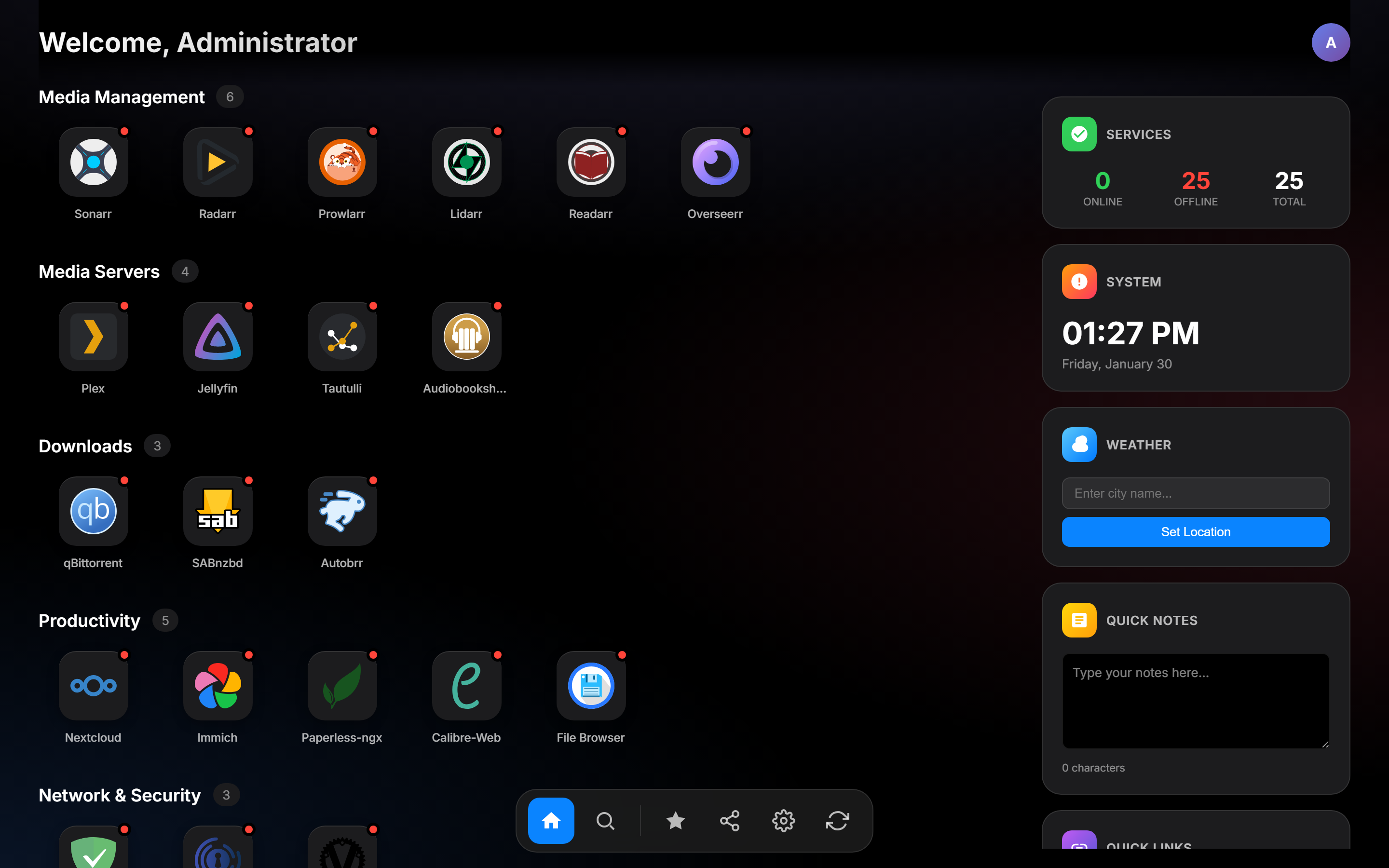
Features
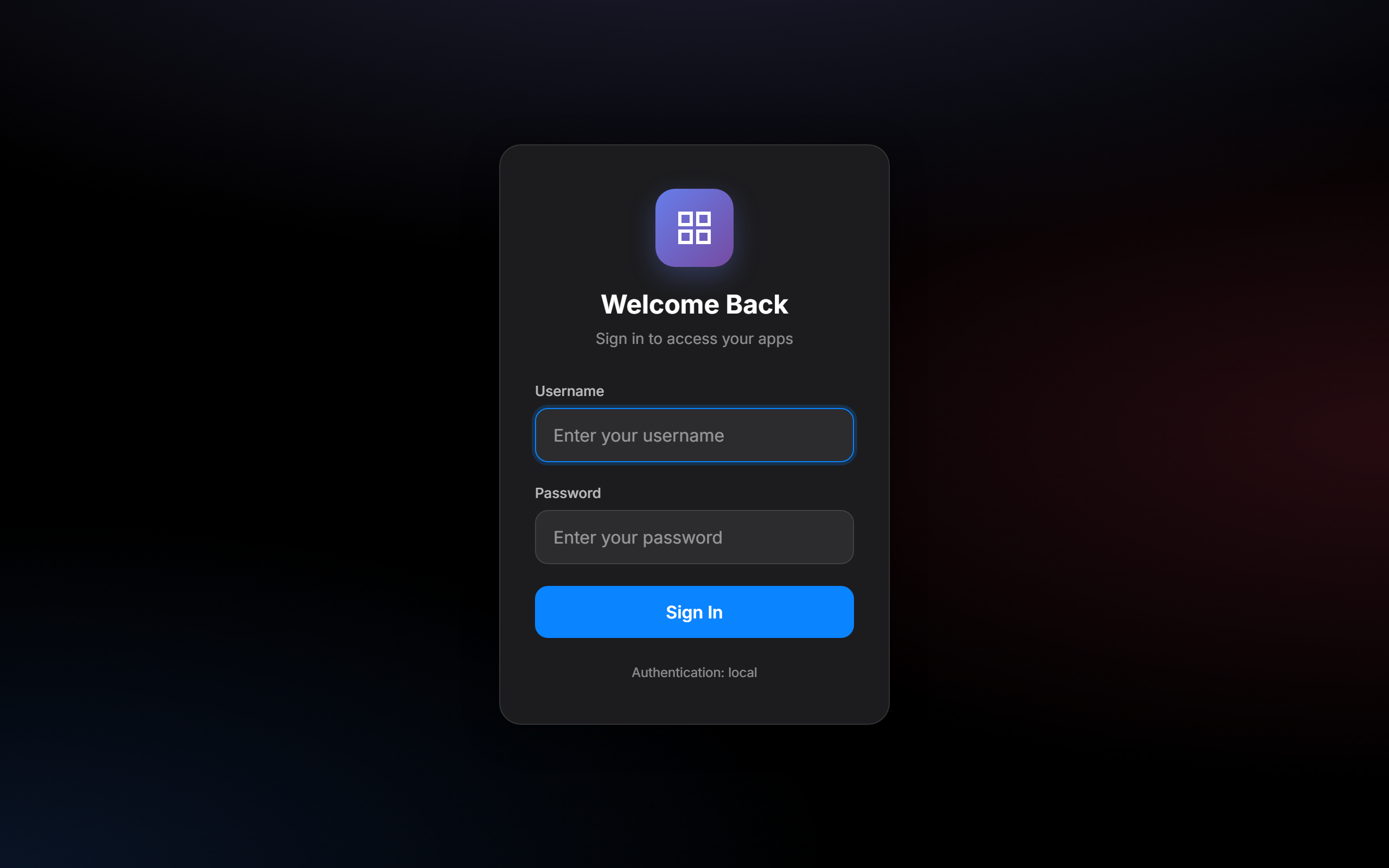
- Multi-method authentication - Local accounts, LDAP, OIDC/OAuth2, and reverse proxy (Authelia/Authentik) support
- Group-based access control - Show apps only to users in specific groups
- Automatic app discovery - Discover apps from Docker, Traefik, Nginx, Nginx Proxy Manager, Caddy, and Unraid
- Health monitoring - Background health checks with real-time status indicators
- Auto-login redirect - Unauthenticated requests redirect to login page or OIDC provider; API requests get structured JSON 401 with redirect URL
- First-time setup wizard - Guided configuration on initial deployment
- Admin panel - Manage users, apps, categories, groups, and discovery sources from the UI
- Group management - Create and delete managed groups with server-side persistence via admin panel
- LLDAP integration - Manage users and groups via LLDAP directory
- API key authentication - Programmatic access with scoped API keys
- Progressive Web App - Install as a PWA with offline support
- Encryption at rest - Sensitive configuration values (passwords, secrets) encrypted with AES-256-GCM
- Audit logging - Track admin actions with audit trail
- Backup/Restore - Export and import DashGate configuration
- User self-service - Edit profile (display name, email) and change password via Settings > Profile tab
- Configurable clock format - Toggle between 12h and 24h time display via Settings
- Customizable themes - User-selectable accent colors and dark/light mode
- Security hardened - CSP nonce, CSRF protection, rate limiting, HSTS, security headers
Quick Start
Docker (Recommended)
# Create config directory
mkdir -p config

# Run with docker
docker run -d \
  --name dashgate \
  -p 1738:1738 \
  -v ./config:/config \
  -e PUID=1000 \
  -e PGID=1000 \
  --restart unless-stopped \
  khak1s/dashgate:latest

# Dev builds: ghcr.io/kha-kis/dashgate:dev (multi-arch, pushed on every main commit)
Visit http://localhost:1738 and complete the setup wizard.
Manual Installation
Prerequisites: Go 1.24+, GCC (for CGO/SQLite)
# Clone and build
git clone https://github.com/khak1s/dashgate.git
cd dashgate
CGO_ENABLED=1 go build -ldflags="-s -w" -o dashgate .

# Run
CONFIG_PATH=./config.yaml DB_PATH=./dashgate.db ICONS_PATH=./static/icons ./dashgate
Windows Development
Requires MSYS2 with MinGW-w64 GCC at C:\msys64\mingw64\bin\gcc.exe.
$env:PATH = "C:\msys64\mingw64\bin;" + $env:PATH
$env:CGO_ENABLED = "1"
go build -o dashgate.exe .

$env:CONFIG_PATH = ".\config.yaml"
$env:DB_PATH = ".\dashgate.db"
$env:TEMPLATES_PATH = ".\templates"
$env:STATIC_PATH = ".\static"
.\dashgate.exe
Configuration
Environment Variables
| Variable | Default | Description |
|---|---|---|
PUID |
1000 |
User ID for file permissions (NAS/Unraid compatibility) |
PGID |
1000 |
Group ID for file permissions (NAS/Unraid compatibility) |
PORT |
1738 |
HTTP server port |
CONFIG_PATH |
/config/config.yaml |
Path to YAML app configuration |
DB_PATH |
/config/dashgate.db |
SQLite database path |
ICONS_PATH |
/config/icons |
Persistent icons directory (bundled icons seeded on first run) |
DEV_MODE |
false |
Enable live template reloading |
TEMPLATES_PATH |
/app/templates |
Templates directory (used in dev mode) |
ENCRYPTION_KEY |
(auto-generated) | 64 hex character AES-256 key for encrypting secrets at rest |
LOGIN_RATE_LIMIT |
5 |
Max login attempts per IP per window |
COOKIE_SECURE |
(auto) | Set to false to allow cookies over HTTP (useful behind reverse proxies) |
UNRAID_DISCOVERY |
false |
Enable Unraid container discovery |
UNRAID_URL |
Unraid server URL (e.g., http://tower.local) |
|
UNRAID_API_KEY |
Unraid API key for GraphQL access |
App Catalog (config.yaml)
Apps are organized into categories:
title: My DashGate
categories:
  - name: Media
    apps:
      - name: Plex
        url: https://plex.example.com
        icon: plex
        description: Media server
        groups:
          - media
          - admins
      - name: Jellyfin
        url: https://jellyfin.example.com
        icon: jellyfin
        description: Media streaming
        groups:
          - media

  - name: Tools
    apps:
      - name: Portainer
        url: https://portainer.example.com
        icon: portainer
        groups:
          - admins
Each app supports:
name- Display nameurl- Application URLicon- Icon name (matches files in static/icons/) or URLdescription- Short descriptiongroups- List of groups that can see this configured app (empty = admin-only)depends_on- List of app names this app depends on (for dependency graph)
Authentication
DashGate supports multiple authentication methods that can be enabled simultaneously:
Local Authentication
Local user accounts stored in SQLite with bcrypt-hashed passwords. Create your first admin user during the setup wizard.
LDAP Authentication
Bind-based LDAP authentication. Configure in the setup wizard or admin settings:
- Server URL (e.g.,
ldap://ldap.example.com:389) - Bind DN and password (service account)
- Base DN, user filter, attribute mappings
- Optional StartTLS with configurable certificate verification
OIDC/OAuth2
OpenID Connect authentication with any compliant provider (Authelia, Authentik, Keycloak, etc.):
- Issuer URL, Client ID, Client Secret
- Configurable scopes and groups claim name
- Automatic user creation on first login
For group-based access and admin rights, configure the identity provider to include the chosen groups claim in the ID token. The group value must match DashGate's Admin Group (or an app's assigned group). If an OIDC user signs in without expected access, check the token claim mapping and exact group names first.
New apps created in the admin UI include the configured Admin Group by default. To show one to an OIDC user, select an additional Access Group that appears in that user's ID token. Managed groups can be created under Admin > Users when local auth is enabled, but OIDC membership still comes from the identity provider.
Proxy Authentication (Authelia/Authentik)
Trust authentication headers from a reverse proxy:
Remote-User,Remote-Groups,Remote-Name,Remote-Email- Configure trusted proxy IP ranges to prevent header spoofing
- Works with Authelia, Authentik, and similar auth proxies
- Each trusted proxy username gets its own user record, so settings, favorites, and My Apps sync across browsers and devices
- A proxy username already used by a local, LDAP, or OIDC account is rejected; use distinct usernames for each authentication source
- If a proxy email belongs to another account, DashGate leaves that account unchanged and stores the proxy user without an email
API Keys
Create scoped API keys for programmatic access:
- Prefix-based lookup with bcrypt verification
- Optional expiration dates
- Group-scoped permissions
App Discovery
Background workers automatically discover apps from various sources every 60 seconds:
Docker
Enable with DOCKER_DISCOVERY=true. Discovers containers with labels:
labels:
  - "dashgate.enable=true"
  - "dashgate.name=My App"
  - "dashgate.url=https://app.example.com"
  - "dashgate.icon=app-icon"
  - "dashgate.description=Description"
Requires mounting the Docker socket: -v /var/run/docker.sock:/var/run/docker.sock:ro
Using a Docker Socket Proxy (recommended for security):
Instead of mounting the Docker socket directly, you can use a socket proxy like docker-socket-proxy to limit API access:
services:
  socket-proxy:
    image: tecnativa/docker-socket-proxy
    environment:
      - CONTAINERS=1 # Only allow container listing
    volumes:
      - /var/run/docker.sock:/var/run/docker.sock:ro

  dashgate:
    image: khak1s/dashgate:latest
    environment:
      - DOCKER_DISCOVERY=true
      - DOCKER_SOCKET=tcp://socket-proxy:2375
    # No socket mount needed
Traefik
Enable with TRAEFIK_DISCOVERY=true and TRAEFIK_URL=http://traefik:8080. Discovers HTTP routers from the Traefik API.
Nginx
Enable with NGINX_DISCOVERY=true and NGINX_CONFIG_PATH=/etc/nginx/conf.d. Parses Nginx configuration files for server blocks.
Nginx Proxy Manager (NPM)
Enable with NPM_DISCOVERY=true, NPM_URL, NPM_EMAIL, and NPM_PASSWORD. Discovers proxy hosts from the NPM API.
Caddy
Enable with CADDY_DISCOVERY=true and CADDY_ADMIN_URL=http://localhost:2019. Discovers reverse proxy routes from the Caddy admin API.
Unraid
Enable with UNRAID_DISCOVERY=true, UNRAID_URL, and UNRAID_API_KEY. Discovers Docker containers with WebUI URLs configured via the Unraid GraphQL API (requires Unraid 7.2+).
To create an API key on your Unraid server:
unraid-api apikey --name "DashGate" --create --roles ADMIN --json
Or configure via the admin UI under Discovery settings — enter your Unraid server URL and API key, then test the connection.
Discovery sources enabled by environment variables are read-only in the admin UI. Change those variables in your deployment configuration and restart DashGate; sources configured in the UI are saved to the database.
Managing Discovered Apps
Discovered apps are hidden by default. Use the admin panel to:
- Show/hide discovered apps on the DashGate dashboard
- Override names, icons, URLs, and descriptions
- Assign groups and categories
- Test discovery connections
The Discovered Apps inbox lists unconfigured and Hidden routes. Use Dismiss on a row or select several rows and choose Dismiss selected to clear routes you do not want to configure. Dismissed routes move to the collapsed Ignored list, where Restore returns them to the inbox. Ignored entries remain available for restoration even if a source stops reporting them. Dismissing a route does not publish, hide, or change dashboard access for an app; it only removes that source and URL pair from the inbox.
A published discovered app with no assigned groups is visible to every authenticated user. An unpublished or hidden discovered app does not appear, including for admins.
Explaining App Access
In Admin > Users > Explain App Access, select a saved user and an app to see whether the app appears on that user's dashboard and why. The explanation shows the app source, effective app groups, stored user groups, and any matching group. OIDC, LDAP, and proxy groups are snapshots saved by DashGate and may differ from the identity provider's current membership. The checker is read-only and available only to admins.
LLDAP Integration
Optional integration with LLDAP for user and group management:
environment:
  - LLDAP_URL=http://lldap:17170
  - LLDAP_ADMIN_USERNAME=admin
  - LLDAP_ADMIN_PASSWORD=changeme
This enables viewing LLDAP users and groups in the admin panel.
API Reference
All API endpoints return JSON. State-changing requests require a X-CSRF-Token header matching the dashgate_csrf cookie.
Public Endpoints
| Method | Path | Description |
|---|---|---|
GET |
/health |
Health check (returns version; returns JSON 401 with redirect URL when unauthenticated) |
GET |
/api/auth/config |
Enabled auth methods |
Authenticated Endpoints
| Method | Path | Description |
|---|---|---|
GET |
/api/auth/me |
Current user info |
POST |
/api/auth/logout |
End session |
GET |
/api/health |
App health statuses |
GET/PUT |
/api/user/preferences |
Settings, favorites, My Apps |
GET/PUT |
/api/user/profile |
User profile (display name, email) |
POST |
/api/user/password |
Change password (local users only) |
GET |
/api/discovered-apps |
List discovered apps |
GET |
/api/dependencies |
Service dependency graph |
API keys cannot access user preferences; these settings belong to a signed-in user. Personal apps in Settings > My Personal Apps sync through these preferences and appear on the dashboard, including when no shared categories are configured. After upgrading from a browser-only My Apps version, review the restoration notice in Settings > My Personal Apps. Confirm the full browser and account lists before restoring: restoration replaces the account list. DashGate keeps a local backup until the restore succeeds. If a personal-app change cannot reach the server, DashGate keeps an account-scoped pending copy. Retry sync shows the latest account list and asks before replacing it. Choose Keep account apps to discard the pending browser copy and continue editing the server list. Quick Links, Quick Notes, and the weather location remain local to each browser.
Admin Endpoints
All require admin group membership.
| Method | Path | Description |
|---|---|---|
GET |
/api/admin/apps |
List all apps (config + discovered, deduplicated by URL) |
GET |
/api/admin/check |
Verify admin access |
GET/POST |
/api/admin/local-users |
List/create local users |
PUT/DELETE |
/api/admin/local-users/:id |
Update/delete user |
POST |
/api/admin/local-users/:id/password |
Reset password |
GET/POST |
/api/admin/api-keys |
List/create API keys |
GET/PUT |
/api/admin/system-config |
Get/update system config |
GET/POST |
/api/admin/config/apps |
Manage app catalog |
GET/POST |
/api/admin/config/categories |
Manage categories |
GET |
/api/admin/config/icons |
List available icons |
POST |
/api/admin/config/icons/upload |
Upload custom icon |
GET/POST |
/api/admin/docker-discovery |
Docker discovery config |
GET/POST |
/api/admin/traefik-discovery |
Traefik discovery config |
GET/POST |
/api/admin/nginx-discovery |
Nginx discovery config |
GET/POST |
/api/admin/npm-discovery |
NPM discovery config |
GET/POST |
/api/admin/caddy-discovery |
Caddy discovery config |
GET/POST/PUT |
/api/admin/unraid-discovery |
Unraid discovery config |
POST |
/api/admin/unraid-discovery/test |
Test Unraid connection |
GET |
/api/admin/backup |
Download backup |
POST |
/api/admin/restore |
Restore from backup |
GET |
/api/admin/audit-log |
View audit log |
GET |
/api/admin/users |
List LLDAP users |
GET |
/api/admin/groups |
List LLDAP groups |
GET/POST |
/api/admin/managed-groups |
List/create managed groups |
DELETE |
/api/admin/managed-groups/{name} |
Delete a managed group |
Security
Built-in Protections
- CSRF protection - Double-submit cookie pattern with constant-time comparison
- Content Security Policy - Per-request nonces for inline scripts
- Rate limiting - Per-IP rate limiting on login endpoints (configurable)
- Security headers - X-Content-Type-Options, X-Frame-Options, HSTS, Referrer-Policy
- Session security - Cryptographic session tokens, old sessions invalidated on new login
- Encryption at rest - Sensitive values (LDAP passwords, OIDC secrets) encrypted with AES-256-GCM
- Directory listing disabled - Static file server blocks directory browsing
- Input validation - Open redirect prevention, URL validation
- Body size limits - 1 MB max request body to prevent DoS
- Trusted proxy validation - Proxy auth headers only accepted from configured IP ranges
Recommendations for Production
- Always use HTTPS - Deploy behind a reverse proxy with TLS termination
- Set
ENCRYPTION_KEY- Provide a stable encryption key via environment variable rather than relying on auto-generation. Generate one with:openssl rand -hex 32 - Configure trusted proxies - If using proxy auth, restrict to your proxy's IP range
- Regular backups - Use the admin backup feature to export configuration
- Review audit logs - Monitor admin actions via the audit log endpoint
- Update regularly - Keep the application and its dependencies up to date
Development
Project Structure
dashgate/
  main.go                  # Entry point, routing, server setup
  config.yaml              # App catalog
  internal/
    auth/                  # Authentication (OIDC, LDAP, local, proxy, API keys)
    config/                # YAML config loading and app mappings
    database/              # SQLite schema, system config, encryption, audit
    discovery/             # Auto-discovery (Docker, Traefik, Nginx, NPM, Caddy, Unraid)
    handlers/              # HTTP request handlers
    health/                # Background health checker
    lldap/                 # LLDAP API client
    middleware/             # Security headers, CSRF, rate limiting
    models/                # Data structures
    server/                # App state holder
    urlvalidation/         # URL validation utilities
  templates/               # HTML templates (index, login, setup, offline)
  static/
    css/                   # Stylesheets
    js/                    # Client-side JavaScript
    fonts/                 # Self-hosted Inter font
    icons/                 # App icons (SVG/PNG)
    sw.js                  # Service worker for PWA
  e2e/                     # End-to-end tests (Playwright)
Running Tests
# End-to-end tests (requires Node.js)
cd e2e
npm install
npm test

# Run with browser visible
npm run test:headed

# Run with Playwright UI
npm run test:ui
Build with Version
CGO_ENABLED=1 go build -ldflags="-s -w -X main.Version=1.5.5" -o dashgate .
License
MIT License - Copyright (c) 2025 Khak1s
Requirements
Categories
Download Statistics
Related apps
Explore more like this
Explore allDetails
khak1s/dashgate:latestRuntime arguments
- Web UI
http://[IP]:[PORT:1738]- Network
bridge- Privileged
- false
Template configuration
DashGate web interface port.
- Target
- 1738
- Default
- 1738
Persistent storage for config.yaml and SQLite database.
- Target
- /config
- Default
- /mnt/user/appdata/dashgate
User ID for file permissions (run 'id' in Unraid terminal to find yours).
- Default
- 99
Group ID for file permissions (run 'id' in Unraid terminal to find yours).
- Default
- 100
Internal port (should match WebUI Port).
- Target
- PORT
- Default
- 1738
Authentication mode
- Target
- AUTH_MODE
- Default
- local|hybrid|authelia
How many days a login session stays valid.
- Target
- SESSION_DURATION_DAYS
- Default
- 7
64-char hex string for encrypting secrets at rest. Leave empty to auto-generate.
- Target
- ENCRYPTION_KEY
Docker socket for auto-discovering containers. Optional.
- Target
- /var/run/docker.sock
- Default
- /var/run/docker.sock
Enable automatic Docker container discovery.
- Target
- DOCKER_DISCOVERY
- Default
- true
Enable Traefik router discovery.
- Target
- TRAEFIK_DISCOVERY
- Default
- false
Traefik API URL (e.g., http://traefik:8080).
- Target
- TRAEFIK_URL
Enable Nginx Proxy Manager discovery.
- Target
- NPM_DISCOVERY
- Default
- false
NPM API URL (e.g., http://npm:81).
- Target
- NPM_URL
NPM admin email for API login.
- Target
- NPM_EMAIL
NPM admin password for API login.
- Target
- NPM_PASSWORD
LLDAP server URL for user directory (e.g., http://lldap:17170).
- Target
- LLDAP_URL
LLDAP admin username.
- Target
- LLDAP_ADMIN_USERNAME
LLDAP admin password.
- Target
- LLDAP_ADMIN_PASSWORD