
All apps · 0 apps

Dark Theme
DeprecatedPlugin from Justin Nolan / Skitals
Overview
Readme
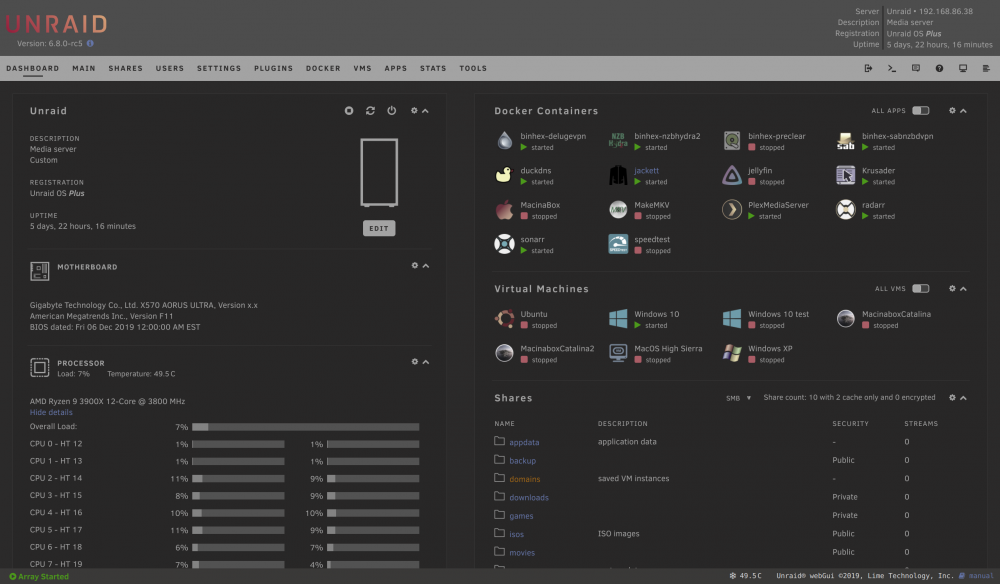
View on GitHubDark Theme for unRAID webGui
Install
Community Application users: Search for "Dark Theme" from the Apps tab!
Manual install: from the unRAID webGui go to Plugins -> Install Plugin, paste the following url and press Install
https://github.com/Skitals/unraid-dark-plugin/raw/master/plugins/dark.theme.plg
Why a Plugin
Themes are not officially supported in unRAID. Installing as a plugin allows the theme to persist on reboot, as well as override hardcoded CSS. With the plugin installed you can switch between this theme and the default themes with no loss of functionality.
Customization / Settings
The Dark Theme settings can be found under User Preferences on the unRAID settings page. Here you can adjust the grayscale/desaturation of icons and images. By default, icons and images are desaturated to be easier on your eyes at night.
Screenshot
Categories
Download Statistics
Downloads by Month
Related apps
Explore more like this
Explore allDetails
https://raw.githubusercontent.com/Skitals/unraid-dark-plugin/master/plugins/dark.theme.plg