
All apps · 0 apps
CWA-eBook-Translate
Docker app from felixapel's Repository
Overview
Readme
View on GitHubCWA eBook Translate Plugin
Bilingual LLM-powered translation overlay for Calibre-Web-Automated. Translate ebooks paragraph-by-paragraph while reading — in 100+ languages — using local LLMs (vLLM, LM Studio, Ollama) or any major Cloud API (OpenAI, Anthropic, Gemini, Groq, Together, MiniMax, DeepSeek, OpenRouter).
✨ Features
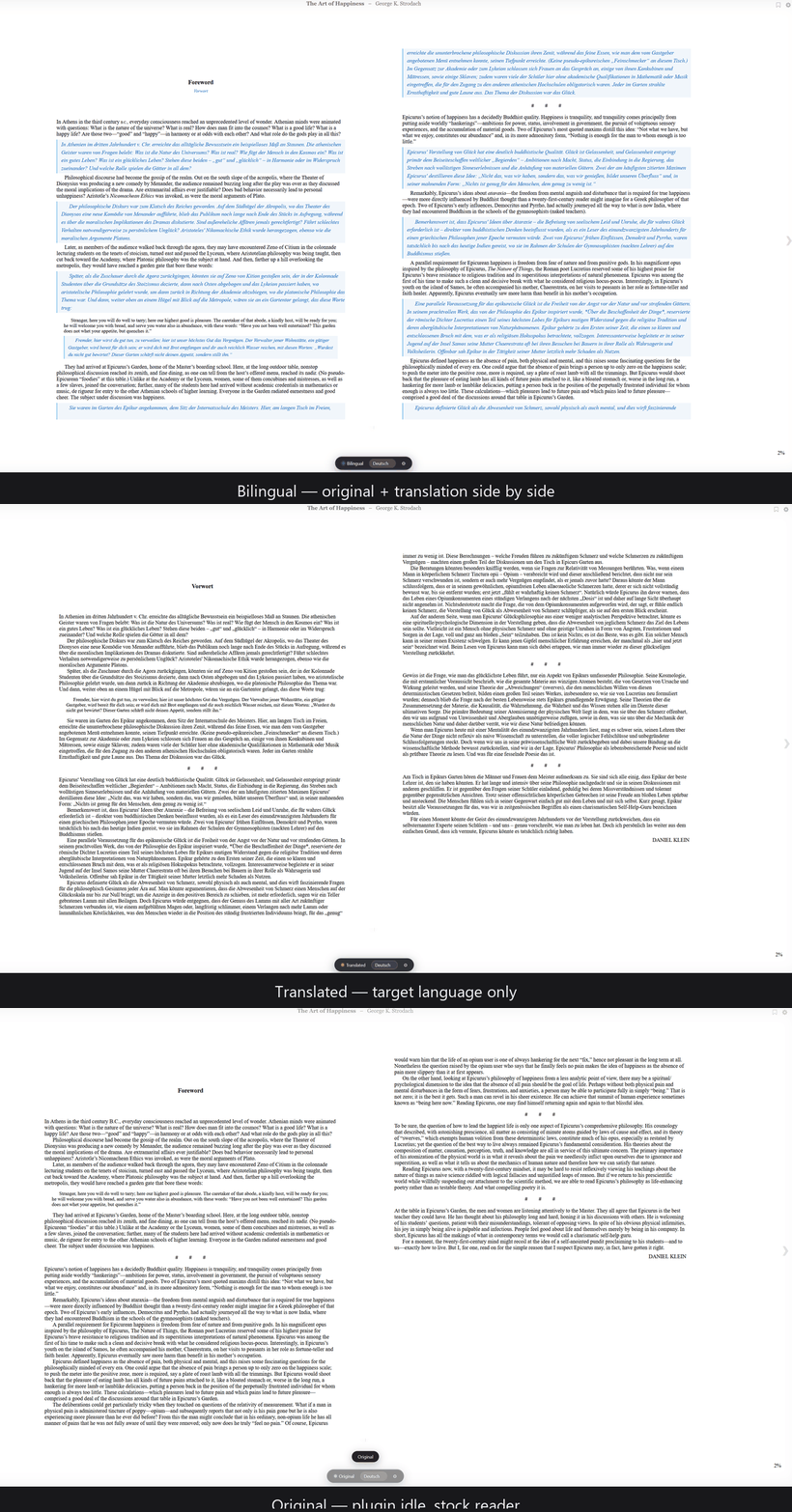
- 🌐 Bilingual reading — original + translation side by side
- 🔄 Three modes — Bilingual / Translation-only / Original
- 🌍 100+ target languages — the picker shows the 10 most-spoken languages first, then every other supported language A–Z (type to jump). Developed and tuned against Google's Gemma 4 as the default local model; the language set mirrors Gemma's pre-training coverage
- ⚡ Visible-First Translation — prioritizes paragraphs visible on screen for instant rendering
- 🚀 Background Prefetching — translates the rest of the chapter sequentially in the background
- 🧠 Context-Aware Translation — feeds surrounding paragraphs to the LLM to improve literary quality and character voice
- 📚 Deep DOM Parsing — accurately captures headings, custom title classes, and clickable TOC links
- 💾 Persistent Double Cache — server-side SQLite (SHA-256) + client-side
localStoragecaching ensures you never lose a translation or re-pay API costs - 🔒 Rate limited & Stable — request-size caps and per-IP rate limiting protect your API keys and GPU from runaway requests, with
AbortControllercancellation for perfectly responsive UI buttons - 🔌 Zero-touch install — proxy-injection mode overlays a stock CWA container: no template mounts, nothing to re-apply when CWA updates
A note on language quality
The default model, Gemma 4 (gemma4-12b), is pre-trained on 140+ languages
with ~35 languages receiving first-class, benchmarked support (all major
European, East Asian, South/Southeast Asian, and Middle Eastern languages).
The remaining languages in the picker come from Gemma's wider pre-training
corpus: translation works, but lower-resource languages (e.g. Nahuatl, Chewa,
Tibetan) can occasionally lose coherence or bleed into a dominant language on
complex passages. Cloud models (GPT, Claude, Gemini) generally handle the
lower-resource tier better — switch LLM_PROVIDER if a language matters to you.
🚀 Installation
Recommended: proxy-injection mode (one extra container, stock CWA)
The translator container sits in front of CWA and injects the overlay into reader pages on the fly. Your CWA container stays completely untouched.
Browser ──► book-translator (:8084) ──► Calibre-Web-Automated (:8083, stock)
                 │ injects overlay on /read/ pages
                 └─ /bt-api → translation API (same origin, no CORS)
git clone https://github.com/felixapel/CWA-eBook-Translate-Plugin.git
cd CWA-eBook-Translate-Plugin
# Edit docker-compose.yml: set BT_LOCAL_URL (or a cloud provider + API key)
docker compose up -d
Then read your library at http://<host>:8084 — the translator control
bar appears in the ebook reader. That's the whole install. The compose file
pulls the prebuilt multi-arch image
(ghcr.io/felixapel/cwa-ebook-translate-plugin, amd64 + arm64) — no build
step needed.
Already have CWA running? Add just the translator service to your existing
compose file and point CWA_UPSTREAM at your CWA container/host:
  book-translator:
    image: ghcr.io/felixapel/cwa-ebook-translate-plugin:latest
    environment:
      - CWA_UPSTREAM=http://calibre-web-automated:8083
      - BT_LOCAL_URL=http://host.docker.internal:11434/v1/chat/completions
    extra_hosts: ["host.docker.internal:host-gateway"]
    volumes: ["./config/translator:/app/data"]
    ports: ["8084:8080"]   # read CWA (with overlay) here — any free port works
    restart: unless-stopped
Removing the plugin = stop reading through the proxy port. Nothing in your CWA install was modified.
Behind a reverse proxy (SWAG / Traefik / NPM / Cloudflare)
If you already expose CWA on a domain, point your reverse proxy's main location at the translator's proxy port instead of CWA's port — the overlay then works on your domain with the API same-origin (no CORS, no extra routes). Verified SWAG example (only the main location changes; keep OPDS/Kobo sync locations pointing directly at CWA):
    location / {
        include /config/nginx/proxy.conf;
        include /config/nginx/resolver.conf;
        set $upstream_app 10.0.0.10;        # docker host (substitute your own)
        set $upstream_port 8084;            # translator proxy port (NOT CWA's)
        set $upstream_proto http;
        proxy_pass $upstream_proto://$upstream_app:$upstream_port;
    }
The injection proxy forwards your reverse proxy's X-Forwarded-Proto, so
HTTPS sessions and secure cookies keep working.
Option 2: Unraid
Community Applications (recommended once listed): search for
"CWA eBook Translate" in the Apps tab. Until the listing is approved, add
the template manually — Docker tab → Add Container → Template repositories
→ add https://github.com/felixapel/unraid-templates, or download the
template XML
into /boot/config/plugins/dockerMan/templates-user/. The template installs
proxy-injection mode: set CWA URL to your CWA instance and read through
this container's port — your CWA container stays stock.
Legacy: bind-mount installer script
install_unraid.sh copies the overlay files into your CWA appdata folder and
installs an Unraid Docker template for the API (bind-mount method). Review the
script, then run it locally (don't pipe an unreviewed remote script into
bash):
git clone https://github.com/felixapel/CWA-eBook-Translate-Plugin.git
cd CWA-eBook-Translate-Plugin
chmod +x install_unraid.sh
./install_unraid.sh
Post-Install Steps:
- Go to your Unraid Docker tab and edit your
calibre-web-automatedcontainer. - Add the 3 paths (as instructed by the script) to inject the plugin files.
- Deploy the newly added
book-translator-apicontainer.
deploy_unraid.sh / verify_unraid.sh are personal SSH-based redeploy/verify
helpers for an existing install — read them and adapt the host/paths before use.
Tip: proxy-injection mode also works on Unraid (run the container with
CWA_UPSTREAMset and browse through its port) and avoids the 3 path mappings entirely.
Advanced: bind-mount install (development / no proxy)
Mount the overlay files directly into the CWA container — useful when hacking on the overlay itself:
volumes:
  - ./overlay/read.html:/app/calibre-web-automated/cps/templates/read.html:ro
  - ./static/translator.js:/app/calibre-web-automated/cps/static/js/translator.js:ro
  - ./static/translator.css:/app/calibre-web-automated/cps/static/css/translator.css:ro
Caveats: overlay/read.html is a full template replacement tracked against
the pinned CWA version in docker-compose.yml (v4.0.6). A CWA update that
changes read.html can drift from this copy — proxy mode does not have this
problem. With bind mounts the API is cross-origin, so set BT_ALLOWED_ORIGINS
(or rely on the private-LAN default) and configure window.BOOK_TRANSLATOR
in overlay/read.html.
⚡ Performance
Throughput and latency depend entirely on your LLM backend (local GPU/model vs. a cloud API) and on the tunables in Configuration — there is no single number that applies to every setup, so we don't publish one. Two scripts are included so you can measure your deployment:
benchmark.py— quick concurrent load test against a running API.benchmark_realistic.py— simulates a realistic reading session (visible-page + background prefetch) against a live backend.
Run either with the API up (python benchmark.py / python benchmark_realistic.py)
and read the printed p50/p95/throughput for your own hardware.
If cold translations feel slow, see BT_BATCH_SIZE, BT_OUTPUT_TOKEN_FACTOR, and
BT_MAX_CONCURRENT below, and docs/TROUBLESHOOTING.md.
⚙️ Configuration
Environment variables for the book-translator container:
| Variable | Default | Description |
|---|---|---|
CWA_UPSTREAM |
Enables proxy-injection mode. URL of your CWA instance (e.g. http://calibre-web-automated:8083). When set, the container also serves CWA with the overlay injected on port BT_PROXY_PORT. Unset = API-only (bind-mount installs). |
|
BT_PROXY_PORT |
8080 |
Container port for the injection proxy (proxy mode only). |
LLM_PROVIDER |
local |
local, openai, anthropic, gemini, groq, together, minimax, deepseek, openrouter |
LLM_MODEL |
gemma4-12b |
Model name for the chosen provider |
LLM_API_KEY |
Your API key for the chosen provider (the only supported key mechanism since 2.0.0) | |
BT_LOCAL_URL |
http://localhost:1234/v1/chat/completions |
Only used if LLM_PROVIDER=local. OpenAI-compatible endpoint — the path is always /v1/chat/completions (vLLM, LM Studio, Ollama, llama.cpp all speak it); only host:port changes (vLLM :8000, LM Studio :1234, Ollama :11434). In Docker, localhost is the container itself — use http://host.docker.internal:<port>/... or the host IP. |
BT_MAX_CONCURRENT |
2 |
Simultaneous translation requests (batches). For a slow single-GPU local model, 1–2 is more stable than 3 (avoids timeout cascades). |
BT_BATCH_SIZE |
5 |
Paragraphs translated per LLM call. >1 is dramatically faster on slow models (one generation instead of one-per-paragraph); if the model's segmented reply can't be parsed it transparently falls back to per-paragraph. Set 1 for legacy one-call-per-paragraph. |
BT_MAX_TOKENS |
4096 |
Hard ceiling on max_tokens for a single-paragraph request. The actual value sent is the smaller of this and the proportional cap (see BT_OUTPUT_TOKEN_FACTOR). |
BT_BATCH_MAX_TOKENS |
8192 |
Same ceiling, but for a batched (multi-paragraph) request. |
BT_OUTPUT_TOKEN_FACTOR |
2.0 |
Caps generated max_tokens at input_tokens × FACTOR + FLOOR, clamped to the ceiling above. Prevents a rambling/stuck local model from generating thousands of tokens for a short paragraph (the main cause of 8–20s and 120s stalls). 2.0 never truncates real translations; lower it (e.g. 1.6) for a bit more speed at some risk on very expansive target languages. |
BT_OUTPUT_TOKEN_FLOOR |
256 |
Minimum max_tokens per request. |
BT_CONTEXT_WINDOW |
0 |
Number of surrounding paragraphs included as a do-not-translate [CONTEXT] block in batch prompts. Set to 1 or 2 for context-aware translations. Improves literary quality but consumes more tokens per request. |
BT_TIMEOUT |
60 |
Seconds before a single translation request is abandoned. Raise it if a slow local model times out on long paragraphs; lower it (with a smaller BT_BATCH_SIZE) if you'd rather fail fast under contention. |
LLM_FALLBACK_PROVIDER |
Optional. A secondary provider used automatically when the primary fails (e.g. minimax while local is slow/down). |
|
LLM_FALLBACK_MODEL |
Model name for the fallback provider. | |
LLM_FALLBACK_API_KEY |
API key for the fallback provider. | |
BT_API_TOKEN |
Optional shared secret. When set, translate endpoints require the X-BT-Token header — use it if the API is reachable beyond your LAN. In proxy mode set it per-browser via localStorage.setItem('bt_token', '<token>'); in bind-mount installs set apiToken in window.BOOK_TRANSLATOR. Also gates /cache/cleanup (a destructive endpoint) for the same reason. |
|
BT_MAX_BATCH_PARAGRAPHS |
50 |
Max paragraphs accepted per /translate/batch request (oversized requests get 413). Protects your GPU/API bill from a single runaway request. |
BT_MAX_PARAGRAPH_CHARS |
8000 |
Max characters per paragraph (413 beyond it). |
BT_MAX_CONTENT_LENGTH |
2097152 (2 MB) |
Hard cap on the request body (the WSGI-level backstop). Per-field caps (BT_MAX_BATCH_PARAGRAPHS, BT_MAX_PARAGRAPH_CHARS) check the parsed content; this cap rejects oversize bodies before parsing. Lower it for untrusted networks, raise it for very long paragraphs. |
BT_MAX_UPSTREAM_INFLIGHT |
0 |
Process-wide cap on simultaneous in-flight LLM calls (0 = unlimited). BT_MAX_CONCURRENT bounds concurrency per request; this bounds the TOTAL across all requests — set 2 for a single local GPU to prevent timeout cascades under multi-reader load. |
BT_HEALTH_DETAILS |
true |
When false (and BT_API_TOKEN is set), unauthenticated /health returns only {"status":"ok"} — backend names/latency require the token. Use when the API is reachable beyond a trusted LAN. |
BT_RATE_LIMIT_PER_MINUTE |
120 |
Max requests per client IP per 60s window before the API returns 429. |
BT_RATE_LIMIT_RETRY_AFTER |
10 |
Seconds reported in the Retry-After header / response body on a 429. The frontend reads this and backs off automatically. |
BT_TRUST_PROXY |
false |
Legacy/dev only. When true, the API trusts the first X-Forwarded-For hop from any peer as the rate-limit key. A client that can reach the API directly can spoof this header and bypass the rate limiter. In production, prefer BT_TRUSTED_PROXIES below. |
BT_TRUSTED_PROXIES |
(empty) | Production-safe rate-limit-key source. Comma-separated CIDRs/IPs of the peer (the actual socket source) allowed to set X-Forwarded-For. The first XFF hop is used as the rate-limit key only when the peer is in this list; otherwise the peer is used. Example: 127.0.0.1/32,::1/128 for a local nginx, or 10.0.0.0/8 for a private-network reverse proxy. |
BT_ALLOWED_ORIGINS |
http://localhost:8083,http://localhost:8383 |
Comma-separated exact origins allowed for CORS (bind-mount installs; irrelevant in proxy mode, which is same-origin). Add your public reader URL here, e.g. https://books.example.com. |
BT_ALLOW_PRIVATE_LAN |
true |
Additionally allow localhost/RFC1918 origins (10.*, 192.168.*, 172.16-31.*) on any port — the common self-hosted case. Set false to allow only BT_ALLOWED_ORIGINS. |
BT_CACHE_MAX_ENTRIES |
0 |
Optional hard cap on cached translations (0 = unlimited). When exceeded, the oldest entries are evicted. |
DB_PATH |
translations.db |
Path to the SQLite translation cache. In Docker this should point inside the /app/data volume (the provided Dockerfile/compose already set it to /app/data/translations.db) so the cache survives container recreation. |
PORT |
8390 |
Port the API listens on. If you remap it, also update the -p/compose port mapping and any reverse-proxy route — EXPOSE in the Dockerfile is documentation only. |
Why a single gunicorn worker? Rate limiting, request metrics, and the health cache are kept in process memory for simplicity. Running more than one worker would give each its own copy (e.g. the rate limit becoming
N×the configured value). The--threads 8setting already gives plenty of request concurrency within that one worker — don't raise--workerswithout moving that state to something shared (e.g. SQLite, like the translation cache already is).
🏗️ Architecture
                       book-translator container
                 ┌───────────────────────────────────────┐
Browser ────────►│ nginx (:8080, proxy mode only)        │      ┌──────────────────────┐
  reads library  │  ├─ /bt-api/*    → gunicorn (below)   │─────►│ CWA (:8083, stock)   │
  through :8084  │  ├─ /bt-static/* → overlay js/css     │      │ untouched image      │
                 │  └─ /*           → CWA + injected tag │      └──────────────────────┘
                 │                                       │
                 │ gunicorn (:8390, always on)           │      ┌──────────────────────┐
                 │  ├─ POST /translate, /translate/batch │─────►│ Providers: local,    │
                 │  ├─ GET  /ping /health /metrics /stats│      │ OpenAI, Anthropic,   │
                 │  └─ SQLite cache (/app/data)          │      │ Gemini, Groq, ...    │
                 └───────────────────────────────────────┘      └──────────────────────┘
In bind-mount installs nginx never starts; the overlay files are mounted into
CWA and call the API on :8390 directly (CORS applies — see
BT_ALLOWED_ORIGINS).
❤️ Support the project
CWA eBook Translate is free, GPL-licensed, and has no telemetry, ads, or subscription — if it replaced a paid translation service for you, consider funding its development:
- Ko-fi — quick one-time tips, 0% platform fees
- GitHub Sponsors — monthly support (enrollment in progress)
Donations fund GPU time for multi-model testing, coverage of the 100+ language matrix, and maintainer time on issues. Non-monetary support counts just as much: ⭐ star the repo, report bugs with reproducible steps, test new releases, or bring a translation of the UI strings.
📜 License
GPL-3.0. This project extends Calibre-Web-Automated (itself GPL-licensed), and the advanced bind-mount install ships a template derived from it — so the whole project is licensed under the GNU GPL v3 to keep everything clean and compatible. See LICENSE.
This project is not affiliated with, endorsed by, or sponsored by Calibre-Web, Calibre-Web-Automated, Calibre, Google (Gemma), or any LLM provider. All names are used nominatively to describe compatibility.
Install CWA-eBook-Translate on Unraid in a few clicks.
Find CWA-eBook-Translate in Community Apps on your Unraid server, review the template, and click Install. Unraid handles the Docker app or plugin setup from the published template.
Requirements
Categories
Related apps
Explore more like this
Explore allDetails
ghcr.io/felixapel/cwa-ebook-translate-plugin:latestRuntime arguments
- Web UI
http://[IP]:[PORT:8080]/- Network
bridge- Shell
sh- Privileged
- false
Template configuration
Read your library through this port to get the translation overlay. Your CWA port keeps serving stock CWA.
- Target
- 8080
- Default
- 8084
- Value
- 8084
URL of your Calibre-Web-Automated instance, e.g. http://YOUR-SERVER-IP:8083 (use the HOST port you mapped for CWA). Required for the overlay; leave empty for API-only mode.
- Target
- CWA_UPSTREAM
Holds the SQLite translation cache (translations are never re-paid).
- Target
- /app/data
- Default
- /mnt/user/appdata/cwa-ebook-translate/data
- Value
- /mnt/user/appdata/cwa-ebook-translate/data
local (Ollama/vLLM/LM Studio) or: openai, anthropic, gemini, groq, together, minimax, deepseek, openrouter
- Target
- LLM_PROVIDER
- Default
- local
- Value
- local
Model name for the chosen provider. Gemma 4 is the tuned default for local use.
- Target
- LLM_MODEL
- Default
- gemma4-12b
- Value
- gemma4-12b
Only for LLM Provider=local. OpenAI-compatible endpoint - the path is always /v1/chat/completions; only host:port changes (Ollama :11434, LM Studio :1234, vLLM :8000). Use your server's IP, NOT localhost.
- Target
- BT_LOCAL_URL
- Default
- http://YOUR-SERVER-IP:11434/v1/chat/completions
- Value
- http://YOUR-SERVER-IP:11434/v1/chat/completions
Only for cloud providers.
- Target
- LLM_API_KEY
Process-wide cap on simultaneous LLM calls (0 = unlimited). Set 2 for a single local GPU to prevent timeout cascades.
- Target
- BT_MAX_UPSTREAM_INFLIGHT
- Default
- 0
- Value
- 2
Paragraphs per LLM call. Higher is faster on slow local models; lower if requests time out.
- Target
- BT_BATCH_SIZE
- Default
- 5
- Value
- 5
Simultaneous batches per request. 1-2 is safest on a single GPU.
- Target
- BT_MAX_CONCURRENT
- Default
- 2
- Value
- 2
Seconds before a single translation request is abandoned.
- Target
- BT_TIMEOUT
- Default
- 60
- Value
- 60
Surrounding paragraphs given to the LLM as do-not-translate context (0 = off; 1-2 improves literary quality, costs tokens).
- Target
- BT_CONTEXT_WINDOW
- Default
- 0
- Value
- 0
Optional cloud provider used automatically when the primary fails (e.g. deepseek).
- Target
- LLM_FALLBACK_PROVIDER
Model for the fallback provider.
- Target
- LLM_FALLBACK_MODEL
API key for the fallback provider.
- Target
- LLM_FALLBACK_API_KEY
Optional shared secret for the translation API (X-BT-Token). Recommended if anyone untrusted shares your network.
- Target
- BT_API_TOKEN