

curtain
Docker app from ggarden's Repository
Overview
Readme
View on GitHub🎭 curtain
"Pay no attention to the man behind the curtain."
curtain is a public-facing dashboard for an Unraid (or any Linux) home server. It shows visitors a curated, admin-approved view of the machine — live metrics, storage usage, and quick links to your public services — with no login required and nothing sensitive ever exposed.
The name fits the intent: it's the public front of the server — what's on stage, never backstage.
Features
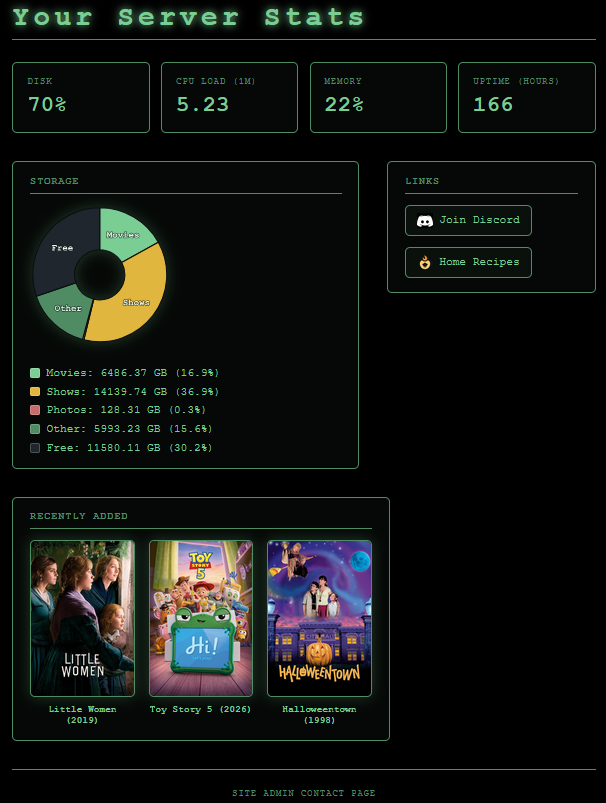
- Live server metrics — CPU load, memory usage, uptime, and disk usage, refreshed automatically.
- Storage breakdown — a pie chart of up to three named paths (e.g. Movies, Shows, Photos), plus Other used space and Free space.
- Quick links — admin-defined links to your services, each with an optional custom icon. No service support is hard-coded; add anything.
- Recently Added (optional) — posters for the three most recently added movies, from local poster files or an optional TMDB lookup. Off unless configured.
- Customizable — set the dashboard title and a footer contact/portfolio link via environment variables.
- Wizard-of-Oz theme — an Emerald City black-and-green aesthetic.
- Fails gracefully — any unavailable metric shows "unavailable" instead of breaking the page.
Built for safety
curtain is designed from the ground up to sit on a public, unauthenticated surface in front of a real home server. Security outranks every other concern:
- Read-only by default. There are no write, control, or configuration endpoints — curtain can only read and display.
- Allowlist, not passthrough. The admin explicitly opts each metric, path, and link in via environment variables. Nothing is exposed by default; raw system interfaces,
/proc, and Docker sockets are never proxied to the browser. - No secrets reach the client. Responses contain only safe aggregate numbers and admin-chosen labels — never hostnames, internal IPs, filesystem paths, usernames, or environment secrets.
- Hardened static serving. The built-in file server is path-traversal protected (containment-checked against the web root).
- Locked-down container. Ships as a minimal, non-root image with all Linux capabilities dropped,
no-new-privileges, a read-only root filesystem, and your data bind-mounted read-only. Even a fully compromised container cannot alter your files. - Security headers (CSP,
X-Content-Type-Options,X-Frame-Options,Referrer-Policy,Permissions-Policy) on every response.
Tech stack
- Backend: Node.js (ESM), zero runtime dependencies — metrics come from Node's built-in
osandfsmodules; nothing is shelled out. - Frontend: React + Vite, compiled to static files.
- Delivery: a minimal multi-stage Docker image (~170 MB) — the build toolchain and dev dependencies never ship.
Quick start (Docker)
The image is published on Docker Hub as ggarden/curtain.
docker run
docker run -d --name curtain \
  -p 1939:1939 \
  -e SERVER_NAME="My Server" \
  -e DISK_PATH=/data/movies \
  -e STORAGE_1_NAME=Movies -e STORAGE_1_PATH=/data/movies \
  -e STORAGE_2_NAME=Shows  -e STORAGE_2_PATH=/data/shows \
  -e MOVIES_PATH=/data/movies \
  -e LINK_1_LABEL=Plex -e LINK_1_URL=http://192.168.1.10:32400 -e LINK_1_ICON=/logos/plex.png \
  -v /mnt/user/Movies:/data/movies:ro \
  -v /mnt/user/Shows:/data/shows:ro \
  --cap-drop ALL \
  --security-opt no-new-privileges \
  --read-only \
  ggarden/curtain:latest
Then open http://localhost:1939 (or point your reverse proxy at it).
docker compose
services:
  curtain:
    image: ggarden/curtain:latest
    container_name: curtain
    restart: unless-stopped
    ports:
      - "1939:1939"
    environment:
      SERVER_NAME: "My Server"
      CONTACT_URL: "https://example.com"
      DISK_PATH: /data/movies
      STORAGE_1_NAME: Movies
      STORAGE_1_PATH: /data/movies
      STORAGE_2_NAME: Shows
      STORAGE_2_PATH: /data/shows
      STORAGE_3_NAME: Photos
      STORAGE_3_PATH: /data/photos
      MOVIES_PATH: /data/movies
      # TMDB_API_KEY: "your-key"   # optional poster fallback (see Now Showing)
      LINK_1_LABEL: Plex
      LINK_1_URL: "http://192.168.1.10:32400"
      LINK_1_ICON: /logos/plex.png
      LINK_2_LABEL: Jellyfin
      LINK_2_URL: "http://192.168.1.10:8096"
      LINK_2_ICON: /logos/jellyfin.png
    volumes:
      - /mnt/user/Movies:/data/movies:ro
      - /mnt/user/Shows:/data/shows:ro
      - /mnt/user/immich:/data/photos:ro
    cap_drop:
      - ALL
    security_opt:
      - no-new-privileges:true
    read_only: true
docker compose up -d
On Unraid: install the Community Applications plugin, then the Docker Compose Manager plugin, and add the compose file above as a stack. If storage sizes read as
0, the container user can't read your shares — adduser: "99:100"(matching Unraid'snobody:users).
Configuration
All configuration is supplied through environment variables (Docker -e / compose
environment:). Only these specific, named variables are read — curtain never
enumerates the environment, so your other secrets stay invisible.
General
| Variable | Required | Description |
|---|---|---|
SERVER_NAME |
No | Dashboard title. Defaults to curtain. Rendered exactly as typed. |
CONTACT_URL |
No | A footer link to the maintainer's site/portfolio/contact page. Shown only if it is a valid http(s) URL. |
DISK_PATH |
No | Path whose filesystem total/free is reported (drives the "Disk" metric and the pie's Free/Other). Point it at a mounted path on your storage volume. Defaults to /. |
Storage pie (up to 3)
Each entry needs both a name and a path. n is 1, 2, or 3.
| Variable | Description |
|---|---|
STORAGE_<n>_NAME |
Display label for the wedge (e.g. Movies). |
STORAGE_<n>_PATH |
Directory to measure. In a container this is the in-container mount target. |
Measured directories become pie wedges; the rest of the used space becomes Other, plus a Free slice. (More than three paths are ignored with a log warning — extras fold into Other.)
Quick links (up to 12)
Each entry needs a label and a valid http(s) URL; the icon is optional. n is
1–12, numbered sequentially.
| Variable | Required | Description |
|---|---|---|
LINK_<n>_LABEL |
Yes | Link text (e.g. Plex). |
LINK_<n>_URL |
Yes | Target URL. Must be http(s); invalid URLs are dropped. |
LINK_<n>_ICON |
No | Icon image. A local path like /logos/plex.png (self-hosted, recommended) or an external http(s) image URL. |
Self-hosted icons live in
client/public/logos/and are baked into the image at build time. External icon URLs work too, but cause visitors' browsers to fetch from that third party — self-hosting is preferred.
Recently Added — latest movie posters (optional)
Shows posters for the three most recently added titles in a movie library.
Entirely optional: if MOVIES_PATH is unset, nothing renders.
| Variable | Required | Description |
|---|---|---|
MOVIES_PATH |
No | In-container path to a movie library (bind-mounted read-only). curtain lists the top level, picks the three newest entries (movie folders or bare video files) by modification time, and shows them newest-first. Unset → feature off. |
TMDB_API_KEY |
No | Optional poster fallback. Used per movie, only when a title has no local poster image. |
How the poster is resolved:
- Local first — looks for
poster.jpg/folder.jpg/cover.jpginside the movie's folder (or a sidecar image beside a bare video file). No external calls, no API key. - TMDB fallback — only if
TMDB_API_KEYis set and no local poster exists. curtain searches TMDB by title/year server-side and proxies the image, so visitors' browsers never contact TMDB.
Security & privacy
MOVIES_PATHis bind-mounted read-only, exactly like the storage paths — curtain only ever reads it, and symlinks are never followed.TMDB_API_KEYis used server-side only — never sent to the browser or included in any API response.- This feature publicly reveals the titles and posters of your three most recently added movies. It's off by default; enable it only if you're comfortable disclosing that. With the TMDB fallback on, your movie titles are also sent to TMDB for lookup.
Storage & read-only mounts
A container can't see the host filesystem unless you mount it. To report a path's
size, bind-mount it into the container read-only and point the matching
STORAGE_<n>_PATH at the in-container target:
-v /mnt/user/Movies:/data/movies:ro      ->   STORAGE_1_PATH=/data/movies
                                               MOVIES_PATH=/data/movies   (same mount, reused)
Read-only (:ro) is deliberate: curtain only ever reads, so even a compromise
can't modify or delete your media. The set of mounts you provide is the
allowlist of what curtain can see. A single read-only mount can back several
features — e.g. the Storage pie and Now Showing can both point at /data/movies.
Development
Requires Node.js 22+.
git clone https://github.com/ggardenhire/curtain.git
cd curtain

# install the front-end's build tooling
cd client && npm install && cd ..

# create a local .env (gitignored) with your config, then run the backend
node --env-file=.env server.js            # API + metrics on :1939

# in a second terminal, run the Vite dev server (hot reload)
cd client && npm run dev                  # UI on :5173, proxies /api -> :1939
Open http://localhost:5173 during development. Vite proxies /api/* to the
backend, mirroring the single-origin setup used in production.
The backend has no dependencies to install — it runs on Node built-ins.
Building the image
docker build -t curtain:latest .
A multi-stage build compiles the React app in a full-toolchain stage, then copies
only the compiled output into a minimal runtime image that serves the static
files and the /api/* JSON.
License
MIT © Garret Gardenhire
Categories
Download Statistics
Related apps
Explore more like this
Explore allDetails
ggarden/curtain:latestRuntime arguments
- Web UI
http://[IP]:[PORT:1939]/- Network
bridge- Shell
sh- Privileged
- false
- Extra Params
--read-only --cap-drop=ALL --security-opt=no-new-privileges
Template configuration
Port the dashboard is served on.
- Target
- 1939
- Default
- 1939
- Value
- 1939
Dashboard title, rendered as typed.
- Target
- SERVER_NAME
- Default
- curtain
- Value
- curtain
Optional footer link to your site/portfolio. Must be http(s); invalid URLs are dropped.
- Target
- CONTACT_URL
Optional text for the contact link.
- Target
- CONTACT_LABEL
In-container path whose filesystem total/free drives the Disk metric and the pie's Free/Other. Point it at one of the mounted paths below.
- Target
- DISK_PATH
- Default
- /data/movies
- Value
- /data/movies
In-container path to the movie library used for the 'Recently Added' posters. Leave as /data/movies to reuse the Movies mount below; unset to disable the feature. Update 'TMDB API Key' to pull posters from TMDB.
- Target
- MOVIES_PATH
- Default
- /data/movies
- Value
- /data/movies
Optional. Used server-side only (never sent to the browser) to fetch a poster when a movie has no local poster image. Leave blank to use local posters only.
- Target
- TMDB_API_KEY
Label for storage wedge 1.
- Target
- STORAGE_1_NAME
- Default
- Movies
- Value
- Movies
In-container path measured for wedge 1 (matches the Movies mount).
- Target
- STORAGE_1_PATH
- Default
- /data/movies
- Value
- /data/movies
Label for storage wedge 2.
- Target
- STORAGE_2_NAME
- Default
- Shows
- Value
- Shows
In-container path measured for wedge 2 (matches the Shows mount).
- Target
- STORAGE_2_PATH
- Default
- /data/shows
- Value
- /data/shows
Label for storage wedge 3 (optional).
- Target
- STORAGE_3_NAME
In-container path measured for wedge 3 (optional; add a matching mount).
- Target
- STORAGE_3_PATH
Quick link 1 text (e.g. Plex).
- Target
- LINK_1_LABEL
Quick link 1 URL. Must be http(s).
- Target
- LINK_1_URL
Quick link 1 icon. Local /logos/plex.png etc., or an external http(s) image URL.
- Target
- LINK_1_ICON
Quick link 2 text.
- Target
- LINK_2_LABEL
Quick link 2 URL. Must be http(s).
- Target
- LINK_2_URL
Quick link 2 icon. Local /logos/*.png, or an external http(s) image URL.
- Target
- LINK_2_ICON
Quick link 3 text.
- Target
- LINK_3_LABEL
Quick link 3 URL. Must be http(s).
- Target
- LINK_3_URL
Quick link 3 icon. Local /logos/*.png, or an external http(s) image URL.
- Target
- LINK_3_ICON
Your movie library, mounted READ-ONLY. Backs the Storage 'Movies' wedge and 'Recently Added'.
- Target
- /data/movies
- Default
- /mnt/user/data/media/movies
- Value
- /mnt/user/data/media/movies
Your TV library, mounted READ-ONLY. Backs the Storage 'Shows' wedge.
- Target
- /data/shows
- Default
- /mnt/user/data/media/shows
- Value
- /mnt/user/data/media/shows
Optional photo library, mounted READ-ONLY (used only if you add a matching Storage 3 entry).
- Target
- /data/photos